> For the complete documentation index, see [llms.txt](https://docs.360dialog.com/docs/llms.txt). Markdown versions of documentation pages are available by appending `.md` to page URLs; this page is available as [Markdown](https://docs.360dialog.com/docs/messaging/message-types/interactive.md).
# Interactive
This page describes interactive messages.
{% hint style="info" %}
**Free Form Message**\
Interactive messages can only be sent within 24 hours of receiving a message from a user. If no message is received within this period, a new conversation must be initiated using a Template message.
{% endhint %}
Interactive messages contain buttons, menus, or custom actions that invite users to interact with the business besides only typing texts.
They achieve significantly higher response rates and conversions compared to text-based messages.
The following messages are considered interactive:
* **List Messages**: Messages including a menu of up to 10 options. This type of message offers a simpler and more consistent way for users to make a selection when interacting with a business.
* **Reply Buttons**: Messages including up to 3 options —each option is a button. This type of message offers a quicker way for users to make a selection from a menu when interacting with a business. Reply buttons have the same user experience as interactive templates with buttons.
* **Reaction Messages:** Reaction Messages allow you to react to messages. This feature is currently available in the Cloud API.
* **Single Product Message**: Messages with a Single Product item from the business’ inventory. See[ Products and Catalogs](/docs/messaging/catalogs.md) for more information.
* **Multi-Product Message**: Messages containing a selection of up to 30 items from a business’ inventory. See[ Products and Catalogs](/docs/messaging/catalogs.md) for more information.
* **Location Request Messages**: Location request messages contain body text and a Send location button that users can tap. Tapping the button displays a location sharing screen which the user can then use to share their location. See[ Location Request Messages](/docs/messaging/message-types/interactive/location-request-message.md).
## Specifications:
* Interactive messages can be combined together in the same flow.
* Users cannot select more than one option at the same time from a list or button message, but they can go back and re-open a previous message.
* List or reply button messages cannot be used as notifications. Currently, they can only be sent within 24 hours of the last message sent by the user. If you try to send a message outside the 24-hour window, you get an error message.
* Supported platforms: iOS, Android, and web.
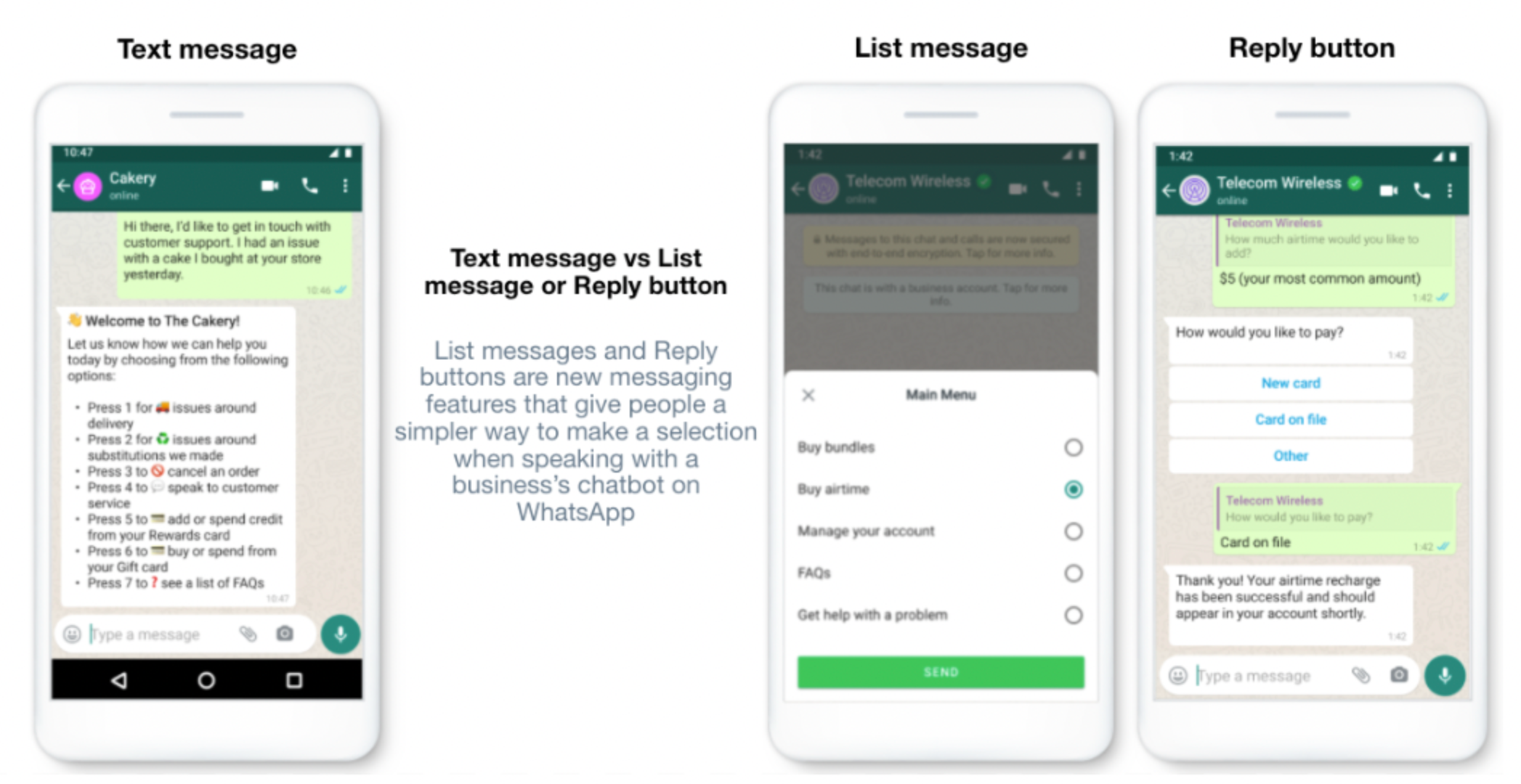
See how text messages compare to interactive messages:
---
# Agent Instructions
This documentation is published with GitBook. GitBook is the documentation platform designed so that both humans and AI agents can read, navigate, and reason over technical content effectively. Learn more at gitbook.com.
## Querying This Documentation
If you need additional information that is not directly available in this page, you can query the documentation by asking a question.
Perform an HTTP GET request on the following URL with the `ask` and `goal` query parameters:
```
GET https://docs.360dialog.com/docs/messaging/message-types/interactive.md?ask=&goal=
```
`ask` is the immediate question: it should be specific, self-contained, and written in natural language.
`goal` is what the user is ultimately trying to achieve, the reason they need the answer. Sharing it helps GitBook give you a better, more relevant answer. A goal is most helpful when it describes the outcome the user wants rather than restating the question. For example, with `ask=how do I create an API token`, a goal like `automate deployments from our CI pipeline` lets GitBook tailor the answer to that use case.
The response will contain a direct answer to the question and relevant excerpts and sources from the documentation.
Use this mechanism when the answer is not explicitly present in the current page, you need clarification or additional context, or you want to retrieve related documentation sections.