# Location Request Message

{% hint style="info" %}
You can only send a interactive message up until 24 hours after receiving a message from the user. If you have not received a message from the user within this time, you will need to start a new conversation by sending a [Template message](https://docs.360dialog.com/docs/resources/templates/sending-template-messages).
{% endhint %}

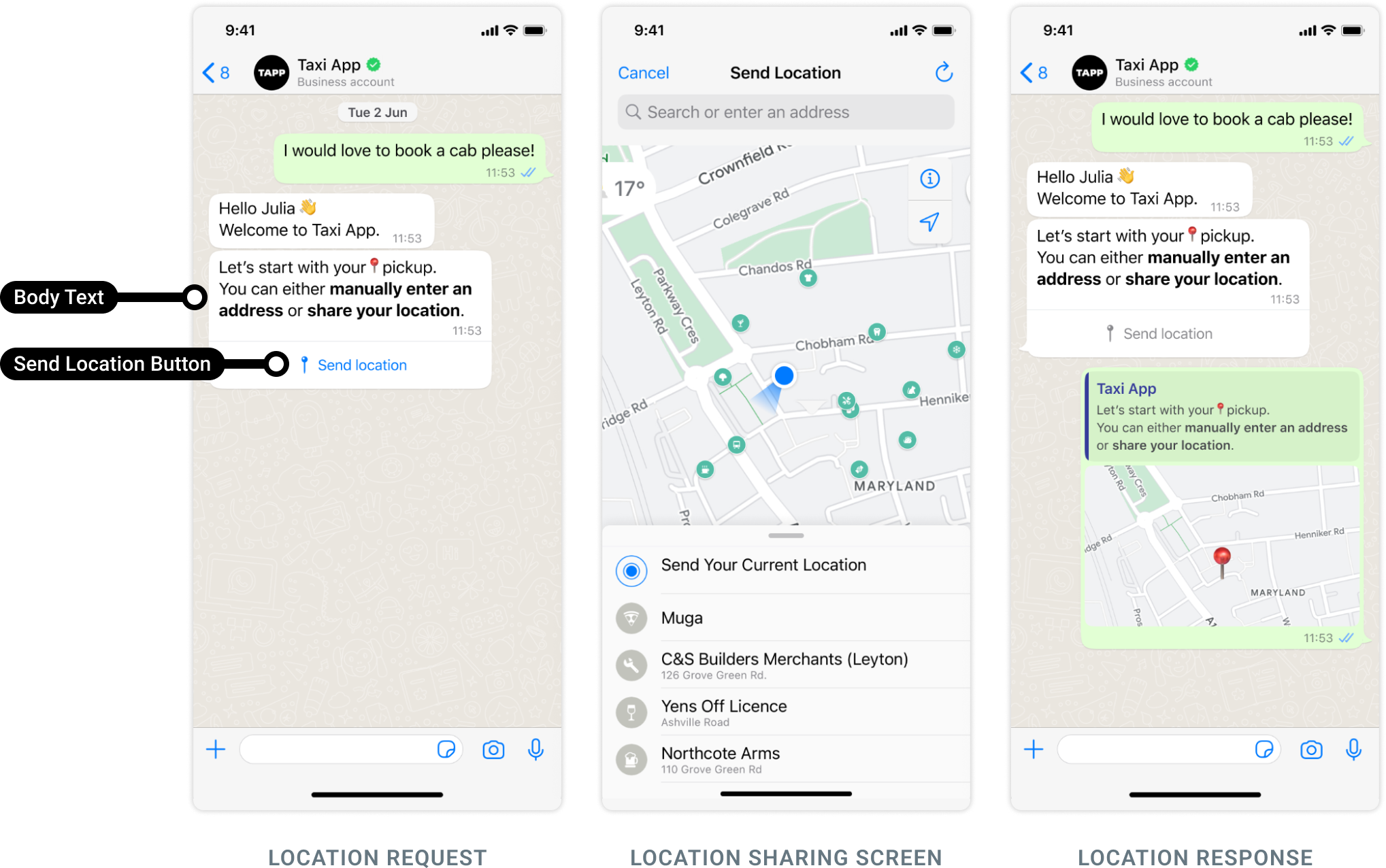
Location request messages are free-form messages displaying only a **body text** and a **send location button**. When a WhatsApp user taps the button, a location sharing screen appears which the user can then use to share their location.

<figure><img src="https://3527970750-files.gitbook.io/~/files/v0/b/gitbook-x-prod.appspot.com/o/spaces%2F-M4sMxKjL6eJRvZn6jeG-887967055%2Fuploads%2FgoK9jlyEIG0VsFqpsEY6%2Fimage.png?alt=media&#x26;token=47c6e08b-a073-4dbc-bd78-2bf031ce9e20" alt=""><figcaption></figcaption></figure>

Once the user shares their location, a **messages** webhook is triggered, containing the user's location details to the business.

## Sending Location Request Messages <a href="#creating-coupon-code-templates" id="creating-coupon-code-templates"></a>

<mark style="color:green;">`POST`</mark> `https://waba-v2.360dialog.io/messages`

To send a message, use the request URL and the following body parameters.

#### Request Body

| Name               | Type   | Description                                                                                                                  |
| ------------------ | ------ | ---------------------------------------------------------------------------------------------------------------------------- |
| recipient\_type    | string | individual                                                                                                                   |
| to                 | string | `wa_id`of the contact you want to message                                                                                    |
| type               | string | `location_request_message`                                                                                                   |
| messaging\_product | string | <p><strong>Required only for Cloud API.</strong><br>Messaging service used for the request. Use <code>"whatsapp"</code>.</p> |
| interactive        | object |                                                                                                                              |

{% tabs %}
{% tab title="201: Created " %}

{% endtab %}
{% endtabs %}

#### Post Body <a href="#post-body" id="post-body"></a>

```json
{
  "messaging_product": "whatsapp",
  "recipient_type": "individual",
  "type": "interactive",
  "to": "<WHATSAPP_USER_PHONE_NUMBER>",
  "interactive": {
    "type": "location_request_message",
    "body": {
      "text": "<BODY_TEXT>"
    },
    "action": {
      "name": "send_location"
    }
  }
}
```

#### Body Properties <a href="#body-properties" id="body-properties"></a>

<table><thead><tr><th width="286.3333333333333">Placeholder</th><th width="214">Description</th><th>Example Value</th></tr></thead><tbody><tr><td><p><code>&#x3C;BODY_TEXT></code></p><p><em>String</em></p></td><td><p><strong>Required.</strong><br></p><p>Message body text. Supports URLs.</p><p></p><p>4096 characters maximum.</p></td><td><code>Let's start with your pickup. You can either manually *enter an address* or *share your current location*.</code></td></tr></tbody></table>

**Example Request**

```json
{
  "messaging_product": "whatsapp",
  "recipient_type": "individual",
  "type": "interactive",
  "to": "+15551234567",
  "interactive": {
    "type": "location_request_message",
    "body": {
      "text": "Let us start with your pickup. You can either manually *enter an address* or *share your current location*."
    },
    "action": {
      "name": "send_location"
    }
  }
}'
```

## Webhook

When a WhatsApp user shares their location in response to your message, a **messages** webhook is triggered containing the user's location details. See [Receiving messages via Webhook.](https://docs.360dialog.com/docs/messaging/message-types/interactive/broken-reference)

The `location` component within the payload contains the user's latitude and longitude. Note that `address` and `name` are optional for the user and may not be included.

```json
{
  "object": "whatsapp_business_account",
  "entry": [
    {
      "id": "<WHATSAPP_BUSINESS_ACCOUNT_ID>",
      "changes": [
        {
          "value": {
            "messaging_product": "whatsapp",
            "metadata": {
              "display_phone_number": "<WHATSAPP_BUSINESS_DISPLAY_PHONE_NUMBER>",
              "phone_number_id": "<WHATSAPP_BUSINESS_PHONE_NUMBER_ID>"
            },
            "contacts": [
              {
                "profile": {
                  "name": "<WHATSAPP_USER_NAME>"
                },
                "wa_id": "<WHATSAPP_USER_ID>"
              }
            ],
            "messages": [
              {
                "context": {
                  "from": "<WHATSAPP_BUSINESS_PHONE_NUMBER>",
                  "id": "<WHATSAPP_CONTEXT_MESSAGE_ID>"
                },
                "from": "<WHATSAPP_USER_ID>",
                "id": "<WHATSAPP_MESSAGE_ID>",
                "timestamp": "<TIMESTAMP>",
                "location": {
                  "address": "<LOCATION_ADDRESS>", #Optional
                  "latitude": <LOCATION_LATITUDE>,
                  "longitude": <LOCATION_LONGITUDE>,
                  "name": "<LOCATION_NAME>" #Optional
                },
                "type": "location"
              }
            ]
          },
          "field": "messages"
        }
      ]
    }
  ]
}
```

#### Webhook Contents <a href="#webhook-contents" id="webhook-contents"></a>

<table><thead><tr><th width="332.3333333333333">Placeholder</th><th>Description</th><th>Example Value</th></tr></thead><tbody><tr><td><p><code>&#x3C;LOCATION_ADDRESS></code></p><p><em>String</em></p></td><td><p>Location address.</p><p><br></p><p>This parameter will only appear if the WhatsApp user chooses to share it.</p></td><td><code>1071 5th Ave, New York, NY 10128</code></td></tr><tr><td><p><code>&#x3C;LOCATION_LATITUDE></code></p><p><em>Number</em></p></td><td>Location latitude in decimal degrees.</td><td><code>40.782910059774</code></td></tr><tr><td><p><code>&#x3C;LOCATION_LONGITUDE></code></p><p><em>Number</em></p></td><td>Location longitude in decimal degrees.</td><td><code>-73.959075808525</code></td></tr><tr><td><p><code>&#x3C;LOCATION_NAME></code></p><p><em>String</em></p></td><td><p>Location name.</p><p><br></p><p>This parameter will only appear if the WhatsApp user chooses to share it.</p></td><td><code>Solomon R. Guggenheim Museum</code></td></tr><tr><td><p><code>&#x3C;TIMESTAMP></code></p><p><em>String</em></p></td><td>UNIX timestamp indicating when our servers processed the WhatsApp user's message.</td><td><code>1702920965</code></td></tr><tr><td><p><code>&#x3C;WHATSAPP_BUSINESS_ACCOUNT_ID></code></p><p><em>String</em></p></td><td>WhatsApp Business Account ID.</td><td><code>102290129340398</code></td></tr><tr><td><p><code>&#x3C;WHATSAPP_BUSINESS_DISPLAY_PHONE_NUMBER></code></p><p><em>String</em></p></td><td>WhatsApp business phone number's display number.</td><td><code>15550783881</code></td></tr><tr><td><p><code>&#x3C;WHATSAPP_BUSINESS_PHONE_NUMBER></code></p><p><em>String</em></p></td><td>WhatsApp business phone number.</td><td><code>15550783881</code></td></tr><tr><td><p><code>&#x3C;WHATSAPP_BUSINESS_PHONE_NUMBER_ID></code></p><p><em>String</em></p></td><td>WhatsApp business phone number ID.</td><td><code>106540352242922</code></td></tr><tr><td><p><code>&#x3C;WHATSAPP_CONTEXT_MESSAGE_ID></code></p><p><em>String</em></p></td><td>WhatsApp message ID of message that the user is responding to.</td><td><code>wamid.HBgLMTY0NjcwNDM1OTUVAgARGBI1QjJGRjI1RDY0RkE4Nzg4QzcA</code></td></tr><tr><td><p><code>&#x3C;WHATSAPP_MESSAGE_ID></code></p><p><em>String</em></p></td><td>WhatsApp message ID of the user's message.</td><td><code>wamid.HBgLMTY0NjcwNDM1OTUVAgASGBQzQTRCRDcwNzgzMTRDNTAwRTgwRQA=</code></td></tr><tr><td><p><code>&#x3C;WHATSAPP_USER_ID></code></p><p><em>String</em></p></td><td>WhatsApp user's WhatsApp ID.</td><td><code>16467043595</code></td></tr><tr><td><p><code>&#x3C;WHATSAPP_USER_NAME></code></p><p><em>String</em></p></td><td>WhatsApp user's name.</td><td><code>Pablo Morales</code></td></tr></tbody></table>

**Example Webhook**

```json
{
  "object": "whatsapp_business_account",
  "entry": [
    {
      "id": "102290129340398",
      "changes": [
        {
          "value": {
            "messaging_product": "whatsapp",
            "metadata": {
              "display_phone_number": "15550783881",
              "phone_number_id": "106540352242922"
            },
            "contacts": [
              {
                "profile": {
                  "name": "John Doe"
                },
                "wa_id": "15551234567"
              }
            ],
            "messages": [
              {
                "context": {
                  "from": "15550783881",
                  "id": "wamid.HBgLMTY0NjcwNDM1OTUVAgARGBI1QjJGRjI1RDY0RkE4Nzg4QzcA"
                },
                "from": "15551234567",
                "id": "wamid.HBgLMTY0NjcwNDM1OTUVAgASGBQzQTRCRDcwNzgzMTRDNTAwRTgwRQA=",
                "timestamp": "1702920965",
                "location": {
                  "address": "1071 5th Ave, New York, NY 10128",
                  "latitude": 40.782910059774,
                  "longitude": -73.959075808525,
                  "name": "Solomon R. Guggenheim Museum"
                },
                "type": "location"
              }
            ]
          },
          "field": "messages"
        }
      ]
    }
  ]
}
```


---

# Agent Instructions: Querying This Documentation

If you need additional information that is not directly available in this page, you can query the documentation dynamically by asking a question.

Perform an HTTP GET request on the current page URL with the `ask` query parameter:

```
GET https://docs.360dialog.com/docs/messaging/message-types/interactive/location-request-message.md?ask=<question>
```

The question should be specific, self-contained, and written in natural language.
The response will contain a direct answer to the question and relevant excerpts and sources from the documentation.

Use this mechanism when the answer is not explicitly present in the current page, you need clarification or additional context, or you want to retrieve related documentation sections.
