# Receive WhatsApp Payments via Payment Links

## Integration Steps <a href="#integration-steps" id="integration-steps"></a>

The steps outlined below assume that the business is about to send order details message to consumer client.

The following sequence diagram demonstrates the typical integration flow for WA Payments API:

{% stepper %}
{% step %}

#### Get Payment Link from Payment Gateway <a href="#step-1" id="step-1"></a>

Once the consumer has expressed their interest to purchase an item using payment link. Business needs to call payment gateway with necessary information like `reference-id`, `amount` and `validity` to generate the payment link. Following is a sample payment link:

```json
https://rzp.io/i/rNiAagU8y
```

Business needs to use the same reference-id, amount and expiration in invoice(`order_details`) interactive message.
{% endstep %}

{% step %}

#### Assemble the Interactive Object <a href="#step-2--assemble-the-interactive-object" id="step-2--assemble-the-interactive-object"></a>

<details>

<summary>To send an <code>order_details</code> message, businesses must assemble an interactive object of type <code>order_details</code> with the following components:</summary>

| Object                                       | Description                                                                                                                                                                                                                                                                                                                                                                                                                                                                                                                                                                                                                                                                                                                                                                                                                                                                                                                                                                                                                                                                                                                                                                                                                                                                                                                                                                                                                                                                                 |
| -------------------------------------------- | ------------------------------------------------------------------------------------------------------------------------------------------------------------------------------------------------------------------------------------------------------------------------------------------------------------------------------------------------------------------------------------------------------------------------------------------------------------------------------------------------------------------------------------------------------------------------------------------------------------------------------------------------------------------------------------------------------------------------------------------------------------------------------------------------------------------------------------------------------------------------------------------------------------------------------------------------------------------------------------------------------------------------------------------------------------------------------------------------------------------------------------------------------------------------------------------------------------------------------------------------------------------------------------------------------------------------------------------------------------------------------------------------------------------------------------------------------------------------------------------- |
| <p><code>status</code></p><p>string</p>      | <p><strong>Required.</strong></p><p>Only supported value in the <code>order\_details</code> message is <code>pending</code>.</p><p>In an <code>order\_status</code> message, <code>status</code> can be: <code>pending</code>, <code>captured</code>, or <code>failed</code>.</p>                                                                                                                                                                                                                                                                                                                                                                                                                                                                                                                                                                                                                                                                                                                                                                                                                                                                                                                                                                                                                                                                                                                                                                                                           |
| <p><code>items</code></p><p>object</p>       | <p><strong>Required.</strong></p><p>An object with the list of items for this order, containing the following fields:</p><p><code>retailer\_id</code> string</p><ul><li><strong>Required.</strong> Unique identifier for an item in the order.</li></ul><p><code>name</code> string</p><ul><li><strong>Required.</strong> The item’s name to be displayed to the user. Cannot exceed 60 characters</li></ul><p><code>amount</code> amount object with value and offset -- refer total amount field above</p><ul><li><strong>Required.</strong> The price per item</li></ul><p><code>sale\_amount</code> amount object</p><ul><li><strong>Optional.</strong> The discounted price per item. This should be less than the original amount. If included, this field is used to calculate the subtotal amount</li></ul><p><code>quantity</code> integer</p><ul><li><strong>Required.</strong> The number of items in this order, this field cannot be decimal has to be integer.</li></ul><p><code>country\_of\_origin</code> string</p><ul><li><strong>Required</strong> if <code>catalog\_id</code> is not present. The country of origin of the product</li></ul><p><code>importer\_name</code> string</p><ul><li><strong>Required</strong> if <code>catalog\_id</code> is not present. Name of the importer company</li></ul><p><code>importer\_adress</code> string</p><ul><li><strong>Required</strong> if <code>catalog\_id</code> is not present. Address of importer company</li></ul> |
| <p><code>subtotal</code></p><p>object</p>    | <p><strong>Required.</strong></p><p>The value <strong>must be equal</strong> to sum of <code>order.amount.value</code> \* <code>order.amount.quantity</code>. Refer to <code>total\_amount</code> description for explanation of <code>offset</code> and <code>value</code> fields</p><p>The following fields are part of the <code>subtotal</code> object:</p><p><code>offset</code> integer</p><ul><li><strong>Required.</strong> Must be <code>100</code> for <code>INR</code></li></ul><p><code>value</code> integer</p><ul><li><strong>Required.</strong> Positive integer representing the amount value multiplied by offset. For example, ₹12.34 has value 1234</li></ul>                                                                                                                                                                                                                                                                                                                                                                                                                                                                                                                                                                                                                                                                                                                                                                                                            |
| <p><code>tax</code></p><p>object</p>         | <p><strong>Required.</strong></p><p>The tax information for this order which contains the following fields:</p><p><code>offset</code> integer</p><ul><li><strong>Required.</strong> Must be <code>100</code> for <code>INR</code></li></ul><p><code>value</code> integer</p><ul><li><strong>Required.</strong> Positive integer representing the amount value multiplied by offset. For example, ₹12.34 has value 1234</li></ul><p><code>description</code> string</p><ul><li><strong>Optional.</strong> Max character limit is 60 characters</li></ul>                                                                                                                                                                                                                                                                                                                                                                                                                                                                                                                                                                                                                                                                                                                                                                                                                                                                                                                                     |
| <p><code>shipping</code></p><p>object</p>    | <p><strong>Optional.</strong></p><p>The shipping cost of the order. The object contains the following fields:</p><p><code>offset</code> integer</p><ul><li><strong>Required.</strong> Must be <code>100</code> for <code>INR</code></li></ul><p><code>value</code> integer</p><ul><li><strong>Required.</strong> Positive integer representing the amount value multiplied by offset. For example, ₹12.34 has value 1234</li></ul><p><code>description</code> string</p><ul><li><strong>Optional.</strong> Max character limit is 60 characters</li></ul>                                                                                                                                                                                                                                                                                                                                                                                                                                                                                                                                                                                                                                                                                                                                                                                                                                                                                                                                   |
| <p><code>discount</code></p><p>object</p>    | <p><strong>Optional.</strong></p><p>The discount for the order. The object contains the following fields:</p><p><code>offset</code> integer</p><ul><li><strong>Required.</strong> Must be <code>100</code> for <code>INR</code></li></ul><p><code>value</code> integer</p><ul><li><strong>Required.</strong> Positive integer representing the amount value multiplied by offset. For example, ₹12.34 has value 1234</li></ul><p><code>description</code> string</p><ul><li><strong>Optional.</strong> Max character limit is 60 characters</li></ul><p><code>discount\_program\_name</code> string</p><ul><li><strong>Optional.</strong> Text used for defining incentivised orders. If order is incentivised, the merchant needs to define this information. Max character limit is 60 characters</li></ul>                                                                                                                                                                                                                                                                                                                                                                                                                                                                                                                                                                                                                                                                               |
| <p><code>catalog\_id</code></p><p>object</p> | <p><strong>Optional.</strong></p><p>Unique identifier of the Facebook catalog being used by the business.</p><p>If you do not provide this field, you must provide the following fields inside the items object: <code>country\_of\_origin</code>, <code>importer\_name</code>, and <code>importer\_address</code></p>                                                                                                                                                                                                                                                                                                                                                                                                                                                                                                                                                                                                                                                                                                                                                                                                                                                                                                                                                                                                                                                                                                                                                                      |
| <p><code>expiration</code></p><p>object</p>  | <p><strong>Optional.</strong></p><p>Expiration for that order. Business must define the following fields inside this object:</p><p><code>timestamp</code> string – UTC timestamp in seconds of time when order should expire. Minimum threshold is 300 seconds</p><p><code>description</code> string – Text explanation for expiration. Max character limit is 120 characters</p>                                                                                                                                                                                                                                                                                                                                                                                                                                                                                                                                                                                                                                                                                                                                                                                                                                                                                                                                                                                                                                                                                                           |

</details>

<details>

<summary>By the end, the interactive object should look something like this for a catalog-based integration:</summary>

```json
{
  "interactive": {
    "type": "order_details",
    "header": {
      "type": "image",
      "image": {
        "link": "http(s)://the-url",
        "provider": {
          "name": "provider-name"
        }
      }
    },
    "body": {
      "text": "your-text-body-content"
    },
    "footer": {
      "text": "your-text-footer-content"
    },
    "action": {
      "name": "review_and_pay",
      "parameters": {
        "reference_id": "reference-id-value",
        "type": "digital-goods",
        "payment_type": "upi",
        "payment_settings": [
          {
            "type": "payment_link",
            "payment_link": {
              "uri": "https://the-payment-link"
            }
          }
        ],
        "currency": "INR",
        "total_amount": {
          "value": 21000,
          "offset": 100
        },
        "order": {
          "status": "pending",
          "catalog_id": "the-catalog_id",
          "expiration": {
            "timestamp": "utc_timestamp_in_seconds",
            "description": "cancellation-explanation"
          },
          "items": [
            {
              "retailer_id": "1234567",
              "name": "Product name, for example bread",
              "amount": {
                "value": 10000,
                "offset": 100
              },
              "quantity": 1,
              "sale_amount": {
                "value": 100,
                "offset": 100
              }
            }
          ],
          "subtotal": {
            "value": 20000,
            "offset": 100
          },
          "tax": {
            "value": 1000,
            "offset": 100,
            "description": "optional_text"
          },
          "shipping": {
            "value": 1000,
            "offset": 100,
            "description": "optional_text"
          },
          "discount": {
            "value": 1000,
            "offset": 100,
            "description": "optional_text",
            "discount_program_name": "optional_text"
          }
        }
      }
    }
  }
}
```

</details>

<details>

<summary>For a non-catalog based integration i.e. when catalog-id is not present, an example payload looks as follows:</summary>

```json
{
  "interactive": {
    "type": "order_details",
    "header": {
      "type": "image",
      "image": {
        "id": "your-media-id"
      }
    },
    "body": {
      "text": "your-text-body-content"
    },
    "footer": {
      "text": "your-text-footer-content"
    },
    "action": {
      "name": "review_and_pay",
      "parameters": {
        "reference_id": "reference-id-value",
        "type": "digital-goods",
        "payment_type": "upi",
        "payment_settings": [
          {
            "type": "payment_link",
            "payment_link": {
              "uri": "https://the-payment-link"
            }
          }
        ],
        "currency": "INR",
        "total_amount": {
          "value": 21000,
          "offset": 100
        },
        "order": {
          "status": "pending",
          "expiration": {
            "timestamp": "utc_timestamp_in_seconds",
            "description": "cancellation-explanation"
          },
          "items": [
            {
              "retailer_id": "1234567",
              "name": "Product name, for example bread",
              "amount": {
                "value": 10000,
                "offset": 100
              },
              "quantity": 1,
              "sale_amount": {
                "value": 100,
                "offset": 100
              },
              "country_of_origin": "country-of-origin",
              "importer_name": "name-of-importer-business",
              "importer_address": {
                "address_line1": "B8/733 nand nagri",
                "address_line2": "police station",
                "city": "East Delhi",
                "zone_code": "DL",
                "postal_code": "110093",
                "country_code": "IN"
              }
            },
            {
              "retailer_id": "14325",
              "name": "Product name, for example bread",
              "amount": {
                "value": 10000,
                "offset": 100
              },
              "quantity": 1,
              "sale_amount": {
                "value": 100,
                "offset": 100
              },
              "country_of_origin": "country-of-origin",
              "importer_name": "name-of-importer-business",
              "importer_address": {
                "address_line1": "B8/733 nand nagri",
                "address_line2": "police station",
                "city": "East Delhi",
                "zone_code": "DL",
                "postal_code": "110093",
                "country_code": "IN"
              }
            }
          ],
          "subtotal": {
            "value": 20000,
            "offset": 100
          },
          "tax": {
            "value": 1000,
            "offset": 100,
            "description": "optional_text"
          },
          "shipping": {
            "value": 1000,
            "offset": 100,
            "description": "optional_text"
          },
          "discount": {
            "value": 1000,
            "offset": 100,
            "description": "optional_text",
            "discount_program_name": "optional_text"
          }
        }
      }
    }
  }
}
```

</details>
{% endstep %}

{% step %}

#### Add Common Message Parameters <a href="#step-3--add-common-message-parameters" id="step-3--add-common-message-parameters"></a>

Once the interactive object is complete, append the other parameters that make a message: `recipient_type`, `to`, and `type`. Remember to set the `type` to `interactive`.

```json
{
   "messaging_product": "whatsapp",
   "recipient_type": "individual",
   "to": "PHONE_NUMBER",
   "type": "interactive",
   "interactive": {
     // interactive object here     
   }
 }
```

{% endstep %}

{% step %}

#### Make a POST Call to Messages Endpoint <a href="#step-4-make-a-post-call-to-messages-endpoint" id="step-4-make-a-post-call-to-messages-endpoint"></a>

Make a POST call to the `/messages` endpoint with the `JSON` object you have assembled. If your message is sent successfully, you get the following response:

```json
{
  "messaging_product": "whatsapp",
  "contacts": [ {
      "input": "[PHONE_NUMBER_ID]",
      "wa_id": "[PHONE-NUMBER_ID]"
  } ],
  "messages": [ {
      "id": "wamid.HBgLMTY1MDUwNzY1MjAVAgARGBI5QTNDQTVCM0Q0Q0Q2RTY3RTcA"
  } ]
}
```

{% endstep %}

{% step %}

#### Consumer Pays for the Order <a href="#step-5--consumer-pays-for-the-order" id="step-5--consumer-pays-for-the-order"></a>

Consumers can pay using WhatsApp payment method or using any UPI supported app that is installed on the device.
{% endstep %}

{% step %}

#### Get Notified About Transaction Status Updates from payment gateway <a href="#step-6--get-notified-about-transaction-status-updates-from-payment-gateway" id="step-6--get-notified-about-transaction-status-updates-from-payment-gateway"></a>

Businesses receive updates to the invoice via payment gateway webhooks, when the status of the user-initiated transaction changes. The unique identifier reference-id passed in `order_details` message can be used to map the transaction to the consumer invoice or interactive order details message.&#x20;
{% endstep %}

{% step %}

#### Update order status <a href="#step-7--update-order-status" id="step-7--update-order-status"></a>

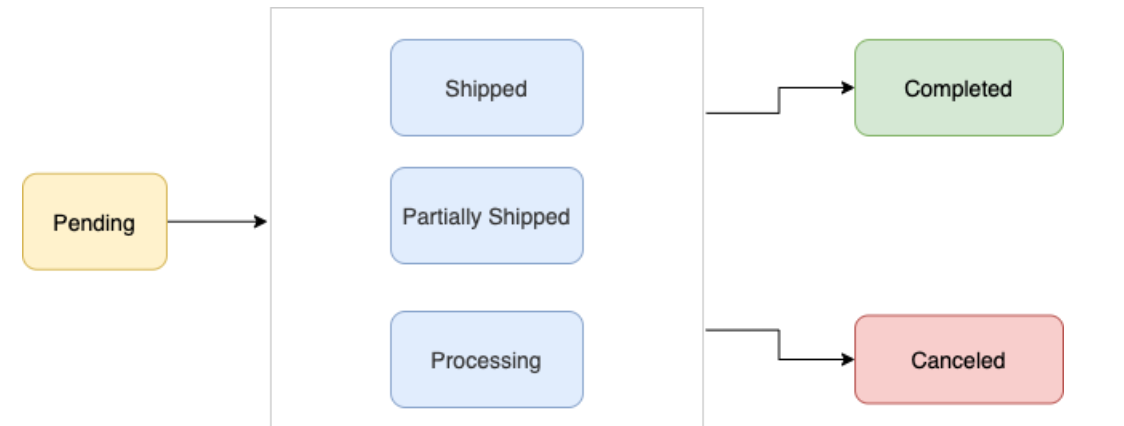
Upon receiving transaction signals from payment gateway through webhook, the business must update the order status to keep the user up to date. Currently we support the following order status values:

<figure><img src="https://3527970750-files.gitbook.io/~/files/v0/b/gitbook-x-prod.appspot.com/o/spaces%2F-M4sMxKjL6eJRvZn6jeG-887967055%2Fuploads%2FJe7x5MOZyFXXsj04HDeH%2Fimage.png?alt=media&#x26;token=898da4fb-97e6-4025-a68d-b434e9ba8bf9" alt=""><figcaption></figcaption></figure>

| Value               | Description                                                                                                                                                                                                       |
| ------------------- | ----------------------------------------------------------------------------------------------------------------------------------------------------------------------------------------------------------------- |
| `pending`           | User has not successfully paid yet                                                                                                                                                                                |
| `processing`        | User payment authorized, merchant/partner is fulfilling the order, performing service, etc.                                                                                                                       |
| `partially-shipped` | A portion of the products in the order have been shipped by the merchant                                                                                                                                          |
| `shipped`           | All the products in the order have been shipped by the merchant                                                                                                                                                   |
| `completed`         | The order is completed and no further action is expected from the user or the partner/merchant                                                                                                                    |
| `canceled`          | The partner/merchant would like to cancel the `order_details` message for the order/invoice. The status update will fail if there is already a `successful` or `pending` payment for this `order_details` message |

Typically businesses update the `order_status` using either the WhatsApp payment status change notifications or their own internal processes. To update `order_status`, the partner sends an `order_status` message to the user.

<details>

<summary>Example:</summary>

```json
{
  "recipient_type": "individual",
  "to": "whatsapp-id",
  "type": "interactive",
  "interactive": {
    "type": "order_status",
    "body": {
      "text": "your-text-body-content"
    },
    "action": {
      "name": "review_order",
      "parameters": {
        "reference_id": "reference-id-value",
        "order": {
          "status": "processing | partially_shipped | shipped | completed | canceled",
          "description": "optional-text"
        }
      }
    }
  }
}
```

</details>

<details>

<summary>The following table describes the returned values:</summary>

<table><thead><tr><th width="240.66668701171875">Value</th><th>Description</th></tr></thead><tbody><tr><td><code>reference_id</code></td><td>The ID provided by the partner in the <code>order_details</code> message</td></tr><tr><td><code>status</code></td><td>The new order <code>status</code></td></tr><tr><td><code>description</code></td><td>Optional text for sharing status related information in <code>order_details</code>. Could be useful while sending cancellation. Max character limit is 120 characters</td></tr></tbody></table>

</details>
{% endstep %}

{% step %}

#### Reconcile Payments <a href="#step-8--reconcile-payments" id="step-8--reconcile-payments"></a>

Please note that neither 360dialog nor WhatsApp supports payment reconciliations. Businesses should use their bank statements to reconcile the payments using the `reference_id` provided in the `order_details` messages.
{% endstep %}
{% endstepper %}
