# Payments (Singapore only)
{% hint style="info" %}
It's important to note that this payment feature is currently exclusive to Singapore businesses receiving payments from users located in Singapore.
{% endhint %}
## What WhatsApp Payments Enables
WhatsApp Payments allows businesses to **receive payments directly inside WhatsApp**. This transforms WhatsApp from a messaging channel into a **full commerce experience**, where customers can:
* [Browse business catalogs](https://docs.360dialog.com/docs/messaging/catalogs)
* [Add products to a cart](https://docs.360dialog.com/docs/catalogs#shopping-cart-experience)
* Submit orders
* Complete payments
* Receive order status updates
With the **Payments Gateway integration**, businesses can send bills and payment requests directly to customers within WhatsApp.
### Payments Inside a Message
Payments are initiated through a new type of interactive WhatsApp message called an **order\_details message**. This message:
* Always contains four components: **header, body, footer, and action**
* Includes all information required for the customer to complete payment
* Is associated with a **unique reference\_id** generated by the business
The **reference\_id** is used throughout the payment flow to identify and track the order.
### Regional Availability
The Stripe payment integration is **currently exclusive to Singapore** and applies only when:
* The business is registered in Singapore
* The WhatsApp phone number is from Singapore
* The customer making the payment is also located in Singapore
Eligible businesses using the **360Dialog WhatsApp Business Platform** can request activation through Support.
### How Payment Status Works
Once the order\_details message is sent, the business waits for updates about the transaction. WhatsApp supports three possible payment statuses:
* **Pending**
* **Captured**
* **Failed**
A single payment may include **one or multiple transactions**, each with its own status.
Status updates can be received through webhook notifications, but for security reasons, WhatsApp also provides a **payment lookup API** that allows businesses to retrieve status directly - even across different phone numbers under the same Meta business portfolio.
### Responsibilities and Limitations
Neither 360Dialog nor WhatsApp performs **payment reconciliation**. The business must reconcile payments directly in Stripe, using:
* The **reference\_id** of the order, or
* The **transaction\_id** of each transaction
This ensures accurate financial tracking outside of WhatsApp.
## Purchase Flow in App
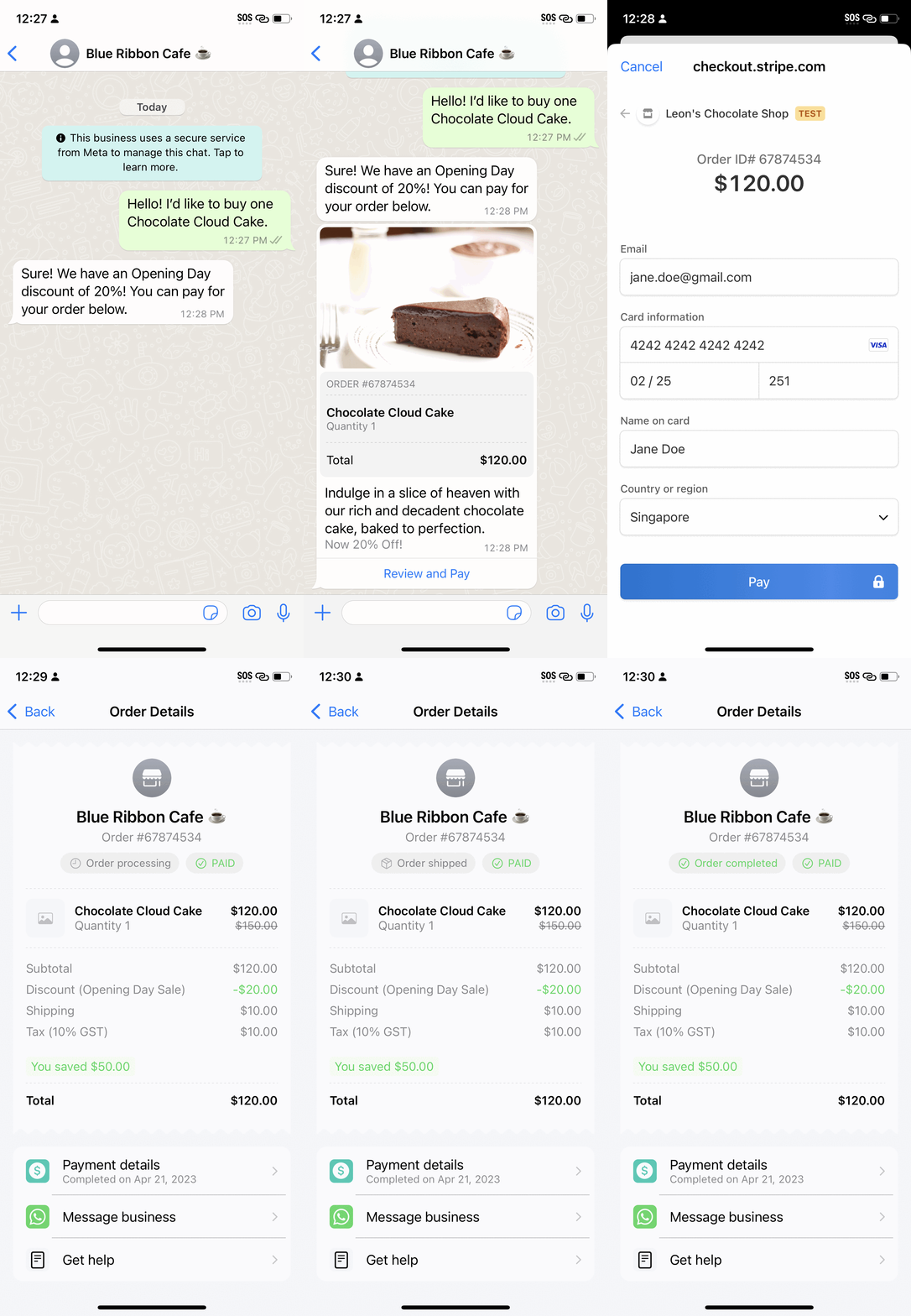
The purchase flow has the following steps in the WhatsApp customer app:
{% stepper %}
{% step %}
Customers send an order with selected products to the business either through simple text messages or using other interactive messages such as [Single Product Message, Multi Product Message, and Product Detail.](https://docs.360dialog.com/docs/messaging/catalogs)
{% endstep %}
{% step %}
Once the business receives the order, they send an `order_details` message to the user. When the user taps on Review and Pay, they will see details about the order and total amount to be paid.
{% endstep %}
{% step %}
When the user taps the **Secure Checkout** button, a secure in-app webview will appear for the user to pay for the order.
{% endstep %}
{% step %}
Once the payment has been confirmed, the business will be notified of the latest payment status using a webhook notification as shown in section 2 below.
{% endstep %}
{% step %}
Businesses can then send an `order_status` message to the consumer informing them about the status of the order. Each message will result in a message bubble (as shown below) that refers to the original order details message and also updates the status displayed on the order details page.
{% endstep %}
{% endstepper %}
## Link your Payment Account
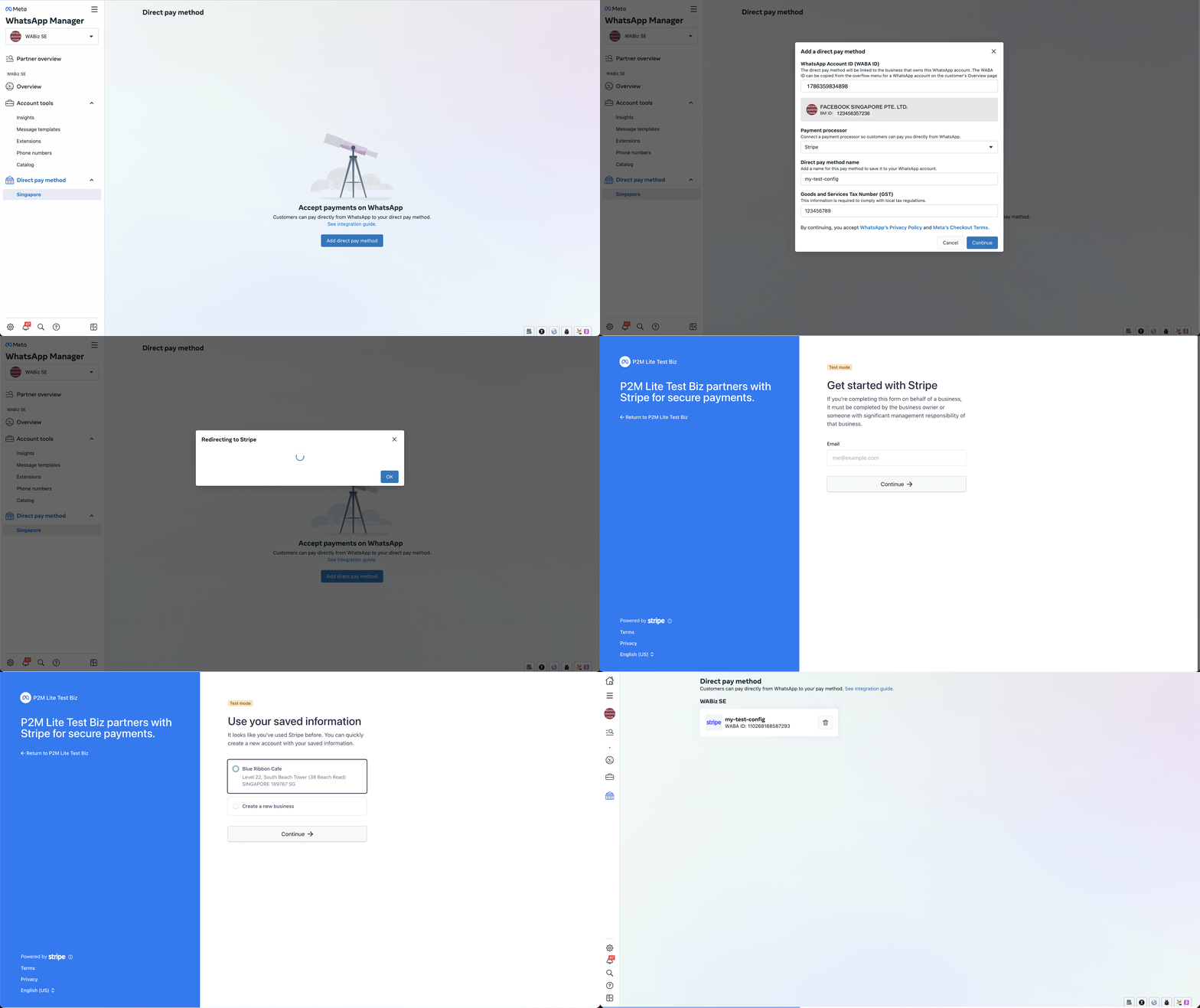
Businesses should add a Stripe payment configuration to the WhatsApp Business Account to receive payments on WhatsApp.
Accounts created with Embbeded-Sign up model (Shared WABA) can add it using the 'Direct pay methods' page under 'Singapore' in the [WhatsApp Manager](https://business.facebook.com/wa/manage/home) as shown below. In addition, **only Admin and Financial Editors users of such a business are eligible connect the Stripe accounts.**
If the WABA was created using the OBO (On Behalf-Of) model, please [reach out to our support team and we will assist you during this step](https://docs.360dialog.com/docs/support/get-support).
A payment configuration allows businesses to link their Stripe account to WhatsApp. Each payment configuration is associated with a *unique name*.
As part of the `order_details` message, you can specify the payment configuration to use for a specific checkout. WhatsApp will then generate a payment link using the associated Stripe account indicated in the request. This link opens up in an in-app webview so consumers can pay for their order.
After linking your Stripe account, you must integrate with the Payments APIs below. This will allow you to send an `order_details` message to customers with the payment configuration to receive payments.