> For the complete documentation index, see [llms.txt](https://docs.360dialog.com/docs/llms.txt). Markdown versions of documentation pages are available by appending `.md` to page URLs; this page is available as [Markdown](https://docs.360dialog.com/docs/resources/marketing-messages/expected-errors-and-programming-languages.md).
# Expected Errors & Programming Languages
## **Expected Errors**
MM API is designed specifically for sending Marketing template messages. If you try to send any other message type - such as freeform, Authentication, Service, or Utility - you’ll receive an error response. These formats aren't supported in MM API.
It’s also important to note that MM API is a send-only API. It doesn’t support incoming messages from users. If your use case requires two-way communication, you’ll need to use the Cloud API alongside MM API on the same phone number to receive incoming messages and replies.
***
#### **Using MM API to send normal text messages**
The expected error if we try to send a message which is not a Marketing template message is:
```json
{
"detail": {
"error": {
"message": "(#100) Invalid parameter",
"type": "OAuthException",
"code": 100,
"error_data": {
"messaging_product": "whatsapp",
"details": "Message must be a template message."
},
"fbtrace_id": "AS8UhxdPr7P7WMufJGTGVGU"
}
}
}
```
#### **Using MM API to send Authentication/Utility templates**
The expected error if we try to send a template message that is not a Marketing template message is:
```json
{
"detail": {
"error": {
"message": "(#131055) Method not allowed",
"type": "OAuthException",
"code": 131055,
"error_data": {
"messaging_product": "whatsapp",
"details": "Only marketing template messages are supported"
},
"fbtrace_id": "AacMONwqoqRZJidqSa1LDey"
}
}
}
```
#### **Not allowed to send messages using MM API**
The expected error if we try to send a MM API if the phone number is not activated for this API:
```json
{
"detail": {
"error": {
"message":"(#200) You must accept the Marketing Messages Lite API terms to use the API."
"type": "OAuthException",
"code": 131055,
"fbtrace_id": "AacMONwqoqRZJidqSa1LDey"
}
}
}
```
#### **Using the wrong D360-API-KEY**
If you use an invalid `D360-API-KEY`, the request will fail with an authentication error. This typically means the token is incorrect or missing.
```json
{ "error": "Invalid api token." }
```
***
## **Examples using multiple programming languages**
### 1. Postman Collection
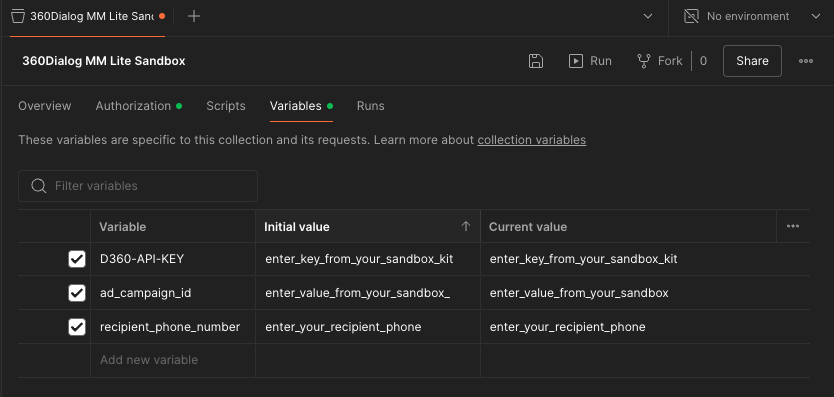
Once you’re approved to join the program, you can download the Postman collection that includes both successful request examples and the expected error responses:
{% file src="/files/S6ELFZrYwecADwyagYK4" %}
This collection is designed to help you quickly test and validate MM API behavior across a range of use cases.
**How to use:**
1. Import in Postman, the JSON file corresponding to a collection of requests with examples related with MM API.
2. Modify the collection variables, with the values you received from 360Dialog Team.
### 2. NodeJS (using request library)
Set current Webhook URL
```javascript
var request = require('request');
var options = {
'method': 'POST',
'url': 'https://waba-v2.360dialog.io/waba_webhook',
'headers': {
'Content-Type': 'application/json',
'D360-API-KEY': ''
},
body: JSON.stringify({
"url": "https://webhook.site/d4d4df6d-ee02-4572-a021-bcc60836d1e7"
})
};
request(options, function (error, response) {
if (error) throw new Error(error);
console.log(response.body);
});
```
Send text message using Cloud API
```javascript
var request = require('request');
var options = {
'method': 'POST',
'url': 'https://waba-v2.360dialog.io/messages',
'headers': {
'Content-Type': 'application/json',
'D360-API-KEY': ''
},
body: JSON.stringify({
"messaging_product": "whatsapp",
"recipient_type": "individual",
"to": "",
"type": "text",
"text": {
"body": "This is a simple text msg send using cloud api"
}
})
};
request(options, function (error, response) {
if (error) throw new Error(error);
console.log(response.body);
});
```
Send Marketing Template message using Cloud API
```javascript
var request = require('request');
var options = {
'method': 'POST',
'url': 'https://waba-v2.360dialog.io/messages',
'headers': {
'Content-Type': 'application/json',
'D360-API-KEY': ''
},
body: JSON.stringify({
"messaging_product": "whatsapp",
"recipient_type": "individual",
"to": "",
"type": "template",
"template": {
"name": "marketing_text_no_param",
"language": {
"policy": "deterministic",
"code": "en"
}
}
})
};
request(options, function (error, response) {
if (error) throw new Error(error);
console.log(response.body);
});
```
Send Marketing Template message using MM API
```javascript
var request = require('request');
var options = {
'method': 'POST',
'url': 'https://waba-v2.360dialog.io/marketing_messages',
'headers': {
'Content-Type': 'application/json',
'D360-API-KEY': ''
},
body: JSON.stringify({
"messaging_product": "whatsapp",
"recipient_type": "individual",
"to": "",
"type": "template",
"template": {
"name": "marketing_text_no_param",
"language": {
"policy": "deterministic",
"code": "en"
}
}
})
};
request(options, function (error, response) {
if (error) throw new Error(error);
console.log(response.body);
});
```
### 3. Python (using request library)
Set current Webhook URL
```javascript
import requests
import json
url = "https://waba-v2.360dialog.io/waba_webhook"
payload = json.dumps({
"url": "https://webhook.site/d4d4df6d-ee02-4572-a021-bcc60836d1e7"
})
headers = {
'Content-Type': 'application/json',
'D360-API-KEY': ''
}
response = requests.request("POST", url, headers=headers, data=payload)
print(response.text)
```
Send text message using Cloud API
```javascript
import requests
import json
url = "https://waba-v2.360dialog.io/messages"
payload = json.dumps({
"messaging_product": "whatsapp",
"recipient_type": "individual",
"to": "",
"type": "text",
"text": {
"body": "This is a simple text msg send using cloud api"
}
})
headers = {
'Content-Type': 'application/json',
'D360-API-KEY': ''
}
response = requests.request("POST", url, headers=headers, data=payload)
print(response.text)
```
Send Marketing Template message using Cloud API
```javascript
import requests
import json
url = "https://waba-v2.360dialog.io/messages"
payload = json.dumps({
"messaging_product": "whatsapp",
"recipient_type": "individual",
"to": "",
"type": "template",
"template": {
"name": "marketing_text_no_param",
"language": {
"policy": "deterministic",
"code": "en"
}
}
})
headers = {
'Content-Type': 'application/json',
'D360-API-KEY': ''
}
response = requests.request("POST", url, headers=headers, data=payload)
print(response.text)
```
Send Marketing Template message using MM API
```javascript
import requests
import json
url = "https://waba-v2.360dialog.io/marketing_messages"
payload = json.dumps({
"messaging_product": "whatsapp",
"recipient_type": "individual",
"to": "",
"type": "template",
"template": {
"name": "marketing_text_no_param",
"language": {
"policy": "deterministic",
"code": "en"
}
}
})
headers = {
'Content-Type': 'application/json',
'D360-API-KEY': ''
}
response = requests.request("POST", url, headers=headers, data=payload)
print(response.text)
```
---
# Agent Instructions
This documentation is published with GitBook. GitBook is the documentation platform designed so that both humans and AI agents can read, navigate, and reason over technical content effectively. Learn more at gitbook.com.
## Querying This Documentation
If you need additional information that is not directly available in this page, you can query the documentation by asking a question.
Perform an HTTP GET request on the following URL with the `ask` and `goal` query parameters:
```
GET https://docs.360dialog.com/docs/resources/marketing-messages/expected-errors-and-programming-languages.md?ask=&goal=
```
`ask` is the immediate question: it should be specific, self-contained, and written in natural language.
`goal` is what the user is ultimately trying to achieve, the reason they need the answer. Sharing it helps GitBook give you a better, more relevant answer. A goal is most helpful when it describes the outcome the user wants rather than restating the question. For example, with `ask=how do I create an API token`, a goal like `automate deployments from our CI pipeline` lets GitBook tailor the answer to that use case.
The response will contain a direct answer to the question and relevant excerpts and sources from the documentation.
Use this mechanism when the answer is not explicitly present in the current page, you need clarification or additional context, or you want to retrieve related documentation sections.