> For the complete documentation index, see [llms.txt](https://docs.360dialog.com/docs/llms.txt). Markdown versions of documentation pages are available by appending `.md` to page URLs; this page is available as [Markdown](https://docs.360dialog.com/docs/resources/phone-numbers/meta-provided-555-phone-numbers.md).
# Meta Provided (555) Phone Numbers
This page describes Meta 555 Business Phone numbers.
During Embedded Signup to the WhatsApp Business Platform, Meta may offer eligible businesses the option to add up to two 555 business phone numbers.
These numbers are issued directly by Meta and can be used on the WhatsApp Business Platform under specific conditions.
### 555 Number Characteristics
* Use the US country calling code (+1) with a 555 area code
* Are automatically verified by Meta
* Behave like standard WhatsApp Business phone numbers in terms of:
* Pricing rules
* Quality ratings
* Messaging limits
* Require display name approval before messages can be sent
* Cannot be migrated to another WhatsApp Business Account
* Cannot be used outside of the WhatsApp Business platform
For Meta’s official documentation, see: [Embedded Signup](https://developers.facebook.com/docs/whatsapp/embedded-signup#555-business-phone-numbers)
### 555 Number Limitations
While 555 numbers can technically send and receive messages, they have important restrictions:
* They are non-portable and cannot be transferred to another WABA
* Any configuration, history, or setup linked to a 555 number cannot be moved to another phone number
* Once stopped, a 555 number should be considered disposable
* They are not suitable for long-term production use where number ownership, portability, or future migration is required
555 numbers are issued and managed by Meta. They are not provided, owned, or controlled by 360Dialog.
### Register a 555 Business Phone Number
{% stepper %}
{% step %}
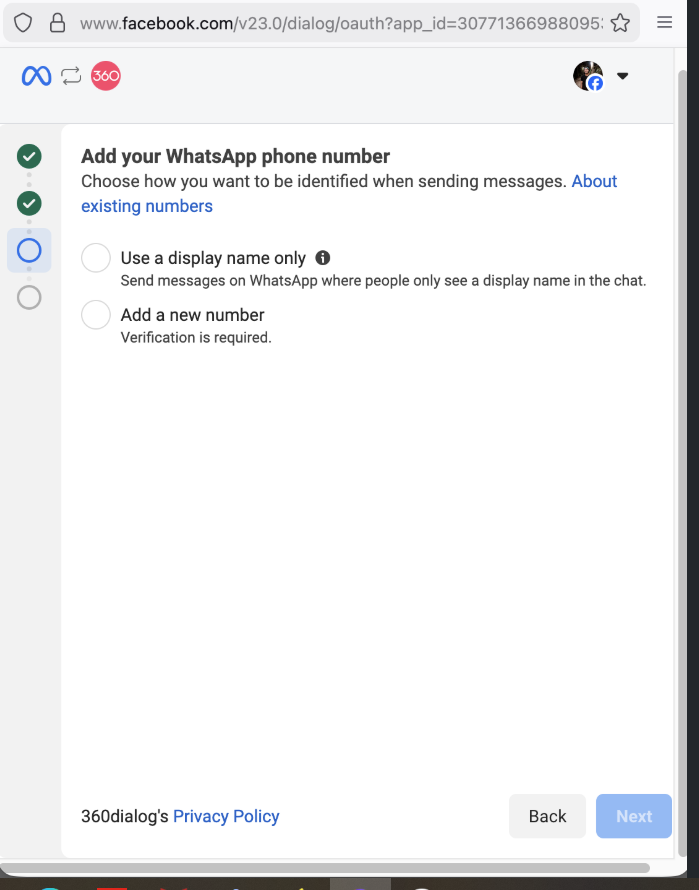
During Embedded Signup, eligible businesses can see the option to **use a display name only**.
{% endstep %}
{% step %}
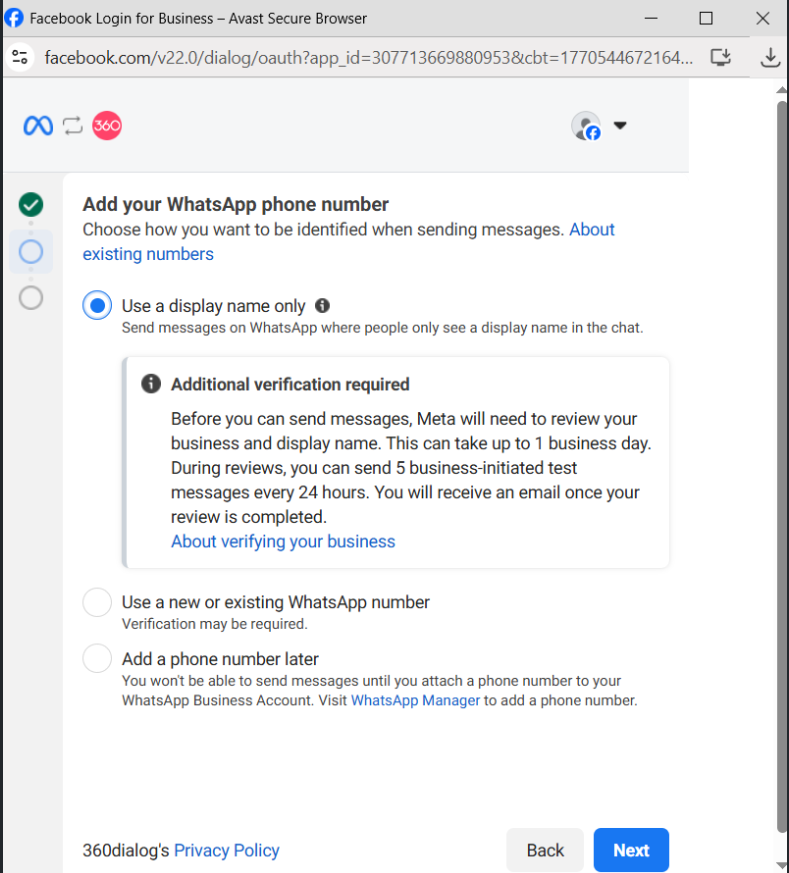
Select Use a display name only and a message will be returned about Additional verification required. Click **Next**
{% endstep %}
{% step %}
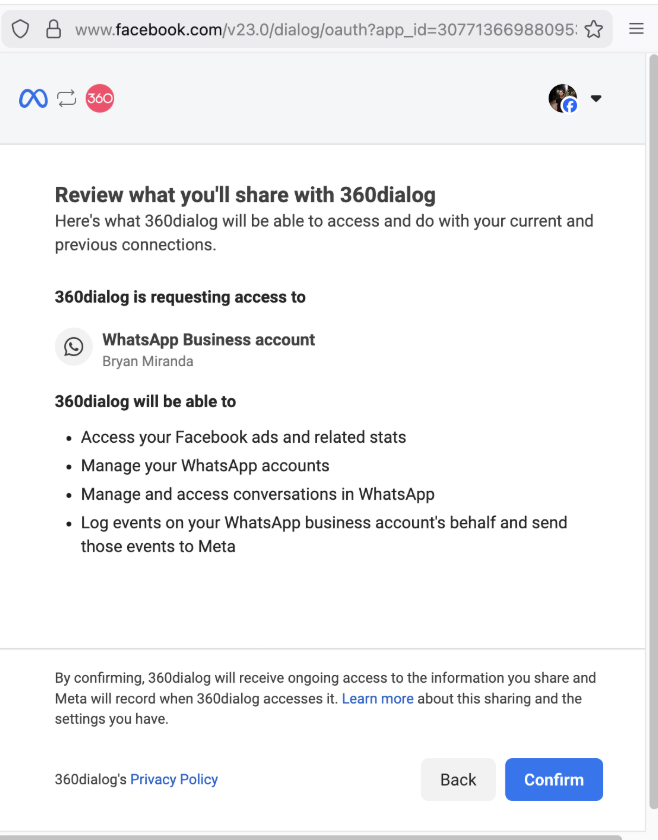
Click next and **Confirm** the sharing with 360dialog.
{% endstep %}
{% step %}
{% endstep %}
{% step %}
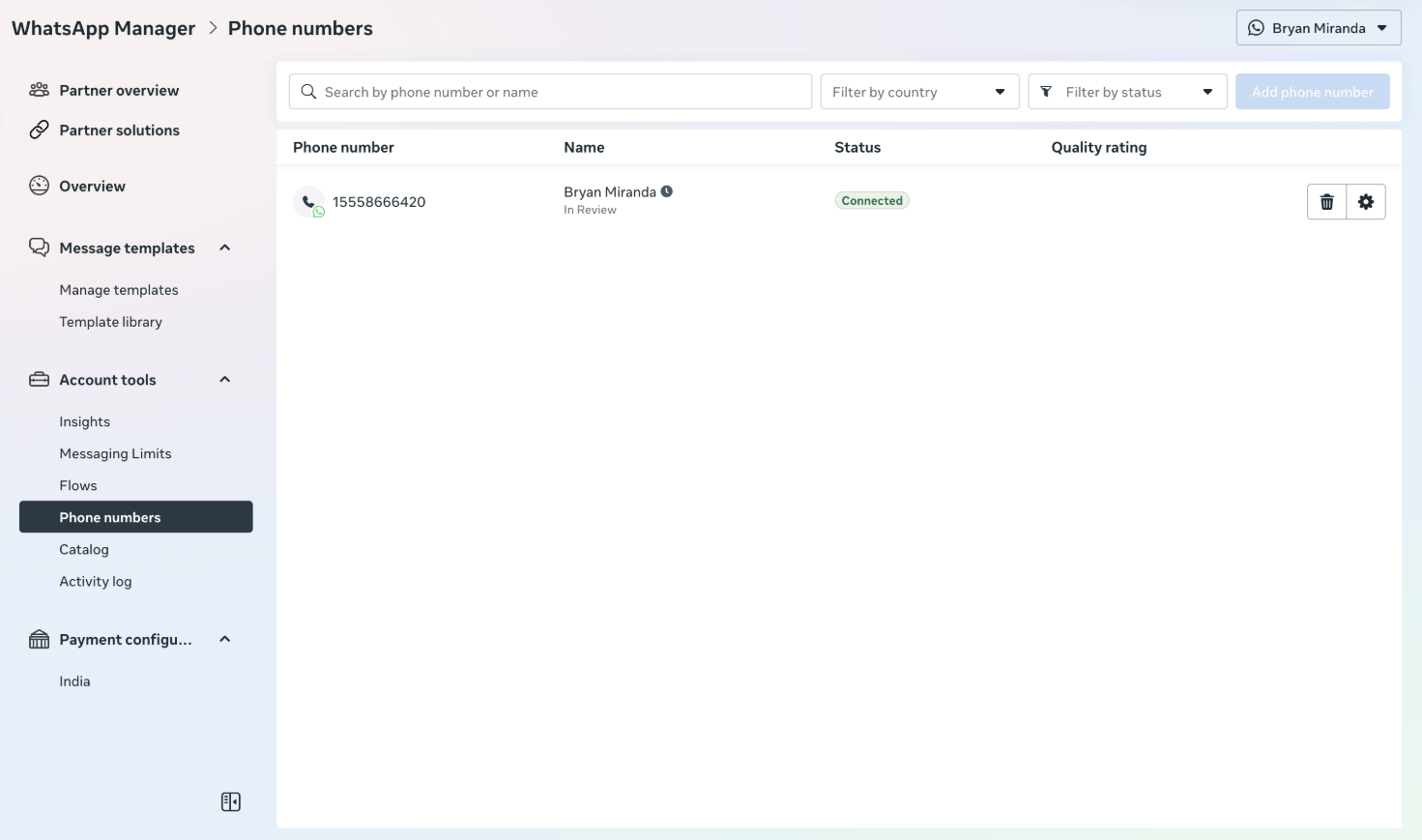
Complete number registration and you will see the +1555 number with Connected status in WhatsApp Manager > **Phone numbers.**
Note: Meta might take additional time to review and approve the display name.
{% endstep %}
{% endstepper %}
### Recommended use cases
555 business phone numbers are best suited for:
* Initial onboarding and platform evaluation
* Integration testing and demos
* Internal QA and proof-of-concept setups
For live, customer-facing, or long-term usage, a regular business phone number is strongly recommended.
### Switching from a 555 number to a regular phone number
1. Prepare a new phone number
* Must be able to receive SMS or voice calls
* Must not already be registered with WhatsApp
2. Add and verify the new phone number
* Complete the standard verification process
* Add the number to the same WABA to be able to use the same templates
3. Reconfigure setup
* Update webhooks, integrations, and messaging configuration
4. Stop using the 555 number
* Any data, balances, or setup associated with the 555 number cannot be transferred
Message history cannot be transferred from the 555 number to the regular phone number by 360dialog. We do not provide any synchronization functionality between different phone numbers.
### Billing and refunds
* 555 numbers are charged as regular numbers at standard rates.
* 360dialog does not sell 555 numbers at any additional cost.
* Any usage charges incurred are subject to WhatsApp [pricing](/docs/get-started/pricing.md) terms.
* We do not issue refunds for 555 numbers that were onboarded by mistake.
* Any 555 numbers that are registered will be billed in the same way as regular phone numbers.
### Best practice
Use 555 business phone numbers only for testing, evaluation, or short-term onboarding.
For production environments, always onboard with a regular business phone number to avoid reconfiguration effort, migration limitations, and long-term operational constraints.
---
# Agent Instructions
This documentation is published with GitBook. GitBook is the documentation platform designed so that both humans and AI agents can read, navigate, and reason over technical content effectively. Learn more at gitbook.com.
## Querying This Documentation
If you need additional information that is not directly available in this page, you can query the documentation by asking a question.
Perform an HTTP GET request on the following URL with the `ask` and `goal` query parameters:
```
GET https://docs.360dialog.com/docs/resources/phone-numbers/meta-provided-555-phone-numbers.md?ask=&goal=
```
`ask` is the immediate question: it should be specific, self-contained, and written in natural language.
`goal` is what the user is ultimately trying to achieve, the reason they need the answer. Sharing it helps GitBook give you a better, more relevant answer. A goal is most helpful when it describes the outcome the user wants rather than restating the question. For example, with `ask=how do I create an API token`, a goal like `automate deployments from our CI pipeline` lets GitBook tailor the answer to that use case.
The response will contain a direct answer to the question and relevant excerpts and sources from the documentation.
Use this mechanism when the answer is not explicitly present in the current page, you need clarification or additional context, or you want to retrieve related documentation sections.