
Required.
Template category. Set this to MARKETING.
Required.
Array of objects that describe the components that make up the template.
See Components below.
| See [Components](https://developers.facebook.com/docs/whatsapp/business-management-api/message-templates/mpm-templates#components) below. | | `Required.
Template language and locale code.
| `en_US` | | `Required.
Template name.
Maximum 512 characters.
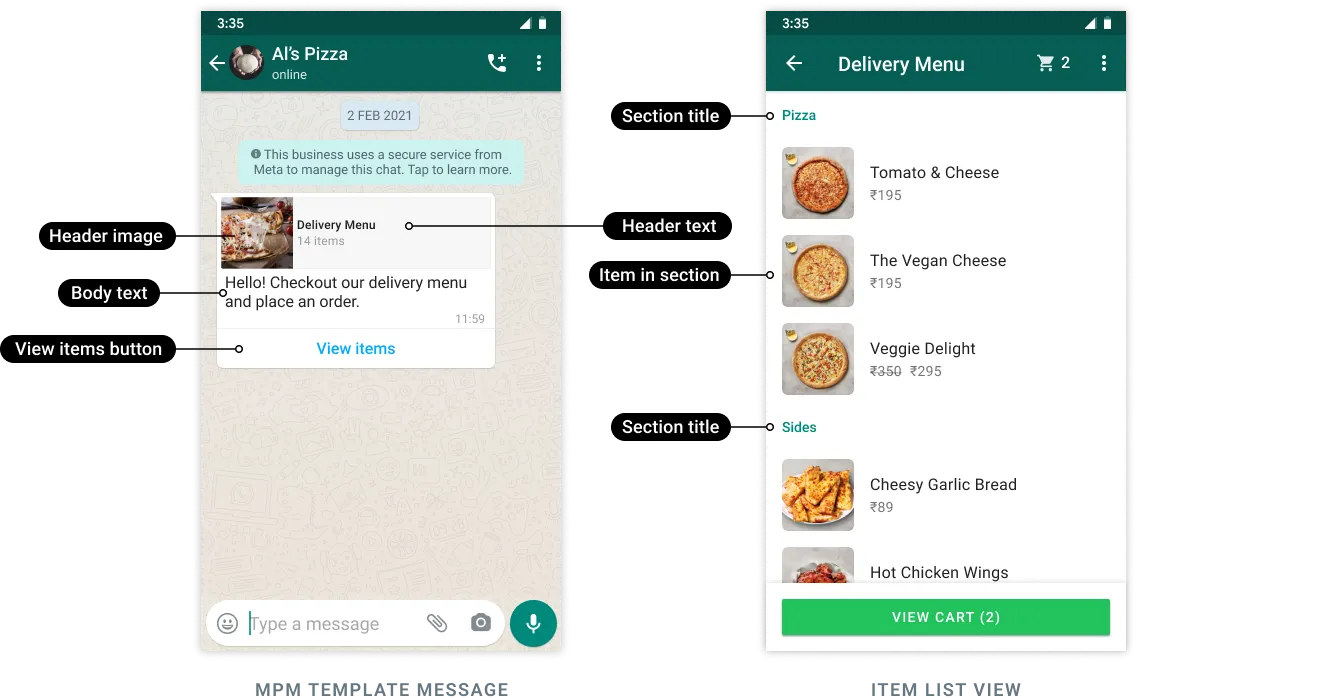
| `abandoned_cart` | #### Components The `components` value must be an array of objects that describes each component that makes up the template. MPM templates must have the following components: * a single header component * a single body component * a single footer component (optional) * a single MPM button component ```json [ { "type": "HEADER", "format": "TEXT", "text": "Template body text. Supports multiple variables.
If the string contains variables, you must include the example property and sample variable values.
1024 characters maximum.
| `Forget something, {{1}}?` | | `Template footer text.
60 characters maximum.
| `Lucky Shrub, 1 Hacker Way, Menlo Park, CA 94025` | | `Template header text. Supports 1 variable.
If the string contains a variable, you must include the example property and a sample variable value.
60 characters maximum.
| `Looks like you left these items in your cart, still interested? Use code {{1}} to get 10% off!` | #### Sample Request ```json { "name": "abandoned_cart", "language": "en_US", "category": "MARKETING", "components": [ { "type": "HEADER", "format": "TEXT", "text": "Forget something, {{1}}?", "example": { "header_text": [ "Pablo" ] } }, { "type": "BODY", "text": "Looks like you left these items in your cart, still interested? Use code {{1}} to get 10% off!", "example": { "body_text": [ [ "10OFF" ] ] } }, { "type":"BUTTONS", "buttons": [ { "type": "MPM", "text": "View items" } ] } ] } ``` ## Sending MPM Templates Use the API to send an MPM template once it has been approved. `POST` `https://waba-v2.360dialog.io/messages` #### Request Body | Name | Type | Description | | ---------- | ------ | ------------------------------------------------------------------------------------------------------------------------------------------ | | components | String | See [Components](#properties-1) | | language | String | [View list of supported languages here.](https://developers.facebook.com/docs/whatsapp/api/messages/message-templates#supported-languages) | {% tabs %} {% tab title="201: Created " %} ```json { "messaging_product": "whatsapp", "contacts": [ { "input": "12015553931", "wa_id": "12015553931" } ], "messages": [ { "id": "wamid.HBgLMTY1MDM4Nzk0MzkVAgARGBI4Qzc5QkNGNTc5NTMyMDU5QzEA" } ] } ``` {% endtab %} {% endtabs %} **Post Body** ```json { "messaging_product": "whatsapp", "recipient_type": "individual", "to": ""
},
"components": [
/* Header component required if template uses a header variable, otherwise omit */
{
"type": "header",
"parameters": [
{
"type": "text",
"text": ""
}
]
},
/* Body component required if template uses a body variable, otherwise omit */
{
"type": "body",
"parameters": [
{
"type": "text",
"text": ""
}
]
},
/* MPM button component always required */
{
"type": "button",
"sub_type": "mpm",
"index": 0,
"parameters": [
{
"type": "action",
"action": {
"thumbnail_product_retailer_id": "",
"sections": [
{
"title": "",
"product_items": [
{
"product_retailer_id": "<PRODUCT_RETAILER_ID>"
},
... // Additional item objects (up to 30)
]
},
... // Add section objects (up to 10)
]
}
}
]
}
]
}
}
```
#### Properties <a href="#properties" id="properties"></a>
<table><thead><tr><th width="292.3333333333333">Placeholder</th><th>Description</th><th>Sample Value</th></tr></thead><tbody><tr><td><code><BODY_TEXT></code></td><td><p><strong>Required if template uses variables.</strong><br></p><p>String or array of strings. Text to replace body variable(s) defined in the template.</p></td><td><code>10OFF</code></td></tr><tr><td><code><CODE></code></td><td>Template <a href="https://developers.facebook.com/docs/whatsapp/business-management-api/message-templates/supported-languages">language and locale code</a>.</td><td><code>en_US</code></td></tr><tr><td><code><HEADER_TEXT></code></td><td><p><strong>Required if template uses a variable.</strong><br></p><p>Text to replace header variable defined in the template.</p></td><td><code>Pablo</code></td></tr><tr><td><code><NAME></code></td><td>Template name.</td><td><code>abandoned_cart</code></td></tr><tr><td><code><PRODUCT_RETAILER_ID></code></td><td><p>SKU number of the item you want to appear in the section.<br></p><p>SKU numbers are labeled as <strong>Content ID</strong> in the Commerce Manager.</p><p></p><p>Supports up to 30 products total, across all sections.</p></td><td><code>2lc20305pt</code></td></tr><tr><td><code><THUMBNAIL_PRODUCT_RETAILER_ID></code></td><td><p>Item SKU number. Labeled as <strong>Content ID</strong> in the Commerce Manager.<br></p><p>The thumbnail of this item will be used as the template message's header image.</p></td><td><code>2lc20305pt</code></td></tr><tr><td><code><TITLE></code></td><td><p>Section title text.</p><p></p><p>You can define up to 10 sections.</p><p></p><p>Maximum 24 characters. Markdown is not supported.</p></td><td><code>Popular Bundles</code></td></tr><tr><td><code><TO></code></td><td>Customer phone number.</td><td><code>1650555123</code></td></tr></tbody></table>
#### Example Request <a href="#example-request" id="example-request"></a>
This example sends an approved template named "abandoned\_cart" and injects a variable (the customer's first name) into the template header and a discount code into the template body. It also defines two sections ("Popular Bundles" and "Premium Packages") and identifies the products (a total of 3) that should be injected into those sections.
```json
{
"messaging_product": "whatsapp",
"recipient_type": "individual",
"to": "16505551234",
"type": "template",
"template": {
"name": "abandoned_cart",
"language": {
"code": "en_US"
},
"components": [
{
"type": "header",
"parameters": [
{
"type": "text",
"text": "Pablo"
}
]
},
{
"type": "body",
"parameters": [
{
"type": "text",
"text": "10OFF"
}
]
},
{
"type": "button",
"sub_type": "mpm",
"index": 0,
"parameters": [
{
"type": "action",
"action": {
"thumbnail_product_retailer_id": "2lc20305pt",
"sections": [
{
"title": "Popular Bundles",
"product_items": [
{
"product_retailer_id": "2lc20305pt"
},
{
"product_retailer_id": "nseiw1x3ch"
}
]
},
{
"title": "Premium Packages",
"product_items": [
{
"product_retailer_id": "n6k6x0y7oe"
}
]
}
]
}
}
]
}
]
}
}'
```
## Webhooks <a href="#webhooks" id="webhooks"></a>
When a customer adds one or more products to their cart and submits an order, Meta will send you a webhook that describes the order.
#### Webhook Syntax <a href="#webhook-syntax" id="webhook-syntax"></a>
```json
{
"object": "whatsapp_business_account",
"entry": [
{
"id": "<ENTRY.ID>",
"changes": [
{
"value": {
"messaging_product": "whatsapp",
"metadata": {
"display_phone_number": "<DISPLAY_PHONE_NUMBER>",
"phone_number_id": "<PHONE_NUMBER_ID>"
},
"contacts": [
{
"profile": {
"name": "<NAME>"
},
"wa_id": "<WA_ID>"
}
],
"messages": [
{
"from": "<FROM>",
"id": "<MESSAGES.ID>",
"timestamp": "<TIMESTAMP>",
"type": "order",
"order": {
"catalog_id": "<CATALOG_ID>",
"product_items": [
{
"product_retailer_id": "<PRODUCT_RETAILER_ID>",
"quantity": <QUANTITY>,
"item_price": <ITEM_PRICE>,
"currency": "<CURRENCY>"
}
]
}
}
]
},
"field": "messages"
}
]
}
]
}
```
#### Webhook Contents <a href="#webhook-contents" id="webhook-contents"></a>
<table><thead><tr><th width="277.3333333333333">Placeholder</th><th>Description</th><th>Sample Value</th></tr></thead><tbody><tr><td><code><CATALOG_ID></code></td><td>Ecommerce product catalog ID.</td><td><code>1537566713439863</code></td></tr><tr><td><code><CURRENCY></code></td><td>Item currency.</td><td><code>USD</code></td></tr><tr><td><code><DISPLAY_PHONE_NUMBER></code></td><td>Business phone number display number.</td><td><code>15550051310</code></td></tr><tr><td><code><ENTRY.ID></code></td><td>WhatsApp Business Account ID.</td><td><code>102290129340398</code></td></tr><tr><td><code><ITEM_PRICE></code></td><td>Item price.</td><td><code>99.99</code></td></tr><tr><td><code><MESSAGES.ID></code></td><td>WhatsApp message ID.</td><td><code>wamid.HBgLMTY1MDM4Nzk0MzkVAgARGBJDOEI3ODgxNzQzMjJBQTdEQTcA</code></td></tr><tr><td><code><NAME></code></td><td>Customer's name.</td><td><code>Pablo Morales</code></td></tr><tr><td><code><PHONE_NUMBER_ID></code></td><td>Business phone number ID.</td><td><code>106540352242922</code></td></tr><tr><td><code><PRODUCT_RETAILER_ID></code></td><td>The item SKU number. Labeled as <strong>Content ID</strong> in the Commerce Manager.</td><td><code>2lc20305pt</code></td></tr><tr><td><code><QUANTITY></code></td><td>Number of items ordered (for this particular item).</td><td><code>1</code></td></tr><tr><td><code><TIMESTAMP></code></td><td>UNIX timestamp indicating when we sent you the webhook.</td><td><code>1677522117</code></td></tr><tr><td><code><WA_ID></code></td><td>Customer's WhatsApp phone number.</td><td><code>16505551234</code></td></tr></tbody></table>
**Sample Webhook**
```json
{
"object": "whatsapp_business_account",
"entry": [
{
"id": "102290129340398",
"changes": [
{
"value": {
"messaging_product": "whatsapp",
"metadata": {
"display_phone_number": "15550051310",
"phone_number_id": "106540352242922"
},
"contacts": [
{
"profile": {
"name": "Pablo Morales"
},
"wa_id": "16505551234"
}
],
"messages": [
{
"from": "16505551234",
"id": "wamid.HBgLMTY1MDM4Nzk0MzkVAgASGBQzQTMxNzA1QzNENEI4ODY0OTY2MAA=",
"timestamp": "1683223069",
"type": "order",
"order": {
"catalog_id": "1537566713439863",
"product_items": [
{
"product_retailer_id": "n6k6x0y7oe",
"quantity": 1,
"item_price": 99.99,
"currency": "USD"
}
]
}
}
]
},
"field": "messages"
}
]
}
]
}
```
---
# Agent Instructions
This documentation is published with GitBook. GitBook is the documentation platform designed so that both humans and AI agents can read, navigate, and reason over technical content effectively. Learn more at gitbook.com.
## Querying This Documentation
If you need additional information that is not directly available in this page, you can query the documentation by asking a question.
Perform an HTTP GET request on the following URL with the `ask` and `goal` query parameters:
```
GET https://docs.360dialog.com/docs/resources/templates/multi-product-templates.md?ask=<question>&goal=<user_goal>
```
`ask` is the immediate question: it should be specific, self-contained, and written in natural language.
`goal` is what the user is ultimately trying to achieve, the reason they need the answer. Sharing it helps GitBook give you a better, more relevant answer. A goal is most helpful when it describes the outcome the user wants rather than restating the question. For example, with `ask=how do I create an API token`, a goal like `automate deployments from our CI pipeline` lets GitBook tailor the answer to that use case.
The response will contain a direct answer to the question and relevant excerpts and sources from the documentation.
Use this mechanism when the answer is not explicitly present in the current page, you need clarification or additional context, or you want to retrieve related documentation sections.