> For the complete documentation index, see [llms.txt](https://docs.360dialog.com/partner/llms.txt). Markdown versions of documentation pages are available by appending `.md` to page URLs; this page is available as [Markdown](https://docs.360dialog.com/partner/get-started/alphas-and-betas/whatsapp-login.md).
# WhatsApp Login
Open beta. Onboard businesses to the Cloud API with their WhatsApp Business App instead of a Facebook account. Specifications may change.
{% hint style="warning" %}
**Status: Open Beta (October 2026).** WhatsApp Login is on for every partner. Integrated Onboarding has it enabled by default, nothing to request. Self-hosted Embedded Signup can now run WhatsApp Login on **your own Meta app and Embedded Signup configuration**: 360dialog's app and config IDs are no longer needed. One step remains: during the open beta Meta still allowlists Tech Providers one by one, and 360dialog submits your Tech Provider Business Portfolio ID to Meta for that. Once you are allowlisted there is nothing else to do on Meta's side. Meta has not announced a GA date. The flow runs in production on real numbers, there is no sandbox. Known issues are listed at the [end of this page](#troubleshooting).
{% endhint %}
{% hint style="danger" %}
**Not enabled in the EU.** WhatsApp Login is not enabled for EU-based clients, and there is no timeline for when it will be. Integrated Onboarding does not offer WhatsApp Login for EU phone numbers, and it cannot be enabled on request. Do not offer it to EU businesses in a self-hosted flow either. Onboard EU numbers through standard Embedded Signup with a Facebook account.
{% endhint %}
{% hint style="info" icon="lightbulb-on" %}
**Why this matters**
Businesses that already use the WhatsApp Business App often hit a wall when trying to access the Cloud API. The standard Embedded Signup flow requires navigating Meta's account infrastructure: connecting a Facebook account, selecting the right Business Portfolio, WABA and phone number. That is confusing for non-technical users and one of the leading causes of drop-off during onboarding.
WhatsApp Login removes that step. Instead of Meta accounts and Business Manager, the business authenticates with the WhatsApp app already on their phone. No Facebook account, no asset selection, no Meta account setup. Partners testing it report shorter onboardings and fewer abandoned signups.
{% endhint %}
## How WhatsApp Login works
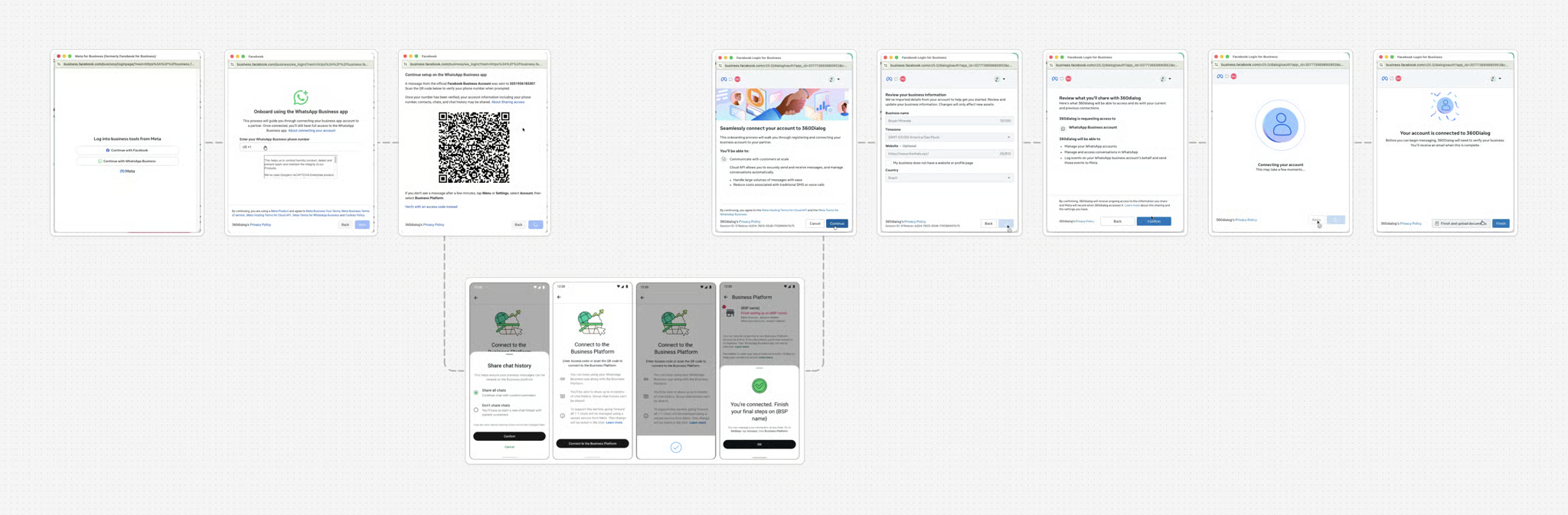
WhatsApp Login (officially **WhatsApp Business App Login for Coexistence Onboarding**, often shortened to WA Login) allows business customers to onboard to the WhatsApp Cloud API **without a Facebook account**. They authenticate with their WhatsApp Business App on mobile via QR code or access code. Meta creates the Business Portfolio and the WABA in the background.
This is a Coexistence-based flow: the business keeps using the WhatsApp Business App while also gaining access to the Cloud API. Everything that applies to [Coexistence](https://docs.360dialog.com/partner/onboarding/whatsapp-coexistence) applies here too, including throughput and messaging limits. WhatsApp Login changes how the business authenticates, nothing else.
**The key difference vs standard Embedded Signup:**
* Standard ES: the customer logs in with Facebook or Meta Business Manager.
* WhatsApp Login: the customer authenticates with their WhatsApp Business App (QR code or access code).
WhatsApp Login is delivered through 360dialog's Integrated Onboarding and through self-hosted Embedded Signup. In Integrated Onboarding, a coexistence signup starts with the question "Do you have a Facebook account?". Customers who answer no go straight to WhatsApp Login, no preparation screens. Customers who answer yes keep today's Facebook path. In a self-hosted Embedded Signup you launch WhatsApp Login from your own Meta app once Meta has allowlisted your Tech Provider.
### When to use WhatsApp Login
| Scenario | Standard ES | WhatsApp Login |
| ----------------------------------------------- | ------------------ | -------------------------------------------------------------------------------------------------------------------- |
| Customer has a Facebook/Meta account | ✅ | ✅ (defaults to Facebook login unless the customer is logged out of Facebook, see [Step 3](#step-3--launch-wa-login)) |
| Customer has NO Facebook account | ❌ | ✅ |
| Customer is already on Business Manager | ✅ | ❌ (blocked by requirements) |
| Customer wants to stay on WhatsApp Business App | ✅ (Coexistence ES) | ✅ (Recommended) |
| Customer's phone number is from an EU country | ✅ | ❌ (not enabled, see the note at the top of this page) |
{% columns %}
{% column %}
{% hint style="warning" %}
WhatsApp Login only appears when the browser is **not logged in to Facebook**. If the user is logged in, Meta skips the login type selection and shows the standard Facebook signup instead. Call `FB.logout()` before launching (see [Step 3](#step-3--launch-wa-login)). It clears a session that previously authorized your app, but it cannot clear a Facebook session that never used your app, so if WhatsApp Login does not appear, ask the user to log out of Facebook or use a private window.
{% endhint %}
{% endcolumn %}
{% column %}
{% endcolumn %}
{% endcolumns %}
## Requirements
### Partner requirements
* Integrated Onboarding: WhatsApp Login is enabled by default for every partner, nothing to request.
* Self-hosted Embedded Signup: you run WhatsApp Login on your own Meta app and your own Embedded Signup configuration, the same ones you use for standard [Partner-Hosted Embedded Signup](https://docs.360dialog.com/partner/onboarding/partner-hosted-embedded-signup). You do not need 360dialog's `app_id` or `config_id` any more.
* Tech Provider allowlisting by Meta: during the open beta, WhatsApp Login only shows in a self-hosted Embedded Signup if Meta has allowlisted your Tech Provider. Send your partner ID and the ID of the Meta Business Portfolio that owns your Tech Provider app and solution to your partner manager or to [support](mailto:support@360dialog.com). 360dialog submits the list to Meta, Meta checks which Tech Providers are already allowlisted and unblocks the rest. The process is manual on Meta's side, so allow some time. See [Self-hosted Embedded Signup](#self-hosted-embedded-signup).
### Customer requirements
Before a customer can onboard via WhatsApp Login, they must meet **all** of the following:
* Using the latest version of the WhatsApp Business App (iOS or Android).
* Phone number is **not** from an EU country. WhatsApp Login is not enabled in the EU, see the note at the top of this page.
* Phone number has **not** been added as a WhatsApp account to any Facebook Page.
* Phone number has **not** been added to any Business Manager account:
* Not set up via Meta Business Suite Inbox.
* Not already onboarded to Coexistence or the Cloud API.
Failing any of these blocks the WhatsApp Login flow. Communicate these requirements upfront to reduce support friction.
### Key limitations to communicate to customers
These are limitations of Meta's WhatsApp Login product, not 360dialog constraints.
1. **No Ads Manager access.** The WhatsApp Business Account created via WhatsApp Login cannot be accessed through Ads Manager.
2. **Payment method: credit line only.** The only payment method for these numbers is the Meta credit line, which 360dialog extends automatically. Accounts without a valid payment method cannot send paid messages via Cloud API.
3. **Asset management is API-only, unless using the Meta Business Suite URL.** Customers have no Business Manager access. They manage message templates and other assets via API through your platform or 360dialog, or via the Meta Business Suite URL you can provide (see [Meta Business Suite access](#meta-business-suite-access-for-wa-login-customers)).
4. **Business verification still applies.** A WhatsApp Login number starts with the standard 250 business-initiated conversations per day limit. Raising it requires business verification, through [Partner-Led Business Verification](https://docs.360dialog.com/partner/onboarding/meta-business-verification) once submissions resume, or Classic Business Verification. Customers who cannot complete Business Info in Business Manager stay on the starting limit.
5. **Same throughput as any Coexistence number.** WhatsApp Login does not change messaging throughput or limits. The number is a Coexistence number on the Cloud API with the same limits as one onboarded with a Facebook account.
6. **Beta volume limits.** During the beta there is no cap on phone number onboarding. After the beta concludes, onboarding may pause until public launch. No timeline is guaranteed.
## Implementing WhatsApp Login
For partners on [360dialog's Integrated Onboarding](#id-360dialog-integrated-onboarding) there is nothing to implement: WhatsApp Login is already on.
Partners who self-host Embedded Signup follow the [self-hosted Embedded Signup](#self-hosted-embedded-signup) path below. Both paths are in open beta, and the exact implementation details may change when the feature reaches general availability (GA).
### Self-hosted Embedded Signup
{% hint style="info" %}
**Changed in October 2026.** Self-hosted WhatsApp Login used to run on 360dialog's Meta app and config IDs as a beta exception for a few partners. It now runs on your own Meta app and Embedded Signup configuration, after Meta allowlists your Tech Provider. If you integrated on 360dialog's IDs, your integration keeps working for now, but plan the move to your own app: see [Migrating from 360dialog's app and config](#migrating-from-360dialogs-app-and-config).
{% endhint %}
#### Prerequisites
* The requirements of [Partner-Hosted Embedded Signup](https://docs.360dialog.com/partner/onboarding/partner-hosted-embedded-signup): Meta Tech Provider status with an `ACTIVE` solution integrated with 360dialog, advanced access to `public_profile`, and your Partner Hub webhook set up.
* Your own `app_id` and an Embedded Signup configuration (Facebook Login for Business configuration) that supports Coexistence. WhatsApp Login is part of the coexistence signup: it is what Meta shows when the customer continues with WhatsApp Business instead of Facebook.
* Your Tech Provider allowlisted by Meta for WhatsApp Login. Send your partner ID and your Tech Provider Business Portfolio ID (the Meta Business Portfolio that owns your app and solution) to your partner manager or [support](mailto:support@360dialog.com). 360dialog files the request with Meta and tells you when it is done. Until then the WhatsApp Login option does not appear in your flow.
{% hint style="warning" %}
There is no partner staging environment for WhatsApp Login. Test against production with a real, non-EU number that meets the [customer requirements](#customer-requirements).
{% endhint %}
#### Process overview
{% stepper %}
{% step %}
#### Load the Facebook JS SDK
Load the SDK with your own Facebook App ID, as for standard Embedded Signup.
```html
```
{% endstep %}
{% step %}
#### Listen for session events
Attach this listener on page load, **before** the user triggers the login. It receives events from the Facebook iframe throughout the ES/WhatsApp Login flow.
```javascript
window.addEventListener('message', function handleMessage(event) {
// Only accept messages from Facebook domains
const allowedOrigins = [
'https://www.facebook.com',
'https://web.facebook.com',
'https://business.facebook.com',
];
if (!allowedOrigins.includes(event.origin)) return;
if (!event.data || typeof event.data !== 'string') return;
if (event.data.startsWith('cb=')) return; // skip callback events
let data;
try {
data = JSON.parse(event.data);
} catch {
return; // not JSON - ignore
}
if (data?.type !== 'WA_EMBEDDED_SIGNUP') return;
if (data.event === 'FINISH') {
const phoneNumberId = data.data?.phone_number_id;
const wabaId = data.data?.waba_id;
const businessId = data.data?.business_id;
const isWaLoginUser = data.data?.is_wa_login_user === true;
// Store these - you'll need them for the callback
console.log({ phoneNumberId, wabaId, businessId, isWaLoginUser });
}
if (data.event === 'ERROR') {
console.error('WA Login ES error:', data.data?.error_message);
}
});
```
`is_wa_login_user: true` in the `FINISH` event confirms this was a WhatsApp Login onboarding rather than standard ES. `ERROR` events inside the popup come from Meta, not from 360dialog.
{% endstep %}
{% step %}
#### Launch WA Login
{% hint style="warning" %}
You must call `FB.logout()` before `FB.login()`. If the user is already logged into Facebook, WhatsApp Login falls back to the standard Facebook login screen instead of the phone number entry screen.
{% endhint %}
```javascript
function launchWALogin(configId, setupOptions = {}) {
return new Promise((resolve, reject) => {
const loginOptions = {
config_id: configId, // your coexistence-enabled Embedded Signup config_id
response_type: 'code',
override_default_response_type: true,
extras: {
setup: setupOptions,
sessionInfoVersion: 3,
},
};
const doFbLogin = () => {
FB.login(function (response) {
if (response?.authResponse) {
resolve({ code: response.authResponse.code });
} else {
reject('user cancelled');
}
}, loginOptions);
};
// Always log out first - WA Login only shows if not already logged into Facebook
FB.getLoginStatus((statusResponse) => {
if (statusResponse?.status === 'connected') {
FB.logout(() => doFbLogin());
} else {
doFbLogin();
}
});
});
}
```
Prefill of business and phone data in `extras.setup` works as in standard ES. What Meta shows pre-filled inside the WhatsApp Login screens is controlled on Meta's side. If your configuration is Embedded Signup v4, follow the `extras` rules on the [Embedded Signup versions](https://docs.360dialog.com/partner/onboarding/partner-hosted-embedded-signup#embedded-signup-versions) section.
{% endstep %}
{% step %}
#### Complete the connection
After the client finishes the ES session, connect the number exactly as for standard partner-hosted Embedded Signup: exchange the `code` on your side, then call the 360dialog account sharing endpoint.
```http
POST /api/v2/partners/{partner_id}/account_sharing/numbers
{
"solution_id": "", # required
"waba_external_id": "", # required
"waba_business_id": "", # optional
"channel_external_id": "", # treat as required for WA Login
"client_id": "" # optional
}
```
{% hint style="info" %}
What to keep in mind for WhatsApp Login onboardings:
* `channel_external_id` is optional in the schema, but send it for WhatsApp Login onboardings so the right number is connected.
* `is_partner_hosted_es` keeps its default (`true`) because the popup ran under your own app. Set it to `false` only if you still run the flow on 360dialog's app and config, see [Migrating from 360dialog's app and config](#migrating-from-360dialogs-app-and-config).
* Either `client_id` or `waba_business_id` must be present. Pass `client_id` to attach the new WABA to an existing client, otherwise we look up or create the client by the Meta business ID.
{% endhint %}
See the [Partner-Hosted Standard Embedded Signup documentation](https://docs.360dialog.com/partner/onboarding/partner-hosted-embedded-signup) for the full details on this request and the error codes it can return.
{% endstep %}
{% endstepper %}
#### Migrating from 360dialog's app and config
Partners that integrated WhatsApp Login during the closed beta on 360dialog's `app_id` and `config_id` can keep that setup running while they migrate. To move to your own app:
1. Ask your partner manager to have your Tech Provider allowlisted by Meta, sending your partner ID and your Tech Provider Business Portfolio ID. The domain allowlisting on 360dialog's app that you used so far does not carry over.
2. Initialise the SDK with your own `app_id` and launch the flow with your own coexistence-enabled `config_id`.
3. In the account sharing call, stop sending `is_partner_hosted_es: false`. The default (`true`) applies to your own app.
4. Test with a real, non-EU number and check the `FINISH` event carries `is_wa_login_user: true`.
#### Checklist before going live
* [ ] Your Tech Provider allowlisted by Meta for WhatsApp Login (requested through your partner manager or support with your Business Portfolio ID)
* [ ] Facebook App initialised with your own App ID (`version: 'v25.0'`)
* [ ] Coexistence-enabled Embedded Signup `config_id` used in `FB.login()`
* [ ] `FB.logout()` called before `FB.login()` in the WhatsApp Login flow
* [ ] `window.message` listener set up before login is triggered and correctly checks `is_wa_login_user`
* [ ] Account sharing endpoint implemented with `channel_external_id`
* [ ] EU numbers routed to standard Embedded Signup with a Facebook account
* [ ] Meta Business Suite custom URL added to your platform for WhatsApp Login customer asset management
* [ ] Limitations communicated to customers (no Ads Manager, no self-service payment method, business verification still needed to scale)
### 360dialog Integrated Onboarding
{% hint style="info" %}
WhatsApp Login is enabled by default in 360dialog's Integrated Onboarding. No allowlisting or configuration is needed on your side. EU phone numbers are the exception: they are not offered WhatsApp Login, see the note at the top of this page.
{% endhint %}
WhatsApp Login is triggered automatically within the Integrated Onboarding flow. A coexistence signup starts with the question "Do you have a Facebook account?". When the customer answers no, the flow goes straight to WhatsApp Login and skips the preparation screens that the Facebook path keeps (admin access, Meta verification, website, phone at hand). No additional implementation is required on your end, and this also applies to partners using a custom onboarding built on top of the Integrated Onboarding link.
{% hint style="warning" icon="megaphone" %}
We have recently launched v2 of the Integrated Onboarding, an improved version with a better UX. We highly recommend using it, via the Connect Button or Direct Link:
`https://app.360dialog.com/onboarding/`
[More details here](https://docs.360dialog.com/partner/onboarding/integrated-onboarding)
{% endhint %}
## Meta Business Suite access for WA Login customers
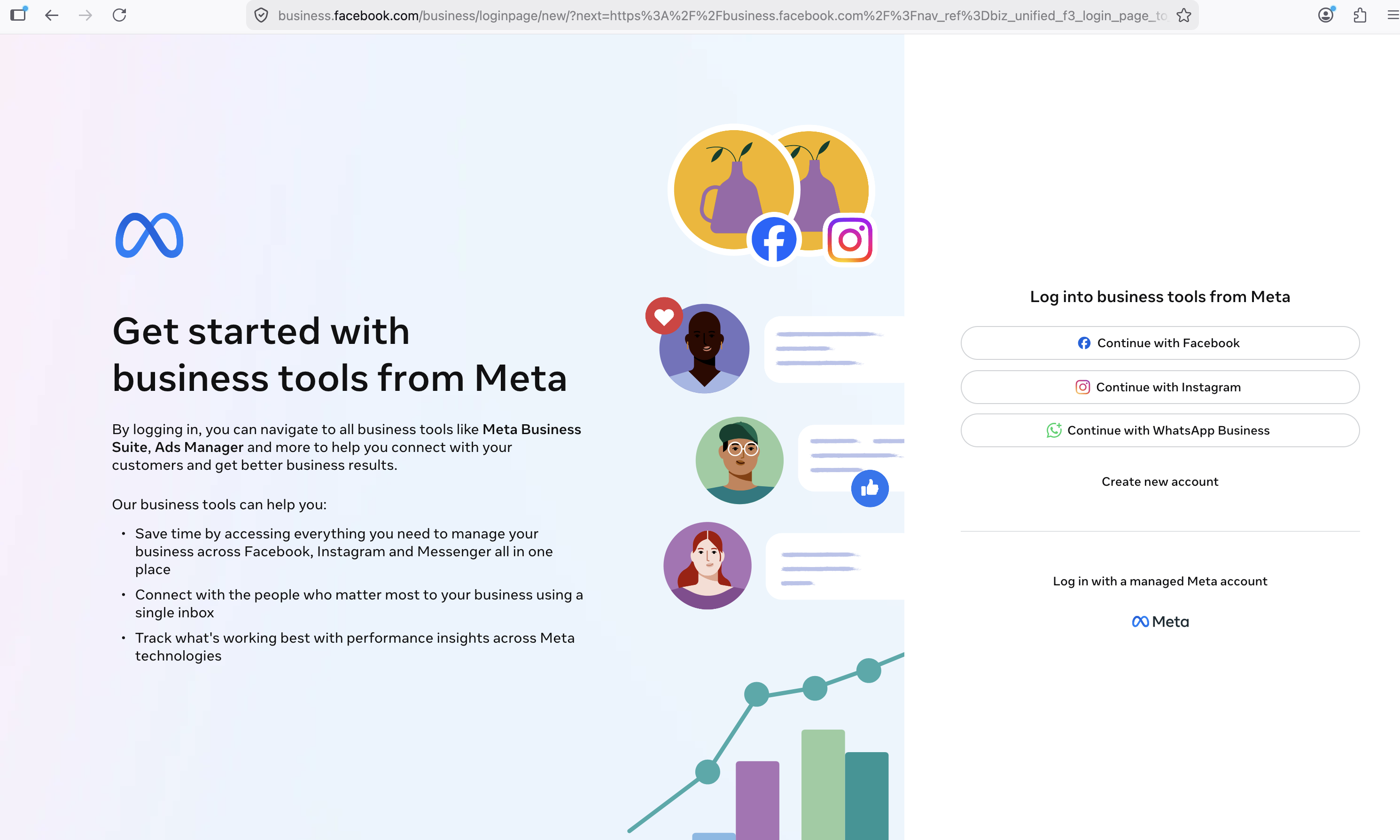
WhatsApp Login customers have no Business Manager access, but they can reach WhatsApp Manager via a custom Meta Business Suite URL that supports WhatsApp authentication:
```
https://business.facebook.com/business/loginpage/new/?login_options[0]=FB&login_options[1]=IG&login_options[2]=SSO&login_options[3]=WABA&config_ref=biz_login_tool_flavor_mbs
```
The `login_options[3]=WABA` parameter is what adds the "Continue with WhatsApp Business" option to the login page. Use it exactly as shown, with the square brackets unencoded. The customer scans the QR code with the WhatsApp Business App and lands on the Business Suite home page.
Add this URL to your platform so WhatsApp Login customers can:
* Manage message templates (create, edit, view status)
* View phone number details, status, and messaging limits
* Access WhatsApp Manager via MBS → Settings → Accounts → WhatsApp accounts → select WABA → Summary → WhatsApp Manager
* Complete Business Info, which is needed before any business verification: on the home page pick the Business Portfolio in the top left corner, open the gear icon next to its name, then Business Info
{% hint style="warning" %}
WhatsApp Login customers cannot use the standard `business.facebook.com` login. Only the custom URL above presents the WhatsApp login option.
{% endhint %}
{% hint style="info" %}
**Note:** Meta describes this login option as being in limited testing with a controlled rollout, so availability varies by account and region. Customers in Brazil and other non-EU regions generally log in without problems. If a customer cannot log in with the URL above, open a support ticket with the phone number and a screenshot.
{% endhint %}
## FAQ
**Is WhatsApp Login still in beta?**\
Yes, it is an open beta. Every partner can use it: it is on by default in Integrated Onboarding, and self-hosted Embedded Signup runs it on your own Meta app once Meta has allowlisted your Tech Provider. Meta has not announced a GA date. We update this page and the [Alphas and Betas](https://docs.360dialog.com/partner/get-started/alphas-and-betas) index when that changes.
**Is WhatsApp Login available for EU numbers?**\
No. WhatsApp Login is not enabled for EU-based clients, and there is no timeline for when it will be. EU numbers go through standard Embedded Signup with a Facebook account.
**Is the number a Coexistence number afterwards?**\
Yes. Meta's name for the feature is WhatsApp Business App Login for Coexistence Onboarding: the business keeps the WhatsApp Business App and gets the Cloud API side by side, see [WhatsApp Coexistence](https://docs.360dialog.com/partner/onboarding/whatsapp-coexistence).
**Does WhatsApp Login change throughput or messaging limits?**\
No. Meta treats WhatsApp Login as an onboarding path only. The number ends up as a Coexistence number on the Cloud API with the same throughput and messaging limits as one onboarded with a Facebook account.
**Do my customers still need business verification?**\
Yes. WhatsApp Login removes the Facebook account, not the verification. Numbers start at 250 business-initiated conversations per day until the business is verified.
**Can I use WhatsApp Login in my own Meta app and Embedded Signup config?**\
Yes. Since the open beta you run WhatsApp Login on your own app and coexistence-enabled configuration, the same way you run standard partner-hosted Embedded Signup. The only extra step is Meta's allowlisting of your Tech Provider, which 360dialog requests for you with your Business Portfolio ID. 360dialog's app and config IDs are no longer handed out.
**Do I still need to ask 360dialog for anything?**\
Only for self-hosted Embedded Signup: send your partner ID and your Tech Provider Business Portfolio ID to your partner manager or support so 360dialog can request the Meta allowlisting. Integrated Onboarding needs nothing.
**Is there a sandbox or test environment?**\
No. WhatsApp Login runs in production only. Test with a real, non-EU phone number that meets the customer requirements.
**Do pre-verified phone numbers work with WhatsApp Login?**\
Yes. If Embedded Signup rejects the pre-verified number with "phone number belongs to another company", go one step back inside the flow, add the number manually and verify it with the OTP.
**The flow shows "Try entering a different phone number or log in with Facebook to use this one". Why?**\
The number already has a Meta business presence (an earlier onboarding, a Facebook Page or a Business Portfolio), so it does not meet the [customer requirements](#customer-requirements) and Meta asks for Facebook login. Onboard it through standard Embedded Signup with that Facebook account, or contact support with the number if the business has no access to it.
**Meta's flow completed but I never received a `channel_created` webhook. What happened?**\
No WABA was shared with 360dialog, so no channel exists and no webhook fires. Self-hosted Embedded Signup: check you received the `FINISH` event and that your account sharing call succeeded. Otherwise send the phone number and the time of the attempt to support.
**What do I do when the WhatsApp Login option does not appear?**\
Check the user is logged out of Facebook in that browser, that your Tech Provider has been allowlisted by Meta (self-hosted ES), that the number is not attached to a Facebook Page or Business Manager, and that it is not an EU number. If all of that is fine, send us the partner ID, the number, a screenshot and if possible a screen recording of the attempt: Meta asks for these to investigate.
## Troubleshooting
### Known issues
| Issue | Cause | Fix or status |
| ------------------------------------------------------------------------------------------------------------------------- | ----------------------------------------------------------------------------------------------------- | --------------------------------------------------------------------------------------------------------------------------------------------- |
| WhatsApp Login screen doesn't appear, standard Facebook login shows instead | User is already logged into Facebook in the browser. Meta skips the login type selection in that case | Call `FB.logout()` before `FB.login()` (see Step 3). If it still does not appear, ask the user to log out of Facebook or use a private window |
| WhatsApp Login option never shows on a self-hosted Embedded Signup | Your Tech Provider has not been allowlisted by Meta yet | Send your partner ID and Tech Provider Business Portfolio ID to your partner manager or support. 360dialog requests it |
| `is_wa_login_user` is not `true` in the FINISH event | User authenticated with Facebook instead of WhatsApp | Expected. The user signed in with Facebook, so treat it as a standard Embedded Signup |
| Customer cannot open Business Manager or Business Suite after onboarding, WhatsApp login option missing on the login page | Meta's WhatsApp login option is in controlled rollout | Use the custom Business Suite URL above. If it still fails, open a support ticket |
| Customer cannot complete Business Info, business verification stays blocked | Follows from the Business Manager access issue above | Use PLBV once submissions resume. Classic Business Verification is the fallback. Numbers stay at the 250 limit until then |
| Pre-verified number rejected with "phone number belongs to another company" | Embedded Signup asked for the phone number before the business was shared with 360dialog | Go one step back inside Embedded Signup, add the number manually and verify it with the OTP |
| Customer cannot add a payment method | No Business Manager access | 360dialog extends the credit line automatically. Contact support if paid messages fail |
| Marketing or paid messages not working | No valid payment method on the account | Check the credit line extension is in place before enabling marketing messages |
| Customer cannot find their account in Ads Manager | WhatsApp Login accounts are excluded from Ads Manager | Expected beta limitation, no workaround available |
| Session event not received | `message` listener not attached before `FB.login()` | Attach the listener on page load, before the user triggers login |
| "Try entering a different phone number or log in with Facebook to use this one" | The number already has a Meta business presence | Onboard with standard Embedded Signup and that Facebook account, or contact support |
| No `channel_created` webhook and no channel in the Hub after the flow | No WABA was shared with 360dialog | Self-hosted ES: check the `FINISH` event and the account sharing call. Otherwise send number and timestamp to support |
| Onboarding stops at the phone number step for an EU prefix in Integrated Onboarding | WhatsApp Login is not enabled for EU numbers | Expected. Onboard the number through standard Embedded Signup with a Facebook account |
---
# Agent Instructions
This documentation is published with GitBook. GitBook is the documentation platform designed so that both humans and AI agents can read, navigate, and reason over technical content effectively. Learn more at gitbook.com.
## Querying This Documentation
If you need additional information that is not directly available in this page, you can query the documentation by asking a question.
Perform an HTTP GET request on the following URL with the `ask` and `goal` query parameters:
```
GET https://docs.360dialog.com/partner/get-started/alphas-and-betas/whatsapp-login.md?ask=&goal=
```
`ask` is the immediate question: it should be specific, self-contained, and written in natural language.
`goal` is what the user is ultimately trying to achieve, the reason they need the answer. Sharing it helps GitBook give you a better, more relevant answer. A goal is most helpful when it describes the outcome the user wants rather than restating the question. For example, with `ask=how do I create an API token`, a goal like `automate deployments from our CI pipeline` lets GitBook tailor the answer to that use case.
The response will contain a direct answer to the question and relevant excerpts and sources from the documentation.
Use this mechanism when the answer is not explicitly present in the current page, you need clarification or additional context, or you want to retrieve related documentation sections.