# Receive WhatsApp Payments via Stripe
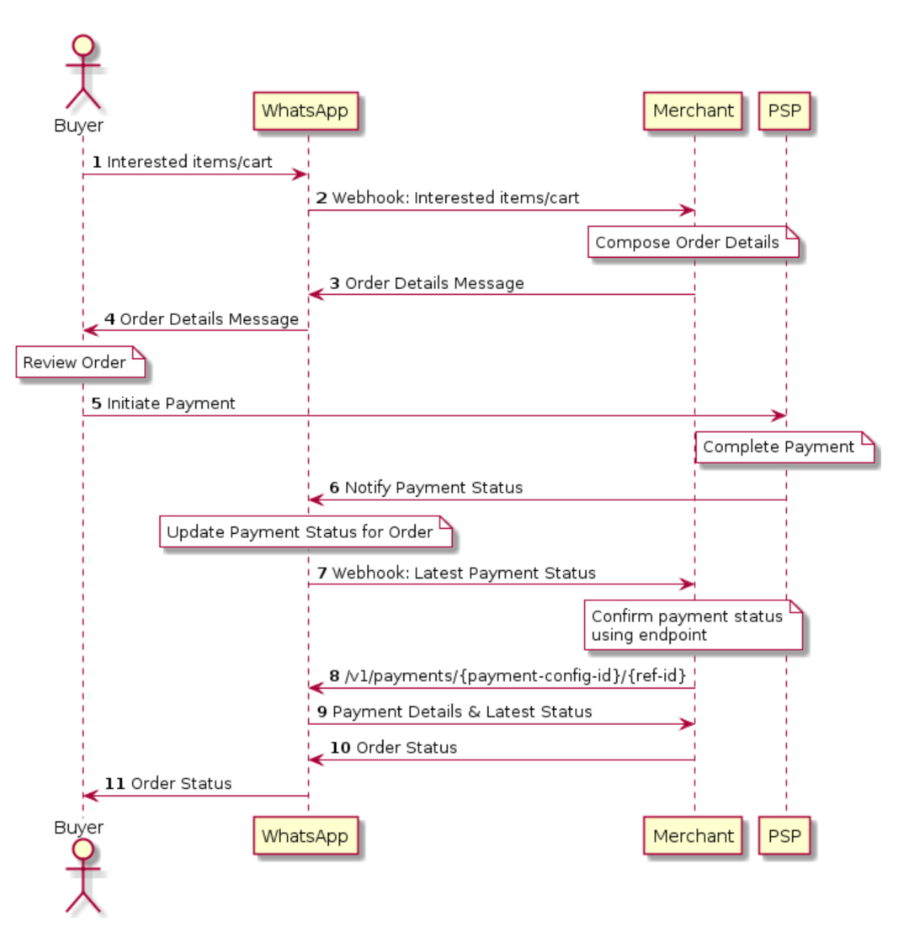
The following sequence diagram demonstrates the typical integration flow for WA Payments API:
## Integration Steps
The steps outlined below assume that the business already knows what the user is interested in through earlier conversations. The payments API is a standalone API and hence can work with various messages such as [List Messages, Reply Buttons, Single or Multi-Product Messages](https://docs.360dialog.com/docs/messaging/message-types/interactive).
{% stepper %}
{% step %}
#### Send Order Details Interactive Message
To send an `order_details` message, businesses must assemble an interactive object of type `order_details` with the following components:
| Object | Description |
| --------------------------------------- | ------------------------------------------------------------------------------------------------------------------------------------------------------------------------------------------------------------------------------------------------------------------------------------------------------------------------------------------------------------------------------------------------------------------ |
|
type
object
|
Required.
Must be "order\_details"
|
|
header
object
|
Optional.
Header content displayed on top of a message. If a header is not provided, the API uses an image of the first available product as the header
|
|
body
object
|
Required.
An object with the body of the message.
The object contains the following field:
text string
Required if body is present. The content of the message. Emojis and markdown are supported. Maximum length is 1024 characters
|
|
footer
object
|
Optional.
An object with the footer of the message. The object contains the following field:
text string
Required if footer is present. The footer content. Emojis, markdown, and links are supported. Maximum length is 60 characters
|
|
action
object
|
Required.
An action object you want the user to perform after reading the message. This action object contains the following fields:
Unique identifier for the order or invoice provided by the business. This cannot be an empty string and can only contain English letters, numbers, underscores, dashes, or dots, and should not exceed 35 characters.
The reference_id must be unique for each order_details message for the same business. If the partner would like to send multiple order_details messages for the same order, invoice, etc. it is recommended to include a sequence number in the reference_id (for example, "BM345A-12") to ensure reference_id uniqueness.
type
string
Required.
Must be one of “digital-goods” or “physical-goods”
beneficiaries
array
**Beneficiary information isn't shown to users but is needed for legal and compliance reasons.
Required for shipped physical-goods.
An array of beneficiaries for this order. A beneficiary is an intended recipient for the delivery of physical goods in the order. It contains the following fields:
name string
Required. Name of the individual or business receiving the physical goods. Cannot exceed 200 characters
address_line1 string
Required. Shipping address (Door/Tower Number, Street Name etc.). Cannot exceed 100 characters
Required. 6-digit postal code of shipping address.
payment_type
string
Required.
Must be "p2m-lite:stripe".
payment_configuration string
**When payment_configuration is invalid, the customer will be unable to pay for their order. In case you experience any errors, please get in touch with our support team as soon as possible.
Required.
The name of the pre-configured payment configuration to use for this order and must not exceed 60 characters. This value must match with a payment configuration set up on the WhatsApp Business Manager as shown here.
currency
string
Required.
The currency for this order. Must be SGD.
total_amount
object
Required.
The total_amount object contains the following fields:
offset string
Required. Must be 100 for SGD.
value string
Required. Positive integer representing the amount value multiplied by offset. For example, S$12.34 has value 1234.
total_amount.value must be equal to order.subtotal.value + order.tax.value + order.shipping.value - order.discount.value.
The smallest amount supported by Stripe is 0.50 USD or equivalent.
Only supported value in the order_details message is pending.
In an order_status message, status can be: pending, processing, partially-shipped, shipped, completed or canceled.
items
object
Required.
An object with the list of items for this order, containing the following fields:
retailer_id string
Required. Unique identifier of the Facebook catalog being used by the business
name string
Required. The item’s name to be displayed to the user. Cannot exceed 60 characters
amount string
Required. The price per item
sale_amount string
Optional. The discounted price per item. This should be less than the original amount. If included, this field is used to calculate the subtotal amount
quantity string
Required. The number of items in this order
subtotal
object
Required.
The value must be equal to sum of order.amount.value * order.amount.quantity. Refer to total_amount description for explanation of offset and value fields
The following fields are part of the subtotal object:
offset string
Required. Must be 100 for SGD
value string
Required. Positive integer representing the amount value multiplied by offset. For example, S$12.34 has value 1234
tax
object
Required.
The tax information for this order which contains the following fields:
offset string
Required. Must be 100 for SGD
value string
Required. Positive integer representing the amount value multiplied by offset. For example, S$12.34 has value 1234
description string
Optional. Max character limit is 60 characters
shipping
object
Optional.
The shipping cost of the order. The object contains the following fields:
offset string
Required. Must be 100 for SGD
value string
Required. Positive integer representing the amount value multiplied by offset. For example, S$12.34 has value 1234
description string
Optional. Max character limit is 60 characters
discount
object
Optional.
The discount for the order. The object contains the following fields:
offset string
Required. Must be 100 for SGD
value string
Required. Positive integer representing the amount value multiplied by offset. For example, S$12.34 has value 1234
description string
Optional. Max character limit is 60 characters
discount_program_name string
Optional. Text used for defining incentivised orders. If order is incentivised, the merchant needs to define this information. Max character limit is 60 characters
catalog_id
object
Optional.
Unique identifier of the Facebook catalog being used by the business.
expiration
object
Optional.
Expiration for that order. Business must define the following fields inside this object:
timestamp string – UTC timestamp in seconds of time when order should expire. Minimum threshold is 300 seconds
description string – Text explanation for expiration. Max character limit is 120 characters
By the end, the interactive object should look something like this:
```json
{
"recipient_type": "individual",
"to": "[recipient-whatsapp-id]",
"type": "interactive",
"interactive": {
"type": "order_details",
"header": {
"type": "image",
"image": {
"link": "http(s)://the-url",
"provider": {
"name": "provider-name"
}
}
},
"body": {
"text": "your-text-body-content"
},
"footer": {
"text": "your-text-footer-content"
},
"action": {
"name": "review_and_pay",
"parameters": {
"reference_id": "reference-id-value",
"type": "digital-goods",
"payment_type": "p2m-lite:stripe",
"payment_configuration": "unique-payment-config-id",
"currency": "SGD",
"total_amount": {
"value": 21000,
"offset": 100
},
"order": {
"status": "pending",
"catalog_id": "the-catalog_id",
"expiration": {
"timestamp": "utc_timestamp_in_seconds",
"description": "cancellation-explanation"
},
"items": [{
"retailer_id": "1234567",
"name": "Product name, for example bread",
"amount": {
"value": 10000,
"offset": 100
},
"quantity": 5,
"sale_amount": {
"value": 10000,
"offset": 100
}
}],
"subtotal": {
"value": 10000,
"offset": 100
},
"shipping": {
"value": 10000,
"offset": 100,
"description": "optional_text"
},
"discount": {
"value": 10000,
"offset": 100,
"description": "optional_text",
"discount_program_name": "optional_text"
}
}
}
}
}
}
```
{% endstep %}
{% step %}
#### Add Common Message Parameters
Once the interactive object is complete, append the other parameters that make a message: `recipient_type`, `to`, and `type`. Remember to set the `type` to `interactive`.
```json
{
"recipient_type": "individual",
"to" : "whatsapp-id", // WhatsApp ID of the recipient
"type": "interactive",
"interactive":{
// The interactive object
}
}
```
These are [parameters common to all message types](https://developers.facebook.com/docs/whatsapp/api/messages#sending-messages).
{% endstep %}
{% step %}
#### **Make a POST Call to /messages**
Make a POST call to the `/messages`endpoint with the `JSON` object you have assembled in steps 1 and 2. \
\
If your message is sent successfully, you get the following response:
```json
{
"messages": [{
"id": "{message-id}"
}]
}
```
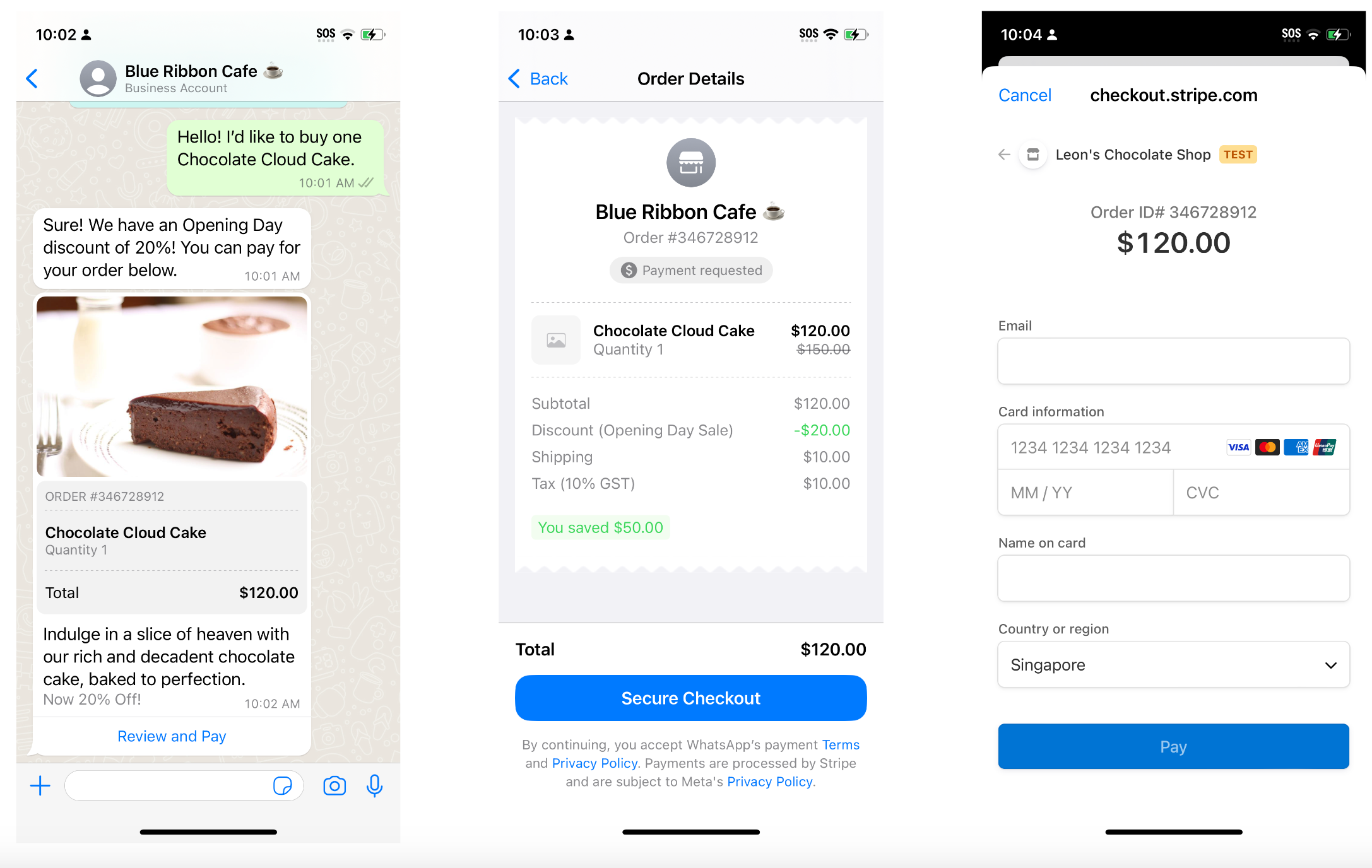
Product Experience
The customer receives an `order_details` message similar to the one below (left). When they click on "Review and Pay", it opens up the order details screen as shown below (middle). Customer can then pay for their order using "Secure Checkout" button that opens up an in-app webview powered by Stripe (right).
{% endstep %}
{% step %}
#### Receive Webhook about Transaction Status
Businesses receive updates via WhatsApp webhooks when the status of the user-initiated transaction changes in a status of type "payment". It contains the following fields:
| Object | Description |
| ------------------------------------------ | ------------------------------------------------------------------------------------------------------------------------------------------------------------------------------------------------------------------------ |
|
id
string
|
Required.
Webhook ID for the notification.
|
|
from
string
|
Required.
WhatsApp ID of the customer.
|
|
type
string
|
Required.
For payment status update webhooks, type is "payment".
|
|
status
string
|
Required.
Latest status of the payment. Can be one of captured, failed or pending.
|
|
payment
object
|
Required.
Contains the following field:
reference\_id string
Unique reference ID for the order sent in order\_details message.
|
|
timestamp
string
|
Required.
Timestamp for the webhook.
|
A webhook notification for an updated transaction status looks like this:
```json
{
"statuses": [{
"id": "gBGGFlB5YjhvAgnhuF1qIUvCo7A",
"from": "16315555555",
"type": "payment",
"status": "new-transaction-status",
"payment": {
"reference_id": "reference-id-value"
},
"timestamp": "1610561171"
}]
}
```
{% endstep %}
{% step %}
#### Confirm Payment
After receiving the payment status change notification, or at any time, the business can look up the status of the payment or transaction.
To do that, businesses must make a `GET` call to `/v1/payments/{payment-config-id}/{ref-id}`, using the reference ID provided in the `order_details` message.
Businesses should expect a response in the same HTTP session (not in a webhook notification). A response can return the following values:
| Field | Description |
| ---------------------------------------------- | ------------------------------------------------------------------------------------------------------------------------------------------------------------------------------------------------------------------------------------------------------------------------------------------------------------------------------------------------------------------------------------------------------------------------------------------------------------------------------------------------------------------------------------------------------------------------------------------------------------------------------------------------------------------------------------------------------------------------------------------------------------------------------------------------------------------------------------------------------------------------------------------------------------------------------- |
|
reference\_id
string
|
Required.
The ID sent by the business in the order\_details message
|
|
status
string
|
Required.
Status of the payment for the order. Can be one of, pending, canceled, captured, failed.
Refer the table below for what these statuses mean.
|
|
currency
string
|
Required.
The currency for this payment. Currently the only supported value is SGD.
|
|
total\_amount
object
|
Required.
The total amount for this payment. It contains the following fields:
offset integer
Required. Must be 100.
value integer
Required. Positive integer representing the amount value multiplied by offset. For example, S$12.34 has value 1234.
|
|
transactions
array
|
The list of transactions for this payment. Contains the following fields:
id string
Required. The alpha-numeric ID of the Stripe transaction.
type string
Required. The payment type for this transactions. Only, p2m-lite is supported.
status string
Required. The status of the transaction. Can be one of pending, success or failed. \*\*At most one transaction can have a success status.
created\_timestamp integer
Required. Time when transaction was created in epoch seconds.
updated\_timestamp integer
Required. Time when transaction was last updated in epoch seconds.
|
{% endstep %}
{% step %}
#### **Check Payment Status**
| Status | Description |
| ---------- | ----------------------------------------------------------------------- |
| `pending` | The user started the payment process and the payment object was created |
| `captured` | The payment was captured |
| `canceled` | The payment was canceled by the user and no retry is possible |
| `failed` | The payment attempt failed but the user can retry |
An example successful response looks like this:
```json
{
"payments": [{
"reference_id": "BM4321",
"status": "success",
"currency": "SGD",
"total_amount": {
"value": 21000,
"offset": 100
},
"transactions": [{
"id": "1243A432",
"type": "p2m-lite",
"status": "failed",
"created_timestamp": 1663021545,
"updated_timestamp": 1664024213
},
{
"id": "1243A434",
"type": "p2m-lite",
"status": "success",
"created_timestamp": 1664030516,
"updated_timestamp": 1664040212
}
]
}]
}
```
In the case of any errors, this is the response:
```json
{
"errors": [{
"code": ERROR_CODE_INT,
"title": "[ERROR_TITLE]",
"details": "[ERROR_DESCRIPTION]"
}]
}
```
{% hint style="info" %}
See [Error Messages](https://docs.360dialog.com/docs/support/api-error-message-list).
{% endhint %}
{% endstep %}
{% step %}
#### Update Order Status
{% hint style="info" %}
Businesses *must* send updates to their order using the `order_status` message instead of text messages since the latest status of an order displayed on the order details page is only based on `order_status` message
{% endhint %}
To notify the customer with updates of an order, you can send an `interactive` message of type `order_status` as shown below:
```json
{
"recipient_type": "individual",
"to": "whatsapp-id",
"type": "interactive",
"interactive": {
"type": "order_status",
"body": {
"text": "your-text-body-content"
},
"action": {
"name": "review_order",
"parameters": {
"reference_id": "reference-id-value",
"order": {
"status": "processing",
"description": "optional-text"
}
}
}
}
}
```
The following table describes the fields in the order_status interactive message:
Object
Description
type
string
Required. Must be "order_status"
body
object
Required.
An object with the body of the message. The object contains the following field:
text string
Required if body is present. The content of the message. Emojis and markdown are supported. Maximum length is 1024 characters
footer
object
Optional.
An object with the footer of the message. The object contains the following field:
text string
Required if footer is present. The footer content. Emojis, markdown, and links are supported. Maximum length is 60 characters
action
object
Required.
An action object you want the user to perform after reading the message. This action object contains the following fields:
The parameters object contains the following fields:
| Value | Description |
| ---------------------------------------------- | --------------------------------------------------------------------------------------------------------------------------------------------------------------------------------------------------------------------------------------------------------------------------------------------------------------------------------------------------------------------------------------------------------------------------------------------------------------------------------------------------------------------------------------------------------------------------------------------------------- |
|
reference\_id
string
|
Required.
The ID sent by the business in the order\_details message
|
|
order
object
|
Required. This object contains the following fields:
status string \* Required.
The new order status. Must be one of processing, partially\_shipped, shipped, completed, canceled.
description string \* Optional.
Text for sharing status related information in order\_details. Could be useful while sending cancellation. Max character limit is 120 characters.
|
order_status message introduces two new errors that are summarized below:
| Error Code | Description |
| ---------------------------------- | --------------------------------------------------------------------------------------------------------- |
| `2046` - Invalid status transition | The order status transition is not allowed. More details [here](#supported-order-status-and-transitions). |
| `2047` - Cannot cancel order | Cannot cancel the order since the user has already paid for it. More details [here](#canceling-an-order). |
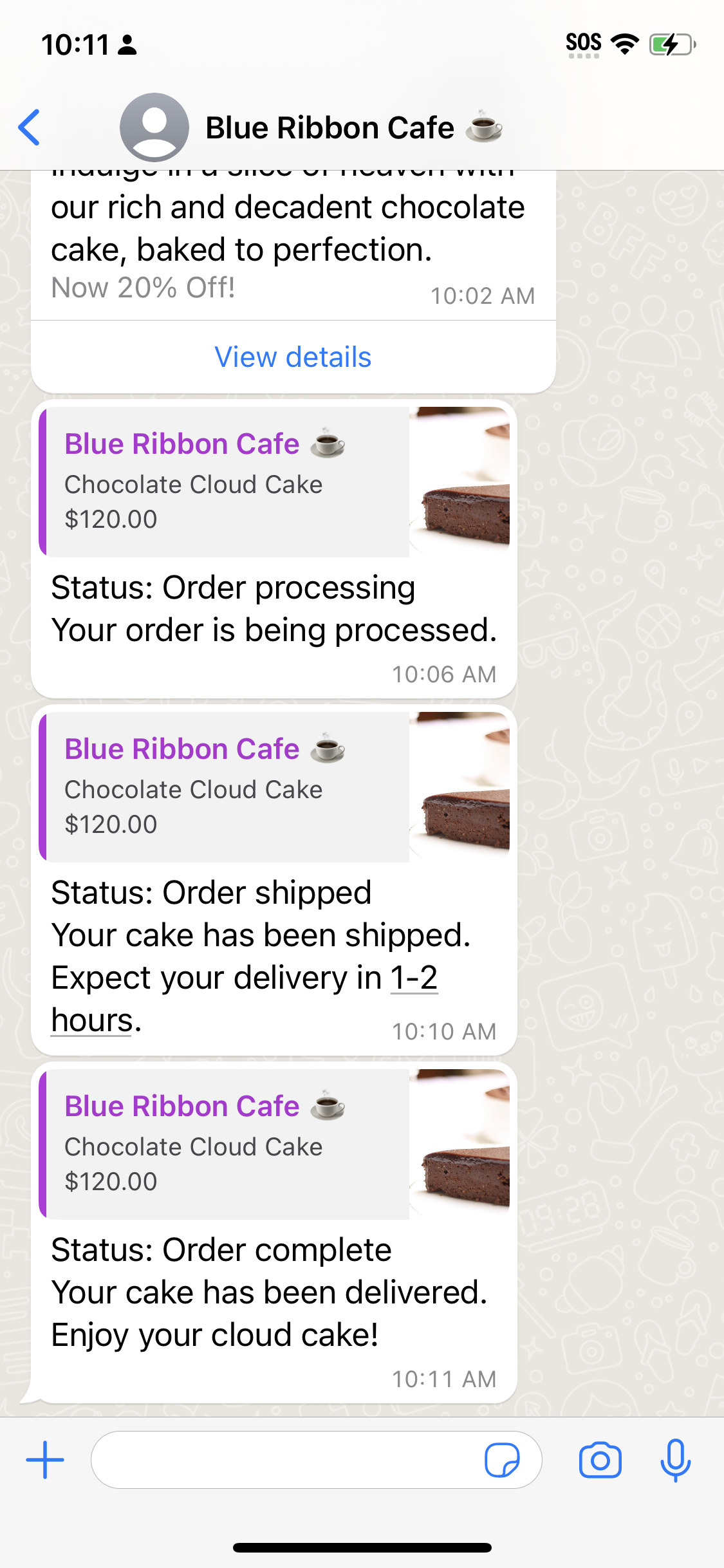
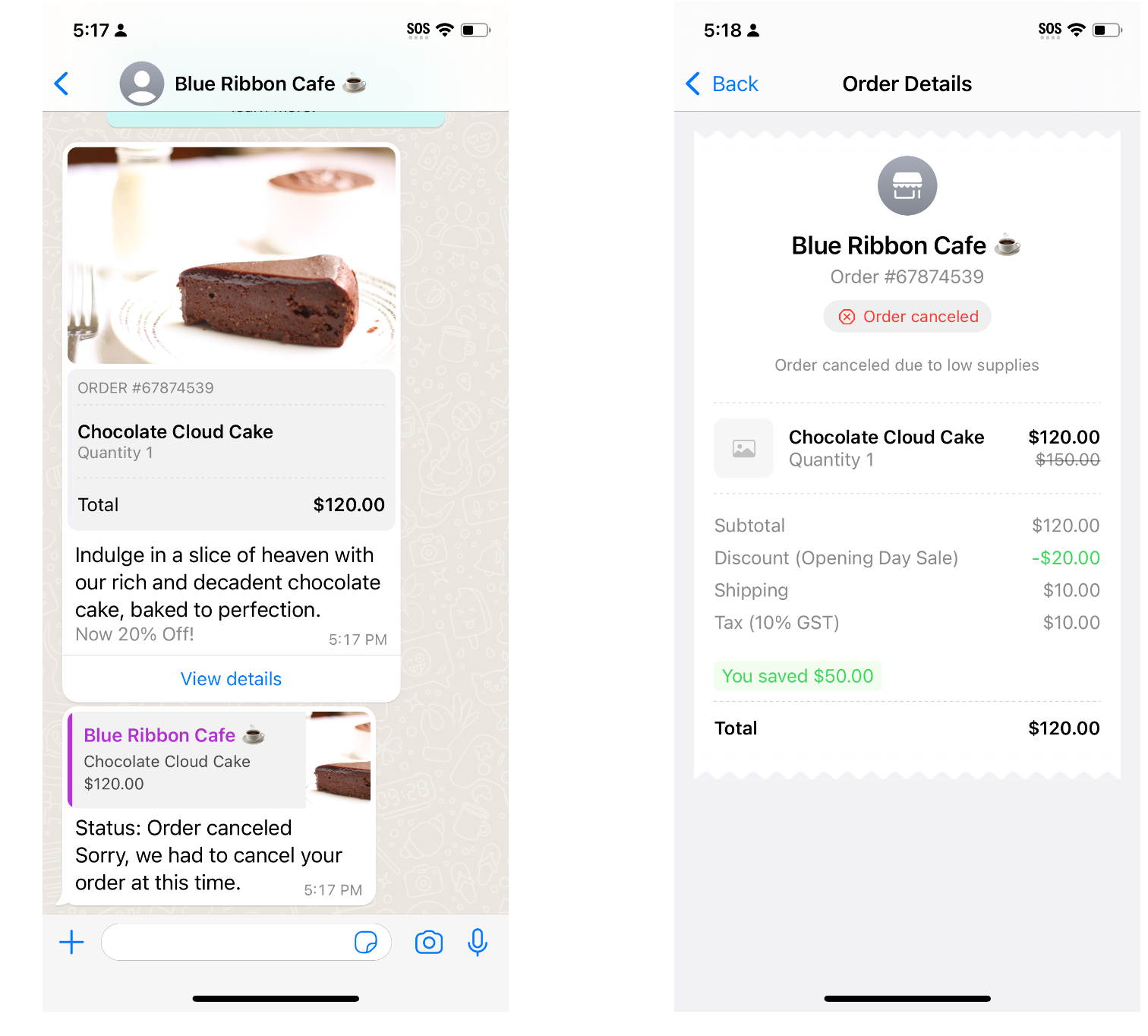
Product Experience
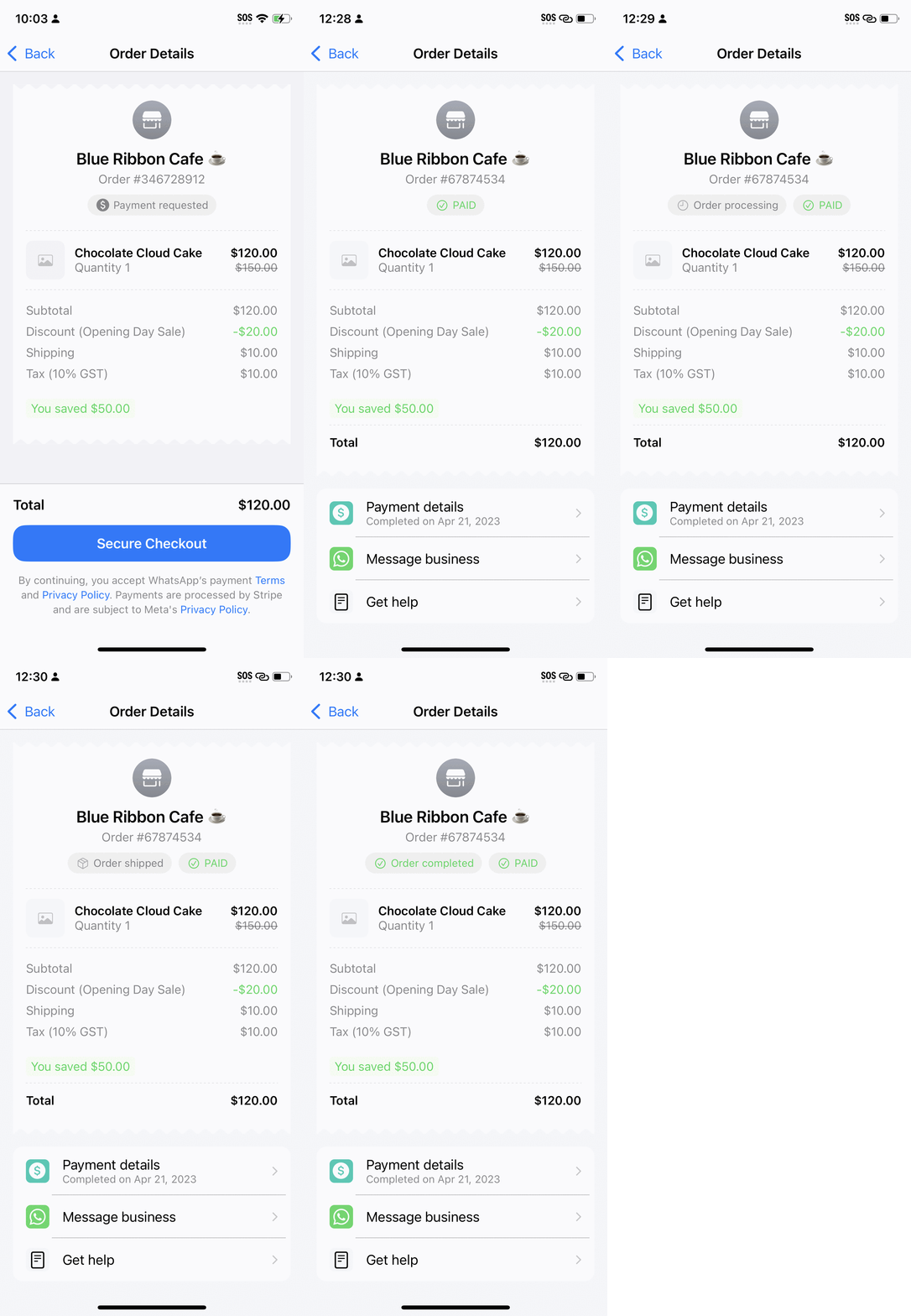
Customers receive each `order_status` update as a separate message in their chat thread, that references their original `order_details` message as shown below.
The order details page always displays the latest valid status communicated to the customer using the `order_status` message as shown below.
{% endstep %}
{% endstepper %}
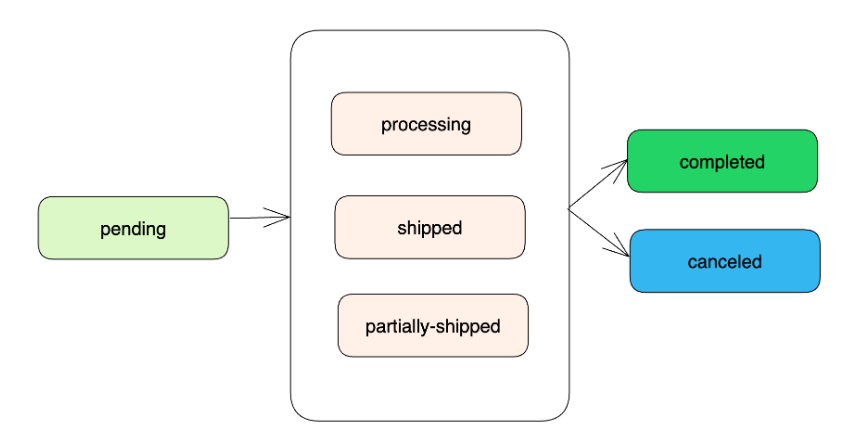
## **Supported Order Status and Transitions**
Currently, Meta supports the following order status values:
| Value | Description |
| ------------------- | ----------------------------------------------------------------------------------------------------------------------------------------------------------------------------------------------------------------- |
| `pending` | User has not successfully paid yet |
| `processing` | User payment authorized, merchant/partner is fulfilling the order, performing service, etc. |
| `partially-shipped` | A portion of the products in the order have been shipped by the merchant |
| `shipped` | All the products in the order have been shipped by the merchant |
| `completed` | The order is completed and no further action is expected from the user or the partner/merchant |
| `canceled` | The partner/merchant would like to cancel the `order_details` message for the order/invoice. The status update will fail if there is already a `successful` or `pending` payment for this `order_details` message |
Order status transitions are restricted for consistency of consumer experience. Allowed status transitions are summarized below:
* Initial status of an order is always `pending`, which is sent in `order_details` message.
* `canceled` and `completed` are terminal status and cannot be updated to any other status.
* `pending` can transition to any of the other statuses including `processing`, `shipped`, `partially-shipped`.
* `processing`, `shipped` and `partially-shipped` are equivalent statuses and can transition between one another or to one of the terminal statuses.
Upon sending an `order_status` message with an invalid transition, you will receive an error webhook with the error code `2046` and message "New order status was not correctly transitioned."
## **Canceling an Order**
An order can be `canceled` by sending an `order_status` message with the status `canceled`. The customer cannot pay for an order that is canceled. The customer receives an `order_status` message (left) and order details page is updated to show that the order is canceled and the "Secure Checkout" button removed (right). The *optional* text shown below "Order canceled" on the order details page can be specified using the `description` field in the `order_status` message.
An order can be canceled only if the user has not already paid for the order. If the user has paid and you send an `order_status` message with `canceled` status, you will receive an error webhook with error code `2047` and message "Could not change order status to 'canceled'".
{% hint style="info" %}
Merchant should always post this order-status message to consumer after reciving transaction updates for an order.
{% endhint %}
## Reconcile Payments
Please note that neither 360dialog nor WhatsApp supports payment reconciliations. Businesses should use their Stripe account to reconcile the payments using the `reference_id` provided in the `order_details` messages and the `transaction_id` of the transactions returned as part of the webhooks or the payment status query.
## Security Considerations for Payments API
{% hint style="info" %}
Review our [WABA Security](https://app.gitbook.com/s/uyAl2S0lSHJaNDXJHo7A/onboarding/integration-best-practices/architecture-and-security) documentation.
{% endhint %}
* Businesses should comply with local security and regulatory requirements in Singapore.
* Businesses should not rely solely on the status of the transaction provided in the webhook and must use payment lookup API to retrieve the statuses directly from WhatsApp.
* To ensure secure financial processing, payment configurations such as the business’ VPA shared by all WhatsApp phone numbers **must belong to the same Meta business portfolio**. If you wish to separate payments for different phone numbers, then additional Meta business portfolio must be created.
* Businesses must always sanitize/validate the data in the API responses or webhooks to protect against SSRF attacks.