> This is part 1 of 2 of the full documentation (pages 1–100 of 138).
> The content is paginated: fetch every part to see all of it.
> Next part: https://docs.360dialog.com/partner/llms-full.txt/1
> Page index: https://docs.360dialog.com/partner/llms.txt

# Overview

Welcome to the 360dialog Partner Documentation Hub, a central resource for Partners using the WhatsApp Business API with 360dialog.

This documentation is a central resource for current and prospective 360dialog integration partners. It provides the technical and operational guidance needed to build, launch, and scale WhatsApp Business API solutions using the 360dialog platform.

{% hint style="info" %}
**For 360dialog Partners**

This documentation is intended for 360dialog Partners and focuses on partner-specific concepts, workflows, and integration requirements.

Partners can also use our [**general documentation**](https://docs.360dialog.com/docs/) for broader platform guidance and developer resources, which is available to all users.
{% endhint %}

***

### Get started

Kick off your Partner journey with quick access to the most essential guides and tools.

<table data-view="cards"><thead><tr><th></th><th data-type="content-ref"></th><th data-hidden data-card-cover data-type="files"></th></tr></thead><tbody><tr><td><p><strong>Partner API Reference</strong></p><p>Explore the complete API reference for building and managing integrations.</p></td><td><a href="/partner/partner-api/api-reference">API Reference</a></td><td><a href="https://2248475362-files.gitbook.io/~/files/v0/b/gitbook-x-prod.appspot.com/o/spaces%2FuyAl2S0lSHJaNDXJHo7A%2Fuploads%2F2f9Z3pD1jf8mVtfxK4LD%2FAPI%20(1).png?alt=media&amp;token=a2f97790-0eb1-4a3f-8122-e78b06b2dd6d">API (1).png</a></td></tr><tr><td><p><strong>Early Access</strong> </p><p>Be first to access WhatsApp’s newest features &#x26; stay ahead.</p></td><td><a href="/partner/get-started/partner-api-integration">How to Get API Access</a></td><td><a href="https://2248475362-files.gitbook.io/~/files/v0/b/gitbook-x-prod.appspot.com/o/spaces%2FuyAl2S0lSHJaNDXJHo7A%2Fuploads%2FQsJnilX7Rkl3imV7JLiO%2FEarly%20Access%20(1).png?alt=media&amp;token=dc8716cb-7c3e-4634-a2ee-d06a596efde4">Early Access (1).png</a></td></tr><tr><td><p><strong>24/7 Support</strong></p><p>Expert support 24/7, with Meta escalations for urgent issues.</p></td><td><a href="broken://pages/cl1bh3IjXG2UppfFUtz7">Broken link</a></td><td><a href="https://2248475362-files.gitbook.io/~/files/v0/b/gitbook-x-prod.appspot.com/o/spaces%2FuyAl2S0lSHJaNDXJHo7A%2Fuploads%2FWXcxCSUFn2dLswio4T2D%2FSupport%20(1).png?alt=media&amp;token=b5a8d1dd-6c99-428d-a112-cce976e910bc">Support (1).png</a></td></tr></tbody></table>

***

### Who is 360Dialog For?

From SaaS platforms to software vendors, 360Dialog serves a diverse range of Partner use cases.&#x20;

| Partner Type          | How They Benefit from 360Dialog                                           |
| --------------------- | ------------------------------------------------------------------------- |
| SaaS Platforms        | Add WhatsApp messaging into your product & automate client workflows.     |
| Enterprises           | Deploy large-scale messaging for sales, marketing, and support use cases. |
| Agencies & Developers | Build WhatsApp-powered solutions & tools.                                 |
| ISVs                  | Become a Meta Tech Provider with the 360Dialog's expert guidance.         |

### How it Works

360Dialog provides a **developer-first, API-driven approach** to WhatsApp Business messaging.\
Easily integrate, onboard clients, and manage messaging workflows all within a **scalable, partner-friendly** ecosystem.

#### Partner Journey

{% stepper %}
{% step %}
**Set Up Your Partner Account**

Create a partner account, set API credentials, and start testing.
{% endstep %}

{% step %}
**Integrate WhatsApp API**

Connect the WhatsApp API and integrate it into your solution.
{% endstep %}

{% step %}
**Onboard Clients & Manage WABAs**

Add numbers, onboard clients, and start messaging.
{% endstep %}

{% step %}
**Scale & Optimise Messaging**

Optimise performance, drive revenue, and grow fast.
{% endstep %}
{% endstepper %}

***

### Next Steps

Get started with 360Dialog today—whether you're setting up your first integration, exploring pricing, or deciding if the **Tech Provider** model is right for you.

<table data-view="cards"><thead><tr><th></th><th data-type="content-ref"></th></tr></thead><tbody><tr><td>Explore Quickstarts</td><td><a href="/partner/get-started/quickstarts">Quickstarts</a></td></tr><tr><td>See Pricing &#x26; Plans</td><td><a href="/partner/get-started/pricing">Pricing</a></td></tr><tr><td>Learn About Tech Providers</td><td><a href="/partner/get-started/tech-provider-program">Tech Provider Program</a></td></tr></tbody></table>


# Quickstarts


# Get Started as a Partner

Welcome to the 360dialog Partner Program! This tutorial will guide you through the essential steps to get started, from creating your Partner Account to sending and receiving your first WhatsApp message.

## Prerequisites

Before you begin, ensure you have the following:

* A registration as [Meta Tech Provider](https://docs.360dialog.com/partner/get-started/tech-provider-program).
* A registered company with relevant details.
* A valid payment method (credit/debit card).
* Access to your company’s logo and name for branding purposes.
* A publicly accessible server to handle webhook events (you can use free providers for testing purposes)
* Basic understanding of REST APIs and webhooks.

## Step 1: Create a Partner Hub Account

{% stepper %}
{% step %}

### Account Creation

To begin the onboarding process, create a [360Dialog](https://start.360dialog.com/connect) account.

The guided setup helps to verify requirements and identify the optimal solution for the business.
{% endstep %}

{% step %}

### 2. Provide Company Details

Enter the organization’s information, including the legal name, registered address, and contact details. Ensure these details remain accurate throughout the business lifecycle to prevent invoicing discrepancies.

More details, see [Billing](https://www.google.com/search?q=./billing.md)
{% endstep %}

{% step %}

### 3. Select a Billing Model

Select the model that best fits the business requirements:

* <mark style="color:$primary;">**Partner-Paid:**</mark> The Partner manages all client billing and receives consolidated 360Dialog invoices.
* <mark style="color:$primary;">**Direct-Paid:**</mark> Clients are billed individually and directly by 360Dialog.

More details, see Billing Models
{% endstep %}

{% step %}

### Choose a Partner Plan

{% hint style="info" %}
The Partner Plan is billable immediately upon Partner Hub activation.
{% endhint %}

More details, see Partner Plans
{% endstep %}

{% step %}

### Add a Payment Method

Credit Card is the only payment method accepted. This card will remain the default for future 360Dialog billing.&#x20;

Manage credit cards, see Billing
{% endstep %}
{% endstepper %}

## Step 2: Set Up Number Onboarding

Enable a seamless onboarding experience for your clients.

### 1. Choose one of the three options to onboard new clients

<figure><img src="https://2248475362-files.gitbook.io/~/files/v0/b/gitbook-x-prod.appspot.com/o/spaces%2FuyAl2S0lSHJaNDXJHo7A%2Fuploads%2FWo2kcVX04cPGW5hzNOfY%2Fimage.png?alt=media&amp;token=b1b7823d-4eef-445f-a6ae-2184c58ca5fa" alt=""><figcaption></figcaption></figure>

### 2. Direct Link Setup

Non-code solution. Share the link with the clients so they can start the onboarding.&#x20;

* Set up a webhook URL to receive the notification when a number is onboarded
* Set up a redirect URL to redirect users to your platform after onboarding
* Customize the Branding

<figure><img src="https://2248475362-files.gitbook.io/~/files/v0/b/gitbook-x-prod.appspot.com/o/spaces%2FuyAl2S0lSHJaNDXJHo7A%2Fuploads%2FhoRfwE0YNiz3FtFcib8a%2Fimage.png?alt=media&amp;token=81e9bb93-ab87-4684-8be5-df1b442c75da" alt=""><figcaption></figcaption></figure>

For testing purposes, you can use a free online webhook testing tools to receive webhook events (like <https://webhook.site/> or <https://webhook-test.com/>)

### 3. Connect Button Setup

Low-code solution. Use our button to seamlessly embed number inboarding into your platform.

* Set up a webhook URL to receive the notification when a number is onboarded
* Set up a redirect URL to redirect users to your platform after onboarding
* Customize the Branding

<figure><img src="https://2248475362-files.gitbook.io/~/files/v0/b/gitbook-x-prod.appspot.com/o/spaces%2FuyAl2S0lSHJaNDXJHo7A%2Fuploads%2FtXB2BwhjrQJePkol7tWp%2Fimage.png?alt=media&amp;token=9ecb1508-878e-469c-a25e-79063b824c51" alt=""><figcaption></figcaption></figure>

It is possible to define the plan as well. More options can be explored [here](https://integrated-onboarding-demo.vercel.app/).&#x20;

### 4. Self-hosted Embedded Signup

High-code solution. Fully customizable onboarding.

<figure><img src="https://2248475362-files.gitbook.io/~/files/v0/b/gitbook-x-prod.appspot.com/o/spaces%2FuyAl2S0lSHJaNDXJHo7A%2Fuploads%2FQ3ak9fk0AEwoZPIYwf9B%2Fimage.png?alt=media&amp;token=1e3037ab-cb68-4317-b5c3-8196ac16e2c8" alt=""><figcaption></figcaption></figure>

For implementing this flow, please refer to our [documentation](https://docs.360dialog.com/partner/integrations-and-api-development/integration-best-practices/integrated-onboarding/host-your-own-embedded-signup).

## Step 3: Register Your First WhatsApp API Number

### Use the IO Button or Direct Link

Clients can register their WhatsApp Business number using the methods set up in the previous step. Use the Direct Link to easily register your first number or the Button if you have already implemented it in your platform.

<figure><img src="https://2248475362-files.gitbook.io/~/files/v0/b/gitbook-x-prod.appspot.com/o/spaces%2FuyAl2S0lSHJaNDXJHo7A%2Fuploads%2FLg0CBvvRke7Eb1luqeRh%2Fimage.png?alt=media&amp;token=b881ba56-7291-404e-b9cb-a9aa3907bd45" alt=""><figcaption><p>Partner HUB step to register a number. A client account will be created under your partner user, so you will have access to all the client resources also.</p></figcaption></figure>

> [Step by step guide](https://docs.360dialog.com/docs/waba-management/embedded-signup/using-a-new-phone-number#account-creation-process) for the add number flow.

Once the first number is added, you will be able to see it in your [partner account.](https://app.360dialog.com/)

You will receive notifications in your [Partner Webhook URL](#id-2.-add-partner-webhook-url) for every new registered number.

{% tabs %}
{% tab title="Channel Created" %}
This event is submitted when a new number is created in our system.

{% code title="Channel created event - webhook payload" overflow="wrap" %}

```json
{
  "id": "string",
  "event": "channel_created",
  "data": {
    "id": "string",
    "setup_info": {
      "phone_number": "string",
      "phone_name": "string"
    },
    ...
    },
    "waba_account": {...},
    "integration": {...}
  }
}
```

{% endcode %}

More details about the webhook event [here](https://docs.360dialog.com/partner/integrations-and-api-development/webhook-events-and-setup/webhook-events-partner-and-messaging-api#channel-created)
{% endtab %}

{% tab title="Channel Running" %}
This event is submitted when a new number is correctly setup and ready to start messaging.

{% code title="Channel running event - webhook payload" overflow="wrap" %}

```json
{
  "id": "string",
  "event": "channel_running",
  "data": {
    "id": "string",
    "setup_info": {
      "phone_number": "string",
      "phone_name": "string"
    },
    ...
    },
    "waba_account": {...},
    "integration": {...}
  }
}
```

{% endcode %}

More details about the webhook event [here](https://docs.360dialog.com/partner/integrations-and-api-development/webhook-events-and-setup/webhook-events-partner-and-messaging-api#channel-running)
{% endtab %}

{% tab title="Other events" %}
Find all the channel events you can receive here:

[Webhook Events (Partner & Messaging API)](/partner/onboarding/webhook-events-and-setup/webhook-events-partner-and-messaging-api)
{% endtab %}
{% endtabs %}

{% hint style="info" %}
**Channels are billed on a pro-rata basis upon activation and on the 1st of each month thereafter.**\
If a channel is inactive, please ensure the subscription is cancelled to avoid unwanted charges.
{% endhint %}

## Step 4: Send and Receive Your First Message

{% hint style="success" %}
Congratulations, if you are here means you have already registered your first number! :tada:

:speech\_balloon: You are five minutes away from starting to message through WhatsApp API.
{% endhint %}

### 1. Generate Number API Key

<div data-with-frame="true"><figure><img src="https://2248475362-files.gitbook.io/~/files/v0/b/gitbook-x-prod.appspot.com/o/spaces%2FuyAl2S0lSHJaNDXJHo7A%2Fuploads%2Fcv8R6EV3iuug5N2InfYL%2Fimage.png?alt=media&amp;token=6f18ac63-2acd-4226-a5c1-eaccfc95723e" alt=""><figcaption></figcaption></figure></div>

* Navigate to the Partner Hub.
* Select the registered number and generate an API key. Securely save the Number API Key beacuse we will not display it anymore. If you lose it, you will need to generate a new one.

More info about [number API Keys](https://docs.360dialog.com/partner/waba-management/managing-waba-accounts/partner-permission-to-generate-api-key)

### 2. Set Number Webhook

Configure the Number webhook to receive incoming messages and outgoing message statuses.

Use this [API endpoint](https://docs.360dialog.com/docs/messaging-api/api-reference/webhooks#post-v1-configs-webhook) to set the webhook URL for the specific number.

Remember, you can use an online webhook test service for testing purposes.

More info about [messaging webhook URL](https://docs.360dialog.com/partner/messaging/sending-and-receiving-messages/receiving-messages-via-webhook#set-webhook-url-for-phone-number).

### 3. Receive a Message

Use a [wa.me](https://wa.me/) link to send a message to the registered number and start a connversation.

```url
https://wa.me/YOUR_NUMBER_WITH_COUNTRY_CODE

-- Example for Spanish Number (+34) 68098673512
https://wa.me/3468098673512
```

Monitor the number webhook for incoming message events.

<details>

<summary>Example of Incoming Message Payload</summary>

{% code title="Text Message" overflow="wrap" %}

```
{
  "object": "whatsapp_business_account",
  "entry": [{
      "id": "WHATSAPP_BUSINESS_ACCOUNT_ID",
      "changes": [{
          "value": {
              "messaging_product": "whatsapp",
              "metadata": {
                  "display_phone_number": PHONE_NUMBER,
                  "phone_number_id": PHONE_NUMBER_ID
              },
              "contacts": [{
                  "profile": {
                    "name": "NAME"
                  },
                  "wa_id": PHONE_NUMBER
                }],
              "messages": [{
                  "from": PHONE_NUMBER,
                  "id": "wamid.ID",
                  "timestamp": TIMESTAMP,
                  "text": {
                    "body": "MESSAGE_BODY"
                  },
                  "type": "text"
                }]
          },
          "field": "messages"
        }]
  }]
}
```

{% endcode %}

Find payload examples for [other type of messages here](https://docs.360dialog.com/partner/integrations-and-api-development/webhook-events-and-setup/webhook-events-partner-and-messaging-api#messaging-webhook-associated-with-messaging-api).

</details>

### 4. Send a Message:

Now that the conversation has started, you can easily send a message using our Messaging API to answer the incoming message.

Please use this [endpoint.](https://docs.360dialog.com/docs/messaging-api/api-reference/messages#post-messages)&#x20;

For each message you send, you could receive up to 3 webhook events into your Number Webhook URL (for `delivered`, `read` and `sent` statuses). [More info here](https://docs.360dialog.com/partner/integrations-and-api-development/webhook-events-and-setup/webhook-events-partner-and-messaging-api#messaging-webhook-associated-with-messaging-api)

## :rocket: Amazing, you are ready to start scaling WhatsApp API for your customers.

Your next step will be to Register your company as a Tech Provider.

[Tech Provider Program](/partner/get-started/tech-provider-program)

## Summary

By following this tutorial, you’ve:

* Created a Partner Account with 360dialog.
* Set up Integrated Onboarding for your clients.
* Registered your first WhatsApp Business number.
* Sent and received your first message using the 360dialog API.

For more detailed information, you can navigate through our [360dialog Partner Documentation](https://docs.360dialog.com/partner/) or reach our to our support team.

:rocket: Have a successfull dialog!

***

## FAQ

<details>

<summary>How to find my 360dialog Partner ID</summary>

The Partner ID is an unique ID that will be used for most API actions.

The easiest way to find your Partner ID is to log into the 360dialog Partner Hub on your browser and go to the "Partner Integration" section.

<figure><img src="https://docs.360dialog.com/~gitbook/image?url=https%3A%2F%2F2248475362-files.gitbook.io%2F%7E%2Ffiles%2Fv0%2Fb%2Fgitbook-x-prod.appspot.com%2Fo%2Fspaces%252FuyAl2S0lSHJaNDXJHo7A%252Fuploads%252FtUZLqXGIwy5xcV7NZ5uJ%252Fimage-20250410-165832%2520%281%29.png%3Falt%3Dmedia%26token%3D99ed51c6-6da8-42f7-9569-45908778651b&#x26;width=768&#x26;dpr=4&#x26;quality=100&#x26;sign=b0066709&#x26;sv=2" alt=""><figcaption><p>Find your Partner ID</p></figcaption></figure>

To understand more about the Partner ID and credentials, see the [Architecture and Security documentation](https://docs.360dialog.com/partner/integrations-and-api-development/integration-best-practices/architecture-and-security).

</details>


# Register as a Meta Tech Provider

This guide walks you through registering as a Meta Tech Provider and integrating with 360Dialog's WhatsApp Business API solutions.

## Register as a Meta Tech Provider

Complete the Meta Tech Provider registration process and integrate with 360Dialog to access WhatsApp Business API features.

{% hint style="warning" %}
To onboard more than 3 numbers as a partner, you will need to be registered as Tech Provider
{% endhint %}

### Before you begin

Make sure you have all of the following ready:

* An existing 360Dialog partner account
* Access to your Meta Business Manager
* Your 360Dialog Partner ID (format: xxxxxxPA)
* Ability to record demonstration videos

### Registration Process

{% stepper %}
{% step %}
**Access your Meta Business Account**

Go to [business.facebook.com](https://business.facebook.com/) and sign in with your Facebook credentials.

If you don't already have a Meta Business Account for your company, create one now.
{% endstep %}

{% step %}
**Register as a Meta Developer**

Go to [developers.facebook.com](https://developers.facebook.com) and click "Get Started" in the upper-right corner.

Follow these steps to complete the registration:

1. Visit developers.facebook.com
2. Click "Get Started" in the upper-right corner
3. Accept Developer Terms
4. Complete verification steps if prompted
   {% endstep %}

{% step %}
**Create your Meta App**

Create a new Meta App for your Tech Provider registration:

1. Navigate to [developers.facebook.com/apps](https://developers.facebook.com/apps)
2. Click "Create App"
3. Select "Business" as the app type
4. Select your business portfolio
5. Name your app and click "Create App"
   {% endstep %}

{% step %}
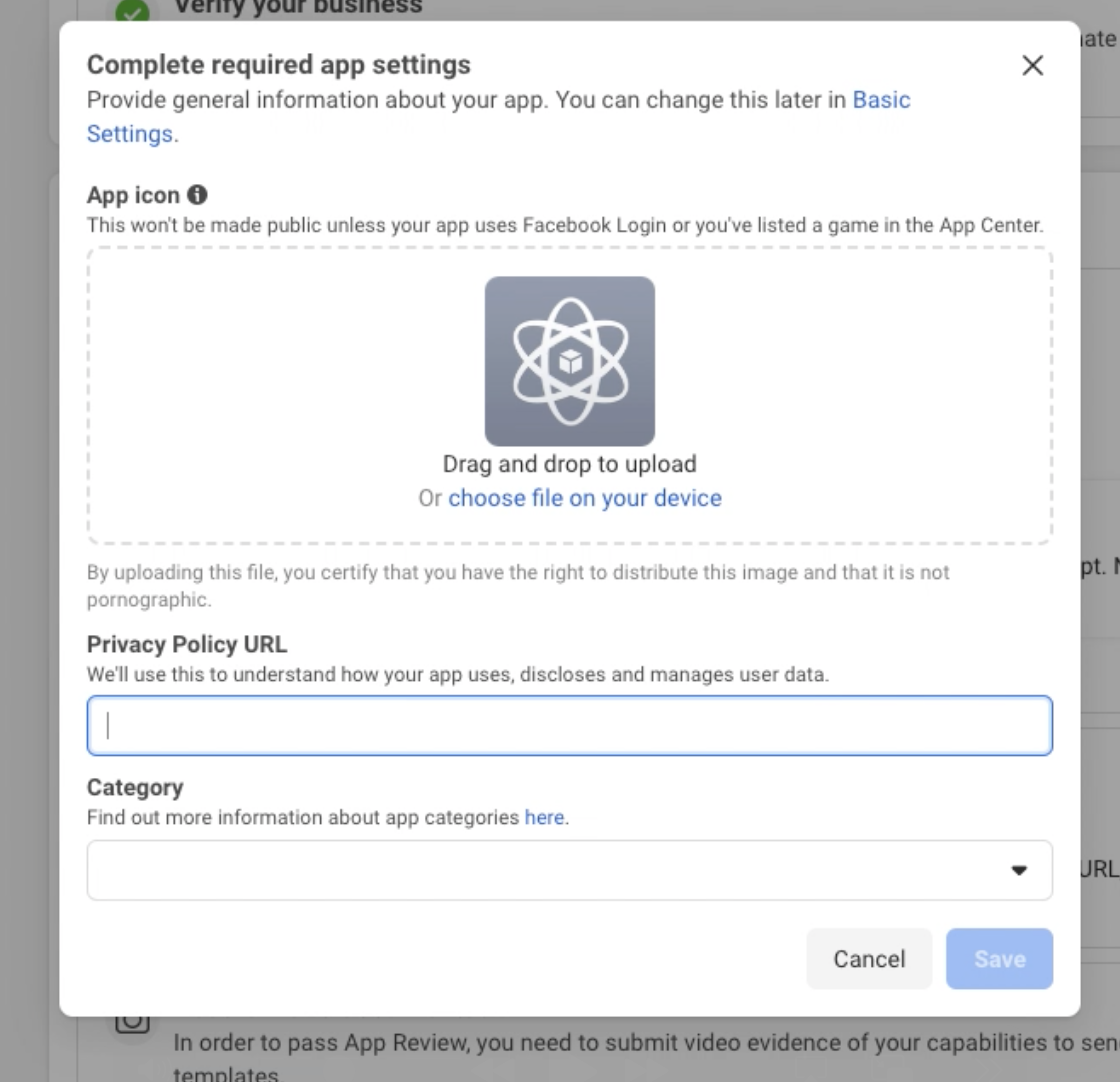
**Set up your app basics**

Add required information to your app:

* App icon (512x512 or 1024x1024 pixels)
* Privacy Policy URL (must be a valid URL to your company's privacy policy)
* Category (select "Business" or "Developer Tools")
* Platform (select the platforms you'll support)

Then add the WhatsApp product:

1. Scroll to "Add products to your app"
2. Find WhatsApp and click "Set Up"
3. When the Quickstart panel appears, find "Become a Tech Provider"
4. Click "Start onboarding"
   {% endstep %}

{% step %}
**Accept Meta's terms and verify your business**

When prompted, select "Working with a Solution Partner"

**Important:** Your business must be verified before proceeding. Check verification status in [Business Settings](https://business.facebook.com/settings/info). If unverified, submit verification documents and wait for completion.
{% endstep %}

{% step %}
**Create a Multi-Partner Solution**

Connect your app to 360Dialog as a Solution Partner:

```
Solution Name: Your company name + your Partner ID
Format: ISV_Name: xxxxxxPA
Example: 360Dialog: SvAiK8PA

Partner App ID: 307713669880953
```

1. In your Meta App Dashboard, go to WhatsApp > Partner Solutions
2. Click "Create a Partner Solution"
3. Enter the solution details exactly as shown above
4. Submit your solution (it will show as "Pending Acceptance")

**Solution states you may see:**

* **Draft**: Solution initiated but not sent to 360Dialog
* **Pending Acceptance**: 360Dialog has not yet accepted the solution
* **Active**: 360Dialog has accepted the solution
* **Inactive**: 360Dialog declined the solution request
  {% endstep %}

{% step %}
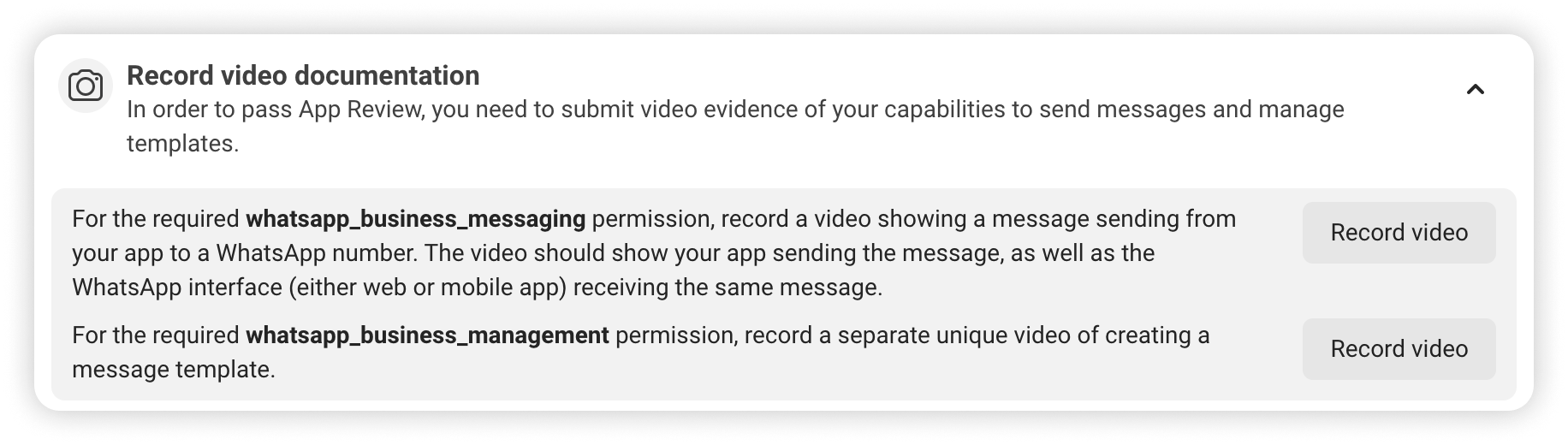
**Prepare demonstration videos**

Record two demonstration videos that show your integration capabilities:

{% tabs %}
{% tab title="Video 1: Sending a Message" %}
**What to demonstrate:**

* Show a message being sent through your app
* Show the message being received in WhatsApp
* Use either 360Dialog's API or your own integration

**Example API Request:**

```bash
curl -X POST https://waba.360dialog.io/v1/messages \
-H "Content-Type: application/json" \
-H "D360-API-KEY: your_api_key" \
-d '{
  "to": "whatsapp-number",
  "type": "template",
  "template": {
    "namespace": "your_namespace",
    "name": "your_template_name",
    "language": {
      "code": "en",
      "policy": "deterministic"
    }
  }
}'
```

{% endtab %}

{% tab title="Video 2: Creating a Template" %}
**What to demonstrate:**

* Show template creation from start to finish
* Display all relevant template fields
* Use either the WABA Management App or API

**Example Template Creation:**

```bash
curl -X POST https://waba.360dialog.io/v1/configs/templates \
-H "D360-API-KEY: your_api_key" \
-H "Content-Type: application/json" \
-d '{
  "name": "welcome_template",
  "category": "MARKETING",
  "components": [
    {
      "type": "HEADER",
      "format": "TEXT",
      "text": "Welcome {{1}}!"
    },
    {
      "type": "BODY",
      "text": "Thank you for registering with us, {{1}}."
    }
  ],
  "language": "en"
}'
```

{% endtab %}
{% endtabs %}

{% hint style="info" %}
Need help with recording? Contact 360Dialog Support to schedule an assisted recording session.
{% endhint %}
{% endstep %}

{% step %}
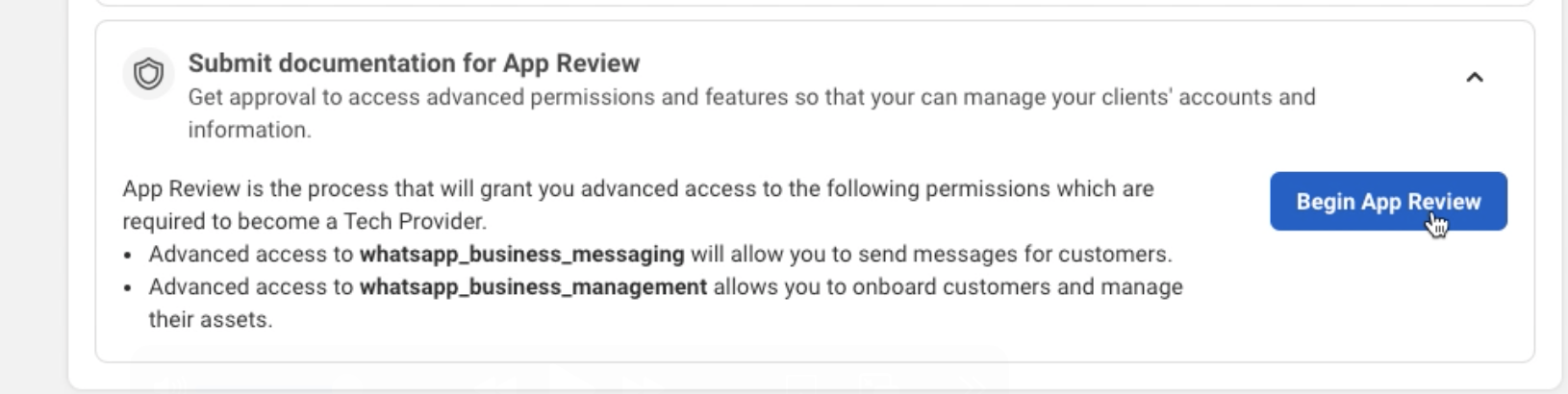
**Submit your app for review**

Submit your app for Meta's review:

1. In the Onboarding panel, click "Begin App Review"
2. Request these permissions:
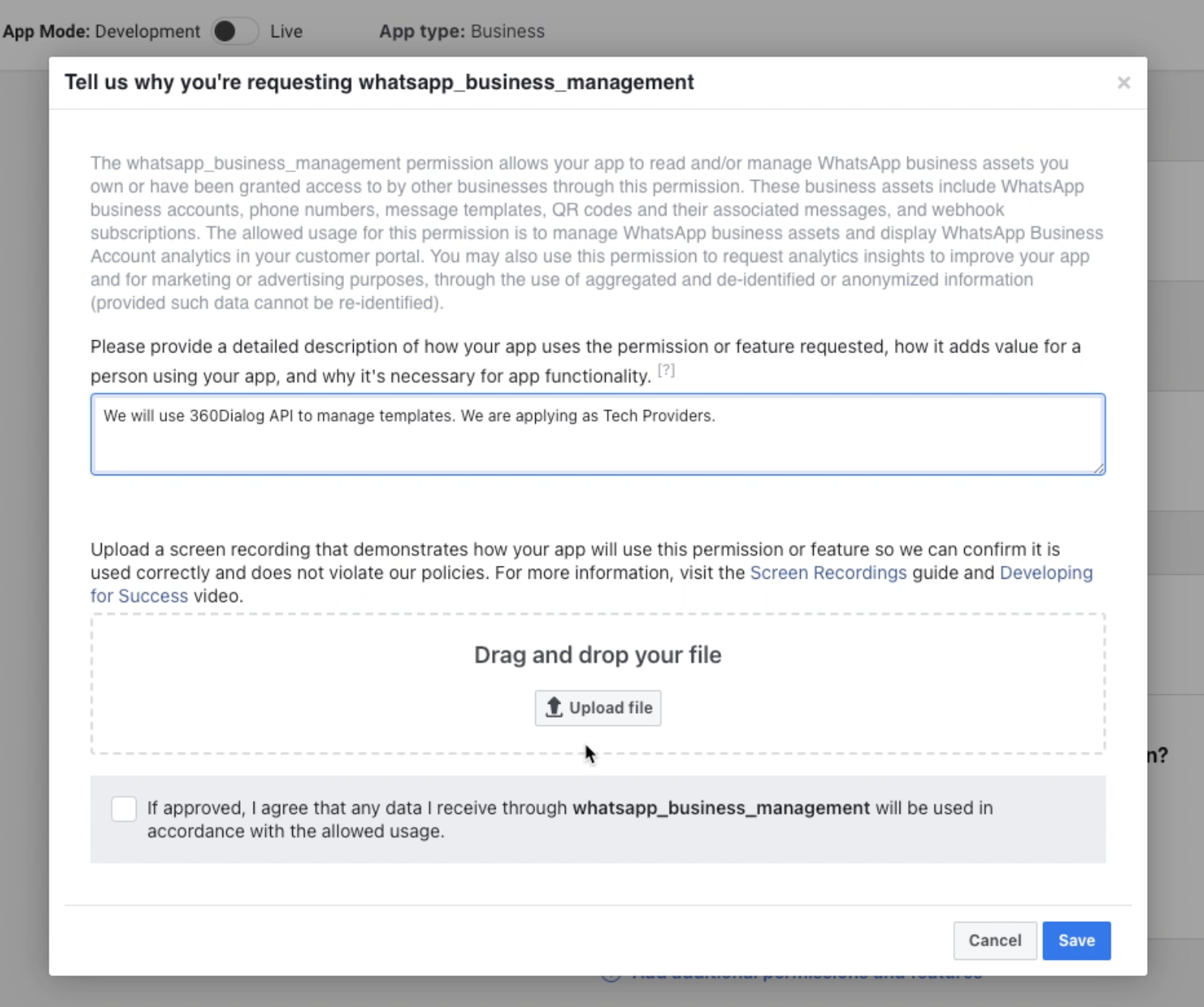
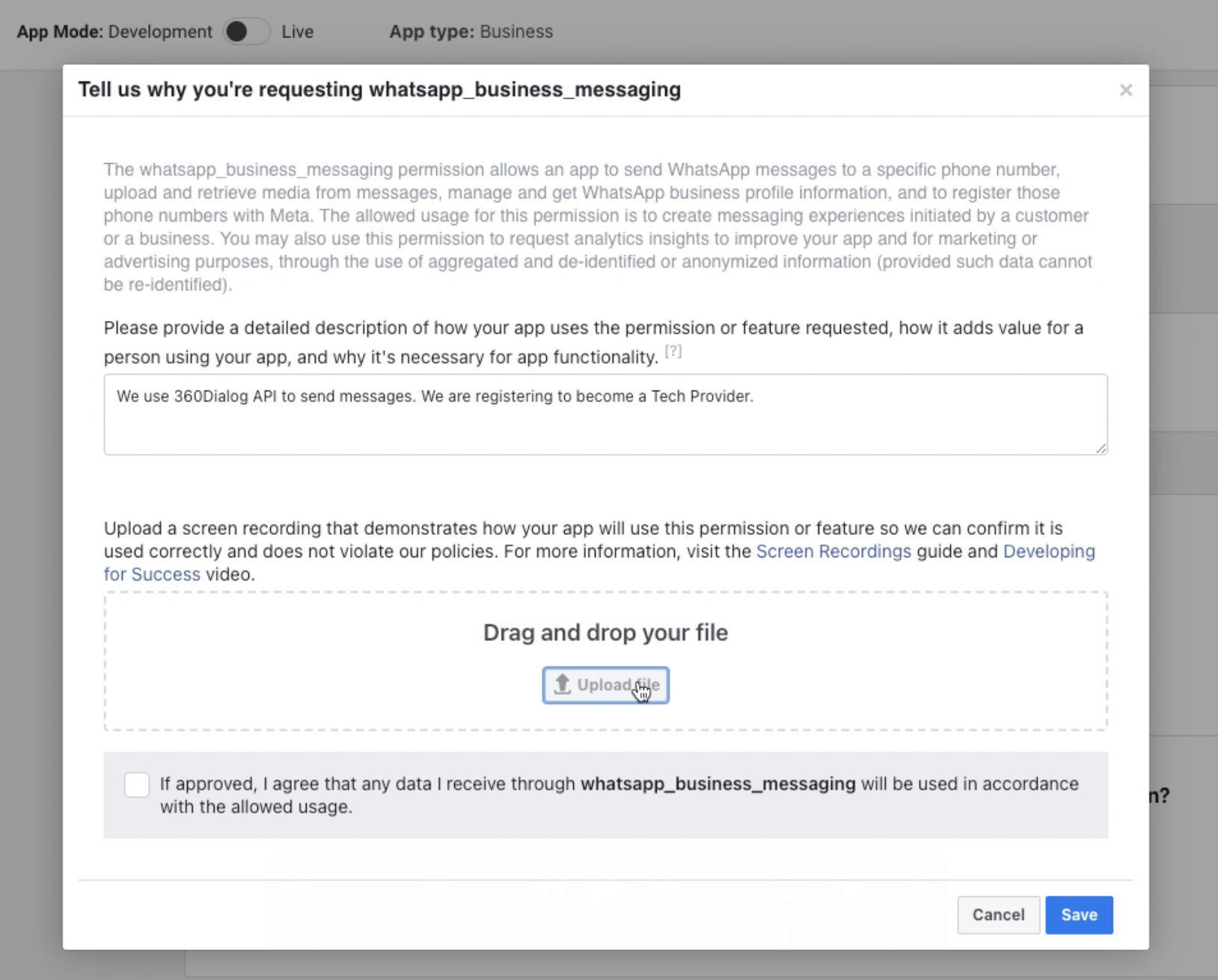
   * `whatsapp_business_messaging` (for sending messages, attach Video 1)
   * `whatsapp_business_management` (for account management and templates, attach Video 2)
3. Complete access verification when prompted
4. Wait for Meta to review and approve your app (typically 24-48 hours)
   {% endstep %}

{% step %}
**Connect with 360Dialog**

After Meta approves your app:

1. Find your Solution ID in Meta Dashboard under WhatsApp > Partner Solutions
2. Log in to [360Dialog Partner Hub](https://app.360dialog.com/)
3. Go to the "Integration" tab
4. Add your Solution ID to the appropriate field
5. Configure your webhook and redirect URLs
6. Wait for 360Dialog to approve your solution (typically within 24 hours)

**Required Integration Settings:**

```
Solution ID: Your Meta Solution ID from the previous steps
Partner Webhook URL: Your endpoint to receive webhooks
Redirect URL: Your app's OAuth redirect endpoint
```

{% endstep %}
{% endstepper %}

{% hint style="success" %}
Congratulations! You're now a registered Meta Tech Provider with access to advanced WhatsApp Business API features through 360Dialog.
{% endhint %}


# Add a WhatsApp Number

In this quickstart, you'll learn how to add a WhatsApp Business number to the 360Dialog platform. This allows you to send and receive WhatsApp messages through the 360Dialog API.

{% hint style="info" %}
As a Partner, to onboard more than 3 numbers, you will need to be registered as Tech Provider.

[See more here](/partner/get-started/tech-provider-program)
{% endhint %}

### Before you begin

Ensure you have:

* Active Meta Business Manager account
* Admin access to your business account
* Complete business information:
  * Business name
  * Website URL
  * Business address
* Phone number capable of receiving SMS or voice calls

### Adding your WhatsApp Business number

{% stepper %}
{% step %}
**Access the 360Dialog Partner Hub**

* Navigate to app.360dialog.com
* Log in with your credentials
* Go to the "Clients" section
* Select or create a client profile

{% hint style="warning" %}
Verify you have the correct permissions to add a number.
{% endhint %}
{% endstep %}

{% step %}
**Prepare your business information**

* Verify your Meta Business Manager details
* Ensure your business website is live and accurate
* Prepare your business display name
* Check display name guidelines:
  * Directly represents your business
  * Matches external branding
  * At least 3 characters long
  * Avoids generic terms

{% hint style="info" %}
Your display name will be visible to customers on WhatsApp.
{% endhint %}
{% endstep %}

{% step %}
**Create a new WhatsApp Business account**

* Click "Add Number" in Partner Hub
* Select Meta Business Account
* Choose "Create a new WhatsApp Business Account"
* Enter business profile details
* Create a distinct, clear account name

{% hint style="warning" %}
Ensure all information accurately represents your business.
{% endhint %}
{% endstep %}

{% step %}
**Complete your business profile**

* Enter detailed business information
* Add business description
* Upload business logo or profile image
* Verify business contact details
* Configure communication preferences

{% hint style="info" %}
A complete profile helps build customer trust.
{% endhint %}
{% endstep %}

{% step %}
**Verify your phone number**

* Enter phone number in international format
* Select verification method:
  * SMS
  * Voice Call
* Receive 6-digit verification PIN
* Enter PIN to complete verification

{% hint style="warning" %}
Ensure the phone can receive verification codes.
{% endhint %}
{% endstep %}

{% step %}
**Activate your WhatsApp account**

* Confirm WhatsApp Business Account creation
* Verify number in 360Dialog platform
* Check account status
* Verify initial settings

{% hint style="info" %}
Account activation typically completes within minutes.
{% endhint %}
{% endstep %}

{% step %}
**Generate API credentials**

* Navigate to number details
* Access API configuration
* Generate new API key
* Securely store authentication credentials

{% hint style="danger" %}
Protect your API key. Never share publicly.
{% endhint %}
{% endstep %}
{% endstepper %}

### Existing number migration

{% hint style="warning" %}
**Migrating an existing number?** If you're moving a WhatsApp Business number from another provider:

* Disable two-factor authentication
* Ensure Display Name is approved
* Verify business information matches
* Prepare for potential API reconfiguration

Refer to our [Number Migration Guide](/partner/partner-hub/migrating-phone-numbers/migrating-existing-waba) for detailed steps.
{% endhint %}


# Create a Message Template

In this quickstart, you'll learn how to create a message template for WhatsApp Business API. Templates are pre-approved message formats that allow businesses to initiate conversations with users or send notifications after the 24-hour messaging window has closed.

{% stepper %}
{% step %}
**Understanding Template Basics**

Before creating a template, it's important to understand the key components:

**Template Categories:**

* **Marketing**: For promotional offers and sales notifications
* **Utility**: For transactional updates like order confirmations
* **Authentication**: For sending verification codes

**Template Components:**

* **Header** (Optional): Can include text, image, video, or document
* **Body** (Required): Main content with variables (`{{1}}`, `{{2}}`, etc.)
* **Footer** (Optional): Additional static information
* **Buttons** (Optional): Action buttons like links or quick replies
  {% endstep %}

{% step %}
**Choose Your Creation Method**

{% tabs %}
{% tab title="Template Library Method" %}
**Using the Template Library:**

* Pre-written templates for common use cases
* Instant approval in most cases
* Limited customization options
* Best for getting started quickly
  {% endtab %}

{% tab title="Custom Template Method" %}
**Creating a Custom Template:**

* Complete flexibility over content and structure
* Requires approval from Meta (up to 24 hours)
* Full control over all template elements
* Best when you need specific messaging formats
  {% endtab %}
  {% endtabs %}

We'll cover both methods in the following steps.
{% endstep %}

{% step %}
**Creating a Template from the Template Library**

Here's how to create a template using the Template Library:

* In WhatsApp Business Manager, navigate to **Message Templates** in the left sidebar
* Select **Create Template**
* Under "Browse the WhatsApp Template Library," click **Browse Templates**
* Find a suitable template for your use case
* Click on your desired template to select it
* Complete the template form by adding your template name, selecting the language, and filling in button details if applicable
* Click **Submit**

If using the API instead, please use this [endpoint](https://docs.360dialog.com/docs/messaging-api/api-reference/templates#post-v1-configs-templates).&#x20;
{% endstep %}

{% step %}
**Creating a Custom Template**

For more flexibility, you can create a custom template using this [endpoint](https://docs.360dialog.com/docs/messaging-api/api-reference/templates#post-v1-configs-templates).

{% hint style="info" %}
Including `"allow_category_change": true` lets Meta recategorize your template if needed, preventing rejection.
{% endhint %}
{% endstep %}

{% step %}
**Review and Approval Process**

After submitting your template:

* **Category Validation**: Meta checks if your template is correctly categorized
* **Template Review**: Meta reviews the content against their guidelines
  * Library templates are usually approved instantly
  * Custom templates can take up to 24 hours for approval
* **Check Status**: You can check the status using this [endpoint](https://docs.360dialog.com/docs/messaging-api/api-reference/templates#get-v1-configs-templates):

Your template will be marked as `PENDING`, `APPROVED`, or `REJECTED`.
{% endstep %}

{% step %}
**Tips for Template Success**

For better approval chances and user engagement:

* Keep content clear and consistent with your template category
* Provide accurate examples for all variables
* Use `allow_category_change: true` to prevent miscategorization rejections
* Make the first 60-65 characters engaging (this appears in message previews)
* For marketing templates, include clear opt-out options
* Test different templates to see which ones perform better

Once approved, your template is ready to use in your WhatsApp messaging campaigns!
{% endstep %}
{% endstepper %}

### Quick Examples

Here are simple examples for each template category:

{% tabs %}
{% tab title="Marketing Template" %}

```json
{
  "name": "seasonal_promotion",
  "category": "MARKETING",
  "components": [
    {
      "type": "HEADER",
      "format": "TEXT",
      "text": "Our Summer Sale is on!"
    },
    {
      "type": "BODY",
      "text": "Shop now through August 31 and use code SUMMER25 to get 25% off all merchandise."
    },
    {
      "type": "FOOTER",
      "text": "Reply STOP to unsubscribe from promotions"
    }
  ]
}
```

{% endtab %}

{% tab title="Utility Template" %}

```json
{
  "name": "order_status",
  "category": "UTILITY",
  "components": [
    {
      "type": "BODY",
      "text": "Your order #{{1}} has been shipped! It should arrive by {{2}}. Track your delivery here: {{3}}",
      "example": {
        "body_text": [
          ["ABC123", "Aug 25", "https://example.com/track/ABC123"]
        ]
      }
    }
  ]
}
```

{% endtab %}

{% tab title="Authentication Template" %}

```json
{
  "name": "verification_code",
  "category": "AUTHENTICATION",
  "components": [
    {
      "type": "BODY",
      "text": "Your verification code is {{1}}. This code expires in 10 minutes.",
      "example": {
        "body_text": [
          ["123456"]
        ]
      }
    },
    {
      "type": "BUTTONS",
      "buttons": [
        {
          "type": "COPY_CODE",
          "example": "123456"
        }
      ]
    }
  ]
}
```

{% endtab %}
{% endtabs %}

That's it! You're now ready to create your first WhatsApp template and start sending structured messages to your customers.


# Send a Message

In this quickstart, you'll learn how to send a template message using the WhatsApp Business API. Template messages allow you to initiate conversations with users when there has been no interaction in the past 24 hours.

{% stepper %}
{% step %}
**Verify Template Availability**

Before sending a template message, using this [endpoint](https://docs.360dialog.com/docs/messaging-api/api-reference/templates#get-v1-configs-templates), check that your template is approved and ready to use.

Confirm that your template shows a status of "APPROVED" in the response. Only templates with an active status can be sent to users.
{% endstep %}

{% step %}
**Prepare Your Template Parameters**

Most template messages contain variables (parameters) that need to be filled with specific information for each recipient.

For example, if your template is:

```
Thank you for your order, {{1}}! Your confirmation number is {{2}}.
```

Identify the variables you need to replace:

* `{{1}}` will be the customer's name
* `{{2}}` will be the order number

Make sure you have these values ready before sending your message.
{% endstep %}

{% step %}
**Send Your Template Message**

Use this [endpoint ](https://docs.360dialog.com/docs/messaging-api/api-reference/messages#post-messages)to send your template message:

This sends the "order\_confirmation" template to the specified phone number, replacing the variables with "Maria" and "B67890".
{% endstep %}

{% step %}
**Check The Response**

After sending your request, you'll receive a response containing a message ID:

```json
{
  "messaging_product": "whatsapp",
  "contacts": [
    {
      "input": "15551234567",
      "wa_id": "15551234567"
    }
  ],
  "messages": [
    {
      "id": "wamid.HBgLMTU1NTEyMzQ1NjcVAgARGBI5QTNDQTVCM0Q0Q0Q2RTY3RTcA"
    }
  ]
}
```

Save this message ID to track the delivery status of your message.
{% endstep %}

{% step %}
**Monitor Message Status**

Set up a webhook endpoint in your application to receive message status updates. The webhook will receive notifications when the message is:

* **sent**: Message has been sent from your WABA
* **delivered**: Message has reached the recipient's device
* **read**: Recipient has opened and read the message
* **failed**: Message failed to send

A typical status webhook looks like this:

```json
{
  "object": "whatsapp_business_account",
  "entry": [
    {
      "id": "WHATSAPP_BUSINESS_ACCOUNT_ID",
      "changes": [
        {
          "value": {
            "messaging_product": "whatsapp",
            "metadata": {
              "display_phone_number": "PHONE_NUMBER",
              "phone_number_id": "PHONE_NUMBER_ID"
            },
            "statuses": [
              {
                "id": "wamid.HBgLMTU1NTEyMzQ1NjcVAgARGBI5QTNDQTVCM0Q0Q0Q2RTY3RTcA",
                "status": "delivered",
                "timestamp": "1675175992",
                "recipient_id": "15551234567"
              }
            ]
          },
          "field": "messages"
        }
      ]
    }
  ]
}
```

This webhook tells you that the message was delivered to the recipient's device.
{% endstep %}
{% endstepper %}

### Common Template Types

{% tabs %}
{% tab title="Text Templates" %}
The simplest type of template with only text content and variables:

```json
{
  "messaging_product": "whatsapp",
  "to": "15551234567",
  "type": "template",
  "template": {
    "name": "appointment_reminder",
    "language": {
      "code": "en_US"
    },
    "components": [
      {
        "type": "body",
        "parameters": [
          {
            "type": "text",
            "text": "John"
          },
          {
            "type": "date_time",
            "date_time": {
              "fallback_value": "February 25, 2023"
            }
          }
        ]
      }
    ]
  }
}
```

{% endtab %}

{% tab title="Media Templates" %}
Templates that include images, videos, or documents:

```json
{
  "messaging_product": "whatsapp",
  "to": "15551234567",
  "type": "template",
  "template": {
    "name": "product_update",
    "language": {
      "code": "en_US"
    },
    "components": [
      {
        "type": "header",
        "parameters": [
          {
            "type": "image",
            "image": {
              "link": "https://example.com/product.jpg"
            }
          }
        ]
      },
      {
        "type": "body",
        "parameters": [
          {
            "type": "text",
            "text": "New Summer Collection"
          }
        ]
      }
    ]
  }
}
```

{% endtab %}

{% tab title="Interactive Templates" %}
Templates with buttons for quick replies or actions:

```json
{
  "messaging_product": "whatsapp",
  "to": "15551234567",
  "type": "template",
  "template": {
    "name": "order_feedback",
    "language": {
      "code": "en_US"
    },
    "components": [
      {
        "type": "body",
        "parameters": [
          {
            "type": "text",
            "text": "B67890"
          }
        ]
      },
      {
        "type": "buttons"
      }
    ]
  }
}
```

{% endtab %}
{% endtabs %}

{% hint style="info" %}
**Best Practices**

* Send template messages at appropriate times based on the recipient's time zone
* Use template parameters to personalize messages for each recipient
* Monitor message delivery rates and adjust your strategy if delivery rates drop
* For marketing templates, focus on making the first 5 lines engaging due to text truncation
  {% endhint %}

{% hint style="warning" %}
**Troubleshooting** If your template message fails to send, check for these common issues:

* Incorrect template name or namespace
* Missing or incorrect parameters
* Template has been paused or disabled due to poor quality rating
* Recipient may have blocked messages from your business
* Per-user marketing template limits may be in effect (error code 131049)
  {% endhint %}

That's it! You've now sent your first template message using the WhatsApp Business API. For more information about template messages, see the Template Messages documentation.


# Pricing

Costs associated with becoming a 360Dialog Partner

The monthly costs associated with becoming a 360Dialog partner are made up of the following components:<br>

1. [**360Dialog Partner Plan**](#partner-plan) - Monthly platform fee for accessing the 360Dialog Partner Hub and Partner APIs<br>
2. [**360Dialog Channel Licence Fees**](#channel-licence-fees) - Monthly subscription fee for additional WhatsApp channels beyond those included in the selected Partner Plan.<br>
3. [**WhatsApp Messaging & Calls Fees**](#whatsapp-messaging-and-call-fees-1) - Billed at the Official Meta rate<br>
4. [**Payment Processing Fees**](#payment-processing-fees) - 4% Applied to usage-related card payments

{% hint style="info" %}
All pricing is configured in the currency selected during the partner onboarding (EUR or USD). This currency applies across all plans, subscriptions, and invoices.
{% endhint %}

## Partner Plan

360Dialog offers three Partner Plans designed to support partners at different stages of growth.

Partner Plans include a monthly platform fee for access to the Partner Hub and Partner APIs. Each plan includes a number of regular WhatsApp channels.&#x20;

Additional channels are billed according to the selected Partner Plan.

{% hint style="info" %}
Partner Plans follow a calendar-month billing cycle. If a Partner Plan is activated mid-month, a pro-rata charge will apply.&#x20;
{% endhint %}

<table data-header-hidden><thead><tr><th width="124.3333740234375" align="center">Plan</th><th width="181.6666259765625" align="center">Monthly (EUR)</th><th width="172.3333740234375" align="center">Monthly (USD)</th><th align="center">Included Regular Channels</th></tr></thead><tbody><tr><td align="center"><strong>Plan</strong></td><td align="center"><strong>Monthly (EUR)</strong></td><td align="center"><strong>Monthly (USD)</strong></td><td align="center"><strong>Included Regular Channels</strong></td></tr><tr><td align="center">Starter</td><td align="center">€250</td><td align="center">$300</td><td align="center">5 </td></tr><tr><td align="center">Growth</td><td align="center">€500</td><td align="center">$600</td><td align="center">10</td></tr><tr><td align="center">Premium</td><td align="center">€1,000</td><td align="center">$1,200</td><td align="center">20</td></tr></tbody></table>

## Channel Licence Fees

Monthly licence fees apply to additional WhatsApp channels beyond the number of regular channels included in the selected Partner Plan.

Charges apply per month, per active channel.

Channels activated during the current billing cycle are billed on a pro-rata basis for the remaining days of the month. From the first day of the following month, the full monthly fee applies.

Channels cancelled during the billing cycle remain active and billable until the end of the current billing cycle.

| Partner Plan | Regular Channel | Premium Channel |
| ------------ | --------------- | --------------- |
| Starter      | €49 / $59       | €99 / $119      |
| Growth       | €25 / $30       | €75 / $90       |
| Premium      | €15 / $18       | €65 / $78       |

> Premium channels are billed at the applicable Partner Plan rate plus a €50/$60 Premium channel add-on.

### Higher Throughput

Higher Throughput is an optional add-on that is available for eligible channels. The monthly fee is the same across all Partner Plans.

| Licence           | Monthly (EUR) | Monthly (USD) |
| ----------------- | ------------- | ------------- |
| Higher Throughput | €249          | $299          |

For more, see [Higher Throughput](https://docs.360dialog.com/docs/get-started/pricing/higher-throughput)

## WhatsApp Messaging & Call Fees <a href="#whatsapp-messaging-and-call-fees-1" id="whatsapp-messaging-and-call-fees-1"></a>

Usage-based costs are dictated by official Meta Rate Cards. 360Dialog currently supports WhatsApp message pricing in EUR, USD, and INR.

#### **🔗 Official Meta Messaging Rate Cards**

Meta determines the official pricing for messaging and voice calls. Use the resources below to find specific rates for your region and category:

* [Official Meta Messaging Rate Cards & Volume Tiers](https://developers.facebook.com/documentation/business-messaging/whatsapp/pricing#rate-cards-and-volume-tiers)
* [Official Meta Rate Card Updates](https://developers.facebook.com/documentation/business-messaging/whatsapp/pricing#updates-to-rate-cards)

**WhatsApp Voice Call Pricing**

Voice call pricing is defined by Meta and published in the official Volume-Based Pricing (VBP) Rate Cards for the WhatsApp Business Calling API.

* [Meta Volume-Based Pricing (VBP) Rate Cards for Voice](https://developers.facebook.com/documentation/business-messaging/whatsapp/calling/pricing#rate-cards-and-volume-tiers)

Call pricing is determined by the call direction (inbound or outbound), the recipient country prefix code, and the total duration in minutes.

For more, see [Free vs. Billed Messaging](https://docs.360dialog.com/docs/get-started/pricing/free-vs-billed-messaging)

## Payment Processing Fees

Third-party card processing fees apply to usage-based payments and top-ups

| Type                | Rate |
| ------------------- | ---- |
| Credit / Debit Card | 4%   |

For more, see [Invoices](/partner/partner-hub/invoices-tab).

{% content-ref url="/pages/rAfKGxlU2lmoc5bozcLw" %}
[Invoices Tab](/partner/partner-hub/invoices-tab)
{% endcontent-ref %}


# Billing Models

360Dialog offers two billing models designed to support different partner business structures.&#x20;

1. Direct Paid - designed for partners who prefer to reduce operational overhead by having 360Dialog manage billing directly with clients.
2. Partner Paid -  designed for partners who want full control over pricing, billing, and the commercial relationship with their clients.

The billing model selected during 360Dialog Partner Hub creation determines:

* How costs are charged
* Who receives invoices
* Who is responsible for payment

### Direct-Paid

Under the Direct-Paid model, 360Dialog manages client-level billing.

#### Overview

* Partner Plan is invoiced to the Partner
* Channel subscription fees, messaging, and calls are invoiced to the client
* Each channel maintains an individual prepaid balance
* Invoices are issued per channel to the client
* Client invoices are not visible in the Partner Hub

### Partner-Paid

Under the Partner-Paid model, the Partner assumes full financial responsibility for all channels.

#### Overview

* Partner Plan, channel subscriptions, messaging, and calls are invoiced to the Partner
* A shared balance is maintained across all channels
* All costs are consolidated into Partner-level invoices
* No invoices are issued to clients by 360dialog
* Client billing is managed independently by the Partner

### Key Differences

|                      | Direct-Paid          | Partner-Paid                        |
| -------------------- | -------------------- | ----------------------------------- |
| Partner Plan         | Charged to Partner   | Charged to Partner                  |
| Channel & Usage Cost | Charged to Client    | Charged to Partner                  |
| Balance Structure    | Per channel balance  | Shared balance accross all channels |
| Client Billing       | Managed by 360Dialog | Manged by Partner                   |

### Billing Configuration

Billing is configured using the currency selected during onboarding, which also determines pricing for partner plans, channel subscriptions, and WhatsApp messaging fees for both clients and partners.

Supported billing currencies:

* EUR
* USD

{% hint style="info" %}
Ensuring the correct currency is chosen during the Partner Hub setup helps maintain a consistent billing structure across all connected accounts.
{% endhint %}

For more, see [Pricing](/partner/get-started/pricing)


# How to Get API Access

Want to become a 360Dialog Partner? Follow the step by step below.

{% stepper %}
{% step %}

#### Signup/ Create Partner Account

To become a 360Dialog Partner, you can use our new Partner Onboarding flow to create a Partner Account.&#x20;

{% embed url="<https://partner.360dialog.io/signup>" %}

You will be asked to input information about your company and receive a confirmation email.

{% hint style="info" %}
Ensure to add acronyms or use distinct email addresses for different Partner Hubs.
{% endhint %}
{% endstep %}

{% step %}

#### Confirm your payment settings

We offer two payment options: **Direct Payment** (when the client pays for their license fees and conversation fees directly to 360Dialog) or **Partner Payment** (when the Partner is responsible for paying on behalf of all clients. This option requires a valid credit card):&#x20;

* [x] Once you start the onboarding process, you can the choose the currency for charges and your Partner Billing terms.&#x20;
* [x] You can create multiple Partner accounts, each with distinct billing terms. If preferred, you can have a Partner account billed in euros using Partner Payment, and another billed in dollars using Direct Payment.&#x20;
* [x] Accounts using Partner Payment must add a valid credit card and maintain a sufficient balance to cover any incurred charges for registered numbers. Conversely, accounts with Direct Payment are billed directly through the Client card.

{% hint style="info" %}

* Each Partner Account is assigned a unique `partner_id` and must be managed separately.&#x20;
* For businesses in Europe, adding the VAT ID is a **required** additional step. This can be done during the Partner Onboarding flow.&#x20;
  {% endhint %}

{% hint style="info" %}
See [Pricing](/partner/get-started/pricing) for invoiving details.
{% endhint %}
{% endstep %}

{% step %}

#### Access Partner Hub/ Get your Partner ID

When your Partner Account is created, click on the *Continue to my Partner App* button to access the 360Dialog Hub to start onboarding new numbers.

You can also use [app.360dialog.com](https://app.360dialog.com/) to log in to your Partner Hub account with the newly credentials.&#x20;

{% hint style="info" %}

#### Partner ID

The Partner ID is an unique ID that will be used for most API actions.&#x20;

> The easiest way to find your Partner ID is to log into the 360Dialog Partner Hub on your browser and go to the "[Integration](/partner/partner-hub/overview#partner-integration-settings)" section.

To understand more about the Partner ID and credentials, see the [Architecture and Security documentation](/partner/onboarding/integration-best-practices/architecture-and-security).
{% endhint %}

{% hint style="info" %}
See our [Overview](/partner/partner-hub/overview)documentation to learn more about the functionalities available in your Partner Hub.
{% endhint %}
{% endstep %}

{% step %}

#### &#x20;Use Sandbox to test messaging

To get familiar with how messaging works, we recommend testing in the sandbox environment:&#x20;

{% content-ref url="/pages/-M9N-kYci3EiI-OFevdr" %}
[Broken mention](broken://pages/-M9N-kYci3EiI-OFevdr)
{% endcontent-ref %}
{% endstep %}

{% step %}

#### Choose which Signup to use

You can choose between Integrated Onboarding, Signup Link, or, if you are a Tech Provider Partner, you have the option to host the Embedded Signup and onboard clients.&#x20;

Please refer to our documentation for guidance on how to create accounts.

{% content-ref url="/pages/Zo3mWTdgeiO8Uqy6xVHR" %}
[Broken mention](broken://pages/Zo3mWTdgeiO8Uqy6xVHR)
{% endcontent-ref %}
{% endstep %}

{% step %}

#### Integrate with Messaging API

After you onboarded your first number you can start using the Messaging API.&#x20;

Refer to our documentation to learn how to send and receive messages.

{% content-ref url="/pages/KEjZTujuNtCqNNUrjS73" %}
[Broken mention](broken://pages/KEjZTujuNtCqNNUrjS73)
{% endcontent-ref %}
{% endstep %}

{% step %}

#### Manage your clients accounts

Once you onboard accounts, you can use either the Partner Hub or the Partner API to manage your clients.

#### In the Partner API

{% content-ref url="/pages/dIlciyZN3A5O2pNMxEmP" %}
[Partner API](/partner/partner-api/overview)
{% endcontent-ref %}

#### In the 360Dialog Partner Hub

{% content-ref url="/pages/dbPmqlAINb2zj8op5koK" %}
[Using the Partner Hub to manage Clients and Channels](/partner/partner-hub/managing-your-clients)
{% endcontent-ref %}
{% endstep %}
{% endstepper %}

## Need help?

If you need help or run into any issues, reach out to our [Support](broken://pages/cl1bh3IjXG2UppfFUtz7) team.


# Tech Provider Program

This page describes the Meta Tech Provider Program and how ISVs can integrate with 360dialog.

{% hint style="warning" %}
**Meta Tech Provider Registration**\
As part of the 360dialog Partner Program, becoming an approved Tech Provider enables partners to offer full WhatsApp Business Platform services to onboarded customers and access direct support from Meta.\
\
360dialog Partners can onboard numbers immediately. However, onboarding more than 3 numbers requires registration as a Meta Tech Provider.
{% endhint %}

## About the Program

This program enables Independent Software Vendors (ISVs) to integrate WhatsApp API solutions directly with **360Dialog as a Solution Partner**, providing a structured way to onboard customers, scale operations, and gain access to Meta’s advanced features.

By becoming an approved **Meta** **Tech Provider**, businesses can:

* [ ] **Manage WABAs** – Efficiently oversee multiple accounts through a Multi-Partner Solution.
* [ ] **Access Resources** – Gain direct Meta support and exclusive programs available via 360dialog.

{% hint style="info" %}
**Note:** Under Meta’s latest updates, **all ISVs must enroll as Tech Providers** to continue offering WhatsApp Business API services and maintain uninterrupted access.
{% endhint %}

### Who is it for?

The Meta Tech Provider Program is designed for businesses that:

* [ ] **ISVs** – Businesses that develop or integrate WhatsApp Business API solutions for customers.
* [ ] **360dialog Partners** – Existing partners looking to scale services and access new features.

## **Integration Process** <a href="#already-a-meta-tech-provider-how-to-integrate-with-360dialog" id="already-a-meta-tech-provider-how-to-integrate-with-360dialog"></a>

This section describes how to integrate with 360dialog for that partners that already are a Tech Provider.

To create a joint solution with 360Dialog, the Meta app must have the `whatsapp_business_management` permission. If this permission is not yet granted, request approval from Meta before proceeding.

[ Please see detailed information about this in the Meta documentation.](https://developers.facebook.com/docs/permissions#w)

If the **app is already approved** with the correct permissions:

1. [Share Solution ID with 360Dialog](https://docs.360dialog.com/partner/get-started/tech-provider-program/become-a-meta-tech-provider#id-8.-add-your-solution_id-to-the-360dialog-partner-hub)
2. Continue onboarding WABAs via [**Integrated Onboarding**](https://docs.360dialog.com/partner/onboarding/integrated-onboarding/connect-button)**.**

{% hint style="info" %}
**WABAs** created with the Multi-Partner Solution automatically appear in the 360dialog Partner Hub and Partner API.
{% endhint %}

For instructions on onboarding new WABAs when hosting Embedded Signup, see:

{% content-ref url="/pages/8wUoHUuwfuWzhRQTaGBc" %}
[Partner-Hosted Embedded Signup](/partner/onboarding/partner-hosted-embedded-signup)
{% endcontent-ref %}

## Benefits and Responsibilities

Tech Providers can host their own embedded sign-up, allowing customers to onboard WhatsApp numbers directly through their application, or use 360Dialog native solution available.&#x20;

See more details below:

<table><thead><tr><th width="217.23697916666663">Feature</th><th>360Dialog  Partner Solution + Tech Provider</th></tr></thead><tbody><tr><td><strong>Number Sign Up options</strong></td><td><p>Partner uses 360Dialog basic or custom <a href="/partner/onboarding/integrated-onboarding">Integrated Onboarding</a></p><p>and is able to<a href="/partner/onboarding/partner-hosted-embedded-signup"> host their own Embedded Signup</a> if they want to</p></td></tr><tr><td><strong>Management</strong></td><td><p>Partner uses Partner Hub and Partner API for easy management of multiple WABAs or suite of APIs</p><p>and/or </p><p>Partner can access and manage WABAs directly from Meta Business Manager and API</p></td></tr><tr><td><strong>Support</strong></td><td><p></p><p>360Dialog: Full chat support system, with SLA terms depending on the selected license fee plan or Partner Solution plan</p><p></p><p>Meta: Direct access to Meta Support is available. However, if the integration is done directly with Meta, 360Dialog will have limited ability to provide technical assistance</p></td></tr><tr><td><strong>Credit Lines</strong></td><td>Credit lines available via 360Dialog </td></tr><tr><td><strong>Solutions</strong></td><td>Partner Hub, Partner API, WABA Management, Messaging APIs, Early Access to WhatsApp features</td></tr><tr><td><strong>Incentives</strong></td><td>Access to incentives: discounts, events, CTWA promotions and more</td></tr></tbody></table>

### **Compliance**

Joining the program requires adherence to [Meta’s Compliance Requirements](https://www.facebook.com/legal/BM-tech-provider-terms), including management, messaging templates, and data privacy policies.

### Multi-Partner Solution

A Multi-Partner Solution is a required setup to manage WABAs across **three entities**: the Tech Provider, 360dialog (Solution Provider), and the end customer. This allows the Tech Provider to share WABA management with 360dialog while maintaining customer ownership.

* Approval – The solution must be approved by 360dialog.
* Limits – Each Solution ID can onboard up to 200 clients in a rolling seven-day period.
* Compatibility – Multi-Partner Solution is not possible between 360dialog and other Business Solution Providers (BSPs).

**Solution Status and Embedded Signup**

Meta assigns every Multi-Partner Solution a status (for example, `ACTIVE`, `DEACTIVATED`, `DRAFT`, `INITIATED`, `PENDING_DEACTIVATION`, or `REJECTED`).&#x20;

The solution must be in `ACTIVE` status for it to be used during Embedded Signup.

**360dialog automatically tracks the solution's status** via Meta webhooks and adjusts the onboarding flow accordingly:

* When the solution is `ACTIVE`: 360dialog passes `solution_id` to Embedded Signup. Newly onboarded WABAs are shared with Tech Provider solution.
* When the solution is not `ACTIVE` (any of `DEACTIVATED`, `DRAFT`, `INITIATED`, `PENDING_DEACTIVATION`, `REJECTED`): 360dialog onboards new WABAs without passing `solution_id`. This prevents the ES flow from failing. The WABA is created as a standard 360dialog WABA and can be managed normally via the Partner Hub and Partner API.
* When the solution returns to `ACTIVE`: 360dialog automatically shares any previously onboarded (but not-yet-shared) WABAs with Tech Provider solution. No manual action is required.

The current status of the solution can be checked in the Partner Hub → Solution Settings.

Solution status can change for several reasons outside 360dialog's control. For example, a tech provider compliance issue, a business verification problem, or changes to the business portfolio. For the full list of solution statuses and what each one means, see Meta's documentation:

* [Multi-Partner Solutions – Overview](https://developers.facebook.com/docs/whatsapp/solution-providers/multi-partner-solutions)
* [Partners – Overview](https://developers.facebook.com/docs/whatsapp/solution-providers)

### What Happens After Registration is Completed?

Once approved as a Tech Provider and have a Shared Solution with 360Dialog, the Tech Provider can fully manage and scale the WhatsApp Business API services.

With the Tech Provider status, it allows to:

* Manage WABAs efficiently using Multi-Partner Solutions.
* Access Meta’s latest API features and direct Meta support.
* Onboard customers through own Embedded Signup or use 360Dialog’s Integrated Onboarding for seamless integration.

## Getting Started

To begin the registration process, follow the step-by-step instructions in the guide below:

{% content-ref url="/pages/ZmxELNfCfnHXhsx5dAoT" %}
[Become a Meta Tech Provider](/partner/get-started/tech-provider-program/become-a-meta-tech-provider)
{% endcontent-ref %}

## FAQ

Frequently asked questions about the Tech Provider Program.

### 1. General Questions

<details>

<summary>Why do I need to become a Meta Tech Provider?</summary>

Meta requires partners that onboard other businesses to become Tech Providers. This ensures compliance with Meta’s policies while allowing you to continue using 360Dialog as your Business Solution Provider (BSP).

</details>

<details>

<summary>What does this mean for my partnership with 360Dialog?</summary>

Becoming a Meta Tech Provider does not change your relationship with 360Dialog. You will still be able to use our platform, benefit from our services, and receive support as you do today.

</details>

<details>

<summary>How can I stay updated on this transition?</summary>

We will share key updates via email, WhatsApp channels, and partner webinars. If you have any questions, you can always reach out to our team.

</details>

***

### 2. Terms, Pricing, and Billing

<details>

<summary>Will the terms and conditions between 360Dialog and the Partner be updated?</summary>

There will be no immediate updates to our terms and conditions to reflect the Meta Tech Provider requirements. We will notify you in advance about any changes.

</details>

<details>

<summary>How will this impact the pricing for my current subscription to 360Dialog?</summary>

There will be no immediate impact on your current subscription pricing with 360Dialog. Any updates related to pricing adjustments will be communicated transparently.

</details>

<details>

<summary>Is any billing change expected after becoming a Tech Provider?</summary>

No significant billing changes are expected. You will continue to be billed by 360Dialog as per your current agreement. If any modifications arise, we will ensure you are informed well in advance.

</details>

***

### 3. Technical & Onboarding Changes

<details>

<summary>Does the Partner require any technical changes in using the 360Dialog platform after becoming a Tech Provider?</summary>

No, there are no major technical changes required. You will still be able to use the 360Dialog platform as before. However, we recommend reviewing Meta’s guidelines for Tech Providers to ensure compliance. You can find it [here](https://developers.facebook.com/docs/whatsapp/solution-providers).

</details>

<details>

<summary>Does the Partner require any changes to onboard new Clients after becoming a Tech Provider?</summary>

The onboarding process will remain largely the same, but you will now be classified as a Meta Tech Provider with the option to host ES on your own. We will provide guidance to ensure a smooth onboarding for you.

</details>

***

### 4. Support

<details>

<summary>How should I contact 360Dialog if I have more questions?</summary>

Our team is here to support you! [You can reach us via](broken://pages/-MR0aNObaBED89Cgo23u):

* Chat
* Email
* Account Manager (if you're a Premium partner)

For further assistance, we also recommend attending our upcoming webinars, where we will provide live Q\&A sessions.

</details>

***

### 5. Compliance & Requirements

<details>

<summary>What are the key requirements to become a Meta Tech Provider?</summary>

Meta requires businesses that onboard other clients to register as a Tech Provider. This includes compliance with Meta’s policies, verification processes, and maintaining high-quality service standards.

</details>

<details>

<summary>How do I apply to become a Meta Tech Provider?</summary>

For more details, see our documentation: [Becoming a Meta Tech Provider: A step by step guide.](/partner/get-started/tech-provider-program/become-a-meta-tech-provider)

</details>

<details>

<summary>What happens if I don’t transition to a Meta Tech Provider?</summary>

Partners who onboard other businesses are required to become Tech Providers under Meta’s new policies. If you do not transition, you may face restrictions in onboarding new clients with 360Dialog or maintaining your existing accounts.

</details>

<details>

<summary>Will 360Dialog assist me in meeting Meta’s requirements?</summary>

Yes! We will provide guidance, documentation, and best practices to help you complete the transition smoothly. For assistance on this process, please[ reach out to our Support Team](broken://pages/-MR0aNObaBED89Cgo23u).

</details>

***

### 6. Impact on End Clients & Operations

<details>

<summary>Will my existing clients be affected by this change?</summary>

No, your current clients will continue to operate as usual. The transition mainly changes your status with Meta, not your client relationships.

</details>

<details>

<summary>Do I need to inform my clients about this change?</summary>

It’s not mandatory, but we recommend communicating with your clients to reassure them that your partnership with 360Dialog remains unchanged.

</details>

<details>

<summary>Will I still have access to the same support and services from 360Dialog?</summary>

Absolutely! Your partnership with 360Dialog remains unchanged, and you will continue receiving the same level of support, platform access, and features.

</details>

<details>

<summary>Will there be any downtime or service interruptions during the transition?</summary>

No, the transition to Meta Tech Provider status does not affect your existing services or platform access.

</details>

## Support

Use the Support Widget in the Partner Hub for quick assistance. If any issues require escalation with Meta, we have a dedicated process to fast-track Tech Provider registrations.

{% content-ref url="/spaces/A9K5ywaAjJL8mhR3e4GI/pages/K16fIvZZklIDVnno1c98" %}
[How to get support](https://docs.360dialog.com/360pilot/account-and-support/how-to-get-support)
{% endcontent-ref %}


# Become a Meta Tech Provider

This guide provides a step-by-step approach to successfully creating and integrating your Meta App solution with 360Dialog

As a Tech Provider, you must complete all the steps below, including registering as a Meta Developer, configuring a Meta App, verifying a business, and obtaining approval from Meta and 360Dialog. This is a required step for Independent Software Vendors (ISVs) to enroll in Meta's Tech Provider Program and unlock benefits for partnering with 360Dialog.

### Overview of the Process

To become a Tech Provider, partners must complete an onboarding process managed by Meta.

1. **Access an ISV Business Portfolio** in Meta Business Suite
2. **Meta App Creation and Setup**
3. **Accept Meta Terms of Service**
4. **Complete Business Verification** (If not already verified)
5. **Create a Partner Solution** (with a Solution Partner - 360Dialog)
6. **Start App Review**
7. **Set Application Mode to Live**
8. **Add a Solution ID in the 360Dialog Partner Hub**
9. **Wait for 360Dialog to Accept the Partner Solution Request**
10. Once all integration steps are completed, final setup and customer onboarding can begin with end customers.

## Get started

### 1. Access an ISV Business Portfolio in Meta Business Suite

#### Create a business portfolio <a href="#step-1--create-a-business-portfolio" id="step-1--create-a-business-portfolio"></a>

*If a business portfolio for the ISV company already exists, you can skip this step.*

If not yet created, go to [Meta Business Suite](https://business.facebook.com/) and create an account using Facebook credentials. This will generate a business portfolio, which will serve as a container for any WhatsApp related assets created later.

#### Register as a Meta developer <a href="#step-2--register-as-a-meta-developer" id="step-2--register-as-a-meta-developer"></a>

A Meta Developer Account is required to begin app creation. After logging into an ISV Business Profile, go to [Meta for Developers](https://developers.facebook.com/), click Get Started, and complete the registration flow.&#x20;

### 2. Meta app Creation and Setup

#### Create a new Meta App

Go to the [Meta App Dashboard](https://developers.facebook.com/apps) and create a new app, which will generate a Meta app ID.

1. Select **Business Messaging and Connect with customers on WhatsApp**

<figure><img src="https://2248475362-files.gitbook.io/~/files/v0/b/gitbook-x-prod.appspot.com/o/spaces%2FuyAl2S0lSHJaNDXJHo7A%2Fuploads%2F3XpkLo5Cmr1igqkNUj1N%2Fimage.png?alt=media&amp;token=743c5c84-8422-49b8-b247-27679ea159bb" alt=""><figcaption></figcaption></figure>

2. Select the business portfolio of the ISV account and click **Create App.**
3. **Configure Data Deletion Instructions** During the app creation process, Meta requires developers to provide instructions for how customers can delete their data. You must provide one of the following:
   * **Data Deletion Callback URL**: A URL that receives a request from Facebook when a user requests data deletion, notifying the developer. The user then receives a URL to check the status of their request.
   * **Data Deletion instructions URL**: A simple documentation URL outlining how users can request data deletion.

#### Add the WhatsApp product to the App <a href="#step-5--add-the-whatsapp-product" id="step-5--add-the-whatsapp-product"></a>

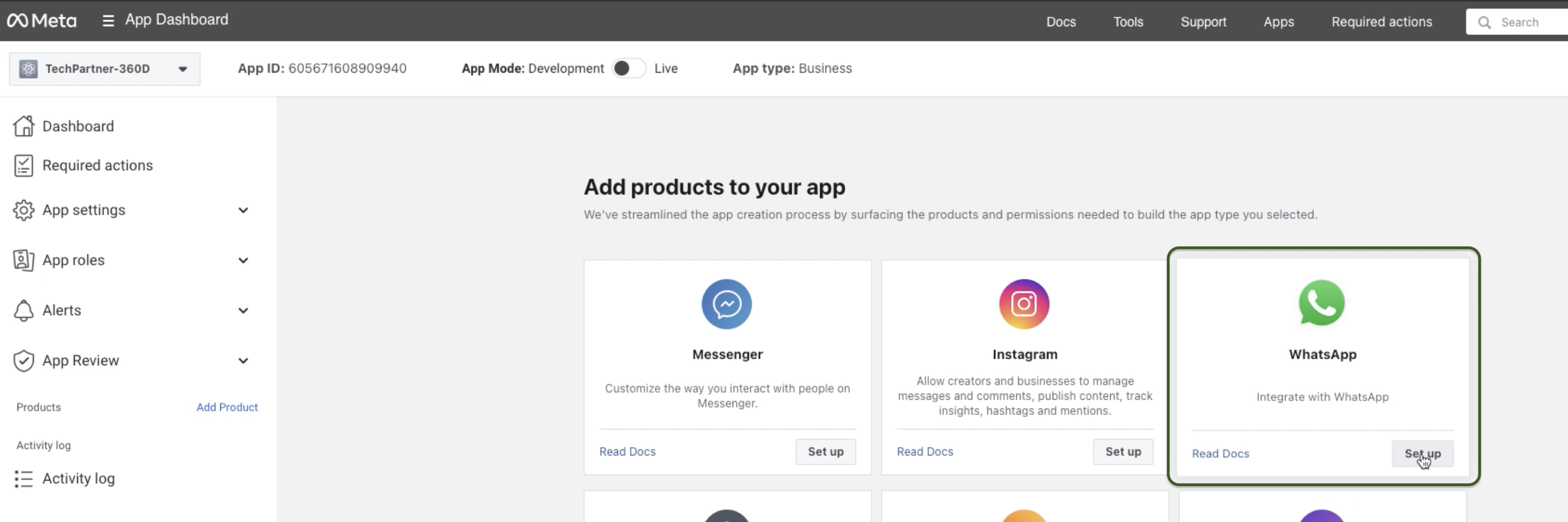
Navigate to Meta for Developers App dashboard > Add products to your app > Set Up (on the WhatsApp product).

<figure><img src="https://2248475362-files.gitbook.io/~/files/v0/b/gitbook-x-prod.appspot.com/o/spaces%2FuyAl2S0lSHJaNDXJHo7A%2Fuploads%2FRraXBZ1al3SMKBJ7IQBx%2Fstep7.png?alt=media&amp;token=89793746-9e6b-401d-90a2-0f2179096f39" alt=""><figcaption></figcaption></figure>

After clicking, navigate to WhatsApp > Quickstart > **Continue Onboarding**.

<figure><img src="https://2248475362-files.gitbook.io/~/files/v0/b/gitbook-x-prod.appspot.com/o/spaces%2FuyAl2S0lSHJaNDXJHo7A%2Fuploads%2F7E4Se630Bvdk6wLQTzDE%2Fstep8.png?alt=media&amp;token=66df7638-6e32-465c-b658-555c86660da6" alt=""><figcaption></figcaption></figure>

### 3. Accept Meta Terms of Service

After clicking to continue onboarding, a pop-up will appear. Click **Continue**.&#x20;

<figure><img src="https://2248475362-files.gitbook.io/~/files/v0/b/gitbook-x-prod.appspot.com/o/spaces%2FuyAl2S0lSHJaNDXJHo7A%2Fuploads%2FHDHOX1E8HVhAhZVGoQFI%2Fstep9.png?alt=media&amp;token=492d0030-f790-4aa0-8afc-2c409020a8ef" alt=""><figcaption><p>Click continue</p></figcaption></figure>

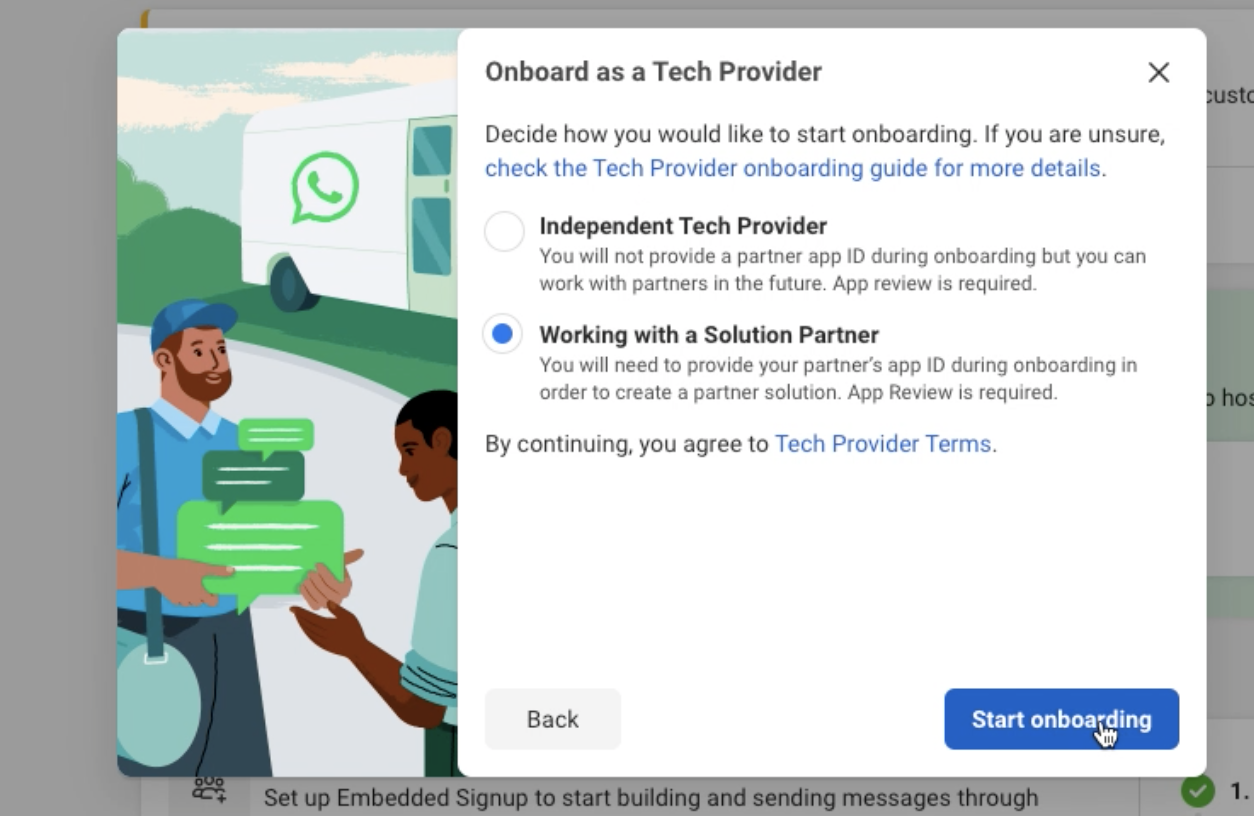
#### Select **Working with a Solution Partner**  <a href="#step-5--add-the-whatsapp-product" id="step-5--add-the-whatsapp-product"></a>

Choose the option **Working with a Solution Partner**.

<figure><img src="https://2248475362-files.gitbook.io/~/files/v0/b/gitbook-x-prod.appspot.com/o/spaces%2FuyAl2S0lSHJaNDXJHo7A%2Fuploads%2FIhu4g7ytpVIGOyFXNqRh%2Fstep91.png?alt=media&amp;token=03dc6a7a-e8e8-4b47-8af5-5244dc868c53" alt=""><figcaption></figcaption></figure>

{% hint style="info" %}
Choosing this option does not prevent access or moving away in the future; it is always possible to switch Solution Partners or operate independently at a later date.
{% endhint %}

After making the choice and continuing, you will be taken to the Onboarding panel.

### &#x20;4. Complete the Business Verification (If not already verified)

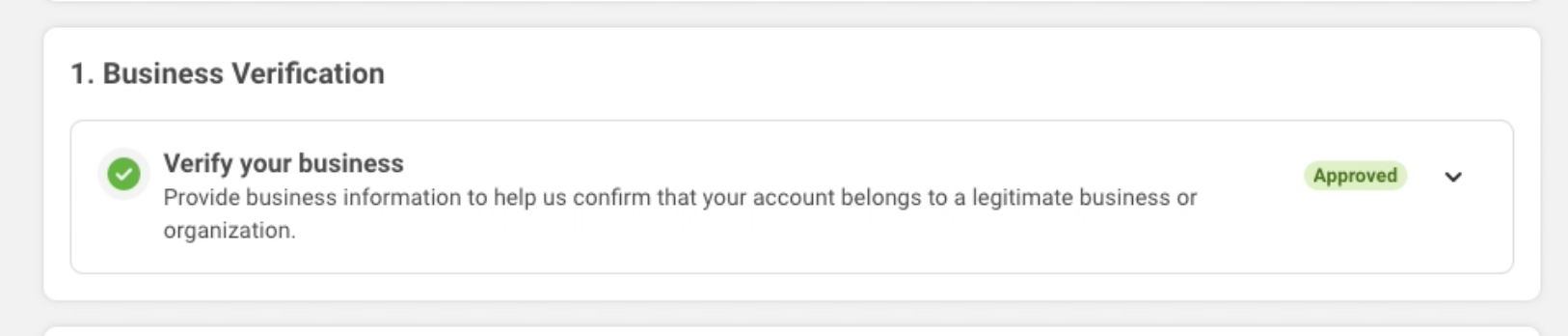
Verified businesses have a green checkmark and a green Approved dropdown menu label. If the business is already verified, you can skip this step.

Otherwise, go to Meta Business Suite > [Business Information](https://developers.facebook.com/micro_site/url/?click_from_context_menu=true\&country=PT\&destination=https%3A%2F%2Fbusiness.facebook.com%2Fsettings%2Finfo\&event_type=click\&last_nav_impression_id=1kGdl6SLZqLCUPY71\&max_percent_page_viewed=97\&max_viewport_height_px=1260\&max_viewport_width_px=2520\&orig_http_referrer=https%3A%2F%2Fdevelopers.facebook.com%2Fdocs%2Fwhatsapp%2Fsolution-providers%2Fget-started-for-tech-providers%2F\&orig_request_uri=https%3A%2F%2Fdevelopers.facebook.com%2Fajax%2Fpagelet%2Fgeneric.php%2FDeveloperNotificationsPayloadPagelet%3Ffb_dtsg_ag%3D--sanitized--%26data%3D%257B%2522businessUserID%2522%253Anull%252C%2522cursor%2522%253Anull%252C%2522length%2522%253A15%252C%2522clientRequestID%2522%253A%2522js_840%2522%257D%26jazoest%3D24825\&region=emea\&scrolled=true\&session_id=0tqqH0wF61j3GMge7\&site=developers) and submit a verification request.

You can only move on to the next steps after business verification is complete.

<figure><img src="https://2248475362-files.gitbook.io/~/files/v0/b/gitbook-x-prod.appspot.com/o/spaces%2FuyAl2S0lSHJaNDXJHo7A%2Fuploads%2FizsSiEi8o70i7cYZn61E%2Fstep10.png?alt=media&amp;token=c162f4b6-69f0-458b-8a5e-0059427ccc95" alt=""><figcaption></figcaption></figure>

{% hint style="warning" %}
Partner-led Business Verification (PLBV) is not accepted. It is necessary to go through the [Classic Business Verification](https://docs.360dialog.com/partner/partner-hub/meta-business-verification/standard-business-verification) as described above.
{% endhint %}

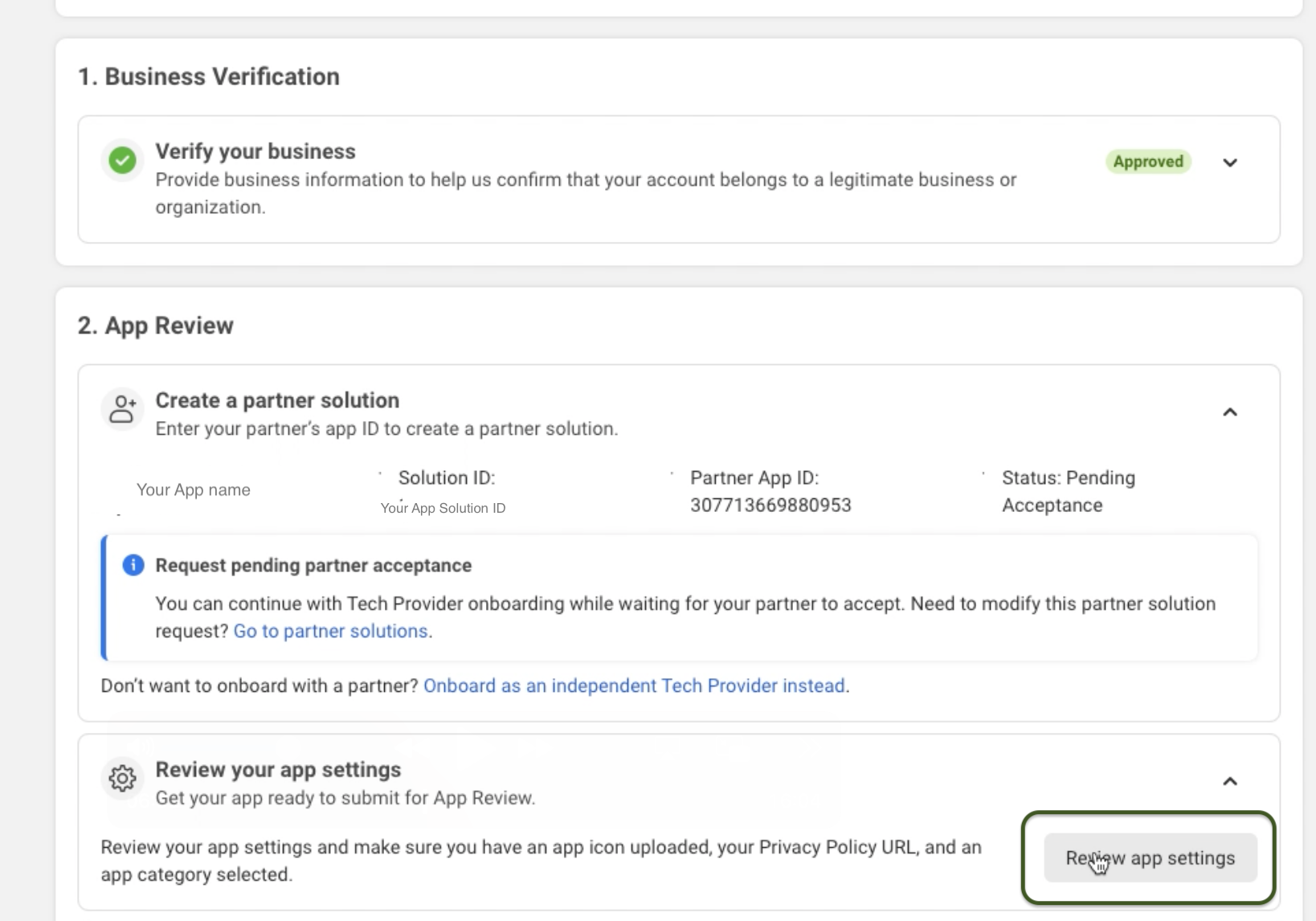
### 5. Create a Partner Solution

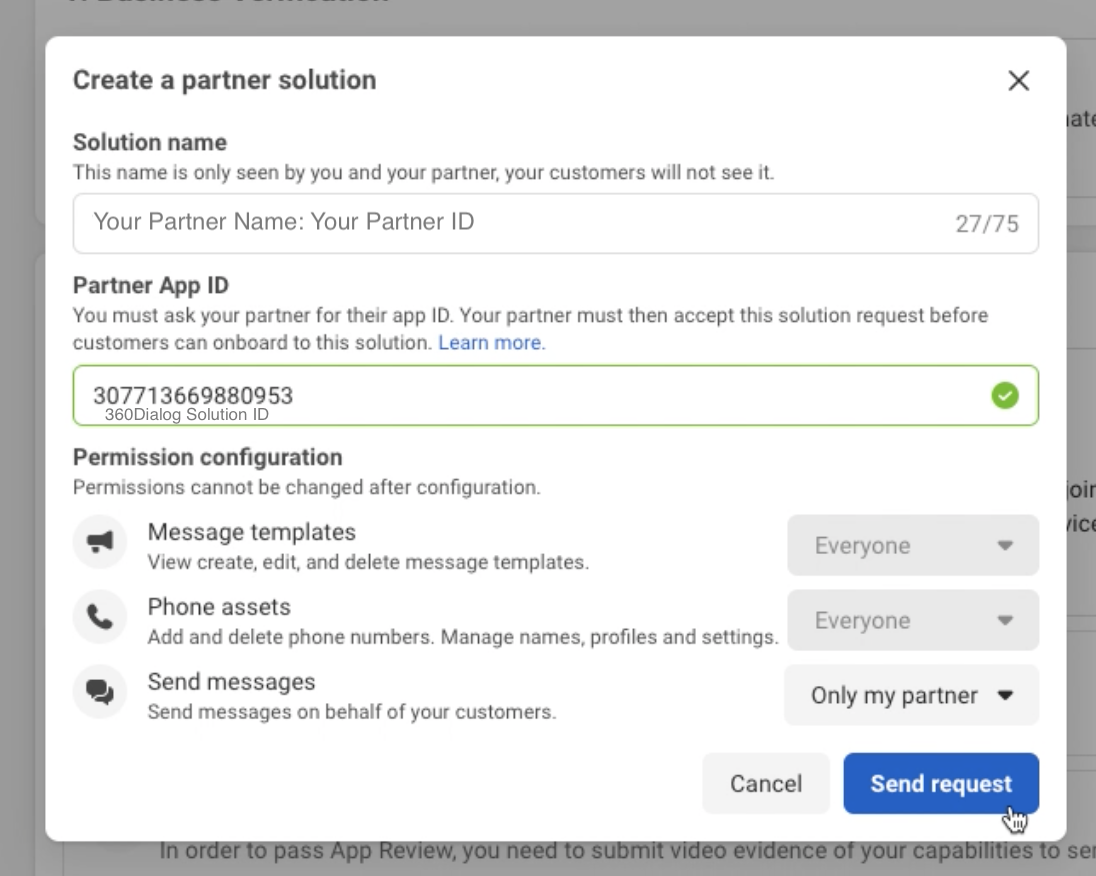
In the Onboarding panel, go to step 2 and click **Create a Partner Solution.**

<figure><img src="https://2248475362-files.gitbook.io/~/files/v0/b/gitbook-x-prod.appspot.com/o/spaces%2FuyAl2S0lSHJaNDXJHo7A%2Fuploads%2FeNCzQZWA7Wj45NcFepus%2Fstep11.png?alt=media&amp;token=ea2c1c7c-943e-47ba-b441-9ae2048841b7" alt=""><figcaption></figcaption></figure>

{% hint style="info" %}
Only Only a verified business can create a Multi-Partner Solution.
{% endhint %}

#### Solution Details

| Field              | Description                                                                                                                                                         | Value                                                                                                       |
| ------------------ | ------------------------------------------------------------------------------------------------------------------------------------------------------------------- | ----------------------------------------------------------------------------------------------------------- |
| **Solution Name**  | <p>Company name + Partner ID (<a href="https://docs.360dialog.com/partner/integration/partner-api-integration#partner-id">see how to retrieve it here</a>).<br></p> | <p><code>ISV\_Name: xxxxxxPA</code></p><p></p><p>Example: <code>PartnerCompanyName1234: SvAiK8PA</code></p> |
| **Partner App ID** | <p>360Dialog's app ID<br>The exact value should be inputted.</p>                                                                                                    | `307713669880953`                                                                                           |
| Send Messages      | Inform Meta you'll use 360Dialog API to send messages.                                                                                                              | `Only my partner`                                                                                           |

<figure><img src="https://2248475362-files.gitbook.io/~/files/v0/b/gitbook-x-prod.appspot.com/o/spaces%2FuyAl2S0lSHJaNDXJHo7A%2Fuploads%2FGT3rFbOwpERGR0MD4BMx%2Fstep12.png?alt=media&amp;token=38ec76b2-1414-4945-879b-303323633873" alt=""><figcaption></figcaption></figure>

Once requested, it will appear in the Create a Partner Solution row with a Pending Acceptance state.

See the possible states below:

<table><thead><tr><th width="239">State</th><th>Description</th></tr></thead><tbody><tr><td><strong>Draft</strong></td><td>The solution has been initiated and saved but has not been sent to 360Dialog. </td></tr><tr><td><strong>Pending Acceptance</strong></td><td>360Dialog has not accepted or rejected the solution. </td></tr><tr><td><strong>Active</strong></td><td>360Dialog has accepted the solution and Partners can use it to host their own embedded signup and leverage Tech Provider features.</td></tr><tr><td><strong>Inactive</strong></td><td>360Dialog declined the solution request.</td></tr><tr><td><strong>Pending deactivation</strong></td><td>360Dialog has requested to deactivate the solution. You can accept or decline this request.</td></tr><tr><td><strong>Deactivated</strong></td><td>The solution has been deactivated. </td></tr></tbody></table>

Your request will be approved once all steps are completed and you share your Solution ID with us in the Hub.

<figure><img src="https://2248475362-files.gitbook.io/~/files/v0/b/gitbook-x-prod.appspot.com/o/spaces%2FuyAl2S0lSHJaNDXJHo7A%2Fuploads%2FsGD5twsWoIRBecZHoqcN%2FPENDING.png?alt=media&amp;token=1b7da1b6-42b3-4bbb-8f70-57921255a885" alt="" width="339"><figcaption></figcaption></figure>

#### Review Your App Settings

Next, click on "**Review app settings**":

<figure><img src="https://2248475362-files.gitbook.io/~/files/v0/b/gitbook-x-prod.appspot.com/o/spaces%2FuyAl2S0lSHJaNDXJHo7A%2Fuploads%2FOAc0mFnmMQpMpgOKp5ZW%2Fstep%2023.png?alt=media&amp;token=c185ca6d-574d-454f-bbc3-75b897b79933" alt=""><figcaption></figcaption></figure>

You must also add basic data about your app such as:

* App icon (You can use [external tools to resize your image](https://www.iloveimg.com/resize-image) for 512x512 or 1024x1024 pixels)
* Privacy Policy URL
* Category (Select the category the best fit your Software)

<figure><img src="https://2248475362-files.gitbook.io/~/files/v0/b/gitbook-x-prod.appspot.com/o/spaces%2FuyAl2S0lSHJaNDXJHo7A%2Fuploads%2F0yB2SbwEtOcbNwzTWGIs%2FScreenshot%202025-02-24%20at%2020.59.33.png?alt=media&amp;token=8bcbb175-18d9-4f8f-ad32-38d219130b37" alt=""><figcaption></figcaption></figure>

Be sure to save your changes. You can add additional information if you wish later, but the information above is the only information required to complete the remaining steps.

#### Capture videos for App Review

As part of the **Meta App Review** process, you have to submit two **video recordings** demonstrating key functionalities of your WhatsApp integration. These videos validate that your app is properly configured to send messages and create message templates.

You only need to prepare and record the videos. The submission will be done in the following step.

<figure><img src="https://2248475362-files.gitbook.io/~/files/v0/b/gitbook-x-prod.appspot.com/o/spaces%2FuyAl2S0lSHJaNDXJHo7A%2Fuploads%2F8bPerCaOzI7vhuMvYkGa%2Fpermissions.png?alt=media&amp;token=120e6996-6f54-4953-8536-291663f06c4b" alt=""><figcaption></figcaption></figure>

#### Required Videos & How to Record

**Video 1: Sending a Message from Your App**

**Objective:** Demonstrate a message being sent from your app and received in a WhatsApp client (mobile or web).

**How to Record:**

* Use [**360Dialog’s API Setup cURL script**](/partner/messaging/template-messages/sending-template-messages) or your existing integration to send a message.
* Select a WhatsApp test recipient and capture the process from message sending to delivery in the WhatsApp client.
* If using an API request, ensure the video shows both the request and the received message in WhatsApp.

**Video Requirements:**

* Clearly display the API request or your software UI interaction sending the message.
* Show the WhatsApp client receiving the message in real time.

***

&#x20;**Video 2: Creating a Message Template**

**Objective:** Demonstrate how your app creates a **Message Template** within the WhatsApp Business API.

**How to Record:**

* Use either:
  * 360Dialog’s WABA Management App in the Hub *(recommended for non-technical users)* to create a template.
  * [360Dialog’s API Setup cURL script](/partner/messaging/template-messages#create-and-manage-template-messages) of your existing integration to create a template message.
* Capture the **entire creation process**, from entering template details to finalizing submission.

**Video Requirements:**

* If using 360Dialog’s API, show the step-by-step template creation from your application.
* Ensure all relevant fields (message body, language, media type) are visible in the recording.

For additional tips on recording, go to the **Quickstart** > **Onboarding** panel and locate the **Record video documentation** row. Select **Record video** button for guidance on creating your videos (note that this button does not capture video; you will need to record them and upload it later).&#x20;

Please note that these videos are mandatory to progress to App Review Submission in the next step.

{% hint style="success" %}

#### **Schedule Expert Assistance for Recording**&#x20;

Contact the Support Team to receive assistance with preparing the recordings or to schedule a live guidance session with a 360dialog expert.
{% endhint %}

### 6. Start App Review

Next, locate the Submit documentation for App Review row and click Begin App Review. Click Continue to App Review.

<figure><img src="https://2248475362-files.gitbook.io/~/files/v0/b/gitbook-x-prod.appspot.com/o/spaces%2FuyAl2S0lSHJaNDXJHo7A%2Fuploads%2FBuBSnTe6Vz5Zhj4tOpby%2Fstep14.png?alt=media&amp;token=a4d86629-b827-4457-9ced-2c84a3939e06" alt=""><figcaption></figcaption></figure>

<figure><img src="https://2248475362-files.gitbook.io/~/files/v0/b/gitbook-x-prod.appspot.com/o/spaces%2FuyAl2S0lSHJaNDXJHo7A%2Fuploads%2Feqvf7sS3flMREWdFwGZ1%2Fstep15.png?alt=media&amp;token=a78f8f5a-ae85-4473-b03d-c34c9935a7f3" alt="" width="375"><figcaption></figcaption></figure>

The App Review is a required step to secure access to specific features on WhatsApp. For you to manage another businesses WABAs and send messages on their behalf, Meta needs to validate how you will use the requested permissions to ensure there is no abuse or harm to user data.&#x20;

Meta's team will review the submission and approve, reject, or request additional information if needed.

<figure><img src="https://2248475362-files.gitbook.io/~/files/v0/b/gitbook-x-prod.appspot.com/o/spaces%2FuyAl2S0lSHJaNDXJHo7A%2Fuploads%2Fjb5Gx2rHLf4uG7axG2MT%2Fstep17.png?alt=media&amp;token=3a46701d-cc57-4748-aabc-870da07efd46" alt="" width="375"><figcaption><p>Click "Continue to App Review"</p></figcaption></figure>

Once you click continue, you will be redirected to the App Review Request page.&#x20;

<figure><img src="https://2248475362-files.gitbook.io/~/files/v0/b/gitbook-x-prod.appspot.com/o/spaces%2FuyAl2S0lSHJaNDXJHo7A%2Fuploads%2FsBHIYkovKohe7I1NOsuv%2F461186267_1216789669534885_7600969123214529793_n%20(1).png?alt=media&amp;token=5b2b8a58-8c5d-44f1-9fe2-8351b50ec383" alt=""><figcaption><p>You will be redirected to the Requests page, click on Edit and follow the process accordingly.</p></figcaption></figure>

#### **Answer Data Handling questions**

On the **App Review page** > **Requests > Edit**, navigate to the bottom down to "Data Handling questions" and answer security questions.&#x20;

<figure><img src="https://2248475362-files.gitbook.io/~/files/v0/b/gitbook-x-prod.appspot.com/o/spaces%2FuyAl2S0lSHJaNDXJHo7A%2Fuploads%2Fwe3H2hsN6I1QRELzksKK%2Fstep22.png?alt=media&amp;token=ced409ea-6d2b-4a85-a620-efc0dd88e630" alt=""><figcaption></figcaption></figure>

When answering the questions in the pop up, you can also use the Pre-fill button (<img src="https://2248475362-files.gitbook.io/~/files/v0/b/gitbook-x-prod.appspot.com/o/spaces%2FuyAl2S0lSHJaNDXJHo7A%2Fuploads%2F0u85wQ0e0S7QjvUrKQPT%2Fprefill.png?alt=media&amp;token=c8903e34-8fe8-4712-9ba3-f759815aaa9f" alt="" data-size="line">) on the top right to reuse answers from another app already created on the same Business Manager.

After you finish the questions, click on "**Submit**".&#x20;

#### **Request permissions and submit video recordings**

Permissions are granular, user-granted authorizations by Meta. Before your app can use a service to access an user's data, Meta must grant all permissions required by that service.&#x20;

To pass the app review, request only the permissions necessary for your app to function, as asking for unnecessary permissions is a common reason for rejection.

Below are the app permissions required during the review process:

<table><thead><tr><th width="249">Permission</th><th>Description</th><th>Video Requirements</th></tr></thead><tbody><tr><td><code>whatsapp_business_messaging</code></td><td><p>Describe how your app uses this permission to send messages on behalf of your users. </p><p></p><p>Explain whether messages are sent through 360Dialog API or an application you have developed, and how it benefits your users.</p></td><td>Attach the "Message Sending" video (1) – showcasing your app being used to send a message template, or the API Setup cURL script (<a href="/partner/messaging/template-messages/sending-template-messages">Templates API</a>).</td></tr><tr><td><code>whatsapp_business_management</code></td><td><p>Includes account details, message templates, and other WhatsApp assets. </p><p></p><p>Highlight how your platform enables customers to control their account settings and assets.</p></td><td><p>Attach the "Message Template Creation" video (2)  –showcasing your permissions to create templates using the <a href="/partner/messaging/template-messages#create-new-waba-template">Partner API</a>, or show the WhatsApp Manager being used by you to create a message template.</p><p></p></td></tr></tbody></table>

Submit the videos you recorded highlighting where each respective permissions are used.

<figure><img src="https://2248475362-files.gitbook.io/~/files/v0/b/gitbook-x-prod.appspot.com/o/spaces%2FuyAl2S0lSHJaNDXJHo7A%2Fuploads%2FnF4xlf1tNF5LKzmiosbV%2Fstep24.png?alt=media&amp;token=9ae2d7bc-fde6-4482-bfc8-cc52f39a7c2d" alt=""><figcaption></figcaption></figure>

Do not submit the same video clip for each permission, even if it covers the use cases for each permission in your submission, or it may be rejected.

<div><figure><img src="https://2248475362-files.gitbook.io/~/files/v0/b/gitbook-x-prod.appspot.com/o/spaces%2FuyAl2S0lSHJaNDXJHo7A%2Fuploads%2FjrSSAUalqy9hs30iUVQ0%2Fmanag.png?alt=media&amp;token=ba45d140-3ab2-4871-9176-5ea2fdf72f22" alt=""><figcaption></figcaption></figure> <figure><img src="https://2248475362-files.gitbook.io/~/files/v0/b/gitbook-x-prod.appspot.com/o/spaces%2FuyAl2S0lSHJaNDXJHo7A%2Fuploads%2F62xo0WBtAalaPi68lNM9%2Fmessag.png?alt=media&amp;token=f737288b-bba1-4ff7-9762-fb8db962983a" alt=""><figcaption></figcaption></figure></div>

You should have a verified page as below:

<figure><img src="https://2248475362-files.gitbook.io/~/files/v0/b/gitbook-x-prod.appspot.com/o/spaces%2FuyAl2S0lSHJaNDXJHo7A%2Fuploads%2F7qQRExhm8tuWEqeuRJDs%2Fcomplete.png?alt=media&amp;token=8acdae4f-05d4-48d0-aa68-afaa0b25f2a2" alt=""><figcaption></figcaption></figure>

After you click on Submit for Review, your app will be on the "In Review" status.

<figure><img src="https://2248475362-files.gitbook.io/~/files/v0/b/gitbook-x-prod.appspot.com/o/spaces%2FuyAl2S0lSHJaNDXJHo7A%2Fuploads%2F9LGqx4ci3xyQK1NYdmDh%2Fsubmitted.png?alt=media&amp;token=c5acdcdd-07ef-4414-89dc-8afa16fcdfad" alt=""><figcaption></figcaption></figure>

#### **A**ccess Verification

This step is crucial to ensure your app complies with the requirements set by Meta and WhatsApp.

In the Meta App Dashboard, go to **App Settings > Basic**, then locate the  "**Access Verification**" row, and "Start Verification".

<figure><img src="https://2248475362-files.gitbook.io/~/files/v0/b/gitbook-x-prod.appspot.com/o/spaces%2FuyAl2S0lSHJaNDXJHo7A%2Fuploads%2Ffm12aJyfckS1cr4dvnYI%2Fstep25.png?alt=media&amp;token=723ea167-1f2d-462f-8315-d5804ec1d411" alt=""><figcaption></figcaption></figure>

<figure><img src="https://2248475362-files.gitbook.io/~/files/v0/b/gitbook-x-prod.appspot.com/o/spaces%2FuyAl2S0lSHJaNDXJHo7A%2Fuploads%2F4vIrRMtenDTTqJEsko57%2Fstart.png?alt=media&amp;token=910fb963-11ab-45d9-b920-cd63faf25519" alt=""><figcaption><p>Click on Start Verification to complete the process</p></figcaption></figure>

Complete the flow and submit your answers for verification.

<figure><img src="https://2248475362-files.gitbook.io/~/files/v0/b/gitbook-x-prod.appspot.com/o/spaces%2FuyAl2S0lSHJaNDXJHo7A%2Fuploads%2FkzPD8ZjP7IVAZd5zQzXZ%2FVERIFICATION.png?alt=media&amp;token=12e12ed4-6146-4382-bf20-5ca57b282d39" alt=""><figcaption></figcaption></figure>

You will hear back from Meta via email, developer alert, and its status will be updated in the **App Review** > **Requests** panel.

After you have completed the steps above, the **Quickstart** > **Onboarding** panel should indicate that all steps are complete (with a green checkmark) like the image below.

<figure><img src="https://2248475362-files.gitbook.io/~/files/v0/b/gitbook-x-prod.appspot.com/o/spaces%2FuyAl2S0lSHJaNDXJHo7A%2Fuploads%2FDrVHt6fgq8XHiRq7RO53%2F461165630_1024046862803184_1435753393620019123_n.png?alt=media&amp;token=4b0a2484-3c1b-435f-8b12-3a41dfa3a6d8" alt="" width="563"><figcaption></figcaption></figure>

### 7. Set **your Application Mode** to: Live

Before sharing your Solution ID, make sure to turn on your App Mode toggle to **Live**.

<figure><img src="https://2248475362-files.gitbook.io/~/files/v0/b/gitbook-x-prod.appspot.com/o/spaces%2FuyAl2S0lSHJaNDXJHo7A%2Fuploads%2FdkVpvie0CcN46Bw2IhVL%2Fapp%20live%20mode.png?alt=media&amp;token=e22cf806-a943-4266-b8d5-c43fff289499" alt=""><figcaption></figcaption></figure>

{% hint style="warning" %}
If your app is on **Development** mode, the Embedded Signup will return error and won't start for end-users. To address this issue, please toggle to the **Live** mode.&#x20;
{% endhint %}

#### Copy your Tech Provider Solution ID

You can find your Solution ID in the **Meta Dashboard** under **WhatsApp > Partner Solutions**. This is the correct ID that you need to copy and share on the 360Dialog Partner Hub.&#x20;

Please note that this ID is different from the App ID shown in the main bar.

<figure><img src="https://2248475362-files.gitbook.io/~/files/v0/b/gitbook-x-prod.appspot.com/o/spaces%2FuyAl2S0lSHJaNDXJHo7A%2Fuploads%2FzblB1RNdoburOW5OJvVS%2FSOLUTIONID.png?alt=media&amp;token=55360ad0-d47b-42b6-b439-0b2269b8d586" alt=""><figcaption></figcaption></figure>

### 8. Add your Solution\_ID to the 360Dialog Partner Hub

After the App is Live, log in to your [Partner Hub](https://app.360dialog.com/) and access the “Integration” Tab. Click the edit button on the right side of the Solution ID row to add your ID.

{% hint style="info" %}
*If you manage multiple Partner accounts, you are required to add a Solution ID to each Partner account. You can use the same Solution ID for multiple Partner accounts.*
{% endhint %}

<figure><img src="https://2248475362-files.gitbook.io/~/files/v0/b/gitbook-x-prod.appspot.com/o/spaces%2FuyAl2S0lSHJaNDXJHo7A%2Fuploads%2Folyrz5ME6xzmcHaJZLC8%2F123123123-snaplight-274.png?alt=media&amp;token=ecbf47e9-f8ed-41d1-ab3b-4953d28d24c7" alt=""><figcaption></figcaption></figure>

Please also make sure that you’ve set your Partner Webhook URL as well as Redirect URL.

**Your Solution will only be approved by 360Dialog after you have added the ID in your Partner Hub.** Without an approved solution, you will not be able to onboard WhatsApp accounts with [your own Embedded Signup](/partner/onboarding/partner-hosted-embedded-signup), but you can keep onboarding numbers normally through [Integrated Onboarding](/partner/onboarding/integrated-onboarding/connect-button).

{% hint style="info" %}
The Solution ID allows us to share WABAs with you as a Tech Provider. After you add it to your Hub, even WABAs created via Integrated Onboarding will be associated with your Business Manager.
{% endhint %}

### **9. 360Dialog accepts the Partner Solution Request**

After you input your Solution ID, 360Dialog receives the request to accept the solution request. You should have your solution approved in a maximum of 24 hours.&#x20;

If the solution gets rejected, reach out to [customer support](https://docs.360dialog.com/docs/support/get-support) to get more information.&#x20;

### 10. Managing and Messaging

That's it! After the Solution ID is shared and approved, as a Tech Provider, you will be able to use the direct Meta APIs for managing shared WABAs and phone numbers. You will also receive the webhooks of received messages of these numbers.

## References

You can also refer to Meta's Official Documentation below:

{% embed url="<https://developers.facebook.com/docs/whatsapp/solution-providers/get-started-for-tech-providers>" %}
Become a Tech Provider
{% endembed %}

{% embed url="<https://developers.facebook.com/docs/whatsapp/embedded-signup/app-review>" %}


# Become a Meta Tech Partner

This page describes the Meta Tech Partner program

Meta Tech Providers that meet eligibility criteria can upgrade to a **Meta Tech Partner**&#x20;

Becoming a Tech Partner allows Businesses to have even more choices and control of WhatsApp messaging solutions. It also grants access to benefits such as:

* Training and support
* Analytics reports
* Business customer matching opportunities

### Eligibility Requirements

To be eligible for an upgrade, Businesses must:

* have successfully completed all [Tech Provider Get Started](https://developers.facebook.com/documentation/business-messaging/whatsapp/solution-providers/get-started-for-tech-providers) steps
* greater than or equal to 2,500 average daily messages (sent or received) on the WhatsApp Business Platform between your business and its users over the last 7 days or greater than or equal to 200 average daily calls (business-initiated or user-initiated) on the WhatsApp Business Platform between your business and its users over the last 7 days
* 10 or more active business customers (have used your app to send at least 1 message in the last 30 days)
* maintain a business phone number [quality rating⁠](https://www.facebook.com/business/help/896873687365001) of 90% or better

### Steps to upgrade to Meta Tech Partner

{% stepper %}
{% step %}

#### Access the Upgrade Flow

In the [App Dashboard](https://developers.facebook.com/apps), navigate to **WhatsApp** > **Quickstart**, and in the **Become a Partner** section, click the **Take the next step** button.

<figure><img src="https://2248475362-files.gitbook.io/~/files/v0/b/gitbook-x-prod.appspot.com/o/spaces%2FuyAl2S0lSHJaNDXJHo7A%2Fuploads%2Fkv9Ur4PJDdy7DOwD6TSM%2Ftp_1.png?alt=media&amp;token=abbd730f-26a1-48f1-b3cf-3d3f64cac822" alt=""><figcaption></figcaption></figure>
{% endstep %}

{% step %}

#### Initiate the Upgrade Process

On the **Onboarding** page, scroll to the bottom and click **Become a Partner**. This will reveal the 4 steps that are required to complete the upgrade to become a Tech Partner.

<figure><img src="https://2248475362-files.gitbook.io/~/files/v0/b/gitbook-x-prod.appspot.com/o/spaces%2FuyAl2S0lSHJaNDXJHo7A%2Fuploads%2FTzGYmzA6gfXYxAoq8gY8%2Ftp_2.png?alt=media&amp;token=164e524c-823d-44b3-acdf-07e4e2059d0e" alt=""><figcaption></figcaption></figure>

Keep in mind the following:

* Please carefully fill out all business details because the information will be submitted and reviewed for approval.
* During a few of these steps, you will receive emails as shown in the steps below. If you do not see them, check your spam folder.
* This process will likely take a few weeks to complete to get through all of the approvals.
  {% endstep %}

{% step %}

#### Add the WhatsApp Specialty For Your Business

Return to the **Onboarding** page inside of Meta for Developers and navigate to the **Meta Business Partners** application step, then click the **Apply now** button to submit an application to become a Meta Business Partner and apply for the WhatsApp Specialty.

<figure><img src="https://2248475362-files.gitbook.io/~/files/v0/b/gitbook-x-prod.appspot.com/o/spaces%2FuyAl2S0lSHJaNDXJHo7A%2Fuploads%2FOd0VBrTeQNq0M0bJTypY%2Ftp3.png?alt=media&amp;token=bb6c65c5-0582-47c3-9ca9-10977732c505" alt=""><figcaption></figcaption></figure>
{% endstep %}

{% step %}

#### Sign up for the Partner Portal&#xD;

Navigate back to the Onboarding page in Meta for Developers and scroll down to the **Sign up for the Partner Portal** step. Click **Sign up** and on the Partner Portal login screen select the link to **Sign up**. Add your name and business ID and accept the agreement to create the account.

<figure><img src="https://2248475362-files.gitbook.io/~/files/v0/b/gitbook-x-prod.appspot.com/o/spaces%2FuyAl2S0lSHJaNDXJHo7A%2Fuploads%2FbxzcdBXOCjNbb8fLXWYn%2Ftp_4.png?alt=media&amp;token=aed92dc2-cf29-41e9-9f90-409cc7565554" alt=""><figcaption></figcaption></figure>

The Partner Portal is a resource to use as a partner to collaborate on deals with the Business Messaging team as well as access resources such as marketing and sales material.

Once you have created an account, you will receive an email with a link to get started and add your account password.
{% endstep %}

{% step %}

#### Enrol in the Accelerate Program&#xD;

The final step is to enroll in the **Business Messaging Accelerate Program** and accept the agreement. On the **Onboarding** page in Meta for Developers, scroll down to the last step to **Enroll in the Accelerate Program** and click the button to **Complete enrollment**.Inside of the Partner Portal, look for the **Business Messaging Accelerate** card and click to view and sign. You will be able to download the agreements if needed.

<div align="left"><figure><img src="https://2248475362-files.gitbook.io/~/files/v0/b/gitbook-x-prod.appspot.com/o/spaces%2FuyAl2S0lSHJaNDXJHo7A%2Fuploads%2F5zK0QGTPcvcY3pJHUA7H%2Ftp_5.png?alt=media&amp;token=39dce329-5373-44b6-9cc1-51973577b510" alt="" width="375"><figcaption></figcaption></figure></div>

When you return to the **Onboarding** page in Meta for Developers, if all steps are complete, you are officially a Tech Partner!

<figure><img src="https://2248475362-files.gitbook.io/~/files/v0/b/gitbook-x-prod.appspot.com/o/spaces%2FuyAl2S0lSHJaNDXJHo7A%2Fuploads%2F3euECFhX0aiygGEvgUNe%2Ftp_6.png?alt=media&amp;token=b7afb143-d23d-4956-8400-b46fceea6239" alt=""><figcaption></figcaption></figure>
{% endstep %}
{% endstepper %}

### **Tech Partner FAQ**

<details>

<summary>Is Meta Tech Provider and Meta tech Partner the same thing? </summary>

No, these are two separate Partner types. See the [comparison table here](https://developers.facebook.com/documentation/business-messaging/whatsapp/solution-providers/overview#comparison).&#x20;

</details>

<details>

<summary>Are there any technical differences between Meta Tech Providers and Meta Tech Partners? </summary>

No technical difference, what changes is that after the Tech Provider achieves a certain volume of active customers and message they can become a Meta partner that will unlock access to some portal and also be listed in Partner Directory.

</details>

<details>

<summary>Can 360dialog grant Meta Tech Partner status? </summary>

No. The process and decision to grant Tech Partner status is managed entirely by Meta.&#x20;

</details>


# Alphas and Betas

Alphas and Betas are programs run by 360Dialog in collaboration with partners to test new features before they become generally available on WhatsApp for Business APIs.

## About Alphas & Betas

By joining an **Alpha or Beta program**, you gain **early access to WhatsApp features** and the opportunity to provide **feedback that shapes development**.

Your insights are shared with **360Dialog** and **Meta’s product teams**, helping improve products before General Availability (GA).&#x20;

Alpha and Beta refers to different stages of a product development, being:&#x20;

* **Alpha** → early-stage, limited functionality, small test group.
* **Beta** → broader testing, more stable, includes improvements from Alpha.
* After Beta → feature becomes **GA** (General Availability) and is released to all users.

{% hint style="info" %}
Team's notes:&#x20;

* We **validate and test all features internally** before opening them up for client testing, ensuring a secure and reliable experience.
* Participation requires commitment: active testing and consistent feedback.
  {% endhint %}

### Why join?

* [x] **Early Access** — test features before the market.
* [x] **Influence** — your feedback guides product design.
* [x] **Competitive Advantage** — adopt powerful solutions early.
* [x] **Learning** — hands-on with cutting-edge tools.

### Roles & Expectations

When you join a Beta you can expect 360Dialog's&#x20;

| What we expect from you                                                                      | What you can expect from us                                                                                |
| -------------------------------------------------------------------------------------------- | ---------------------------------------------------------------------------------------------------------- |
| <ul class="contains-task-list"><li><input type="checkbox" checked>Active usage</li></ul>     | <ul class="contains-task-list"><li><input type="checkbox" checked>Support & guidance</li></ul>             |
| <ul class="contains-task-list"><li><input type="checkbox" checked>Provide feedback</li></ul> | <ul class="contains-task-list"><li><input type="checkbox" checked>Resources & documentation</li></ul>      |
| <ul class="contains-task-list"><li><input type="checkbox" checked>Report issues</li></ul>    | <ul class="contains-task-list"><li><input type="checkbox" checked>Progress tracking</li></ul>              |
| <ul class="contains-task-list"><li><input type="checkbox" checked>Share learnings</li></ul>  | <ul class="contains-task-list"><li><input type="checkbox" checked>Direct collaboration with Meta</li></ul> |

### How to provide feedback on a feature

* Fill out surveys we share during testing.
* Join scheduled calls or workshops.
* Report issues via email or tickets with clear reproduction steps.

### Best practices for participants

* Test features in **real business scenarios**.
* Explore edge cases (different templates, flows, languages).
* Share both **positive outcomes** and **challenges**.

***

## Programs & FAQs

### Available Programs

<table><thead><tr><th width="225.5">Program</th><th width="293">Functionality</th><th width="309.5">Impact</th><th width="168">Status</th></tr></thead><tbody><tr><td><a href="broken://pages/nQbbYLgpBgYmTl67IW0M"><strong>Voice Calling API</strong></a></td><td>Enable <strong>voice calls via WhatsApp</strong>, ideal for support, confirmations, and sales</td><td>Faster, more human customer interactions; expands use cases beyond messaging</td><td>Launched, in production</td></tr><tr><td><a href="https://docs.360dialog.com/partner/messaging/media-messages/voice-message-beta-program"><strong>Voice Messages Beta</strong></a></td><td>Send <strong>native voice messages</strong> with <strong>automatic transcription &#x26; improved playback</strong></td><td>Better engagement (esp. in LATAM); improves accessibility; richer CX vs. audio files</td><td>Launched, in production</td></tr><tr><td><a href="https://docs.360dialog.com/partner/waba-management/meta-business-verification/partner-led-business-verification"><strong>Partner-led Business Verification (PLBV)</strong></a></td><td>Partners upload <strong>business verification docs</strong> during Embedded Signup</td><td>Reduces onboarding friction, accelerates activation, improves client experience</td><td>Launched, in production</td></tr></tbody></table>

***

### FAQ

* **Do I pay extra to test Alpha/Beta features?**\
  No. You pay only for conversations as usual, but must be a 360Dialog client.
* **Does testing impact my current Cloud API setup?**\
  No. Tests run in a separate environment.
* **Do you have a public Postman collection for all current running Betas?** \
  Yes! You can access using the following link:&#x20;

{% embed url="<https://www.postman.com/d-alpha-beta-team/360dialog-public-api>" %}


# Integrated Onboarding

This page describes how to get started with triggering Integrated Onboarding to register phone numbers

The Integrated Onboarding (IO) solution offered by 360Dialog simplifies the process of creating and adding numbers in the WhatsApp Business Account, giving the partner flexibility to offer their clients the best experience possible.

Choosing the right Integrated Onboarding type depends on several factors, including technical capabilities, resources, and specific needs for integrating with the WhatsApp Business API.

## Implementation Methods

Select one of the following implementation methods to get started:

### Direct Link

Integrated onboarding can be started by linking to the partner's dedicated signup URL.

**Ideal for:** Partners who want to onboard numbers right away. **Best for the quickest start.**

✅ No-code\
✅ Available immediately\
✅ Standard user experience

{% content-ref url="/pages/eitKAkWR5fPzgD0zbSDm" %}
[Using Direct Link](/partner/onboarding/integrated-onboarding/using-direct-link)
{% endcontent-ref %}

### Connect Button

The **Connect Button** is a basic Integrated Onboarding solution built by 360Dialog. It is a React.js NPM package that can be embedded into React applications. It allows partners to trigger account creation and 360Dialog-hosted Embedded Signup through intuitive pop-ups.

**Ideal for:** Partners who prefer a streamlined, no-hassle setup with standard technical involvement. **Best for most partners.**

✅ Low-code\
✅ Fast implementation\
✅ Standard user experience

The basic Integrated Onboarding will show:

1. A 360Dialog-branded Signup Page, where the client will submit their information to create an account
2. Embedded Signup, where the client will log in their Business Manager account and register their WABA and phone number
3. Permission screen, where the client will give their partner permission to manage their channels (only required if using Direct Payment)

{% content-ref url="/pages/uUWCoNOOoeWFuLy4NrwL" %}
[Using Connect Button](/partner/onboarding/integrated-onboarding/connect-button)
{% endcontent-ref %}

### Custom IO

Partners can customize the Integrated Onboarding experience by building their own IO trigger.

**Ideal for:** Partners with the capability to manage more complex integrations and who prefer to have more control over the signup experience.

✅ Framework-agnostic\
✅ More customizable versus the Connect Button\
✅ Standard user experience

The custom Integrated Onboarding will show:

1. A 360Dialog-branded Signup Page, where the client will submit their information to create an account
2. Embedded Signup, where the client will log in their Business Manager account and register their WABA and phone number
3. Permission screen, where the client will give you permission to manage their channels (only required if using Direct Payment)

{% content-ref url="/pages/u0vdSjrq2umvRYlVv7If" %}
[Using Custom IO](/partner/onboarding/integrated-onboarding/using-custom-io)
{% endcontent-ref %}

### Partner-Hosted Embedded Signup

Partners who are approved by Meta as Tech Providers have the option to host their own Embedded Signup.

**Ideal for:** Partners who want to fully own their sign up experience. **Best for the biggest partners.**

✅ High-code solution\
✅ Fully customizable\
✅ Partner hosts the flow

For more information on Tech Providers, and becoming a Tech Provider, refer to the documentation below:

* [Details about the Tech Provider Program](/partner/get-started/tech-provider-program)
* [Become a Meta Tech Provider](/partner/get-started/tech-provider-program/become-a-meta-tech-provider)

{% content-ref url="/pages/8wUoHUuwfuWzhRQTaGBc" %}
[Partner-Hosted Embedded Signup](/partner/onboarding/partner-hosted-embedded-signup)
{% endcontent-ref %}

## Standard components

### **URL/Query Parameters**

When triggering Integrated Onboarding, different URL parameters allow you to preselect different settings or customize the flow whenever you need.&#x20;

<table><thead><tr><th width="152.39453125">Parameter name</th><th width="205.0234375">Description</th><th width="103.2421875">Values</th><th width="123">Stored in database?</th><th>Returned in redirect?</th></tr></thead><tbody><tr><td><code>email</code></td><td>User email to pre-fill the signup form</td><td><code>string</code></td><td>Yes, as part of the client setup</td><td>No</td></tr><tr><td><code>name</code></td><td>User name to pre-fill the signup form</td><td><code>string</code></td><td>Yes, as part of the client setup</td><td>No</td></tr><tr><td><code>number</code></td><td>A specific phone number to request permission for. The number has to match the existing number in the hub. It includes the country code without the leading 00/+.</td><td><code>number</code></td><td>No</td><td>No</td></tr><tr><td><code>state</code></td><td>Any string value that shall be passed through and returned with the redirect.</td><td><code>string</code></td><td>Yes</td><td>Yes</td></tr><tr><td><code>redirect_url</code></td><td>Will be used as individual redirect URL instead of the globally set one.</td><td><code>string</code> (URL-encoded)</td><td>No</td><td>Will be used as the new redirect URL</td></tr><tr><td><code>partner</code></td><td>Any string value that shall be stored on the client model. Can be retrieved via API as <code>partner_payload</code>.</td><td><code>string</code></td><td>No</td><td>No</td></tr><tr><td><code>next</code> </td><td>Can be used to redirect clients directly to either the login form or the signup form, in case they are not yet logged in.</td><td>"login" / "signup"</td><td>No</td><td>No</td></tr><tr><td><code>lang</code></td><td>Can be used to set the default language of the Integrated Onboarding (not including Meta’s ES)<br><br>Allowed values:<br><code>de</code>, <code>en</code></td><td><code>string</code></td><td>No</td><td>No</td></tr><tr><td><code>plan_selection</code></td><td><p>Can be used to set the default pricing plan for the number to be added. </p><p></p><p>Will only work for partners enabled for tiered pricing. <br><em>*If you are not sure of you billing plan, please reach out to our Support Team.</em><br></p><p>Clients on partners with client payment will be able to change the pre-selected plan.</p><p></p><p>Allowed values: <code>basic</code>, <code>regular</code>, <code>premium</code> </p><p><br>Default: <code>regular</code>.</p><p><strong><code>basic</code> value is only available to partners on the Premium plan.</strong></p></td><td><code>string</code></td><td>Yes, as part of the number setup</td><td>No</td></tr><tr><td><code>connect_client_user</code></td><td><code>true</code></td><td><code>string</code></td><td>Yes, as part of the number setup</td><td>No</td></tr><tr><td><code>io_signature</code></td><td><strong>Required</strong> if IO Signature is enabled.<br><br>Refer to <a href="/partner/onboarding/integrated-onboarding/io-signature">IO Signature</a> for details.</td><td><code>string</code></td><td>Yes, as part of replay protection</td><td>No</td></tr><tr><td><code>io_timestamp</code></td><td><strong>Required</strong> if IO Signature is enabled. UNIX timestamp in seconds.<br><br>Refer to <a href="/partner/onboarding/integrated-onboarding/io-signature">IO Signature</a> for details.</td><td><code>number</code></td><td>No</td><td>No</td></tr></tbody></table>

{% hint style="warning" %}
360Dialog will not issue billing correction notes due to the misuse of the plan\_selection parameter, and charges will be applied in accordance with the agreed-upon financial terms and the parameters used during onboarding.
{% endhint %}

### **Embedded Signup**

Embedded Signup allows customers to log into their Meta account to create new Meta business portfolios, WhatsApp Business Accounts (WABAs), and/or register new phone numbers.&#x20;

The 360Dialog Embedded Signup is triggered automatically throughout the Integrated Onboarding flow. Partners can host their own Embedded Signup if they wish to, after following specific requirements from Meta.

### **Webhook Events**

When you have a Partner API Webhook URL set, we will send different webhook events that will allow you to understand a status of a signup.

[See Webhook events and notifications. ](/partner/onboarding/webhook-events-and-setup/webhook-events-partner-and-messaging-api#pending-client-user)


# IO Signature

This page describes implementing IO Signature and toggling it on

IO Signature is an **optional** feature that prevents clients from onboarding phone numbers without authorization from the partner platform.

**We recommend partners use IO signatures to enhance their platform security.**

Implementing IO signatures requires adding a new server endpoint.

## IO Signature Implementation

{% hint style="danger" %}
**Server-only**

IO signature generation must only be done server-side.

Do not generate the signature on the frontend - this will leak the platform secret, allowing for unauthorized phone number onboarding attempts, as well as risking webhook URL's security.

[If the platform secret has leaked, regenerate it on the 360Dialog Hub by following instructions here.](/partner/partner-hub/integration#generate-platform-secret)
{% endhint %}

{% stepper %}
{% step %}

### Get Platform Secret

[Get an existing platform secret, or generate a new one by following the instructions here.](/partner/partner-hub/integration#generate-platform-secret)
{% endstep %}

{% step %}

### Prepare String to Sign

Prepare the string to sign with the platform secret. The string is the partner's ID and timestamp now in **UNIX seconds** separated by a pipe character. Example:

`{partnerId}|{timestampSeconds}`

If the partner's ID is `aAbBcCPA`, and the timestamp is `1775653748`, the string to sign would look like:

`aAbBcCPA|1775653748`

{% hint style="info" %}
**Avoid caching**

Caching this string preparation step, or the signing step below, is not recommended (e.g. generating every N minutes).

[Replay protection prevents reusing the same signature across multiple onboarding attempts.](#link-reuse)
{% endhint %}
{% endstep %}

{% step %}

### Compute Signature

The signature must be computed using **HMAC-SHA512**. Sign the string prepared in Step 2 using the platform secret acquired in Step 1.

Below are code samples for Python, Node.js, and PHP.

{% tabs %}
{% tab title="Python" %}

```python
# io_signature.py

import os
import time
import hmac
import hashlib

partner_id = "Your partner ID here"

# Platform secret should be passed as an environment variable as best practice
secret = os.getenv("PLATFORM_SECRET")

def generate_signature(partner_id: str, secret: str) -> dict:
    if secret is None or secret.trim() == "":
        raise Exception("ERROR: No platform secret provided")
        
    timestamp = int(time.time())
    message = f"{partner_id}|{timestamp}"
    
    signature = hmac.new(
        secret.encode("utf-8"),
        message.encode("utf-8"),
        hashlib.sha512
    ).hexdigest()

    return {
        "timestamp": timestamp,
        "signature": signature,
    }
```

{% endtab %}

{% tab title="Node.js (ES6)" %}

```javascript
// io_signature.js

import crypto from "crypto";

const partnerId = "Your partner ID here";

// Partner secret should be passed as an environment variable as best practice
const secret = process.env.PLATFORM_SECRET;

export function generateSignature() {
	if (!secret || !secret.trim()) {
		throw Error("ERROR: No platform secret provided");
	};
	
	const timestamp = Math.floor(Date.now() / 1000);
	const message = `${partnerId}|${timestamp}`;
	const signature = crypto
		.createHmac("sha512", secret)
		.update(message)
		.digest("hex");
	return { signature, timestamp };
}
```

{% endtab %}

{% tab title="PHP" %}

```php
// io_signature.php

<?php

function generateSignature(): array
{
    $partnerId = "Your partner ID here";

    // Platform secret should be passed as an environment variable as best practice
    $secret = getenv("PLATFORM_SECRET");

    $timestamp = time();
    $message = $partnerId . "|" . $timestamp;

    $signature = hash_hmac("sha512", $message, $secret);

    return [
        "timestamp" => $timestamp,
        "signature" => $signature,
    ];
}
```

{% endtab %}
{% endtabs %}
{% endstep %}

{% step %}

### Serve Signature and Timestamp

Partner's server must generate the signature and timestamp at each **authenticated** request, and serve them to users before they start onboarding a phone number.

If the app is rendered client-side, the server must have a REST endpoint for requesting a signature and timestamp.

If the app is rendered server-side, the server can also ship the signature and timestamp in the page's HTML.

Below are REST API endpoint samples for Python, Node.js, and PHP, each serving at <mark style="color:$success;">`GET`</mark> `/api/sign_io`.

{% hint style="warning" %}
**Authentication**

These code samples do not cover authentication.

**Make sure to implement authentication into the server, and authenticate all requests made to this endpoint.** Skipping this step breaks security benefits of IO signatures.
{% endhint %}

{% tabs %}
{% tab title="Python" %}

<pre class="language-python"><code class="lang-python"><strong># server.py
</strong>
import os
import time
import hmac
import hashlib
from flask import Flask, jsonify
from io_signature import generate_signature # Sample shown in Step 3

app = Flask(__name__)

@app.get("/api/sign_io")
def signature():
    return jsonify(generate_signature())
</code></pre>

{% endtab %}

{% tab title="Node.js (ES6)" %}

```javascript
// server.js

import express from "express";
import crypto from "crypto";
import dotenv from "dotenv";
import { generateSignature } from "./io_signature.js"; // Sample shown in Step 3

dotenv.config();

const app = express();

app.get("/api/sign_io", (req, res) => {
  res.json(generateSignature());
});

app.listen(3000);
```

{% endtab %}

{% tab title="PHP" %}

<pre class="language-php"><code class="lang-php"><strong>// api/sign_io.php
</strong>
&#x3C;?php

require_once __DIR__ . "/../io_signature.php"; # Sample shown in Step 3

header("Content-Type: application/json");

echo json_encode(generateSignature());
</code></pre>

{% endtab %}
{% endtabs %}
{% endstep %}
{% endstepper %}

## Enable IO Signature

{% stepper %}
{% step %}

### Open 360Dialog Hub

[Click here to open 360Dialog Hub.](https://app.360dialog.com/)
{% endstep %}

{% step %}

### Open Integration Page

Navigate to the Integration page.\
![](https://2248475362-files.gitbook.io/~/files/v0/b/gitbook-x-prod.appspot.com/o/spaces%2FuyAl2S0lSHJaNDXJHo7A%2Fuploads%2FNT8uWGYnPK0ZdZmhkzQy%2Fimage.png?alt=media\&token=13cfe3de-0d0c-45a9-b928-7bb669409fd2)\
\
Notice the IO signature option:\
![](https://2248475362-files.gitbook.io/~/files/v0/b/gitbook-x-prod.appspot.com/o/spaces%2FuyAl2S0lSHJaNDXJHo7A%2Fuploads%2FZzTFmUWA2IHTIFd1EMbb%2Fimage.png?alt=media\&token=264edc2b-ae45-4278-b1ed-47e7b3cac5de)
{% endstep %}

{% step %}

### Test IO Signature

Get a signature and timestamp from your server's signature endpoint, exampled under [#io-signature-implementation](#io-signature-implementation "mention").

Click **Test** in the UI, then paste the signature and timestamp, and finally click **Test**.\
![](https://2248475362-files.gitbook.io/~/files/v0/b/gitbook-x-prod.appspot.com/o/spaces%2FuyAl2S0lSHJaNDXJHo7A%2Fuploads%2F0erTQ87PDohskUKtcwgk%2Fimage.png?alt=media\&token=ec1d5ae9-1d67-40fb-bff9-3226aa8ea113)
{% endstep %}

{% step %}

### Toggle **IO Signature**

Enable **IO Signature** by clicking the toggle next to IO Signature if:

* The test in Step 3 was successful,
* The frontend successfully requests a signature from the backend,
* And frontend correctly passes the IO signature + timestamp to the integrated onboarding link.

Enabling this toggle will enforce a valid IO signature + timestamp on all onboarding attempts.
{% endstep %}
{% endstepper %}

## IO Security Measures

When IO Signature is enabled, 360Dialog protects against integrated onboarding link staleness and reuse.

### Link Staleness

Signatures older than 24 hours are automatically rejected.

{% hint style="info" %}
**Suggestion**

Store in the frontend when the signature was received. When the user attempts to start onboarding, check if the signature was received more than 24 hours ago; if true, get a new signature.
{% endhint %}

### Link Reuse

Replay protection is active for 48 hours per used signature.

When a signature is first used to attempt integrated onboarding, any further attempts to use the signature are blocked. As a result, users cannot use the same integrated onboarding link to perform multiple onboarding attempts.

{% hint style="info" %}
**Suggestion**

Issue a new signature + timestamp per onboarding attempt.
{% endhint %}

## Examples of Using IO Signatures

**Direct URL**&#x20;

```
https://local.360dialog.io/onboarding/Mr2ww7PA?redirect_url=http%3A%2F%2Flocalhost%3A1234%2F&plan_selection=basic&flow=partner_activation&io_signature=02260b46b339f154a76bb543c5c6537afb5ec9dd83536d6afaa8e61aca83968bffadb20b8cc3257c48f5079f29ad988eadbe7ffa54669b36b69cf7876ec22815&io_timestamp=1782083643
```

**Connect button Setup:**

```
<ConnectButton
partnerId={PARTNER_ID}
label="Create WABA"
callback={object => console.log(object)}
version="v2"
queryParameters={{
io_signature:
'02260b46b339f154a76bb543c5c6537afb5ec9dd83536d6afaa8e61aca83968bffadb20b8cc3257c48f5079f29ad988eadbe7ffa54669b36b69cf7876ec22815',
io_timestamp: '1782083643',
}}
/>
```

**Vanillajs/HTML**:

```
<dialog-connect-button
  id="connectBtn"
  partner-id="YOUR_PARTNER_ID"
  label="Connect WhatsApp Business"
></dialog-connect-button>
<script>
  // Fetch a fresh signature on page load
  fetch('https://your-server.com/api/sign_io')
    .then(res => res.json())
    .then(payload => {
      const btn = document.getElementById('connectBtn');
      btn.setAttribute('io-signature', payload.signature);
      btn.setAttribute('io-timestamp', payload.timestamp);
    });
  window.addEventListener('dialog-connect-callback', event => {
    console.log('client ID:', event.detail.client);
    console.log('channel IDs:', event.detail.channels);
  });
</script>
```

After the Embedded signup, if the signature has been manipulated or expired within 24 hours, then the FB callback fails and returns this error:

<figure><img src="https://2248475362-files.gitbook.io/~/files/v0/b/gitbook-x-prod.appspot.com/o/spaces%2FuyAl2S0lSHJaNDXJHo7A%2Fuploads%2F5m0a7Bg09hAucL4J7AKI%2Fimage.png?alt=media&amp;token=90f902ee-d03b-421d-8bf2-f187bbceb4f7" alt=""><figcaption></figcaption></figure>


# Using Direct Link

This page describes how to trigger Integrated Onboarding with a direct link

Using a direct link is the quickest way partners can start onboarding clients and their phone numbers to their platform. No-code solution.

## Limitations

Implementation of the following is **not covered** in this guide:

* [ ] [Setting a redirect URL and handling the redirect queries.](/partner/partner-api/overview#partner-hub-redirect-url)\
  This takes clients to the partner's website after Integrated Onboarding. Partners can display a success message afterwards, or show other helpful information.
* [ ] [Setting partner webhook URL and handling events.](/partner/partner-api/overview#partner-hub-webhook)\
  Clients' phone numbers receive management events (like channel status changed) that are forwarded to the partner webhook URL.
* [ ] [Using IO Signature for securely triggering Integrated Onboarding.](/partner/onboarding/integrated-onboarding/io-signature)\
  IO Signature is an **optional** feature that prevents clients from onboarding phone numbers without authorization from the partner platform.

For a comprehensive guide that covers these topics, see [Using Custom IO](/partner/onboarding/integrated-onboarding/using-custom-io).

Partners using React can instead embed the 360Dialog Connect Button for a streamlined Integrated Onboarding experience: [Using Connect Button](/partner/onboarding/integrated-onboarding/connect-button)

## Prepare and Use Link

{% stepper %}
{% step %}

### Get Partner ID

**Integration** tab of the [360Dialog Hub](https://app.360dialog.com/) shows the partner ID.

Look under **Integration Settings** for the Partner ID field. Copy this ID.\
\
![](https://2248475362-files.gitbook.io/~/files/v0/b/gitbook-x-prod.appspot.com/o/spaces%2FuyAl2S0lSHJaNDXJHo7A%2Fuploads%2FrhbOjFkLRQDHGAJQrnwM%2Fimage.png?alt=media\&token=1ee247d8-b640-448e-aa9a-311d16d00719)
{% endstep %}

{% step %}

### Add Partner ID to Link

Replace **Partner ID** in the snippet below with the ID acquired in Step 1:

`https://app.360dialog.com/onboarding/{partner_id}`

For a partner with partner ID aAbBcCPA, the direct link would look like:

`https://app.360dialog.com/onboarding/aAbBcCPA`
{% endstep %}

{% step %}

### Click Link

When clients click this link, they will start onboarding a new phone number under the partner account.

Clients of [Direct-Paid partner accounts](/partner/get-started/billing-models#direct-paid) will see a price detail and payment information page between the **Account Creation** and **Embedded Signup** steps.

The direct-paid client needs to grant the API key permission before the partner can generate an API key for them. The permission is granted automatically for the partner-paid clients.&#x20;
{% endstep %}

{% step %}

### Generate API Key

When the channel reaches `running` status, create an API key for the newly onboarded phone number to begin sending messages with this phone number. Please use this [endpoint](/partner/partner-api/api-reference/channel-management#post-api-v2-partners-partner_id-channels-channel_id-api_keys).&#x20;

Store the returned API key securely - it cannot be retrieved later.

{% hint style="info" %}
**Reminder for** [**Direct-Paid partners**](/partner/get-started/billing-models#direct-paid)

Partners on the Direct-Paid billing plan must receive API key permission from their client before being allowed to generate an API key for the client's phone number.

Clients are asked during onboarding if they want to grant API key permission. They can also grant API key permission later in the 360Dialog Hub.

See [Partner Permissions](/partner/partner-hub/api-keys) for details.
{% endhint %}
{% endstep %}

{% step %}

### Handle Webhooks

After completing onboarding, the partner's webhook URL endpoint will receive the following important status events:

* `channel_created`: [Sent when a new WhatsApp channel is created](https://docs.360dialog.com/partner/onboarding/webhook-events-and-setup/webhook-events-partner-and-messaging-api#channel-created)
* `channel_status_running`: [Sent when the channel status changes](https://docs.360dialog.com/partner/onboarding/webhook-events-and-setup/webhook-events-partner-and-messaging-api#channel-running)

{% endstep %}
{% endstepper %}


# Using Connect Button

This page describes how to use the 360Dialog Connect Button to trigger Integrated Onboarding

The 360Dialog Connect Button simplifies **Integrated Onboarding (IO).** The button is customizable and, when clicked, triggers the Integrated Onboarding flow. It also simplifies handling the post-IO-flow redirect.

Partners using a different UI library or framework, or preferring their own implementation, can create their own Integrated Onboarding trigger and redirect the consumer by [following this guide.](/partner/onboarding/integrated-onboarding/using-custom-io)

## Requirements

* [x] Redirect URL must be set in the 360Dialog Hub. [See instructions here.](/partner/partner-api/overview#partner-hub-redirect-url)
* [x] Partner Hub webhook URL must be set. [See instructions here.](/partner/partner-api/overview#partner-hub-webhook)

### Direct-Paid Accounts

Clients of [Direct-Paid partner accounts](/partner/get-started/billing-models#direct-paid) will see a price detail and payment information page between the **Account Creation** and **Embedded Signup** steps.

## Implementation

{% stepper %}
{% step %}

### Use the connect button

There are two ways to use the 360Dialog Connect Button:

* This [**Demo App**](https://integrated-onboarding-demo.vercel.app/) can be used. Just fill in the partner ID and copy the button or link:&#x20;

<figure><img src="https://2248475362-files.gitbook.io/~/files/v0/b/gitbook-x-prod.appspot.com/o/spaces%2FuyAl2S0lSHJaNDXJHo7A%2Fuploads%2FQHoFMKGbqByffF2zLpjD%2Fimage.png?alt=media&amp;token=136bac5d-7b7b-45fc-a9ad-9383ee180228" alt=""><figcaption></figcaption></figure>

* Or include a script tag on your page:

```
<!-- unpkg -->
<script src="https://unpkg.com/360dialog-connect-button/dist/dialog-connect-button.umd.js"></script>
<!-- jsDelivr -->
<script src="https://cdn.jsdelivr.net/npm/360dialog-connect-button/dist/dialog-connect-button.umd.js"></scri
```

{% hint style="info" %}
**With /** **Without IO Signature**

The button can be configured to use [IO Signature, a new **optional** security feature](/partner/onboarding/integrated-onboarding/io-signature) that prevents clients from onboarding phone numbers without authorization from the partner/partner platform.

It requires a server-side implementation, and IO Signature must be enabled in the 360Dialog Hub. [See implementation instructions here.](/partner/onboarding/integrated-onboarding/io-signature)

***

Partners preferring a quicker start can use the 360Dialog Connect Button without using the IO Signature feature.

Code examples for both approaches (with and without IO Signature) are shown below.
{% endhint %}

{% tabs %}
{% tab title="Without IO Signature" %}

```javascript
<!DOCTYPE html>
<html>
  <head>
    <script src="https://unpkg.com/360dialog-connect-button/dist/dialog-connect-button.umd.js"></script>
  </head>
  <body>
    <dialog-connect-button
      partner-id="YOUR_PARTNER_ID"
      label="Connect WhatsApp Business"
    ></dialog-connect-button>
    <script>
      window.addEventListener('dialog-connect-callback', event => {
        console.log('client ID:', event.detail.client);
        console.log('channel IDs:', event.detail.channels);
        console.log('revoked channel IDs:', event.detail.revokedChannels || []);
      });
    </script>
  </body>
</html>
```

{% endtab %}

{% tab title="With IO Signature" %}

```javascript
<dialog-connect-button
  id="connectBtn"
  partner-id="YOUR_PARTNER_ID"
  label="Connect WhatsApp Business"
></dialog-connect-button>
<script>
  // Fetch a fresh signature on page load
  fetch('https://your-server.com/api/sign_io')
    .then(res => res.json())
    .then(payload => {
      const btn = document.getElementById('connectBtn');
      btn.setAttribute('io-signature', payload.signature);
      btn.setAttribute('io-timestamp', payload.timestamp);
    });
  window.addEventListener('dialog-connect-callback', event => {
    console.log('client ID:', event.detail.client);
    console.log('channel IDs:', event.detail.channels);
  });

```

{% endtab %}
{% endtabs %}

{% endstep %}

{% step %}

### Consume Redirect

After completing onboarding, clients are redirected to the partner's configured redirect URL. The following query parameters are added to the redirect URL:

| Parameter in query                     | Description                                                                                                                                                                                                   |
| -------------------------------------- | ------------------------------------------------------------------------------------------------------------------------------------------------------------------------------------------------------------- |
| client=`<client-id>`                   | Client ID                                                                                                                                                                                                     |
| channels=`[<channel-id>,<channel-id>]` | Array of channel IDs, that were being permitted during the last call to the permission page                                                                                                                   |
| revoked=`[<channel-id>]`               | **OPTIONAL** In case the client removes permissions to one or multiple numbers during the most recent call to the permission page, the channel IDs of the newly revoked channels will be present in the query |

{% endstep %}

{% step %}

### Handle Webhooks

After completing onboarding, the partner's webhook URL endpoint will receive the following important status events:

* `channel_created`: [Sent when a new WhatsApp channel is created](https://docs.360dialog.com/partner/onboarding/webhook-events-and-setup/webhook-events-partner-and-messaging-api#channel-created)
* `channel_status_running`: [Sent when the channel status changes](https://docs.360dialog.com/partner/onboarding/webhook-events-and-setup/webhook-events-partner-and-messaging-api#channel-running)
* `phone_number_quality_changed`: [Sent when the messaging limit changes](https://docs.360dialog.com/partner/onboarding/webhook-events-and-setup/webhook-events-partner-and-messaging-api#quality-rating-event)
  {% endstep %}

{% step %}

### Generate API Key

When the channel reaches `running` status, create an API key for the newly onboarded phone number to begin sending messages with this phone number.

Please use this [endpoint](/partner/partner-api/api-reference/channel-management#post-api-v2-partners-partner_id-channels-channel_id-api_keys).
{% endstep %}
{% endstepper %}


# Using Custom IO

This page describes how to create a custom Integrated Onboarding trigger on any frontend framework

The Custom Integrated Onboarding allows you to trigger the sign-up experience for clients according to your own development requirements.

## Requirements

* [x] Redirect URL must be set in the 360Dialog Hub. [See instructions here.](/partner/partner-api/overview#partner-hub-redirect-url)
* [x] Partner Hub webhook URL must be set. [See instructions here.](/partner/partner-api/overview#partner-hub-webhook)

### Direct-Paid Accounts

Clients of [Direct-Paid partner accounts](/partner/get-started/billing-models#direct-paid) will see a price detail and payment information page between the **Account Creation** and **Embedded Signup** steps.

## Implementation

{% stepper %}
{% step %}

### View Flow Diagram

The following flow diagram shows the general guidelines for a custom Integrated Onboarding implementation.

<figure><img src="https://2248475362-files.gitbook.io/~/files/v0/b/gitbook-x-prod.appspot.com/o/spaces%2FuyAl2S0lSHJaNDXJHo7A%2Fuploads%2FQTPbIdHi3zgGtWujO1yX%2Fimage.png?alt=media&amp;token=b9cc90f8-a2dc-40c0-9bed-3e0f26b0f1f1" alt=""><figcaption></figcaption></figure>

If you have multiple 360dialog Partner Hubs (one for Partner Payment and one for Direct Payment, for example), you can create different buttons for each Hub and show them to users accordingly.
{% endstep %}

{% step %}

### Open Onboarding Pop-Up

Integrated Onboarding is initiated from this link: <https://app.360dialog.com/onboarding/{partner_id}>

{% hint style="info" %}
**With /** **Without IO Signature**

The button can be configured to use [IO Signature, a new **optional** security feature](/partner/onboarding/integrated-onboarding/io-signature) that prevents clients from onboarding phone numbers without authorization from the partner/partner platform.

It requires a server-side implementation, and IO Signature must be enabled in the 360Dialog Hub. [See implementation instructions here.](/partner/onboarding/integrated-onboarding/io-signature)

***

Partners preferring a quicker start can use the 360Dialog Connect Button without using the IO Signature feature.

Code examples for both approaches (with and without IO Signature) are shown below.
{% endhint %}

{% tabs %}
{% tab title="Without IO Signature" %}
The code block below shows an example including explanations. Integrated Onboarding flow can be initiated by calling the function `open360DialogPopup(window.location.origin)`.

```javascript
// `processParams` function retrieves the current URL search parameters and posts them to the parent window.
// If there is an `opener` window, the function posts the parameters to it and closes the current window.
function processParams() {
  const params = window.location.search; // retrieve the current URL search parameters

  // Check if there is an opener window
  if (window.opener) {
    window.opener.postMessage(params); // post the parameters to the opener window
    window.close(); // close the current window
  }
}

// `window.onload` event is used to trigger the execution of the `processParams` function
// when the page has finished loading.
window.onload = function() {
  processParams();
};

// `open360DialogPopup` function opens a new window with the specified URL and options
// and adds a message event listener to the current window.
function open360DialogPopup(baseUrl) {
  window.removeEventListener("message", receiveMessage); // remove any existing message event listeners

  // Window options to be used in opening the new window
  const windowFeatures = "toolbar=no, menubar=no, width=600, height=900, top=100, left=100";
  const partnerId = "yourPartnerId";
  const redirectUrl = "yourRedirectUrl"; // additional redirect if needed - if you don't want to use your 
  // previously set partner redirect

  // Open the new window with the specified URL
  open(
    "https://app.360dialog.com/dashboard/app/" + partnerId + "/permissions?redirect_url=" + redirectUrl,
    "integratedOnboardingWindow",
    windowFeatures
  );

  // Add a message event listener to the current window
  window.addEventListener("message", (event) => receiveMessage(event, baseUrl), false);
}

// `receiveMessage` function is the callback function that is executed when the message event is triggered.
// It retrieves the data from the event, sets it as the search parameters of the current URL,
// and returns if the origin of the event is not the same as the `baseUrl` or the type of `event.data` is an object.
const receiveMessage = (event, baseUrl) => {
  // Check if the event origin is not the same as `baseUrl` or `event.data` is an object.
  if (event.origin != baseUrl || typeof event.data === "object") {
    return;
  }
  const { data } = event; // retrieve the data from the event
  const redirectUrl = `${data}`; // create a redirect URL from the data
  window.location.search = redirectUrl; // set the redirect URL as the search parameters of the current URL
};
```

{% endtab %}

{% tab title="With IO Signature" %}
Add `io_signature`, `io_timestamp` query parameters into the onboarding link. Add a `fetchIoSignature` function on the frontend to get the io\_signature and io\_timestamp from the partner server.

The code example below expects a REST endpoint on the server, [as shown in the implementation guide here.](/partner/onboarding/integrated-onboarding/io-signature#io-signature-implementation)

{% hint style="warning" %}
**Signature invalidation not covered**

An IO Signature becomes invalid:

* after 24 hours,
* or when it has been used once to start IO.

When an IO signature is invalidated, a new one must be acquired from the server before the user can make another IO attempt.

**The example below does not cover signature invalidation.**
{% endhint %}

```javascript
/**
 * Your (the partner's) server must have an endpoint that returns a fresh IO signature
 * and timestamp.
 *
 * IO signature implementation example shown below:
 * https://docs.360dialog.com/partner/onboarding/integrated-onboarding/io-signature
 */
const MY_SIGNATURE_ENDPOINT = "https://foo.com/api/sign_io";

// `processParams` function retrieves the current URL search parameters and posts them to the parent window.
// If there is an `opener` window, the function posts the parameters to it and closes the current window.
function processParams() {
	const params = window.location.search; // retrieve the current URL search parameters

	// Check if there is an opener window
	if (window.opener) {
		window.opener.postMessage(params); // post the parameters to the opener window
		window.close(); // close the current window
	}
}

// `window.onload` event is used to trigger the execution of the `processParams` function
// when the page has finished loading.
window.onload = function () {
	processParams();
};

/**
 * An example function for fetching IO signature and timestamp from
 * the server.
 *
 * You can replace this function with a frontend library solution like
 * TanStack Query for simplified error and loading handling,
 * as well as invalidation.
 */
function fetchIoSignature() {
	fetch(MY_SIGNATURE_ENDPOINT, {
		method: "GET",
		// ... other request parameters your server accepts,
		// like a JWT for authentication.
	}).then(async (response) => {
		const payload = await response.json();
		return { signature: payload.signature, timestamp: payload.timestamp };
	});
}

// `open360DialogPopup` function opens a new window with the specified URL and options
// and adds a message event listener to the current window.
function open360DialogPopup(baseUrl) {
	window.removeEventListener("message", receiveMessage); // remove any existing message event listeners

	// Window options to be used in opening the new window
	const windowFeatures =
		"toolbar=no, menubar=no, width=600, height=900, top=100, left=100";
	const partnerId = "yourPartnerId";
	const redirectUrl = "yourRedirectUrl"; // additional redirect if needed - if you don't want to use your
	// previously set partner redirect

	fetchIoSignature().then(({ signature, timestamp }) => {
		// Open the new window with the specified URL
		open(
			"https://app.360dialog.com/dashboard/app/" +
				partnerId +
				"/permissions?redirect_url=" +
				redirectUrl +
				"io_signature=" +
				signature +
				"&io_timestamp=" +
				timestamp,
			"integratedOnboardingWindow",
			windowFeatures,
		);
	});

	// Add a message event listener to the current window
	window.addEventListener(
		"message",
		(event) => receiveMessage(event, baseUrl),
		false,
	);
}

// `receiveMessage` function is the callback function that is executed when the message event is triggered.
// It retrieves the data from the event, sets it as the search parameters of the current URL,
// and returns if the origin of the event is not the same as the `baseUrl` or the type of `event.data` is an object.
const receiveMessage = (event, baseUrl) => {
	// Check if the event origin is not the same as `baseUrl` or `event.data` is an object.
	if (event.origin != baseUrl || typeof event.data === "object") {
		return;
	}
	const { data } = event; // retrieve the data from the event
	const redirectUrl = `${data}`; // create a redirect URL from the data
	window.location.search = redirectUrl; // set the redirect URL as the search parameters of the current URL
};

```

{% endtab %}
{% endtabs %}
{% endstep %}

{% step %}

### Consume Redirect

After completing onboarding, clients are redirected to the partner's configured redirect URL. The following query parameters are added to the redirect URL:

<table><thead><tr><th width="259.28125">Parameter in query</th><th>Description</th></tr></thead><tbody><tr><td>client=<code>&#x3C;client-id></code></td><td>ID of the client who was redirected to the partner's redirect URL.</td></tr><tr><td>channels=<code>[&#x3C;channel-id>,&#x3C;channel-id>]</code></td><td>Comma-separated array of channel IDs (a.k.a. phone numbers) the partner has permission to generate an API key for</td></tr></tbody></table>

[See the full list of possible URL Parameters here.](/partner/onboarding/integrated-onboarding#url-query-parameters)

{% hint style="info" %}
Legacy Behavior: Previously, API responses included a `revoked` field containing a comma-separated array of channel IDs (phone numbers) for which the client had revoked the partner's API key permissions.

Current Behavior: Response Payload: The `revoked` field is no longer returned in API responses.
{% endhint %}

Usually the newly opened popup window should close automatically if the [Redirect URL ](#set-redirect-url)matches the calling window’s URL. It will pass the query parameters to the calling window, where these can be retrieved by using the `addEventListener()` method together with the `Window` target:

```java
window.addEventListener(
      "message",
      (event) => {
        const { data } = event;
        const queryString = `${data}`;        
        console.log(queryString);        
        // ?client=oaY9LLfUCL&channels=[y9MiLoCH]
      }, false
    );
```

To retrieve the parameters from the query string, e.g. `?client=oaY9LLfUCL&channels=[y9MiLoCH]`, the browser’s `get()` method of the [URLSearchParams](https://developer.mozilla.org/en-US/docs/Web/API/URLSearchParams) interface can be used.

```java
let params = new URLSearchParams(queryString);
let channels = params.get("channels");
console.log(channels)
// [y9MiLoCH]
console.log(client)
// oaY9LLfUCL
```

If the newly opened popup window won't close after the redirect call (if redirect is the same as parent window URL), you can add a function that is executed on `window.onload`, ensuring that the parameters are processed only after the page has finished loading:

```java
function processParams() {
  const params = window.location.search;
  if (window.opener) {
    window.opener.postMessage(params);
    window.close();
  }
}
window.onload = function() {
  processParams();
}
```

{% endstep %}

{% step %}

### Handle Webhooks

After completing onboarding, the partner's webhook URL endpoint will receive the following important status events:

* `channel_created`: [Sent when a new WhatsApp channel is created](/partner/onboarding/webhook-events-and-setup/webhook-events-partner-and-messaging-api#channel-created)
* `channel_status_running`: [Sent when the channel status changes](/partner/onboarding/webhook-events-and-setup/webhook-events-partner-and-messaging-api#channel-running)
* `phone_number_quality_changed`: [Sent when the messaging limit changes](/partner/onboarding/webhook-events-and-setup/webhook-events-partner-and-messaging-api#quality-rating-event)

```javascript
// Example Express.js webhook handler
app.post('/webhooks/360dialog', express.json(), (req, res) => {
  const event = req.body;
  
  switch (event.type) {
    case 'channel_created':
      console.log(`New channel created: ${event.payload.channel}`);
      break;
      
    case 'channel_running':
      console.log(`Channel ${event.payload.channel} is now active!`);
      break;
      
    case 'phone_number_quality_changed':
      console.log(`Channel ${event.payload.channel} messaging limit: ${event.payload.value}`);
      break;
  }
  
  // Always respond with 200 to acknowledge receipt
  res.status(200).send();
});
```

{% endstep %}

{% step %}

### Generate API Key

When the channel reaches `running` status, create an API key for the newly-onboarded phone number to begin sending messages with this phone number.

```bash
curl -X POST https://hub.360dialog.io/api/v2/partners/channels/{channelId}/api-keys \
  -H "Authorization: Bearer YOUR_PARTNER_TOKEN"
```

Store the returned API key securely - it cannot be retrieved later.

Auto-Assignment: Newly onboarded numbers and channels are automatically assigned API key permissions to the partner by default.

Revoking Permissions: Clients can revoke a partner's API key permissions for a specific channel at any time by navigating to the Channel Details page and toggling off the permission setting

See [Partner Permissions](/partner/partner-hub/api-keys) for details.
{% endstep %}
{% endstepper %}


# Webhook Events & Setup


# Signature Validation

This page describes how webhook signatures can be validated to enhance webhook URL security

Signature validation is an **optional** security step that ensures:

* **Origin Verification**: Ensures the request is actually from 360Dialog and not a malicious third party.
* **Data Integrity**: Guarantees that the webhook payload has not been modified during transit.

**We recommend partners perform webhook signature validation to enhance their platform security.**

This feature is complementary to the custom webhook URL headers. Custom headers can be used to bypass firewalls or API gateways. Partners can set custom webhook headers and values (e.g., `Authorization: <secret>`, `X-Partner-Auth: <secret>`) while setting their webhook URL.

## Instructions

360Dialog uses the platform secret to sign the webhook event's body with HMAC-SHA256. The signature is inserted to the request's `x-360dialog-signature` header. This header is present for messaging-related webhook events

The partner must use the platform secret to generate an HMAC-SHA256 signature of the webhook event's body. The signature must be compared with the signature provided in the `x-360dialog-signature` header **using a** **constant-time algorithm**.

If the signatures are identical, continue processing the webhook. If not identical, reject the request.

{% hint style="danger" %}
**Rotating platform secret**

If the platform secret is leaked, rotate the platform secret immediately.

The platform secret should also be rotated regularly as a best practice. This minimizes the impact of a potential secret compromise.

[See here for instructions.](/partner/partner-hub/integration#generate-platform-secret)
{% endhint %}

Make sure to:

1. Pass platform secret to the server using an environment variable or secret manager.
2. Protect the platform secret from being leaked by:
   1. Not sending it to the frontend,
   2. Not making it accessible via API,
   3. Using HTTPS for the webhook URL.\
      HTTP connections are insecure and can be intercepted by third-parties on the same network.
3. Perform signature validation right after receiving a webhook event.
4. Use constant-time comparison to compare the generated signature with the one in the `x-360dialog-signature` header. This prevents timing-based attacks.
5. Use deduplication to protect against replay attacks. A webhook event may be captured by a third-party and replayed to the partner webhook URL.
   1. Extract an identifier from the webhook payload, such as its ID,
   2. Check whether that identifier has already been processed,
   3. If it has already been seen, ignore the webhook event and return an HTTP 200 response,
   4. If it has not been seen, enqueue and process it normally, then store the identifier as processed.

## Implementation

{% stepper %}
{% step %}

### Get Platform Secret

[Get an existing partner secret, or generate a new one by following the instructions here.](/partner/partner-hub/integration#generate-platform-secret)
{% endstep %}

{% step %}

### Define Function

The function below signs the payload with the platform secret, then performs a constant-time comparison between the generated signature and the signature received in `x-360dialog-signature` header.

```python
# webhook_security.py

import hmac
import hashlib

def verify_signature(payload, secret, received_signature):
    """
    Verifies 'received_signature' by signing 'payload' with 'secret' using
    HMAC-SHA256. Payload must be the request's raw body in bytes.
    
    Performs constant time comparison between 'received_signature' and generated
    signature.
    
    Returns:
        True if signature is valid, False if invalid.
    """
    expected_signature = hmac.new(
        secret.encode('utf-8'),
        payload.encode('utf-8'),
        hashlib.sha256
    ).hexdigest()
    
    return hmac.compare_digest(expected_signature, received_signature)
```

{% endstep %}

{% step %}

### Use Function

Call the function declared in Step 2 right after receiving a webhook event. If there is no x-360dialog-signature header, reject the request with 401. If the function returns false, reject the request with 403.

```python
import os
from fastapi import FastAPI, Request, HTTPException, Response

from webhook_security import verify_signature # Function declared in Step 2

app = FastAPI()

# Retrieve platform secret from environment, or from a secret manager
PARTNER_SECRET = os.environ["PLATFORM_SECRET"]

@app.post("/webhook")
async def webhook(request: Request):
    received_signature = request.headers.get("x-360dialog-signature")
    if not received_signature:
        raise HTTPException(status_code=401)

    raw_body = await request.body()

    if not verify_signature(raw_body, PARTNER_SECRET, received_signature):
        raise HTTPException(status_code=401)

    payload = await request.json()

    # Queue webhook payload processing here, then return 200.
    return Response(status=200)
```

{% endstep %}

{% step %}

### Implement Deduplication

Webhook signatures do not include a timestamp or nonce. This means a valid signed request could be captured and replayed later by an attacker.

To reduce replay risk, partners should implement a deduplication check based on identifiers in the webhook payload, such as message IDs or other event-specific IDs.

#### Recommended approach

* Validate webhook signature first.
* Extract an identifier from the webhook payload, such as its ID.
* Check whether that identifier has already been processed.
* If it has already been seen, ignore the webhook event and return an HTTP 200 response.
* If it has not been seen, enqueue and process it normally, then store the identifier as processed.
  {% endstep %}
  {% endstepper %}


# Webhook Events (Partner & Messaging API)

#### Partner Webhook Events (associated with Partner API)

Real-time notifications sent to a Partner Webhook about the management of WABAs and phone numbers associated with a Partner Account.

After a Partner Hub Webhook URL is configured, these webhook events will begin arriving. Exact webhooks are available in the [**Partner Webhook Events**](https://docs.360dialog.com/partner/partner-api/api-reference/webhooks) article.

#### Messaging Webhook (associated with Messaging API)

After the webhook is set for the number, it will receive notifications about messaging events. These events are grouped and can be used for:

* **Inbound Message Notifications:** Use it to get a notification when a customer performs an action, such as:

<table data-header-hidden><thead><tr><th width="374"></th><th></th></tr></thead><tbody><tr><td><ul><li>Sends a text message to the business</li><li>Sends an image, video, audio, document, or sticker to the business</li><li>Sends contact information to the business</li><li>Sends location information to the business</li><li>Clicks a reply button set up by the business</li></ul></td><td><ul><li>Clicks a call-to-actions button on an Ad that Clicks to WhatsApp</li><li>Clicks an item on a business' list</li><li>Updates their profile information such as their phone number</li><li>Asks for information about a specific product</li><li>Orders products being sold by the business</li></ul></td></tr></tbody></table>

**Message Status Notifications**: Use it to monitor the status of sent messages.

| <ul><li><code>delivered</code></li></ul> | <ul><li><code>read</code></li></ul> | <ul><li><code>sent</code></li></ul> |
| ---------------------------------------- | ----------------------------------- | ----------------------------------- |

If a webhook event isn't delivered for any reason (e.g., the client is offline) or if the webhook request returns a HTTP status code other than 200, we retry the webhook delivery. We continue retrying delivery with increasing delays up to a certain timeout (typically 24 hours, though this may vary), or until the delivery succeeds.

The object is always `whatsapp_business_account` but the `field` will be indicative of the type of information being sent.

```json
{
  "object": "whatsapp_business_account",
  "entry": [{
    "id": "WHATSAPP_BUSINESS_ACCOUNT_ID",
    "changes": [{
      "value": {
        "messaging_product": "whatsapp",
        "metadata": {
          "display_phone_number": PHONE_NUMBER,
          "phone_number_id": PHONE_NUMBER_ID
        },
        "contacts": [{
          "profile": {
            "name": "NAME"
          },
          "wa_id": PHONE_NUMBER
        }],
        "messages": [{
          "from": PHONE_NUMBER,
          "id": "wamid.ID",
          "timestamp": TIMESTAMP,
          "text": {
            "body": "MESSAGE_BODY"
          },
          "type": "text"
        }]
      },
      "field": "messages"
    }]
  }]
}
```

### Text Messages <a href="#text-messages" id="text-messages"></a>

See [Text Messages](/partner/messaging/sending-and-receiving-messages/text-messages).

The following is an example of a text message you received from a customer:

<details>

<summary>Example Payload</summary>

```json
{
  "object": "whatsapp_business_account",
  "entry": [{
      "id": "WHATSAPP_BUSINESS_ACCOUNT_ID",
      "changes": [{
          "value": {
              "messaging_product": "whatsapp",
              "metadata": {
                  "display_phone_number": PHONE_NUMBER,
                  "phone_number_id": PHONE_NUMBER_ID
              },
              "contacts": [{
                  "profile": {
                    "name": "NAME"
                  },
                  "wa_id": PHONE_NUMBER
                }],
              "messages": [{
                  "from": PHONE_NUMBER,
                  "id": "wamid.ID",
                  "timestamp": TIMESTAMP,
                  "text": {
                    "body": "MESSAGE_BODY"
                  },
                  "type": "text"
                }]
          },
          "field": "messages"
        }]
  }]
}
```

</details>

### Reaction Messages <a href="#reaction-messages" id="reaction-messages"></a>

See [Reaction Messages](/partner/messaging/sending-and-receiving-messages/text-messages/interactive-messages#reaction-messages).

The following is an example of a reaction message you received from a customer. You will not receive this webbook if the message the customer is reacting to is more than 30 days old.

<details>

<summary>Example Payload</summary>

<pre class="language-json"><code class="lang-json"><strong>{
</strong>"object": "whatsapp_business_account",
"entry": [{
    "id": "WHATSAPP_BUSINESS_ACCOUNT_ID",
    "changes": [{
        "value": {
            "messaging_product": "whatsapp",
            "metadata": {
                "display_phone_number": PHONE_NUMBER,
                "phone_number_id": PHONE_NUMBER_ID
            },
            "contacts": [{
                "profile": {
                  "name": "NAME"
                },
                "wa_id": PHONE_NUMBER
              }],
            "messages": [{
                "from": PHONE_NUMBER,
                "id": "wamid.ID",
                "timestamp": TIMESTAMP,
                "reaction": {
                  "message_id": "MESSAGE_ID",
                  "emoji": "EMOJI"
                },
                "type": "reaction"
              }]
        },
        "field": "messages"
      }]
}]
}
</code></pre>

</details>

Note that for reactions, the `timestamp` value indicates when the customer sent the reaction, not when the webhook was generated.

### Media Messages <a href="#media-messages" id="media-messages"></a>

See[ Media Messages.](/partner/messaging/media-messages)

When a message with media is received, the WhatsApp Business Platform downloads the media. A notification is sent to the Webhook once the media is downloaded.

The Webhook notification contains information that identifies the media object and enables you to find and retrieve the object. [Use the media endpoints to retrieve the media](/partner/messaging/media-messages).

<details>

<summary>Example Payload</summary>

```json
{
  "object": "whatsapp_business_account",
  "entry": [{
      "id": "WHATSAPP_BUSINESS_ACCOUNT_ID",
      "changes": [{
          "value": {
              "messaging_product": "whatsapp",
              "metadata": {
                  "display_phone_number": PHONE_NUMBER,
                  "phone_number_id": PHONE_NUMBER_ID
              },
              "contacts": [{
                  "profile": {
                    "name": "NAME"
                  },
                  "wa_id": "WHATSAPP_ID"
                }],
              "messages": [{
                  "from": PHONE_NUMBER,
                  "id": "wamid.ID",
                  "timestamp": TIMESTAMP,
                  "type": "image",
                  "image": {
                    "caption": "CAPTION",
                    "mime_type": "image/jpeg",
                    "sha256": "IMAGE_HASH",
                    "id": "ID"
                  }
                }]
          },
          "field": "messages"
        }]
    }]
}
```

When you receive a sticker, you will get the following notification:

```json
{
  "object": "whatsapp_business_account",
  "entry": [
    {
      "id": "ID",
      "changes": [
        {
          "value": {
            "messaging_product": "whatsapp",
            "metadata": {
              "display_phone_number": "PHONE_NUMBER",
              "phone_number_id": "PHONE_NUMBER_ID"
            },
            "contacts": [
              {
                "profile": {
                  "name": "NAME"
                },
                "wa_id": "ID"
              }
            ],
            "messages": [
              {
                "from": "SENDER_PHONE_NUMBER",
                "id": "wamid.ID",
                "timestamp": "TIMESTAMP",
                "type": "sticker",
                "sticker": {
                  "mime_type": "image/webp",
                  "sha256": "HASH",
                  "id": "ID"
                }
              }
            ]
          },
          "field": "messages"
        }
      ]
    }
  ]
}
```

</details>

### Unknown Messages <a href="#unknown-messages" id="unknown-messages"></a>

It's possible to receive an unknown message callback notification. For example, a customer could send you a message that's not supported, such as a disappearing message (in which case Meta notifies the that the message type is not supported).

<details>

<summary>Example Payload</summary>

The following is an example of a message you received from a customer that is not supported.

```json
{
  "object": "whatsapp_business_account",
  "entry": [{
      "id": "WHATSAPP_BUSINESS_ACCOUNT_ID",
      "changes": [{
          "value": {
              "messaging_product": "whatsapp",
              "metadata": { 
                "display_phone_number": "PHONE_NUMBER", 
                "phone_number_id": "PHONE_NUMBER_ID" 
              },
              "contacts": [{
                  "profile": { 
                    "name": "NAME" 
                  }, 
                  "wa_id": "WHATSAPP_ID"
                }],
              "messages": [{
                  "from": "PHONE_NUMBER",
                  "id": "wamid.ID", 
                  "timestamp": "TIMESTAMP",
                  "errors": [ 
                    { 
                      "code": 131051, 
                      "details": "Message type is not currently supported",
                      "title": "Unsupported message type"
                    }],
                   "type": "unknown"
                   }]
            }
            "field": "messages"
        }],
    }]
}
```

</details>

### Location Messages <a href="#location-messages" id="location-messages"></a>

See[ Location Messages](/partner/messaging/sending-and-receiving-messages/text-messages/contacts-and-location-messages#sending-location-messages).

The following is an example of a location message you received from a customer:

<details>

<summary>Example Payload</summary>

```json
{
  "object": "whatsapp_business_account",
  "entry": [{
      "id": "WHATSAPP_BUSINESS_ACCOUNT_ID",
      "changes": [{
          "value": {
              "messaging_product": "whatsapp",
              "metadata": {
                  "display_phone_number": "PHONE_NUMBER",
                  "phone_number_id": "PHONE_NUMBER_ID"
              },
              "contacts": [{
                  "profile": {
                    "name": "NAME"
                  },
                  "wa_id": "WHATSAPP_ID"
                }],
              "messages": [{
                  "from": "PHONE_NUMBER",
                  "id": "wamid.ID",
                  "timestamp": "TIMESTAMP",
                 "location": {
                    "latitude": LOCATION_LATITUDE,
                    "longitude": LOCATION_LONGITUDE,
                    "name": LOCATION_NAME,
                    "address": LOCATION_ADDRESS,
                 }
                }]
          },
          "field": "messages"
        }]
    }]
}
```

</details>

### Contacts Messages <a href="#contacts-messages" id="contacts-messages"></a>

See [Contacts Messages](/partner/messaging/sending-and-receiving-messages/text-messages/contacts-and-location-messages).

The following is an example of a contact message you received from a customer:

<details>

<summary>Example Payload</summary>

```json
{
  "object":"whatsapp_business_account",
  "entry":[{
    "id":"WHATSAPP_BUSINESS_ACCOUNT_ID",
    "changes":[{
      "value":{
        "messaging_product":"whatsapp",
        "metadata": {
          "display_phone_number":"PHONE_NUMBER",
          "phone_number_id":"PHONE_NUMBER_ID"
          },
        "contacts": [{
          "profile":{
            "name":"NAME"
            },
          "wa_id":"WHATSAPP_ID"
          }],
        "messages":[{
          "from":"PHONE_NUMBER",
          "id":"wamid.ID",
          "timestamp":"TIMESTAMP",
          "contacts":[{
            "addresses":[{
              "city":"CONTACT_CITY",
              "country":"CONTACT_COUNTRY",
              "country_code":"CONTACT_COUNTRY_CODE",
              "state":"CONTACT_STATE",
              "street":"CONTACT_STREET",
              "type":"HOME or WORK",
              "zip":"CONTACT_ZIP"
            }],
            "birthday":"CONTACT_BIRTHDAY",
            "emails":[{
              "email":"CONTACT_EMAIL",
              "type":"WORK or HOME"
              }],
            "name":{
              "formatted_name":"CONTACT_FORMATTED_NAME",
              "first_name":"CONTACT_FIRST_NAME",
              "last_name":"CONTACT_LAST_NAME",
              "middle_name":"CONTACT_MIDDLE_NAME",
              "suffix":"CONTACT_SUFFIX",
              "prefix":"CONTACT_PREFIX"
              },
            "org":{
              "company":"CONTACT_ORG_COMPANY",
              "department":"CONTACT_ORG_DEPARTMENT",
              "title":"CONTACT_ORG_TITLE"
              },
            "phones":[{
              "phone":"CONTACT_PHONE",
              "wa_id":"CONTACT_WA_ID",
              "type":"HOME or WORK>"
              }],
            "urls":[{
              "url":"CONTACT_URL",
              "type":"HOME or WORK"
              }]
            }]
          }]
        },
      "field":"messages"
    }]
  }]
}
```

</details>

### Received Callback from a Quick Reply Button <a href="#received-callback-from-a-quick-reply-button" id="received-callback-from-a-quick-reply-button"></a>

See [Interactive Messages.](/partner/messaging/sending-and-receiving-messages/text-messages/interactive-messages)

When your customer clicks on a quick reply button in an [interactive message template](/partner/messaging/sending-and-receiving-messages/text-messages/interactive-messages), a response is sent. Below is an example of the callback format.

<details>

<summary>Example Payload</summary>

```json
{
  "object": "whatsapp_business_account",
  "entry": [{
      "id": "WHATSAPP_BUSINESS_ACCOUNT_ID",
      "changes": [{
          "value": {
              "messaging_product": "whatsapp",
              "metadata": {
                  "display_phone_number": PHONE_NUMBER,
                  "phone_number_id": PHONE_NUMBER_ID
              },
              "contacts": [{
                  "profile": {
                    "name": "NAME"
                  },
                  "wa_id": "WHATSAPP_ID"
                }],
              "messages": [{
                  "context": {
                    "from": PHONE_NUMBER,
                    "id": "wamid.ID"
                  },
                  "from": "16315551234",
                  "id": "wamid.ID",
                  "timestamp": TIMESTAMP,
                  "type": "button",
                  "button": {
                    "text": "No",
                    "payload": "No-Button-Payload"
                  }
                }]
          },
          "field": "messages"
        }]
    }]
}
```

</details>

### Received Answer From List Message <a href="#list-messages" id="list-messages"></a>

See [Interactive Messages.](/partner/messaging/sending-and-receiving-messages/text-messages/interactive-messages)

The following webhook notification is received when a user clicks on an item from a list message you sent:

<details>

<summary>Example Payload</summary>

```json
{
  "object": "whatsapp_business_account",
  "entry": [
    {
      "id": "WHATSAPP_BUSINESS_ACCOUNT_ID",
      "changes": [
        {
          "value": {
              "messaging_product": "whatsapp",
              "metadata": {
                   "display_phone_number": "PHONE_NUMBER",
                   "phone_number_id": "PHONE_NUMBER_ID",
              },
              "contacts": [
                {
                  "profile": {
                    "name": "NAME"
                  },
                  "wa_id": "PHONE_NUMBER_ID"
                }
              ],
              "messages": [
                {
                  "from": PHONE_NUMBER_ID,
                  "id": "wamid.ID",
                  "timestamp": TIMESTAMP,
                  "interactive": {
                    "list_reply": {
                      "id": "list_reply_id",
                      "title": "list_reply_title",
                      "description": "list_reply_description"
                    },
                    "type": "list_reply"
                  },
                  "type": "interactive"
                }
              ]
          },
          "field": "messages"
        }
      ]
    }
  ]
}
```

</details>

### Received Answer to Reply Button <a href="#reply-button" id="reply-button"></a>

See [Interactive Messages.](/partner/messaging/sending-and-receiving-messages/text-messages/interactive-messages)

The following webhook notification is received when a user clicks on a reply button you sent:

<details>

<summary>Example Payload</summary>

<pre class="language-json"><code class="lang-json"><strong>{
</strong>  "object": "whatsapp_business_account",
  "entry": [
    {
      "id": "WHATSAPP_BUSINESS_ACCOUNT_ID",
      "changes": [
        {
          "value": {
              "messaging_product": "whatsapp",
              "metadata": {
                   "display_phone_number": "PHONE_NUMBER",
                   "phone_number_id": PHONE_NUMBER_ID,
              },
              "contacts": [
                {
                  "profile": {
                    "name": "NAME"
                  },
                  "wa_id": "PHONE_NUMBER_ID"
                }
              ],
              "messages": [
                {
                  "from": PHONE_NUMBER_ID,
                  "id": "wamid.ID",
                  "timestamp": TIMESTAMP,
                  "interactive": {
                    "button_reply": {
                      "id": "unique-button-identifier-here",
                      "title": "button-text",
                    },
                    "type": "button_reply"
                  },
                  "type": "interactive"
                }
              ]
          },
          "field": "messages"
        }
      ]
    }
  ]
}
</code></pre>

</details>

### Received Message Triggered by Click to WhatsApp Ads <a href="#received-message-triggered-by-click-to-whatsapp-a-ds" id="received-message-triggered-by-click-to-whatsapp-a-ds"></a>

You get the following webhook when a conversation is started after a user clicks an ad with a Click to WhatsApp’s call-to-action:

<details>

<summary>Example Payload</summary>

```json
{
  "object": "whatsapp_business_account",
  "entry": [
    {
      "id": "ID",
      "changes": [
        {
          "value": {
            "messaging_product": "whatsapp",
            "metadata": {
              "display_phone_number": "PHONE_NUMBER",
              "phone_number_id": "PHONE_NUMBER_ID"
            },
            "contacts": [
              {
                "profile": {
                  "name": "NAME"
                },
                "wa_id": "ID"
              }
            ],
            "messages": [
              {
                "referral": {
                  "source_url": "AD_OR_POST_FB_URL",
                  "source_id": "ADID",
                  "source_type": "ad or post",
                  "headline": "AD_TITLE",
                  "body": "AD_DESCRIPTION",
                  "media_type": "image or video",
                  "image_url": "RAW_IMAGE_URL",
                  "video_url": "RAW_VIDEO_URL",
                  "thumbnail_url": "RAW_THUMBNAIL_URL",
                  "ctwa_clid": "CTWA_CLID"
                },
                "from": "SENDER_PHONE_NUMBERID",
                "id": "wamid.ID",
                "timestamp": "TIMESTAMP",
                "type": "text",
                "text": {
                  "body": "BODY"
                }
              }
            ]
          },
          "field": "messages"
        }
      ]
    }
  ]
}
```

</details>

### Flow completed <a href="#product-inquiry-messages" id="product-inquiry-messages"></a>

When the user completes the flow, a message is sent to WhatsApp chat. You will receive that message through a webhook which you normally use to process chat messages from the user.&#x20;

<details>

<summary>Example Payload</summary>

```json
{
  "messages": [{
    "context": {
      "from": "16315558151",
      "id": "gBGGEiRVVgBPAgm7FUgc73noXjo"
    },
    "from": "<USER_ACCOUNT_NUMBER>",
    "id": "<MESSAGE_ID>",
    "type": "interactive",
    "interactive": {
      "type": "nfm_reply",
      "nfm_reply": {
        "name": "flow",
        "response_json": {
            "flow_token": "<FLOW_TOKEN>", 
            "optional_param1": "<value1>",
            "optional_param2": "<value2>"
        }
      }
    },
    "timestamp": "<MESSAGE_SEND_TIMESTAMP>"
  }]
}
```

</details>

### Request\_message

See [Conversational Components](/partner/messaging/sending-and-receiving-messages/text-messages/conversational-components).

<details>

<summary>Example Payload</summary>

```json
{
  "object": "whatsapp_business_account",
  "entry": [
    {
      "id": "<WHATSAPP_BUSINESS_ACCOUNT_ID>",
      "changes": [
        {
          "value": {
            "messaging_product": "whatsapp",
            "metadata": {
              "display_phone_number": "<BUSINESS_DISPLAY_PHONE_NUMBER>",
              "phone_number_id": "<BUSINESS_PHONE_NUMBER_ID>"
            },
            "contacts": [
              {
                "profile": {
                  "name": "<WHATSAPP_USER_NAME>"
                },
                "wa_id": "<WHATSAPP_USER_ID>"
              }
            ],
            "messages": [
              {
                "from": "<WHATSAPP_USER_PHONE_NUMBER>",
                "id": "<WHATSAPP_MESSAGE_ID>",
                "timestamp": "<TIMESTAMP>",
                "type": "request_welcome"  // Indicates first time message from WhatsApp user
              }
            ]
          },
          "field": "messages"
        }
      ]
    }
  ]
}
```

</details>

### Product Inquiry Messages <a href="#product-inquiry-messages" id="product-inquiry-messages"></a>

A Product Inquiry Message is received when a customer asks for more information about a product. These can happen when:

* a customer replies to [Single or Multi-Product Messages](/partner/messaging/sending-and-receiving-messages/text-messages/interactive-messages/single-and-multi-product-messages), or
* a customer accesses a business's catalog via another entry point, navigates to a **Product Details** page, and clicks **Message Business about this Product**.

A webhooks notification for a Product Inquiry Message looks like this:

<details>

<summary>Example Payload</summary>

```json
{
  "object": "whatsapp_business_account",
  "entry": [
    {
      "id": "ID",
      "changes": [
        {
          "value": {
              "messaging_product": "whatsapp",
              "metadata": {
                   "display_phone_number": "PHONE_NUMBER",
                   "phone_number_id": "PHONE_NUMBER_ID",
              },
              "contacts": [
                {
                  "profile": {
                    "name": "NAME"
                  },
                  "wa_id": "PHONE_NUMBER_ID"
                }
              ],
              "messages": [
                {
                  "from": "PHONE_NUMBER",
                  "id": "wamid.ID",
                  "text": {
                    "body": "MESSAGE_TEXT"
                  },
                  "context": {
                    "from": "PHONE_NUMBER",
                    "id": "wamid.ID",
                    "referred_product": {
                      "catalog_id": "CATALOG_ID",
                      "product_retailer_id": "PRODUCT_ID"
                    }
                  },
                  "timestamp": "TIMESTAMP",
                  "type": "text"
                }
              ]
          },
          "field": "messages"
        }
      ]
    }
  ]
}
```

</details>

### Order Messages <a href="#order-messages" id="order-messages"></a>

See[ Order Details Template Messages](/partner/messaging/commerce-and-payments/payments-india-only/order-details-template-message)

A webhooks notification for when a customer places an order looks like this:

<details>

<summary>Example Payload</summary>

```json
{
  "object": "whatsapp_business_account",
  "entry": [
    {
      "id": "8856996819413533",
      "changes": [
        {
          "value": {
              "messaging_product": "whatsapp",
              "metadata": {
                   "display_phone_number": "16505553333",
                   "phone_number_id": "phone-number-id",
              },
              "contacts": [
                {
                  "profile": {
                    "name": "Kerry Fisher"
                  },
                  "wa_id": "16315551234"
                }
              ],
              "messages": [
                {
                  "from": "16315551234",
                  "id": "wamid.ABGGFlCGg0cvAgo6cHbBhfK5760V",
                  "order": {
                    "catalog_id": "the-catalog_id",
                    "product_items": [
                      {
                        "product_retailer_id":"the-product-SKU-identifier",
                        "quantity":"number-of-item",
                        "item_price":"unitary-price-of-item",
                        "currency":"price-currency"
                      },
                      ...
                    ],
                    "text":"text-message-sent-along-with-the-order"
                  },
                  "context": {
                    "from": "16315551234",
                    "id": "wamid.gBGGFlaCGg0xcvAdgmZ9plHrf2Mh-o"
                  },
                  "timestamp": "1603069091",
                  "type": "order"
                }
              ]
          },
          "field": "messages"
        }
      ]
    }
  ]
}
```

</details>

### User Changed Number Notification <a href="#user-changed-number-notification" id="user-changed-number-notification"></a>

When a user changes their phone number on WhatsApp, you receive a system message notification:

<details>

<summary>Example Payload</summary>

```json
{
  "object": "whatsapp_business_account",
  "entry": [{
      "id": "WHATSAPP_BUSINESS_ACCOUNT_ID",
      "changes": [{
          "value": {
              "messaging_product": "whatsapp",
              "metadata": {
                  "display_phone_number": PHONE_NUMBER,
                  "phone_number_id": PHONE_NUMBER_ID
              },
              "messages": [{
                  "from": PHONE_NUMBER,
                  "id": "wamid.ID",
                  "system": {
                    "body": "NAME changed from PHONE_NUMBER to PHONE_NUMBER",
                    "new_wa_id": NEW_PHONE_NUMBER,
                    "type": "user_changed_number"
                  },
                  "timestamp": TIMESTAMP,
                  "type": "system"
                }]
          },
          "field": "messages"
        }]
    }]
}
```

</details>

### Template held for Pacing&#x20;

<details>

<summary><strong>Example Payload</strong> </summary>

Messages will have one of the following statuses which will be returned in each of the `messages` objects

* `"message_status":`**`"accepted"`** : means the message was sent to the intended recipient.
* `"message_status":`**`"held_for_quality_assessment"`**: means the message send was delayed until quality can be validated and it will either be sent or dropped at this point.

```json
      {
      "messaging_product": "whatsapp",
      "contacts": [
        {
          "input": "16505555555",
          "wa_id": "16505555555"
        }
      ],
      "messages": [
        {
          "id": "wamid.HBgLMTY1MDUwNzY1MjAVAgARGBI5QTNDQTVCM0Q0Q0Q2RTY3RTcA",
          "message_status": "Message has been held because quality assessment is pending",
          //"message_status": "accepted",
        }
      ]
    }
```

</details>

### SMB Message Echoes&#x20;

This webhook captures new messages sent by the business customer using the WhatsApp Business app after onboarding.

<details>

<summary>Example Payload</summary>

```
{
  "object": "whatsapp_business_account",
  "entry": [
    {
      "id": "<CUSTOMER_WABA_ID>",
      "changes": [
        {
          "value": {
            "messaging_product": "whatsapp",
            "metadata": {
              "display_phone_number": "<CUSTOMER_DISPLAY_PHONE_NUMBER>",
              "phone_number_id": "<CUSTOMER_PHONE_NUMBER_ID>"
            },
            "history": [
              {
                "metadata": {
                  "phase": <PHASE>,
                  "chunk_order": <CHUNK_ORDER>,
                  "progress": <PROGRESS>
                },
                "threads": [
                  /* First chat history thread object */
                  {
                    "id": "<WHATSAPP_USER_PHONE_NUMBER>",           <!-- CHANGED -->
                    "context": {                                    <!-- ADDED -->
                      "wa_id": "<WHATSAPP_USER_PHONE_NUMBER>",      <!-- ADDED -->
                      "user_id": "<BSUID>",                         <!-- ADDED -->

                      <!-- Only included if parent BSUIDs enabled before sync request -->
                      "parent_user_id": "<PARENT_BSUID>",           <!-- ADDED -->

                      <!-- Only included if user has enabled usernames feature before sync request -->
                      "username": "<USERNAME>"                      <!-- ADDED -->

                    },
                    "messages": [
                      /* First message object in thread */
                      {
                        "from": "<BUSINESS_OR_WHATSAPP_USER_PHONE_NUMBER>",  <!-- CHANGED -->
                        "from_user_id" : "<BSUID>",                 <!-- ADDED -->

                        <!-- Only included if parent BSUIDs enabled before sync request -->
                        "from_parent_user_id": "<PARENT_BSUID>",    <!-- ADDED -->

                        "to": "<WHATSAPP_USER_PHONE_NUMBER>",
                        "id": "<WHATSAPP_MESSAGE_ID>",
                        "timestamp": "<DEVICE_TIMESTAMP>,
                        "type": "<MESSAGE_TYPE>",
                        "<MESSAGE_TYPE>": {
                          <MESSAGE_CONTENTS>
                        },
                        "history_context": {
                          "status": "<MESSAGE_STATUS>"
                        }
                      },
                      /* Additional message objects in thread would follow, if any */
                    ]
                  },
                  /* Additional chat history thread objects would follow, if any */
                ]
              }
            ]
          },
          "field": "history"
        }
      ]
    }
  ]
}
```

</details>

## Message Status Updates <a href="#message-status-updates" id="message-status-updates"></a>

The [Messaging webhook](/partner/onboarding/webhook-events-and-setup/webhook-events-partner-and-messaging-api#messaging-webhook-associated-with-messaging-api) receives an event when the message is sent, delivered, and read.&#x20;

The order of these events may not reflect the actual timing of the message status. View the timestamp to determine the timing, if necessary.

### Status: Message Sent <a href="#status--message-sent" id="status--message-sent"></a>

The following notification is received when a business sends a message as part of a [user-initiated conversation](broken://pages/fTKB5o8I8KjMhhkw0tsy) (if that conversation did not originate in a free entry point):

<details>

<summary>Example Payload</summary>

```json
{
  "object": "whatsapp_business_account",
  "entry": [{
    "id": "WHATSAPP_BUSINESS_ACCOUNT_ID",
    "changes": [{
    "value": {
    "messaging_product": "whatsapp",
    "metadata": {
      "display_phone_number": "PHONE_NUMBER",
      "phone_number_id": "PHONE_NUMBER_ID"
      },
    "statuses": [{
      "id": "wamid.ID",
      "status": "sent",
      "timestamp": TIMESTAMP,
      "recipient_id": PHONE_NUMBER,
      "conversation": {
        "id": "CONVERSATION_ID",
        "expiration_timestamp": TIMESTAMP,
        "origin": {
          "type": "referral_conversion"
          }
      },
      "pricing": {
        "billable": false,
        "pricing_model": "CBP",
        "category": "referral_conversion"
        }
     }]
    },
    "field": "messages"
   }]
 }]
}
```

</details>

The following notification is received when a business sends a message in reply to a [user-initiated conversation ](broken://pages/fTKB5o8I8KjMhhkw0tsy)originating from [free entry points](broken://pages/fTKB5o8I8KjMhhkw0tsy#free-entry-points):

<details>

<summary>Example Payload</summary>

```json
{
  "object": "whatsapp_business_account",
  "entry": [{
    "id": "WHATSAPP_BUSINESS_ACCOUNT_ID",
    "changes": [{
    "value": {
    "messaging_product": "whatsapp",
    "metadata": {
      "display_phone_number": "PHONE_NUMBER",
      "phone_number_id": "PHONE_NUMBER_ID"
      },
    "statuses": [{
      "id": "wamid.ID",
      "recipient_id": "PHONE_NUMBER",
      "status": "sent",
      "timestamp": "TIMESTAMP",
      "conversation": {
        "id": "CONVERSATION_ID",
        "expiration_timestamp": TIMESTAMP,
        "origin": {
          "type": "business_initated"
          }
        },
      "pricing": {
        "pricing_model": "CBP",
        "billable": true,
        "category": "business_initated"
        }
      }] 
    },
    "field": "messages"
    }]
 }]
}
```

</details>

The following notification is received when a business sends a message as part of [a business-initiated conversation](broken://pages/fTKB5o8I8KjMhhkw0tsy):

<details>

<summary>Example Payload</summary>

```json
{
  "object": "whatsapp_business_account",
  "entry": [
    {
      "id": "WHATSAPP_BUSINESS_ACCOUNT_ID",
      "changes": [
        {
          "value": {
            "messaging_product": "whatsapp",
            "metadata": {
              "display_phone_number": "BUSINESS_DISPLAY_PHONE_NUMBER",
              "phone_number_id": "BUSINESS_PHONE_NUMBER_ID"
            },
            "statuses": [
              {
                "id": "WHATSAPP_MESSAGE_ID",
                "status": "sent",
                "timestamp": "TIMESTAMP",
                "recipient_id": "CUSTOMER_PHONE_NUMBER",
                "conversation": {
                  "id": "CONVERSATION_ID",
                  "expiration_timestamp": "CONVERSATION_EXPIRATION_TIMESTAMP",
                  "origin": {
                    "type": "user_initiated"
                  }
                },
                "pricing": {
                  "billable": true,
                  "pricing_model": "CBP",
                  "category": "service"
                }
              }
            ]
          },
          "field": "messages"
        }
      ]
    }
  ]
}
```

</details>

### Status: Message Delivered

The following notification is received when a business’ message is delivered and that message is part of a [user-initiated conversation](broken://pages/fTKB5o8I8KjMhhkw0tsy) (if that conversation did not originate in a [free entry point](broken://pages/fTKB5o8I8KjMhhkw0tsy#free-entry-points)):

<details>

<summary>Example Payload</summary>

```reason
{
  "object": "whatsapp_business_account",
  "entry": [{
    "id": "WHATSAPP_BUSINESS_ACCOUNT_ID",
    "changes": [{
    "value": {
    "messaging_product": "whatsapp",
    "metadata": {
      "display_phone_number": "PHONE_NUMBER",
      "phone_number_id": "PHONE_NUMBER_ID"
      },
    "statuses": [{
      "id": "wamid.ID",
      "recipient_id": "PHONE_NUMBER",
      "status": "delivered",
      "timestamp": "TIMESTAMP",
      "conversation": {
        "id": "CONVERSATION_ID",
        "expiration_timestamp": TIMESTAMP,
        "origin": {
          "type": "user_initiated"
         }
        },
      "pricing": {
        "pricing_model": "CBP",
        "billable": true,
        "category": "service"
        }
      }]
     },
    "field": "messages"
  }]
 }]

```

</details>

The following notification is received when a business’ message is delivered and that message is part of a [business-initiated conversation](broken://pages/fTKB5o8I8KjMhhkw0tsy):

<details>

<summary>Example Payload</summary>

```json
{
  "object": "whatsapp_business_account",
  "entry": [{
    "id": "WHATSAPP_BUSINESS_ACCOUNT_ID",
    "changes": [{
    "value": {
    "messaging_product": "whatsapp",
    "metadata": {
      "display_phone_number": "PHONE_NUMBER",
      "phone_number_id": "PHONE_NUMBER_ID"
      },
    "statuses": [{
      "id": "wamid.ID",
      "recipient_id": "PHONE_NUMBER",
      "status": "delivered",
      "timestamp": "TIMESTAMP",
      "conversation": {
        "id": "CONVERSATION_ID",
        "expiration_timestamp": TIMESTAMP,
        "origin": {
          "type": "business_initiated"
        }
      },
      "pricing": {
        "pricing_model": "CBP",
        "billable": true,
        "category":"business-initiated"
      }
    }]
    },
    "field": "messages"
  }]
 }]
}
```

</details>

The following notification is received when a business’ message is delivered and that message is part of a [user-initiated conversation](https://developers.facebook.com/docs/whatsapp/pricing/conversationpricing#how-it-works) originating from a [free entry point](https://developers.facebook.com/docs/whatsapp/pricing/conversationpricing#free-entry-points):

<details>

<summary>Example Payload</summary>

<pre class="language-json"><code class="lang-json"><strong>{
</strong>  "object": "whatsapp_business_account",
  "entry": [{
    "id": "WHATSAPP_BUSINESS_ACCOUNT_ID",
    "changes": [{
    "value": {
    "messaging_product": "whatsapp",
    "metadata": {
      "display_phone_number": "PHONE_NUMBER",
      "phone_number_id": "PHONE_NUMBER_ID"
      },
    "statuses": [{
      "id": "wamid.ID",
      "status": "sent",
      "timestamp": "TIMESTAMP",
      "recipient_id": "PHONE_NUMBER",
      "conversation": {
        "id": "CONVERSATION_ID",
        "expiration_timestamp": TIMESTAMP,
        "origin" {
          "type": "referral_conversion"
          }
        },
      "pricing": {
        "billable": false,
        "pricing_model": "CBP",
        "category": "referral_conversion"
      }
    }]
    },
    "field": "messages"
  }]
 }]
}
</code></pre>

</details>

### Status: Message Read <a href="#status--message-read" id="status--message-read"></a>

<details>

<summary>Example Payload</summary>

```json
{
  "object": "whatsapp_business_account",
  "entry": [
    {
      "id": "WHATSAPP_BUSINESS_ACCOUNT_ID",
      "changes": [
        {
          "value": {
            "messaging_product": "whatsapp",
            "metadata": {
              "display_phone_number": "BUSINESS_DISPLAY_PHONE_NUMBER",
              "phone_number_id": "BUSINESS_PHONE_NUMBER_ID"
            },
            "statuses": [
              {
                "id": "WHATSAPP_MESSAGE_ID",
                "status": "read",
                "timestamp": "TIMESTAMP",
                "recipient_id": "CUSTOMER_PHONE_NUMBER"
              }
            ]
          },
          "field": "messages"
        }
      ]
    }
  ]
}
```

</details>

### Status: Message Deleted <a href="#status--message-deleted" id="status--message-deleted"></a>

Currently, the Cloud API does not support webhook status updates for deleted messages. If a user deletes a message, you will receive a webhook with an error code for an unsupported message type:

<details>

<summary>Example Payload</summary>

```json
{
  "object": "whatsapp_business_account",
  "entry": [{
    "id": "WHATSAPP_BUSINESS_ACCOUNT_ID",
    "changes": [{
      "value": {
      "messaging_product": "whatsapp",
      "metadata": {
        "display_phone_number": PHONE_NUMBER,
        "phone_number_id": PHONE_NUMBER
      },
      "contacts": [{
        "profile": {
          "name": "NAME"
          },
        "wa_id": PHONE_NUMBER
        }],
    "messages": [{
      "from": PHONE_NUMBER,
      "id": "wamid.ID",
      "timestamp": TIMESTAMP,
      "errors": [{
        "code": 131051,
        "details": "Message type is not currently supported",
        "title": "Unsupported message type"
        }],
      "type": "unsupported"
      }]
    },
    "field": "messages"
    }]
  }]
}
```

</details>

Please note that there are other user behaviors that can trigger this same error message. See [Error Messages](broken://pages/-MNcrLvdW3fbJD7J3Wif).&#x20;

### Status: Message Failed <a href="#status--message-failed" id="status--message-failed"></a>

<details>

<summary>Example Payload</summary>

```json
{
  "object": "whatsapp_business_account",
  "entry": [
    {
      "id": "<WHATSAPP_BUSINESS_ACCOUNT_ID>",
      "changes": [
        {
          "value": {
            "messaging_product": "whatsapp",
            "metadata": {
              "display_phone_number": "15550783881",
              "phone_number_id": "106540352242922"
            },
            "statuses": [
              {
                "id": "wamid.HBgLMTIxMTU1NTc5NDcVAgARGBIyRkQxREUxRDJFQUJGMkQ3NDIA",
                "status": "failed",
                "timestamp": "1689380458",
                "recipient_id": "15551234567",
                "errors": [
                  {
                    "code": 131014,
                    "title": "Request for url https://URL.jpg failed with error: 404 (Not Found)"
                  }
                ]
              }
            ]
          },
          "field": "messages"
        }
      ]
    }
  ]
}
```

</details>

### Status: Message Undeliverable (Experiments) <a href="#status--message-undeliverable" id="status--message-undeliverable"></a>

See [Experiments in Marketing Messages.](broken://pages/fTKB5o8I8KjMhhkw0tsy#experiments)&#x20;

<details>

<summary>Example Payload</summary>

```json
{
  "object": "whatsapp_business_account",
  "entry": [
    {
      "id": "102290129340398 ",
      "changes": [
        {
          "value": {
            "messaging_product": "whatsapp",
            "metadata": {
              "display_phone_number": "15550783881",
              "phone_number_id": "106540352242922"
            },
            "statuses": [
              {
                "id": "wamid.HBgLMTIxMTU1NTc5NDcVAgARGBIyRkQxREUxRDJFQUJGMkQ3NDIA",
                "status": "failed",
                "timestamp": "1689380458",
                "recipient_id": "15551234567",
                "errors": [
                  {
                    "code": 130472,
                    "title": "User's number is part of an experiment",
                    "message": "User's number is part of an experiment",
                    "error_data": {
                      "details": "Failed to send message because this user's phone number is part of an experiment"
                    },
                    "href": "https://developers.facebook.com/docs/whatsapp/cloud-api/support/error-codes/"
                  }
                ]
              }
            ]
          },
          "field": "messages"
        }
      ]
    }
  ]
}
```

</details>


# Set multiple webhooks for Phone Number

{% hint style="info" %}
It is only useful in certain non-standard situations. \
\
To set up a webhook in a standard way please refer to [this article](https://docs.360dialog.com/partner/messaging/sending-and-receiving-messages/receiving-messages-via-webhook#set-webhook-url).
{% endhint %}

You can attach multiple Webhook URLs to a single phone number. This can be used to manage additional webhooks, enhancing automation and integration capabilities within your systems.\
\
This feature compromises on performance. The more webhooks are attached to a number, the longer messages will take to arrive and be acknowledged, so **the overall performance will be impacted**. Using only one webhook is recommended for high volume accounts.

All destinations will get cloned incoming notifications from the[ Messaging API](/partner/onboarding/webhook-events-and-setup/webhook-events-partner-and-messaging-api#messaging-webhook-associated-with-messaging-api). But, extra webhooks will only get these notifications if the main destination ([connected to the phone number](broken://pages/GDFkrzImpDeal8X5B9fP#set-webhook-url)) successfully receives them with `200` success code. See our documentation for [Best Practices for designing Integrations](broken://pages/LvBEsctZYW5iG5J8i0Ft).&#x20;

Each phone number is limited to a maximum of **3** unique webhooks. This limit cannot be increased. You cannot attach multiple webhooks to a full WABA, only to specific phone numbers.

{% hint style="warning" %}
Webhook URLs or headers for Cloud API does not support *"*`_`*"*`(underscore)` or "`:xxxx`"`(port)`in (sub)domain names.

**Invalid webhook URL:** `https://your_webhook.example.com` \
**Valid webhook URL:** `https://yourwebhook.example.com`

**Invalid webhook URL:**`https://subdomain.your_webhook.example.com`**`:3000`** \
**Valid webhook URL:** `https://subdomain.yourwebhook.example.com`
{% endhint %}

## Enable/Disable Multiple Webhooks

Use this [endpoint ](https://docs.360dialog.com/docs/messaging-api/api-reference/webhooks#post-multi_webhook)to enable or disable the Multiple Webhook configuration to a specific phone number.&#x20;

Webhook names are case-sensitive and function like unique IDs. Therefore, a webhook named "`webhook`" is considered distinct from "`WEBhook`."  The API will only add a new webhook if the `<name>` provided in the request does not match with any existing configuration.

To enable or disable the multi-webhook feature, the `destination` object is not required:

## Get list of configured Webhooks

This [endpoint](https://docs.360dialog.com/docs/messaging-api/api-reference/webhooks#get-multi_webhook) retrieves all configured and additional webhooks.&#x20;

## Append additional Webhooks

Using this [endpoint](https://docs.360dialog.com/docs/messaging-api/api-reference/webhooks#put-multi_webhook), 3 webhooks per phone number can be added. This limit cannot be increased.&#x20;

## Update properties of an existing webhook

To update properties of an existing webhook, use this [endpoint](https://docs.360dialog.com/docs/messaging-api/api-reference/webhooks#patch-multi_webhook) and specify the new webhook configuration in the request payload.&#x20;

## Delete a specific webhook configuration by name

To delete an additional webhook, use this [endpoint](https://docs.360dialog.com/docs/messaging-api/api-reference/webhooks#delete-multi_webhook-dest_name). Remember that if you delete all webhooks, the system will return an empty response when attempting callbacks.

Use this [request](#get-list-of-configured-webhooks) to retrieve webhook names.&#x20;

Webhook names are case-sensitive, and function like unique IDs. Therefore, a webhook named "`webhook`" is considered distinct from."`WEBhook`".  The API will only delete the webhook if the `<name>` request passed in is an exact match.


# Integration Best Practices


# Architecture and Security

## 360dialog Account Architecture <a href="#client-architecture" id="client-architecture"></a>

The Meta and WhatsApp ecosystem, as well as the 360 Partner Hub and the underlying API can be structured into Businesses (Clients), WhatsApp Business Accounts and WhatsApp Business Profiles (Channels / Numbers). Each Channel has a corresponding App, as soon as the integration is running and the Channel is live.

![](https://2248475362-files.gitbook.io/~/files/v0/b/gitbook-x-prod.appspot.com/o/spaces%2FuyAl2S0lSHJaNDXJHo7A%2Fuploads%2FBPNWRqeonkrE5MOepOHA%2F360%20Account%20Hierarchy.png?alt=media\&token=e7ea5880-0230-4811-9e1f-631804caeb4d)

## Cloud API Architecture

Since October 2025 the only option to use WhatsApp Business API is Cloud API.

<figure><img src="https://2248475362-files.gitbook.io/~/files/v0/b/gitbook-x-prod.appspot.com/o/spaces%2FuyAl2S0lSHJaNDXJHo7A%2Fuploads%2FoKjz8WmiUi3djn9vfyQa%2Fimage.png?alt=media&amp;token=346831d9-ea9b-450c-a3f8-fba587e3465f" alt=""><figcaption></figcaption></figure>

#### Encryption

With the Cloud API, every WhatsApp message continues to be protected by Signal protocol encryption that secures messages before they leave the device. This means messages with a WhatsApp business account are securely delivered to the destination chosen by each business.

The Cloud API uses industry-standard encryption techniques to protect data in transit and at rest. The API uses Graph API for sending messages and Webhooks for receiving events, and both operate over industry standard HTTPS, protected by TLS.&#x20;

See [Encryption Overview whitepaper](https://l.facebook.com/l.php?u=https%3A%2F%2Fwww.whatsapp.com%2Fsecurity%2FWhatsApp-Security-Whitepaper.pdf\&h=AT0kBWmN-FuBlryc_RSngHD59o-ef3MT1L9fxq0pEIo0vHAoCOCl-y9AHu9s6yY-RR2PZSirAV9VT4i8kGK5dXv18kZOzj4_XcGeX5g_N4V0H36upx_cQYp4HdPDRCjJAp_Wm_n_iPXD4gE8ncoeGVcSjve3oUpPHp2wwAVLv1efxDpome2L0mzN) for additional details.

### Local Storage

[Local Storage for Cloud API numbers is available](broken://pages/AZttV3eWmMjf9zRFhG6V#set-default-data-localization-region-settings). This gives businesses the option to control the location where their message data is stored at rest. If your company operates in a regulated industry such as finance, government, or healthcare, you may prefer to have your message data stored in a specific country when at rest because of regulatory or company policies.

#### **What data is localized?**

The following message flows are covered by Local Storage feature:

* **Outgoing messages**: messages you are sending to recipients with Cloud API
* **Incoming messages**: messages you are receiving back via Cloud API

The following message types are covered by Local Storage feature:

* **Text messages**: textual payload (message body) is localized
* **Media messages**: media (audio, document image or video) payload is localized
* **Template messages**: components with text / media payload are localized

Also, a limited set of metadata attributes is included in the localized data set, in order to correctly associate encrypted localized message payload with the originally processed message and to audit the fact of localization. Metadata is protected with tokenization and encryption.

#### Available regions <a href="#available-regions" id="available-regions"></a>

The following regions are currently supported by Cloud API Local Storage:

* **APAC**: India, Singapore, Indonesia, South Korea, Japan, Australia
* **LATAM**: Brazil
* **MEA**: South Africa, Bahrain
* **Europe**: EU (Germany), UK, Switzerland
* **NORAM**: Canada

#### Activating and using Local Storage <a href="#activating-and-using-local-storage" id="activating-and-using-local-storage"></a>

With such settings enabled, Cloud API uses a localized storage in the specified country for persisting message content, instead of using its **default storage based in the US**. Alternatively, by disabling Local Storage, Cloud API reverts to its default storage based in the US.

If you wish to change the local storage of a WABA, you can [use the Partner API](broken://pages/KEjZTujuNtCqNNUrjS73#available-regions). Note that you will need to receive a pin code in the phone number to confirm the change. If you need any assistance, [please reach out to our Support Team](broken://pages/-MR0aNObaBED89Cgo23u) with the specific location, and we will configure this feature for you. Once enabled, you can see the configured local storage from the 360dialog Hub.&#x20;

### Message Flows

When a user sends a message to one of these businesses, the message travels end-to-end encrypted between the user and the Cloud API. As per the Signal protocol, the user and the Cloud API, on behalf of the business, negotiate encryption keys and establish a secure communication channel. WhatsApp cannot access any message content exchanged between users and businesses.

Once a message is received by the Cloud API, it gets decrypted and forwarded to the Business. Messages are only temporarily stored by the Cloud API as required to provide the base API functionality.

Messages from a business to a user flow on the reverse path. Businesses send messages to Cloud API. The Cloud API service stores the messages temporarily and takes on the task to send the message to the WhatsApp platform. Messages are stored for any necessary retransmissions.

All messages are encrypted by the Cloud API before being sent to WhatsApp using the Signal protocol with keys negotiated with the user (recipient).

WhatsApp acts as the transport service. It provides the message forwarding software; both client and server. It has no visibility into the messages being sent. It protects the users by detecting unusual messaging patterns (like a business trying to message all users) or collecting spam reports from users.

Cloud API, operated by Meta, acts as the intermediary between WhatsApp and the Cloud API businesses. In other words, those businesses have given Cloud API the power to operate on their behalf. Because of this, WhatsApp forwards all message traffic destined for those businesses to Cloud API. WhatsApp also expects to receive from Cloud API all message traffic from those businesses.&#x20;

WhatsApp gives Cloud API metering and billing information for the Cloud API businesses. It does not share any other messaging information.

Meta, in providing the WhatsApp Cloud API service, acts as a Data Processor on behalf of the business. In other words, the businesses have requested Meta to provide programmatic access to the WhatsApp platform.

Cloud API receives from WhatsApp the messages destined for the businesses that use Cloud API. Cloud API also sends to WhatsApp the messages sent by those businesses. Other parts of Meta (other than Cloud API) do not have access to the Cloud API business communications, including message content and metadata. Meta does not use any Cloud API data for advertising.

### Stored and Collected Data <a href="#store-collected-data" id="store-collected-data"></a>

All data collected, stored and accessed by Cloud API is controlled and monitored to ensure proper usage and maintain the high level of privacy expected from a WhatsApp client.

Information about the businesses, including their phone numbers, business address, contacts, type, etc. is maintained by Meta and the Business Manager product and is subject to the terms of service set by Meta. Cloud API relies on Business Manager and other Meta systems to identify any access to Cloud API on behalf of the business.

Messages sent or received via Cloud API are only accessed by Cloud API, no other part of Meta can use this information. Messages have a maximum retention period of 30 days in order to provide the base features and functionality of the Cloud API service; for example, retransmissions. After 30 days, these features and functionality are no longer available.

Cloud API does not rely on any information about the user (customer/consumer) the business is communicating with other than the phone number used to identify the account. This information is used to deliver the messages via the WhatsApp client code. User phone numbers are used as sources or destinations of individual messages; as such they are deleted when messages are deleted. No other part of Meta has access to this information.

No message content is shared or sent to WhatsApp at any time and no WhatsApp employee has access to any message content.

| Cloud API Data                   | System           | Available to the rest of Meta? | Available to WhatsApp? |
| -------------------------------- | ---------------- | ------------------------------ | ---------------------- |
| Message content                  | Cloud API        | No                             | No                     |
| Consumer phone number            | Cloud API        | No                             | Yes                    |
| Non-identifiable statistics      | Cloud API        | Yes                            | Yes                    |
| Integrity signals - per business | WhatsApp Client  | No                             | Yes                    |
| Business information             | Business Manager | Yes                            | Yes                    |
| Billing - per business           | WhatsApp         | Yes                            | Yes                    |

### **GDPR**

Meta enables businesses to fulfill their obligations under the General Data Protection Regulation (GDPR). However, it's important to note that each business bears the responsibility of ensuring its own compliance with the GDPR, similar to other applicable laws.

To understand compliance with GDPR, please see:

* [Business Messaging Compliance Center](https://www.facebook.com/business/business-messaging/compliance)
* [General GDPR FAQ for businesses](https://www.facebook.com/business/gdpr)
* [Cloud API Data Privacy & Security](https://developers.facebook.com/docs/whatsapp/cloud-api/overview/data-privacy-and-security?content_id=l2E1qHiZ7MPR03X)
* [Cloud API GDPR FAQ](https://developers.facebook.com/docs/whatsapp/cloud-api/support/faqs#faq_1529419660724679)
* [ISO 27001 for Cloud API](https://www.facebook.com/business/business-messaging/compliance/whatsapp-iso-27001)

<figure><img src="https://2248475362-files.gitbook.io/~/files/v0/b/gitbook-x-prod.appspot.com/o/spaces%2FuyAl2S0lSHJaNDXJHo7A%2Fuploads%2F546KUAEWj2zHAHN2ftg7%2Fimage.png?alt=media&amp;token=b8e14976-cd4c-4cde-bd11-1542675941ef" alt=""><figcaption></figcaption></figure>

## Developer Documentation

{% embed url="<https://developers.facebook.com/docs/whatsapp/cloud-api/support/faqs>" %}
Cloud API FAQ
{% endembed %}

{% embed url="<https://developers.facebook.com/docs/whatsapp/cloud-api/overview/data-privacy-and-security>" %}
Cloud API Security
{% endembed %}

{% embed url="<https://www.whatsapp.com/security?fbclid=IwAR3FiUSoPLdb2XPNcsGfzswT3_mIhm2f-uiAiJTkEpv30Pz_R92R2V0ODyo>" %}


# Sizing Your Environment Based on Expected Throughput

If your WABA number receives more requests that it can effectively handle, the message queues can become overloaded, which may lead to a disconnection from the WhatsApp servers. As a result, you will no longer be able to send or receive messages using that number.&#x20;

To avoid this, it's important to manage the volume of messages you send and receive, as exceeding the capacity of your WABA number can cause disruption to your messaging service. Two strategies can be adopted to prevent such cases.

**Minimum speed of web-hook receiving endpoint**

To ensure that your setup can handle your desired use cases and avoid any disconnections, it's important to calculate the minimum requests per second that your web-hook receiving endpoint needs to handle. We recommend using the following formula to calculate this value:

`min_webhook_rps = (max_outgoing_messages * 3) + expected_messages_per_second`

*Note:* The factor of three is used because typically, for each sent message, three notifications will be received *(`sent`, `delivered`, `read`).*

As an example, let's imagine your use case needs to send 20 messages per second, and plans to receive no more than 30 messages per second from your users:

`min_webhook_rps = (20 * 3) + 30 = 90`

In the above example, your web-hook receiving endpoint has to be able to receive at least `90 messages per second.` To determine the potential capacity of your endpoint, we recommend using [wrk](https://github.com/wg/wrk), an open-source HTTP benchmarking tool or a similar alternative.

**Rate Limiting outgoing messages**

Under ideal conditions, accounts with CloudAPI can handle up to **80** messages per second. Ideal conditions include your webhook responding in less than 200ms and having sufficient technical resources to ensure optimal performance.&#x20;

For more information on this topic, please visit the following [page](https://docs.360dialog.com/partner/messaging-and-calling/sending-and-receiving-messages#capacity).&#x20;

{% hint style="info" %}
If you anticipate the need for high message volumes, please reach out to your Partner Manager for assistance well in advance of the event for support.
{% endhint %}


# Design a Stable Webhook Receiving Endpoint

Ensure your service quickly responds to Webhook Notifications

In order to send and receive messages using 360Dialog's API, you will need to set up a server that handles Webhook Notifications from WhatsApp.

A webhook is a mechanism that enables communication between two different applications or systems in real-time. With a webhook, an application can send a notification (usually in the form of an HTTP POST request) to another application whenever a particular event occurs. This allows for the automatic exchange of information between the two applications without the need for continuous polling or user intervention.&#x20;

### WhatsApp Webhook Notifications

The WhatsApp Business API Client sends Webhook Notifications to the [client-designated webhook URL](/partner/onboarding/webhook-events-and-setup/webhook-events-partner-and-messaging-api).

For further information, review our [guide](/partner/onboarding/webhook-events-and-setup/webhook-events-partner-and-messaging-api) on receiving messages via webhook.&#x20;

### WhatsApp Webhook Response Requirements

For a Webhook Notification to be considered by WhatsApp to be 'successfully delivered', the client must respond to the [designated endpoint](/partner/onboarding/webhook-events-and-setup/webhook-events-partner-and-messaging-api) with a '200' status code.&#x20;

If any other status code is returned, or if the client fails to correctly set up the endpoint to accept Notifications, the WhatsApp Business API Client considers it to be a 'failed delivery' and adds the Notification to its callback queue. 360Dialog also has a hard limit rule of 5 seconds for the client to return a 200 status code, after which it will register as a failed delivery.

{% hint style="warning" %}
**Important**: We recommend designing your service to respond as quickly as possible, or as close to your network speed to avoid any issues. Furthermore, the service should be scalable, and capable of performing well under high load/messaging volume, as an increased latency may lead to your WABA number being disconnected.&#x20;

For further advice on designing your service for scale, [review our page on sizing your environment based on expected throughput.](/partner/onboarding/integration-best-practices/sizing-your-environment-based-on-expected-throughput)
{% endhint %}

Webhooks can be handled synchronously or asynchronously. We would recommend following the asynchronous approach for the reasons below.&#x20;

### The risk of synchronously handling Webhook Notifications

Designing a synchronous Webhook Notification handler typically involves these steps:

1\) The Server receives the Webhook Notification.

2\) The Server begins to process the Notification payload.

3\) The Sever finishes processing the Notification payload.

4\) The Server returns a 200 'status' response.

The problem with this design is that the response time is blocked by the processing time (step 2) , which may not be consistently achievable under higher loads, especially if step 2 is complex (such as making a complex SQL query, or a call to another API).&#x20;

To solve this problem, it is advisable to decouple the storage of the webhook from the processing of the payload by implementing an asynchronous flow.

### Asynchronous Handling of Webhook Notifications

Asynchronous refers to a computing process or communication method in which tasks or requests are executed independently and in a non-blocking manner, allowing the system to perform certain tasks simultaneously. In an asynchronous system, tasks or events can be initiated and run independently of one another, without having to wait for the previous task to complete before starting the next one.

An asynchronous approach for the Webhook Notification Handler may involve the following steps:

1\) The Server receives Webhook Notification.

2\) The Server adds the Notification payload to a message queue.

3\) The Server returns a 200 status response.

4\) (Asynchronously) The Server processes the stored Notification.

Because the payload processing is conducted in a non-blocking manner, the server can send the response to WhatsApp almost immediately after storing the payload. This guarantees a consistent response time, improving the stability of the WhatsApp number.

#### **Pseudocode Example of an Asynchronous Webhook Notification Handler**

When a request is received, the `webhook_handler` function will simply add the request to the message queue, and return a 200 status response. &#x20;

<pre class="language-python"><code class="lang-python"><strong>from aiohttp import web
</strong><strong>import message_queue
</strong><strong>
</strong><strong>async def webhook_handler(request):
</strong>    message_queue.add(request.json)
    return web.Response(status=200)

app = web.Application()
app.add_routes([web.get('/webhook_handler', webhook_handler)])
web.run_app(app)
</code></pre>

A separate, non-blocking component retrieves messages from the queue and processes them, without the pressure of any time limits.&#x20;

```python
import message_queue

async def process_payload(message):
    print("Processing payload...")
    # processing ...
    print("Payload processed: ", message)

def main():
    for message in message_queue.get():
        process_payload(message)
```


# Design a Resilient Message Sending Service

Ensure that messages are guaranteed to be sent, and never lost

## Build your Integration with a resiliency to errors: implementing a Message Queue and a Retry mechanism with exponential backoff

To ensure that clients don't lose any messages or become alarmed by minor glitches in the 360dialog <> partner connection, there are two patterns which if combined, can help us create a more resilient and reliable messaging system: a retry mechanism, and a message queue.&#x20;

Your hosted WABA instance combines message queues and retry mechanisms to ensure that callbacks are always delivered to your web-hook endpoint, and messages are always delivered to the WhatsApp network. In order to achieve this level of reliability to your systems and integration(s), we strongly encourage you to implement a similar solution.&#x20;

Let’s break down the problem and analyse it step by step.

### Different fault types

Clarity on fault types is essential for Identifying the right solution It's crucial to understand that faults can come in different forms: transient, intermittent, and permanent.&#x20;

Transient and intermittent faults are time-bound disruptions. Examples include a service glitch that requires a restart, a temporary loss of connectivity between your systems and 360dialog, or scheduled maintenance procedures that result in weekly service restarts.&#x20;

Permanent faults, on the other hand, persist until the faulty component is fixed. Examples include long-lasting connectivity issues with your ISP and 360dialog, a full-scale malfunction of a cloud provider, and a persistent resource shortage in 360dialog systems that leads to the failure of all API requests for an extended period.

#### How to solve transient and intermittent faults - Retry Mechanism

For transient and intermittent faults, you can establish a retry mechanism where failed requests are repeatedly attempted. Every time a retry is initiated, the waiting time is increased by a factor of 2, as demonstrated in the diagram below.

<figure><img src="https://2248475362-files.gitbook.io/~/files/v0/b/gitbook-x-prod.appspot.com/o/spaces%2FuyAl2S0lSHJaNDXJHo7A%2Fuploads%2FWe0VrhlYlcjqi4DFcdtx%2FRetry%20with%20Exp%20%2B%20Message%20queue.png?alt=media&amp;token=46ebb9a9-f4fd-4c85-a78b-743cf382dbed" alt="diagram of retry mechanism interacting with an intermittent server"><figcaption></figcaption></figure>

{% hint style="danger" %}
**Warning**:  Without an exponential backoff, your integration may send too many requests to 360dialog's systems, triggering rate limiting that can temporarily prevent access to the API (waba-v2.360dialog.io) for your system.
{% endhint %}

#### How to solve permanent faults - Message Queue

While a retry mechanism with exponential backoff may be sufficient to handle transient and intermittent faults and/or with low message volumes, it may not be able to deal with permanent faults. Eventually, a retry mechanism based on memory storage will consume all available memory, causing it to fail and potentially lose messages.

A software design pattern that can be implemented to handle such cases is a message queue.

A message queue is an asynchronous service that facilitates the transfer of data between two points. The entity that initiates the message is referred to as the Producer, and the recipient is known as the Consumer.&#x20;

**Message Queue Functionality**

The Producer begins the process by adding a message to the message queue, where it remains until it is retrieved by the Consumer. The Consumer retrieves the message(s) and attempts to send it to the 360dialog API. If the message is successfully sent, it is removed from the message queue. In the event of failure, the message is returned to the queue, ensuring that no unsent messages are ever lost. The implementation of this process is demonstrated in the following diagram.

<figure><img src="https://lh6.googleusercontent.com/dS6azG1WfcChAAQnmlXDm93UL6DPqEyU-SGR3qqOX2d0u5BWyrMn00X5LrdJIOO2V9Kdgm2mJ5oclsIVbByocn1LfmS18TrvohTgc48VZ6PyHa1jrg7YCW-zsCtVo5xUKf7TUmMYNGyGJWj69k5wBiCxqHb2CVh3GaeupKBGbTFZiNqsG39U1CD0p05flQ" alt=""><figcaption></figcaption></figure>

Implementing this solution will guarantee that the messages will always be delivered regardless of the destination status, as the messages will sit in the message queue until the destination is reachable.

{% hint style="warning" %}
**Note:** Failed messages should only be returned to the Message Queue when the failure is due to a server error (5XX status). Client errors (4XX status) signify that there is something wrong with the message request itself (e.g. sending to the wrong url), so the message will always be rejected by 360dialog. Client errors must be removed from the queue, and handled elsewhere.&#x20;
{% endhint %}

### Implementing a comprehensive solution

For maximum resilience and reliability, we suggest combining a message queue with a Consumer that implements a retry mechanism with exponential back-off. The message should only be removed from the queue once successful delivery is confirmed. This way, your system will be able to handle its own malfunctions.

#### Implementation examples and suggestions

To see examples of how to implement a retry mechanism with exponential back-off, we recommend checking out the following resources:

* <https://keestalkstech.com/2021/03/python-utility-function-retry-with-exponential-backoff/>
* <https://www.npmjs.com/package/exponential-backoff>
* <https://www.bayanbennett.com/posts/retrying-and-exponential-backoff-with-promises/>

\
When implementing a message queue, it's important to note that it doesn't have to be built using commonly-used tools like Celery and Redis, RabbitMQ, or Kafka. For example, the widely used mail server Postfix implements a file-based approach that leverages the atomic file rename and move characteristics of UNIX file systems.

You could also implement a message queue on a SQL database, similarly to how it is implemented in the WABA instance itself.

[This Python library](https://pypi.org/project/persist-queue/) implements a queue that can be configured to work on files, sqlite, or MySQL.

If you're working in a cloud environment, you can explore the message queue options available in services like [GCP](https://cloud.google.com/solutions/event-driven-architecture-pubsub), [AWS](https://aws.amazon.com/blogs/architecture/application-integration-using-queues-and-messages/) or [AZURE](https://azure.microsoft.com/en-us/products/storage/queues/).

#### Pseudocode Implementation of a Message Sending Queue, with a Built-in Retry Mechanism

The first step of sending a message is to add the message to the `message_queue`

<pre class="language-python"><code class="lang-python"><strong>import message_queue
</strong>
def send_message(message):
    message_queue.add_message(message, backoff_time=0)
</code></pre>

The second step of sending a message is done in another dedicated process: the `main` function will retrieve messages from the queue, and attempt to send the message. If the message is successfully sent, the message is deleted from the queue, otherwise it is returned to the message queue with an increased backoff time.

```python
import message_queue

BACKOFF_LIMIT = 86400

        
def deliver_message_to_waba_api(message):
    # implementation of message sending via 360dialog API
    pass


def send_message(message, backoff_time):
    if backoff_time:
        time.sleep(backoff)

    is_sent = deliver_message_to_waba_api(message)
    if not is_sent:
        if backoff_time == 0:
            backoff_time = 1

        if backoff_time < BACKOFF_LIMIT:
            # Increment backoff time only if lower than 24H.
            # In some cases it could make sense to remove the message from the queue
            # after a certain time limit.
            backoff_time *= 2

    return is_sent, backoff_time


def main():
    messages = message_queue.get()
    for message, backoff_time in messages:
        is_sent, backoff_time = send_message(message, backoff_time)
        if is_sent:
            message_queue.delete_message(message)
        else:
            message_queue.return_to_queue(message, backoff_time)
```


# API Key Authentication for the Partner API

### How to Create, View, and Delete API Keys

{% stepper %}
{% step %}
**Log in** to your [Partner Dashboard](https://app.360dialog.com/).
{% endstep %}

{% step %}
Open **"Integration"** tab
{% endstep %}

{% step %}
Scroll down to the **“Partner API Keys”** section:

<figure><img src="https://2248475362-files.gitbook.io/~/files/v0/b/gitbook-x-prod.appspot.com/o/spaces%2FuyAl2S0lSHJaNDXJHo7A%2Fuploads%2FXcLLklBnXPp79SsXUzCK%2F2026-09-17_14-54-55-snaplight-805.png?alt=media&amp;token=9197718e-c83f-4305-be3c-03c2bfa54aa7" alt=""><figcaption></figcaption></figure>
{% endstep %}

{% step %}
To **generate a new key**:

Click “**Generate API Key**”

Add a name (e.g., “Prod Server”)

Complete the OTP

Copy the key and store it securely — this is the only time you’ll see it.

Use different keys for different environments or systems to isolate access and simplify management.
{% endstep %}

{% step %}
To delete a key, simply click the trash icon next to the key name. The key is immediately revoked.
{% endstep %}
{% endstepper %}

To start using an API key, add the `x-api-key` authorization header to requests:

```markdown
curl -X GET "https://hub.360Dialog.io/api/v2/..." \
  -H "x-api-key: YOUR_API_KEY_HERE"
```

**Outdated Authentication Method - Bearer Token**

Starting from September 28, 2026, the `x-api-key` header is the only supported authentication method. The Bearer token approach is deprecated. All endpoints and functionality remain unchanged.

Bearer Token Limitations

The Bearer token authentication had several structural limitations:

* Single Token Access – Only one token was available per account, preventing the separation of environments or integrations.
* Lack of Granular Control – Managing different keys for distinct use cases was not supported.
* Security Risks – If a Bearer token was compromised, revoking it disrupted all access across the account.

### FAQ's

#### Can I have multiple API keys?

Yes, you can generate multiple keys and revoke them individually.

#### What happens if I delete an API key?

Any API requests using that key will stop working immediately. Make sure to update your integrations before deleting keys.


# Partner API Sandbox

This page describes how partner API sandbox can be used to send testing messages to a phone number on WhatsApp.

## Overview

The Partner Sandbox allows partners to quickly connect a personal WhatsApp number and test the 360Dialog messaging APIs - including text messages, interactive messages, template messages, and webhook events - without needing a full WABA setup.

## Accessing the Sandbox

After logging into the 360Dialog Partner Hub, select **Sandbox** from the navigation panel on the right.&#x20;

{% hint style="info" %}
Partners can access the Partner Sandbox without requiring a paid plan. The Partner Sandbox is included with all Partner Plans.
{% endhint %}

<figure><img src="https://2248475362-files.gitbook.io/~/files/v0/b/gitbook-x-prod.appspot.com/o/spaces%2FuyAl2S0lSHJaNDXJHo7A%2Fuploads%2FqxGwKkx7ifOeelXOHfqR%2Fimage.png?alt=media&amp;token=659196f0-420e-40dc-87b2-3e79119870b8" alt=""><figcaption></figcaption></figure>

## Getting Started

{% hint style="info" %}
Sandbox Usage Limit

Each sandbox test account can send a maximum of **200 messages**. Once the limit is reached, further requests fail with **HTTP 429**. Every request that reaches the messaging API counts towards the limit, even if the message itself is rejected.
{% endhint %}

{% stepper %}
{% step %}

### Register A Test Number

<figure><img src="https://2248475362-files.gitbook.io/~/files/v0/b/gitbook-x-prod.appspot.com/o/spaces%2FuyAl2S0lSHJaNDXJHo7A%2Fuploads%2Fh42YAsGseODs9iauWbQr%2Fimage.png?alt=media&amp;token=bb7d0f9c-7327-4778-9f1c-adabbc29bc9c" alt=""><figcaption></figcaption></figure>

Click "Connect" and enter a personal WhatsApp phone number you currently have access to.

Before sending test messages to this phone number, a message needs to be sent on WhatsApp from the phone number to the 360Dialog sandbox number. For this, a QR code will appear along with a **Send Connection Code** button. Next:

* **Scan the QR code** to open WhatsApp directly on a mobile device.
* **Or click the button** to open WhatsApp Web or WhatsApp Desktop with a pre-filled connection message.

Both options send a pre-filled message to the 360Dialog sandbox number.

<figure><img src="https://2248475362-files.gitbook.io/~/files/v0/b/gitbook-x-prod.appspot.com/o/spaces%2FuyAl2S0lSHJaNDXJHo7A%2Fuploads%2FIOxtB4LpdqUGgRQrMraT%2Fimage.png?alt=media&amp;token=b336f8c6-8739-42e1-979c-0e9e8d75bd43" alt=""><figcaption></figcaption></figure>

{% hint style="info" %}
Once the 360Dialog sandbox number receives a message sent from WhatsApp, all remaining steps will unlock automatically.
{% endhint %}

{% hint style="info" %}
**Connection Message Behavior**

Depending on the WhatsApp configuration of the sending device, WhatsApp may deliver the connection message without the phone number. The connection code alone is sufficient in that case, so registration completes and the status badge still changes to **Connected**. The test number shown in the Hub is always the number entered in the form.
{% endhint %}

Once the connection is established, the status badge changes to **Connected.**
{% endstep %}

{% step %}

### Send a Basic Text Message

Send a simple text message from the sandbox number to the connected number.

This section includes a message preview showing how the message will appear in WhatsApp, a configurable text field (defaulting to "Hello World! 👋"), a **Send Message** button, and the equivalent cURL command for the API call.

The cURL example uses the sandbox endpoint:

```
https://waba-sandbox.360dialog.io/v1/messages
```

The generated API key is included in the `D360-API-KEY` header.

{% hint style="info" %}
**Business-Scoped User ID (BSUID) Compatibility**

The messaging API also accepts a `recipient` field instead of `to` for test accounts that are identified by a **business-scoped user ID (BSUID)** rather than a phone number.
{% endhint %}
{% endstep %}

{% step %}

### Send an Interactive Message

Test sending a pre-approved message with interactive buttons. The message preview shows a greeting message with two button options - for example, "Speak with an agent" and "Get Pricing Information."

Both a **Send Message** button and the corresponding cURL command are provided. This step uses the `interactive_template_sandbox` template.
{% endstep %}

{% step %}

### Send a Marketing Message

Send a template message via the MM API endpoint, designed for high-throughput marketing campaigns. In the sandbox, all messages, including marketing templates, go through the same endpoint `https://waba-sandbox.360dialog.io/v1/messages` . In production, marketing campaigns use the dedicated high-throughput [MM API endpoint](https://docs.360dialog.com/docs/messaging-api/api-reference/marketing-messages#post-marketing-marketing_messages).

The message preview shows a marketing template with a header image, body text, and a "Shop Now" CTA button. The template used is `marketing_message`. The cURL command targets the same sandbox endpoint.<br>

<figure><img src="https://2248475362-files.gitbook.io/~/files/v0/b/gitbook-x-prod.appspot.com/o/spaces%2FuyAl2S0lSHJaNDXJHo7A%2Fuploads%2F8xp9RsVB7C0cQk26Q759%2Fimage.png?alt=media&amp;token=bac6b4e4-b2a6-4e4d-9a71-2764e000d45e" alt=""><figcaption></figcaption></figure>
{% endstep %}
{% endstepper %}

## Webhook Events

The right-hand panel displays webhook events in real time. It includes:

* A **Webhook URL** field (initially set to `N/A`) with an **Edit** button to configure the own webhook endpoint. The URL must use **HTTPS** (a plain `http://` URL is rejected). Optional custom headers can be stored alongside the URL and are then sent with every webhook delivery.
* A **refresh** button to manually reload events.

New events are highlighted with a blue outline. Clicking any event row displays its full JSON payload in the **Event Payload** section.

### Webhooks and Business-Scoped User IDs (BSUID)

If WhatsApp does not share the phone number of the connected device, events identify the contact by its **business-scoped user ID (BSUID)** instead.

The Business-Scoped User ID is an opaque, per-business identifier that WhatsApp assigns to a user for one specific business when their phone number is not shared.

In the event payload, the BSUID appears as:

* `from_user_id` on inbound messages
* `recipient_user_id` on status events
* `user_id` inside contacts

These events are still listed in the panel and delivered to your configured webhook URL.

## FAQ

<details>

<summary>Why is my registration status stuck in "Pending"?</summary>

If you sent the connection message but the status did not update, verify if WhatsApp delivered the connection message. Starting with sandbox release version 0.3.0, if WhatsApp withholds the phone number, the connection code alone is sufficient to complete registration and update the badge to **Connected**.

</details>

<details>

<summary>What is a Business-Scoped User ID (BSUID)?</summary>

It is an identifier that WhatsApp assigns to a user for a specific business. WhatsApp sends it instead of the phone number when the user's phone number is not shared with the business.

</details>


# Partner-Hosted Embedded Signup

This page describes how partners can host Embedded Signup

For advanced personalization, approved Meta Tech Providers can host a custom Embedded Signup flow.

## Requirements

#### Tech Provider registration and approved Solution

Enabling this option requires status as a Meta-approved Tech Provider with a live solution integrated with 360dialog. The solution must be in Meta's `ACTIVE` status. [More details](https://docs.360dialog.com/partner/get-started/tech-provider-program#multi-partner-solution).

#### Technical Capacity

Hosting and managing an independent Embedded Signup script requires technical implementation knowledge. Technical support from 360dialog is not available for troubleshooting custom Embedded Signup scripts.

#### Request Advanced Access for public\_profile permission

An additional permission is required for the onboarding process to function correctly. In the Meta for Developers App dashboard > navigate to your **App Review** > **Permissions** > Find the ‘`public_profile`’ permission and request `advanced access`.&#x20;

<figure><img src="https://2248475362-files.gitbook.io/~/files/v0/b/gitbook-x-prod.appspot.com/o/spaces%2FuyAl2S0lSHJaNDXJHo7A%2Fuploads%2FtdpPWJQL5QrIRZo5PLor%2Fpublic_profile.png?alt=media&amp;token=2404d889-7720-4e42-8b18-a5b01939694d" alt=""><figcaption></figcaption></figure>

Ensure advanced access is granted before configuring the ES.&#x20;

<figure><img src="https://2248475362-files.gitbook.io/~/files/v0/b/gitbook-x-prod.appspot.com/o/spaces%2FuyAl2S0lSHJaNDXJHo7A%2Fuploads%2Fg5uxVcJRIISHDU1Tk9Ns%2Fpublic_profile1.png?alt=media&amp;token=e800ebbc-5b50-477c-b664-66dc4265a69a" alt=""><figcaption></figcaption></figure>

#### Set Partner Hub Webhook URL and listen to Webhook Events

[See instructions here](/partner/partner-api/overview#partner-hub-webhook).

## Build Self-Hosted Embedded Signup

{% hint style="danger" %}
**Important:** The Meta documentation linked below includes steps for **registering a phone number**.

**Do not follow those steps.** Phone number registration is handled entirely by 360Dialog.
{% endhint %}

1. [Implement Embedded Signup](https://developers.facebook.com/docs/whatsapp/embedded-signup/implementation).
2. [Check the signup flow for Cloud API](https://developers.facebook.com/docs/whatsapp/embedded-signup/default-flow).\
   Note that if you have information about your customer's business, you can [inject this data](https://developers.facebook.com/docs/whatsapp/embedded-signup/pre-filled-data), which can significantly reduce the number of screens that your customers have to interact with.\
   \
   We recommend using Embedded Signup version 4. In this case you can enable the [Marketing Messages API (MM API)](https://docs.360dialog.com/partner/messaging-and-calling/sending-marketing-messages) for the client *during* the onboarding process. This allows your clients to skip an additional step of enabling the MM API after they are onboarded. Here is how to enable [Embedded Signup version 4](https://developers.facebook.com/docs/whatsapp/embedded-signup/versions/version-4).&#x20;

## Connect Self-Hosted Embedded Signup to 360dialog&#x20;

### Step 1: Create or retrieve a Client Account

In order to later submit the number, you need to either retrieve an existing `client_id` or create a new client instance through our Partner API using the endpoint below. Make sure to store the Client ID of each client within your database, since it will be required afterwards.  Alternatively, you can also retrieve it with [this endpoint](/partner/partner-api/api-reference/client-management#get-api-v2-partners-partner_id-clients).

#### Create client account&#x20;

This [endpoint](/partner/partner-api/api-reference/account-sharing#post-api-v2-partners-partner_id-account_sharing-clients) must be used to create the client account.&#x20;

### **Step 2: Surface Embedded Signup to client and fetch information**

{% hint style="danger" %}
**Important:** The Meta documentation linked below includes steps for **registering a phone number**.

**Do not follow those steps.** Phone number registration is handled entirely by 360Dialog.
{% endhint %}

When the[ Embedded Signup](https://developers.facebook.com/docs/whatsapp/embedded-signup) is completed by the client, you can use the code received in the payload to fetch detailed WABA information. See more [here](https://developers.facebook.com/docs/whatsapp/embedded-signup/embed-the-flow#after-business-completes-signup-flow) and [here](https://developers.facebook.com/docs/whatsapp/embedded-signup/manage-accounts#get-shared-waba-id-with-access-token).

### Step 3: Connect Client account to the registered Phone Number

Use the endpoint below to submit the phone number/channel to 360Dialog records. If the number was successfully onboarded via self-hosted Embedded Signup and the attached `client_id` matches the user data in 360dialog records, the onboarding flow ends by redirecting the Client to the Partner Redirect URL set.&#x20;

#### Submit channel/number created via self-hosted Embedded Signup

Please use this [endpoint](/partner/partner-api/api-reference/account-sharing#post-api-v2-partners-partner_id-account_sharing-numbers).&#x20;

{% hint style="info" %}
`channel_external_id` should be filled in with the phone number ID. Once it is filled in, we connect the particular number. If the value is sent as `null` we will connect all numbers associated with the particular waba `waba_external_id`
{% endhint %}

### Step 4: Create API key to start messaging

When the number is fully live, you will receive the [Channel Live Webhook Event](/partner/onboarding/webhook-events-and-setup/webhook-events-partner-and-messaging-api).&#x20;

You should be able to generate an API Key and connect it to your integration to start messaging with this phone number by default.

See [Partner Permissions](/partner/partner-hub/api-keys) for details.

<br>


# WhatsApp Coexistence

Clients now have the possibility of onboarding a number to the WhatsApp Cloud API even if it is already connected to the WhatsApp Business App.

WhatsApp Coexistence

Onboarding a number already registered with the WhatsApp Business App allows you to enable API functionalities without losing chat history and while maintaining access through the mobile app.&#x20;

This feature enables both interfaces to coexist using the same phone number, allowing businesses to use the benefits of both platforms simultaneously: message at scale and still have the ability to send messages via WhatsApp Business App. You can find a reference to this functionality as "WhatsApp Coexistence", or "Coex" in this documentation.&#x20;

### Why Use WhatsApp Coexistence?

By enabling Coexistence, your clients can enjoy the full capabilities of the WhatsApp API - such as API messaging, Meta Insights, Click-to-WhatsApp (CTWA) campaigns, and more - without losing their existing number, messaging history, or audience.

This is ideal for businesses looking to scale their messaging strategies, while maintaining their current setup. Messages will be mirrored between the mobile App and the API,  using echoes.&#x20;

💬 **Message echoes:**

* Messages sent via the API will appear in the WhatsApp Business App.
* Messages sent via the App will appear in the Cloud API conversation history.

### Key Benefits

* Maintain access to the WhatsApp Business App while using the WhatsApp Business API.
* Message at scale via the API while retaining one-to-one messaging in the app.
* Simplifies migration for businesses already using WhatsApp Business App.

## How it works

### Pricing

All messages sent through the WhatsApp Business App remain free.

Messages sent through the WhatsApp Cloud API are subject to WhatsApp Cloud API pricing. [WhatsApp Cloud API's per-message pricing structure is explained here.](https://docs.360dialog.com/docs/prices-plans-and-payments/free-vs-billed-messages) Template messages are still required to initiate conversations from the WhatsApp Cloud API. Service messages can only be sent within 24 hours of the customer's last incoming message (e.g. within a 24-hour customer service window).

{% hint style="info" %}
Clients will also need a 360Dialog account and subscription plan, as Cloud API usage and fees are charged normally.
{% endhint %}

### Linked devices

Businesses can link up to four "companion" devices to their WhatsApp Business App (described as "[linked devices](https://faq.whatsapp.com/378279804439436/?fbclid=IwZXh0bgNhZW0CMTEAAR2wCtUhMIoG1VO6mhMVxnM5qZxdKKDjFtvk4YpCNwhSJkGt11imnDaOig0_aem_JIFUbZ1WN9y9vercActG7Q)" in Meta Help Center).

However, after onboarding to Cloud API, all companion apps will be unlinked. The business can re-link only supported devices after onboarding.

* [WhatsApp for Windows](https://faq.whatsapp.com/1317564962315842/?cms_platform=windows-desktop\&fbclid=IwZXh0bgNhZW0CMTEAAR1gLC6waIwQKEQoEGKbjg1Oq5txm6UhdPaW9MJk7tl5zfmxi91acb2AbGw_aem_vEQZZFO6LlCvkD5nb6NX8g) and [WhatsApp for WearOS](https://l.facebook.com/l.php?u=https%3A%2F%2Ffaq.whatsapp.com%2F564431798835071%2F%3Ffbclid%3DIwZXh0bgNhZW0CMTEAAR3TYfj7mUed27k4ZOjGcgQO-Mapj7z_BYOqlWO6aUWVB1xeMm0xCHR_uqk_aem_xcqnRjqlXr4M_20TUJtC7g\&h=AT2NG1pwbUs22EOCRkHrvG6K_aFSINqj05GrvmYFcsCaqWHlqtC4XoaJFWb84a-ep6ZYIoh94EydtJalaOb1plLo-HV9IWVFNm9vXmQVzaildL8W5uS-s_qTki2HAW6S8EhH56zySyT7X9xSPhufKGA-qFY) are not supported.
* Messages from unsupported companion devices will not trigger webhooks, so the business won't be able to mirror the message through the API. The business can still use the App to respond to this message.

Messages viewed on an unsupported companion device will show a placeholder text instructing users to check their primary device.&#x20;

While WhatsApp users can still message an onboarded business from an unsupported companion client, these messages will not trigger `smb_message_echoes` webhooks, meaning the business will be unable to mirror them in their app.

### Limitations

WhatsApp Coexistence comes with some functional limitations:

* **Classic Business Verification not supported:** [Classic Business Verification](broken://pages/FUKKWPbAx5lJFszi7tcC) is not available for coexistence accounts. [Partner-Led Business Verification (PLBV)](broken://pages/3oxScwmO6P5cRhbCMZyH) or [Meta Verified for Business](broken://pages/o1IW1kuTWKWV9J5nMdq3) are available instead.
* **OBA not supported: Official Business Account (OBA / Blue badge)** is not supported for coexistence accounts. [Meta Verified for Business](broken://pages/o1IW1kuTWKWV9J5nMdq3) is available instead.&#x20;
* **COEX numbers can´t be migrated between WABAs**

{% hint style="info" %}
Please refer to [Meta's feature comparison](https://developers.facebook.com/docs/whatsapp/embedded-signup/custom-flows/onboarding-business-app-users/#feature-comparison) to understand what features are supported on Cloud API and if there are changes in the WhatsApp Business App.
{% endhint %}

### Important Notes

* You can sync message history from the WhatsApp Business App into the Cloud API.
* Do not uninstall the WhatsApp Business App - doing so will disconnect the account.
* You must open the WhatsApp Business App at least once every 13 days to keep the account active.<br>

### FAQ

<details>

<summary>Eligibility for WhatsApp Business API Access</summary>

While the WhatsApp Business API is now accessible for App numbers, it is intended for businesses that are **already actively using the WhatsApp Business App and looking to scale their messaging capabilities**. Businesses with newly created Business App accounts are not immediately eligible for API access.

Eligibility is determined based on factors such as account tenure and messaging quality to ensure a reliable and effective messaging experience. **Meta recommends businesses to use Coexistence only if they are already using the WhatsApp Business App consistently and can benefit from advanced API tools to scale operations.**&#x20;

</details>

<details>

<summary>Are marketing messages sent from a Partner platform via Cloud API supported on the WhatsApp Business App?</summary>

Yes, both the WhatsApp Business App and Cloud API support the same types of messages, including Marketing, Utility, Service, and Authentication messages.

</details>

<details>

<summary>Can a business using the Coexistence via Cloud API switch back to WhatsApp Business App with the same number?</summary>

Yes. To disconnect your number from the Cloud API, go to **Settings > Account > Business Platform** and click the **Disconnect** button.

⚠️ **Important:** Please do not disconnect the app without first consulting our team to ensure you don’t lose any data and to understand the implications.

* **Stop sending messages from your phone number?** You do not need to disconnect the number; simply stop sending messages.
* **Remove access to the app?** This is not possible through the API.

</details>

<details>

<summary>Can a business use their WhatsApp API number to register on the WhatsApp Business App?</summary>

No, this process only works for numbers registered in the App. If the number is connected to the WhatsApp API, this Coexistence Onboarding won't work.

</details>

<details>

<summary>Is this solution applicable to larger enterprises?</summary>

The primary use case is to assist SMBs that have not previously onboarded to the WhatsApp Business API. The solution is not specifically designed for larger enterprises.

</details>

<details>

<summary>Will businesses with Meta Verified blue badges on WhatsApp Business App maintain their verification when connecting to the WhatsApp Business API?</summary>

Yes, it will be maintained.

</details>

<details>

<summary><strong>Is it possible to migrate a number from another BSP to us with COEX enabled?</strong></summary>

Yes, it’s possible. To do so:

1. Go to the **WhatsApp Business App > Settings > Account > Business Platform** and click **Disconnect Account** to unlink from the current BSP (and Cloud API).
2. Re-onboard the number using **360Dialog** [**COEX Onboarding**](/partner/onboarding/whatsapp-coexistence/coexistence-onboarding).

Your message history will be preserved after migration.

</details>

<details>

<summary>Can Government accounts have COEX?</summary>

Yes. Government accounts can have COEX.

</details>

<details>

<summary>Can we activate multiple COEX numbers under one Business Manager (BM)?</summary>

Yes. There is currently no stated limit on the number of COEX numbers that can be activated under a single BM.

</details>


# Coexistence Onboarding

This section provides details on how to onboard businesses that are already using the WhatsApp Business App and want to expand to the WhatsApp Cloud API.

## R**equirements**

Before onboarding a number to WhatsApp Coexistence Mode, make sure:

* The latest version of the WhatsApp Business App is installed on a smartphone with a camera (QR code required).

{% hint style="info" %}
**You can create a new Meta Business Account or connect to an existing one during the Embedded Signup process.**

Please choose your Business Manager carefully, since it can't be changed after the number is registered. **It is mandatory that the Business Manager is owned by the Business who is sending messages. Adding users who do not belong to this company can cause your Business Manager to be blocked.**

You must add your information in the[ Business Info](https://www.facebook.com/business/help/257957338156440?id=180505742745347) section of **Business Manager Settings**. You need to include a legal name, an address, a website, and the business phone number you intend to use for messaging.
{% endhint %}

## S**tep-by-Step Procedure**

{% stepper %}
{% step %}

### S**tart the Embedded Signup (ES) via 360dialog**

* Use the standard 360dialog Embedded Signup process.
* In the flow, select:
  * **No**, this number is not connected to the WhatsApp Business API.\ <br>

    <figure><img src="https://2248475362-files.gitbook.io/~/files/v0/b/gitbook-x-prod.appspot.com/o/spaces%2FuyAl2S0lSHJaNDXJHo7A%2Fuploads%2F3dZFHxfl3SKIFFF90rp8%2Fimage.png?alt=media&amp;token=b1e6f7ec-a8d0-4fef-ac4a-12e817b35c12" alt="" width="329"><figcaption></figcaption></figure>
  * **Yes**, this number is connected to the WhatsApp Business App.<br>

    <figure><img src="https://2248475362-files.gitbook.io/~/files/v0/b/gitbook-x-prod.appspot.com/o/spaces%2FuyAl2S0lSHJaNDXJHo7A%2Fuploads%2Fp8rvVSJG9kDbCa757WL2%2Fimage.png?alt=media&amp;token=3402afb9-74c9-4f90-a3db-039d8a2a8b5d" alt="" width="306"><figcaption></figcaption></figure>
* Confirm the number details.
  {% endstep %}

{% step %}

### C**onnect the WhatsApp Business App**

* Proceed with the **“Connect your existing WhatsApp Business app”** option.<br>

  <figure><img src="https://lh7-qw.googleusercontent.com/docsz/AD_4nXeUzWejAhwRvJQf_DnWztnRuOXpMxQnFsXL0yKl25MGn154sTOsx0hWAv--6MP5cwnadpD-NvZ5_0N_1HNmaUhnp_IL9OBK4SDU18Tpfw4s9zaKDl5xV-0Bcbfr4QvnfpKAQzvBMQ?key=PrAgf3JroswxJliiZIwofKaM" alt="" width="375"><figcaption></figcaption></figure>
* Enter the phone number again and verify.<br>

  <figure><img src="https://lh7-qw.googleusercontent.com/docsz/AD_4nXfy02jscuxXxHL613kTtc3MyK7MA38qv1py0kqJISdpaH_QWfzXeuGf3qO2X250UW53J31GPv07t37Ouylyar2f6PY5ryr6Y6Pl87iVbNdn83ZNyuK4JTfRzBDZ9lhltPwOh4AcWg?key=PrAgf3JroswxJliiZIwofKaM" alt="" width="375"><figcaption></figcaption></figure>
* Open the **WhatsApp Business App** on your phone.
* Follow the in-app instructions:

  * A **new WhatsApp message** will prompt you to **scan a QR code**.<br>

    <figure><img src="https://2248475362-files.gitbook.io/~/files/v0/b/gitbook-x-prod.appspot.com/o/spaces%2FuyAl2S0lSHJaNDXJHo7A%2Fuploads%2FyzjkMn3c2VAK0EB9GY2o%2Fimage.png?alt=media&amp;token=67dcb839-b8a8-439d-9ca7-3384d03c5f4b" alt="" width="296"><figcaption></figcaption></figure>
  * Tap the message and either scan the QR code displayed on the screen or insert the access code:<br>
  *

  ```
  <figure><img src="/files/naQ7iJh6fh7Ca1cGNQH8" alt="" width="356"><figcaption></figcaption></figure>
  ```

{% endstep %}

{% step %}

### C**onfirm Migration and History Sync**

* Tapping the message button will:
  * Inform the business that chat history can be migrated to 360dialog.
  * Enable history and contact sync (optional).<br>

    <figure><img src="https://lh7-qw.googleusercontent.com/docsz/AD_4nXd9iORc_QwNyaIp6-F5jP0Su0vIC5tnGOtkqHFZ6yxXGO11J-sfkn8ARyGfTTbP9PFEUJhlwN5yWQ_Jte7jss6-hZKPYp5RpYH-g4FGraPfz8mdObv9VgptCHELe426PGmyNwOQ8A?key=PrAgf3JroswxJliiZIwofKaM" alt="" width="375"><figcaption></figcaption></figure>
* Tapping **“Scan QR code”** will trigger:
  * The **chat history sharing** with 360dialog.
  * The connection to the WhatsApp Business Platform.<br>

    <figure><img src="https://lh7-qw.googleusercontent.com/docsz/AD_4nXdglyeBsCI-jvCbIqh5axYYO0SyB-qa-AXI1aMkeBoYBJASpXIYQmjL4aPqjeDorBA8JVnM1vabEVDVfSLyvaMFN22UXtize9N1TQiezctWlN4Roarmkm2DxTV5etawZmkIPQgyaw?key=PrAgf3JroswxJliiZIwofKaM" alt="" width="375"><figcaption></figcaption></figure>

{% endstep %}

{% step %}

### F**inish the Embedded Signup**

* Confirm or edit your **WhatsApp Business Account** information.<br>

  <figure><img src="https://lh7-qw.googleusercontent.com/docsz/AD_4nXcdPHPUY3shscMKwNmVk0lC0rXx7uqMvbypFPRkUz-X9EQ4uIEH5lBabgMfo57YJJeBNiM-IMazkDKsO5Rp6yzsVlPFXAFLcViHpc6QnkFvoMIzLOeH3AnB2M5Y7Zo90BxuZcLnzA?key=PrAgf3JroswxJliiZIwofKaM" alt="" width="375"><figcaption></figcaption></figure>
* Once completed:
  * 360dialog will create the integration.
  * The number will be **ready for use** on the WhatsApp Business Platform (Cloud API).
  * **Contacts and history sync** will begin, if chosen.
  * Webhooks will be logged and available.
    {% endstep %}
    {% endstepper %}

{% hint style="info" %}
Onboarding and synchronization can take several minutes, depending on a number of factors such as the size of the business's messaging history, internet speed, etc. If you encounter any issues, please [reach out to our Support Team.](broken://pages/-MR0aNObaBED89Cgo23u)
{% endhint %}

***

## P**ost-Onboarding Notes**

You may now:

* Set the number webhook.
* Start processing **echo payloads**.
* Refer to the [Echo Payload Documentation](https://developers.facebook.com/docs/whatsapp/embedded-signup/custom-flows/onboarding-business-app-users/#smb-message-echoes) for implementation.


# Coexistence Webhooks

Here you will find information about history webhooks and message echoes for businesses that have been onboarded to both the WhatsApp Business App and the WhatsApp Cloud API simultaneously.

{% hint style="info" %}
All webhooks will be automatically delivered to the Partner Webhook URL provided during the partner onboarding process. It will also be sent to the phone number's webhook URL after the URL is set.
{% endhint %}

You will receive the following webhooks related to the onboarded numbers:

* `history`: Provides details about past messages the business customer has sent or received.\
  Destination: *history* webhook will be sent to the partner's configured webhook URL in the following minutes after the onboarding succeeds.&#x20;
* `smb_app_state_sync`: Describes the business customer's current and new contacts.\
  Destination: *smb\_app\_state\_sync* webhook will be sent to the partner's configured webhook URL  in the following minutes after the onboarding succeeds. The webhook will also be sent to the phone number's webhook URL after the URL is set.
* `smb_message_echoes`: Describes any new messages the business customer sends with the WhatsApp Business app after onboarding.\
  Destination: *smb\_message\_echoes* webhook will be sent to the phone number's webhook URL.

### History webhook

The `history` webhook is triggered when the business approves or declines sharing of their chat history. \
\
Below you can find example structures for both scenarios.&#x20;

<details>

<summary>Chat history sharing approved</summary>

```
{
  "id": "<EVENT_ID>",
  "event": "history",
  "data": {
    "id": "<WABA_ID>",
    "messaging_product": "whatsapp",
    "metadata": {
      "display_phone_number": "<BUSINESS_PHONE_NUMBER>",
      "phone_number_id": "<BUSINESS_PHONE_NUMBER_ID>"
    },
    "history": [
      {
        "metadata": {
          "phase": "<PHASE>", // Add appropriate phase value
          "chunk_order": <CHUNK_ORDER>,
          "progress": "<PROGRESS_VALUE>" // Add appropriate progress value
        },
        "threads": [
          {
            "id": "<WHATSAPP_USER_PHONE_NUMBER>",
            "messages": [
              {
                "from": "<BUSINESS_OR_WHATSAPP_USER_PHONE_NUMBER>",
                "to": "<WHATSAPP_USER_PHONE_NUMBER>", // Only included if SMB message echo
                "id": "<WHATSAPP_MESSAGE_ID>",
                "timestamp": "<DEVICE_TIMESTAMP>",
                "type": "<MESSAGE_TYPE>",
                "<MESSAGE_TYPE>": {
                  "<MESSAGE_CONTENTS>" // Fill in message contents specifics
                },
                "history_context": {
                  "status": "<MESSAGE_STATUS>"
                }
              }
              // Additional message objects in thread would follow, if any
            ]
          }
          // Additional chat history thread objects would follow, if any
        ]
      }
    ]
  }
}
```

</details>

<details>

<summary>Chat history sharing declined</summary>

```
{
      "id": "<EVENT_ID>",
      "event": "history",
      "data": {
        "id": "<WABA_ID>",
        "messaging_product": "whatsapp",
        "metadata": {
          "display_phone_number": "<BUSINESS_PHONE_NUMBER>",
          "phone_number_id": "<BUSINESS_PHONE_NUMBER_ID>"
        },
        "history": [{
          "errors": [{
            "code": 2593109,
            "title": "History sync is turned off by the business from the WhatsApp Business App",
            "message": "History sync is turned off by the business from the WhatsApp Business App",
            "error_data": {
              "details": "History sharing is turned off by the business"
            }
          }]
        }]
      }
    }
```

</details>

{% hint style="warning" %}
For more examples of webhook history events, such as media message assets, please refer to the official Meta documentation [here](https://developers.facebook.com/docs/whatsapp/embedded-signup/custom-flows/onboarding-business-app-users/#history).
{% endhint %}

### SMB App State sync webhook

The `smb_app_state_sync` webhook provides updates about the business customer's contacts, including future additions or changes.&#x20;

<details>

<summary>Example structure</summary>

```json
{
      "id": "DM3",
      "event": "smb_app_state_sync",
      "data": {
        "id": "<WABA_ID>",
        "messaging_product": "whatsapp",
        "metadata": {
          "display_phone_number": "<BUSINESS_PHONE_NUMBER>",
          "phone_number_id": "<BUSINESS_PHONE_NUMBER_ID>"
        },
        "state_sync": [{
          "type": "contact",
          "contact": {
            "full_name": "<CONTACT_FULL_NAME>",
            "first_name": "<CONTACT_FIRST_NAME>",
            "phone_number": "<CONTACT_PHONE_NUMBER>"
          },
          "action": "<ACTION>",
          "metadata": {
            "timestamp": "<WEBHOOK_TIMESTAMP>"
          }
        },
        * Additional contacts would follow, if any */
      ]
    }
  }
```

</details>

### SMB Message Echoes webhook

The `smb_message_echoes` webhook captures new messages sent by the business customer using the WhatsApp Business app after onboarding. This webhook ensures that partners can track and process these messages in real time. This webhook will be sent to the **phone number level webhook.**&#x20;

<details>

<summary>Example structure</summary>

```json
{
  "object": "whatsapp_business_account",
  "entry": [
    {
      "id": "<WABA_ID>",
      "changes": [
        {
          "value": {
            "messaging_product": "whatsapp",
            "metadata": {
              "display_phone_number": "<BUSINESS_PHONE_NUMBER>",
              "phone_number_id": "<BUSINESS_PHONE_NUMBER_ID>"
            },
            "message_echoes": [
              {
                "from": "<BUSINESS_PHONE_NUMBER>",
                "to": "<WHATSAPP_USER_PHONE_NUMBER>",
                "id": "<WHATSAPP_MESSAGE_ID>",
                "timestamp": "<WEBHOOK_TIMESTAMP>",
                "type": "<MESSAGE_TYPE>",
                "<MESSAGE_TYPE>": {
                  <MESSAGE_CONTENTS>
                }
              }
            ]
          },
          "field": "smb_message_echoes"
        }
      ]
    }
  ]
}
```

</details>


# Testing different messaging scenarios

To help you viewing different use cases, we made a few tests and shared the results below:

### 1 - **Coex number (from App) sends a text message to an API number** <a href="#coex-number-from-app-greater-than-text-message-greater-than-api-number" id="coex-number-from-app-greater-than-text-message-greater-than-api-number"></a>

02 webhooks are received: one incoming message to the API number and one echo message from the Business app number.

### 2 - API number sends a text message to a Coex number <a href="#api-number-greater-than-text-message-greater-than-coex-number" id="api-number-greater-than-text-message-greater-than-coex-number"></a>

No message echo was generated. The API number received one error, but the message was sent, delivered, and read. It seems that it is not possible to check the content of the message, but it was sent and delivered correctly.

### **3 - Coex number (from API) sends a template message to the API number** <a href="#coex-number-from-api-greater-than-template-message-greater-than-api-number" id="coex-number-from-api-greater-than-template-message-greater-than-api-number"></a>

Message undeliverable error.

### **4 - API number sends a template message to the Coex number** <a href="#api-number-greater-than-template-message-greater-than-coex-number" id="api-number-greater-than-template-message-greater-than-coex-number"></a>

It works fine. Generated the 03 standard webhooks: sent, delivered, and read.


# Meta Business Verification

Meta Business Verification for Partners

***

Meta Business Verification confirms the legitimacy of a company within Meta's ecosystem. As a Partner, verification applies to you in two separate situations that use different methods: verifying your own business, and helping your Clients verify theirs.

### Verifying your own business

To verify your own business, use **Classic Business Verification**. This flow is completed directly in your Meta Business Portfolio and is not submitted by 360dialog on your behalf.

Verifying your business is required to:

* Register as a Meta Tech Provider.
* Onboard more than the standard number of phone numbers as a Partner.
* Establish trust across your Meta assets (Facebook, Instagram, and WhatsApp).

How it works:

* Initiate verification at any time from Meta Business Portfolio > Security Centre.
* Documents must be uploaded by an authorised representative of your business.
* Meta reviews submissions within up to 14 business days. You can track progress in the Security Centre.

{% hint style="info" %}
**Verify your Business Portfolio**\
Business Verification is a prerequisite for the Meta Tech Provider Program. See [Become a Meta Tech Provider](https://claude.ai/partner/get-started/tech-provider-program/become-a-meta-tech-provider.md).&#x20;
{% endhint %}

For the full step-by-step guide, see the Client documentation:

{% content-ref url="/spaces/-M4sMxKjL6eJRvZn6jeG-887967055/pages/6phcPq9pFMBI4exQ1Fx7" %}
[Classic Business Verification](https://docs.360dialog.com/docs/resources/meta-business-verification/classic-business-verification)
{% endcontent-ref %}

### Verifying your Clients' businesses

Your Clients can be verified in three ways. The first, Classic Business Verification, is always available to any Client and is completed directly in Meta with no involvement from 360dialog. The other two routes both use Partner-led Business Verification (PLBV).

{% hint style="warning" %}
**Update 01/09/2026: PLBV Temporarily Paused**\
We have temporarily paused the submission of new PLBV requests while we review the integrity process with Meta. This pause will remain in place until further notice.\
﻿In the meantime, you can proceed with verification through Meta using the Classic Business Verification process. You can follow our step-by-step guide here: 👉 [Classic Business Verification](broken://pages/6phcPq9pFMBI4exQ1Fx7) Guide
{% endhint %}

Partner-led Business Verification (PLBV) is a faster route in which 360dialog submits a Client's business documents to Meta on their behalf, as their Business Solution Provider. It relies on trust signals from 360dialog, such as business and person legitimacy checks, to expedite the process, and can unlock full WhatsApp API capabilities from day one. Before submitting, 360dialog validates the business against Meta's requirements, and Meta usually returns an outcome within 48 hours. The two PLBV routes differ only in how the Client's documents are collected.

#### Classic Business Verification (client-led)

Your Clients can always verify their own business directly, using Classic Business Verification. This route does not involve 360dialog in the submission.

* The Client initiates verification from Meta Business Portfolio > Security Centre.
* Documents must be uploaded by an authorised representative of the Client's business.
* Meta reviews submissions within up to 14 business days.

See the Client documentation.

#### PLBV via the Embedded Signup

The Client uploads their documents during the Embedded Signup, and 360dialog submits them to Meta. This is the lowest-friction route and requires no development work.

1. The Client launches the Embedded Signup to create a WABA and register a phone number.
2. After phone number (OTP) verification, the Client selects "Finish and upload documents" and uploads the required business documents.
3. 360dialog validates the business, then submits the documents to Meta.
4. Meta reviews and returns an outcome, usually within 48 hours.

<div align="left"><figure><img src="https://2248475362-files.gitbook.io/~/files/v0/b/gitbook-x-prod.appspot.com/o/spaces%2FuyAl2S0lSHJaNDXJHo7A%2Fuploads%2F39gqAfG9akXX5zUqd40m%2Fes_upload_docs.avif?alt=media&amp;token=6a41efaf-e697-4cc6-a0be-e1617654a9a6" alt="" width="563"><figcaption></figcaption></figure></div>

See the Client documentation:

{% content-ref url="/spaces/-M4sMxKjL6eJRvZn6jeG-887967055/pages/5m3iSHm64xJUYiZFVBA1" %}
[Partner-led Business Verification (PLBV) for WhatsApp](https://docs.360dialog.com/docs/resources/meta-business-verification/partner-led-business-verification-plbv-for-whatsapp)
{% endcontent-ref %}

#### PLBV via the Partner API

{% hint style="info" %}
**PLBV via the Partner API**

The PLBV endpoints on the Partner API are available on the Growth and Premium Partner Plans only.
{% endhint %}

You can collect the required Client information and documents using whatever method suits your onboarding (web forms, APIs, automation, or manual collection) and submit the request to 360dialog through the Partner API. 360dialog then submits to Meta.

Submit a case with `POST /api/v2/partners/{partner_id}/clients/{client_id}/plbv/cases`, providing:

* One to three documents (PDF, JPEG, JPG, or PNG), each 5 MB or smaller.
* The matching document types, in the same order as the documents.
* The Client's Meta business portfolio ID (`client_business_id`).

Track cases with \
`GET /api/v2/partners/{partner_id}/clients/{client_id}/plbv/cases` (list) and \
`GET /api/v2/partners/{partner_id}/clients/{client_id}/plbv/cases/{case_id}` (retrieve). Requests are authenticated with your Partner API key.

See the full schema and error codes in the Partner API reference:&#x20;

{% content-ref url="/pages/8a838234271aa49f8af845d7f8a044bfa0bf19c7" %}
[Partner Led Business Verification (PLBV)](/partner/partner-api/api-reference/partner-led-business-verification-plbv)
{% endcontent-ref %}

{% hint style="info" %}
**PLBV constraints (both routes)**

* Up to 3 PLBV attempts are allowed per Business. After that, Classic Business Verification is required.
* PLBV and Classic Business Verification cannot run at the same time. If a Classic request is pending, wait three days before triggering PLBV.
* PLBV is available for Cloud API and Coexistence phone numbers. It is not available for Government Agencies.
* Meta makes the final decision. Submitting a business to 360dialog does not guarantee verification.
  {% endhint %}

### Which method applies

| Scenario                    | Method                        | How it is submitted                                                  | Typical approval time   |
| --------------------------- | ----------------------------- | -------------------------------------------------------------------- | ----------------------- |
| Your own (Partner) business | Classic Business Verification | You submit in Meta Business Portfolio > Security Centre              | Up to 14 business days  |
| Client verifies directly    | Classic Business Verification | The Client submits in Meta Business Portfolio > Security Centre      | Up to 14 business days  |
| Client via Embedded Signup  | PLBV                          | The Client uploads in the Embedded Signup; 360dialog submits to Meta | Usually within 48 hours |
| Client via Partner API      | PLBV                          | You submit documents via the Partner API; 360dialog submits to Meta  | Usually within 48 hours |

### Related

For document requirements, accepted document types by country, and Meta Verified for Business, see the Client documentation:&#x20;

{% content-ref url="/spaces/-M4sMxKjL6eJRvZn6jeG-887967055/pages/qazxw5WHIRAHSY8W49bR" %}
[Meta Business Verification](https://docs.360dialog.com/docs/resources/meta-business-verification)
{% endcontent-ref %}


# Overview

This page describes our Partner API.

The 360dialog Partner API follows REST principles. It uses predictable, resource-oriented URLs, accepts form-encoded request bodies, returns JSON-formatted responses, and relies on standard HTTP methods, authentication mechanisms, and response status codes.

The 360dialog Partner API enables the programmatic management of WhatsApp Business Accounts and phone numbers. It enables Partners to automate workflows and build a seamless onboarding and management experience for their clients.

To get started, you will need:

* Partner ID
* Partner Hub login credentials

#### Partner ID

The Partner ID is a unique identifier used for most Partner API requests. You can find your Partner ID by logging into the 360dialog Partner Hub in your browser and navigating to the **Partner Integration** section.

<figure><img src="https://2248475362-files.gitbook.io/~/files/v0/b/gitbook-x-prod.appspot.com/o/spaces%2FuyAl2S0lSHJaNDXJHo7A%2Fuploads%2FtUZLqXGIwy5xcV7NZ5uJ%2Fimage-20250410-165832%20(1).png?alt=media&amp;token=99ed51c6-6da8-42f7-9569-45908778651b" alt=""><figcaption></figcaption></figure>

#### Login Credentials <a href="#login-credentials" id="login-credentials"></a>

When a Partner account is created, you will receive an email invitation to activate the account and set a password.&#x20;

#### Base URL

The default base URL for the 360dialog Partner API is **`https://hub.360dialog.io/api/v2`**

{% hint style="info" %}
The Partner API **v1** will stop functioning in January 2027. The legacy URL is `hub.360dialog.io/api/v1`.
{% endhint %}

## Authentication

The Partner API supports two authentication methods:&#x20;

* API Key (Recommended)
* Bearer Token&#x20;

Partner API Key and Bearer Tokens are only intended for API calls to `hub.360Dialog.io/*` .&#x20;

For the Messaging API ( `https://waba-v2.360dialog.io/*` ) the supported authentication method is through the use of **D360-API Keys.** Adding `D360-API-KEY` in the header with your Client's unique API Key as a value will grant access to Messaging API. [See how to retrieve an API key here.](/partner/partner-hub/api-keys)

### API Key Authentication (Recommended)

Allows secure access to the Partner API without requiring user credentials. Each request must include a valid API key in the request headers.

**How to Obtain an API Key**

* Navigate to the API Keys section in the Partner Dashboard
* Generate an API key. Store the key securely, as it grants access to the Partner API. It will only be displayed once

**Using the API key**

Include the API Key in the request header:

```
x-api-key: YOUR_API_KEY
```

**Example Request**

```
curl -X GET "https://hub.360Dialog.io/api/v2/partners/<partner-id>" \
  -H "x-api-key: YOUR_API_KEY_HERE"
```

**Best Practices for API Authentication**

* **API Keys Usage**: Use API Keys for service-to-service communication.
* **API Keys Rotation**: Rotate keys periodically to maintain security.
* **Secure Storage:** Always store API keys and credentials securely. Avoid exposing them publicly or hardcoding them in client-side code - use environment variables instead.
* **Error Handling:** Handle authentication errors gracefully. Common errors include:
  * 401 Unauthorized: Invalid or missing authentication credentials.
  * 403 Forbidden: Valid credentials, but insufficient permissions.

### Bearer Token Authentication (Deprecated)

{% hint style="info" %}
Bearer Token Authentication will stop functioning in January 2027.&#x20;
{% endhint %}

Bearer Token authentication is not recommended for use.

<details>

<summary>Show instructions</summary>

To obtain a Bearer Token, provide your username (email) and password.

**Request OAuth token for any Partner API request**

<mark style="color:green;">`POST`</mark> `https://hub.360dialog.io/api/v2/token`

**Request example**

```json
curl --request POST
--url https://hub.360dialog.io/api/v2/token
--header 'Authorization: '
--header 'Content-Type: application/json'
--data '{ "username": "user@example.com", "password": "123StrongPass4Me!" }'
```

#### Request Body

| Name                                       | Type   | Description                 |
| ------------------------------------------ | ------ | --------------------------- |
| username<mark style="color:red;">\*</mark> | string | Example: <user@example.com> |
| password<mark style="color:red;">\*</mark> | string | Example: 123StrongPass4Me!  |

Response:&#x20;

{% code expandable="true" %}

```json
{  "access_token": "string",   "refresh_token": 
"string",  "token_type": "Bearer",  "expires_in": 86400}
```

{% endcode %}

After the token is received, use this access token in the authorization header:

```json
"Authorization": "Bearer <your-access-token>"
```

</details>

## Partner Webhook URL&#x20;

A Webhook URL is required to receive notifications for certain events relating to a Partner Account and connected Client Accounts. You can set a Partner URL in the Partner Hub UI or via [API endpoint](https://docs.360dialog.com/partner/partner-api/api-reference#set-partner-webhook-url).&#x20;

## Filtering and sorting the API output

#### Filtering

Allows results to be narrowed down.

For users running `curl` in a Bash or Linux environment: Because filtering syntax utilizes special characters like `{` and `}`, you must escape these symbols with a backslash (`\`).

**Filtering Examples**

Get a specific channel.

```json
GET https://hub.360dialog.io/api/v2/partners/{{partner_id}}/
channels?filters={"id":"{{channel_id}}"}
```

Get a client by contact email.

```json
GET https://hub.360dialog.io/api/v2/partners/{{partner_id}}/
clients?filters={"contact_info":"abc@xyz.com"}
```

Filter channels by channel property.&#x20;

```json
GET  https://hub.360dialog.io/api/v2/partners/{{partner_id}}/
channels?filters={"setup_info.verification_method":"sms"}
```

**Filtering options**

{% code expandable="true" %}

```
- q (this can be used to search in multiple fields at the same time)
- meta_status
- id
- type
- status
- client_id
- version
- is_migrated
- account_mode
- terminated_at
- profile_info.about_text
- profile_info.business_vertical
- profile_info.business_description
- use_case_description
- profile_info.country
- profile_info.street_name
- profile_info.city
- profile_info.contact_email
- profile_info.zip_code
- profile_info.webpage_url
- setup_info.phone_number (you can also use "q" to search in this field)
- setup_info.phone_name (you can also use "q" to search in this field)
- setup_info.was_in_use
- setup_info.ivr
- setup_info.verification_method
- setup_info.default_language
- created_at
- modified_at
- project.id
- project.name
- project.license_model
- project.inbox
- project.api_user_email
- project.status
- project.created_at
- project.modified_at
- client.id
- client.name (you can also use "q" to search in this field)
- client.organisation
- client.status
- client.partner_payload (you can also use "q" to search in this field)
- client.meta_info.business_vertical
- client.meta_info.timezone
- client.meta_info.about
- client.meta_info.business_description
- client.meta_info.use_case
- client.contact_info.webpage_url
- client.contact_info.phone
- client.contact_info.language
- client.contact_info.country
- client.contact_info.street_name
- client.contact_info.city
- client.contact_info.email
- client.contact_info.zip_code
- client.contact_user.phone
- client.contact_user.email
- client.contact_user.name
- client.created_at
- client.modified_at
- integration.id
- integration.app_id
- integration.type
- integration.stack_id
- integration.state
- integration.parameters.default_language
- integration.parameters.verification_method
- integration.parameters.app_name
- integration.parameters.organisation
- integration.parameters.api_user_email
- integration.created_at
- integration.modified_at
- waba_account.id
- waba_account.name
- waba_account.namespace
- waba_account.status
- waba_account.external_id
- waba_account.fb_business_id (you can also use "q" to search in this field)
- waba_account.on_behalf_of_business_info.id
- waba_account.on_behalf_of_business_info.name
- waba_account.on_behalf_of_business_info.status
- waba_account.on_behalf_of_business_info.type
- waba_account.created_at
- waba_account.modified_at
- channel_settings.ctwa_enabled
- channel_settings.settings.tier
```

{% endcode %}

#### Sorting

Allows results to be ordered as needed.

Examples:

* ascending: `https://hub.360dialog.io/api/v2/partners/partner-id/clients?sort=id`
* descending: `https://hub.360dialog.io/api/v2/partners/partner-id/clients?sort=-id`

**Sorting options**

<pre data-expandable="true"><code>- id
- type
- status
- profile_info.about_text
- profile_info.business_vertical
- profile_info.business_description
- profile_info.use_case_description
- profile_info.country
- profile_info.street_name
- profile_info.city
- profile_info.contact_email
- profile_info.zip_code
- profile_info.webpage_url
- setup_info.phone_number
- setup_info.phone_name
- setup_info.was_in_use
- setup_info.ivr
- setup_info.verification_method
- setup_info.default_language
- created_at
- modified_at
- project.id
- project.name
- project.license_model
- project.inbox
- project.api_user_email
- project.status
- project.created_at
- project.modified_at
- client.id
- client.name
- client.organisation
- client.status
- client.partner_payload
- client.meta_info.business_vertical
- client.meta_info.timezone
- client.meta_info.about
- client.meta_info.business_description
- client.meta_info.use_case
- client.contact_info.webpage_url
- client.contact_info.phone
- client.contact_info.language
- client.contact_info.country
- client.contact_info.street_name
- client.contact_info.city
- client.contact_info.email
- client.contact_info.zip_code
- client.contact_user.phone
- client.contact_user.email
- client.contact_user.name
- client.created_at
- client.modified_at
- integration.id
- integration.app_id
- integration.type
- integration.stack_id
- integration.state
- integration.parameters.default_language
- integration.parameters.verification_method
- integration.parameters.app_name
- integration.parameters.organisation
- integration.parameters.api_user_email
- integration.created_at
- integration.modified_at
- waba_account.id
- waba_account.name
- waba_account.namespace
- waba_account.status
- waba_account.external_id
- waba_account.fb_business_id
- waba_account.on_behalf_of_business_info.id
- waba_account.on_behalf_of_business_info.name
- waba_account.on_behalf_of_business_info.status
- waba_account.on_behalf_of_business_info.type
- waba_account.created_at
- waba_account.modified_at
<strong>- channel_settings.ctwa_enabled
</strong><strong>
</strong></code></pre>

## Channel Statuses

The **availability\_status** property indicates the readiness of a channel for manage traffic.

| Status       | Description                                                                                                                                                       |
| ------------ | ----------------------------------------------------------------------------------------------------------------------------------------------------------------- |
| `ready`      | The channel is fully onboarded and configured to handle traffic.                                                                                                  |
| `setting_up` | The channel is in the final stages of the onboarding or migration process.                                                                                        |
| `error`      | The channel is in a non-operational state due to a configuration issue or failure that prevents it from being used, and it is not in the process of being set up. |


# API Reference

This page describes available endpoints, required authentication, request parameters, response formats, and error codes.


# Partner Management

Endpoints for managing partner accounts and settings

## Retrieve partner

> Use this endpoint to get partner account info.

```json
{"openapi":"3.1.0","info":{"title":"Partners V2 API","version":"2.1.0"},"tags":[{"name":"Partner Management","description":"Endpoints for managing partner accounts and settings"}],"servers":[{"description":"Production Server","url":"https://hub.360dialog.io"}],"security":[{"PartnerApiKeyV2":[]},{"Bearer":[]}],"components":{"securitySchemes":{"PartnerApiKeyV2":{"type":"apiKey","name":"X-API-Key","in":"header","description":"API Key for V2 authentication. Send your Partner API key in the X-API-Key header. Preferred authentication method."},"Bearer":{"type":"http","scheme":"bearer","bearerFormat":"JWT","description":"Bearer token authentication. Token obtained via /api/v2/token endpoint."}},"schemas":{"PartnerOut":{"type":"object","properties":{"id":{"type":"string","description":"Partner ID"},"name":{"type":"string","description":"Partner name"},"brand_name":{"type":"string","description":"Brand name"},"payment_required":{"type":"boolean","description":"[Deprecated]","deprecated":true},"payment_plan":{"type":"object","description":"[Deprecated]","deprecated":true,"additionalProperties":{}},"logo_url":{"type":"string","description":"Logo url","nullable":true},"onboarding_deeplink_add_params":{"type":"boolean","description":"[Internal Field]","deprecated":true},"webhook_url":{"type":"string","format":"url","description":"Webhook url for Partners API events (non-messaging)"},"partner_redirect_url":{"type":"string","format":"url","description":"Partner redirect URL, clients will be redirected to this URL after integrated onboarding is done."},"country":{"type":"string","description":"Country code"},"blocked_new_submission":{"type":"boolean","description":"[Internal Field]","deprecated":true},"allow_client_to_add_phone_no":{"type":"boolean","description":"If set to false, clients will not be able to onboard new numbers"},"settings":{"description":"Settings that configure features of the partner hub","anyOf":[{"$ref":"#/components/schemas/PartnerSettingsPublicOut"},{"type":"object","nullable":true}]},"billing_system":{"type":"string","description":"[Internal Field]","deprecated":true},"publishable_key":{"type":"string","default":null,"description":"[Deprecated] Stripe public key","deprecated":true,"nullable":true}},"additionalProperties":false},"PartnerSettingsPublicOut":{"type":"object","properties":{"partner_change_request":{"description":"Partner change request settings","anyOf":[{"$ref":"#/components/schemas/PartnerChangeRequestSettingsOut"},{"type":"object","nullable":true}]},"account_sharing":{"description":"Account sharing settings","anyOf":[{"$ref":"#/components/schemas/AccountSharingSettingsOutData"},{"type":"object","nullable":true}]},"default_data_localization_region":{"type":"string","description":"Default location where new channel's message data is stored at rest","nullable":true},"use_marketing_messages_api":{"type":"boolean","description":"Whether to proxy requests to the marketing messages API","nullable":true},"bearer_token_auth_disabled":{"type":"boolean","description":"Whether bearer token authentication is disabled","nullable":true},"io_secure":{"description":"Partner IO security settings","anyOf":[{"$ref":"#/components/schemas/PartnerIOSecureSettingsOut"},{"type":"object","nullable":true}]},"is_direct_360dialog_partner":{"type":"boolean","description":"Is the partner a direct 360dialog account?","nullable":true}},"additionalProperties":false},"PartnerChangeRequestSettingsOut":{"type":"object","properties":{"auto_approve":{"type":"boolean","description":"When true, all the partner change requests from other clients to your partner hub will be automatically approved."}},"required":["auto_approve"],"additionalProperties":false},"AccountSharingSettingsOutData":{"type":"object","properties":{"solution_id":{"type":"string","description":"The solution id that is created and approved on Meta"},"business_manager_id":{"type":"string","description":"The business manager id that is connected to the solution agreement"},"solution_status":{"type":"string","description":"Solution status. Values can be: [`ACTIVE`, `DEACTIVATED`, `DRAFT`, `INITATED`, `PENDING_DEACTIVATION`, `REJECTED`]"}},"additionalProperties":false},"PartnerIOSecureSettingsOut":{"type":"object","properties":{"io_signature_verification_enabled":{"type":"boolean","description":"Whether IO signature verification is enabled","nullable":true}},"additionalProperties":false},"DefaultValidationError":{"type":"object","properties":{"meta":{"allOf":[{"$ref":"#/components/schemas/MetaSchemaErrorWithDetails"}]}},"required":["meta"],"additionalProperties":false},"MetaSchemaErrorWithDetails":{"type":"object","properties":{"developer_message":{"type":"string"},"http_code":{"type":"integer"},"success":{"type":"boolean"},"360dialog_trace_id":{"type":"string","description":"Trace ID for debugging purposes"},"details":{"type":"object","description":"Additional error data","additionalProperties":{}}},"required":["developer_message","http_code","success"],"additionalProperties":false},"DefaultHttpError":{"type":"object","properties":{"meta":{"allOf":[{"$ref":"#/components/schemas/_MetaSchemaError"}]}},"required":["meta"],"additionalProperties":false},"_MetaSchemaError":{"type":"object","properties":{"developer_message":{"type":"string"},"http_code":{"type":"integer"},"success":{"type":"boolean"},"360dialog_trace_id":{"type":"string","description":"Trace ID for debugging purposes"}},"required":["developer_message","http_code","success"],"additionalProperties":false}}},"paths":{"/api/v2/partners/{partner_id}":{"get":{"parameters":[{"in":"path","name":"partner_id","description":"The ID of the partner.","schema":{"type":"string"},"required":true}],"responses":{"200":{"content":{"application/json":{"schema":{"$ref":"#/components/schemas/PartnerOut"}}},"description":"Successful response"},"400":{"content":{"application/json":{"schema":{"$ref":"#/components/schemas/DefaultValidationError"}}},"description":"Wrong payload"},"404":{"content":{"application/json":{"schema":{"$ref":"#/components/schemas/DefaultHttpError"}}},"description":"Not found"}},"tags":["Partner Management"],"summary":"Retrieve partner","description":"Use this endpoint to get partner account info.","operationId":"get_partner_management_docs_api_get_partner"}}}}
```

## Update partner

> Use this endpoint to update some partner account settings like webhook\_url and partner\_redirect\_url.

```json
{"openapi":"3.1.0","info":{"title":"Partners V2 API","version":"2.1.0"},"tags":[{"name":"Partner Management","description":"Endpoints for managing partner accounts and settings"}],"servers":[{"description":"Production Server","url":"https://hub.360dialog.io"}],"security":[{"PartnerApiKeyV2":[]},{"Bearer":[]}],"components":{"securitySchemes":{"PartnerApiKeyV2":{"type":"apiKey","name":"X-API-Key","in":"header","description":"API Key for V2 authentication. Send your Partner API key in the X-API-Key header. Preferred authentication method."},"Bearer":{"type":"http","scheme":"bearer","bearerFormat":"JWT","description":"Bearer token authentication. Token obtained via /api/v2/token endpoint."}},"schemas":{"PartnerOut":{"type":"object","properties":{"id":{"type":"string","description":"Partner ID"},"name":{"type":"string","description":"Partner name"},"brand_name":{"type":"string","description":"Brand name"},"payment_required":{"type":"boolean","description":"[Deprecated]","deprecated":true},"payment_plan":{"type":"object","description":"[Deprecated]","deprecated":true,"additionalProperties":{}},"logo_url":{"type":"string","description":"Logo url","nullable":true},"onboarding_deeplink_add_params":{"type":"boolean","description":"[Internal Field]","deprecated":true},"webhook_url":{"type":"string","format":"url","description":"Webhook url for Partners API events (non-messaging)"},"partner_redirect_url":{"type":"string","format":"url","description":"Partner redirect URL, clients will be redirected to this URL after integrated onboarding is done."},"country":{"type":"string","description":"Country code"},"blocked_new_submission":{"type":"boolean","description":"[Internal Field]","deprecated":true},"allow_client_to_add_phone_no":{"type":"boolean","description":"If set to false, clients will not be able to onboard new numbers"},"settings":{"description":"Settings that configure features of the partner hub","anyOf":[{"$ref":"#/components/schemas/PartnerSettingsPublicOut"},{"type":"object","nullable":true}]},"billing_system":{"type":"string","description":"[Internal Field]","deprecated":true},"publishable_key":{"type":"string","default":null,"description":"[Deprecated] Stripe public key","deprecated":true,"nullable":true}},"additionalProperties":false},"PartnerSettingsPublicOut":{"type":"object","properties":{"partner_change_request":{"description":"Partner change request settings","anyOf":[{"$ref":"#/components/schemas/PartnerChangeRequestSettingsOut"},{"type":"object","nullable":true}]},"account_sharing":{"description":"Account sharing settings","anyOf":[{"$ref":"#/components/schemas/AccountSharingSettingsOutData"},{"type":"object","nullable":true}]},"default_data_localization_region":{"type":"string","description":"Default location where new channel's message data is stored at rest","nullable":true},"use_marketing_messages_api":{"type":"boolean","description":"Whether to proxy requests to the marketing messages API","nullable":true},"bearer_token_auth_disabled":{"type":"boolean","description":"Whether bearer token authentication is disabled","nullable":true},"io_secure":{"description":"Partner IO security settings","anyOf":[{"$ref":"#/components/schemas/PartnerIOSecureSettingsOut"},{"type":"object","nullable":true}]},"is_direct_360dialog_partner":{"type":"boolean","description":"Is the partner a direct 360dialog account?","nullable":true}},"additionalProperties":false},"PartnerChangeRequestSettingsOut":{"type":"object","properties":{"auto_approve":{"type":"boolean","description":"When true, all the partner change requests from other clients to your partner hub will be automatically approved."}},"required":["auto_approve"],"additionalProperties":false},"AccountSharingSettingsOutData":{"type":"object","properties":{"solution_id":{"type":"string","description":"The solution id that is created and approved on Meta"},"business_manager_id":{"type":"string","description":"The business manager id that is connected to the solution agreement"},"solution_status":{"type":"string","description":"Solution status. Values can be: [`ACTIVE`, `DEACTIVATED`, `DRAFT`, `INITATED`, `PENDING_DEACTIVATION`, `REJECTED`]"}},"additionalProperties":false},"PartnerIOSecureSettingsOut":{"type":"object","properties":{"io_signature_verification_enabled":{"type":"boolean","description":"Whether IO signature verification is enabled","nullable":true}},"additionalProperties":false},"DefaultValidationError":{"type":"object","properties":{"meta":{"allOf":[{"$ref":"#/components/schemas/MetaSchemaErrorWithDetails"}]}},"required":["meta"],"additionalProperties":false},"MetaSchemaErrorWithDetails":{"type":"object","properties":{"developer_message":{"type":"string"},"http_code":{"type":"integer"},"success":{"type":"boolean"},"360dialog_trace_id":{"type":"string","description":"Trace ID for debugging purposes"},"details":{"type":"object","description":"Additional error data","additionalProperties":{}}},"required":["developer_message","http_code","success"],"additionalProperties":false},"DefaultHttpError":{"type":"object","properties":{"meta":{"allOf":[{"$ref":"#/components/schemas/_MetaSchemaError"}]}},"required":["meta"],"additionalProperties":false},"_MetaSchemaError":{"type":"object","properties":{"developer_message":{"type":"string"},"http_code":{"type":"integer"},"success":{"type":"boolean"},"360dialog_trace_id":{"type":"string","description":"Trace ID for debugging purposes"}},"required":["developer_message","http_code","success"],"additionalProperties":false},"PatchPartnerIn":{"type":"object","properties":{"webhook_url":{"type":"string","description":"Webhook URL"},"partner_redirect_url":{"type":"string","description":"Partner redirect URL, clients will be redirected to this URL after integrated onboarding is done."},"allow_client_to_add_phone_no":{"type":"boolean","description":"Allow clients to add phone numbers?"}},"additionalProperties":false}}},"paths":{"/api/v2/partners/{partner_id}":{"patch":{"parameters":[{"in":"path","name":"partner_id","description":"The ID of the partner.","schema":{"type":"string"},"required":true}],"responses":{"200":{"content":{"application/json":{"schema":{"$ref":"#/components/schemas/PartnerOut"}}},"description":"Successful response"},"400":{"content":{"application/json":{"schema":{"$ref":"#/components/schemas/DefaultValidationError"}}},"description":"Wrong payload"},"404":{"content":{"application/json":{"schema":{"$ref":"#/components/schemas/DefaultHttpError"}}},"description":"Not found"}},"tags":["Partner Management"],"summary":"Update partner","description":"Use this endpoint to update some partner account settings like webhook_url and partner_redirect_url.","operationId":"patch_partner_management_docs_api_patch_partner","requestBody":{"content":{"application/json":{"schema":{"$ref":"#/components/schemas/PatchPartnerIn"}}}}}}}}
```


# WABA Account Management

Endpoints for managing WhatsApp Business Accounts (WABA)

## Retrieve waba account

> Use this endpoint to get info of a waba account.

```json
{"openapi":"3.1.0","info":{"title":"Partners V2 API","version":"2.1.0"},"tags":[{"name":"WABA Account Management","description":"Endpoints for managing WhatsApp Business Accounts (WABA)"}],"servers":[{"description":"Production Server","url":"https://hub.360dialog.io"}],"security":[{"PartnerApiKeyV2":[]},{"Bearer":[]}],"components":{"securitySchemes":{"PartnerApiKeyV2":{"type":"apiKey","name":"X-API-Key","in":"header","description":"API Key for V2 authentication. Send your Partner API key in the X-API-Key header. Preferred authentication method."},"Bearer":{"type":"http","scheme":"bearer","bearerFormat":"JWT","description":"Bearer token authentication. Token obtained via /api/v2/token endpoint."}},"schemas":{"PartnerWabaAccountOut":{"type":"object","properties":{"status":{"type":"string","enum":["created","consents_pending","unverified","pending","approved","imported","sandbox","verification_failed","account_violation","account_restriction","account_banned","account_offboarded","account_reconnected","modified","error","bsp_removed"],"description":"Current status of the waba account. Possible values are:\n- **created**: Initial status of a new waba account.\n- **consents_pending**: Waiting for client to sign the agreements they received by email.\n- **unverified**: Waiting for Meta to approve the waba account.\n- **pending**: [deprecated]\n- **approved**: Waba account is approved by Meta.\n- **imported**: [deprecated]\n- **sandbox**: [deprecated]\n- **verification_failed**: [deprecated]\n- **account_violation**: Waba account violated Meta rules.\n- **account_restriction**: Waba account is restricted by Meta because of violating rules.\n- **account_banned**: Waba account is disabled/banned by Meta.\n- **modified**: [deprecated] When waba account name is updated.\n- **error**: [deprecated]\n- **bsp_removed**: 360dialog does not have access to waba account on Meta."},"id":{"type":"string","description":"Internal 360dialog ID of the waba account."},"name":{"type":"string","description":"Waba account name"},"namespace":{"type":"string","description":"Whatsapp account namespace on Meta"},"partner_id":{"type":"string","description":"Partner ID"},"client_id":{"type":"string","description":"Client ID"},"external_id":{"type":"string","description":"Meta's Whatsapp Business Account (WABA) ID"},"timezone_id":{"type":"string","description":"Meta's Timezone ID"},"fb_business_id":{"type":"string","description":"Meta's Business ID of the WABA owner"},"settings":{"description":"WABA settings","anyOf":[{"$ref":"#/components/schemas/WabaAccountPublicSettings"},{"type":"object","nullable":true}]}},"additionalProperties":false},"WabaAccountPublicSettings":{"type":"object","properties":{"marketing_messages_lite_api_status":{"type":"string","description":"MM Lite eligibility status of a WABA","nullable":true}},"additionalProperties":false},"DefaultValidationError":{"type":"object","properties":{"meta":{"allOf":[{"$ref":"#/components/schemas/MetaSchemaErrorWithDetails"}]}},"required":["meta"],"additionalProperties":false},"MetaSchemaErrorWithDetails":{"type":"object","properties":{"developer_message":{"type":"string"},"http_code":{"type":"integer"},"success":{"type":"boolean"},"360dialog_trace_id":{"type":"string","description":"Trace ID for debugging purposes"},"details":{"type":"object","description":"Additional error data","additionalProperties":{}}},"required":["developer_message","http_code","success"],"additionalProperties":false},"DefaultHttpError":{"type":"object","properties":{"meta":{"allOf":[{"$ref":"#/components/schemas/_MetaSchemaError"}]}},"required":["meta"],"additionalProperties":false},"_MetaSchemaError":{"type":"object","properties":{"developer_message":{"type":"string"},"http_code":{"type":"integer"},"success":{"type":"boolean"},"360dialog_trace_id":{"type":"string","description":"Trace ID for debugging purposes"}},"required":["developer_message","http_code","success"],"additionalProperties":false}}},"paths":{"/api/v2/partners/{partner_id}/waba_accounts/{waba_account_id}":{"get":{"parameters":[{"in":"path","name":"partner_id","description":"The ID of the partner.","schema":{"type":"string"},"required":true},{"in":"path","name":"waba_account_id","description":"Internal 360dialog ID of the waba account. This ID always have postfix WA.","schema":{"type":"string"},"required":true}],"responses":{"200":{"content":{"application/json":{"schema":{"$ref":"#/components/schemas/PartnerWabaAccountOut"}}},"description":"Successful response"},"400":{"content":{"application/json":{"schema":{"$ref":"#/components/schemas/DefaultValidationError"}}},"description":"Wrong payload"},"404":{"content":{"application/json":{"schema":{"$ref":"#/components/schemas/DefaultHttpError"}}},"description":"Not found"}},"tags":["WABA Account Management"],"summary":"Retrieve waba account","description":"Use this endpoint to get info of a waba account.","operationId":"get_waba_account_management_docs_api_get_waba_account_details"}}}}
```


# Client Management

Endpoints for managing clients and their configurations

## Retrieve list of clients

> This endpoint allows partners to get the list of clients.

```json
{"openapi":"3.1.0","info":{"title":"Partners V2 API","version":"2.1.0"},"tags":[{"name":"Client Management","description":"Endpoints for managing clients and their configurations"}],"servers":[{"description":"Production Server","url":"https://hub.360dialog.io"}],"security":[{"PartnerApiKeyV2":[]},{"Bearer":[]}],"components":{"securitySchemes":{"PartnerApiKeyV2":{"type":"apiKey","name":"X-API-Key","in":"header","description":"API Key for V2 authentication. Send your Partner API key in the X-API-Key header. Preferred authentication method."},"Bearer":{"type":"http","scheme":"bearer","bearerFormat":"JWT","description":"Bearer token authentication. Token obtained via /api/v2/token endpoint."}},"schemas":{"PartnerClientsListFilterIn":{"type":"object","properties":{"id":{},"name":{},"status":{},"meta_info.business_vertical":{},"meta_info.timezone":{},"meta_info.about":{},"meta_info.business_description":{},"meta_info.use_case":{},"contact_info.webpage_url":{},"contact_info.phone":{},"contact_info.language":{},"contact_info.country":{},"contact_info.street_name":{},"contact_info.city":{},"contact_info.email":{},"contact_info.zip_code":{},"contact_user.phone":{},"contact_user.email":{},"contact_user.name":{}},"additionalProperties":false},"PartnerClientsPublicOut":{"type":"object","properties":{"limit":{"type":"integer","description":"Maximum number of results to return"},"offset":{"type":"integer","description":"Number of results to skip"},"sort":{"type":"array","description":"Sort results by client fields","items":{"type":"string"}},"filters":{"type":"object","description":"Filter results by client fields","additionalProperties":{}},"total":{"type":"integer","description":"Total number of results"},"count":{"type":"integer","description":"Number of results returned"},"clients":{"type":"array","description":"List of client objects","items":{"$ref":"#/components/schemas/ClientPayloadOut"}}},"additionalProperties":false},"ClientPayloadOut":{"type":"object","properties":{"modified_by":{"type":"object","description":"Information about the user who last modified the entity","additionalProperties":{}},"created_by":{"type":"object","description":"Information about the user who created the entity","additionalProperties":{}},"modified_at":{"type":"string","description":"Time when the entity was last modified"},"created_at":{"type":"string","description":"Time when the entity was created"},"id":{"type":"string","description":"Client ID"},"name":{"type":"string","description":"Client name"},"status":{"type":"string","description":"Client status"},"organisation":{"type":"string","description":"[Deprecated]","deprecated":true},"meta_info":{"description":"[Deprecated]","deprecated":true,"allOf":[{"$ref":"#/components/schemas/ClientMetaInfo"}]},"contact_info":{"description":"Client (company) contact and address info","allOf":[{"$ref":"#/components/schemas/ContactInfo"}]},"contact_user":{"description":"Client contact person","allOf":[{"$ref":"#/components/schemas/ContactUser"}]},"partner_payload":{"type":"string","description":"Optional field that partner can use to configure something on their logic or distinguish clients based on different values"},"max_channels":{"type":"integer","description":"Maximum number of channels/numbers that the client can have"},"suspicious":{"type":"boolean","description":"[Internal Field]","deprecated":true},"enabled_for_chat_support":{"type":"boolean","description":"[Internal Field]","deprecated":true},"fb_business_id":{"type":"string","default":null,"description":"Business ID of the first whatsapp business account that this client used to onboard a number","nullable":true},"creation_source":{"type":"string","default":null,"description":"[Internal Field] How the client was created, when the flow is worth marking. Unset for an ordinary browser signup","nullable":true}},"additionalProperties":false},"ClientMetaInfo":{"type":"object","properties":{"business_vertical":{"type":"string","nullable":true},"timezone":{"type":"string","nullable":true},"about":{"type":"string","nullable":true},"business_description":{"type":"string","nullable":true},"use_case":{"type":"string","nullable":true}},"additionalProperties":false},"ContactInfo":{"type":"object","properties":{"email":{"type":"string","format":"email","nullable":true},"webpage_url":{"type":"string","nullable":true},"phone":{"type":"string","nullable":true},"language":{"type":"string","nullable":true},"country":{"type":"string","description":"Country code","nullable":true},"street_name":{"type":"string","nullable":true},"city":{"type":"string","nullable":true},"full_name":{"type":"string","nullable":true},"zip_code":{"type":"string","nullable":true}},"additionalProperties":false},"ContactUser":{"type":"object","properties":{"email":{"type":"string","format":"email","nullable":true},"phone":{"type":"string","nullable":true},"name":{"type":"string","nullable":true}},"additionalProperties":false},"DefaultValidationError":{"type":"object","properties":{"meta":{"allOf":[{"$ref":"#/components/schemas/MetaSchemaErrorWithDetails"}]}},"required":["meta"],"additionalProperties":false},"MetaSchemaErrorWithDetails":{"type":"object","properties":{"developer_message":{"type":"string"},"http_code":{"type":"integer"},"success":{"type":"boolean"},"360dialog_trace_id":{"type":"string","description":"Trace ID for debugging purposes"},"details":{"type":"object","description":"Additional error data","additionalProperties":{}}},"required":["developer_message","http_code","success"],"additionalProperties":false},"DefaultHttpError":{"type":"object","properties":{"meta":{"allOf":[{"$ref":"#/components/schemas/_MetaSchemaError"}]}},"required":["meta"],"additionalProperties":false},"_MetaSchemaError":{"type":"object","properties":{"developer_message":{"type":"string"},"http_code":{"type":"integer"},"success":{"type":"boolean"},"360dialog_trace_id":{"type":"string","description":"Trace ID for debugging purposes"}},"required":["developer_message","http_code","success"],"additionalProperties":false}}},"paths":{"/api/v2/partners/{partner_id}/clients":{"get":{"parameters":[{"in":"query","name":"filters","description":"Filter results by client fields","schema":{"allOf":[{"$ref":"#/components/schemas/PartnerClientsListFilterIn"}]},"required":false},{"in":"query","name":"sort","description":"Sort results by client fields","schema":{"type":"string","enum":["id","name","status","meta_info.business_vertical","meta_info.timezone","meta_info.about","meta_info.business_description","meta_info.use_case","contact_info.webpage_url","contact_info.email","contact_info.phone","contact_info.language","contact_info.country","contact_info.street_name","contact_info.city","contact_info.zip_code","contact_user.phone","contact_user.email","contact_user.name","created_at","modified_at"]},"required":false},{"in":"query","name":"offset","description":"Number of results to skip","schema":{"type":"integer"},"required":false},{"in":"query","name":"limit","description":"Maximum number of results to return","schema":{"type":"integer"},"required":false},{"in":"path","name":"partner_id","description":"The ID of the partner.","schema":{"type":"string"},"required":true}],"responses":{"200":{"content":{"application/json":{"schema":{"$ref":"#/components/schemas/PartnerClientsPublicOut"}}},"description":"Successful response"},"400":{"content":{"application/json":{"schema":{"$ref":"#/components/schemas/DefaultValidationError"}}},"description":"Wrong payload"},"404":{"content":{"application/json":{"schema":{"$ref":"#/components/schemas/DefaultHttpError"}}},"description":"Not found"}},"tags":["Client Management"],"summary":"Retrieve list of clients","description":"This endpoint allows partners to get the list of clients.","operationId":"get_client_management_docs_api_get_list"}}}}
```

## Update a client

> This endpoint allows partners to update client onboarding settings.

```json
{"openapi":"3.1.0","info":{"title":"Partners V2 API","version":"2.1.0"},"tags":[{"name":"Client Management","description":"Endpoints for managing clients and their configurations"}],"servers":[{"description":"Production Server","url":"https://hub.360dialog.io"}],"security":[{"PartnerApiKeyV2":[]},{"Bearer":[]}],"components":{"securitySchemes":{"PartnerApiKeyV2":{"type":"apiKey","name":"X-API-Key","in":"header","description":"API Key for V2 authentication. Send your Partner API key in the X-API-Key header. Preferred authentication method."},"Bearer":{"type":"http","scheme":"bearer","bearerFormat":"JWT","description":"Bearer token authentication. Token obtained via /api/v2/token endpoint."}},"schemas":{"ClientPayloadOut":{"type":"object","properties":{"modified_by":{"type":"object","description":"Information about the user who last modified the entity","additionalProperties":{}},"created_by":{"type":"object","description":"Information about the user who created the entity","additionalProperties":{}},"modified_at":{"type":"string","description":"Time when the entity was last modified"},"created_at":{"type":"string","description":"Time when the entity was created"},"id":{"type":"string","description":"Client ID"},"name":{"type":"string","description":"Client name"},"status":{"type":"string","description":"Client status"},"organisation":{"type":"string","description":"[Deprecated]","deprecated":true},"meta_info":{"description":"[Deprecated]","deprecated":true,"allOf":[{"$ref":"#/components/schemas/ClientMetaInfo"}]},"contact_info":{"description":"Client (company) contact and address info","allOf":[{"$ref":"#/components/schemas/ContactInfo"}]},"contact_user":{"description":"Client contact person","allOf":[{"$ref":"#/components/schemas/ContactUser"}]},"partner_payload":{"type":"string","description":"Optional field that partner can use to configure something on their logic or distinguish clients based on different values"},"max_channels":{"type":"integer","description":"Maximum number of channels/numbers that the client can have"},"suspicious":{"type":"boolean","description":"[Internal Field]","deprecated":true},"enabled_for_chat_support":{"type":"boolean","description":"[Internal Field]","deprecated":true},"fb_business_id":{"type":"string","default":null,"description":"Business ID of the first whatsapp business account that this client used to onboard a number","nullable":true},"creation_source":{"type":"string","default":null,"description":"[Internal Field] How the client was created, when the flow is worth marking. Unset for an ordinary browser signup","nullable":true}},"additionalProperties":false},"ClientMetaInfo":{"type":"object","properties":{"business_vertical":{"type":"string","nullable":true},"timezone":{"type":"string","nullable":true},"about":{"type":"string","nullable":true},"business_description":{"type":"string","nullable":true},"use_case":{"type":"string","nullable":true}},"additionalProperties":false},"ContactInfo":{"type":"object","properties":{"email":{"type":"string","format":"email","nullable":true},"webpage_url":{"type":"string","nullable":true},"phone":{"type":"string","nullable":true},"language":{"type":"string","nullable":true},"country":{"type":"string","description":"Country code","nullable":true},"street_name":{"type":"string","nullable":true},"city":{"type":"string","nullable":true},"full_name":{"type":"string","nullable":true},"zip_code":{"type":"string","nullable":true}},"additionalProperties":false},"ContactUser":{"type":"object","properties":{"email":{"type":"string","format":"email","nullable":true},"phone":{"type":"string","nullable":true},"name":{"type":"string","nullable":true}},"additionalProperties":false},"DefaultValidationError":{"type":"object","properties":{"meta":{"allOf":[{"$ref":"#/components/schemas/MetaSchemaErrorWithDetails"}]}},"required":["meta"],"additionalProperties":false},"MetaSchemaErrorWithDetails":{"type":"object","properties":{"developer_message":{"type":"string"},"http_code":{"type":"integer"},"success":{"type":"boolean"},"360dialog_trace_id":{"type":"string","description":"Trace ID for debugging purposes"},"details":{"type":"object","description":"Additional error data","additionalProperties":{}}},"required":["developer_message","http_code","success"],"additionalProperties":false},"DefaultHttpError":{"type":"object","properties":{"meta":{"allOf":[{"$ref":"#/components/schemas/_MetaSchemaError"}]}},"required":["meta"],"additionalProperties":false},"_MetaSchemaError":{"type":"object","properties":{"developer_message":{"type":"string"},"http_code":{"type":"integer"},"success":{"type":"boolean"},"360dialog_trace_id":{"type":"string","description":"Trace ID for debugging purposes"}},"required":["developer_message","http_code","success"],"additionalProperties":false},"PartnerClientUpdateIn":{"type":"object","properties":{"partner_payload":{"type":"string","description":"Optional field that partner can use to configure something on their logic or distinguish clients based on different values"},"max_channels":{"type":"integer","description":"Maximum number of channels/numbers that the client can have"}},"additionalProperties":false}}},"paths":{"/api/v2/partners/{partner_id}/clients/{client_id}":{"patch":{"parameters":[{"in":"path","name":"client_id","description":"The ID of the client.","schema":{"type":"string"},"required":true},{"in":"path","name":"partner_id","description":"The ID of the partner.","schema":{"type":"string"},"required":true}],"responses":{"200":{"content":{"application/json":{"schema":{"$ref":"#/components/schemas/ClientPayloadOut"}}},"description":"Successful response"},"400":{"content":{"application/json":{"schema":{"$ref":"#/components/schemas/DefaultValidationError"}}},"description":"Wrong payload"},"404":{"content":{"application/json":{"schema":{"$ref":"#/components/schemas/DefaultHttpError"}}},"description":"Not found"}},"tags":["Client Management"],"summary":"Update a client","description":"This endpoint allows partners to update client onboarding settings.","operationId":"patch_client_management_docs_api_update_client","requestBody":{"content":{"application/json":{"schema":{"$ref":"#/components/schemas/PartnerClientUpdateIn"}}}}}}}}
```

## Retrieve Shared Client Numbers

> This endpoint retrieves the list of channels that clients shared with the partner

```json
{"openapi":"3.1.0","info":{"title":"Partners V2 API","version":"2.1.0"},"tags":[{"name":"Client Management","description":"Endpoints for managing clients and their configurations"}],"servers":[{"description":"Production Server","url":"https://hub.360dialog.io"}],"security":[{"PartnerApiKeyV2":[]},{"Bearer":[]}],"components":{"securitySchemes":{"PartnerApiKeyV2":{"type":"apiKey","name":"X-API-Key","in":"header","description":"API Key for V2 authentication. Send your Partner API key in the X-API-Key header. Preferred authentication method."},"Bearer":{"type":"http","scheme":"bearer","bearerFormat":"JWT","description":"Bearer token authentication. Token obtained via /api/v2/token endpoint."}},"schemas":{"ChannelPublicPayloadOut":{"type":"object","properties":{"status":{"type":"string","enum":["created","unverified","verified","ready","transferred","modified","imported","new_name_requested","certificate_declined","consents_signed","error","porting_ready","ready_for_migration","waiting_for_migration_code","migration_code_requested","migration_verified","unregistered","removed"],"description":"Current status of the channel. Possible values are:\n- **created**: The channel is created and process for onboarding is started.\n- **unverified**: The channel is submitted to Meta and waiting for them to verify the display name.\n- **verified**: The channel display name is verified by Meta.\n- **ready**: The channel onboarding is completed and can be used for sending and receiving messages.\n- **transferred**: The channel is transferred to another BSP and 360dialog does not have access to it.\n- **modified**: [deprecated] When a channel name is updated.\n- **imported**: [deprecated]\n- **new_name_requested**: A new display name is requested for the channel and waiting for Meta's approval.\n- **certificate_declined**: The channel display name is rejected by Meta.\n- **consents_signed**: [deprecated]\n- **error**: Channel setup is failed for any reason and channel can not be used for messaging.\n- **porting_ready**: [deprecated]\n- **ready_for_migration**: [deprecated] A new channel is created to migrate a phone number from another BSP to 360dialog.\n- **waiting_for_migration_code**: [deprecated] Channel migration is initiated and next step is requesting a migration code from Meta.\n- **migration_code_requested**: [deprecated] Channel migration code is requested from Meta.\n- **migration_verified**: [deprecated] Channel migration is verified.\n- **unregistered**: [deprecated] [on-prem] On-prem stack health has become unregistered and needs to be re-registered.\n- **removed**: 360dialog does not have access to the number on Meta."},"id":{"type":"string","description":"Channel ID"},"cancelled_at":{"type":"string","description":"Channel cancellation datetime","nullable":true},"client_id":{"type":"string","description":"Client ID that is the owner of the channel"},"created_at":{"type":"string","description":"Channel creation datetime"},"current_limit":{"type":"string","description":"Meta's number current limit, can be NA or from TIER_50 to TIER_UNLIMITED"},"current_quality_rating":{"type":"string","description":"Meta's number current quality rating, can be NA, Low, Medium or High"},"current_quality_update_event":{"type":"string","description":"Meta's Last number quality update event","nullable":true},"is_oba":{"type":"boolean","description":"Indicates if business phone number is an Meta's [Official Business Account](https://developers.facebook.com/docs/whatsapp/overview/business-accounts/#official-business-account)."},"hub_status":{"type":"string","description":"**[Deprecated]** Current hub status of the channel. Use `availability_status` as the source of truth. Possible values are:\n- **live**: Number is live and connected and messaging is available.\n- **sandbox**: [deprecated] Number is available in sandbox environment.\n- **done**: [deprecated] Same as live.\n- **pending**: [deprecated] [on-prem] An on-prem stack is being setup.\n- **draft**: Stack is being setup for the number.\n- **pending_deletion**: Number will be terminated soon.\n- **unregistered**: [deprecated] [on-prem] On-prem stack health has become unregistered and needs to be re-registered.\n- **unknown**: Unknown status. Needs to be checked by support.","deprecated":true},"availability_status":{"type":"string","enum":["setting_up","ready","error","cancelled","inactive","pending_activation"],"description":"Current availability status of the channel. This is the unified source of truth for channel availability. Possible values are:\n- **setting_up**: Channel is being set up\n- **ready**: Channel is ready and available for messaging\n- **error**: Channel has an error and is not available for messaging\n- **cancelled**: Channel is cancelled (cancelled_at is set, not yet terminated)\n- **inactive**: Channel is inactive (terminated_at is in the past)\n- **pending_activation**: Channel is connected but blocked due to pending payment activation","nullable":true},"settings":{"description":"Channel settings","allOf":[{"$ref":"#/components/schemas/Settings"}]},"setup_info":{"description":"Channel setup information","allOf":[{"$ref":"#/components/schemas/ChannelSetupInfo"}]},"terminated_at":{"type":"string","description":"Channel termination datetime","nullable":true},"account_mode":{"type":"string","description":"[Deprecated] Can be live or sandbox","deprecated":true},"billing_started_at":{"type":"string","description":"[Deprecated]","deprecated":true,"nullable":true},"is_migrated":{"type":"boolean","description":"[Internal Field]","deprecated":true},"has_inbox":{"type":"boolean","default":null,"description":"[Internal Field]","deprecated":true,"nullable":true},"version":{"type":"integer","description":"[Deprecated]","deprecated":true}},"additionalProperties":false},"Settings":{"type":"object","properties":{"tier":{"type":"string","description":"Billing tier","nullable":true},"is_allowed_to_send_outbound_message":{"type":"boolean","description":"[Internal Field]","deprecated":true},"data_localization_region":{"type":"string","description":"The region where your message data is stored on Meta infrastructure https://www.facebook.com/legal/Meta-Hosting-Terms-Cloud-API","nullable":true},"throughput":{"description":"Current throughput settings","anyOf":[{"$ref":"#/components/schemas/Throughput"},{"type":"object","nullable":true}]}},"additionalProperties":false},"Throughput":{"type":"object","properties":{"level":{"type":"string","description":"Current throughput level","nullable":true}},"additionalProperties":false},"ChannelSetupInfo":{"type":"object","properties":{"phone_name":{"type":"string","description":"Meta's phone name","nullable":true},"phone_number":{"type":"string","description":"Phone number","nullable":true},"certificate":{"type":"string","description":"Number certificate on Meta","nullable":true},"default_language":{"type":"string","description":"Default language for the number","nullable":true},"ivr":{"type":"boolean","description":"Does number have Interactive Voice Response?"},"verification_method":{"type":"string","enum":["voice","sms"],"description":"Methods to receive an OTP and verify the number ownership","nullable":true},"was_in_use":{"type":"boolean","description":"Was the WhatsApp number already in use?"},"business_username":{"type":"string","description":"Current WhatsApp business username (business-scoped user IDs) claimed for the number","nullable":true},"business_username_status":{"type":"string","description":"Status of the business username on Meta","nullable":true},"display_name_status":{"type":"string","description":"Status of the display name","nullable":true}},"additionalProperties":false},"DefaultValidationError":{"type":"object","properties":{"meta":{"allOf":[{"$ref":"#/components/schemas/MetaSchemaErrorWithDetails"}]}},"required":["meta"],"additionalProperties":false},"MetaSchemaErrorWithDetails":{"type":"object","properties":{"developer_message":{"type":"string"},"http_code":{"type":"integer"},"success":{"type":"boolean"},"360dialog_trace_id":{"type":"string","description":"Trace ID for debugging purposes"},"details":{"type":"object","description":"Additional error data","additionalProperties":{}}},"required":["developer_message","http_code","success"],"additionalProperties":false},"DefaultHttpError":{"type":"object","properties":{"meta":{"allOf":[{"$ref":"#/components/schemas/_MetaSchemaError"}]}},"required":["meta"],"additionalProperties":false},"_MetaSchemaError":{"type":"object","properties":{"developer_message":{"type":"string"},"http_code":{"type":"integer"},"success":{"type":"boolean"},"360dialog_trace_id":{"type":"string","description":"Trace ID for debugging purposes"}},"required":["developer_message","http_code","success"],"additionalProperties":false}}},"paths":{"/api/v2/partners/{partner_id}/clients/{client_id}/shared_client_numbers":{"get":{"parameters":[{"in":"path","name":"client_id","description":"The ID of the client.","schema":{"type":"string"},"required":true},{"in":"path","name":"partner_id","description":"The ID of the partner.","schema":{"type":"string"},"required":true}],"responses":{"200":{"content":{"application/json":{"schema":{"type":"array","items":{"$ref":"#/components/schemas/ChannelPublicPayloadOut"}}}},"description":"Successful response"},"400":{"content":{"application/json":{"schema":{"$ref":"#/components/schemas/DefaultValidationError"}}},"description":"Wrong payload"},"404":{"content":{"application/json":{"schema":{"$ref":"#/components/schemas/DefaultHttpError"}}},"description":"Not found"}},"tags":["Client Management"],"summary":"Retrieve Shared Client Numbers","description":"This endpoint retrieves the list of channels that clients shared with the partner","operationId":"get_client_management_docs_api_get_shared_clients_numbers"}}}}
```


# Channel Management

Endpoints for managing channels (phone numbers) and their settings

## Retrieve list of channels

> This endpoint allows partners to retrieve the list of owned channels.

```json
{"openapi":"3.1.0","info":{"title":"Partners V2 API","version":"2.1.0"},"tags":[{"name":"Channel Management","description":"Endpoints for managing channels (phone numbers) and their settings"}],"servers":[{"description":"Production Server","url":"https://hub.360dialog.io"}],"security":[{"PartnerApiKeyV2":[]},{"Bearer":[]}],"components":{"securitySchemes":{"PartnerApiKeyV2":{"type":"apiKey","name":"X-API-Key","in":"header","description":"API Key for V2 authentication. Send your Partner API key in the X-API-Key header. Preferred authentication method."},"Bearer":{"type":"http","scheme":"bearer","bearerFormat":"JWT","description":"Bearer token authentication. Token obtained via /api/v2/token endpoint."}},"schemas":{"PartnerChannelsListFilterIn":{"type":"object","properties":{"q":{"type":"string"},"meta_status":{},"id":{},"type":{},"status":{},"client_id":{},"version":{},"is_migrated":{},"account_mode":{},"terminated_at":{"nullable":true},"current_limit":{"nullable":true},"current_quality_rating":{"nullable":true},"availability_status":{},"profile_info.about_text":{},"profile_info.business_vertical":{},"profile_info.business_description":{},"profile_info.contact_email":{},"setup_info.phone_number":{},"setup_info.phone_name":{},"setup_info.was_in_use":{},"setup_info.ivr":{},"setup_info.verification_method":{},"setup_info.default_language":{},"created_at":{},"modified_at":{},"external_id":{},"project.id":{},"project.name":{},"project.license_model":{},"project.inbox":{},"project.api_user_email":{},"project.status":{},"project.created_at":{},"project.modified_at":{},"client.id":{},"client.name":{},"client.organisation":{},"client.status":{},"client.partner_payload":{},"client.meta_info.business_vertical":{},"client.meta_info.timezone":{},"client.meta_info.about":{},"client.meta_info.business_description":{},"client.meta_info.use_case":{},"client.contact_info.webpage_url":{},"client.contact_info.phone":{},"client.contact_info.language":{},"client.contact_info.country":{},"client.contact_info.street_name":{},"client.contact_info.city":{},"client.contact_info.email":{},"client.contact_info.zip_code":{},"client.contact_user.phone":{},"client.contact_user.email":{},"client.contact_user.name":{},"client.created_at":{},"client.modified_at":{},"partner.id":{},"partner.name":{},"integration.id":{},"integration.app_id":{},"integration.type":{},"integration.stack_id":{},"integration.state":{},"integration.parameters.default_language":{},"integration.parameters.verification_method":{},"integration.parameters.app_name":{},"integration.parameters.organisation":{},"integration.parameters.api_user_email":{},"integration.hosting_platform_type":{},"integration.created_at":{},"integration.modified_at":{},"waba_account.id":{},"waba_account.name":{},"waba_account.namespace":{},"waba_account.status":{},"waba_account.external_id":{},"waba_account.fb_business_id":{},"waba_account.on_behalf_of_business_info.id":{},"waba_account.on_behalf_of_business_info.name":{},"waba_account.on_behalf_of_business_info.status":{},"waba_account.on_behalf_of_business_info.type":{},"waba_account.created_at":{},"waba_account.modified_at":{},"waba_account.settings.marketing_messages_lite_api_status":{},"channel_settings.settings.tier":{}},"additionalProperties":false},"PartnerChannelsPublicOut":{"type":"object","properties":{"limit":{"type":"integer","description":"Maximum number of results returned per page (capped at 1000)."},"offset":{"type":"integer","description":"Number of results to skip"},"sort":{"type":"array","description":"Sort results by channel, client, project, integration, waba_account fields","items":{"type":"string"}},"filters":{"type":"object","description":"Filter results by channel, channel settings, client, project, integration, waba_account, partner fields","additionalProperties":{}},"total":{"type":"integer","description":"Total number of results"},"count":{"type":"integer","description":"Number of results returned"},"partner_channels":{"type":"array","description":"List of channel objects","items":{"$ref":"#/components/schemas/PartnerChannelsPublicPayload"}}},"additionalProperties":false},"PartnerChannelsPublicPayload":{"type":"object","properties":{"status":{"type":"string","enum":["created","unverified","verified","ready","transferred","modified","imported","new_name_requested","certificate_declined","consents_signed","error","porting_ready","ready_for_migration","waiting_for_migration_code","migration_code_requested","migration_verified","unregistered","removed"],"description":"Current status of the channel. Possible values are:\n- **created**: The channel is created and process for onboarding is started.\n- **unverified**: The channel is submitted to Meta and waiting for them to verify the display name.\n- **verified**: The channel display name is verified by Meta.\n- **ready**: The channel onboarding is completed and can be used for sending and receiving messages.\n- **transferred**: The channel is transferred to another BSP and 360dialog does not have access to it.\n- **modified**: [deprecated] When a channel name is updated.\n- **imported**: [deprecated]\n- **new_name_requested**: A new display name is requested for the channel and waiting for Meta's approval.\n- **certificate_declined**: The channel display name is rejected by Meta.\n- **consents_signed**: [deprecated]\n- **error**: Channel setup is failed for any reason and channel can not be used for messaging.\n- **porting_ready**: [deprecated]\n- **ready_for_migration**: [deprecated] A new channel is created to migrate a phone number from another BSP to 360dialog.\n- **waiting_for_migration_code**: [deprecated] Channel migration is initiated and next step is requesting a migration code from Meta.\n- **migration_code_requested**: [deprecated] Channel migration code is requested from Meta.\n- **migration_verified**: [deprecated] Channel migration is verified.\n- **unregistered**: [deprecated] [on-prem] On-prem stack health has become unregistered and needs to be re-registered.\n- **removed**: 360dialog does not have access to the number on Meta."},"id":{"type":"string","description":"Channel ID","deprecated":true},"account_mode":{"type":"string","description":"[Deprecated] can be live or sandbox","deprecated":true},"billing_started_at":{"type":"string","description":"[Deprecated]","deprecated":true},"cancelled_at":{"type":"string","description":"Channel cancellation datetime","nullable":true},"client_id":{"type":"string","description":"Client ID that is the owner of the channel"},"created_at":{"type":"string","description":"Channel creation datetime"},"current_limit":{"type":"string","description":"Meta's number current limit, can be NA or from TIER_50 to TIER_UNLIMITED"},"current_quality_rating":{"type":"string","description":"Meta's number current quality rating, can be NA, Low, Medium or High"},"is_migrated":{"type":"boolean","description":"[Internal Field]","deprecated":true},"is_oba":{"type":"boolean","description":"Indicates if business phone number is an Meta's [Official Business Account](https://developers.facebook.com/docs/whatsapp/overview/business-accounts/#official-business-account)."},"has_inbox":{"type":"boolean","description":"[Internal Field]","deprecated":true},"hub_status":{"type":"string","description":"**[Deprecated]** Current hub status of the channel. Use `availability_status` as the source of truth. Possible values are:\n- **live**: Number is live and connected and messaging is available.\n- **sandbox**: [deprecated] Number is available in sandbox environment.\n- **done**: [deprecated] Same as live.\n- **pending**: [deprecated] [on-prem] An on-prem stack is being setup.\n- **draft**: Stack is being setup for the number.\n- **pending_deletion**: Number will be terminated soon.\n- **unregistered**: [deprecated] [on-prem] On-prem stack health has become unregistered and needs to be re-registered.\n- **unknown**: Unknown status. Needs to be checked by support.","deprecated":true},"availability_status":{"type":"string","enum":["setting_up","ready","error","cancelled","inactive","pending_activation"],"description":"Current availability status of the channel. This is the unified source of truth for channel availability. Possible values are:\n- **setting_up**: Channel is being set up\n- **ready**: Channel is ready and available for messaging\n- **error**: Channel has an error and is not available for messaging\n- **cancelled**: Channel is cancelled (cancelled_at is set, not yet terminated)\n- **inactive**: Channel is inactive (terminated_at is in the past)\n- **pending_activation**: Channel is connected but blocked due to pending payment activation","nullable":true},"settings":{"description":"Channel settings","allOf":[{"$ref":"#/components/schemas/_Settings"}]},"setup_info":{"description":"Channel setup information","allOf":[{"$ref":"#/components/schemas/ChannelPublicSetupInfo"}]},"terminated_at":{"type":"string","description":"Channel termination datetime","nullable":true},"version":{"type":"integer","description":"[Deprecated]","deprecated":true},"is_on_biz_app":{"type":"boolean","description":"Indicates that the WhatsApp business phone number is used with the WhatsApp Business app."},"client":{"description":"Client information that is the owner of the channel","allOf":[{"$ref":"#/components/schemas/ClientPublicOut"}]},"waba_account":{"description":"Waba account information that number belongs to","allOf":[{"$ref":"#/components/schemas/WabaAccountPublicOut"}]},"integration":{"description":"Integration information that number is connected to","allOf":[{"$ref":"#/components/schemas/IntegrationPublicOut"}]}},"additionalProperties":false},"_Settings":{"type":"object","properties":{"tier":{"type":"string","description":"Billing tier","nullable":true},"data_localization_region":{"type":"string","description":"The region where your message data is stored on Meta infrastructure https://www.facebook.com/legal/Meta-Hosting-Terms-Cloud-API","nullable":true},"throughput":{"description":"Current throughput settings","anyOf":[{"$ref":"#/components/schemas/Throughput"},{"type":"object","nullable":true}]}},"additionalProperties":false},"Throughput":{"type":"object","properties":{"level":{"type":"string","description":"Current throughput level","nullable":true}},"additionalProperties":false},"ChannelPublicSetupInfo":{"type":"object","properties":{"phone_name":{"type":"string","description":"Meta's phone name","nullable":true},"phone_number":{"type":"string","description":"Phone number","nullable":true}},"additionalProperties":false},"ClientPublicOut":{"type":"object","properties":{"id":{"type":"string","description":"Client ID"},"name":{"type":"string","description":"Client name"},"contact_info":{"description":"Client contact information","allOf":[{"$ref":"#/components/schemas/ContactInfo"}]},"partner_payload":{"type":"string","description":"Optional field that partner can use to configure something on their logic or distinguish clients based on different values"}},"additionalProperties":false},"ContactInfo":{"type":"object","properties":{"email":{"type":"string","format":"email","nullable":true},"webpage_url":{"type":"string","nullable":true},"phone":{"type":"string","nullable":true},"language":{"type":"string","nullable":true},"country":{"type":"string","description":"Country code","nullable":true},"street_name":{"type":"string","nullable":true},"city":{"type":"string","nullable":true},"full_name":{"type":"string","nullable":true},"zip_code":{"type":"string","nullable":true}},"additionalProperties":false},"WabaAccountPublicOut":{"type":"object","properties":{"status":{"type":"string","enum":["created","consents_pending","unverified","pending","approved","imported","sandbox","verification_failed","account_violation","account_restriction","account_banned","account_offboarded","account_reconnected","modified","error","bsp_removed"],"description":"Current status of the waba account. Possible values are:\n- **created**: Initial status of a new waba account.\n- **consents_pending**: Waiting for client to sign the agreements they received by email.\n- **unverified**: Waiting for Meta to approve the waba account.\n- **pending**: [deprecated]\n- **approved**: Waba account is approved by Meta.\n- **imported**: [deprecated]\n- **sandbox**: [deprecated]\n- **verification_failed**: [deprecated]\n- **account_violation**: Waba account violated Meta rules.\n- **account_restriction**: Waba account is restricted by Meta because of violating rules.\n- **account_banned**: Waba account is disabled/banned by Meta.\n- **modified**: [deprecated] When waba account name is updated.\n- **error**: [deprecated]\n- **bsp_removed**: 360dialog does not have access to waba account on Meta."},"id":{"type":"string","description":"Waba account ID"},"on_behalf_of_business_info":{"description":"Meta's OBO Business information","anyOf":[{"$ref":"#/components/schemas/WabaOnBehalfOfBusinessInfo"},{"type":"object","nullable":true}]},"fb_account_status":{"type":"string","description":"Meta's business account status"},"namespace":{"type":"string","description":"Meta's WABA namespace on Meta"},"external_id":{"type":"string","description":"Meta's Whatsapp Business Account ID"},"fb_business_id":{"type":"string","description":"Meta's business account ID of WABA's owner"},"settings":{"description":"Waba account settings","anyOf":[{"$ref":"#/components/schemas/WabaAccountPublicSettings"},{"type":"object","nullable":true}]}},"additionalProperties":false},"WabaOnBehalfOfBusinessInfo":{"type":"object","properties":{"id":{"type":"string","description":"OBO Business ID"},"name":{"type":"string","description":"OBO Business name"},"status":{"type":"string","description":"OBO Business status on Meta"},"type":{"type":"string","description":"OBO Business type"}},"additionalProperties":false},"WabaAccountPublicSettings":{"type":"object","properties":{"marketing_messages_lite_api_status":{"type":"string","description":"MM Lite eligibility status of a WABA","nullable":true}},"additionalProperties":false},"IntegrationPublicOut":{"type":"object","properties":{"state":{"type":"string","description":"Current state of the integration"},"enabled":{"type":"boolean","description":"True means that outbound messaging is enabled"},"app_id":{"type":"string","description":"Integration application ID"},"hosting_platform_type":{"type":"string","description":"Integration hosting platform type. If not `meta_cloud_api`, should be migrated to Meta's Cloud API"}},"additionalProperties":false},"DefaultValidationError":{"type":"object","properties":{"meta":{"allOf":[{"$ref":"#/components/schemas/MetaSchemaErrorWithDetails"}]}},"required":["meta"],"additionalProperties":false},"MetaSchemaErrorWithDetails":{"type":"object","properties":{"developer_message":{"type":"string"},"http_code":{"type":"integer"},"success":{"type":"boolean"},"360dialog_trace_id":{"type":"string","description":"Trace ID for debugging purposes"},"details":{"type":"object","description":"Additional error data","additionalProperties":{}}},"required":["developer_message","http_code","success"],"additionalProperties":false},"DefaultHttpError":{"type":"object","properties":{"meta":{"allOf":[{"$ref":"#/components/schemas/_MetaSchemaError"}]}},"required":["meta"],"additionalProperties":false},"_MetaSchemaError":{"type":"object","properties":{"developer_message":{"type":"string"},"http_code":{"type":"integer"},"success":{"type":"boolean"},"360dialog_trace_id":{"type":"string","description":"Trace ID for debugging purposes"}},"required":["developer_message","http_code","success"],"additionalProperties":false}}},"paths":{"/api/v2/partners/{partner_id}/channels":{"get":{"parameters":[{"in":"query","name":"filters","description":"Filter results by channel, channel settings, client, project, waba_account, integration, partner fields","schema":{"allOf":[{"$ref":"#/components/schemas/PartnerChannelsListFilterIn"}]},"required":false},{"in":"query","name":"sort","description":"Sort results by channel, client, project, waba_accounte, integration fields","schema":{"type":"string","enum":["id","type","status","current_limit","current_quality_rating","profile_info.about_text","profile_info.business_vertical","profile_info.business_description","profile_info.contact_email","setup_info.phone_number","setup_info.phone_name","setup_info.was_in_use","setup_info.ivr","setup_info.verification_method","setup_info.default_language","created_at","modified_at","project.id","project.name","project.license_model","project.inbox","project.api_user_email","project.status","project.created_at","project.modified_at","client.id","client.name","client.organisation","client.status","client.partner_payload","client.meta_info.business_vertical","client.meta_info.timezone","client.meta_info.about","client.meta_info.business_description","client.meta_info.use_case","client.contact_info.webpage_url","client.contact_info.phone","client.contact_info.language","client.contact_info.country","client.contact_info.street_name","client.contact_info.city","client.contact_info.email","client.contact_info.zip_code","client.contact_user.phone","client.contact_user.email","client.contact_user.name","client.created_at","client.modified_at","integration.id","integration.app_id","integration.type","integration.stack_id","integration.state","integration.parameters.default_language","integration.parameters.verification_method","integration.parameters.app_name","integration.parameters.organisation","integration.parameters.api_user_email","integration.created_at","integration.modified_atwaba_account.id","waba_account.name","waba_account.namespace","waba_account.status","waba_account.external_id","waba_account.fb_business_id","waba_account.on_behalf_of_business_info.id","waba_account.on_behalf_of_business_info.name","waba_account.on_behalf_of_business_info.status","waba_account.on_behalf_of_business_info.type","waba_account.created_at","waba_account.modified_at"]},"required":false},{"in":"query","name":"offset","description":"Number of results to skip","schema":{"type":"integer"},"required":false},{"in":"query","name":"limit","description":"Maximum number of results to return per page. Capped at 1000; higher values are clamped down to 1000.","schema":{"type":"integer"},"required":false},{"in":"path","name":"partner_id","description":"The ID of the partner.","schema":{"type":"string"},"required":true}],"responses":{"200":{"content":{"application/json":{"schema":{"$ref":"#/components/schemas/PartnerChannelsPublicOut"}}},"description":"Successful response"},"400":{"content":{"application/json":{"schema":{"$ref":"#/components/schemas/DefaultValidationError"}}},"description":"Wrong payload"},"404":{"content":{"application/json":{"schema":{"$ref":"#/components/schemas/DefaultHttpError"}}},"description":"Not found"},"429":{"content":{"application/json":{"schema":{"$ref":"#/components/schemas/DefaultHttpError"}}},"description":"Client error"}},"tags":["Channel Management"],"summary":"Retrieve list of channels","description":"This endpoint allows partners to retrieve the list of owned channels.","operationId":"get_channel_management_docs_api_get_public_channels"}}}}
```

## Generate API Key for a Specified Channel

> This endpoint allows partners to create an API key for a specified channel.\
> The created API key can be used to authenticate and access specific services\
> (like messaging or template management) linked to the channel.\
> \*\*Rate limits:\*\* This endpoint is subject to rate limits. A maximum of \*\*1 request in 30 seconds per channel\*\* is allowed. Requests exceeding these limits will receive a \`429 Too Many Requests\` response.

```json
{"openapi":"3.1.0","info":{"title":"Partners V2 API","version":"2.1.0"},"tags":[{"name":"Channel Management","description":"Endpoints for managing channels (phone numbers) and their settings"}],"servers":[{"description":"Production Server","url":"https://hub.360dialog.io"}],"security":[{"PartnerApiKeyV2":[]},{"Bearer":[]}],"components":{"securitySchemes":{"PartnerApiKeyV2":{"type":"apiKey","name":"X-API-Key","in":"header","description":"API Key for V2 authentication. Send your Partner API key in the X-API-Key header. Preferred authentication method."},"Bearer":{"type":"http","scheme":"bearer","bearerFormat":"JWT","description":"Bearer token authentication. Token obtained via /api/v2/token endpoint."}},"schemas":{"ApiKeyOut":{"type":"object","properties":{"id":{"type":"string","description":"The unique identifier for the API key."},"address":{"type":"string","description":"The base URL to call a messaging and others API with this API key"},"api_key":{"type":"string","description":"The generated API key."},"app_id":{"type":"string","description":"The application ID associated with the API key."}},"additionalProperties":false},"DefaultValidationError":{"type":"object","properties":{"meta":{"allOf":[{"$ref":"#/components/schemas/MetaSchemaErrorWithDetails"}]}},"required":["meta"],"additionalProperties":false},"MetaSchemaErrorWithDetails":{"type":"object","properties":{"developer_message":{"type":"string"},"http_code":{"type":"integer"},"success":{"type":"boolean"},"360dialog_trace_id":{"type":"string","description":"Trace ID for debugging purposes"},"details":{"type":"object","description":"Additional error data","additionalProperties":{}}},"required":["developer_message","http_code","success"],"additionalProperties":false},"DefaultHttpError":{"type":"object","properties":{"meta":{"allOf":[{"$ref":"#/components/schemas/_MetaSchemaError"}]}},"required":["meta"],"additionalProperties":false},"_MetaSchemaError":{"type":"object","properties":{"developer_message":{"type":"string"},"http_code":{"type":"integer"},"success":{"type":"boolean"},"360dialog_trace_id":{"type":"string","description":"Trace ID for debugging purposes"}},"required":["developer_message","http_code","success"],"additionalProperties":false}}},"paths":{"/api/v2/partners/{partner_id}/channels/{channel_id}/api_keys":{"post":{"parameters":[{"in":"path","name":"channel_id","description":"The ID of the channel.","schema":{"type":"string"},"required":true},{"in":"path","name":"partner_id","description":"The ID of the partner.","schema":{"type":"string"},"required":true}],"responses":{"200":{"content":{"application/json":{"schema":{"$ref":"#/components/schemas/ApiKeyOut"}}},"description":"Successful response","headers":{"RateLimit-Limit":{"schema":{"type":"integer"},"description":"The maximum quota units allowed in the current window (from the most critical policy).","required":true},"RateLimit-Remaining":{"schema":{"type":"integer"},"description":"The number of remaining quota units (from the most critical policy).","required":true},"RateLimit-Reset":{"schema":{"type":"integer"},"description":"The time, in seconds, until the critical rate limit resets.","required":true},"RateLimit-Policy":{"schema":{"type":"string"},"description":"A Structured Field string listing all concurrent policies enforced by the server.","required":true}}},"400":{"content":{"application/json":{"schema":{"$ref":"#/components/schemas/DefaultValidationError"}}},"description":"Wrong payload"},"403":{"content":{"application/json":{"schema":{"$ref":"#/components/schemas/DefaultHttpError"}}},"description":"Forbidden"},"404":{"content":{"application/json":{"schema":{"$ref":"#/components/schemas/DefaultHttpError"}}},"description":"Not found"},"429":{"content":{"application/json":{"schema":{"$ref":"#/components/schemas/DefaultHttpError"}}},"description":"Client error"}},"tags":["Channel Management"],"summary":"Generate API Key for a Specified Channel","description":"This endpoint allows partners to create an API key for a specified channel.\nThe created API key can be used to authenticate and access specific services\n(like messaging or template management) linked to the channel.\n**Rate limits:** This endpoint is subject to rate limits. A maximum of **1 request in 30 seconds per channel** is allowed. Requests exceeding these limits will receive a `429 Too Many Requests` response.","operationId":"post_channel_management_docs_api_create_by_channel_id"}}}}
```

## Get List of Blocked Users for a channel

> This endpoint retrieves the list of users blocked by partner\
> Meta documentation: <https://developers.facebook.com/docs/whatsapp/cloud-api/block-users>

```json
{"openapi":"3.1.0","info":{"title":"Partners V2 API","version":"2.1.0"},"tags":[{"name":"Channel Management","description":"Endpoints for managing channels (phone numbers) and their settings"}],"servers":[{"description":"Production Server","url":"https://hub.360dialog.io"}],"security":[{"PartnerApiKeyV2":[]},{"Bearer":[]}],"components":{"securitySchemes":{"PartnerApiKeyV2":{"type":"apiKey","name":"X-API-Key","in":"header","description":"API Key for V2 authentication. Send your Partner API key in the X-API-Key header. Preferred authentication method."},"Bearer":{"type":"http","scheme":"bearer","bearerFormat":"JWT","description":"Bearer token authentication. Token obtained via /api/v2/token endpoint."}},"schemas":{"GetBlockUsersOut":{"type":"object","properties":{"meta":{"$ref":"#/components/schemas/_Meta"},"status_code":{"type":"integer"},"data":{"description":"Blocked users","allOf":[{"$ref":"#/components/schemas/GetBlockUsersData"}]}},"required":["data","meta","status_code"],"additionalProperties":false},"_Meta":{"type":"object","properties":{"developer_message":{"type":"string"},"http_code":{"type":"integer"},"success":{"type":"boolean"},"360dialog_trace_id":{"type":"string","description":"Trace ID for debugging purposes"}},"required":["developer_message","http_code","success"],"additionalProperties":false},"GetBlockUsersData":{"type":"object","properties":{"block_users":{"type":"array","description":"List of blocked users","items":{"$ref":"#/components/schemas/GetBlockUsersDataBlockedUsers"}}},"required":["block_users"],"additionalProperties":false},"GetBlockUsersDataBlockedUsers":{"type":"object","properties":{"input":{"type":"string","description":"Identifier used for the user (phone number or BSUID)"},"wa_id":{"type":"string","description":"Whatsapp id of the user. Omitted when the user was blocked by BSUID."},"user_id":{"type":"string","description":"Business-scoped user ID (BSUID) of the user"},"parent_user_id":{"type":"string","description":"Parent business-scoped user ID. Present only when parent BSUIDs are enabled."}},"required":["input","user_id"],"additionalProperties":false},"DefaultValidationError":{"type":"object","properties":{"meta":{"allOf":[{"$ref":"#/components/schemas/MetaSchemaErrorWithDetails"}]}},"required":["meta"],"additionalProperties":false},"MetaSchemaErrorWithDetails":{"type":"object","properties":{"developer_message":{"type":"string"},"http_code":{"type":"integer"},"success":{"type":"boolean"},"360dialog_trace_id":{"type":"string","description":"Trace ID for debugging purposes"},"details":{"type":"object","description":"Additional error data","additionalProperties":{}}},"required":["developer_message","http_code","success"],"additionalProperties":false},"DefaultHttpError":{"type":"object","properties":{"meta":{"allOf":[{"$ref":"#/components/schemas/_MetaSchemaError"}]}},"required":["meta"],"additionalProperties":false},"_MetaSchemaError":{"type":"object","properties":{"developer_message":{"type":"string"},"http_code":{"type":"integer"},"success":{"type":"boolean"},"360dialog_trace_id":{"type":"string","description":"Trace ID for debugging purposes"}},"required":["developer_message","http_code","success"],"additionalProperties":false}}},"paths":{"/api/v2/partners/{partner_id}/channels/{channel_id}/block_users":{"get":{"parameters":[{"in":"path","name":"channel_id","description":"The ID of the channel.","schema":{"type":"string"},"required":true},{"in":"path","name":"partner_id","description":"The ID of the partner.","schema":{"type":"string"},"required":true}],"responses":{"200":{"content":{"application/json":{"schema":{"$ref":"#/components/schemas/GetBlockUsersOut"}}},"description":"Successful response"},"400":{"content":{"application/json":{"schema":{"$ref":"#/components/schemas/DefaultValidationError"}}},"description":"Wrong payload"},"404":{"content":{"application/json":{"schema":{"$ref":"#/components/schemas/DefaultHttpError"}}},"description":"Not found"}},"tags":["Channel Management"],"summary":"Get List of Blocked Users for a channel","description":"This endpoint retrieves the list of users blocked by partner\nMeta documentation: https://developers.facebook.com/docs/whatsapp/cloud-api/block-users","operationId":"get_channel_management_docs_api_get_block_users"}}}}
```

## Block users for a channel

> This endpoint allows blocking a list of users by phone number or whatsapp id.\
> Meta documentation: <https://developers.facebook.com/docs/whatsapp/cloud-api/block-users>

```json
{"openapi":"3.1.0","info":{"title":"Partners V2 API","version":"2.1.0"},"tags":[{"name":"Channel Management","description":"Endpoints for managing channels (phone numbers) and their settings"}],"servers":[{"description":"Production Server","url":"https://hub.360dialog.io"}],"security":[{"PartnerApiKeyV2":[]},{"Bearer":[]}],"components":{"securitySchemes":{"PartnerApiKeyV2":{"type":"apiKey","name":"X-API-Key","in":"header","description":"API Key for V2 authentication. Send your Partner API key in the X-API-Key header. Preferred authentication method."},"Bearer":{"type":"http","scheme":"bearer","bearerFormat":"JWT","description":"Bearer token authentication. Token obtained via /api/v2/token endpoint."}},"schemas":{"PostBlockUsersOut":{"type":"object","properties":{"meta":{"$ref":"#/components/schemas/_Meta"},"status_code":{"type":"integer"},"data":{"description":"Blocked/Unblocked users","allOf":[{"$ref":"#/components/schemas/PostBlockUsersData"}]}},"required":["data","meta","status_code"],"additionalProperties":false},"_Meta":{"type":"object","properties":{"developer_message":{"type":"string"},"http_code":{"type":"integer"},"success":{"type":"boolean"},"360dialog_trace_id":{"type":"string","description":"Trace ID for debugging purposes"}},"required":["developer_message","http_code","success"],"additionalProperties":false},"PostBlockUsersData":{"type":"object","properties":{"messaging_product":{"type":"string","description":"Messaging product value on Meta (currently only whatsapp)"},"block_users":{"description":"Blocked/Unblocked users data","allOf":[{"$ref":"#/components/schemas/PostBlockUsersDataBlockUsers"}]},"errors":{"description":"Errors occur during the operation","allOf":[{"$ref":"#/components/schemas/PostBlockUsersDataErrors"}]}},"required":["block_users","messaging_product"],"additionalProperties":false},"PostBlockUsersDataBlockUsers":{"type":"object","properties":{"added_users":{"type":"array","description":"List of users successfully blocked","items":{"$ref":"#/components/schemas/BlockUsersEntry"}},"removed_users":{"type":"array","description":"List of users successfully unblocked","items":{"$ref":"#/components/schemas/BlockUsersEntry"}},"failed_users":{"type":"array","description":"List of users that block/unblock operation failed for them","items":{"$ref":"#/components/schemas/PostBlockUsersDataFailedUsers"}}},"additionalProperties":false},"BlockUsersEntry":{"type":"object","properties":{"input":{"type":"string","description":"Identifier used for the user (phone number or BSUID)"},"wa_id":{"type":"string","description":"Whatsapp id of the user. Omitted when the user was blocked by BSUID."},"user_id":{"type":"string","description":"Business-scoped user ID (BSUID) of the user. Present when the user was blocked by BSUID."}},"required":["input"],"additionalProperties":false},"PostBlockUsersDataFailedUsers":{"type":"object","properties":{"input":{"type":"string","description":"Identifier used for the user (phone number or BSUID)"},"wa_id":{"type":"string","description":"Whatsapp id of the user. Omitted when the user was blocked by BSUID."},"user_id":{"type":"string","description":"Business-scoped user ID (BSUID) of the user. Present when the user was blocked by BSUID."},"errors":{"type":"array","description":"List of errors that occur during the block/unblock operation","items":{"$ref":"#/components/schemas/PostBlockUsersDataBlockedFailedUsersErrors"}}},"required":["errors","input"],"additionalProperties":false},"PostBlockUsersDataBlockedFailedUsersErrors":{"type":"object","properties":{"message":{"type":"string","description":"Error message"},"code":{"type":"integer","description":"Error code"},"error_data":{"description":"Error data","allOf":[{"$ref":"#/components/schemas/PostBlockUsersDataErrorData"}]}},"required":["code","error_data","message"],"additionalProperties":false},"PostBlockUsersDataErrorData":{"type":"object","properties":{"details":{"type":"string","description":"Error details"}},"required":["details"],"additionalProperties":false},"PostBlockUsersDataErrors":{"type":"object","properties":{"message":{"type":"string","description":"Error message"},"type":{"type":"string","description":"Error type"},"code":{"type":"integer","description":"Error code"},"error_data":{"description":"Error data","allOf":[{"$ref":"#/components/schemas/PostBlockUsersDataErrorData"}]},"fbtrace_id":{"type":"string","description":"FB trace id on Meta"}},"required":["code","error_data","message","type"],"additionalProperties":false},"DefaultValidationError":{"type":"object","properties":{"meta":{"allOf":[{"$ref":"#/components/schemas/MetaSchemaErrorWithDetails"}]}},"required":["meta"],"additionalProperties":false},"MetaSchemaErrorWithDetails":{"type":"object","properties":{"developer_message":{"type":"string"},"http_code":{"type":"integer"},"success":{"type":"boolean"},"360dialog_trace_id":{"type":"string","description":"Trace ID for debugging purposes"},"details":{"type":"object","description":"Additional error data","additionalProperties":{}}},"required":["developer_message","http_code","success"],"additionalProperties":false},"DefaultHttpError":{"type":"object","properties":{"meta":{"allOf":[{"$ref":"#/components/schemas/_MetaSchemaError"}]}},"required":["meta"],"additionalProperties":false},"_MetaSchemaError":{"type":"object","properties":{"developer_message":{"type":"string"},"http_code":{"type":"integer"},"success":{"type":"boolean"},"360dialog_trace_id":{"type":"string","description":"Trace ID for debugging purposes"}},"required":["developer_message","http_code","success"],"additionalProperties":false},"BlockUsersIn":{"type":"object","properties":{"block_users":{"type":"array","minItems":1,"description":"List of users to block/unblock","items":{"$ref":"#/components/schemas/BlockUserIn"}}},"required":["block_users"],"additionalProperties":false},"BlockUserIn":{"type":"object","properties":{"user":{"type":"string","minLength":1,"description":"Phone number of the user to block/unblock. Provide `user`, `user_id`, or both (phone number takes precedence on Meta's side)."},"user_id":{"type":"string","minLength":1,"description":"Business-scoped user ID (BSUID) of the user to block/unblock. Provide `user`, `user_id`, or both (phone number takes precedence on Meta's side)."}},"additionalProperties":false}}},"paths":{"/api/v2/partners/{partner_id}/channels/{channel_id}/block_users":{"post":{"parameters":[{"in":"path","name":"channel_id","description":"The ID of the channel.","schema":{"type":"string"},"required":true},{"in":"path","name":"partner_id","description":"The ID of the partner.","schema":{"type":"string"},"required":true}],"responses":{"200":{"content":{"application/json":{"schema":{"$ref":"#/components/schemas/PostBlockUsersOut"}}},"description":"Successful response"},"400":{"content":{"application/json":{"schema":{"$ref":"#/components/schemas/DefaultValidationError"}}},"description":"Wrong payload"},"404":{"content":{"application/json":{"schema":{"$ref":"#/components/schemas/DefaultHttpError"}}},"description":"Not found"}},"tags":["Channel Management"],"summary":"Block users for a channel","description":"This endpoint allows blocking a list of users by phone number or whatsapp id.\nMeta documentation: https://developers.facebook.com/docs/whatsapp/cloud-api/block-users","operationId":"post_channel_management_docs_api_block_users","requestBody":{"content":{"application/json":{"schema":{"$ref":"#/components/schemas/BlockUsersIn"}}}}}}}}
```

## Unblock users for a channel

> This endpoint allows unblocking a list of users by phone number or whatsapp id.\
> Meta documentation: <https://developers.facebook.com/docs/whatsapp/cloud-api/block-users>

```json
{"openapi":"3.1.0","info":{"title":"Partners V2 API","version":"2.1.0"},"tags":[{"name":"Channel Management","description":"Endpoints for managing channels (phone numbers) and their settings"}],"servers":[{"description":"Production Server","url":"https://hub.360dialog.io"}],"security":[{"PartnerApiKeyV2":[]},{"Bearer":[]}],"components":{"securitySchemes":{"PartnerApiKeyV2":{"type":"apiKey","name":"X-API-Key","in":"header","description":"API Key for V2 authentication. Send your Partner API key in the X-API-Key header. Preferred authentication method."},"Bearer":{"type":"http","scheme":"bearer","bearerFormat":"JWT","description":"Bearer token authentication. Token obtained via /api/v2/token endpoint."}},"schemas":{"PostBlockUsersOut":{"type":"object","properties":{"meta":{"$ref":"#/components/schemas/_Meta"},"status_code":{"type":"integer"},"data":{"description":"Blocked/Unblocked users","allOf":[{"$ref":"#/components/schemas/PostBlockUsersData"}]}},"required":["data","meta","status_code"],"additionalProperties":false},"_Meta":{"type":"object","properties":{"developer_message":{"type":"string"},"http_code":{"type":"integer"},"success":{"type":"boolean"},"360dialog_trace_id":{"type":"string","description":"Trace ID for debugging purposes"}},"required":["developer_message","http_code","success"],"additionalProperties":false},"PostBlockUsersData":{"type":"object","properties":{"messaging_product":{"type":"string","description":"Messaging product value on Meta (currently only whatsapp)"},"block_users":{"description":"Blocked/Unblocked users data","allOf":[{"$ref":"#/components/schemas/PostBlockUsersDataBlockUsers"}]},"errors":{"description":"Errors occur during the operation","allOf":[{"$ref":"#/components/schemas/PostBlockUsersDataErrors"}]}},"required":["block_users","messaging_product"],"additionalProperties":false},"PostBlockUsersDataBlockUsers":{"type":"object","properties":{"added_users":{"type":"array","description":"List of users successfully blocked","items":{"$ref":"#/components/schemas/BlockUsersEntry"}},"removed_users":{"type":"array","description":"List of users successfully unblocked","items":{"$ref":"#/components/schemas/BlockUsersEntry"}},"failed_users":{"type":"array","description":"List of users that block/unblock operation failed for them","items":{"$ref":"#/components/schemas/PostBlockUsersDataFailedUsers"}}},"additionalProperties":false},"BlockUsersEntry":{"type":"object","properties":{"input":{"type":"string","description":"Identifier used for the user (phone number or BSUID)"},"wa_id":{"type":"string","description":"Whatsapp id of the user. Omitted when the user was blocked by BSUID."},"user_id":{"type":"string","description":"Business-scoped user ID (BSUID) of the user. Present when the user was blocked by BSUID."}},"required":["input"],"additionalProperties":false},"PostBlockUsersDataFailedUsers":{"type":"object","properties":{"input":{"type":"string","description":"Identifier used for the user (phone number or BSUID)"},"wa_id":{"type":"string","description":"Whatsapp id of the user. Omitted when the user was blocked by BSUID."},"user_id":{"type":"string","description":"Business-scoped user ID (BSUID) of the user. Present when the user was blocked by BSUID."},"errors":{"type":"array","description":"List of errors that occur during the block/unblock operation","items":{"$ref":"#/components/schemas/PostBlockUsersDataBlockedFailedUsersErrors"}}},"required":["errors","input"],"additionalProperties":false},"PostBlockUsersDataBlockedFailedUsersErrors":{"type":"object","properties":{"message":{"type":"string","description":"Error message"},"code":{"type":"integer","description":"Error code"},"error_data":{"description":"Error data","allOf":[{"$ref":"#/components/schemas/PostBlockUsersDataErrorData"}]}},"required":["code","error_data","message"],"additionalProperties":false},"PostBlockUsersDataErrorData":{"type":"object","properties":{"details":{"type":"string","description":"Error details"}},"required":["details"],"additionalProperties":false},"PostBlockUsersDataErrors":{"type":"object","properties":{"message":{"type":"string","description":"Error message"},"type":{"type":"string","description":"Error type"},"code":{"type":"integer","description":"Error code"},"error_data":{"description":"Error data","allOf":[{"$ref":"#/components/schemas/PostBlockUsersDataErrorData"}]},"fbtrace_id":{"type":"string","description":"FB trace id on Meta"}},"required":["code","error_data","message","type"],"additionalProperties":false},"DefaultValidationError":{"type":"object","properties":{"meta":{"allOf":[{"$ref":"#/components/schemas/MetaSchemaErrorWithDetails"}]}},"required":["meta"],"additionalProperties":false},"MetaSchemaErrorWithDetails":{"type":"object","properties":{"developer_message":{"type":"string"},"http_code":{"type":"integer"},"success":{"type":"boolean"},"360dialog_trace_id":{"type":"string","description":"Trace ID for debugging purposes"},"details":{"type":"object","description":"Additional error data","additionalProperties":{}}},"required":["developer_message","http_code","success"],"additionalProperties":false},"DefaultHttpError":{"type":"object","properties":{"meta":{"allOf":[{"$ref":"#/components/schemas/_MetaSchemaError"}]}},"required":["meta"],"additionalProperties":false},"_MetaSchemaError":{"type":"object","properties":{"developer_message":{"type":"string"},"http_code":{"type":"integer"},"success":{"type":"boolean"},"360dialog_trace_id":{"type":"string","description":"Trace ID for debugging purposes"}},"required":["developer_message","http_code","success"],"additionalProperties":false},"BlockUsersIn":{"type":"object","properties":{"block_users":{"type":"array","minItems":1,"description":"List of users to block/unblock","items":{"$ref":"#/components/schemas/BlockUserIn"}}},"required":["block_users"],"additionalProperties":false},"BlockUserIn":{"type":"object","properties":{"user":{"type":"string","minLength":1,"description":"Phone number of the user to block/unblock. Provide `user`, `user_id`, or both (phone number takes precedence on Meta's side)."},"user_id":{"type":"string","minLength":1,"description":"Business-scoped user ID (BSUID) of the user to block/unblock. Provide `user`, `user_id`, or both (phone number takes precedence on Meta's side)."}},"additionalProperties":false}}},"paths":{"/api/v2/partners/{partner_id}/channels/{channel_id}/block_users":{"delete":{"parameters":[{"in":"path","name":"channel_id","description":"The ID of the channel.","schema":{"type":"string"},"required":true},{"in":"path","name":"partner_id","description":"The ID of the partner.","schema":{"type":"string"},"required":true}],"responses":{"200":{"content":{"application/json":{"schema":{"$ref":"#/components/schemas/PostBlockUsersOut"}}},"description":"Successful response"},"400":{"content":{"application/json":{"schema":{"$ref":"#/components/schemas/DefaultValidationError"}}},"description":"Wrong payload"},"404":{"content":{"application/json":{"schema":{"$ref":"#/components/schemas/DefaultHttpError"}}},"description":"Not found"}},"tags":["Channel Management"],"summary":"Unblock users for a channel","description":"This endpoint allows unblocking a list of users by phone number or whatsapp id.\nMeta documentation: https://developers.facebook.com/docs/whatsapp/cloud-api/block-users","operationId":"delete_channel_management_docs_api_unblock_users","requestBody":{"content":{"application/json":{"schema":{"$ref":"#/components/schemas/BlockUsersIn"}}}}}}}}
```

## Update display name.

> Update display name of a partner channel.

```json
{"openapi":"3.1.0","info":{"title":"Partners V2 API","version":"2.1.0"},"tags":[{"name":"Channel Management","description":"Endpoints for managing channels (phone numbers) and their settings"}],"servers":[{"description":"Production Server","url":"https://hub.360dialog.io"}],"security":[{"PartnerApiKeyV2":[]},{"Bearer":[]}],"components":{"securitySchemes":{"PartnerApiKeyV2":{"type":"apiKey","name":"X-API-Key","in":"header","description":"API Key for V2 authentication. Send your Partner API key in the X-API-Key header. Preferred authentication method."},"Bearer":{"type":"http","scheme":"bearer","bearerFormat":"JWT","description":"Bearer token authentication. Token obtained via /api/v2/token endpoint."}},"schemas":{"DefaultHttpOut":{"type":"object","properties":{"meta":{"$ref":"#/components/schemas/_Meta"},"status_code":{"type":"integer"}},"required":["meta","status_code"],"additionalProperties":false},"_Meta":{"type":"object","properties":{"developer_message":{"type":"string"},"http_code":{"type":"integer"},"success":{"type":"boolean"},"360dialog_trace_id":{"type":"string","description":"Trace ID for debugging purposes"}},"required":["developer_message","http_code","success"],"additionalProperties":false},"DefaultValidationError":{"type":"object","properties":{"meta":{"allOf":[{"$ref":"#/components/schemas/MetaSchemaErrorWithDetails"}]}},"required":["meta"],"additionalProperties":false},"MetaSchemaErrorWithDetails":{"type":"object","properties":{"developer_message":{"type":"string"},"http_code":{"type":"integer"},"success":{"type":"boolean"},"360dialog_trace_id":{"type":"string","description":"Trace ID for debugging purposes"},"details":{"type":"object","description":"Additional error data","additionalProperties":{}}},"required":["developer_message","http_code","success"],"additionalProperties":false},"DefaultHttpError":{"type":"object","properties":{"meta":{"allOf":[{"$ref":"#/components/schemas/_MetaSchemaError"}]}},"required":["meta"],"additionalProperties":false},"_MetaSchemaError":{"type":"object","properties":{"developer_message":{"type":"string"},"http_code":{"type":"integer"},"success":{"type":"boolean"},"360dialog_trace_id":{"type":"string","description":"Trace ID for debugging purposes"}},"required":["developer_message","http_code","success"],"additionalProperties":false},"ChannelUpdateApiIn":{"type":"object","properties":{"name":{"type":"string","description":"The new display name for the channel."}},"required":["name"],"additionalProperties":false}}},"paths":{"/api/v2/partners/{partner_id}/clients/{client_id}/channels/{channel_id}":{"put":{"parameters":[{"in":"path","name":"client_id","description":"The ID of the client.","schema":{"type":"string"},"required":true},{"in":"path","name":"partner_id","description":"The ID of the partner.","schema":{"type":"string"},"required":true},{"in":"path","name":"channel_id","description":"The ID of the channel.","schema":{"type":"string"},"required":true}],"responses":{"200":{"content":{"application/json":{"schema":{"$ref":"#/components/schemas/DefaultHttpOut"}}},"description":"Successful response"},"400":{"content":{"application/json":{"schema":{"$ref":"#/components/schemas/DefaultValidationError"}}},"description":"Wrong payload"},"404":{"content":{"application/json":{"schema":{"$ref":"#/components/schemas/DefaultHttpError"}}},"description":"Not found"}},"tags":["Channel Management"],"summary":"Update display name.","description":"Update display name of a partner channel.","operationId":"put_channel_management_docs_api_put_channel","requestBody":{"content":{"application/json":{"schema":{"$ref":"#/components/schemas/ChannelUpdateApiIn"}}}}}}}}
```

## Reactivate a previously cancelled channel.

> This endpoint works by revoking a previously requested cancellation for a specific channel.\
> Channel should be paid by partner and not completely deleted.

```json
{"openapi":"3.1.0","info":{"title":"Partners V2 API","version":"2.1.0"},"tags":[{"name":"Channel Management","description":"Endpoints for managing channels (phone numbers) and their settings"}],"servers":[{"description":"Production Server","url":"https://hub.360dialog.io"}],"security":[{"PartnerApiKeyV2":[]},{"Bearer":[]}],"components":{"securitySchemes":{"PartnerApiKeyV2":{"type":"apiKey","name":"X-API-Key","in":"header","description":"API Key for V2 authentication. Send your Partner API key in the X-API-Key header. Preferred authentication method."},"Bearer":{"type":"http","scheme":"bearer","bearerFormat":"JWT","description":"Bearer token authentication. Token obtained via /api/v2/token endpoint."}},"schemas":{"SingleChannelPublicPayloadOut":{"type":"object","properties":{"status":{"type":"string","enum":["created","unverified","verified","ready","transferred","modified","imported","new_name_requested","certificate_declined","consents_signed","error","porting_ready","ready_for_migration","waiting_for_migration_code","migration_code_requested","migration_verified","unregistered","removed"],"description":"Current status of the channel. Possible values are:\n- **created**: The channel is created and process for onboarding is started.\n- **unverified**: The channel is submitted to Meta and waiting for them to verify the display name.\n- **verified**: The channel display name is verified by Meta.\n- **ready**: The channel onboarding is completed and can be used for sending and receiving messages.\n- **transferred**: The channel is transferred to another BSP and 360dialog does not have access to it.\n- **modified**: [deprecated] When a channel name is updated.\n- **imported**: [deprecated]\n- **new_name_requested**: A new display name is requested for the channel and waiting for Meta's approval.\n- **certificate_declined**: The channel display name is rejected by Meta.\n- **consents_signed**: [deprecated]\n- **error**: Channel setup is failed for any reason and channel can not be used for messaging.\n- **porting_ready**: [deprecated]\n- **ready_for_migration**: [deprecated] A new channel is created to migrate a phone number from another BSP to 360dialog.\n- **waiting_for_migration_code**: [deprecated] Channel migration is initiated and next step is requesting a migration code from Meta.\n- **migration_code_requested**: [deprecated] Channel migration code is requested from Meta.\n- **migration_verified**: [deprecated] Channel migration is verified.\n- **unregistered**: [deprecated] [on-prem] On-prem stack health has become unregistered and needs to be re-registered.\n- **removed**: 360dialog does not have access to the number on Meta."},"id":{"type":"string","description":"Channel ID"},"cancelled_at":{"type":"string","description":"Channel cancellation datetime","nullable":true},"client_id":{"type":"string","description":"Client ID that is the owner of the channel"},"created_at":{"type":"string","description":"Channel creation datetime"},"current_limit":{"type":"string","description":"Meta's number current limit, can be NA or from TIER_50 to TIER_UNLIMITED"},"current_quality_rating":{"type":"string","description":"Meta's number current quality rating, can be NA, Low, Medium or High"},"current_quality_update_event":{"type":"string","description":"Meta's Last number quality update event","nullable":true},"is_oba":{"type":"boolean","description":"Indicates if business phone number is an Meta's [Official Business Account](https://developers.facebook.com/docs/whatsapp/overview/business-accounts/#official-business-account)."},"hub_status":{"type":"string","description":"**[Deprecated]** Current hub status of the channel. Use `availability_status` as the source of truth. Possible values are:\n- **live**: Number is live and connected and messaging is available.\n- **sandbox**: [deprecated] Number is available in sandbox environment.\n- **done**: [deprecated] Same as live.\n- **pending**: [deprecated] [on-prem] An on-prem stack is being setup.\n- **draft**: Stack is being setup for the number.\n- **pending_deletion**: Number will be terminated soon.\n- **unregistered**: [deprecated] [on-prem] On-prem stack health has become unregistered and needs to be re-registered.\n- **unknown**: Unknown status. Needs to be checked by support.","deprecated":true},"availability_status":{"type":"string","enum":["setting_up","ready","error","cancelled","inactive","pending_activation"],"description":"Current availability status of the channel. This is the unified source of truth for channel availability. Possible values are:\n- **setting_up**: Channel is being set up\n- **ready**: Channel is ready and available for messaging\n- **error**: Channel has an error and is not available for messaging\n- **cancelled**: Channel is cancelled (cancelled_at is set, not yet terminated)\n- **inactive**: Channel is inactive (terminated_at is in the past)\n- **pending_activation**: Channel is connected but blocked due to pending payment activation","nullable":true},"settings":{"description":"Channel settings","allOf":[{"$ref":"#/components/schemas/Settings"}]},"setup_info":{"description":"Channel setup information","allOf":[{"$ref":"#/components/schemas/ChannelSetupInfo"}]},"terminated_at":{"type":"string","description":"Channel termination datetime","nullable":true}},"additionalProperties":false},"Settings":{"type":"object","properties":{"tier":{"type":"string","description":"Billing tier","nullable":true},"is_allowed_to_send_outbound_message":{"type":"boolean","description":"[Internal Field]","deprecated":true},"data_localization_region":{"type":"string","description":"The region where your message data is stored on Meta infrastructure https://www.facebook.com/legal/Meta-Hosting-Terms-Cloud-API","nullable":true},"throughput":{"description":"Current throughput settings","anyOf":[{"$ref":"#/components/schemas/Throughput"},{"type":"object","nullable":true}]}},"additionalProperties":false},"Throughput":{"type":"object","properties":{"level":{"type":"string","description":"Current throughput level","nullable":true}},"additionalProperties":false},"ChannelSetupInfo":{"type":"object","properties":{"phone_name":{"type":"string","description":"Meta's phone name","nullable":true},"phone_number":{"type":"string","description":"Phone number","nullable":true},"certificate":{"type":"string","description":"Number certificate on Meta","nullable":true},"default_language":{"type":"string","description":"Default language for the number","nullable":true},"ivr":{"type":"boolean","description":"Does number have Interactive Voice Response?"},"verification_method":{"type":"string","enum":["voice","sms"],"description":"Methods to receive an OTP and verify the number ownership","nullable":true},"was_in_use":{"type":"boolean","description":"Was the WhatsApp number already in use?"},"business_username":{"type":"string","description":"Current WhatsApp business username (business-scoped user IDs) claimed for the number","nullable":true},"business_username_status":{"type":"string","description":"Status of the business username on Meta","nullable":true},"display_name_status":{"type":"string","description":"Status of the display name","nullable":true}},"additionalProperties":false},"DefaultValidationError":{"type":"object","properties":{"meta":{"allOf":[{"$ref":"#/components/schemas/MetaSchemaErrorWithDetails"}]}},"required":["meta"],"additionalProperties":false},"MetaSchemaErrorWithDetails":{"type":"object","properties":{"developer_message":{"type":"string"},"http_code":{"type":"integer"},"success":{"type":"boolean"},"360dialog_trace_id":{"type":"string","description":"Trace ID for debugging purposes"},"details":{"type":"object","description":"Additional error data","additionalProperties":{}}},"required":["developer_message","http_code","success"],"additionalProperties":false},"DefaultHttpError":{"type":"object","properties":{"meta":{"allOf":[{"$ref":"#/components/schemas/_MetaSchemaError"}]}},"required":["meta"],"additionalProperties":false},"_MetaSchemaError":{"type":"object","properties":{"developer_message":{"type":"string"},"http_code":{"type":"integer"},"success":{"type":"boolean"},"360dialog_trace_id":{"type":"string","description":"Trace ID for debugging purposes"}},"required":["developer_message","http_code","success"],"additionalProperties":false}}},"paths":{"/api/v2/partners/{partner_id}/clients/{client_id}/channels/{channel_id}/control/reactivate":{"post":{"parameters":[{"in":"path","name":"client_id","description":"The ID of the client.","schema":{"type":"string"},"required":true},{"in":"path","name":"partner_id","description":"The ID of the partner.","schema":{"type":"string"},"required":true},{"in":"path","name":"channel_id","description":"The ID of the channel.","schema":{"type":"string"},"required":true}],"responses":{"200":{"content":{"application/json":{"schema":{"$ref":"#/components/schemas/SingleChannelPublicPayloadOut"}}},"description":"Successful response"},"400":{"content":{"application/json":{"schema":{"$ref":"#/components/schemas/DefaultValidationError"}}},"description":"Wrong payload"},"404":{"content":{"application/json":{"schema":{"$ref":"#/components/schemas/DefaultHttpError"}}},"description":"Not found"}},"tags":["Channel Management"],"summary":"Reactivate a previously cancelled channel.","description":"This endpoint works by revoking a previously requested cancellation for a specific channel.\nChannel should be paid by partner and not completely deleted.","operationId":"post_channel_management_docs_api_reactivate_channel"}}}}
```

## Retrieve whatsapp commerce settings for a specific channel

> This endpoint allows partners to get whatsapp commerce settings for a specific number.\
> It acts as a proxy for Meta's API to retrieve commerce settings (like catalog visibility and cart enablement).\
> Meta documentation: <https://developers.facebook.com/documentation/business-messaging/whatsapp/catalogs/sell-products-and-services/set-commerce-settings/#get-commerce-settings>

```json
{"openapi":"3.1.0","info":{"title":"Partners V2 API","version":"2.1.0"},"tags":[{"name":"Channel Management","description":"Endpoints for managing channels (phone numbers) and their settings"}],"servers":[{"description":"Production Server","url":"https://hub.360dialog.io"}],"security":[{"PartnerApiKeyV2":[]},{"Bearer":[]}],"components":{"securitySchemes":{"PartnerApiKeyV2":{"type":"apiKey","name":"X-API-Key","in":"header","description":"API Key for V2 authentication. Send your Partner API key in the X-API-Key header. Preferred authentication method."},"Bearer":{"type":"http","scheme":"bearer","bearerFormat":"JWT","description":"Bearer token authentication. Token obtained via /api/v2/token endpoint."}},"schemas":{"PartnerGetWhatsappCommerceSettingsOut":{"type":"object","properties":{"data":{"type":"array","description":"Whatsapp commerce settings","items":{"$ref":"#/components/schemas/PartnerGetWhatsappCommerceSettingOut"}}},"additionalProperties":false},"PartnerGetWhatsappCommerceSettingOut":{"type":"object","properties":{"id":{"type":"string","description":"Phone number id on Meta"},"is_cart_enabled":{"type":"boolean","description":"When true, cart-related buttons appear in the conversation, catalog, and product details views"},"is_catalog_visible":{"type":"boolean","description":"When true, the catalog storefront icon and catalog-related buttons appear in conversation and business profile views"}},"additionalProperties":false},"DefaultValidationError":{"type":"object","properties":{"meta":{"allOf":[{"$ref":"#/components/schemas/MetaSchemaErrorWithDetails"}]}},"required":["meta"],"additionalProperties":false},"MetaSchemaErrorWithDetails":{"type":"object","properties":{"developer_message":{"type":"string"},"http_code":{"type":"integer"},"success":{"type":"boolean"},"360dialog_trace_id":{"type":"string","description":"Trace ID for debugging purposes"},"details":{"type":"object","description":"Additional error data","additionalProperties":{}}},"required":["developer_message","http_code","success"],"additionalProperties":false},"DefaultHttpError":{"type":"object","properties":{"meta":{"allOf":[{"$ref":"#/components/schemas/_MetaSchemaError"}]}},"required":["meta"],"additionalProperties":false},"_MetaSchemaError":{"type":"object","properties":{"developer_message":{"type":"string"},"http_code":{"type":"integer"},"success":{"type":"boolean"},"360dialog_trace_id":{"type":"string","description":"Trace ID for debugging purposes"}},"required":["developer_message","http_code","success"],"additionalProperties":false}}},"paths":{"/api/v2/partners/{partner_id}/clients/{client_id}/channels/{channel_id}/whatsapp_commerce_settings":{"get":{"parameters":[{"in":"path","name":"client_id","description":"The ID of the client.","schema":{"type":"string"},"required":true},{"in":"path","name":"partner_id","description":"The ID of the partner.","schema":{"type":"string"},"required":true},{"in":"path","name":"channel_id","description":"The ID of the channel.","schema":{"type":"string"},"required":true}],"responses":{"200":{"content":{"application/json":{"schema":{"$ref":"#/components/schemas/PartnerGetWhatsappCommerceSettingsOut"}}},"description":"Successful response"},"400":{"content":{"application/json":{"schema":{"$ref":"#/components/schemas/DefaultValidationError"}}},"description":"Wrong payload"},"404":{"content":{"application/json":{"schema":{"$ref":"#/components/schemas/DefaultHttpError"}}},"description":"Not found"}},"tags":["Channel Management"],"summary":"Retrieve whatsapp commerce settings for a specific channel","description":"This endpoint allows partners to get whatsapp commerce settings for a specific number.\nIt acts as a proxy for Meta's API to retrieve commerce settings (like catalog visibility and cart enablement).\nMeta documentation: https://developers.facebook.com/documentation/business-messaging/whatsapp/catalogs/sell-products-and-services/set-commerce-settings/#get-commerce-settings","operationId":"get_channel_management_docs_api_get_whatsapp_commerce_settings_by_partner"}}}}
```

## Update whatsapp commerce settings for a specific channel

> This endpoint allows partners to update whatsapp commerce settings for a specific number.

```json
{"openapi":"3.1.0","info":{"title":"Partners V2 API","version":"2.1.0"},"tags":[{"name":"Channel Management","description":"Endpoints for managing channels (phone numbers) and their settings"}],"servers":[{"description":"Production Server","url":"https://hub.360dialog.io"}],"security":[{"PartnerApiKeyV2":[]},{"Bearer":[]}],"components":{"securitySchemes":{"PartnerApiKeyV2":{"type":"apiKey","name":"X-API-Key","in":"header","description":"API Key for V2 authentication. Send your Partner API key in the X-API-Key header. Preferred authentication method."},"Bearer":{"type":"http","scheme":"bearer","bearerFormat":"JWT","description":"Bearer token authentication. Token obtained via /api/v2/token endpoint."}},"schemas":{"DefaultHttpOut":{"type":"object","properties":{"meta":{"$ref":"#/components/schemas/_Meta"},"status_code":{"type":"integer"}},"required":["meta","status_code"],"additionalProperties":false},"_Meta":{"type":"object","properties":{"developer_message":{"type":"string"},"http_code":{"type":"integer"},"success":{"type":"boolean"},"360dialog_trace_id":{"type":"string","description":"Trace ID for debugging purposes"}},"required":["developer_message","http_code","success"],"additionalProperties":false},"DefaultValidationError":{"type":"object","properties":{"meta":{"allOf":[{"$ref":"#/components/schemas/MetaSchemaErrorWithDetails"}]}},"required":["meta"],"additionalProperties":false},"MetaSchemaErrorWithDetails":{"type":"object","properties":{"developer_message":{"type":"string"},"http_code":{"type":"integer"},"success":{"type":"boolean"},"360dialog_trace_id":{"type":"string","description":"Trace ID for debugging purposes"},"details":{"type":"object","description":"Additional error data","additionalProperties":{}}},"required":["developer_message","http_code","success"],"additionalProperties":false},"DefaultHttpError":{"type":"object","properties":{"meta":{"allOf":[{"$ref":"#/components/schemas/_MetaSchemaError"}]}},"required":["meta"],"additionalProperties":false},"_MetaSchemaError":{"type":"object","properties":{"developer_message":{"type":"string"},"http_code":{"type":"integer"},"success":{"type":"boolean"},"360dialog_trace_id":{"type":"string","description":"Trace ID for debugging purposes"}},"required":["developer_message","http_code","success"],"additionalProperties":false},"PartnerWhatsappCommerceSettingsIn":{"type":"object","properties":{"is_cart_enabled":{"type":"boolean","description":"When true, cart-related buttons appear in the conversation, catalog, and product details views"},"is_catalog_visible":{"type":"boolean","description":"When true, the catalog storefront icon and catalog-related buttons appear in conversation and business profile views"}},"required":["is_cart_enabled","is_catalog_visible"],"additionalProperties":false}}},"paths":{"/api/v2/partners/{partner_id}/clients/{client_id}/channels/{channel_id}/whatsapp_commerce_settings":{"post":{"parameters":[{"in":"path","name":"client_id","description":"The ID of the client.","schema":{"type":"string"},"required":true},{"in":"path","name":"partner_id","description":"The ID of the partner.","schema":{"type":"string"},"required":true},{"in":"path","name":"channel_id","description":"The ID of the channel.","schema":{"type":"string"},"required":true}],"responses":{"200":{"content":{"application/json":{"schema":{"$ref":"#/components/schemas/DefaultHttpOut"}}},"description":"Successful response"},"400":{"content":{"application/json":{"schema":{"$ref":"#/components/schemas/DefaultValidationError"}}},"description":"Wrong payload"},"404":{"content":{"application/json":{"schema":{"$ref":"#/components/schemas/DefaultHttpError"}}},"description":"Not found"}},"tags":["Channel Management"],"summary":"Update whatsapp commerce settings for a specific channel","description":"This endpoint allows partners to update whatsapp commerce settings for a specific number.","operationId":"post_channel_management_docs_api_update_whatsapp_commerce_settings_by_partner","requestBody":{"content":{"application/json":{"schema":{"$ref":"#/components/schemas/PartnerWhatsappCommerceSettingsIn"}}}}}}}}
```

## Request cancellation for a specific channel

> The channel will be marked for cancellation and will be deactivated at the end of the month.

```json
{"openapi":"3.1.0","info":{"title":"Partners V2 API","version":"2.1.0"},"tags":[{"name":"Channel Management","description":"Endpoints for managing channels (phone numbers) and their settings"}],"servers":[{"description":"Production Server","url":"https://hub.360dialog.io"}],"security":[{"PartnerApiKeyV2":[]},{"Bearer":[]}],"components":{"securitySchemes":{"PartnerApiKeyV2":{"type":"apiKey","name":"X-API-Key","in":"header","description":"API Key for V2 authentication. Send your Partner API key in the X-API-Key header. Preferred authentication method."},"Bearer":{"type":"http","scheme":"bearer","bearerFormat":"JWT","description":"Bearer token authentication. Token obtained via /api/v2/token endpoint."}},"schemas":{"SingleChannelPublicPayloadOutLegacy":{"type":"object","properties":{"status":{"type":"string","enum":["created","unverified","verified","ready","transferred","modified","imported","new_name_requested","certificate_declined","consents_signed","error","porting_ready","ready_for_migration","waiting_for_migration_code","migration_code_requested","migration_verified","unregistered","removed"],"description":"Current status of the channel. Possible values are:\n- **created**: The channel is created and process for onboarding is started.\n- **unverified**: The channel is submitted to Meta and waiting for them to verify the display name.\n- **verified**: The channel display name is verified by Meta.\n- **ready**: The channel onboarding is completed and can be used for sending and receiving messages.\n- **transferred**: The channel is transferred to another BSP and 360dialog does not have access to it.\n- **modified**: [deprecated] When a channel name is updated.\n- **imported**: [deprecated]\n- **new_name_requested**: A new display name is requested for the channel and waiting for Meta's approval.\n- **certificate_declined**: The channel display name is rejected by Meta.\n- **consents_signed**: [deprecated]\n- **error**: Channel setup is failed for any reason and channel can not be used for messaging.\n- **porting_ready**: [deprecated]\n- **ready_for_migration**: [deprecated] A new channel is created to migrate a phone number from another BSP to 360dialog.\n- **waiting_for_migration_code**: [deprecated] Channel migration is initiated and next step is requesting a migration code from Meta.\n- **migration_code_requested**: [deprecated] Channel migration code is requested from Meta.\n- **migration_verified**: [deprecated] Channel migration is verified.\n- **unregistered**: [deprecated] [on-prem] On-prem stack health has become unregistered and needs to be re-registered.\n- **removed**: 360dialog does not have access to the number on Meta."},"id":{"type":"string","description":"Channel ID"},"cancelled_at":{"type":"string","description":"Channel cancellation datetime","nullable":true},"client_id":{"type":"string","description":"Client ID that is the owner of the channel"},"created_at":{"type":"string","description":"Channel creation datetime"},"current_limit":{"type":"string","description":"Meta's number current limit, can be NA or from TIER_50 to TIER_UNLIMITED"},"current_quality_rating":{"type":"string","description":"Meta's number current quality rating, can be NA, Low, Medium or High"},"current_quality_update_event":{"type":"string","description":"Meta's Last number quality update event","nullable":true},"is_oba":{"type":"boolean","description":"Indicates if business phone number is an Meta's [Official Business Account](https://developers.facebook.com/docs/whatsapp/overview/business-accounts/#official-business-account)."},"hub_status":{"type":"string","description":"**[Deprecated]** Current hub status of the channel. Use `availability_status` as the source of truth. Possible values are:\n- **live**: Number is live and connected and messaging is available.\n- **sandbox**: [deprecated] Number is available in sandbox environment.\n- **done**: [deprecated] Same as live.\n- **pending**: [deprecated] [on-prem] An on-prem stack is being setup.\n- **draft**: Stack is being setup for the number.\n- **pending_deletion**: Number will be terminated soon.\n- **unregistered**: [deprecated] [on-prem] On-prem stack health has become unregistered and needs to be re-registered.\n- **unknown**: Unknown status. Needs to be checked by support.","deprecated":true},"availability_status":{"type":"string","enum":["setting_up","ready","error","cancelled","inactive","pending_activation"],"description":"Current availability status of the channel. This is the unified source of truth for channel availability. Possible values are:\n- **setting_up**: Channel is being set up\n- **ready**: Channel is ready and available for messaging\n- **error**: Channel has an error and is not available for messaging\n- **cancelled**: Channel is cancelled (cancelled_at is set, not yet terminated)\n- **inactive**: Channel is inactive (terminated_at is in the past)\n- **pending_activation**: Channel is connected but blocked due to pending payment activation","nullable":true},"settings":{"description":"Channel settings","allOf":[{"$ref":"#/components/schemas/Settings"}]},"setup_info":{"description":"Channel setup information","allOf":[{"$ref":"#/components/schemas/ChannelSetupInfo"}]},"terminated_at":{"type":"string","description":"Channel termination datetime","nullable":true},"account_mode":{"type":"string","description":"[Deprecated] Can be live or sandbox","deprecated":true},"billing_started_at":{"type":"string","description":"[Deprecated]","deprecated":true,"nullable":true},"is_migrated":{"type":"boolean","description":"[Internal Field]","deprecated":true},"has_inbox":{"type":"boolean","default":null,"description":"[Internal Field]","deprecated":true,"nullable":true},"version":{"type":"integer","description":"[Deprecated]","deprecated":true}},"additionalProperties":false},"Settings":{"type":"object","properties":{"tier":{"type":"string","description":"Billing tier","nullable":true},"is_allowed_to_send_outbound_message":{"type":"boolean","description":"[Internal Field]","deprecated":true},"data_localization_region":{"type":"string","description":"The region where your message data is stored on Meta infrastructure https://www.facebook.com/legal/Meta-Hosting-Terms-Cloud-API","nullable":true},"throughput":{"description":"Current throughput settings","anyOf":[{"$ref":"#/components/schemas/Throughput"},{"type":"object","nullable":true}]}},"additionalProperties":false},"Throughput":{"type":"object","properties":{"level":{"type":"string","description":"Current throughput level","nullable":true}},"additionalProperties":false},"ChannelSetupInfo":{"type":"object","properties":{"phone_name":{"type":"string","description":"Meta's phone name","nullable":true},"phone_number":{"type":"string","description":"Phone number","nullable":true},"certificate":{"type":"string","description":"Number certificate on Meta","nullable":true},"default_language":{"type":"string","description":"Default language for the number","nullable":true},"ivr":{"type":"boolean","description":"Does number have Interactive Voice Response?"},"verification_method":{"type":"string","enum":["voice","sms"],"description":"Methods to receive an OTP and verify the number ownership","nullable":true},"was_in_use":{"type":"boolean","description":"Was the WhatsApp number already in use?"},"business_username":{"type":"string","description":"Current WhatsApp business username (business-scoped user IDs) claimed for the number","nullable":true},"business_username_status":{"type":"string","description":"Status of the business username on Meta","nullable":true},"display_name_status":{"type":"string","description":"Status of the display name","nullable":true}},"additionalProperties":false},"DefaultValidationError":{"type":"object","properties":{"meta":{"allOf":[{"$ref":"#/components/schemas/MetaSchemaErrorWithDetails"}]}},"required":["meta"],"additionalProperties":false},"MetaSchemaErrorWithDetails":{"type":"object","properties":{"developer_message":{"type":"string"},"http_code":{"type":"integer"},"success":{"type":"boolean"},"360dialog_trace_id":{"type":"string","description":"Trace ID for debugging purposes"},"details":{"type":"object","description":"Additional error data","additionalProperties":{}}},"required":["developer_message","http_code","success"],"additionalProperties":false},"DefaultHttpError":{"type":"object","properties":{"meta":{"allOf":[{"$ref":"#/components/schemas/_MetaSchemaError"}]}},"required":["meta"],"additionalProperties":false},"_MetaSchemaError":{"type":"object","properties":{"developer_message":{"type":"string"},"http_code":{"type":"integer"},"success":{"type":"boolean"},"360dialog_trace_id":{"type":"string","description":"Trace ID for debugging purposes"}},"required":["developer_message","http_code","success"],"additionalProperties":false}}},"paths":{"/api/v2/partners/{partner_id}/clients/{client_id}/channels/{channel_id}/control/cancellation_request":{"post":{"parameters":[{"in":"path","name":"client_id","description":"The ID of the client.","schema":{"type":"string"},"required":true},{"in":"path","name":"partner_id","description":"The ID of the partner.","schema":{"type":"string"},"required":true},{"in":"path","name":"channel_id","description":"The ID of the channel.","schema":{"type":"string"},"required":true}],"responses":{"200":{"content":{"application/json":{"schema":{"$ref":"#/components/schemas/SingleChannelPublicPayloadOutLegacy"}}},"description":"Successful response"},"400":{"content":{"application/json":{"schema":{"$ref":"#/components/schemas/DefaultValidationError"}}},"description":"Wrong payload"},"404":{"content":{"application/json":{"schema":{"$ref":"#/components/schemas/DefaultHttpError"}}},"description":"Not found"}},"tags":["Channel Management"],"summary":"Request cancellation for a specific channel","description":"The channel will be marked for cancellation and will be deactivated at the end of the month.","operationId":"post_channel_management_docs_api_cancellation_request"}}}}
```

## Enable local storage for a specific channel

> This endpoint allows partners to enable local storage for a channel.\
> Cloud API Local Storage gives you the option to control where your message data is stored at rest.\
> Meta documentation: <https://developers.facebook.com/docs/whatsapp/cloud-api/overview/local-storage/>

```json
{"openapi":"3.1.0","info":{"title":"Partners V2 API","version":"2.1.0"},"tags":[{"name":"Channel Management","description":"Endpoints for managing channels (phone numbers) and their settings"}],"servers":[{"description":"Production Server","url":"https://hub.360dialog.io"}],"security":[{"PartnerApiKeyV2":[]},{"Bearer":[]}],"components":{"securitySchemes":{"PartnerApiKeyV2":{"type":"apiKey","name":"X-API-Key","in":"header","description":"API Key for V2 authentication. Send your Partner API key in the X-API-Key header. Preferred authentication method."},"Bearer":{"type":"http","scheme":"bearer","bearerFormat":"JWT","description":"Bearer token authentication. Token obtained via /api/v2/token endpoint."}},"schemas":{"DefaultHttpOut":{"type":"object","properties":{"meta":{"$ref":"#/components/schemas/_Meta"},"status_code":{"type":"integer"}},"required":["meta","status_code"],"additionalProperties":false},"_Meta":{"type":"object","properties":{"developer_message":{"type":"string"},"http_code":{"type":"integer"},"success":{"type":"boolean"},"360dialog_trace_id":{"type":"string","description":"Trace ID for debugging purposes"}},"required":["developer_message","http_code","success"],"additionalProperties":false},"DefaultValidationError":{"type":"object","properties":{"meta":{"allOf":[{"$ref":"#/components/schemas/MetaSchemaErrorWithDetails"}]}},"required":["meta"],"additionalProperties":false},"MetaSchemaErrorWithDetails":{"type":"object","properties":{"developer_message":{"type":"string"},"http_code":{"type":"integer"},"success":{"type":"boolean"},"360dialog_trace_id":{"type":"string","description":"Trace ID for debugging purposes"},"details":{"type":"object","description":"Additional error data","additionalProperties":{}}},"required":["developer_message","http_code","success"],"additionalProperties":false},"DefaultHttpError":{"type":"object","properties":{"meta":{"allOf":[{"$ref":"#/components/schemas/_MetaSchemaError"}]}},"required":["meta"],"additionalProperties":false},"_MetaSchemaError":{"type":"object","properties":{"developer_message":{"type":"string"},"http_code":{"type":"integer"},"success":{"type":"boolean"},"360dialog_trace_id":{"type":"string","description":"Trace ID for debugging purposes"}},"required":["developer_message","http_code","success"],"additionalProperties":false},"ChannelLocalStorageIn":{"type":"object","properties":{"data_localization_region":{"type":"string","enum":["AU","ID","IN","JP","SG","KR","DE","CH","GB","BR","BH","ZA","AE","CA"],"description":"The region for channel to store messaging data on Meta infrastructure"}},"required":["data_localization_region"],"additionalProperties":false}}},"paths":{"/api/v2/partners/{partner_id}/clients/{client_id}/channels/{channel_id}/control/enable_local_storage":{"post":{"parameters":[{"in":"path","name":"client_id","description":"The ID of the client.","schema":{"type":"string"},"required":true},{"in":"path","name":"partner_id","description":"The ID of the partner.","schema":{"type":"string"},"required":true},{"in":"path","name":"channel_id","description":"The ID of the channel.","schema":{"type":"string"},"required":true}],"responses":{"200":{"content":{"application/json":{"schema":{"$ref":"#/components/schemas/DefaultHttpOut"}}},"description":"Successful response"},"400":{"content":{"application/json":{"schema":{"$ref":"#/components/schemas/DefaultValidationError"}}},"description":"Wrong payload"},"404":{"content":{"application/json":{"schema":{"$ref":"#/components/schemas/DefaultHttpError"}}},"description":"Not found"},"502":{"content":{"application/json":{"schema":{"$ref":"#/components/schemas/DefaultHttpError"}}},"description":"Server error"}},"tags":["Channel Management"],"summary":"Enable local storage for a specific channel","description":"This endpoint allows partners to enable local storage for a channel.\nCloud API Local Storage gives you the option to control where your message data is stored at rest.\nMeta documentation: https://developers.facebook.com/docs/whatsapp/cloud-api/overview/local-storage/","operationId":"post_channel_management_docs_api_enable_local_storage","requestBody":{"content":{"application/json":{"schema":{"$ref":"#/components/schemas/ChannelLocalStorageIn"}}}}}}}}
```

## Disable local storage for a specific channel

> This endpoint allows partners to disable local storage for a channel.\
> Cloud API Local Storage gives you the option to control where your message data is stored at rest.\
> Meta documentation: <https://developers.facebook.com/docs/whatsapp/cloud-api/overview/local-storage/>

```json
{"openapi":"3.1.0","info":{"title":"Partners V2 API","version":"2.1.0"},"tags":[{"name":"Channel Management","description":"Endpoints for managing channels (phone numbers) and their settings"}],"servers":[{"description":"Production Server","url":"https://hub.360dialog.io"}],"security":[{"PartnerApiKeyV2":[]},{"Bearer":[]}],"components":{"securitySchemes":{"PartnerApiKeyV2":{"type":"apiKey","name":"X-API-Key","in":"header","description":"API Key for V2 authentication. Send your Partner API key in the X-API-Key header. Preferred authentication method."},"Bearer":{"type":"http","scheme":"bearer","bearerFormat":"JWT","description":"Bearer token authentication. Token obtained via /api/v2/token endpoint."}},"schemas":{"DefaultHttpOut":{"type":"object","properties":{"meta":{"$ref":"#/components/schemas/_Meta"},"status_code":{"type":"integer"}},"required":["meta","status_code"],"additionalProperties":false},"_Meta":{"type":"object","properties":{"developer_message":{"type":"string"},"http_code":{"type":"integer"},"success":{"type":"boolean"},"360dialog_trace_id":{"type":"string","description":"Trace ID for debugging purposes"}},"required":["developer_message","http_code","success"],"additionalProperties":false},"DefaultValidationError":{"type":"object","properties":{"meta":{"allOf":[{"$ref":"#/components/schemas/MetaSchemaErrorWithDetails"}]}},"required":["meta"],"additionalProperties":false},"MetaSchemaErrorWithDetails":{"type":"object","properties":{"developer_message":{"type":"string"},"http_code":{"type":"integer"},"success":{"type":"boolean"},"360dialog_trace_id":{"type":"string","description":"Trace ID for debugging purposes"},"details":{"type":"object","description":"Additional error data","additionalProperties":{}}},"required":["developer_message","http_code","success"],"additionalProperties":false},"DefaultHttpError":{"type":"object","properties":{"meta":{"allOf":[{"$ref":"#/components/schemas/_MetaSchemaError"}]}},"required":["meta"],"additionalProperties":false},"_MetaSchemaError":{"type":"object","properties":{"developer_message":{"type":"string"},"http_code":{"type":"integer"},"success":{"type":"boolean"},"360dialog_trace_id":{"type":"string","description":"Trace ID for debugging purposes"}},"required":["developer_message","http_code","success"],"additionalProperties":false}}},"paths":{"/api/v2/partners/{partner_id}/clients/{client_id}/channels/{channel_id}/control/disable_local_storage":{"post":{"parameters":[{"in":"path","name":"client_id","description":"The ID of the client.","schema":{"type":"string"},"required":true},{"in":"path","name":"partner_id","description":"The ID of the partner.","schema":{"type":"string"},"required":true},{"in":"path","name":"channel_id","description":"The ID of the channel.","schema":{"type":"string"},"required":true}],"responses":{"200":{"content":{"application/json":{"schema":{"$ref":"#/components/schemas/DefaultHttpOut"}}},"description":"Successful response"},"400":{"content":{"application/json":{"schema":{"$ref":"#/components/schemas/DefaultValidationError"}}},"description":"Wrong payload"},"404":{"content":{"application/json":{"schema":{"$ref":"#/components/schemas/DefaultHttpError"}}},"description":"Not found"},"502":{"content":{"application/json":{"schema":{"$ref":"#/components/schemas/DefaultHttpError"}}},"description":"Server error"}},"tags":["Channel Management"],"summary":"Disable local storage for a specific channel","description":"This endpoint allows partners to disable local storage for a channel.\nCloud API Local Storage gives you the option to control where your message data is stored at rest.\nMeta documentation: https://developers.facebook.com/docs/whatsapp/cloud-api/overview/local-storage/","operationId":"post_channel_management_docs_api_disable_local_storage"}}}}
```


# Webhook Management

Endpoints for configuring and managing webhooks

## Retrieve webhook URL

> This endpoint allows partners to get their webhook URL.\
> Webhook URL will be used to send important events when something changes on client, channel or WABA.\
> \
> \### Key Events\
> \
> \* A new channel is created: \*\*\[Channel Created]\(<https://docs.360dialog.com/partner/partner-api/api-reference/webhooks#channel\\_created)\\*\\*\\>
> \* A message template's status changes: \*\*\[Template Status Changed]\(<https://docs.360dialog.com/partner/partner-api/api-reference/webhooks#waba\\_template\\_status\\_changed)\\*\\*\\>
> \* A channel's messaging is enabled: \*\*\[Template Messaging Enabled]\(<https://docs.360dialog.com/partner/partner-api/api-reference/webhooks#template\\_messaging\\_enabled)\\*\\*\\>
> \
> See \[Webhooks]\(<https://docs.360dialog.com/partner/partner-api/api-reference/webhooks>) for further reference.

```json
{"openapi":"3.1.0","info":{"title":"Partners V2 API","version":"2.1.0"},"tags":[{"name":"Webhook Management","description":"Endpoints for configuring and managing webhooks"}],"servers":[{"description":"Production Server","url":"https://hub.360dialog.io"}],"security":[{"PartnerApiKeyV2":[]},{"Bearer":[]}],"components":{"securitySchemes":{"PartnerApiKeyV2":{"type":"apiKey","name":"X-API-Key","in":"header","description":"API Key for V2 authentication. Send your Partner API key in the X-API-Key header. Preferred authentication method."},"Bearer":{"type":"http","scheme":"bearer","bearerFormat":"JWT","description":"Bearer token authentication. Token obtained via /api/v2/token endpoint."}},"schemas":{"PartnerGetWebhookUrlOut":{"type":"object","properties":{"webhook_url":{"type":"string","format":"url","description":"Webhook url"}},"additionalProperties":false},"DefaultValidationError":{"type":"object","properties":{"meta":{"allOf":[{"$ref":"#/components/schemas/MetaSchemaErrorWithDetails"}]}},"required":["meta"],"additionalProperties":false},"MetaSchemaErrorWithDetails":{"type":"object","properties":{"developer_message":{"type":"string"},"http_code":{"type":"integer"},"success":{"type":"boolean"},"360dialog_trace_id":{"type":"string","description":"Trace ID for debugging purposes"},"details":{"type":"object","description":"Additional error data","additionalProperties":{}}},"required":["developer_message","http_code","success"],"additionalProperties":false},"DefaultHttpError":{"type":"object","properties":{"meta":{"allOf":[{"$ref":"#/components/schemas/_MetaSchemaError"}]}},"required":["meta"],"additionalProperties":false},"_MetaSchemaError":{"type":"object","properties":{"developer_message":{"type":"string"},"http_code":{"type":"integer"},"success":{"type":"boolean"},"360dialog_trace_id":{"type":"string","description":"Trace ID for debugging purposes"}},"required":["developer_message","http_code","success"],"additionalProperties":false}}},"paths":{"/api/v2/partners/{partner_id}/webhook_url":{"get":{"parameters":[{"in":"path","name":"partner_id","description":"The ID of the partner.","schema":{"type":"string"},"required":true}],"responses":{"200":{"content":{"application/json":{"schema":{"$ref":"#/components/schemas/PartnerGetWebhookUrlOut"}}},"description":"Successful response"},"400":{"content":{"application/json":{"schema":{"$ref":"#/components/schemas/DefaultValidationError"}}},"description":"Wrong payload"},"404":{"content":{"application/json":{"schema":{"$ref":"#/components/schemas/DefaultHttpError"}}},"description":"Not found"}},"tags":["Webhook Management"],"summary":"Retrieve webhook URL","description":"This endpoint allows partners to get their webhook URL.\nWebhook URL will be used to send important events when something changes on client, channel or WABA.\n\n### Key Events\n\n* A new channel is created: **[Channel Created](https://docs.360dialog.com/partner/partner-api/api-reference/webhooks#channel_created)**\n* A message template's status changes: **[Template Status Changed](https://docs.360dialog.com/partner/partner-api/api-reference/webhooks#waba_template_status_changed)**\n* A channel's messaging is enabled: **[Template Messaging Enabled](https://docs.360dialog.com/partner/partner-api/api-reference/webhooks#template_messaging_enabled)**\n\nSee [Webhooks](https://docs.360dialog.com/partner/partner-api/api-reference/webhooks) for further reference.","operationId":"get_webhook_management_docs_api_get_webhook_url"}}}}
```

## Set/update webhook URL

> This endpoint allows partners to set their partner webhook URL.\
> This URL receives various asynchronous notifications from our system.\
> \
> \### Key Events\
> \
> \* A new channel is created: \*\*\[Channel Created]\(<https://docs.360dialog.com/partner/partner-api/api-reference/webhooks#channel\\_created)\\*\\*\\>
> \* A message template's status changes: \*\*\[Template Status Changed]\(<https://docs.360dialog.com/partner/partner-api/api-reference/webhooks#waba\\_template\\_status\\_changed)\\*\\*\\>
> \* A channel's messaging is enabled: \*\*\[Template Messaging Enabled]\(<https://docs.360dialog.com/partner/partner-api/api-reference/webhooks#template\\_messaging\\_enabled)\\*\\*\\>
> \
> See \[Webhooks]\(<https://docs.360dialog.com/partner/partner-api/api-reference/webhooks>) for further reference.

```json
{"openapi":"3.1.0","info":{"title":"Partners V2 API","version":"2.1.0"},"tags":[{"name":"Webhook Management","description":"Endpoints for configuring and managing webhooks"}],"servers":[{"description":"Production Server","url":"https://hub.360dialog.io"}],"security":[{"PartnerApiKeyV2":[]},{"Bearer":[]}],"components":{"securitySchemes":{"PartnerApiKeyV2":{"type":"apiKey","name":"X-API-Key","in":"header","description":"API Key for V2 authentication. Send your Partner API key in the X-API-Key header. Preferred authentication method."},"Bearer":{"type":"http","scheme":"bearer","bearerFormat":"JWT","description":"Bearer token authentication. Token obtained via /api/v2/token endpoint."}},"schemas":{"PartnerOut":{"type":"object","properties":{"id":{"type":"string","description":"Partner ID"},"name":{"type":"string","description":"Partner name"},"brand_name":{"type":"string","description":"Brand name"},"payment_required":{"type":"boolean","description":"[Deprecated]","deprecated":true},"payment_plan":{"type":"object","description":"[Deprecated]","deprecated":true,"additionalProperties":{}},"logo_url":{"type":"string","description":"Logo url","nullable":true},"onboarding_deeplink_add_params":{"type":"boolean","description":"[Internal Field]","deprecated":true},"webhook_url":{"type":"string","format":"url","description":"Webhook url for Partners API events (non-messaging)"},"partner_redirect_url":{"type":"string","format":"url","description":"Partner redirect URL, clients will be redirected to this URL after integrated onboarding is done."},"country":{"type":"string","description":"Country code"},"blocked_new_submission":{"type":"boolean","description":"[Internal Field]","deprecated":true},"allow_client_to_add_phone_no":{"type":"boolean","description":"If set to false, clients will not be able to onboard new numbers"},"settings":{"description":"Settings that configure features of the partner hub","anyOf":[{"$ref":"#/components/schemas/PartnerSettingsPublicOut"},{"type":"object","nullable":true}]},"billing_system":{"type":"string","description":"[Internal Field]","deprecated":true},"publishable_key":{"type":"string","default":null,"description":"[Deprecated] Stripe public key","deprecated":true,"nullable":true}},"additionalProperties":false},"PartnerSettingsPublicOut":{"type":"object","properties":{"partner_change_request":{"description":"Partner change request settings","anyOf":[{"$ref":"#/components/schemas/PartnerChangeRequestSettingsOut"},{"type":"object","nullable":true}]},"account_sharing":{"description":"Account sharing settings","anyOf":[{"$ref":"#/components/schemas/AccountSharingSettingsOutData"},{"type":"object","nullable":true}]},"default_data_localization_region":{"type":"string","description":"Default location where new channel's message data is stored at rest","nullable":true},"use_marketing_messages_api":{"type":"boolean","description":"Whether to proxy requests to the marketing messages API","nullable":true},"bearer_token_auth_disabled":{"type":"boolean","description":"Whether bearer token authentication is disabled","nullable":true},"io_secure":{"description":"Partner IO security settings","anyOf":[{"$ref":"#/components/schemas/PartnerIOSecureSettingsOut"},{"type":"object","nullable":true}]},"is_direct_360dialog_partner":{"type":"boolean","description":"Is the partner a direct 360dialog account?","nullable":true}},"additionalProperties":false},"PartnerChangeRequestSettingsOut":{"type":"object","properties":{"auto_approve":{"type":"boolean","description":"When true, all the partner change requests from other clients to your partner hub will be automatically approved."}},"required":["auto_approve"],"additionalProperties":false},"AccountSharingSettingsOutData":{"type":"object","properties":{"solution_id":{"type":"string","description":"The solution id that is created and approved on Meta"},"business_manager_id":{"type":"string","description":"The business manager id that is connected to the solution agreement"},"solution_status":{"type":"string","description":"Solution status. Values can be: [`ACTIVE`, `DEACTIVATED`, `DRAFT`, `INITATED`, `PENDING_DEACTIVATION`, `REJECTED`]"}},"additionalProperties":false},"PartnerIOSecureSettingsOut":{"type":"object","properties":{"io_signature_verification_enabled":{"type":"boolean","description":"Whether IO signature verification is enabled","nullable":true}},"additionalProperties":false},"DefaultValidationError":{"type":"object","properties":{"meta":{"allOf":[{"$ref":"#/components/schemas/MetaSchemaErrorWithDetails"}]}},"required":["meta"],"additionalProperties":false},"MetaSchemaErrorWithDetails":{"type":"object","properties":{"developer_message":{"type":"string"},"http_code":{"type":"integer"},"success":{"type":"boolean"},"360dialog_trace_id":{"type":"string","description":"Trace ID for debugging purposes"},"details":{"type":"object","description":"Additional error data","additionalProperties":{}}},"required":["developer_message","http_code","success"],"additionalProperties":false},"DefaultHttpError":{"type":"object","properties":{"meta":{"allOf":[{"$ref":"#/components/schemas/_MetaSchemaError"}]}},"required":["meta"],"additionalProperties":false},"_MetaSchemaError":{"type":"object","properties":{"developer_message":{"type":"string"},"http_code":{"type":"integer"},"success":{"type":"boolean"},"360dialog_trace_id":{"type":"string","description":"Trace ID for debugging purposes"}},"required":["developer_message","http_code","success"],"additionalProperties":false},"SetPartnerWebhookUrlIn":{"type":"object","properties":{"webhook_url":{"type":"string","format":"url","description":"Webhook url"}},"required":["webhook_url"],"additionalProperties":false}}},"paths":{"/api/v2/partners/{partner_id}/webhook_url":{"post":{"parameters":[{"in":"path","name":"partner_id","description":"The ID of the partner.","schema":{"type":"string"},"required":true}],"responses":{"200":{"content":{"application/json":{"schema":{"$ref":"#/components/schemas/PartnerOut"}}},"description":"Successful response"},"400":{"content":{"application/json":{"schema":{"$ref":"#/components/schemas/DefaultValidationError"}}},"description":"Wrong payload"},"404":{"content":{"application/json":{"schema":{"$ref":"#/components/schemas/DefaultHttpError"}}},"description":"Not found"}},"tags":["Webhook Management"],"summary":"Set/update webhook URL","description":"This endpoint allows partners to set their partner webhook URL.\nThis URL receives various asynchronous notifications from our system.\n\n### Key Events\n\n* A new channel is created: **[Channel Created](https://docs.360dialog.com/partner/partner-api/api-reference/webhooks#channel_created)**\n* A message template's status changes: **[Template Status Changed](https://docs.360dialog.com/partner/partner-api/api-reference/webhooks#waba_template_status_changed)**\n* A channel's messaging is enabled: **[Template Messaging Enabled](https://docs.360dialog.com/partner/partner-api/api-reference/webhooks#template_messaging_enabled)**\n\nSee [Webhooks](https://docs.360dialog.com/partner/partner-api/api-reference/webhooks) for further reference.","operationId":"post_webhook_management_docs_api_set_webhook_url","requestBody":{"content":{"application/json":{"schema":{"$ref":"#/components/schemas/SetPartnerWebhookUrlIn"}}}}}}}}
```

## Retrieve webhook headers

> This endpoint allows partners to get the webhook headers.\
> Partners can set http headers that they want to receive in webhook requests.\
> Example: Authorization, Content-Type.

```json
{"openapi":"3.1.0","info":{"title":"Partners V2 API","version":"2.1.0"},"tags":[{"name":"Webhook Management","description":"Endpoints for configuring and managing webhooks"}],"servers":[{"description":"Production Server","url":"https://hub.360dialog.io"}],"security":[{"PartnerApiKeyV2":[]},{"Bearer":[]}],"components":{"securitySchemes":{"PartnerApiKeyV2":{"type":"apiKey","name":"X-API-Key","in":"header","description":"API Key for V2 authentication. Send your Partner API key in the X-API-Key header. Preferred authentication method."},"Bearer":{"type":"http","scheme":"bearer","bearerFormat":"JWT","description":"Bearer token authentication. Token obtained via /api/v2/token endpoint."}},"schemas":{"PartnerGetWebhookHeadersOut":{"type":"object","properties":{"webhook_headers":{"type":"object","description":"Webhook headers","additionalProperties":{}}},"additionalProperties":false},"DefaultValidationError":{"type":"object","properties":{"meta":{"allOf":[{"$ref":"#/components/schemas/MetaSchemaErrorWithDetails"}]}},"required":["meta"],"additionalProperties":false},"MetaSchemaErrorWithDetails":{"type":"object","properties":{"developer_message":{"type":"string"},"http_code":{"type":"integer"},"success":{"type":"boolean"},"360dialog_trace_id":{"type":"string","description":"Trace ID for debugging purposes"},"details":{"type":"object","description":"Additional error data","additionalProperties":{}}},"required":["developer_message","http_code","success"],"additionalProperties":false},"DefaultHttpError":{"type":"object","properties":{"meta":{"allOf":[{"$ref":"#/components/schemas/_MetaSchemaError"}]}},"required":["meta"],"additionalProperties":false},"_MetaSchemaError":{"type":"object","properties":{"developer_message":{"type":"string"},"http_code":{"type":"integer"},"success":{"type":"boolean"},"360dialog_trace_id":{"type":"string","description":"Trace ID for debugging purposes"}},"required":["developer_message","http_code","success"],"additionalProperties":false}}},"paths":{"/api/v2/partners/{partner_id}/webhook_headers":{"get":{"parameters":[{"in":"path","name":"partner_id","description":"The ID of the partner.","schema":{"type":"string"},"required":true}],"responses":{"200":{"content":{"application/json":{"schema":{"$ref":"#/components/schemas/PartnerGetWebhookHeadersOut"}}},"description":"Successful response"},"400":{"content":{"application/json":{"schema":{"$ref":"#/components/schemas/DefaultValidationError"}}},"description":"Wrong payload"},"404":{"content":{"application/json":{"schema":{"$ref":"#/components/schemas/DefaultHttpError"}}},"description":"Not found"}},"tags":["Webhook Management"],"summary":"Retrieve webhook headers","description":"This endpoint allows partners to get the webhook headers.\nPartners can set http headers that they want to receive in webhook requests.\nExample: Authorization, Content-Type.","operationId":"get_webhook_management_docs_api_get_webhook_headers"}}}}
```

## Set/Update webhook headers

> This endpoint allows partners to set the webhook headers.\
> Partners can set http headers that they want to receive in webhook requests.\
> Example: Authorization, Content-Type, ...

```json
{"openapi":"3.1.0","info":{"title":"Partners V2 API","version":"2.1.0"},"tags":[{"name":"Webhook Management","description":"Endpoints for configuring and managing webhooks"}],"servers":[{"description":"Production Server","url":"https://hub.360dialog.io"}],"security":[{"PartnerApiKeyV2":[]},{"Bearer":[]}],"components":{"securitySchemes":{"PartnerApiKeyV2":{"type":"apiKey","name":"X-API-Key","in":"header","description":"API Key for V2 authentication. Send your Partner API key in the X-API-Key header. Preferred authentication method."},"Bearer":{"type":"http","scheme":"bearer","bearerFormat":"JWT","description":"Bearer token authentication. Token obtained via /api/v2/token endpoint."}},"schemas":{"PartnerSetWebhookHeadersOut":{"type":"object","properties":{"id":{"type":"string","description":"Partner ID"},"name":{"type":"string","description":"Partner name"},"brand_name":{"type":"string","description":"Brand name"},"payment_required":{"type":"boolean","description":"[Deprecated]","deprecated":true},"payment_plan":{"type":"object","description":"[Deprecated]","deprecated":true,"additionalProperties":{}},"logo_url":{"type":"string","description":"Logo url","nullable":true},"onboarding_deeplink_add_params":{"type":"boolean","description":"[Internal Field]","deprecated":true},"webhook_url":{"type":"string","format":"url","description":"Webhook url for Partners API events (non-messaging)"},"partner_redirect_url":{"type":"string","format":"url","description":"Partner redirect URL, clients will be redirected to this URL after integrated onboarding is done."},"country":{"type":"string","description":"Country code"},"blocked_new_submission":{"type":"boolean","description":"[Internal Field]","deprecated":true},"allow_client_to_add_phone_no":{"type":"boolean","description":"If set to false, clients will not be able to onboard new numbers"},"settings":{"description":"Settings that configure features of the partner hub","anyOf":[{"$ref":"#/components/schemas/PartnerSettingsPublicOut"},{"type":"object","nullable":true}]},"billing_system":{"type":"string","description":"[Internal Field]","deprecated":true},"publishable_key":{"type":"string","default":null,"description":"[Deprecated] Stripe public key","deprecated":true,"nullable":true},"webhook_headers":{"type":"object","description":"Webhook headers","additionalProperties":{}}},"additionalProperties":false},"PartnerSettingsPublicOut":{"type":"object","properties":{"partner_change_request":{"description":"Partner change request settings","anyOf":[{"$ref":"#/components/schemas/PartnerChangeRequestSettingsOut"},{"type":"object","nullable":true}]},"account_sharing":{"description":"Account sharing settings","anyOf":[{"$ref":"#/components/schemas/AccountSharingSettingsOutData"},{"type":"object","nullable":true}]},"default_data_localization_region":{"type":"string","description":"Default location where new channel's message data is stored at rest","nullable":true},"use_marketing_messages_api":{"type":"boolean","description":"Whether to proxy requests to the marketing messages API","nullable":true},"bearer_token_auth_disabled":{"type":"boolean","description":"Whether bearer token authentication is disabled","nullable":true},"io_secure":{"description":"Partner IO security settings","anyOf":[{"$ref":"#/components/schemas/PartnerIOSecureSettingsOut"},{"type":"object","nullable":true}]},"is_direct_360dialog_partner":{"type":"boolean","description":"Is the partner a direct 360dialog account?","nullable":true}},"additionalProperties":false},"PartnerChangeRequestSettingsOut":{"type":"object","properties":{"auto_approve":{"type":"boolean","description":"When true, all the partner change requests from other clients to your partner hub will be automatically approved."}},"required":["auto_approve"],"additionalProperties":false},"AccountSharingSettingsOutData":{"type":"object","properties":{"solution_id":{"type":"string","description":"The solution id that is created and approved on Meta"},"business_manager_id":{"type":"string","description":"The business manager id that is connected to the solution agreement"},"solution_status":{"type":"string","description":"Solution status. Values can be: [`ACTIVE`, `DEACTIVATED`, `DRAFT`, `INITATED`, `PENDING_DEACTIVATION`, `REJECTED`]"}},"additionalProperties":false},"PartnerIOSecureSettingsOut":{"type":"object","properties":{"io_signature_verification_enabled":{"type":"boolean","description":"Whether IO signature verification is enabled","nullable":true}},"additionalProperties":false},"DefaultValidationError":{"type":"object","properties":{"meta":{"allOf":[{"$ref":"#/components/schemas/MetaSchemaErrorWithDetails"}]}},"required":["meta"],"additionalProperties":false},"MetaSchemaErrorWithDetails":{"type":"object","properties":{"developer_message":{"type":"string"},"http_code":{"type":"integer"},"success":{"type":"boolean"},"360dialog_trace_id":{"type":"string","description":"Trace ID for debugging purposes"},"details":{"type":"object","description":"Additional error data","additionalProperties":{}}},"required":["developer_message","http_code","success"],"additionalProperties":false},"DefaultHttpError":{"type":"object","properties":{"meta":{"allOf":[{"$ref":"#/components/schemas/_MetaSchemaError"}]}},"required":["meta"],"additionalProperties":false},"_MetaSchemaError":{"type":"object","properties":{"developer_message":{"type":"string"},"http_code":{"type":"integer"},"success":{"type":"boolean"},"360dialog_trace_id":{"type":"string","description":"Trace ID for debugging purposes"}},"required":["developer_message","http_code","success"],"additionalProperties":false},"SetPartnerWebhookHeadersIn":{"type":"object","properties":{"webhook_headers":{"type":"object","description":"Webhook headers","additionalProperties":{}}},"required":["webhook_headers"],"additionalProperties":false}}},"paths":{"/api/v2/partners/{partner_id}/webhook_headers":{"post":{"parameters":[{"in":"path","name":"partner_id","description":"The ID of the partner.","schema":{"type":"string"},"required":true}],"responses":{"200":{"content":{"application/json":{"schema":{"$ref":"#/components/schemas/PartnerSetWebhookHeadersOut"}}},"description":"Successful response"},"400":{"content":{"application/json":{"schema":{"$ref":"#/components/schemas/DefaultValidationError"}}},"description":"Wrong payload"},"404":{"content":{"application/json":{"schema":{"$ref":"#/components/schemas/DefaultHttpError"}}},"description":"Not found"}},"tags":["Webhook Management"],"summary":"Set/Update webhook headers","description":"This endpoint allows partners to set the webhook headers.\nPartners can set http headers that they want to receive in webhook requests.\nExample: Authorization, Content-Type, ...","operationId":"post_webhook_management_docs_api_set_webhook_headers","requestBody":{"content":{"application/json":{"schema":{"$ref":"#/components/schemas/SetPartnerWebhookHeadersIn"}}}}}}}}
```


# Balance & Usage

Endpoints for retrieving balance information and usage analytics

## Retrieve the balance information for a partner

> The "Get Partner Balance" endpoint is a part of our API that enables partner users to retrieve the partner balance.\
> This endpoint is particularly useful for partners who have prepaid accounts with us\
> and are responsible for making payments based on their usage of our services.\
> \
> There can be multiple balance records for a partner, if partner's balance is topped-up in different currencies.

```json
{"openapi":"3.1.0","info":{"title":"Partners V2 API","version":"2.1.0"},"tags":[{"name":"Balance & Usage","description":"Endpoints for retrieving balance information and usage analytics"}],"servers":[{"description":"Production Server","url":"https://hub.360dialog.io"}],"security":[{"PartnerApiKeyV2":[]},{"Bearer":[]}],"components":{"securitySchemes":{"PartnerApiKeyV2":{"type":"apiKey","name":"X-API-Key","in":"header","description":"API Key for V2 authentication. Send your Partner API key in the X-API-Key header. Preferred authentication method."},"Bearer":{"type":"http","scheme":"bearer","bearerFormat":"JWT","description":"Bearer token authentication. Token obtained via /api/v2/token endpoint."}},"schemas":{"PartnerBalanceOut":{"type":"object","properties":{"total":{"type":"number","description":"The total balance amount"},"currency":{"type":"string","description":"The balance currency"}},"additionalProperties":false},"DefaultValidationError":{"type":"object","properties":{"meta":{"allOf":[{"$ref":"#/components/schemas/MetaSchemaErrorWithDetails"}]}},"required":["meta"],"additionalProperties":false},"MetaSchemaErrorWithDetails":{"type":"object","properties":{"developer_message":{"type":"string"},"http_code":{"type":"integer"},"success":{"type":"boolean"},"360dialog_trace_id":{"type":"string","description":"Trace ID for debugging purposes"},"details":{"type":"object","description":"Additional error data","additionalProperties":{}}},"required":["developer_message","http_code","success"],"additionalProperties":false},"DefaultHttpError":{"type":"object","properties":{"meta":{"allOf":[{"$ref":"#/components/schemas/_MetaSchemaError"}]}},"required":["meta"],"additionalProperties":false},"_MetaSchemaError":{"type":"object","properties":{"developer_message":{"type":"string"},"http_code":{"type":"integer"},"success":{"type":"boolean"},"360dialog_trace_id":{"type":"string","description":"Trace ID for debugging purposes"}},"required":["developer_message","http_code","success"],"additionalProperties":false}}},"paths":{"/api/v2/partners/{partner_id}/balance":{"get":{"parameters":[{"in":"path","name":"partner_id","schema":{"type":"string"},"required":true,"description":"The partner_id path parameter"}],"responses":{"200":{"content":{"application/json":{"schema":{"type":"array","items":{"$ref":"#/components/schemas/PartnerBalanceOut"}}}},"description":"Successful response"},"400":{"content":{"application/json":{"schema":{"$ref":"#/components/schemas/DefaultValidationError"}}},"description":"Bad request"},"404":{"content":{"application/json":{"schema":{"$ref":"#/components/schemas/DefaultHttpError"}}},"description":"Not found"}},"tags":["Balance & Usage"],"summary":"Retrieve the balance information for a partner","description":"The \"Get Partner Balance\" endpoint is a part of our API that enables partner users to retrieve the partner balance.\nThis endpoint is particularly useful for partners who have prepaid accounts with us\nand are responsible for making payments based on their usage of our services.\n\nThere can be multiple balance records for a partner, if partner's balance is topped-up in different currencies.","operationId":"get_balance_management_docs_api_get_partner_prepaid_balance"}}}}
```

## Retrieve the balance information for a specific client

> This endpoint allows partners to retrieve the balance information for a particular client within the partner API.\
> By providing the necessary authentication data, partner ID, and client ID, along with optional filters for the starting year, month, and application ID(s), you can obtain the corresponding balance data.\
> The response will include details such as the client's balance and any associated financial information.\
> \*\*Rate limits:\*\* This endpoint is subject to rate limits. A maximum of \*\*5 requests in 30 seconds per client\*\* is allowed. Requests exceeding these limits will receive a \`429 Too Many Requests\` response.

```json
{"openapi":"3.1.0","info":{"title":"Partners V2 API","version":"2.1.0"},"tags":[{"name":"Balance & Usage","description":"Endpoints for retrieving balance information and usage analytics"}],"servers":[{"description":"Production Server","url":"https://hub.360dialog.io"}],"security":[{"PartnerApiKeyV2":[]},{"Bearer":[]}],"components":{"securitySchemes":{"PartnerApiKeyV2":{"type":"apiKey","name":"X-API-Key","in":"header","description":"API Key for V2 authentication. Send your Partner API key in the X-API-Key header. Preferred authentication method."},"Bearer":{"type":"http","scheme":"bearer","bearerFormat":"JWT","description":"Bearer token authentication. Token obtained via /api/v2/token endpoint."}},"schemas":{"BalanceOut":{"type":"object","properties":{"balance":{"type":"number","description":"The balance amount"},"currency":{"type":"string","description":"The balance currency"},"last_renewal":{"description":"Last time the balance was renewed","allOf":[{"$ref":"#/components/schemas/LastRenewalOut"}]},"usage":{"type":"array","description":"[Deprecated] List of monthly/daily usage and price for all types of messages","deprecated":true,"items":{"$ref":"#/components/schemas/UsageOut"}},"estimated_template_cost":{"type":"number","description":"[Deprecated]","deprecated":true},"ui_price_for_currency_and_client_country":{"type":"number","description":"[Deprecated]","deprecated":true},"bi_price_for_currency_and_client_country":{"type":"number","description":"[Deprecated]","deprecated":true},"granularity":{"type":"string","description":"The time-based aggregation level - month or day"}},"additionalProperties":false},"LastRenewalOut":{"type":"object","properties":{"date":{"type":"string","description":"Datetime of renewal"},"amount":{"type":"number","description":"Renewal amount"}},"additionalProperties":false},"UsageOut":{"type":"object","properties":{"period_date":{"type":"string","description":"Datetime of day or first day of month (depends on granularity)"},"total_price":{"type":"number","description":"Sum of all costs"},"quantity":{"type":"integer","description":"Count of all messages"},"free_quantity":{"type":"integer","description":"Count of all free messages"},"paid_quantity":{"type":"integer","description":"Count of all paid messages"},"authentication_price":{"type":"number","description":"Cost of all authentication messages"},"authentication_quantity":{"type":"integer","description":"Count of all authentication messages"},"authentication_paid_quantity":{"type":"integer","description":"Count of paid authentication messages"},"marketing_price":{"type":"number","description":"Cost of all marketing messages"},"marketing_quantity":{"type":"integer","description":"Count of all marketing messages"},"marketing_paid_quantity":{"type":"integer","description":"Count of all paid marketing messages"},"utility_price":{"type":"number","description":"Cost of all utility messages"},"utility_quantity":{"type":"integer","description":"Count of all utility messages"},"utility_paid_quantity":{"type":"integer","description":"Count of all paid utility messages"},"service_price":{"type":"number","description":"Cost of all service messages"},"service_quantity":{"type":"integer","description":"Count of all service messages"},"service_paid_quantity":{"type":"integer","description":"Count of all paid service messages"},"user_initiated_price":{"type":"number","description":"Cost of all user initiated messages","deprecated":true},"user_initiated_quantity":{"type":"integer","description":"Count of all user initiated messages","deprecated":true},"user_initiated_paid_quantity":{"type":"integer","description":"Count of all paid user initiated messages","deprecated":true},"business_initiated_price":{"type":"number","description":"Cost of all business initiated messages","deprecated":true},"business_initiated_quantity":{"type":"integer","description":"Count of all business initiated messages","deprecated":true},"business_initiated_paid_quantity":{"type":"integer","description":"Count of all paid business initiated messages","deprecated":true},"free_entry_point":{"type":"integer","description":"Count of all free entry point messages"},"free_tier":{"type":"integer","description":"Count of all free tier messages"}},"additionalProperties":false},"DefaultValidationError":{"type":"object","properties":{"meta":{"allOf":[{"$ref":"#/components/schemas/MetaSchemaErrorWithDetails"}]}},"required":["meta"],"additionalProperties":false},"MetaSchemaErrorWithDetails":{"type":"object","properties":{"developer_message":{"type":"string"},"http_code":{"type":"integer"},"success":{"type":"boolean"},"360dialog_trace_id":{"type":"string","description":"Trace ID for debugging purposes"},"details":{"type":"object","description":"Additional error data","additionalProperties":{}}},"required":["developer_message","http_code","success"],"additionalProperties":false},"DefaultHttpError":{"type":"object","properties":{"meta":{"allOf":[{"$ref":"#/components/schemas/_MetaSchemaError"}]}},"required":["meta"],"additionalProperties":false},"_MetaSchemaError":{"type":"object","properties":{"developer_message":{"type":"string"},"http_code":{"type":"integer"},"success":{"type":"boolean"},"360dialog_trace_id":{"type":"string","description":"Trace ID for debugging purposes"}},"required":["developer_message","http_code","success"],"additionalProperties":false}}},"paths":{"/api/v2/partners/{partner_id}/clients/{client_id}/info/balance":{"get":{"parameters":[{"in":"query","name":"start_date","description":"The start date in UNIX Timestamp. Returned data will be equal to or newer than the specified date.","schema":{"type":"number","format":"float","default":0,"min":"0"},"required":false},{"in":"query","name":"end_date","description":"The end date in UNIX Timestamp. Returned data will be equal to or older than the specified date.","schema":{"type":"number","format":"float","default":4102358400,"min":"0"},"required":false},{"in":"query","name":"granularity","description":"The granularity by which you would like to retrieve the analytics. Supported options: ['day', 'month]","schema":{"type":"string","default":"month","enum":["day","month"]},"required":false},{"in":"query","name":"app_ids","description":"The ID(s) of the application(s). The returned data will be filtered by the specified application ID(s). Multiple IDs can be provided, separated by commas.","schema":{"type":"string","default":null,"nullable":true},"required":false},{"in":"path","name":"client_id","description":"The ID of the client.","schema":{"type":"string"},"required":true},{"in":"path","name":"partner_id","description":"The ID of the partner.","schema":{"type":"string"},"required":true}],"responses":{"200":{"content":{"application/json":{"schema":{"$ref":"#/components/schemas/BalanceOut"}}},"description":"Successful response","headers":{"RateLimit-Limit":{"schema":{"type":"integer"},"description":"The maximum quota units allowed in the current window (from the most critical policy).","required":true},"RateLimit-Remaining":{"schema":{"type":"integer"},"description":"The number of remaining quota units (from the most critical policy).","required":true},"RateLimit-Reset":{"schema":{"type":"integer"},"description":"The time, in seconds, until the critical rate limit resets.","required":true},"RateLimit-Policy":{"schema":{"type":"string"},"description":"A Structured Field string listing all concurrent policies enforced by the server.","required":true}}},"400":{"content":{"application/json":{"schema":{"$ref":"#/components/schemas/DefaultValidationError"}}},"description":"Wrong payload"},"404":{"content":{"application/json":{"schema":{"$ref":"#/components/schemas/DefaultHttpError"}}},"description":"Not found"},"429":{"content":{"application/json":{"schema":{"$ref":"#/components/schemas/DefaultHttpError"}}},"description":"Client error"}},"tags":["Balance & Usage"],"summary":"Retrieve the balance information for a specific client","description":"This endpoint allows partners to retrieve the balance information for a particular client within the partner API.\nBy providing the necessary authentication data, partner ID, and client ID, along with optional filters for the starting year, month, and application ID(s), you can obtain the corresponding balance data.\nThe response will include details such as the client's balance and any associated financial information.\n**Rate limits:** This endpoint is subject to rate limits. A maximum of **5 requests in 30 seconds per client** is allowed. Requests exceeding these limits will receive a `429 Too Many Requests` response.","operationId":"get_balance_management_docs_api_get_client_balance"}}}}
```

## Retrieve pricing and call analytics usage for a specific channel. Check Meta documentation for more details.

> This endpoint allows partners to retrieve detailed usage analytics and cost information for a specific channel within the partner API.\
> By providing valid authentication, partner ID, client ID, and channel ID, along with optional filters such as date range, country codes, pricing types, and dimensions, partners can access a breakdown of usage data.\
> \
> The response includes metrics such as message volume and cost across various pricing categories and types, organized by specified dimensions (e.g., country, pricing type).\
> \*\*Rate limits:\*\* This endpoint is subject to rate limits. A maximum of \*\*10 requests per hour per channel\*\* and \*\*200 requests per hour per WABA\*\* is allowed. Requests exceeding these limits will receive a \`429 Too Many Requests\` response.

```json
{"openapi":"3.1.0","info":{"title":"Partners V2 API","version":"2.1.0"},"tags":[{"name":"Balance & Usage","description":"Endpoints for retrieving balance information and usage analytics"}],"servers":[{"description":"Production Server","url":"https://hub.360dialog.io"}],"security":[{"PartnerApiKeyV2":[]},{"Bearer":[]}],"components":{"securitySchemes":{"PartnerApiKeyV2":{"type":"apiKey","name":"X-API-Key","in":"header","description":"API Key for V2 authentication. Send your Partner API key in the X-API-Key header. Preferred authentication method."},"Bearer":{"type":"http","scheme":"bearer","bearerFormat":"JWT","description":"Bearer token authentication. Token obtained via /api/v2/token endpoint."}},"schemas":{"MetaAnalyticsResponseOut":{"type":"object","properties":{"id":{"type":"string","description":"Meta's WABA ID"},"currency":{"type":"string","description":"Currency code"},"pricing_analytics":{"description":"Detailed pricing analytics data","allOf":[{"$ref":"#/components/schemas/MetaAnalytics"}]},"call_analytics":{"description":"Detailed call analytics data","allOf":[{"$ref":"#/components/schemas/MetaAnalytics"}]}},"required":["currency","id"],"additionalProperties":false},"MetaAnalytics":{"type":"object","properties":{"data":{"type":"array","description":"List of analytics items","items":{"$ref":"#/components/schemas/MetaAnalyticsItem"}}},"required":["data"],"additionalProperties":false},"MetaAnalyticsItem":{"type":"object","properties":{"data_points":{"type":"array","description":"List of pricing data points","items":{"type":"object","additionalProperties":{}}}},"required":["data_points"],"additionalProperties":false},"DefaultValidationError":{"type":"object","properties":{"meta":{"allOf":[{"$ref":"#/components/schemas/MetaSchemaErrorWithDetails"}]}},"required":["meta"],"additionalProperties":false},"MetaSchemaErrorWithDetails":{"type":"object","properties":{"developer_message":{"type":"string"},"http_code":{"type":"integer"},"success":{"type":"boolean"},"360dialog_trace_id":{"type":"string","description":"Trace ID for debugging purposes"},"details":{"type":"object","description":"Additional error data","additionalProperties":{}}},"required":["developer_message","http_code","success"],"additionalProperties":false},"DefaultHttpError":{"type":"object","properties":{"meta":{"allOf":[{"$ref":"#/components/schemas/_MetaSchemaError"}]}},"required":["meta"],"additionalProperties":false},"_MetaSchemaError":{"type":"object","properties":{"developer_message":{"type":"string"},"http_code":{"type":"integer"},"success":{"type":"boolean"},"360dialog_trace_id":{"type":"string","description":"Trace ID for debugging purposes"}},"required":["developer_message","http_code","success"],"additionalProperties":false}}},"paths":{"/api/v2/partners/{partner_id}/clients/{client_id}/channels/{channel_id}/info/usage":{"get":{"parameters":[{"in":"query","name":"start_date","description":"The start date in UNIX Timestamp. Returned data will be equal to or newer than the specified date.","schema":{"type":"integer","format":"timestamp"},"required":true},{"in":"query","name":"end_date","description":"The end date in UNIX Timestamp. Returned data will be equal to or older than the specified date.","schema":{"type":"integer","format":"timestamp"},"required":true},{"in":"query","name":"granularity","description":"The granularity by which you would like to retrieve the analytics.","schema":{"type":"string","enum":["daily","half_hour","monthly"]},"required":true},{"in":"query","name":"countries","description":"The countries for which you would like to retrieve analytics. Provide a 2 letter country codes for the countries you would like to include. If not provided, usage data will be returned for all countries you have communicated with.","schema":{"type":"array","items":{"type":"string","minLength":2,"maxLength":2}},"required":false,"explode":true,"style":"form"},{"in":"query","name":"pricing_types","description":"For pricing analytics: filter messages per pricing types list. If not present, we return results for all pricing types.","schema":{"type":"array","items":{"type":"string","enum":["free_customer_service","free_entry_point","regular"]}},"required":false,"explode":true,"style":"form"},{"in":"query","name":"pricing_categories","description":"For pricing analytics: filter messages per pricing categories list. If not present, we return results for all pricing categories.","schema":{"type":"array","items":{"type":"string","enum":["authentication","authentication_international","marketing","service","utility","marketing_lite"]}},"required":false,"explode":true,"style":"form"},{"in":"query","name":"metrics","description":"The metric types you would like to receive. If not provided, we return results for all metric types.","schema":{"type":"array","items":{"type":"string","enum":["cost","volume","count"]}},"required":false,"explode":true,"style":"form"},{"in":"query","name":"dimensions","description":"Breakdowns you would like to apply to your metrics. If not provided, we return results without any breakdowns.","schema":{"type":"array","items":{"type":"string","enum":["country","pricing_type","pricing_category","phone","tier","direction"]}},"required":false,"explode":true,"style":"form"},{"in":"query","name":"directions","description":"For call analytics: filter call per call direction. If not present, we return results for all call directions.","schema":{"type":"array","items":{"type":"string","enum":["business_initiated","user_initiated"]}},"required":false,"explode":true,"style":"form"},{"in":"path","name":"client_id","description":"The ID of the client.","schema":{"type":"string"},"required":true},{"in":"path","name":"partner_id","description":"The ID of the partner.","schema":{"type":"string"},"required":true},{"in":"path","name":"channel_id","description":"The ID of the channel.","schema":{"type":"string"},"required":true}],"responses":{"200":{"content":{"application/json":{"schema":{"$ref":"#/components/schemas/MetaAnalyticsResponseOut"}}},"description":"Successful response","headers":{"RateLimit-Limit":{"schema":{"type":"integer"},"description":"The maximum quota units allowed in the current window (from the most critical policy).","required":true},"RateLimit-Remaining":{"schema":{"type":"integer"},"description":"The number of remaining quota units (from the most critical policy).","required":true},"RateLimit-Reset":{"schema":{"type":"integer"},"description":"The time, in seconds, until the critical rate limit resets.","required":true},"RateLimit-Policy":{"schema":{"type":"string"},"description":"A Structured Field string listing all concurrent policies enforced by the server.","required":true}}},"400":{"content":{"application/json":{"schema":{"$ref":"#/components/schemas/DefaultValidationError"}}},"description":"Wrong payload"},"404":{"content":{"application/json":{"schema":{"$ref":"#/components/schemas/DefaultHttpError"}}},"description":"Not found"},"429":{"content":{"application/json":{"schema":{"$ref":"#/components/schemas/DefaultHttpError"}}},"description":"Client error"}},"tags":["Balance & Usage"],"summary":"Retrieve pricing and call analytics usage for a specific channel. Check Meta documentation for more details.","description":"This endpoint allows partners to retrieve detailed usage analytics and cost information for a specific channel within the partner API.\nBy providing valid authentication, partner ID, client ID, and channel ID, along with optional filters such as date range, country codes, pricing types, and dimensions, partners can access a breakdown of usage data.\n\nThe response includes metrics such as message volume and cost across various pricing categories and types, organized by specified dimensions (e.g., country, pricing type).\n**Rate limits:** This endpoint is subject to rate limits. A maximum of **10 requests per hour per channel** and **200 requests per hour per WABA** is allowed. Requests exceeding these limits will receive a `429 Too Many Requests` response.","operationId":"get_balance_management_docs_api_get_channel_usage"}}}}
```

## Retrieve the balance information for a specific channel

> This endpoint allows partners to retrieve the balance information for a particular channel within the partner API.\
> By providing the necessary authentication data, partner ID, client ID, and channel ID, along with optional filters for the starting year, month, and application ID(s), you can obtain the corresponding balance data.\
> The response will include details such as the channel's balance and any associated financial information.

```json
{"openapi":"3.1.0","info":{"title":"Partners V2 API","version":"2.1.0"},"tags":[{"name":"Balance & Usage","description":"Endpoints for retrieving balance information and usage analytics"}],"servers":[{"description":"Production Server","url":"https://hub.360dialog.io"}],"security":[{"PartnerApiKeyV2":[]},{"Bearer":[]}],"components":{"securitySchemes":{"PartnerApiKeyV2":{"type":"apiKey","name":"X-API-Key","in":"header","description":"API Key for V2 authentication. Send your Partner API key in the X-API-Key header. Preferred authentication method."},"Bearer":{"type":"http","scheme":"bearer","bearerFormat":"JWT","description":"Bearer token authentication. Token obtained via /api/v2/token endpoint."}},"schemas":{"BalanceOut":{"type":"object","properties":{"balance":{"type":"number","description":"The balance amount"},"currency":{"type":"string","description":"The balance currency"},"last_renewal":{"description":"Last time the balance was renewed","allOf":[{"$ref":"#/components/schemas/LastRenewalOut"}]},"usage":{"type":"array","description":"[Deprecated] List of monthly/daily usage and price for all types of messages","deprecated":true,"items":{"$ref":"#/components/schemas/UsageOut"}},"estimated_template_cost":{"type":"number","description":"[Deprecated]","deprecated":true},"ui_price_for_currency_and_client_country":{"type":"number","description":"[Deprecated]","deprecated":true},"bi_price_for_currency_and_client_country":{"type":"number","description":"[Deprecated]","deprecated":true},"granularity":{"type":"string","description":"The time-based aggregation level - month or day"}},"additionalProperties":false},"LastRenewalOut":{"type":"object","properties":{"date":{"type":"string","description":"Datetime of renewal"},"amount":{"type":"number","description":"Renewal amount"}},"additionalProperties":false},"UsageOut":{"type":"object","properties":{"period_date":{"type":"string","description":"Datetime of day or first day of month (depends on granularity)"},"total_price":{"type":"number","description":"Sum of all costs"},"quantity":{"type":"integer","description":"Count of all messages"},"free_quantity":{"type":"integer","description":"Count of all free messages"},"paid_quantity":{"type":"integer","description":"Count of all paid messages"},"authentication_price":{"type":"number","description":"Cost of all authentication messages"},"authentication_quantity":{"type":"integer","description":"Count of all authentication messages"},"authentication_paid_quantity":{"type":"integer","description":"Count of paid authentication messages"},"marketing_price":{"type":"number","description":"Cost of all marketing messages"},"marketing_quantity":{"type":"integer","description":"Count of all marketing messages"},"marketing_paid_quantity":{"type":"integer","description":"Count of all paid marketing messages"},"utility_price":{"type":"number","description":"Cost of all utility messages"},"utility_quantity":{"type":"integer","description":"Count of all utility messages"},"utility_paid_quantity":{"type":"integer","description":"Count of all paid utility messages"},"service_price":{"type":"number","description":"Cost of all service messages"},"service_quantity":{"type":"integer","description":"Count of all service messages"},"service_paid_quantity":{"type":"integer","description":"Count of all paid service messages"},"user_initiated_price":{"type":"number","description":"Cost of all user initiated messages","deprecated":true},"user_initiated_quantity":{"type":"integer","description":"Count of all user initiated messages","deprecated":true},"user_initiated_paid_quantity":{"type":"integer","description":"Count of all paid user initiated messages","deprecated":true},"business_initiated_price":{"type":"number","description":"Cost of all business initiated messages","deprecated":true},"business_initiated_quantity":{"type":"integer","description":"Count of all business initiated messages","deprecated":true},"business_initiated_paid_quantity":{"type":"integer","description":"Count of all paid business initiated messages","deprecated":true},"free_entry_point":{"type":"integer","description":"Count of all free entry point messages"},"free_tier":{"type":"integer","description":"Count of all free tier messages"}},"additionalProperties":false},"DefaultValidationError":{"type":"object","properties":{"meta":{"allOf":[{"$ref":"#/components/schemas/MetaSchemaErrorWithDetails"}]}},"required":["meta"],"additionalProperties":false},"MetaSchemaErrorWithDetails":{"type":"object","properties":{"developer_message":{"type":"string"},"http_code":{"type":"integer"},"success":{"type":"boolean"},"360dialog_trace_id":{"type":"string","description":"Trace ID for debugging purposes"},"details":{"type":"object","description":"Additional error data","additionalProperties":{}}},"required":["developer_message","http_code","success"],"additionalProperties":false},"DefaultHttpError":{"type":"object","properties":{"meta":{"allOf":[{"$ref":"#/components/schemas/_MetaSchemaError"}]}},"required":["meta"],"additionalProperties":false},"_MetaSchemaError":{"type":"object","properties":{"developer_message":{"type":"string"},"http_code":{"type":"integer"},"success":{"type":"boolean"},"360dialog_trace_id":{"type":"string","description":"Trace ID for debugging purposes"}},"required":["developer_message","http_code","success"],"additionalProperties":false}}},"paths":{"/api/v2/partners/{partner_id}/clients/{client_id}/channels/{channel_id}/info/balance":{"get":{"parameters":[{"in":"query","name":"start_date","description":"The start date in UNIX Timestamp. Returned data will be equal to or newer than the specified date.","schema":{"type":"number","format":"float","default":0,"min":"0"},"required":false},{"in":"query","name":"end_date","description":"The end date in UNIX Timestamp. Returned data will be equal to or older than the specified date.","schema":{"type":"number","format":"float","default":4102358400,"min":"0"},"required":false},{"in":"query","name":"granularity","description":"The granularity by which you would like to retrieve the analytics. Supported options: ['day', 'month]","schema":{"type":"string","default":"month","enum":["day","month"]},"required":false},{"in":"path","name":"client_id","description":"The ID of the client.","schema":{"type":"string"},"required":true},{"in":"path","name":"partner_id","description":"The ID of the partner.","schema":{"type":"string"},"required":true},{"in":"path","name":"channel_id","description":"The ID of the channel.","schema":{"type":"string"},"required":true}],"responses":{"200":{"content":{"application/json":{"schema":{"$ref":"#/components/schemas/BalanceOut"}}},"description":"Successful response"},"400":{"content":{"application/json":{"schema":{"$ref":"#/components/schemas/DefaultValidationError"}}},"description":"Wrong payload"},"404":{"content":{"application/json":{"schema":{"$ref":"#/components/schemas/DefaultHttpError"}}},"description":"Not found"}},"tags":["Balance & Usage"],"summary":"Retrieve the balance information for a specific channel","description":"This endpoint allows partners to retrieve the balance information for a particular channel within the partner API.\nBy providing the necessary authentication data, partner ID, client ID, and channel ID, along with optional filters for the starting year, month, and application ID(s), you can obtain the corresponding balance data.\nThe response will include details such as the channel's balance and any associated financial information.","operationId":"get_balance_management_docs_api_get_channel_balance"}}}}
```


# Account Sharing

Endpoints for account sharing features and configurations

## Onboard new number using account sharing feature

> This endpoint allows partners to onboard a number that is shared with solution.\
> One of \`waba\_business\_id\` or \`client\_id\` must be specified.\
> \
> Note: This endpoint is primarily for partners hosting embedded signup.

```json
{"openapi":"3.1.0","info":{"title":"Partners V2 API","version":"2.1.0"},"tags":[{"name":"Account Sharing","description":"Endpoints for account sharing features and configurations"}],"servers":[{"description":"Production Server","url":"https://hub.360dialog.io"}],"security":[{"PartnerApiKeyV2":[]},{"Bearer":[]}],"components":{"securitySchemes":{"PartnerApiKeyV2":{"type":"apiKey","name":"X-API-Key","in":"header","description":"API Key for V2 authentication. Send your Partner API key in the X-API-Key header. Preferred authentication method."},"Bearer":{"type":"http","scheme":"bearer","bearerFormat":"JWT","description":"Bearer token authentication. Token obtained via /api/v2/token endpoint."}},"schemas":{"AccountSharingNewNumbersOut":{"type":"object","properties":{"solution_id":{"type":"string","description":"Meta's partner solution id"},"waba_external_id":{"type":"string","description":"Meta's Whatsapp business account (WABA) id"},"waba_business_id":{"type":"string","description":"Meta's business id which is owning WABA"},"client_id":{"type":"string","description":"Client ID that owns the number"},"tier":{"type":"string","enum":["basic","regular","premium",""],"description":"Tier that should be used for the client channel.","nullable":true},"channel_external_id":{"type":"string","description":"Meta's phone number id","nullable":true},"is_partner_hosted_es":{"type":"boolean","default":true,"description":"Whether the partner is hosting the ES"},"message":{"type":"string"}},"required":["solution_id","waba_external_id"],"additionalProperties":false},"DefaultValidationError":{"type":"object","properties":{"meta":{"allOf":[{"$ref":"#/components/schemas/MetaSchemaErrorWithDetails"}]}},"required":["meta"],"additionalProperties":false},"MetaSchemaErrorWithDetails":{"type":"object","properties":{"developer_message":{"type":"string"},"http_code":{"type":"integer"},"success":{"type":"boolean"},"360dialog_trace_id":{"type":"string","description":"Trace ID for debugging purposes"},"details":{"type":"object","description":"Additional error data","additionalProperties":{}}},"required":["developer_message","http_code","success"],"additionalProperties":false},"DefaultHttpError":{"type":"object","properties":{"meta":{"allOf":[{"$ref":"#/components/schemas/_MetaSchemaError"}]}},"required":["meta"],"additionalProperties":false},"_MetaSchemaError":{"type":"object","properties":{"developer_message":{"type":"string"},"http_code":{"type":"integer"},"success":{"type":"boolean"},"360dialog_trace_id":{"type":"string","description":"Trace ID for debugging purposes"}},"required":["developer_message","http_code","success"],"additionalProperties":false},"AccountSharingNewNumbersIn":{"type":"object","properties":{"solution_id":{"type":"string","description":"Meta's partner solution id"},"waba_external_id":{"type":"string","description":"Meta's Whatsapp business account (WABA) id"},"waba_business_id":{"type":"string","description":"Meta's business id which is owning WABA"},"client_id":{"type":"string","description":"Client ID that owns the number"},"tier":{"type":"string","enum":["basic","regular","premium",""],"description":"Tier that should be used for the client channel.","nullable":true},"channel_external_id":{"type":"string","description":"Meta's phone number id","nullable":true},"is_partner_hosted_es":{"type":"boolean","default":true,"description":"Whether the partner is hosting the ES"}},"required":["solution_id","waba_external_id"],"additionalProperties":false}}},"paths":{"/api/v2/partners/{partner_id}/account_sharing/numbers":{"post":{"parameters":[{"in":"path","name":"partner_id","description":"The ID of the partner.","schema":{"type":"string"},"required":true}],"responses":{"200":{"content":{"application/json":{"schema":{"$ref":"#/components/schemas/AccountSharingNewNumbersOut"}}},"description":"Successful response"},"400":{"content":{"application/json":{"schema":{"$ref":"#/components/schemas/DefaultValidationError"}}},"description":"Wrong payload"},"404":{"content":{"application/json":{"schema":{"$ref":"#/components/schemas/DefaultHttpError"}}},"description":"Not found"}},"tags":["Account Sharing"],"summary":"Onboard new number using account sharing feature","description":"This endpoint allows partners to onboard a number that is shared with solution.\nOne of `waba_business_id` or `client_id` must be specified.\n\nNote: This endpoint is primarily for partners hosting embedded signup.","operationId":"post_account_sharing_docs_api_new_numbers","requestBody":{"content":{"application/json":{"schema":{"$ref":"#/components/schemas/AccountSharingNewNumbersIn"}}}}}}}}
```

## Signup new user and create a client entity.

> This endpoint allows partners to signup a new user and create an empty client entity for the user.\
> \
> Note: This endpoint is primarily for partners hosting embedded signup.\
> \
> \*\*Rate limits:\*\* This endpoint is subject to rate limits. A maximum of \*\*1 request in 5 seconds per client email\*\* is allowed. Requests exceeding this limit will receive a \`429 Too Many Requests\` response.

```json
{"openapi":"3.1.0","info":{"title":"Partners V2 API","version":"2.1.0"},"tags":[{"name":"Account Sharing","description":"Endpoints for account sharing features and configurations"}],"servers":[{"description":"Production Server","url":"https://hub.360dialog.io"}],"security":[{"PartnerApiKeyV2":[]},{"Bearer":[]}],"components":{"securitySchemes":{"PartnerApiKeyV2":{"type":"apiKey","name":"X-API-Key","in":"header","description":"API Key for V2 authentication. Send your Partner API key in the X-API-Key header. Preferred authentication method."},"Bearer":{"type":"http","scheme":"bearer","bearerFormat":"JWT","description":"Bearer token authentication. Token obtained via /api/v2/token endpoint."}},"schemas":{"DefaultHttpOut":{"type":"object","properties":{"meta":{"$ref":"#/components/schemas/_Meta"},"status_code":{"type":"integer"}},"required":["meta","status_code"],"additionalProperties":false},"_Meta":{"type":"object","properties":{"developer_message":{"type":"string"},"http_code":{"type":"integer"},"success":{"type":"boolean"},"360dialog_trace_id":{"type":"string","description":"Trace ID for debugging purposes"}},"required":["developer_message","http_code","success"],"additionalProperties":false},"DefaultValidationError":{"type":"object","properties":{"meta":{"allOf":[{"$ref":"#/components/schemas/MetaSchemaErrorWithDetails"}]}},"required":["meta"],"additionalProperties":false},"MetaSchemaErrorWithDetails":{"type":"object","properties":{"developer_message":{"type":"string"},"http_code":{"type":"integer"},"success":{"type":"boolean"},"360dialog_trace_id":{"type":"string","description":"Trace ID for debugging purposes"},"details":{"type":"object","description":"Additional error data","additionalProperties":{}}},"required":["developer_message","http_code","success"],"additionalProperties":false},"DefaultHttpError":{"type":"object","properties":{"meta":{"allOf":[{"$ref":"#/components/schemas/_MetaSchemaError"}]}},"required":["meta"],"additionalProperties":false},"_MetaSchemaError":{"type":"object","properties":{"developer_message":{"type":"string"},"http_code":{"type":"integer"},"success":{"type":"boolean"},"360dialog_trace_id":{"type":"string","description":"Trace ID for debugging purposes"}},"required":["developer_message","http_code","success"],"additionalProperties":false},"AccountSharingCreateClientIn":{"type":"object","properties":{"name":{"type":"string","description":"Name of the client organisation."},"email":{"type":"string","format":"email","description":"Email address of the client user."},"user_name":{"type":"string","description":"Name of the client user."},"send_client_email":{"type":"boolean","default":true,"description":"Send invitation email to a client user"},"is_initial_onboarding_client":{"type":"boolean","default":false,"description":"Mark this client as the initial onboarding client for auto-assigning new partner users"}},"required":["email","name"],"additionalProperties":false}}},"paths":{"/api/v2/partners/{partner_id}/account_sharing/clients":{"post":{"parameters":[{"in":"path","name":"partner_id","description":"The ID of the partner.","schema":{"type":"string"},"required":true}],"responses":{"200":{"content":{"application/json":{"schema":{"$ref":"#/components/schemas/DefaultHttpOut"}}},"description":"Successful response","headers":{"RateLimit-Limit":{"schema":{"type":"integer"},"description":"The maximum quota units allowed in the current window (from the most critical policy).","required":true},"RateLimit-Remaining":{"schema":{"type":"integer"},"description":"The number of remaining quota units (from the most critical policy).","required":true},"RateLimit-Reset":{"schema":{"type":"integer"},"description":"The time, in seconds, until the critical rate limit resets.","required":true},"RateLimit-Policy":{"schema":{"type":"string"},"description":"A Structured Field string listing all concurrent policies enforced by the server.","required":true}}},"400":{"content":{"application/json":{"schema":{"$ref":"#/components/schemas/DefaultValidationError"}}},"description":"Wrong payload"},"403":{"content":{"application/json":{"schema":{"$ref":"#/components/schemas/DefaultHttpError"}}},"description":"Forbidden"},"404":{"content":{"application/json":{"schema":{"$ref":"#/components/schemas/DefaultHttpError"}}},"description":"Not found"},"429":{"content":{"application/json":{"schema":{"$ref":"#/components/schemas/DefaultHttpError"}}},"description":"Client error"}},"tags":["Account Sharing"],"summary":"Signup new user and create a client entity.","description":"This endpoint allows partners to signup a new user and create an empty client entity for the user.\n\nNote: This endpoint is primarily for partners hosting embedded signup.\n\n**Rate limits:** This endpoint is subject to rate limits. A maximum of **1 request in 5 seconds per client email** is allowed. Requests exceeding this limit will receive a `429 Too Many Requests` response.","operationId":"post_account_sharing_docs_api_create_client_and_signup_user","requestBody":{"content":{"application/json":{"schema":{"$ref":"#/components/schemas/AccountSharingCreateClientIn"}}}}}}}}
```


# Settings

Endpoints for managing various settings and configurations

## Set account sharing settings

> This endpoint allows partners to set their account sharing settings.\
> \
> Note: This endpoint is primarily for partners hosting embedded signup.

```json
{"openapi":"3.1.0","info":{"title":"Partners V2 API","version":"2.1.0"},"tags":[{"name":"Settings","description":"Endpoints for managing various settings and configurations"}],"servers":[{"description":"Production Server","url":"https://hub.360dialog.io"}],"security":[{"PartnerApiKeyV2":[]},{"Bearer":[]}],"components":{"securitySchemes":{"PartnerApiKeyV2":{"type":"apiKey","name":"X-API-Key","in":"header","description":"API Key for V2 authentication. Send your Partner API key in the X-API-Key header. Preferred authentication method."},"Bearer":{"type":"http","scheme":"bearer","bearerFormat":"JWT","description":"Bearer token authentication. Token obtained via /api/v2/token endpoint."}},"schemas":{"AccountSharingSettingsOut":{"type":"object","properties":{"meta":{"$ref":"#/components/schemas/_Meta"},"status_code":{"type":"integer"},"data":{"description":"Partner account sharing settings","allOf":[{"$ref":"#/components/schemas/AccountSharingSettingsOutData"}]}},"required":["data","meta","status_code"],"additionalProperties":false},"_Meta":{"type":"object","properties":{"developer_message":{"type":"string"},"http_code":{"type":"integer"},"success":{"type":"boolean"},"360dialog_trace_id":{"type":"string","description":"Trace ID for debugging purposes"}},"required":["developer_message","http_code","success"],"additionalProperties":false},"AccountSharingSettingsOutData":{"type":"object","properties":{"solution_id":{"type":"string","description":"The solution id that is created and approved on Meta"},"business_manager_id":{"type":"string","description":"The business manager id that is connected to the solution agreement"},"solution_status":{"type":"string","description":"Solution status. Values can be: [`ACTIVE`, `DEACTIVATED`, `DRAFT`, `INITATED`, `PENDING_DEACTIVATION`, `REJECTED`]"}},"additionalProperties":false},"DefaultValidationError":{"type":"object","properties":{"meta":{"allOf":[{"$ref":"#/components/schemas/MetaSchemaErrorWithDetails"}]}},"required":["meta"],"additionalProperties":false},"MetaSchemaErrorWithDetails":{"type":"object","properties":{"developer_message":{"type":"string"},"http_code":{"type":"integer"},"success":{"type":"boolean"},"360dialog_trace_id":{"type":"string","description":"Trace ID for debugging purposes"},"details":{"type":"object","description":"Additional error data","additionalProperties":{}}},"required":["developer_message","http_code","success"],"additionalProperties":false},"DefaultHttpError":{"type":"object","properties":{"meta":{"allOf":[{"$ref":"#/components/schemas/_MetaSchemaError"}]}},"required":["meta"],"additionalProperties":false},"_MetaSchemaError":{"type":"object","properties":{"developer_message":{"type":"string"},"http_code":{"type":"integer"},"success":{"type":"boolean"},"360dialog_trace_id":{"type":"string","description":"Trace ID for debugging purposes"}},"required":["developer_message","http_code","success"],"additionalProperties":false},"AccountSharingSettingsIn":{"type":"object","properties":{"solution_id":{"type":"string","description":"The solution id that is created and approved on Meta","nullable":true},"business_manager_id":{"type":"string","description":"The business manager id that is connected to the solution agreement","nullable":true}},"additionalProperties":false}}},"paths":{"/api/v2/partners/{partner_id}/settings/account_sharing":{"patch":{"parameters":[{"in":"path","name":"partner_id","description":"The ID of the partner.","schema":{"type":"string"},"required":true}],"responses":{"200":{"content":{"application/json":{"schema":{"$ref":"#/components/schemas/AccountSharingSettingsOut"}}},"description":"Successful response"},"400":{"content":{"application/json":{"schema":{"$ref":"#/components/schemas/DefaultValidationError"}}},"description":"Wrong payload"},"403":{"content":{"application/json":{"schema":{"$ref":"#/components/schemas/DefaultHttpError"}}},"description":"Forbidden"},"404":{"content":{"application/json":{"schema":{"$ref":"#/components/schemas/DefaultHttpError"}}},"description":"Not found"}},"tags":["Settings"],"summary":"Set account sharing settings","description":"This endpoint allows partners to set their account sharing settings.\n\nNote: This endpoint is primarily for partners hosting embedded signup.","operationId":"patch_settings_docs_api_partners_set_account_sharing_settings","requestBody":{"content":{"application/json":{"schema":{"$ref":"#/components/schemas/AccountSharingSettingsIn"}}}}}}}}
```

## Set partner change request settings

> This endpoint allows partners to set their partner change request settings (like auto approval).

```json
{"openapi":"3.1.0","info":{"title":"Partners V2 API","version":"2.1.0"},"tags":[{"name":"Settings","description":"Endpoints for managing various settings and configurations"}],"servers":[{"description":"Production Server","url":"https://hub.360dialog.io"}],"security":[{"PartnerApiKeyV2":[]},{"Bearer":[]}],"components":{"securitySchemes":{"PartnerApiKeyV2":{"type":"apiKey","name":"X-API-Key","in":"header","description":"API Key for V2 authentication. Send your Partner API key in the X-API-Key header. Preferred authentication method."},"Bearer":{"type":"http","scheme":"bearer","bearerFormat":"JWT","description":"Bearer token authentication. Token obtained via /api/v2/token endpoint."}},"schemas":{"PartnerChangeRequestSettingsOut":{"type":"object","properties":{"auto_approve":{"type":"boolean","description":"When true, all the partner change requests from other clients to your partner hub will be automatically approved."}},"required":["auto_approve"],"additionalProperties":false},"DefaultValidationError":{"type":"object","properties":{"meta":{"allOf":[{"$ref":"#/components/schemas/MetaSchemaErrorWithDetails"}]}},"required":["meta"],"additionalProperties":false},"MetaSchemaErrorWithDetails":{"type":"object","properties":{"developer_message":{"type":"string"},"http_code":{"type":"integer"},"success":{"type":"boolean"},"360dialog_trace_id":{"type":"string","description":"Trace ID for debugging purposes"},"details":{"type":"object","description":"Additional error data","additionalProperties":{}}},"required":["developer_message","http_code","success"],"additionalProperties":false},"DefaultHttpError":{"type":"object","properties":{"meta":{"allOf":[{"$ref":"#/components/schemas/_MetaSchemaError"}]}},"required":["meta"],"additionalProperties":false},"_MetaSchemaError":{"type":"object","properties":{"developer_message":{"type":"string"},"http_code":{"type":"integer"},"success":{"type":"boolean"},"360dialog_trace_id":{"type":"string","description":"Trace ID for debugging purposes"}},"required":["developer_message","http_code","success"],"additionalProperties":false},"SetPartnerChangeRequestSettingsIn":{"type":"object","properties":{"auto_approve":{"type":"boolean","description":"When true, all the partner change requests from other clients to your partner hub will be automatically approved."}},"required":["auto_approve"],"additionalProperties":false}}},"paths":{"/api/v2/partners/{partner_id}/settings/partner_change_request":{"patch":{"parameters":[{"in":"path","name":"partner_id","description":"The ID of the partner.","schema":{"type":"string"},"required":true}],"responses":{"200":{"content":{"application/json":{"schema":{"$ref":"#/components/schemas/PartnerChangeRequestSettingsOut"}}},"description":"Successful response"},"400":{"content":{"application/json":{"schema":{"$ref":"#/components/schemas/DefaultValidationError"}}},"description":"Wrong payload"},"404":{"content":{"application/json":{"schema":{"$ref":"#/components/schemas/DefaultHttpError"}}},"description":"Not found"}},"tags":["Settings"],"summary":"Set partner change request settings","description":"This endpoint allows partners to set their partner change request settings (like auto approval).","operationId":"patch_settings_docs_api_set_partner_change_request_settings_public","requestBody":{"content":{"application/json":{"schema":{"$ref":"#/components/schemas/SetPartnerChangeRequestSettingsIn"}}}}}}}}
```

## Toggle routing of marketing templates via Marketing Messages API.

> This endpoint allows updating the \`use\_marketing\_messages\_api\` flag.\
> \
> If the \`use\_marketing\_messages\_api\` flag is set to \`True\`, the marketing templates will be routed through the Marketing Messages API for all channels.\
> If set to \`False\`, the marketing templates will not be routed through the Marketing Messages API for all channels.

```json
{"openapi":"3.1.0","info":{"title":"Partners V2 API","version":"2.1.0"},"tags":[{"name":"Settings","description":"Endpoints for managing various settings and configurations"}],"servers":[{"description":"Production Server","url":"https://hub.360dialog.io"}],"security":[{"PartnerApiKeyV2":[]},{"Bearer":[]}],"components":{"securitySchemes":{"PartnerApiKeyV2":{"type":"apiKey","name":"X-API-Key","in":"header","description":"API Key for V2 authentication. Send your Partner API key in the X-API-Key header. Preferred authentication method."},"Bearer":{"type":"http","scheme":"bearer","bearerFormat":"JWT","description":"Bearer token authentication. Token obtained via /api/v2/token endpoint."}},"schemas":{"DefaultHttpOut":{"type":"object","properties":{"meta":{"$ref":"#/components/schemas/_Meta"},"status_code":{"type":"integer"}},"required":["meta","status_code"],"additionalProperties":false},"_Meta":{"type":"object","properties":{"developer_message":{"type":"string"},"http_code":{"type":"integer"},"success":{"type":"boolean"},"360dialog_trace_id":{"type":"string","description":"Trace ID for debugging purposes"}},"required":["developer_message","http_code","success"],"additionalProperties":false},"DefaultValidationError":{"type":"object","properties":{"meta":{"allOf":[{"$ref":"#/components/schemas/MetaSchemaErrorWithDetails"}]}},"required":["meta"],"additionalProperties":false},"MetaSchemaErrorWithDetails":{"type":"object","properties":{"developer_message":{"type":"string"},"http_code":{"type":"integer"},"success":{"type":"boolean"},"360dialog_trace_id":{"type":"string","description":"Trace ID for debugging purposes"},"details":{"type":"object","description":"Additional error data","additionalProperties":{}}},"required":["developer_message","http_code","success"],"additionalProperties":false},"DefaultHttpError":{"type":"object","properties":{"meta":{"allOf":[{"$ref":"#/components/schemas/_MetaSchemaError"}]}},"required":["meta"],"additionalProperties":false},"_MetaSchemaError":{"type":"object","properties":{"developer_message":{"type":"string"},"http_code":{"type":"integer"},"success":{"type":"boolean"},"360dialog_trace_id":{"type":"string","description":"Trace ID for debugging purposes"}},"required":["developer_message","http_code","success"],"additionalProperties":false},"PartnerMarketingTemplatesRoutingIn":{"type":"object","properties":{"use_marketing_messages_api":{"type":"boolean","description":"When true, marketing template requests are routed through the Marketing Messages API."}},"required":["use_marketing_messages_api"],"additionalProperties":false}}},"paths":{"/api/v2/partners/{partner_id}/settings/marketing_templates_routing":{"patch":{"parameters":[{"in":"path","name":"partner_id","description":"The ID of the partner.","schema":{"type":"string"},"required":true}],"responses":{"200":{"content":{"application/json":{"schema":{"$ref":"#/components/schemas/DefaultHttpOut"}}},"description":"Successful response"},"400":{"content":{"application/json":{"schema":{"$ref":"#/components/schemas/DefaultValidationError"}}},"description":"Wrong payload"},"404":{"content":{"application/json":{"schema":{"$ref":"#/components/schemas/DefaultHttpError"}}},"description":"Not found"}},"tags":["Settings"],"summary":"Toggle routing of marketing templates via Marketing Messages API.","description":"This endpoint allows updating the `use_marketing_messages_api` flag.\n\nIf the `use_marketing_messages_api` flag is set to `True`, the marketing templates will be routed through the Marketing Messages API for all channels.\nIf set to `False`, the marketing templates will not be routed through the Marketing Messages API for all channels.","operationId":"patch_settings_docs_api_set_marketing_templates_routing","requestBody":{"content":{"application/json":{"schema":{"$ref":"#/components/schemas/PartnerMarketingTemplatesRoutingIn"}}}}}}}}
```

## Set default data localization region settings

> This endpoint allows partners to set default data localization region for future numbers.\
> The default data localization region is the region of the local storage in the Meta infrastructure.\
> Meta documentation: <https://developers.facebook.com/docs/whatsapp/cloud-api/overview/local-storage/>

```json
{"openapi":"3.1.0","info":{"title":"Partners V2 API","version":"2.1.0"},"tags":[{"name":"Settings","description":"Endpoints for managing various settings and configurations"}],"servers":[{"description":"Production Server","url":"https://hub.360dialog.io"}],"security":[{"PartnerApiKeyV2":[]},{"Bearer":[]}],"components":{"securitySchemes":{"PartnerApiKeyV2":{"type":"apiKey","name":"X-API-Key","in":"header","description":"API Key for V2 authentication. Send your Partner API key in the X-API-Key header. Preferred authentication method."},"Bearer":{"type":"http","scheme":"bearer","bearerFormat":"JWT","description":"Bearer token authentication. Token obtained via /api/v2/token endpoint."}},"schemas":{"PartnerDefaultDataLocalizationRegionOut":{"type":"object","properties":{"meta":{"$ref":"#/components/schemas/_Meta"},"status_code":{"type":"integer"},"data":{"description":"Default data localization region settings","allOf":[{"$ref":"#/components/schemas/PartnerDefaultDataLocalizationRegionOutData"}]}},"required":["data","meta","status_code"],"additionalProperties":false},"_Meta":{"type":"object","properties":{"developer_message":{"type":"string"},"http_code":{"type":"integer"},"success":{"type":"boolean"},"360dialog_trace_id":{"type":"string","description":"Trace ID for debugging purposes"}},"required":["developer_message","http_code","success"],"additionalProperties":false},"PartnerDefaultDataLocalizationRegionOutData":{"type":"object","properties":{"default_data_localization_region":{"type":"string","description":"The default region for all new channels to store messaging data on Meta infrastructure"}},"additionalProperties":false},"DefaultValidationError":{"type":"object","properties":{"meta":{"allOf":[{"$ref":"#/components/schemas/MetaSchemaErrorWithDetails"}]}},"required":["meta"],"additionalProperties":false},"MetaSchemaErrorWithDetails":{"type":"object","properties":{"developer_message":{"type":"string"},"http_code":{"type":"integer"},"success":{"type":"boolean"},"360dialog_trace_id":{"type":"string","description":"Trace ID for debugging purposes"},"details":{"type":"object","description":"Additional error data","additionalProperties":{}}},"required":["developer_message","http_code","success"],"additionalProperties":false},"DefaultHttpError":{"type":"object","properties":{"meta":{"allOf":[{"$ref":"#/components/schemas/_MetaSchemaError"}]}},"required":["meta"],"additionalProperties":false},"_MetaSchemaError":{"type":"object","properties":{"developer_message":{"type":"string"},"http_code":{"type":"integer"},"success":{"type":"boolean"},"360dialog_trace_id":{"type":"string","description":"Trace ID for debugging purposes"}},"required":["developer_message","http_code","success"],"additionalProperties":false},"PartnerDefaultDataLocalizationRegionIn":{"type":"object","properties":{"default_data_localization_region":{"type":"string","enum":["AU","ID","IN","JP","SG","KR","DE","CH","GB","BR","BH","ZA","AE","CA"],"description":"The default region for all new channels to store messaging data on Meta infrastructure"}},"required":["default_data_localization_region"],"additionalProperties":false}}},"paths":{"/api/v2/partners/{partner_id}/settings/default_data_localization_region":{"patch":{"parameters":[{"in":"path","name":"partner_id","description":"The ID of the partner.","schema":{"type":"string"},"required":true}],"responses":{"200":{"content":{"application/json":{"schema":{"$ref":"#/components/schemas/PartnerDefaultDataLocalizationRegionOut"}}},"description":"Successful response"},"400":{"content":{"application/json":{"schema":{"$ref":"#/components/schemas/DefaultValidationError"}}},"description":"Wrong payload"},"404":{"content":{"application/json":{"schema":{"$ref":"#/components/schemas/DefaultHttpError"}}},"description":"Not found"}},"tags":["Settings"],"summary":"Set default data localization region settings","description":"This endpoint allows partners to set default data localization region for future numbers.\nThe default data localization region is the region of the local storage in the Meta infrastructure.\nMeta documentation: https://developers.facebook.com/docs/whatsapp/cloud-api/overview/local-storage/","operationId":"patch_settings_docs_api_public_set_default_data_localization_region_settings","requestBody":{"content":{"application/json":{"schema":{"$ref":"#/components/schemas/PartnerDefaultDataLocalizationRegionIn"}}}}}}}}
```


# Partner Change Request Management

Endpoints for managing partner change requests

## Get list of Partner Change Requests

> This endpoint fetches list of all partner change requests to your partner hub.

```json
{"openapi":"3.1.0","info":{"title":"Partners V2 API","version":"2.1.0"},"tags":[{"name":"Partner Change Request Management","description":"Endpoints for managing partner change requests"}],"servers":[{"description":"Production Server","url":"https://hub.360dialog.io"}],"security":[{"PartnerApiKeyV2":[]},{"Bearer":[]}],"components":{"securitySchemes":{"PartnerApiKeyV2":{"type":"apiKey","name":"X-API-Key","in":"header","description":"API Key for V2 authentication. Send your Partner API key in the X-API-Key header. Preferred authentication method."},"Bearer":{"type":"http","scheme":"bearer","bearerFormat":"JWT","description":"Bearer token authentication. Token obtained via /api/v2/token endpoint."}},"schemas":{"PublicV2PCRListFilterIn":{"type":"object","properties":{"q":{"type":"string"},"id":{},"status":{},"created_at":{},"is_full_migration":{},"source_client_id":{},"target_client_id":{},"source_partner_id":{},"target_partner_id":{}},"additionalProperties":false},"PublicV2PCRListOut":{"type":"object","properties":{"limit":{"type":"integer","description":"Maximum number of results to return"},"offset":{"type":"integer","description":"Number of results to skip"},"sort":{"type":"array","description":"Sort results by partner change request fields","items":{"type":"string"}},"filters":{"type":"object","description":"Filter results by client fields","additionalProperties":{}},"total":{"type":"integer","description":"Total number of results"},"count":{"type":"integer","description":"Number of results returned"},"partner_change_requests":{"type":"array","description":"List of partner change request objects","items":{"$ref":"#/components/schemas/PublicV2PCROut"}}},"additionalProperties":false},"PublicV2PCROut":{"type":"object","properties":{"id":{"type":"string","description":"ID of partner change request object."},"status":{"type":"string","description":"Status of partner change request object. Possible values: created,pending,completed,failed"},"is_full_migration":{"type":"boolean","description":"True means all client channels were/will be moved in this pcr. False means partial migration."},"source_client_id":{"type":"string","description":"Original client id."},"target_client_id":{"type":"string","description":"The copy/clone client id that will be created under target partner (only required for partial migrations)."},"source_partner_id":{"type":"string","description":"Original partner id."},"target_partner_id":{"type":"string","description":"Client will be moved to this partner id."},"migrated_channels":{"type":"array","items":{"type":"string","description":"List of channel ids that will be migrated to target partner."}},"created_at":{"type":"string","description":"Datetime of when this PCR was created."},"modified_at":{"type":"string","description":"Datetime of when this PCR was updated."}},"additionalProperties":false},"DefaultValidationError":{"type":"object","properties":{"meta":{"allOf":[{"$ref":"#/components/schemas/MetaSchemaErrorWithDetails"}]}},"required":["meta"],"additionalProperties":false},"MetaSchemaErrorWithDetails":{"type":"object","properties":{"developer_message":{"type":"string"},"http_code":{"type":"integer"},"success":{"type":"boolean"},"360dialog_trace_id":{"type":"string","description":"Trace ID for debugging purposes"},"details":{"type":"object","description":"Additional error data","additionalProperties":{}}},"required":["developer_message","http_code","success"],"additionalProperties":false},"DefaultHttpError":{"type":"object","properties":{"meta":{"allOf":[{"$ref":"#/components/schemas/_MetaSchemaError"}]}},"required":["meta"],"additionalProperties":false},"_MetaSchemaError":{"type":"object","properties":{"developer_message":{"type":"string"},"http_code":{"type":"integer"},"success":{"type":"boolean"},"360dialog_trace_id":{"type":"string","description":"Trace ID for debugging purposes"}},"required":["developer_message","http_code","success"],"additionalProperties":false}}},"paths":{"/api/v2/partners/{partner_id}/selective_partner_change_requests":{"get":{"parameters":[{"in":"query","name":"filters","description":"Filter results by partner change request fields","schema":{"allOf":[{"$ref":"#/components/schemas/PublicV2PCRListFilterIn"}]},"required":false},{"in":"query","name":"sort","description":"Sort results by partner change request fields","schema":{"type":"string","enum":["id","status","created_at","is_full_migration","source_client_id","target_client_id","source_partner_id"]},"required":false},{"in":"query","name":"offset","description":"Number of results to skip","schema":{"type":"integer"},"required":false},{"in":"query","name":"limit","description":"Maximum number of results to return","schema":{"type":"integer"},"required":false},{"in":"path","name":"partner_id","description":"The ID of the partner.","schema":{"type":"string"},"required":true}],"responses":{"200":{"content":{"application/json":{"schema":{"$ref":"#/components/schemas/PublicV2PCRListOut"}}},"description":"Successful response"},"400":{"content":{"application/json":{"schema":{"$ref":"#/components/schemas/DefaultValidationError"}}},"description":"Wrong payload"},"404":{"content":{"application/json":{"schema":{"$ref":"#/components/schemas/DefaultHttpError"}}},"description":"Not found"}},"tags":["Partner Change Request Management"],"summary":"Get list of Partner Change Requests","description":"This endpoint fetches list of all partner change requests to your partner hub.","operationId":"get_partner_change_request_api_selective_partner_change_requests_list"}}}}
```

## Approve Partner Change Request

> This endpoint approves a partner change request by ID.\
> After approval, the background process will start and a client will be migrated.

```json
{"openapi":"3.1.0","info":{"title":"Partners V2 API","version":"2.1.0"},"tags":[{"name":"Partner Change Request Management","description":"Endpoints for managing partner change requests"}],"servers":[{"description":"Production Server","url":"https://hub.360dialog.io"}],"security":[{"PartnerApiKeyV2":[]},{"Bearer":[]}],"components":{"securitySchemes":{"PartnerApiKeyV2":{"type":"apiKey","name":"X-API-Key","in":"header","description":"API Key for V2 authentication. Send your Partner API key in the X-API-Key header. Preferred authentication method."},"Bearer":{"type":"http","scheme":"bearer","bearerFormat":"JWT","description":"Bearer token authentication. Token obtained via /api/v2/token endpoint."}},"schemas":{"PublicV2PCROut":{"type":"object","properties":{"id":{"type":"string","description":"ID of partner change request object."},"status":{"type":"string","description":"Status of partner change request object. Possible values: created,pending,completed,failed"},"is_full_migration":{"type":"boolean","description":"True means all client channels were/will be moved in this pcr. False means partial migration."},"source_client_id":{"type":"string","description":"Original client id."},"target_client_id":{"type":"string","description":"The copy/clone client id that will be created under target partner (only required for partial migrations)."},"source_partner_id":{"type":"string","description":"Original partner id."},"target_partner_id":{"type":"string","description":"Client will be moved to this partner id."},"migrated_channels":{"type":"array","items":{"type":"string","description":"List of channel ids that will be migrated to target partner."}},"created_at":{"type":"string","description":"Datetime of when this PCR was created."},"modified_at":{"type":"string","description":"Datetime of when this PCR was updated."}},"additionalProperties":false},"DefaultValidationError":{"type":"object","properties":{"meta":{"allOf":[{"$ref":"#/components/schemas/MetaSchemaErrorWithDetails"}]}},"required":["meta"],"additionalProperties":false},"MetaSchemaErrorWithDetails":{"type":"object","properties":{"developer_message":{"type":"string"},"http_code":{"type":"integer"},"success":{"type":"boolean"},"360dialog_trace_id":{"type":"string","description":"Trace ID for debugging purposes"},"details":{"type":"object","description":"Additional error data","additionalProperties":{}}},"required":["developer_message","http_code","success"],"additionalProperties":false},"DefaultHttpError":{"type":"object","properties":{"meta":{"allOf":[{"$ref":"#/components/schemas/_MetaSchemaError"}]}},"required":["meta"],"additionalProperties":false},"_MetaSchemaError":{"type":"object","properties":{"developer_message":{"type":"string"},"http_code":{"type":"integer"},"success":{"type":"boolean"},"360dialog_trace_id":{"type":"string","description":"Trace ID for debugging purposes"}},"required":["developer_message","http_code","success"],"additionalProperties":false}}},"paths":{"/api/v2/partners/{partner_id}/selective_partner_change_requests/{pcr_id}/approve":{"post":{"parameters":[{"in":"path","name":"partner_id","description":"The ID of the partner.","schema":{"type":"string"},"required":true},{"in":"path","name":"pcr_id","description":"The ID of the partner change request.","schema":{"type":"string"},"required":true}],"responses":{"200":{"content":{"application/json":{"schema":{"$ref":"#/components/schemas/PublicV2PCROut"}}},"description":"Successful response"},"400":{"content":{"application/json":{"schema":{"$ref":"#/components/schemas/DefaultValidationError"}}},"description":"Wrong payload"},"404":{"content":{"application/json":{"schema":{"$ref":"#/components/schemas/DefaultHttpError"}}},"description":"Not found"}},"tags":["Partner Change Request Management"],"summary":"Approve Partner Change Request","description":"This endpoint approves a partner change request by ID.\nAfter approval, the background process will start and a client will be migrated.","operationId":"post_partner_change_request_api_selective_partner_change_requests_approve"}}}}
```


# Preverified Numbers Management

## List the partner's pre-verified phone numbers

> Returns the phone numbers in the partner's pre-verified pool. Optional query params\
> filter by verification status and exact phone number; country\_code does not filter\
> but orders matching numbers first.

```json
{"openapi":"3.1.0","info":{"title":"Partners V2 API","version":"2.1.0"},"tags":[{"name":"Preverified Numbers Management"}],"servers":[{"description":"Production Server","url":"https://hub.360dialog.io"}],"security":[{"PartnerApiKeyV2":[]},{"Bearer":[]}],"components":{"securitySchemes":{"PartnerApiKeyV2":{"type":"apiKey","name":"X-API-Key","in":"header","description":"API Key for V2 authentication. Send your Partner API key in the X-API-Key header. Preferred authentication method."},"Bearer":{"type":"http","scheme":"bearer","bearerFormat":"JWT","description":"Bearer token authentication. Token obtained via /api/v2/token endpoint."}},"schemas":{"PreverifiedNumberOut":{"type":"object","properties":{"preverified_phone_number_id":{"type":"string","description":"Meta's pre-verified phone number ID."},"phone_number":{"type":"string","description":"The registered phone number, digits only."},"country_code":{"type":"string","description":"ISO 3166-1 alpha-2 country code (lowercase), derived from the phone number.","nullable":true},"partner_id":{"type":"string","description":"Partner ID the number belongs to.","nullable":true},"code_verification_status":{"type":"string","description":"Verification status of the number."},"created_at":{"type":"string","description":"ISO 8601 creation timestamp."}},"required":["code_verification_status","country_code","created_at","partner_id","phone_number","preverified_phone_number_id"],"additionalProperties":false},"DefaultValidationError":{"type":"object","properties":{"meta":{"allOf":[{"$ref":"#/components/schemas/MetaSchemaErrorWithDetails"}]}},"required":["meta"],"additionalProperties":false},"MetaSchemaErrorWithDetails":{"type":"object","properties":{"developer_message":{"type":"string"},"http_code":{"type":"integer"},"success":{"type":"boolean"},"360dialog_trace_id":{"type":"string","description":"Trace ID for debugging purposes"},"details":{"type":"object","description":"Additional error data","additionalProperties":{}}},"required":["developer_message","http_code","success"],"additionalProperties":false},"DefaultHttpError":{"type":"object","properties":{"meta":{"allOf":[{"$ref":"#/components/schemas/_MetaSchemaError"}]}},"required":["meta"],"additionalProperties":false},"_MetaSchemaError":{"type":"object","properties":{"developer_message":{"type":"string"},"http_code":{"type":"integer"},"success":{"type":"boolean"},"360dialog_trace_id":{"type":"string","description":"Trace ID for debugging purposes"}},"required":["developer_message","http_code","success"],"additionalProperties":false}}},"paths":{"/api/v2/partners/{partner_id}/preverified-numbers":{"get":{"parameters":[{"in":"query","name":"code_verification_status","description":"Filter by verification status. When 'VERIFIED', numbers whose verification has expired on Meta's side are additionally excluded.","schema":{"type":"string","enum":["NOT_VERIFIED","VERIFIED","EXPIRED"]},"required":false},{"in":"query","name":"phone_number","description":"Filter by exact phone number. Digits only, no leading '+'.","schema":{"type":"string","minLength":6,"maxLength":20,"pattern":"^\\d+$"},"required":false},{"in":"query","name":"country_code","description":"Preferred ISO 3166-1 alpha-2 country code (lowercase). Does not filter - numbers with this country code are returned first.","schema":{"type":"string"},"required":false},{"in":"path","name":"partner_id","description":"The ID of the partner.","schema":{"type":"string"},"required":true}],"responses":{"200":{"content":{"application/json":{"schema":{"type":"array","items":{"$ref":"#/components/schemas/PreverifiedNumberOut"}}}},"description":"Successful response"},"400":{"content":{"application/json":{"schema":{"$ref":"#/components/schemas/DefaultValidationError"}}},"description":"Wrong payload"},"404":{"content":{"application/json":{"schema":{"$ref":"#/components/schemas/DefaultHttpError"}}},"description":"Not found"}},"tags":["Preverified Numbers Management"],"summary":"List the partner's pre-verified phone numbers","description":"Returns the phone numbers in the partner's pre-verified pool. Optional query params\nfilter by verification status and exact phone number; country_code does not filter\nbut orders matching numbers first.","operationId":"get_preverified_numbers_endpoints_list_preverified_numbers"}}}}
```

## Add a pre-verified phone number to the partner's pool

> Registers a phone number with Meta's Graph API and shares it with the partner's business.

```json
{"openapi":"3.1.0","info":{"title":"Partners V2 API","version":"2.1.0"},"tags":[{"name":"Preverified Numbers Management"}],"servers":[{"description":"Production Server","url":"https://hub.360dialog.io"}],"security":[{"PartnerApiKeyV2":[]},{"Bearer":[]}],"components":{"securitySchemes":{"PartnerApiKeyV2":{"type":"apiKey","name":"X-API-Key","in":"header","description":"API Key for V2 authentication. Send your Partner API key in the X-API-Key header. Preferred authentication method."},"Bearer":{"type":"http","scheme":"bearer","bearerFormat":"JWT","description":"Bearer token authentication. Token obtained via /api/v2/token endpoint."}},"schemas":{"PreverifiedNumberOut":{"type":"object","properties":{"preverified_phone_number_id":{"type":"string","description":"Meta's pre-verified phone number ID."},"phone_number":{"type":"string","description":"The registered phone number, digits only."},"country_code":{"type":"string","description":"ISO 3166-1 alpha-2 country code (lowercase), derived from the phone number.","nullable":true},"partner_id":{"type":"string","description":"Partner ID the number belongs to.","nullable":true},"code_verification_status":{"type":"string","description":"Verification status of the number."},"created_at":{"type":"string","description":"ISO 8601 creation timestamp."}},"required":["code_verification_status","country_code","created_at","partner_id","phone_number","preverified_phone_number_id"],"additionalProperties":false},"DefaultValidationError":{"type":"object","properties":{"meta":{"allOf":[{"$ref":"#/components/schemas/MetaSchemaErrorWithDetails"}]}},"required":["meta"],"additionalProperties":false},"MetaSchemaErrorWithDetails":{"type":"object","properties":{"developer_message":{"type":"string"},"http_code":{"type":"integer"},"success":{"type":"boolean"},"360dialog_trace_id":{"type":"string","description":"Trace ID for debugging purposes"},"details":{"type":"object","description":"Additional error data","additionalProperties":{}}},"required":["developer_message","http_code","success"],"additionalProperties":false},"AddPreverifiedNumberIn":{"type":"object","properties":{"phone_number":{"type":"string","minLength":6,"maxLength":20,"pattern":"^\\d+$","description":"Phone number to register as pre-verified. Digits only, no leading '+'."}},"required":["phone_number"],"additionalProperties":false}}},"paths":{"/api/v2/partners/{partner_id}/preverified-numbers":{"post":{"parameters":[{"in":"path","name":"partner_id","description":"The ID of the partner.","schema":{"type":"string"},"required":true}],"responses":{"201":{"content":{"application/json":{"schema":{"$ref":"#/components/schemas/PreverifiedNumberOut"}}},"description":"Successful response"},"400":{"content":{"application/json":{"schema":{"$ref":"#/components/schemas/DefaultValidationError"}}},"description":"Wrong payload"},"404":{"content":{"application/json":{"schema":{"$ref":"#/components/schemas/DefaultValidationError"}}},"description":"Not found"},"409":{"content":{"application/json":{"schema":{"$ref":"#/components/schemas/DefaultValidationError"}}},"description":"Conflict"},"502":{"content":{"application/json":{"schema":{"$ref":"#/components/schemas/DefaultValidationError"}}},"description":"Server error"}},"tags":["Preverified Numbers Management"],"summary":"Add a pre-verified phone number to the partner's pool","description":"Registers a phone number with Meta's Graph API and shares it with the partner's business.","operationId":"post_preverified_numbers_endpoints_add_preverified_number","requestBody":{"content":{"application/json":{"schema":{"$ref":"#/components/schemas/AddPreverifiedNumberIn"}}}}}}}}
```

## Delete a preverified phone number

> Deletes the number from Meta's Graph API and soft-deletes it from the\
> partner's pre-verified pool. Returns 404 when the number is not in the pool.

```json
{"openapi":"3.1.0","info":{"title":"Partners V2 API","version":"2.1.0"},"tags":[{"name":"Preverified Numbers Management"}],"servers":[{"description":"Production Server","url":"https://hub.360dialog.io"}],"security":[{"PartnerApiKeyV2":[]},{"Bearer":[]}],"components":{"securitySchemes":{"PartnerApiKeyV2":{"type":"apiKey","name":"X-API-Key","in":"header","description":"API Key for V2 authentication. Send your Partner API key in the X-API-Key header. Preferred authentication method."},"Bearer":{"type":"http","scheme":"bearer","bearerFormat":"JWT","description":"Bearer token authentication. Token obtained via /api/v2/token endpoint."}},"schemas":{"PreverifiedNumberServiceResponse":{"type":"object","properties":{"status":{"type":"string"},"message":{"type":"string"},"data":{"nullable":true}},"required":["message","status"],"additionalProperties":false},"DefaultValidationError":{"type":"object","properties":{"meta":{"allOf":[{"$ref":"#/components/schemas/MetaSchemaErrorWithDetails"}]}},"required":["meta"],"additionalProperties":false},"MetaSchemaErrorWithDetails":{"type":"object","properties":{"developer_message":{"type":"string"},"http_code":{"type":"integer"},"success":{"type":"boolean"},"360dialog_trace_id":{"type":"string","description":"Trace ID for debugging purposes"},"details":{"type":"object","description":"Additional error data","additionalProperties":{}}},"required":["developer_message","http_code","success"],"additionalProperties":false}}},"paths":{"/api/v2/partners/{partner_id}/preverified-numbers/{preverified_phone_number_id}":{"delete":{"parameters":[{"in":"path","name":"preverified_phone_number_id","description":"Meta's phone number id","schema":{"type":"string"},"required":true},{"in":"path","name":"partner_id","description":"The ID of the partner.","schema":{"type":"string"},"required":true}],"responses":{"200":{"content":{"application/json":{"schema":{"$ref":"#/components/schemas/PreverifiedNumberServiceResponse"}}},"description":"Successful response"},"400":{"content":{"application/json":{"schema":{"$ref":"#/components/schemas/DefaultValidationError"}}},"description":"Wrong payload"},"404":{"content":{"application/json":{"schema":{"$ref":"#/components/schemas/DefaultValidationError"}}},"description":"Not found"},"502":{"content":{"application/json":{"schema":{"$ref":"#/components/schemas/DefaultValidationError"}}},"description":"Server error"}},"tags":["Preverified Numbers Management"],"summary":"Delete a preverified phone number","description":"Deletes the number from Meta's Graph API and soft-deletes it from the\npartner's pre-verified pool. Returns 404 when the number is not in the pool.","operationId":"delete_preverified_numbers_endpoints_delete_preverified_number"}}}}
```

## Verify OTP for a preverified phone number

> This endpoint is used to verify the OTP that was received for a preverified number from Meta API.

```json
{"openapi":"3.1.0","info":{"title":"Partners V2 API","version":"2.1.0"},"tags":[{"name":"Preverified Numbers Management"}],"servers":[{"description":"Production Server","url":"https://hub.360dialog.io"}],"security":[{"PartnerApiKeyV2":[]},{"Bearer":[]}],"components":{"securitySchemes":{"PartnerApiKeyV2":{"type":"apiKey","name":"X-API-Key","in":"header","description":"API Key for V2 authentication. Send your Partner API key in the X-API-Key header. Preferred authentication method."},"Bearer":{"type":"http","scheme":"bearer","bearerFormat":"JWT","description":"Bearer token authentication. Token obtained via /api/v2/token endpoint."}},"schemas":{"PreverifiedNumberOut":{"type":"object","properties":{"preverified_phone_number_id":{"type":"string","description":"Meta's pre-verified phone number ID."},"phone_number":{"type":"string","description":"The registered phone number, digits only."},"country_code":{"type":"string","description":"ISO 3166-1 alpha-2 country code (lowercase), derived from the phone number.","nullable":true},"partner_id":{"type":"string","description":"Partner ID the number belongs to.","nullable":true},"code_verification_status":{"type":"string","description":"Verification status of the number."},"created_at":{"type":"string","description":"ISO 8601 creation timestamp."}},"required":["code_verification_status","country_code","created_at","partner_id","phone_number","preverified_phone_number_id"],"additionalProperties":false},"DefaultValidationError":{"type":"object","properties":{"meta":{"allOf":[{"$ref":"#/components/schemas/MetaSchemaErrorWithDetails"}]}},"required":["meta"],"additionalProperties":false},"MetaSchemaErrorWithDetails":{"type":"object","properties":{"developer_message":{"type":"string"},"http_code":{"type":"integer"},"success":{"type":"boolean"},"360dialog_trace_id":{"type":"string","description":"Trace ID for debugging purposes"},"details":{"type":"object","description":"Additional error data","additionalProperties":{}}},"required":["developer_message","http_code","success"],"additionalProperties":false},"PreverifiedPhoneNumberVerifyOTPIn":{"type":"object","properties":{"code":{"type":"string","description":"OTP code to verify"}},"required":["code"],"additionalProperties":false}}},"paths":{"/api/v2/partners/{partner_id}/preverified-numbers/{preverified_phone_number_id}/verify-otp":{"post":{"parameters":[{"in":"path","name":"preverified_phone_number_id","description":"Meta's phone number id","schema":{"type":"string"},"required":true},{"in":"path","name":"partner_id","description":"The ID of the partner.","schema":{"type":"string"},"required":true}],"responses":{"200":{"content":{"application/json":{"schema":{"$ref":"#/components/schemas/PreverifiedNumberOut"}}},"description":"Successful response"},"400":{"content":{"application/json":{"schema":{"$ref":"#/components/schemas/DefaultValidationError"}}},"description":"Wrong payload"},"404":{"content":{"application/json":{"schema":{"$ref":"#/components/schemas/DefaultValidationError"}}},"description":"Not found"}},"tags":["Preverified Numbers Management"],"summary":"Verify OTP for a preverified phone number","description":"This endpoint is used to verify the OTP that was received for a preverified number from Meta API.","operationId":"post_preverified_numbers_endpoints_verify_otp","requestBody":{"content":{"application/json":{"schema":{"$ref":"#/components/schemas/PreverifiedPhoneNumberVerifyOTPIn"}}}}}}}}
```

## Request OTP for a preverified phone number

> This endpoint is used to request an OTP for a preverified number from Meta API.

```json
{"openapi":"3.1.0","info":{"title":"Partners V2 API","version":"2.1.0"},"tags":[{"name":"Preverified Numbers Management"}],"servers":[{"description":"Production Server","url":"https://hub.360dialog.io"}],"security":[{"PartnerApiKeyV2":[]},{"Bearer":[]}],"components":{"securitySchemes":{"PartnerApiKeyV2":{"type":"apiKey","name":"X-API-Key","in":"header","description":"API Key for V2 authentication. Send your Partner API key in the X-API-Key header. Preferred authentication method."},"Bearer":{"type":"http","scheme":"bearer","bearerFormat":"JWT","description":"Bearer token authentication. Token obtained via /api/v2/token endpoint."}},"schemas":{"PreverifiedNumberServiceResponse":{"type":"object","properties":{"status":{"type":"string"},"message":{"type":"string"},"data":{"nullable":true}},"required":["message","status"],"additionalProperties":false},"DefaultValidationError":{"type":"object","properties":{"meta":{"allOf":[{"$ref":"#/components/schemas/MetaSchemaErrorWithDetails"}]}},"required":["meta"],"additionalProperties":false},"MetaSchemaErrorWithDetails":{"type":"object","properties":{"developer_message":{"type":"string"},"http_code":{"type":"integer"},"success":{"type":"boolean"},"360dialog_trace_id":{"type":"string","description":"Trace ID for debugging purposes"},"details":{"type":"object","description":"Additional error data","additionalProperties":{}}},"required":["developer_message","http_code","success"],"additionalProperties":false},"PreverifiedPhoneNumberRequestOTPIn":{"type":"object","properties":{"code_method":{"description":"OTP delivery method","enum":["sms","voice"]},"language":{"type":"string","minLength":1,"description":"Language/locale for the OTP message"}},"required":["code_method","language"],"additionalProperties":false}}},"paths":{"/api/v2/partners/{partner_id}/preverified-numbers/{preverified_phone_number_id}/request-otp":{"post":{"parameters":[{"in":"path","name":"preverified_phone_number_id","description":"Meta's phone number id","schema":{"type":"string"},"required":true},{"in":"path","name":"partner_id","description":"The ID of the partner.","schema":{"type":"string"},"required":true}],"responses":{"200":{"content":{"application/json":{"schema":{"$ref":"#/components/schemas/PreverifiedNumberServiceResponse"}}},"description":"Successful response"},"400":{"content":{"application/json":{"schema":{"$ref":"#/components/schemas/DefaultValidationError"}}},"description":"Wrong payload"},"404":{"content":{"application/json":{"schema":{"$ref":"#/components/schemas/DefaultValidationError"}}},"description":"Not found"}},"tags":["Preverified Numbers Management"],"summary":"Request OTP for a preverified phone number","description":"This endpoint is used to request an OTP for a preverified number from Meta API.","operationId":"post_preverified_numbers_endpoints_request_otp","requestBody":{"content":{"application/json":{"schema":{"$ref":"#/components/schemas/PreverifiedPhoneNumberRequestOTPIn"}}}}}}}}
```


# Partner Led Business Verification (PLBV)

## List PLBV cases

> Lists PLBV cases for a partner's client.

```json
{"openapi":"3.1.0","info":{"title":"Partners V2 API","version":"2.1.0"},"tags":[{"name":"Partner-Led Business Verification (PLBV)"}],"servers":[{"description":"Production Server","url":"https://hub.360dialog.io"}],"security":[{"PartnerApiKeyV2":[]},{"Bearer":[]}],"components":{"securitySchemes":{"PartnerApiKeyV2":{"type":"apiKey","name":"X-API-Key","in":"header","description":"API Key for V2 authentication. Send your Partner API key in the X-API-Key header. Preferred authentication method."},"Bearer":{"type":"http","scheme":"bearer","bearerFormat":"JWT","description":"Bearer token authentication. Token obtained via /api/v2/token endpoint."}},"schemas":{"PlbvPartnerCaseListOut":{"type":"object","properties":{"items":{"type":"array","items":{"$ref":"#/components/schemas/PlbvPartnerCaseSummaryOut"}},"next_cursor":{"type":"string","nullable":true},"previous_cursor":{"type":"string","nullable":true}},"required":["items"],"additionalProperties":false},"PlbvPartnerCaseSummaryOut":{"type":"object","properties":{"id":{"type":"string"},"status":{"type":"string"},"source":{"type":"string"},"client_business_id":{"type":"string"},"client_id":{"type":"string"},"partner_id":{"type":"string"},"attempts_used":{"type":"integer"},"created_at":{"type":"string"},"updated_at":{"type":"string"}},"required":["attempts_used","client_business_id","client_id","created_at","id","partner_id","source","status","updated_at"],"additionalProperties":false},"DefaultValidationError":{"type":"object","properties":{"meta":{"allOf":[{"$ref":"#/components/schemas/MetaSchemaErrorWithDetails"}]}},"required":["meta"],"additionalProperties":false},"MetaSchemaErrorWithDetails":{"type":"object","properties":{"developer_message":{"type":"string"},"http_code":{"type":"integer"},"success":{"type":"boolean"},"360dialog_trace_id":{"type":"string","description":"Trace ID for debugging purposes"},"details":{"type":"object","description":"Additional error data","additionalProperties":{}}},"required":["developer_message","http_code","success"],"additionalProperties":false},"DefaultHttpError":{"type":"object","properties":{"meta":{"allOf":[{"$ref":"#/components/schemas/_MetaSchemaError"}]}},"required":["meta"],"additionalProperties":false},"_MetaSchemaError":{"type":"object","properties":{"developer_message":{"type":"string"},"http_code":{"type":"integer"},"success":{"type":"boolean"},"360dialog_trace_id":{"type":"string","description":"Trace ID for debugging purposes"}},"required":["developer_message","http_code","success"],"additionalProperties":false}}},"paths":{"/api/v2/partners/{partner_id}/clients/{client_id}/plbv/cases":{"get":{"parameters":[{"in":"path","name":"client_id","description":"The ID of the client.","schema":{"type":"string"},"required":true},{"in":"path","name":"partner_id","description":"The ID of the partner.","schema":{"type":"string"},"required":true}],"responses":{"200":{"content":{"application/json":{"schema":{"$ref":"#/components/schemas/PlbvPartnerCaseListOut"}}},"description":"Successful response"},"400":{"content":{"application/json":{"schema":{"$ref":"#/components/schemas/DefaultValidationError"}}},"description":"Wrong payload"},"404":{"content":{"application/json":{"schema":{"$ref":"#/components/schemas/DefaultHttpError"}}},"description":"Not found"}},"tags":["Partner-Led Business Verification (PLBV)"],"summary":"List PLBV cases","description":"Lists PLBV cases for a partner's client.","operationId":"get_plbv_partner_api_list_cases"}}}}
```

## Submit a PLBV case

> Allows a partner user to submit PLBV documents for a client.

```json
{"openapi":"3.1.0","info":{"title":"Partners V2 API","version":"2.1.0"},"tags":[{"name":"Partner-Led Business Verification (PLBV)"}],"servers":[{"description":"Production Server","url":"https://hub.360dialog.io"}],"security":[{"PartnerApiKeyV2":[]},{"Bearer":[]}],"components":{"securitySchemes":{"PartnerApiKeyV2":{"type":"apiKey","name":"X-API-Key","in":"header","description":"API Key for V2 authentication. Send your Partner API key in the X-API-Key header. Preferred authentication method."},"Bearer":{"type":"http","scheme":"bearer","bearerFormat":"JWT","description":"Bearer token authentication. Token obtained via /api/v2/token endpoint."}},"schemas":{"PlbvPartnerCaseCreateOut":{"type":"object","properties":{"id":{"type":"string"},"status":{"type":"string"},"source":{"type":"string"},"client_business_id":{"type":"string"},"client_id":{"type":"string"},"partner_id":{"type":"string"},"attempts_used":{"type":"integer"},"created_at":{"type":"string"},"updated_at":{"type":"string"},"documents":{"type":"array","items":{"$ref":"#/components/schemas/PlbvDocumentOut"}}},"required":["attempts_used","client_business_id","client_id","created_at","documents","id","partner_id","source","status","updated_at"],"additionalProperties":false},"PlbvDocumentOut":{"type":"object","properties":{"id":{"type":"string"},"doc_type":{"type":"string"},"filename":{"type":"string"},"size_bytes":{"type":"integer"},"uploaded_at":{"type":"string"}},"required":["doc_type","filename","id","size_bytes","uploaded_at"],"additionalProperties":false},"DefaultValidationError":{"type":"object","properties":{"meta":{"allOf":[{"$ref":"#/components/schemas/MetaSchemaErrorWithDetails"}]}},"required":["meta"],"additionalProperties":false},"MetaSchemaErrorWithDetails":{"type":"object","properties":{"developer_message":{"type":"string"},"http_code":{"type":"integer"},"success":{"type":"boolean"},"360dialog_trace_id":{"type":"string","description":"Trace ID for debugging purposes"},"details":{"type":"object","description":"Additional error data","additionalProperties":{}}},"required":["developer_message","http_code","success"],"additionalProperties":false},"DefaultHttpError":{"type":"object","properties":{"meta":{"allOf":[{"$ref":"#/components/schemas/_MetaSchemaError"}]}},"required":["meta"],"additionalProperties":false},"_MetaSchemaError":{"type":"object","properties":{"developer_message":{"type":"string"},"http_code":{"type":"integer"},"success":{"type":"boolean"},"360dialog_trace_id":{"type":"string","description":"Trace ID for debugging purposes"}},"required":["developer_message","http_code","success"],"additionalProperties":false},"PlbvCreateCaseIn":{"type":"object","properties":{"documents[]":{"type":"array","minItems":1,"maxItems":3,"description":"PDF/JPEG/JPG/PNG files. Each file must be 5 MB or smaller.","items":{"type":"string","format":"binary"}},"document_types[]":{"type":"array","minItems":1,"maxItems":3,"description":"Document types, in the same order as documents[].","items":{"type":"string","minLength":1}},"client_business_id":{"type":"string","minLength":1,"description":"Meta business portfolio ID of the client."}},"required":["client_business_id","document_types[]","documents[]"],"additionalProperties":false}}},"paths":{"/api/v2/partners/{partner_id}/clients/{client_id}/plbv/cases":{"post":{"parameters":[{"in":"path","name":"client_id","description":"The ID of the client.","schema":{"type":"string"},"required":true},{"in":"path","name":"partner_id","description":"The ID of the partner.","schema":{"type":"string"},"required":true}],"responses":{"201":{"content":{"application/json":{"schema":{"$ref":"#/components/schemas/PlbvPartnerCaseCreateOut"}}},"description":"Successful response"},"400":{"content":{"application/json":{"schema":{"$ref":"#/components/schemas/DefaultValidationError"}}},"description":"Wrong payload"},"404":{"content":{"application/json":{"schema":{"$ref":"#/components/schemas/DefaultHttpError"}}},"description":"Not found"}},"tags":["Partner-Led Business Verification (PLBV)"],"summary":"Submit a PLBV case","description":"Allows a partner user to submit PLBV documents for a client.","operationId":"post_plbv_partner_api_create_case","requestBody":{"content":{"multipart/form-data":{"schema":{"$ref":"#/components/schemas/PlbvCreateCaseIn"}}}}}}}}
```

## Retrieve PLBV case

> Returns details for a specific PLBV case.

```json
{"openapi":"3.1.0","info":{"title":"Partners V2 API","version":"2.1.0"},"tags":[{"name":"Partner-Led Business Verification (PLBV)"}],"servers":[{"description":"Production Server","url":"https://hub.360dialog.io"}],"security":[{"PartnerApiKeyV2":[]},{"Bearer":[]}],"components":{"securitySchemes":{"PartnerApiKeyV2":{"type":"apiKey","name":"X-API-Key","in":"header","description":"API Key for V2 authentication. Send your Partner API key in the X-API-Key header. Preferred authentication method."},"Bearer":{"type":"http","scheme":"bearer","bearerFormat":"JWT","description":"Bearer token authentication. Token obtained via /api/v2/token endpoint."}},"schemas":{"PlbvPartnerCaseDetailOut":{"type":"object","properties":{"id":{"type":"string"},"status":{"type":"string"},"source":{"type":"string"},"client_business_id":{"type":"string"},"client_id":{"type":"string"},"partner_id":{"type":"string"},"attempts_used":{"type":"integer"},"created_at":{"type":"string"},"updated_at":{"type":"string"},"documents":{"type":"array","items":{"$ref":"#/components/schemas/PlbvDocumentOut"}},"meta_submission_id":{"type":"string","nullable":true},"rejection_reasons":{"nullable":true},"submitted_at":{"type":"string","nullable":true}},"required":["attempts_used","client_business_id","client_id","created_at","documents","id","partner_id","source","status","updated_at"],"additionalProperties":false},"PlbvDocumentOut":{"type":"object","properties":{"id":{"type":"string"},"doc_type":{"type":"string"},"filename":{"type":"string"},"size_bytes":{"type":"integer"},"uploaded_at":{"type":"string"}},"required":["doc_type","filename","id","size_bytes","uploaded_at"],"additionalProperties":false},"DefaultValidationError":{"type":"object","properties":{"meta":{"allOf":[{"$ref":"#/components/schemas/MetaSchemaErrorWithDetails"}]}},"required":["meta"],"additionalProperties":false},"MetaSchemaErrorWithDetails":{"type":"object","properties":{"developer_message":{"type":"string"},"http_code":{"type":"integer"},"success":{"type":"boolean"},"360dialog_trace_id":{"type":"string","description":"Trace ID for debugging purposes"},"details":{"type":"object","description":"Additional error data","additionalProperties":{}}},"required":["developer_message","http_code","success"],"additionalProperties":false},"DefaultHttpError":{"type":"object","properties":{"meta":{"allOf":[{"$ref":"#/components/schemas/_MetaSchemaError"}]}},"required":["meta"],"additionalProperties":false},"_MetaSchemaError":{"type":"object","properties":{"developer_message":{"type":"string"},"http_code":{"type":"integer"},"success":{"type":"boolean"},"360dialog_trace_id":{"type":"string","description":"Trace ID for debugging purposes"}},"required":["developer_message","http_code","success"],"additionalProperties":false}}},"paths":{"/api/v2/partners/{partner_id}/clients/{client_id}/plbv/cases/{case_id}":{"get":{"parameters":[{"in":"path","name":"client_id","description":"The ID of the client.","schema":{"type":"string"},"required":true},{"in":"path","name":"partner_id","description":"The ID of the partner.","schema":{"type":"string"},"required":true},{"in":"path","name":"case_id","description":"The ID of the PLBV case.","schema":{"type":"string"},"required":true}],"responses":{"200":{"content":{"application/json":{"schema":{"$ref":"#/components/schemas/PlbvPartnerCaseDetailOut"}}},"description":"Successful response"},"400":{"content":{"application/json":{"schema":{"$ref":"#/components/schemas/DefaultValidationError"}}},"description":"Wrong payload"},"404":{"content":{"application/json":{"schema":{"$ref":"#/components/schemas/DefaultHttpError"}}},"description":"Not found"}},"tags":["Partner-Led Business Verification (PLBV)"],"summary":"Retrieve PLBV case","description":"Returns details for a specific PLBV case.","operationId":"get_plbv_partner_api_get_case"}}}}
```


# Currency Migration

## Get billing currency migration status

> Returns the most recent currency migration for the given WABA, or 404 if none exists.\
> \*\*Rate limits:\*\* This endpoint is subject to rate limits. A maximum of \*\*5 requests per minute per WABA\*\* is allowed. Requests exceeding this limit will receive a \`429 Too Many Requests\` response.

```json
{"openapi":"3.1.0","info":{"title":"Partners V2 API","version":"2.1.0"},"tags":[{"name":"Currency Migration"}],"servers":[{"description":"Production Server","url":"https://hub.360dialog.io"}],"security":[{"PartnerApiKeyV2":[]},{"Bearer":[]}],"components":{"securitySchemes":{"PartnerApiKeyV2":{"type":"apiKey","name":"X-API-Key","in":"header","description":"API Key for V2 authentication. Send your Partner API key in the X-API-Key header. Preferred authentication method."},"Bearer":{"type":"http","scheme":"bearer","bearerFormat":"JWT","description":"Bearer token authentication. Token obtained via /api/v2/token endpoint."}},"schemas":{"WabaCurrencyMigrationOut":{"type":"object","properties":{"id":{"type":"string","description":"Migration ID."},"source_waba_id":{"type":"string","description":"Source WABA ID."},"partner_id":{"type":"string","description":"Partner ID."},"client_id":{"type":"string","description":"Client ID."},"meta_migration_id":{"type":"string","description":"Meta's migration ID.","nullable":true},"target_currency":{"type":"string","description":"Target billing currency."},"status":{"type":"string","description":"Internal migration status."},"meta_status":{"type":"string","description":"Status reported by Meta.","nullable":true},"destination_waba_id":{"type":"string","description":"Destination WABA internal ID once created.","nullable":true},"destination_external_id":{"type":"string","description":"Destination WABA external ID on Meta.","nullable":true},"templates":{"type":"object","description":"Template comparison between source and destination WABA. Present only when status is READY_TO_COMPLETE.","additionalProperties":{},"nullable":true},"created_at":{"type":"string","description":"Creation timestamp."},"modified_at":{"type":"string","description":"Last modification timestamp."},"created_by":{"type":"object","description":"Actor who created the migration.","additionalProperties":{}},"modified_by":{"type":"object","description":"Actor who last modified the migration.","additionalProperties":{}}},"additionalProperties":false},"DefaultValidationError":{"type":"object","properties":{"meta":{"allOf":[{"$ref":"#/components/schemas/MetaSchemaErrorWithDetails"}]}},"required":["meta"],"additionalProperties":false},"MetaSchemaErrorWithDetails":{"type":"object","properties":{"developer_message":{"type":"string"},"http_code":{"type":"integer"},"success":{"type":"boolean"},"360dialog_trace_id":{"type":"string","description":"Trace ID for debugging purposes"},"details":{"type":"object","description":"Additional error data","additionalProperties":{}}},"required":["developer_message","http_code","success"],"additionalProperties":false},"DefaultHttpError":{"type":"object","properties":{"meta":{"allOf":[{"$ref":"#/components/schemas/_MetaSchemaError"}]}},"required":["meta"],"additionalProperties":false},"_MetaSchemaError":{"type":"object","properties":{"developer_message":{"type":"string"},"http_code":{"type":"integer"},"success":{"type":"boolean"},"360dialog_trace_id":{"type":"string","description":"Trace ID for debugging purposes"}},"required":["developer_message","http_code","success"],"additionalProperties":false}}},"paths":{"/api/v2/partners/{partner_id}/waba_accounts/{waba_account_id}/currency_migration":{"get":{"parameters":[{"in":"path","name":"partner_id","description":"The ID of the partner.","schema":{"type":"string"},"required":true},{"in":"path","name":"waba_account_id","description":"Internal 360dialog ID of the waba account. This ID always have postfix WA.","schema":{"type":"string"},"required":true}],"responses":{"200":{"content":{"application/json":{"schema":{"$ref":"#/components/schemas/WabaCurrencyMigrationOut"}}},"description":"Successful response"},"400":{"content":{"application/json":{"schema":{"$ref":"#/components/schemas/DefaultValidationError"}}},"description":"Wrong payload"},"404":{"content":{"application/json":{"schema":{"$ref":"#/components/schemas/DefaultHttpError"}}},"description":"Not found"}},"tags":["Currency Migration"],"summary":"Get billing currency migration status","description":"Returns the most recent currency migration for the given WABA, or 404 if none exists.\n**Rate limits:** This endpoint is subject to rate limits. A maximum of **5 requests per minute per WABA** is allowed. Requests exceeding this limit will receive a `429 Too Many Requests` response.","operationId":"get_currency_migration_api_get_currency_migration_status"}}}}
```

## Initiate billing currency migration

> Initiates a billing currency migration for the given WABA.\
> The migration is processed asynchronously; poll the status endpoint to track progress.\
> \*\*Rate limits:\*\* This endpoint is subject to rate limits. A maximum of \*\*30 requests per hour per partner\*\* is allowed. Requests exceeding this limit will receive a \`429 Too Many Requests\` response.

```json
{"openapi":"3.1.0","info":{"title":"Partners V2 API","version":"2.1.0"},"tags":[{"name":"Currency Migration"}],"servers":[{"description":"Production Server","url":"https://hub.360dialog.io"}],"security":[{"PartnerApiKeyV2":[]},{"Bearer":[]}],"components":{"securitySchemes":{"PartnerApiKeyV2":{"type":"apiKey","name":"X-API-Key","in":"header","description":"API Key for V2 authentication. Send your Partner API key in the X-API-Key header. Preferred authentication method."},"Bearer":{"type":"http","scheme":"bearer","bearerFormat":"JWT","description":"Bearer token authentication. Token obtained via /api/v2/token endpoint."}},"schemas":{"WabaCurrencyMigrationOut":{"type":"object","properties":{"id":{"type":"string","description":"Migration ID."},"source_waba_id":{"type":"string","description":"Source WABA ID."},"partner_id":{"type":"string","description":"Partner ID."},"client_id":{"type":"string","description":"Client ID."},"meta_migration_id":{"type":"string","description":"Meta's migration ID.","nullable":true},"target_currency":{"type":"string","description":"Target billing currency."},"status":{"type":"string","description":"Internal migration status."},"meta_status":{"type":"string","description":"Status reported by Meta.","nullable":true},"destination_waba_id":{"type":"string","description":"Destination WABA internal ID once created.","nullable":true},"destination_external_id":{"type":"string","description":"Destination WABA external ID on Meta.","nullable":true},"templates":{"type":"object","description":"Template comparison between source and destination WABA. Present only when status is READY_TO_COMPLETE.","additionalProperties":{},"nullable":true},"created_at":{"type":"string","description":"Creation timestamp."},"modified_at":{"type":"string","description":"Last modification timestamp."},"created_by":{"type":"object","description":"Actor who created the migration.","additionalProperties":{}},"modified_by":{"type":"object","description":"Actor who last modified the migration.","additionalProperties":{}}},"additionalProperties":false},"DefaultValidationError":{"type":"object","properties":{"meta":{"allOf":[{"$ref":"#/components/schemas/MetaSchemaErrorWithDetails"}]}},"required":["meta"],"additionalProperties":false},"MetaSchemaErrorWithDetails":{"type":"object","properties":{"developer_message":{"type":"string"},"http_code":{"type":"integer"},"success":{"type":"boolean"},"360dialog_trace_id":{"type":"string","description":"Trace ID for debugging purposes"},"details":{"type":"object","description":"Additional error data","additionalProperties":{}}},"required":["developer_message","http_code","success"],"additionalProperties":false},"DefaultHttpError":{"type":"object","properties":{"meta":{"allOf":[{"$ref":"#/components/schemas/_MetaSchemaError"}]}},"required":["meta"],"additionalProperties":false},"_MetaSchemaError":{"type":"object","properties":{"developer_message":{"type":"string"},"http_code":{"type":"integer"},"success":{"type":"boolean"},"360dialog_trace_id":{"type":"string","description":"Trace ID for debugging purposes"}},"required":["developer_message","http_code","success"],"additionalProperties":false},"InitiateCurrencyMigrationIn":{"type":"object","properties":{"target_currency":{"type":"string","description":"ISO 4217 currency code to migrate billing to. Supported: eur, usd, inr, brl."}},"required":["target_currency"],"additionalProperties":false}}},"paths":{"/api/v2/partners/{partner_id}/waba_accounts/{waba_account_id}/currency_migration":{"post":{"parameters":[{"in":"path","name":"partner_id","description":"The ID of the partner.","schema":{"type":"string"},"required":true},{"in":"path","name":"waba_account_id","description":"Internal 360dialog ID of the waba account. This ID always have postfix WA.","schema":{"type":"string"},"required":true}],"responses":{"201":{"content":{"application/json":{"schema":{"$ref":"#/components/schemas/WabaCurrencyMigrationOut"}}},"description":"Successful response"},"400":{"content":{"application/json":{"schema":{"$ref":"#/components/schemas/DefaultValidationError"}}},"description":"Wrong payload"},"404":{"content":{"application/json":{"schema":{"$ref":"#/components/schemas/DefaultHttpError"}}},"description":"Not found"}},"tags":["Currency Migration"],"summary":"Initiate billing currency migration","description":"Initiates a billing currency migration for the given WABA.\nThe migration is processed asynchronously; poll the status endpoint to track progress.\n**Rate limits:** This endpoint is subject to rate limits. A maximum of **30 requests per hour per partner** is allowed. Requests exceeding this limit will receive a `429 Too Many Requests` response.","operationId":"post_currency_migration_api_initiate_currency_migration","requestBody":{"content":{"application/json":{"schema":{"$ref":"#/components/schemas/InitiateCurrencyMigrationIn"}}}}}}}}
```

## Finalize billing currency migration

> Triggers the finalization step once the migration status is READY\_TO\_COMPLETE.\
> As a Tech Provider, verify that your app is subscribed to the destination WABA.

```json
{"openapi":"3.1.0","info":{"title":"Partners V2 API","version":"2.1.0"},"tags":[{"name":"Currency Migration"}],"servers":[{"description":"Production Server","url":"https://hub.360dialog.io"}],"security":[{"PartnerApiKeyV2":[]},{"Bearer":[]}],"components":{"securitySchemes":{"PartnerApiKeyV2":{"type":"apiKey","name":"X-API-Key","in":"header","description":"API Key for V2 authentication. Send your Partner API key in the X-API-Key header. Preferred authentication method."},"Bearer":{"type":"http","scheme":"bearer","bearerFormat":"JWT","description":"Bearer token authentication. Token obtained via /api/v2/token endpoint."}},"schemas":{"WabaCurrencyMigrationOut":{"type":"object","properties":{"id":{"type":"string","description":"Migration ID."},"source_waba_id":{"type":"string","description":"Source WABA ID."},"partner_id":{"type":"string","description":"Partner ID."},"client_id":{"type":"string","description":"Client ID."},"meta_migration_id":{"type":"string","description":"Meta's migration ID.","nullable":true},"target_currency":{"type":"string","description":"Target billing currency."},"status":{"type":"string","description":"Internal migration status."},"meta_status":{"type":"string","description":"Status reported by Meta.","nullable":true},"destination_waba_id":{"type":"string","description":"Destination WABA internal ID once created.","nullable":true},"destination_external_id":{"type":"string","description":"Destination WABA external ID on Meta.","nullable":true},"templates":{"type":"object","description":"Template comparison between source and destination WABA. Present only when status is READY_TO_COMPLETE.","additionalProperties":{},"nullable":true},"created_at":{"type":"string","description":"Creation timestamp."},"modified_at":{"type":"string","description":"Last modification timestamp."},"created_by":{"type":"object","description":"Actor who created the migration.","additionalProperties":{}},"modified_by":{"type":"object","description":"Actor who last modified the migration.","additionalProperties":{}}},"additionalProperties":false},"DefaultValidationError":{"type":"object","properties":{"meta":{"allOf":[{"$ref":"#/components/schemas/MetaSchemaErrorWithDetails"}]}},"required":["meta"],"additionalProperties":false},"MetaSchemaErrorWithDetails":{"type":"object","properties":{"developer_message":{"type":"string"},"http_code":{"type":"integer"},"success":{"type":"boolean"},"360dialog_trace_id":{"type":"string","description":"Trace ID for debugging purposes"},"details":{"type":"object","description":"Additional error data","additionalProperties":{}}},"required":["developer_message","http_code","success"],"additionalProperties":false},"DefaultHttpError":{"type":"object","properties":{"meta":{"allOf":[{"$ref":"#/components/schemas/_MetaSchemaError"}]}},"required":["meta"],"additionalProperties":false},"_MetaSchemaError":{"type":"object","properties":{"developer_message":{"type":"string"},"http_code":{"type":"integer"},"success":{"type":"boolean"},"360dialog_trace_id":{"type":"string","description":"Trace ID for debugging purposes"}},"required":["developer_message","http_code","success"],"additionalProperties":false}}},"paths":{"/api/v2/partners/{partner_id}/waba_accounts/{waba_account_id}/currency_migration/finalize":{"post":{"parameters":[{"in":"path","name":"partner_id","description":"The ID of the partner.","schema":{"type":"string"},"required":true},{"in":"path","name":"waba_account_id","description":"Internal 360dialog ID of the waba account. This ID always have postfix WA.","schema":{"type":"string"},"required":true}],"responses":{"200":{"content":{"application/json":{"schema":{"$ref":"#/components/schemas/WabaCurrencyMigrationOut"}}},"description":"Successful response"},"400":{"content":{"application/json":{"schema":{"$ref":"#/components/schemas/DefaultValidationError"}}},"description":"Wrong payload"},"404":{"content":{"application/json":{"schema":{"$ref":"#/components/schemas/DefaultHttpError"}}},"description":"Not found"}},"tags":["Currency Migration"],"summary":"Finalize billing currency migration","description":"Triggers the finalization step once the migration status is READY_TO_COMPLETE.\nAs a Tech Provider, verify that your app is subscribed to the destination WABA.","operationId":"post_currency_migration_api_finalize_currency_migration"}}}}
```


# Channel Products

## Enable a Marketplace Product on a Channel

> Starts provisioning the product for the channel. Returns \`202\` with state \`PROVISIONING\`\
> when enablement started, and \`200\` with the current state when the product is already\
> enabled or enabling. The channel must be owned by this partner; shared access is not enough.

```json
{"openapi":"3.1.0","info":{"title":"Partners V2 API","version":"2.1.0"},"tags":[{"name":"Channel Products"}],"servers":[{"description":"Production Server","url":"https://hub.360dialog.io"}],"security":[{"PartnerApiKeyV2":[]},{"Bearer":[]}],"components":{"securitySchemes":{"PartnerApiKeyV2":{"type":"apiKey","name":"X-API-Key","in":"header","description":"API Key for V2 authentication. Send your Partner API key in the X-API-Key header. Preferred authentication method."},"Bearer":{"type":"http","scheme":"bearer","bearerFormat":"JWT","description":"Bearer token authentication. Token obtained via /api/v2/token endpoint."}},"schemas":{"ChannelProductOut":{"type":"object","properties":{"product":{"type":"string","description":"The marketplace product name."},"channel_id":{"type":"string","description":"The ID of the channel."},"state":{"type":"string","description":"Provisioning state of the product on this channel."}},"additionalProperties":false},"DefaultValidationError":{"type":"object","properties":{"meta":{"allOf":[{"$ref":"#/components/schemas/MetaSchemaErrorWithDetails"}]}},"required":["meta"],"additionalProperties":false},"MetaSchemaErrorWithDetails":{"type":"object","properties":{"developer_message":{"type":"string"},"http_code":{"type":"integer"},"success":{"type":"boolean"},"360dialog_trace_id":{"type":"string","description":"Trace ID for debugging purposes"},"details":{"type":"object","description":"Additional error data","additionalProperties":{}}},"required":["developer_message","http_code","success"],"additionalProperties":false},"DefaultHttpError":{"type":"object","properties":{"meta":{"allOf":[{"$ref":"#/components/schemas/_MetaSchemaError"}]}},"required":["meta"],"additionalProperties":false},"_MetaSchemaError":{"type":"object","properties":{"developer_message":{"type":"string"},"http_code":{"type":"integer"},"success":{"type":"boolean"},"360dialog_trace_id":{"type":"string","description":"Trace ID for debugging purposes"}},"required":["developer_message","http_code","success"],"additionalProperties":false},"EnableChannelProductIn":{"type":"object","properties":{"product":{"type":"string","description":"The marketplace product to enable."}},"required":["product"],"additionalProperties":false}}},"paths":{"/api/v2/partners/{partner_id}/channels/{channel_id}/products":{"post":{"parameters":[{"in":"path","name":"channel_id","description":"The ID of the channel.","schema":{"type":"string"},"required":true},{"in":"path","name":"partner_id","description":"The ID of the partner.","schema":{"type":"string"},"required":true}],"responses":{"200":{"content":{"application/json":{"schema":{"$ref":"#/components/schemas/ChannelProductOut"}}},"description":"Successful response"},"202":{"content":{"application/json":{"schema":{"$ref":"#/components/schemas/ChannelProductOut"}}},"description":"Successful response"},"400":{"content":{"application/json":{"schema":{"$ref":"#/components/schemas/DefaultValidationError"}}},"description":"Wrong payload"},"403":{"content":{"application/json":{"schema":{"$ref":"#/components/schemas/DefaultHttpError"}}},"description":"Forbidden"},"404":{"content":{"application/json":{"schema":{"$ref":"#/components/schemas/DefaultHttpError"}}},"description":"Not found"},"409":{"content":{"application/json":{"schema":{"$ref":"#/components/schemas/DefaultHttpError"}}},"description":"Conflict"},"502":{"content":{"application/json":{"schema":{"$ref":"#/components/schemas/DefaultHttpError"}}},"description":"Server error"}},"tags":["Channel Products"],"summary":"Enable a Marketplace Product on a Channel","description":"Starts provisioning the product for the channel. Returns `202` with state `PROVISIONING`\nwhen enablement started, and `200` with the current state when the product is already\nenabled or enabling. The channel must be owned by this partner; shared access is not enough.","operationId":"post_channel_products_api_enable_channel_product","requestBody":{"content":{"application/json":{"schema":{"$ref":"#/components/schemas/EnableChannelProductIn"}}}}}}}}
```

## Get the State of a Marketplace Product on a Channel

> \`state\` is the purchase state. \`PROVISIONED\` only means the provider accepted the handoff;\
> the instance can still be building for a few minutes after that, so \`ready\` is \`false\` and\
> \`instance\_url\` is \`null\` until the instance answers.

```json
{"openapi":"3.1.0","info":{"title":"Partners V2 API","version":"2.1.0"},"tags":[{"name":"Channel Products"}],"servers":[{"description":"Production Server","url":"https://hub.360dialog.io"}],"security":[{"PartnerApiKeyV2":[]},{"Bearer":[]}],"components":{"securitySchemes":{"PartnerApiKeyV2":{"type":"apiKey","name":"X-API-Key","in":"header","description":"API Key for V2 authentication. Send your Partner API key in the X-API-Key header. Preferred authentication method."},"Bearer":{"type":"http","scheme":"bearer","bearerFormat":"JWT","description":"Bearer token authentication. Token obtained via /api/v2/token endpoint."}},"schemas":{"ChannelProductStatusOut":{"type":"object","properties":{"product":{"type":"string","description":"The marketplace product name."},"channel_id":{"type":"string","description":"The ID of the channel."},"state":{"type":"string","description":"Provisioning state of the product on this channel."},"ready":{"type":"boolean","description":"Whether the provider instance answers yet. PROVISIONED means the provider accepted the handoff; the instance can still be building for a few minutes after that."},"instance_url":{"type":"string","description":"URL of the provider instance, null until it is ready.","nullable":true}},"additionalProperties":false},"DefaultValidationError":{"type":"object","properties":{"meta":{"allOf":[{"$ref":"#/components/schemas/MetaSchemaErrorWithDetails"}]}},"required":["meta"],"additionalProperties":false},"MetaSchemaErrorWithDetails":{"type":"object","properties":{"developer_message":{"type":"string"},"http_code":{"type":"integer"},"success":{"type":"boolean"},"360dialog_trace_id":{"type":"string","description":"Trace ID for debugging purposes"},"details":{"type":"object","description":"Additional error data","additionalProperties":{}}},"required":["developer_message","http_code","success"],"additionalProperties":false},"DefaultHttpError":{"type":"object","properties":{"meta":{"allOf":[{"$ref":"#/components/schemas/_MetaSchemaError"}]}},"required":["meta"],"additionalProperties":false},"_MetaSchemaError":{"type":"object","properties":{"developer_message":{"type":"string"},"http_code":{"type":"integer"},"success":{"type":"boolean"},"360dialog_trace_id":{"type":"string","description":"Trace ID for debugging purposes"}},"required":["developer_message","http_code","success"],"additionalProperties":false}}},"paths":{"/api/v2/partners/{partner_id}/channels/{channel_id}/products/{product}":{"get":{"parameters":[{"in":"path","name":"product","description":"The marketplace product name.","schema":{"type":"string"},"required":true},{"in":"path","name":"channel_id","description":"The ID of the channel.","schema":{"type":"string"},"required":true},{"in":"path","name":"partner_id","description":"The ID of the partner.","schema":{"type":"string"},"required":true}],"responses":{"200":{"content":{"application/json":{"schema":{"$ref":"#/components/schemas/ChannelProductStatusOut"}}},"description":"Successful response"},"400":{"content":{"application/json":{"schema":{"$ref":"#/components/schemas/DefaultValidationError"}}},"description":"Wrong payload"},"403":{"content":{"application/json":{"schema":{"$ref":"#/components/schemas/DefaultHttpError"}}},"description":"Forbidden"},"404":{"content":{"application/json":{"schema":{"$ref":"#/components/schemas/DefaultHttpError"}}},"description":"Not found"},"409":{"content":{"application/json":{"schema":{"$ref":"#/components/schemas/DefaultHttpError"}}},"description":"Conflict"},"502":{"content":{"application/json":{"schema":{"$ref":"#/components/schemas/DefaultHttpError"}}},"description":"Server error"}},"tags":["Channel Products"],"summary":"Get the State of a Marketplace Product on a Channel","description":"`state` is the purchase state. `PROVISIONED` only means the provider accepted the handoff;\nthe instance can still be building for a few minutes after that, so `ready` is `false` and\n`instance_url` is `null` until the instance answers.","operationId":"get_channel_products_api_get_channel_product"}}}}
```

## Remove a Marketplace Product from a Channel

> Starts deprovisioning the product for the channel. Returns \`202\` with state\
> \`DEPROVISIONING\` when removal started, and \`200\` with state \`DEPROVISIONED\` once it is\
> done. Returns \`404\` when the product was never enabled on the channel.

```json
{"openapi":"3.1.0","info":{"title":"Partners V2 API","version":"2.1.0"},"tags":[{"name":"Channel Products"}],"servers":[{"description":"Production Server","url":"https://hub.360dialog.io"}],"security":[{"PartnerApiKeyV2":[]},{"Bearer":[]}],"components":{"securitySchemes":{"PartnerApiKeyV2":{"type":"apiKey","name":"X-API-Key","in":"header","description":"API Key for V2 authentication. Send your Partner API key in the X-API-Key header. Preferred authentication method."},"Bearer":{"type":"http","scheme":"bearer","bearerFormat":"JWT","description":"Bearer token authentication. Token obtained via /api/v2/token endpoint."}},"schemas":{"ChannelProductOut":{"type":"object","properties":{"product":{"type":"string","description":"The marketplace product name."},"channel_id":{"type":"string","description":"The ID of the channel."},"state":{"type":"string","description":"Provisioning state of the product on this channel."}},"additionalProperties":false},"DefaultValidationError":{"type":"object","properties":{"meta":{"allOf":[{"$ref":"#/components/schemas/MetaSchemaErrorWithDetails"}]}},"required":["meta"],"additionalProperties":false},"MetaSchemaErrorWithDetails":{"type":"object","properties":{"developer_message":{"type":"string"},"http_code":{"type":"integer"},"success":{"type":"boolean"},"360dialog_trace_id":{"type":"string","description":"Trace ID for debugging purposes"},"details":{"type":"object","description":"Additional error data","additionalProperties":{}}},"required":["developer_message","http_code","success"],"additionalProperties":false},"DefaultHttpError":{"type":"object","properties":{"meta":{"allOf":[{"$ref":"#/components/schemas/_MetaSchemaError"}]}},"required":["meta"],"additionalProperties":false},"_MetaSchemaError":{"type":"object","properties":{"developer_message":{"type":"string"},"http_code":{"type":"integer"},"success":{"type":"boolean"},"360dialog_trace_id":{"type":"string","description":"Trace ID for debugging purposes"}},"required":["developer_message","http_code","success"],"additionalProperties":false}}},"paths":{"/api/v2/partners/{partner_id}/channels/{channel_id}/products/{product}":{"delete":{"parameters":[{"in":"path","name":"product","description":"The marketplace product name.","schema":{"type":"string"},"required":true},{"in":"path","name":"channel_id","description":"The ID of the channel.","schema":{"type":"string"},"required":true},{"in":"path","name":"partner_id","description":"The ID of the partner.","schema":{"type":"string"},"required":true}],"responses":{"200":{"content":{"application/json":{"schema":{"$ref":"#/components/schemas/ChannelProductOut"}}},"description":"Successful response"},"202":{"content":{"application/json":{"schema":{"$ref":"#/components/schemas/ChannelProductOut"}}},"description":"Successful response"},"400":{"content":{"application/json":{"schema":{"$ref":"#/components/schemas/DefaultValidationError"}}},"description":"Wrong payload"},"403":{"content":{"application/json":{"schema":{"$ref":"#/components/schemas/DefaultHttpError"}}},"description":"Forbidden"},"404":{"content":{"application/json":{"schema":{"$ref":"#/components/schemas/DefaultHttpError"}}},"description":"Not found"},"409":{"content":{"application/json":{"schema":{"$ref":"#/components/schemas/DefaultHttpError"}}},"description":"Conflict"},"502":{"content":{"application/json":{"schema":{"$ref":"#/components/schemas/DefaultHttpError"}}},"description":"Server error"}},"tags":["Channel Products"],"summary":"Remove a Marketplace Product from a Channel","description":"Starts deprovisioning the product for the channel. Returns `202` with state\n`DEPROVISIONING` when removal started, and `200` with state `DEPROVISIONED` once it is\ndone. Returns `404` when the product was never enabled on the channel.","operationId":"delete_channel_products_api_remove_channel_product"}}}}
```


# Templates Management

Endpoints for managing WhatsApp message templates

## Get templates

> Use this endpoint to get templates. Filtering is available.\
> \*\*Rate limits:\*\* This endpoint is subject to rate limits. A maximum of \*\*400 total requests per minute\*\* is allowed. Requests exceeding these limits will receive a \`429 Too Many Requests\` response.

```json
{"openapi":"3.1.0","info":{"title":"Partners V2 API","version":"2.1.0"},"tags":[{"name":"Templates Management","description":"Endpoints for managing WhatsApp message templates"}],"servers":[{"description":"Production Server","url":"https://hub.360dialog.io"}],"security":[{"PartnerApiKeyV2":[]},{"Bearer":[]}],"components":{"securitySchemes":{"PartnerApiKeyV2":{"type":"apiKey","name":"X-API-Key","in":"header","description":"API Key for V2 authentication. Send your Partner API key in the X-API-Key header. Preferred authentication method."},"Bearer":{"type":"http","scheme":"bearer","bearerFormat":"JWT","description":"Bearer token authentication. Token obtained via /api/v2/token endpoint."}},"schemas":{"TemplateListOut":{"type":"object","properties":{"filters":{"type":"object","description":"Allowed keys: ['id', 'partner_id', 'business_templates.name', 'status', 'category', 'language']","additionalProperties":{}},"sort":{"type":"array","items":{"type":"string","enum":["id","partner_id","business_templates.name","status","category","language"]}},"limit":{"type":"integer","minimum":0,"description":"Maximum number of returned objects."},"offset":{"type":"integer","minimum":0,"description":"Number of objects to skip."},"count":{"type":"integer","description":"Number of returned objects."},"total":{"type":"integer","description":"Total number of objects on 360 side."},"waba_templates":{"type":"array","items":{"$ref":"#/components/schemas/TemplateOut"}}},"additionalProperties":false},"TemplateOut":{"type":"object","properties":{"modified_by":{"type":"object","description":"Information about the user who last modified the entity","additionalProperties":{}},"created_by":{"type":"object","description":"Information about the user who created the entity","additionalProperties":{}},"modified_at":{"type":"string","description":"Time when the entity was last modified"},"created_at":{"type":"string","description":"Time when the entity was created"},"category":{"type":"string","enum":["AUTHENTICATION","MARKETING","UTILITY"],"description":"Template category.","nullable":true},"components":{"type":"array","minItems":1,"items":{"$ref":"#/components/schemas/TemplateComponent"}},"language":{"type":"string","enum":["af","sq","ar","ar_EG","ar_AE","ar_LB","ar_MA","ar_QA","az","be_BY","bn","bn_IN","bg","ca","zh_CN","zh_HK","zh_TW","hr","cs","da","nl","nl_BE","en","en_GB","en_US","en_AE","en_AU","en_CA","en_GH","en_IE","en_IN","en_JM","en_MY","en_NZ","en_QA","en_SG","en_UG","en_ZA","et","fil","fi","fr","fr_BE","fr_CA","fr_CH","fr_CI","fr_MA","ka","de","de_AT","de_CH","el","gu","ha","he","hi","hu","id","ga","it","ja","kn","kk","rw_RW","ko","ky_KG","lo","lv","lt","mk","ms","ml","mr","nb","fa","pl","pt_BR","pt_PT","pa","ps_AF","prs_AF","ro","ru","sr","si_LK","sk","sl","es","es_AR","es_CO","es_ES","es_MX","es_CL","es_CR","es_DO","es_EC","es_HN","es_PA","es_PE","es_UY","sw","sv","ta","te","th","tr","uk","ur","uz","vi","zu"],"description":"Template language short code."},"name":{"type":"string","minLength":1,"maxLength":512,"description":"Template name."},"external_id":{"type":"string","description":"Template id on Meta side."},"id":{"type":"string","description":"Template id on 360 side."},"namespace":{"type":"string","description":"Template namespace on Meta side"},"partner_id":{"type":"string","description":"Template's owner partner id."},"quality_score":{"description":"Template quality score.","allOf":[{"$ref":"#/components/schemas/QualityScore"}]},"rejected_reason":{"type":"string","description":"Reason of rejecting a template by Meta."},"rejection_recommendation":{"type":"string","description":"Meta's recommendation on how to fix a rejected template (rejection_info.recommendation).","nullable":true},"pause_info":{"description":"Pause detail from the last status webhook (paused templates only), surfaced only while it still matches the current status.","anyOf":[{"$ref":"#/components/schemas/StatusEventInfo"},{"type":"object","nullable":true}]},"disabled_info":{"description":"Disable detail from the last status webhook (disabled templates only), surfaced only while it still matches the current status.","anyOf":[{"$ref":"#/components/schemas/StatusEventInfo"},{"type":"object","nullable":true}]},"disable_date":{"type":"string","description":"Scheduled disable date from the last status webhook (disable_info.disable_date), when Meta sends it.","nullable":true},"status":{"type":"string","description":"Template status (synchronized with status on Meta side)."},"updated_external":{"type":"boolean","description":"[Deprecated] Is template synchronized with Meta (always `true`).","deprecated":true},"waba_account_id":{"type":"string","description":"WABA account id on 360 side."}},"additionalProperties":false},"TemplateComponent":{"type":"object","properties":{"text":{"type":"string","description":"Text. Can contain variables."},"type":{"type":"string","enum":["BODY","BUTTONS","CAROUSEL","FOOTER","HEADER","LIMITED_TIME_OFFER","CALL_PERMISSION_REQUEST"],"description":"Component type."},"format":{"type":"string","enum":["IMAGE","DOCUMENT","TEXT","LOCATION","VIDEO","PRODUCT","GIF"],"description":"Header format."},"buttons":{"type":"array","items":{"type":"object","description":"Button structure can be very different, depending on button type. Please see Meta documentation.","additionalProperties":{}}},"cards":{"type":"array","description":"List of cards in carousel.","items":{"$ref":"#/components/schemas/TemplateCardComponents"}},"limited_time_offer":{"description":"Limited time offer details.","allOf":[{"$ref":"#/components/schemas/LimitedTimeOffer"}]},"add_security_recommendation":{"type":"boolean","description":"Is security message is needed for Authentication template"},"code_expiration_minutes":{"type":"integer","minimum":1,"maximum":90,"description":"One-time code expiration minutes for Authentication template"}},"additionalProperties":false},"TemplateCardComponents":{"type":"object","properties":{"components":{"type":"array","description":"Card components.","items":{"$ref":"#/components/schemas/TemplateComponent"}}},"additionalProperties":false},"LimitedTimeOffer":{"type":"object","properties":{"text":{"type":"string","maxLength":16,"description":"Offer text."},"has_expiration":{"type":"boolean","description":"True to have offer expiration details in delivered message."}},"additionalProperties":false},"QualityScore":{"type":"object","properties":{"score":{"type":"string","enum":["RED","YELLOW","GREEN","UNKNOWN"],"description":"Template quality score on Meta side.","nullable":true},"reasons":{"type":"array","description":"Reasons of the last quality update.","items":{"type":"string"}}},"additionalProperties":false},"StatusEventInfo":{"type":"object","properties":{"event":{"type":"string","description":"Raw Meta status detail from the last status webhook (other_info.title).","nullable":true},"occurred_at":{"type":"string","description":"When the last status webhook occurred (Meta webhook time).","nullable":true},"description":{"type":"string","description":"Human-readable detail from Meta (other_info.description).","nullable":true}},"additionalProperties":false},"DefaultValidationError":{"type":"object","properties":{"meta":{"allOf":[{"$ref":"#/components/schemas/MetaSchemaErrorWithDetails"}]}},"required":["meta"],"additionalProperties":false},"MetaSchemaErrorWithDetails":{"type":"object","properties":{"developer_message":{"type":"string"},"http_code":{"type":"integer"},"success":{"type":"boolean"},"360dialog_trace_id":{"type":"string","description":"Trace ID for debugging purposes"},"details":{"type":"object","description":"Additional error data","additionalProperties":{}}},"required":["developer_message","http_code","success"],"additionalProperties":false},"DefaultHttpError":{"type":"object","properties":{"meta":{"allOf":[{"$ref":"#/components/schemas/_MetaSchemaError"}]}},"required":["meta"],"additionalProperties":false},"_MetaSchemaError":{"type":"object","properties":{"developer_message":{"type":"string"},"http_code":{"type":"integer"},"success":{"type":"boolean"},"360dialog_trace_id":{"type":"string","description":"Trace ID for debugging purposes"}},"required":["developer_message","http_code","success"],"additionalProperties":false}}},"paths":{"/api/v2/partners/{partner_id}/waba_accounts/{waba_account_id}/waba_templates":{"get":{"parameters":[{"in":"query","name":"filters","description":"Allowed keys: ['id', 'partner_id', 'business_templates.name', 'status', 'category', 'language']","schema":{"type":"object","additionalProperties":{}},"required":false},{"in":"query","name":"sort","schema":{"type":"array","items":{"type":"string","enum":["id","partner_id","business_templates.name","status","category","language"]}},"required":false,"explode":true,"style":"form","description":"The sort query parameter"},{"in":"query","name":"limit","description":"Maximum number of returned objects.","schema":{"type":"integer","minimum":0},"required":false},{"in":"query","name":"offset","description":"Number of objects to skip.","schema":{"type":"integer","minimum":0},"required":false},{"in":"path","name":"partner_id","description":"The ID of the partner.","schema":{"type":"string"},"required":true},{"in":"path","name":"waba_account_id","description":"Internal 360dialog ID of the waba account. This ID always have postfix WA.","schema":{"type":"string"},"required":true}],"responses":{"200":{"content":{"application/json":{"schema":{"$ref":"#/components/schemas/TemplateListOut"}}},"description":"Successful response","headers":{"RateLimit-Limit":{"schema":{"type":"integer"},"description":"The maximum quota units allowed in the current window (from the most critical policy).","required":true},"RateLimit-Remaining":{"schema":{"type":"integer"},"description":"The number of remaining quota units (from the most critical policy).","required":true},"RateLimit-Reset":{"schema":{"type":"integer"},"description":"The time, in seconds, until the critical rate limit resets.","required":true},"RateLimit-Policy":{"schema":{"type":"string"},"description":"A Structured Field string listing all concurrent policies enforced by the server.","required":true}}},"400":{"content":{"application/json":{"schema":{"$ref":"#/components/schemas/DefaultValidationError"}}},"description":"Wrong payload"},"404":{"content":{"application/json":{"schema":{"$ref":"#/components/schemas/DefaultHttpError"}}},"description":"Not found"}},"tags":["Templates Management"],"summary":"Get templates","description":"Use this endpoint to get templates. Filtering is available.\n**Rate limits:** This endpoint is subject to rate limits. A maximum of **400 total requests per minute** is allowed. Requests exceeding these limits will receive a `429 Too Many Requests` response.","operationId":"get_Partners_v2_api_get_templates_list"}}}}
```

## Create a template

> Use this endpoint to create a template.\
> \*\*Rate limits:\*\* This endpoint is subject to rate limits. A maximum of \*\*60 total requests per minute per waba id\*\* is allowed. Requests exceeding these limits will receive a \`429 Too Many Requests\` response.

```json
{"openapi":"3.1.0","info":{"title":"Partners V2 API","version":"2.1.0"},"tags":[{"name":"Templates Management","description":"Endpoints for managing WhatsApp message templates"}],"servers":[{"description":"Production Server","url":"https://hub.360dialog.io"}],"security":[{"PartnerApiKeyV2":[]},{"Bearer":[]}],"components":{"securitySchemes":{"PartnerApiKeyV2":{"type":"apiKey","name":"X-API-Key","in":"header","description":"API Key for V2 authentication. Send your Partner API key in the X-API-Key header. Preferred authentication method."},"Bearer":{"type":"http","scheme":"bearer","bearerFormat":"JWT","description":"Bearer token authentication. Token obtained via /api/v2/token endpoint."}},"schemas":{"TemplateOut":{"type":"object","properties":{"modified_by":{"type":"object","description":"Information about the user who last modified the entity","additionalProperties":{}},"created_by":{"type":"object","description":"Information about the user who created the entity","additionalProperties":{}},"modified_at":{"type":"string","description":"Time when the entity was last modified"},"created_at":{"type":"string","description":"Time when the entity was created"},"category":{"type":"string","enum":["AUTHENTICATION","MARKETING","UTILITY"],"description":"Template category.","nullable":true},"components":{"type":"array","minItems":1,"items":{"$ref":"#/components/schemas/TemplateComponent"}},"language":{"type":"string","enum":["af","sq","ar","ar_EG","ar_AE","ar_LB","ar_MA","ar_QA","az","be_BY","bn","bn_IN","bg","ca","zh_CN","zh_HK","zh_TW","hr","cs","da","nl","nl_BE","en","en_GB","en_US","en_AE","en_AU","en_CA","en_GH","en_IE","en_IN","en_JM","en_MY","en_NZ","en_QA","en_SG","en_UG","en_ZA","et","fil","fi","fr","fr_BE","fr_CA","fr_CH","fr_CI","fr_MA","ka","de","de_AT","de_CH","el","gu","ha","he","hi","hu","id","ga","it","ja","kn","kk","rw_RW","ko","ky_KG","lo","lv","lt","mk","ms","ml","mr","nb","fa","pl","pt_BR","pt_PT","pa","ps_AF","prs_AF","ro","ru","sr","si_LK","sk","sl","es","es_AR","es_CO","es_ES","es_MX","es_CL","es_CR","es_DO","es_EC","es_HN","es_PA","es_PE","es_UY","sw","sv","ta","te","th","tr","uk","ur","uz","vi","zu"],"description":"Template language short code."},"name":{"type":"string","minLength":1,"maxLength":512,"description":"Template name."},"external_id":{"type":"string","description":"Template id on Meta side."},"id":{"type":"string","description":"Template id on 360 side."},"namespace":{"type":"string","description":"Template namespace on Meta side"},"partner_id":{"type":"string","description":"Template's owner partner id."},"quality_score":{"description":"Template quality score.","allOf":[{"$ref":"#/components/schemas/QualityScore"}]},"rejected_reason":{"type":"string","description":"Reason of rejecting a template by Meta."},"rejection_recommendation":{"type":"string","description":"Meta's recommendation on how to fix a rejected template (rejection_info.recommendation).","nullable":true},"pause_info":{"description":"Pause detail from the last status webhook (paused templates only), surfaced only while it still matches the current status.","anyOf":[{"$ref":"#/components/schemas/StatusEventInfo"},{"type":"object","nullable":true}]},"disabled_info":{"description":"Disable detail from the last status webhook (disabled templates only), surfaced only while it still matches the current status.","anyOf":[{"$ref":"#/components/schemas/StatusEventInfo"},{"type":"object","nullable":true}]},"disable_date":{"type":"string","description":"Scheduled disable date from the last status webhook (disable_info.disable_date), when Meta sends it.","nullable":true},"status":{"type":"string","description":"Template status (synchronized with status on Meta side)."},"updated_external":{"type":"boolean","description":"[Deprecated] Is template synchronized with Meta (always `true`).","deprecated":true},"waba_account_id":{"type":"string","description":"WABA account id on 360 side."}},"additionalProperties":false},"TemplateComponent":{"type":"object","properties":{"text":{"type":"string","description":"Text. Can contain variables."},"type":{"type":"string","enum":["BODY","BUTTONS","CAROUSEL","FOOTER","HEADER","LIMITED_TIME_OFFER","CALL_PERMISSION_REQUEST"],"description":"Component type."},"format":{"type":"string","enum":["IMAGE","DOCUMENT","TEXT","LOCATION","VIDEO","PRODUCT","GIF"],"description":"Header format."},"buttons":{"type":"array","items":{"type":"object","description":"Button structure can be very different, depending on button type. Please see Meta documentation.","additionalProperties":{}}},"cards":{"type":"array","description":"List of cards in carousel.","items":{"$ref":"#/components/schemas/TemplateCardComponents"}},"limited_time_offer":{"description":"Limited time offer details.","allOf":[{"$ref":"#/components/schemas/LimitedTimeOffer"}]},"add_security_recommendation":{"type":"boolean","description":"Is security message is needed for Authentication template"},"code_expiration_minutes":{"type":"integer","minimum":1,"maximum":90,"description":"One-time code expiration minutes for Authentication template"}},"additionalProperties":false},"TemplateCardComponents":{"type":"object","properties":{"components":{"type":"array","description":"Card components.","items":{"$ref":"#/components/schemas/TemplateComponent"}}},"additionalProperties":false},"LimitedTimeOffer":{"type":"object","properties":{"text":{"type":"string","maxLength":16,"description":"Offer text."},"has_expiration":{"type":"boolean","description":"True to have offer expiration details in delivered message."}},"additionalProperties":false},"QualityScore":{"type":"object","properties":{"score":{"type":"string","enum":["RED","YELLOW","GREEN","UNKNOWN"],"description":"Template quality score on Meta side.","nullable":true},"reasons":{"type":"array","description":"Reasons of the last quality update.","items":{"type":"string"}}},"additionalProperties":false},"StatusEventInfo":{"type":"object","properties":{"event":{"type":"string","description":"Raw Meta status detail from the last status webhook (other_info.title).","nullable":true},"occurred_at":{"type":"string","description":"When the last status webhook occurred (Meta webhook time).","nullable":true},"description":{"type":"string","description":"Human-readable detail from Meta (other_info.description).","nullable":true}},"additionalProperties":false},"DefaultHttpError":{"type":"object","properties":{"meta":{"allOf":[{"$ref":"#/components/schemas/_MetaSchemaError"}]}},"required":["meta"],"additionalProperties":false},"_MetaSchemaError":{"type":"object","properties":{"developer_message":{"type":"string"},"http_code":{"type":"integer"},"success":{"type":"boolean"},"360dialog_trace_id":{"type":"string","description":"Trace ID for debugging purposes"}},"required":["developer_message","http_code","success"],"additionalProperties":false},"TemplateCreateIn":{"type":"object","properties":{"category":{"type":"string","enum":["AUTHENTICATION","MARKETING","UTILITY"],"description":"Template category.","nullable":true},"components":{"type":"array","minItems":1,"items":{"$ref":"#/components/schemas/TemplateComponent"}},"language":{"type":"string","enum":["af","sq","ar","ar_EG","ar_AE","ar_LB","ar_MA","ar_QA","az","be_BY","bn","bn_IN","bg","ca","zh_CN","zh_HK","zh_TW","hr","cs","da","nl","nl_BE","en","en_GB","en_US","en_AE","en_AU","en_CA","en_GH","en_IE","en_IN","en_JM","en_MY","en_NZ","en_QA","en_SG","en_UG","en_ZA","et","fil","fi","fr","fr_BE","fr_CA","fr_CH","fr_CI","fr_MA","ka","de","de_AT","de_CH","el","gu","ha","he","hi","hu","id","ga","it","ja","kn","kk","rw_RW","ko","ky_KG","lo","lv","lt","mk","ms","ml","mr","nb","fa","pl","pt_BR","pt_PT","pa","ps_AF","prs_AF","ro","ru","sr","si_LK","sk","sl","es","es_AR","es_CO","es_ES","es_MX","es_CL","es_CR","es_DO","es_EC","es_HN","es_PA","es_PE","es_UY","sw","sv","ta","te","th","tr","uk","ur","uz","vi","zu"],"description":"Template language short code."},"name":{"type":"string","minLength":1,"maxLength":512,"description":"Template name."},"message_send_ttl_seconds":{"type":"integer","description":"To override the default time-to-live when creating an authentication, utility and marketing templates"},"allow_category_change":{"type":"boolean","description":"Allow Meta to auto-update template category","deprecated":true},"cta_url_link_tracking_opted_out":{"type":"boolean","description":"Opt in or opt out of button click analytics for the template"}},"required":["category","components","language","name"],"additionalProperties":false}}},"paths":{"/api/v2/partners/{partner_id}/waba_accounts/{waba_account_id}/waba_templates":{"post":{"parameters":[{"in":"path","name":"partner_id","description":"The ID of the partner.","schema":{"type":"string"},"required":true},{"in":"path","name":"waba_account_id","description":"Internal 360dialog ID of the waba account. This ID always have postfix WA.","schema":{"type":"string"},"required":true}],"responses":{"200":{"content":{"application/json":{"schema":{"$ref":"#/components/schemas/TemplateOut"}}},"description":"Successful response","headers":{"RateLimit-Limit":{"schema":{"type":"integer"},"description":"The maximum quota units allowed in the current window (from the most critical policy).","required":true},"RateLimit-Remaining":{"schema":{"type":"integer"},"description":"The number of remaining quota units (from the most critical policy).","required":true},"RateLimit-Reset":{"schema":{"type":"integer"},"description":"The time, in seconds, until the critical rate limit resets.","required":true},"RateLimit-Policy":{"schema":{"type":"string"},"description":"A Structured Field string listing all concurrent policies enforced by the server.","required":true}}},"400":{"content":{"application/json":{"schema":{"$ref":"#/components/schemas/DefaultHttpError"}}},"description":"Wrong payload"},"404":{"content":{"application/json":{"schema":{"$ref":"#/components/schemas/DefaultHttpError"}}},"description":"Not found"},"429":{"content":{"application/json":{"schema":{"$ref":"#/components/schemas/DefaultHttpError"}}},"description":"Client error"}},"tags":["Templates Management"],"summary":"Create a template","description":"Use this endpoint to create a template.\n**Rate limits:** This endpoint is subject to rate limits. A maximum of **60 total requests per minute per waba id** is allowed. Requests exceeding these limits will receive a `429 Too Many Requests` response.","operationId":"post_Partners_v2_api_create_template","requestBody":{"content":{"application/json":{"schema":{"$ref":"#/components/schemas/TemplateCreateIn"}}}}}}}}
```

## Migrate templates

> Use this endpoint to move templates from one waba account to another (in the same business account).\
> Useful for migrating between WABAs.

```json
{"openapi":"3.1.0","info":{"title":"Partners V2 API","version":"2.1.0"},"tags":[{"name":"Templates Management","description":"Endpoints for managing WhatsApp message templates"}],"servers":[{"description":"Production Server","url":"https://hub.360dialog.io"}],"security":[{"PartnerApiKeyV2":[]},{"Bearer":[]}],"components":{"securitySchemes":{"PartnerApiKeyV2":{"type":"apiKey","name":"X-API-Key","in":"header","description":"API Key for V2 authentication. Send your Partner API key in the X-API-Key header. Preferred authentication method."},"Bearer":{"type":"http","scheme":"bearer","bearerFormat":"JWT","description":"Bearer token authentication. Token obtained via /api/v2/token endpoint."}},"schemas":{"MigrateWabaTemplatesOut":{"type":"object","properties":{"migrated_templates":{"type":"array","description":"List of template ids that successfully migrated.","items":{"type":"string"}},"failed_templates":{"type":"object","description":"Templates that failed to migrate in key(id): value(error) format.","additionalProperties":{"type":"string"}}},"additionalProperties":false},"DefaultHttpError":{"type":"object","properties":{"meta":{"allOf":[{"$ref":"#/components/schemas/_MetaSchemaError"}]}},"required":["meta"],"additionalProperties":false},"_MetaSchemaError":{"type":"object","properties":{"developer_message":{"type":"string"},"http_code":{"type":"integer"},"success":{"type":"boolean"},"360dialog_trace_id":{"type":"string","description":"Trace ID for debugging purposes"}},"required":["developer_message","http_code","success"],"additionalProperties":false},"MigrateWabaTemplatesIn":{"type":"object","properties":{"source_waba_account_id":{"type":"string","description":"Source WhatsApp Business Account ID to copy templates from"},"page_number":{"type":"integer","default":0,"description":"This field specifies the index of which page of templates need to be migrated. Page 0 will migrate the first 2500 templates, and page 1 will migrate the next 2500 and so on."}},"required":["source_waba_account_id"],"additionalProperties":false}}},"paths":{"/api/v2/partners/{partner_id}/waba_accounts/{waba_account_id}/migrate_templates":{"post":{"parameters":[{"in":"path","name":"partner_id","description":"The ID of the partner.","schema":{"type":"string"},"required":true},{"in":"path","name":"waba_account_id","description":"Internal 360dialog ID of the waba account. This ID always have postfix WA.","schema":{"type":"string"},"required":true}],"responses":{"200":{"content":{"application/json":{"schema":{"$ref":"#/components/schemas/MigrateWabaTemplatesOut"}}},"description":"Successful response"},"400":{"content":{"application/json":{"schema":{"$ref":"#/components/schemas/DefaultHttpError"}}},"description":"Wrong payload"},"404":{"content":{"application/json":{"schema":{"$ref":"#/components/schemas/DefaultHttpError"}}},"description":"Not found"},"503":{"content":{"application/json":{"schema":{"$ref":"#/components/schemas/DefaultHttpError"}}},"description":"Server error"}},"tags":["Templates Management"],"summary":"Migrate templates","description":"Use this endpoint to move templates from one waba account to another (in the same business account).\nUseful for migrating between WABAs.","operationId":"post_Partners_v2_api_migrate_waba_templates","requestBody":{"content":{"application/json":{"schema":{"$ref":"#/components/schemas/MigrateWabaTemplatesIn"}}}}}}}}
```

## Get template previews

> Use this endpoint to generate previews of template texts in various languages.\
> Currently only authentication templates are supported (use AUTHENTICATION as category parameter value).\
> You can optionally include the security recommendation string and code expiration string.

```json
{"openapi":"3.1.0","info":{"title":"Partners V2 API","version":"2.1.0"},"tags":[{"name":"Templates Management","description":"Endpoints for managing WhatsApp message templates"}],"servers":[{"description":"Production Server","url":"https://hub.360dialog.io"}],"security":[{"PartnerApiKeyV2":[]},{"Bearer":[]}],"components":{"securitySchemes":{"PartnerApiKeyV2":{"type":"apiKey","name":"X-API-Key","in":"header","description":"API Key for V2 authentication. Send your Partner API key in the X-API-Key header. Preferred authentication method."},"Bearer":{"type":"http","scheme":"bearer","bearerFormat":"JWT","description":"Bearer token authentication. Token obtained via /api/v2/token endpoint."}},"schemas":{"TemplatePreviewOut":{"type":"object","properties":{"body":{"type":"string","description":"The body of the template."},"buttons":{"type":"array","description":"The buttons of the template.","items":{"type":"object","additionalProperties":{}}},"footer":{"type":"string","description":"The footer of the template."},"language":{"type":"string","description":"The language of the template."}},"required":["body","buttons","footer","language"],"additionalProperties":false},"DefaultHttpError":{"type":"object","properties":{"meta":{"allOf":[{"$ref":"#/components/schemas/_MetaSchemaError"}]}},"required":["meta"],"additionalProperties":false},"_MetaSchemaError":{"type":"object","properties":{"developer_message":{"type":"string"},"http_code":{"type":"integer"},"success":{"type":"boolean"},"360dialog_trace_id":{"type":"string","description":"Trace ID for debugging purposes"}},"required":["developer_message","http_code","success"],"additionalProperties":false}}},"paths":{"/api/v2/partners/{partner_id}/waba_accounts/{waba_account_id}/message_template_previews":{"get":{"parameters":[{"in":"query","name":"category","description":"The category of the template.","schema":{"type":"string"},"required":false},{"in":"query","name":"languages","description":"Comma-separated template languages to preview (e.g. `en_US,es_US`)","schema":{"type":"string"},"required":false},{"in":"query","name":"add_security_recommendation","description":"The security recommendation.","schema":{"type":"boolean"},"required":false},{"in":"query","name":"code_expiration_minutes","description":"The code expiration minutes.","schema":{"type":"integer"},"required":false},{"in":"query","name":"button_types","description":"The button types.","schema":{"type":"string"},"required":false},{"in":"path","name":"partner_id","description":"The ID of the partner.","schema":{"type":"string"},"required":true},{"in":"path","name":"waba_account_id","description":"Internal 360dialog ID of the waba account. This ID always have postfix WA.","schema":{"type":"string"},"required":true}],"responses":{"200":{"content":{"application/json":{"schema":{"type":"array","items":{"$ref":"#/components/schemas/TemplatePreviewOut"}}}},"description":"Successful response"},"400":{"content":{"application/json":{"schema":{"$ref":"#/components/schemas/DefaultHttpError"}}},"description":"Wrong payload"},"404":{"content":{"application/json":{"schema":{"$ref":"#/components/schemas/DefaultHttpError"}}},"description":"Not found"},"500":{"content":{"application/json":{"schema":{"$ref":"#/components/schemas/DefaultHttpError"}}},"description":"Internal server error"}},"tags":["Templates Management"],"summary":"Get template previews","description":"Use this endpoint to generate previews of template texts in various languages.\nCurrently only authentication templates are supported (use AUTHENTICATION as category parameter value).\nYou can optionally include the security recommendation string and code expiration string.","operationId":"get_Partners_v2_api_template_previews_partner_api"}}}}
```

## Update a template

> Use this endpoint to update a template.\
> \*\*Rate limits:\*\* This endpoint is subject to rate limits. A maximum of \*\*60 total requests per minute per waba id\*\* is allowed. Requests exceeding these limits will receive a \`429 Too Many Requests\` response.

```json
{"openapi":"3.1.0","info":{"title":"Partners V2 API","version":"2.1.0"},"tags":[{"name":"Templates Management","description":"Endpoints for managing WhatsApp message templates"}],"servers":[{"description":"Production Server","url":"https://hub.360dialog.io"}],"security":[{"PartnerApiKeyV2":[]},{"Bearer":[]}],"components":{"securitySchemes":{"PartnerApiKeyV2":{"type":"apiKey","name":"X-API-Key","in":"header","description":"API Key for V2 authentication. Send your Partner API key in the X-API-Key header. Preferred authentication method."},"Bearer":{"type":"http","scheme":"bearer","bearerFormat":"JWT","description":"Bearer token authentication. Token obtained via /api/v2/token endpoint."}},"schemas":{"TemplateOut":{"type":"object","properties":{"modified_by":{"type":"object","description":"Information about the user who last modified the entity","additionalProperties":{}},"created_by":{"type":"object","description":"Information about the user who created the entity","additionalProperties":{}},"modified_at":{"type":"string","description":"Time when the entity was last modified"},"created_at":{"type":"string","description":"Time when the entity was created"},"category":{"type":"string","enum":["AUTHENTICATION","MARKETING","UTILITY"],"description":"Template category.","nullable":true},"components":{"type":"array","minItems":1,"items":{"$ref":"#/components/schemas/TemplateComponent"}},"language":{"type":"string","enum":["af","sq","ar","ar_EG","ar_AE","ar_LB","ar_MA","ar_QA","az","be_BY","bn","bn_IN","bg","ca","zh_CN","zh_HK","zh_TW","hr","cs","da","nl","nl_BE","en","en_GB","en_US","en_AE","en_AU","en_CA","en_GH","en_IE","en_IN","en_JM","en_MY","en_NZ","en_QA","en_SG","en_UG","en_ZA","et","fil","fi","fr","fr_BE","fr_CA","fr_CH","fr_CI","fr_MA","ka","de","de_AT","de_CH","el","gu","ha","he","hi","hu","id","ga","it","ja","kn","kk","rw_RW","ko","ky_KG","lo","lv","lt","mk","ms","ml","mr","nb","fa","pl","pt_BR","pt_PT","pa","ps_AF","prs_AF","ro","ru","sr","si_LK","sk","sl","es","es_AR","es_CO","es_ES","es_MX","es_CL","es_CR","es_DO","es_EC","es_HN","es_PA","es_PE","es_UY","sw","sv","ta","te","th","tr","uk","ur","uz","vi","zu"],"description":"Template language short code."},"name":{"type":"string","minLength":1,"maxLength":512,"description":"Template name."},"external_id":{"type":"string","description":"Template id on Meta side."},"id":{"type":"string","description":"Template id on 360 side."},"namespace":{"type":"string","description":"Template namespace on Meta side"},"partner_id":{"type":"string","description":"Template's owner partner id."},"quality_score":{"description":"Template quality score.","allOf":[{"$ref":"#/components/schemas/QualityScore"}]},"rejected_reason":{"type":"string","description":"Reason of rejecting a template by Meta."},"rejection_recommendation":{"type":"string","description":"Meta's recommendation on how to fix a rejected template (rejection_info.recommendation).","nullable":true},"pause_info":{"description":"Pause detail from the last status webhook (paused templates only), surfaced only while it still matches the current status.","anyOf":[{"$ref":"#/components/schemas/StatusEventInfo"},{"type":"object","nullable":true}]},"disabled_info":{"description":"Disable detail from the last status webhook (disabled templates only), surfaced only while it still matches the current status.","anyOf":[{"$ref":"#/components/schemas/StatusEventInfo"},{"type":"object","nullable":true}]},"disable_date":{"type":"string","description":"Scheduled disable date from the last status webhook (disable_info.disable_date), when Meta sends it.","nullable":true},"status":{"type":"string","description":"Template status (synchronized with status on Meta side)."},"updated_external":{"type":"boolean","description":"[Deprecated] Is template synchronized with Meta (always `true`).","deprecated":true},"waba_account_id":{"type":"string","description":"WABA account id on 360 side."}},"additionalProperties":false},"TemplateComponent":{"type":"object","properties":{"text":{"type":"string","description":"Text. Can contain variables."},"type":{"type":"string","enum":["BODY","BUTTONS","CAROUSEL","FOOTER","HEADER","LIMITED_TIME_OFFER","CALL_PERMISSION_REQUEST"],"description":"Component type."},"format":{"type":"string","enum":["IMAGE","DOCUMENT","TEXT","LOCATION","VIDEO","PRODUCT","GIF"],"description":"Header format."},"buttons":{"type":"array","items":{"type":"object","description":"Button structure can be very different, depending on button type. Please see Meta documentation.","additionalProperties":{}}},"cards":{"type":"array","description":"List of cards in carousel.","items":{"$ref":"#/components/schemas/TemplateCardComponents"}},"limited_time_offer":{"description":"Limited time offer details.","allOf":[{"$ref":"#/components/schemas/LimitedTimeOffer"}]},"add_security_recommendation":{"type":"boolean","description":"Is security message is needed for Authentication template"},"code_expiration_minutes":{"type":"integer","minimum":1,"maximum":90,"description":"One-time code expiration minutes for Authentication template"}},"additionalProperties":false},"TemplateCardComponents":{"type":"object","properties":{"components":{"type":"array","description":"Card components.","items":{"$ref":"#/components/schemas/TemplateComponent"}}},"additionalProperties":false},"LimitedTimeOffer":{"type":"object","properties":{"text":{"type":"string","maxLength":16,"description":"Offer text."},"has_expiration":{"type":"boolean","description":"True to have offer expiration details in delivered message."}},"additionalProperties":false},"QualityScore":{"type":"object","properties":{"score":{"type":"string","enum":["RED","YELLOW","GREEN","UNKNOWN"],"description":"Template quality score on Meta side.","nullable":true},"reasons":{"type":"array","description":"Reasons of the last quality update.","items":{"type":"string"}}},"additionalProperties":false},"StatusEventInfo":{"type":"object","properties":{"event":{"type":"string","description":"Raw Meta status detail from the last status webhook (other_info.title).","nullable":true},"occurred_at":{"type":"string","description":"When the last status webhook occurred (Meta webhook time).","nullable":true},"description":{"type":"string","description":"Human-readable detail from Meta (other_info.description).","nullable":true}},"additionalProperties":false},"DefaultHttpError":{"type":"object","properties":{"meta":{"allOf":[{"$ref":"#/components/schemas/_MetaSchemaError"}]}},"required":["meta"],"additionalProperties":false},"_MetaSchemaError":{"type":"object","properties":{"developer_message":{"type":"string"},"http_code":{"type":"integer"},"success":{"type":"boolean"},"360dialog_trace_id":{"type":"string","description":"Trace ID for debugging purposes"}},"required":["developer_message","http_code","success"],"additionalProperties":false},"TemplateUpdateIn":{"type":"object","properties":{"category":{"type":"string","enum":["AUTHENTICATION","MARKETING","UTILITY"],"description":"Template category.","nullable":true},"components":{"type":"array","minItems":1,"items":{"$ref":"#/components/schemas/TemplateComponent"}},"language":{"type":"string","enum":["af","sq","ar","ar_EG","ar_AE","ar_LB","ar_MA","ar_QA","az","be_BY","bn","bn_IN","bg","ca","zh_CN","zh_HK","zh_TW","hr","cs","da","nl","nl_BE","en","en_GB","en_US","en_AE","en_AU","en_CA","en_GH","en_IE","en_IN","en_JM","en_MY","en_NZ","en_QA","en_SG","en_UG","en_ZA","et","fil","fi","fr","fr_BE","fr_CA","fr_CH","fr_CI","fr_MA","ka","de","de_AT","de_CH","el","gu","ha","he","hi","hu","id","ga","it","ja","kn","kk","rw_RW","ko","ky_KG","lo","lv","lt","mk","ms","ml","mr","nb","fa","pl","pt_BR","pt_PT","pa","ps_AF","prs_AF","ro","ru","sr","si_LK","sk","sl","es","es_AR","es_CO","es_ES","es_MX","es_CL","es_CR","es_DO","es_EC","es_HN","es_PA","es_PE","es_UY","sw","sv","ta","te","th","tr","uk","ur","uz","vi","zu"],"description":"Template language short code."},"name":{"type":"string","minLength":1,"maxLength":512,"description":"Template name."},"message_send_ttl_seconds":{"type":"integer","description":"To override the default time-to-live when creating an authentication, utility and marketing templates"},"allow_category_change":{"type":"boolean","description":"Allow Meta to auto-update template category","deprecated":true},"cta_url_link_tracking_opted_out":{"type":"boolean","description":"Opt in or opt out of button click analytics for the template"}},"additionalProperties":false}}},"paths":{"/api/v2/partners/{partner_id}/waba_accounts/{waba_account_id}/waba_templates/{template_id}":{"post":{"parameters":[{"in":"path","name":"partner_id","description":"The ID of the partner.","schema":{"type":"string"},"required":true},{"in":"path","name":"waba_account_id","description":"Internal 360dialog ID of the waba account. This ID always have postfix WA.","schema":{"type":"string"},"required":true},{"in":"path","name":"template_id","description":"The ID of the template.","schema":{"type":"string"},"required":true}],"responses":{"200":{"content":{"application/json":{"schema":{"$ref":"#/components/schemas/TemplateOut"}}},"description":"Successful response","headers":{"RateLimit-Limit":{"schema":{"type":"integer"},"description":"The maximum quota units allowed in the current window (from the most critical policy).","required":true},"RateLimit-Remaining":{"schema":{"type":"integer"},"description":"The number of remaining quota units (from the most critical policy).","required":true},"RateLimit-Reset":{"schema":{"type":"integer"},"description":"The time, in seconds, until the critical rate limit resets.","required":true},"RateLimit-Policy":{"schema":{"type":"string"},"description":"A Structured Field string listing all concurrent policies enforced by the server.","required":true}}},"400":{"content":{"application/json":{"schema":{"$ref":"#/components/schemas/DefaultHttpError"}}},"description":"Wrong payload"},"404":{"content":{"application/json":{"schema":{"$ref":"#/components/schemas/DefaultHttpError"}}},"description":"Not found"},"429":{"content":{"application/json":{"schema":{"$ref":"#/components/schemas/DefaultHttpError"}}},"description":"Client error"}},"tags":["Templates Management"],"summary":"Update a template","description":"Use this endpoint to update a template.\n**Rate limits:** This endpoint is subject to rate limits. A maximum of **60 total requests per minute per waba id** is allowed. Requests exceeding these limits will receive a `429 Too Many Requests` response.","operationId":"post_Partners_v2_api_update_template","requestBody":{"content":{"application/json":{"schema":{"$ref":"#/components/schemas/TemplateUpdateIn"}}}}}}}}
```

## Delete a template

> Use this endpoint to delete a template by id.

```json
{"openapi":"3.1.0","info":{"title":"Partners V2 API","version":"2.1.0"},"tags":[{"name":"Templates Management","description":"Endpoints for managing WhatsApp message templates"}],"servers":[{"description":"Production Server","url":"https://hub.360dialog.io"}],"security":[{"PartnerApiKeyV2":[]},{"Bearer":[]}],"components":{"securitySchemes":{"PartnerApiKeyV2":{"type":"apiKey","name":"X-API-Key","in":"header","description":"API Key for V2 authentication. Send your Partner API key in the X-API-Key header. Preferred authentication method."},"Bearer":{"type":"http","scheme":"bearer","bearerFormat":"JWT","description":"Bearer token authentication. Token obtained via /api/v2/token endpoint."}},"schemas":{"DefaultHttpOut":{"type":"object","properties":{"meta":{"$ref":"#/components/schemas/_Meta"},"status_code":{"type":"integer"}},"required":["meta","status_code"],"additionalProperties":false},"_Meta":{"type":"object","properties":{"developer_message":{"type":"string"},"http_code":{"type":"integer"},"success":{"type":"boolean"},"360dialog_trace_id":{"type":"string","description":"Trace ID for debugging purposes"}},"required":["developer_message","http_code","success"],"additionalProperties":false},"TemplateMetaError":{"type":"object","properties":{"meta":{"$ref":"#/components/schemas/MetaSchemaErrorWithDetailsAndErrorData"}},"required":["meta"],"additionalProperties":false},"MetaSchemaErrorWithDetailsAndErrorData":{"type":"object","properties":{"developer_message":{"type":"string"},"http_code":{"type":"integer"},"success":{"type":"boolean"},"360dialog_trace_id":{"type":"string","description":"Trace ID for debugging purposes"},"details":{"type":"string"},"error_data":{"$ref":"#/components/schemas/MetaSchemaErrorData"}},"required":["details","developer_message","error_data","http_code","success"],"additionalProperties":false},"MetaSchemaErrorData":{"type":"object","properties":{"error_user_msg":{"type":"string"},"error_user_title":{"type":"string"},"message":{"type":"string"}},"required":["error_user_msg","error_user_title","message"],"additionalProperties":false},"DefaultHttpError":{"type":"object","properties":{"meta":{"allOf":[{"$ref":"#/components/schemas/_MetaSchemaError"}]}},"required":["meta"],"additionalProperties":false},"_MetaSchemaError":{"type":"object","properties":{"developer_message":{"type":"string"},"http_code":{"type":"integer"},"success":{"type":"boolean"},"360dialog_trace_id":{"type":"string","description":"Trace ID for debugging purposes"}},"required":["developer_message","http_code","success"],"additionalProperties":false}}},"paths":{"/api/v2/partners/{partner_id}/waba_accounts/{waba_account_id}/waba_templates/{template_id}":{"delete":{"parameters":[{"in":"path","name":"partner_id","description":"The ID of the partner.","schema":{"type":"string"},"required":true},{"in":"path","name":"waba_account_id","description":"Internal 360dialog ID of the waba account. This ID always have postfix WA.","schema":{"type":"string"},"required":true},{"in":"path","name":"template_id","description":"The ID of the template.","schema":{"type":"string"},"required":true}],"responses":{"200":{"content":{"application/json":{"schema":{"$ref":"#/components/schemas/DefaultHttpOut"}}},"description":"Successful response"},"400":{"content":{"application/json":{"schema":{"$ref":"#/components/schemas/TemplateMetaError"}}},"description":"Wrong payload"},"404":{"content":{"application/json":{"schema":{"$ref":"#/components/schemas/DefaultHttpError"}}},"description":"Not found"},"409":{"content":{"application/json":{"schema":{"$ref":"#/components/schemas/DefaultHttpError"}}},"description":"Conflict"},"429":{"content":{"application/json":{"schema":{"$ref":"#/components/schemas/DefaultHttpError"}}},"description":"Client error"}},"tags":["Templates Management"],"summary":"Delete a template","description":"Use this endpoint to delete a template by id.","operationId":"delete_Partners_v2_api_delete_template"}}}}
```


# Whats App Flows

Endpoints for managing WhatsApp Flows

## Getting all Flows

> To retrieve a list of Flows under a WhatsApp Business Account (WABA), use this request.

```json
{"openapi":"3.1.0","info":{"title":"Partners V2 API","version":"2.1.0"},"tags":[{"name":"WhatsApp Flows","description":"Endpoints for managing WhatsApp Flows"}],"servers":[{"description":"Production Server","url":"https://hub.360dialog.io"}],"security":[{"PartnerApiKeyV2":[]},{"Bearer":[]}],"components":{"securitySchemes":{"PartnerApiKeyV2":{"type":"apiKey","name":"X-API-Key","in":"header","description":"API Key for V2 authentication. Send your Partner API key in the X-API-Key header. Preferred authentication method."},"Bearer":{"type":"http","scheme":"bearer","bearerFormat":"JWT","description":"Bearer token authentication. Token obtained via /api/v2/token endpoint."}},"schemas":{"AllFlowsOut":{"type":"object","properties":{"flows":{"type":"array","items":{"$ref":"#/components/schemas/FlowOut"}},"count":{"type":"integer"},"total":{"type":"integer"}},"additionalProperties":false},"FlowOut":{"type":"object","properties":{"id":{"type":"string","description":"The unique ID of the Flow."},"name":{"type":"string","description":"The user-defined name of the Flow which is not visible to users"},"status":{"type":"string","description":"Flow status"},"categories":{"type":"array","description":"A list of Flow categories","items":{"type":"string","enum":["SIGN_UP","SIGN_IN","APPOINTMENT_BOOKING","LEAD_GENERATION","CONTACT_US","CUSTOMER_SUPPORT","SURVEY","OTHER"],"description":"Meta Flow category"}},"validation_errors":{"type":"array","items":{"$ref":"#/components/schemas/FlowAssetUpdateError"}},"json_version":{"type":"string","description":"The version specified by the developer in the Flow JSON asset uploaded."},"data_api_version":{"type":"string","description":"The version of the Data API specified by the developer in the Flow JSON asset uploaded. Only for Flows with an Endpoint."},"data_channel_uri":{"type":"string","description":"The URL of the Endpoint specified by the developer in the Flow JSON asset uploaded. Only for Flows with an Endpoint."},"preview":{"description":"The URL to the web preview page to visualize the flow and its expiry time.","allOf":[{"$ref":"#/components/schemas/FlowPreview"}]},"whatsapp_business_account":{"description":"The WhatsApp Business Account which owns the Flow.","allOf":[{"$ref":"#/components/schemas/MetaWABA"}]},"endpoint_uri":{"type":"string","description":"The URL of the WA Flow Endpoint specified by the developer via API or in the Builder UI."},"metric":{"description":"Metric data about the endpoint that is used for the flow.","allOf":[{"$ref":"#/components/schemas/MetaFlowMetric"}]}},"additionalProperties":false},"FlowAssetUpdateError":{"type":"object","properties":{"error":{"type":"string"},"error_type":{"type":"string"},"message":{"type":"string"},"line_start":{"type":"integer"},"line_end":{"type":"integer"},"column_start":{"type":"integer"},"column_end":{"type":"integer"}},"additionalProperties":false},"FlowPreview":{"type":"object","properties":{"preview_url":{"type":"string","format":"url","description":"Flow preview URL"},"expires_at":{"type":"string","description":"Flow preview URL expiration time in ISO8601 format"}},"additionalProperties":false},"MetaWABA":{"type":"object","properties":{"id":{"type":"string","description":"The unique ID of the WABA account."},"name":{"type":"string","description":"WABA account name"},"currency":{"type":"string","description":"WABA account currency"},"timezone_id":{"type":"string","description":"Meta timezone id"},"message_template_namespace":{"type":"string","description":"Namespace of WABA templates"}},"additionalProperties":false},"MetaFlowMetric":{"type":"object","properties":{"data_points":{"type":"array","description":"A list of data points for metric.","items":{"$ref":"#/components/schemas/MetaFlowMetricDataPoint"}},"name":{"type":"string","description":"Metric name. Example: ENDPOINT_REQUEST_COUNT"},"granularity":{"type":"string","description":"Metric granularity. Example: DAY"}},"additionalProperties":false},"MetaFlowMetricDataPoint":{"type":"object","properties":{"timestamp":{"type":"string"},"data":{"type":"array","items":{"$ref":"#/components/schemas/MetaFlowMetricData"}}},"additionalProperties":false},"MetaFlowMetricData":{"type":"object","properties":{"key":{"type":"string"},"value":{"type":"number"}},"additionalProperties":false},"DefaultValidationError":{"type":"object","properties":{"meta":{"allOf":[{"$ref":"#/components/schemas/MetaSchemaErrorWithDetails"}]}},"required":["meta"],"additionalProperties":false},"MetaSchemaErrorWithDetails":{"type":"object","properties":{"developer_message":{"type":"string"},"http_code":{"type":"integer"},"success":{"type":"boolean"},"360dialog_trace_id":{"type":"string","description":"Trace ID for debugging purposes"},"details":{"type":"object","description":"Additional error data","additionalProperties":{}}},"required":["developer_message","http_code","success"],"additionalProperties":false},"DefaultHttpError":{"type":"object","properties":{"meta":{"allOf":[{"$ref":"#/components/schemas/_MetaSchemaError"}]}},"required":["meta"],"additionalProperties":false},"_MetaSchemaError":{"type":"object","properties":{"developer_message":{"type":"string"},"http_code":{"type":"integer"},"success":{"type":"boolean"},"360dialog_trace_id":{"type":"string","description":"Trace ID for debugging purposes"}},"required":["developer_message","http_code","success"],"additionalProperties":false}}},"paths":{"/api/v2/partners/{partner_id}/waba_accounts/{waba_account_id}/flows":{"get":{"parameters":[{"in":"query","name":"fields","description":"Flow fields to return. Available: id, name, categories, validation_errors, status, json_version, data_api_version, data_channel_uri, endpoint_uri, preview, whatsapp_business_account, metric","schema":{"type":"array","default":["id","name","categories","validation_errors","status"],"items":{"type":"string"}},"required":false,"explode":true,"style":"form"},{"in":"path","name":"partner_id","description":"The ID of the partner.","schema":{"type":"string"},"required":true},{"in":"path","name":"waba_account_id","description":"The ID of the waba account.","schema":{"type":"string"},"required":true}],"responses":{"200":{"content":{"application/json":{"schema":{"$ref":"#/components/schemas/AllFlowsOut"}}},"description":"Successful response"},"400":{"content":{"application/json":{"schema":{"$ref":"#/components/schemas/DefaultValidationError"}}},"description":"Wrong payload"},"404":{"content":{"application/json":{"schema":{"$ref":"#/components/schemas/DefaultHttpError"}}},"description":"Not found"}},"tags":["WhatsApp Flows"],"summary":"Getting all Flows","description":"To retrieve a list of Flows under a WhatsApp Business Account (WABA), use this request.","operationId":"get_whatsapp_flows_partner_api_get_all"}}}}
```

## Creating a Flow

> New Flows are created in DRAFT status. You can then make changes to the Flow by uploading an updated JSON file.

```json
{"openapi":"3.1.0","info":{"title":"Partners V2 API","version":"2.1.0"},"tags":[{"name":"WhatsApp Flows","description":"Endpoints for managing WhatsApp Flows"}],"servers":[{"description":"Production Server","url":"https://hub.360dialog.io"}],"security":[{"PartnerApiKeyV2":[]},{"Bearer":[]}],"components":{"securitySchemes":{"PartnerApiKeyV2":{"type":"apiKey","name":"X-API-Key","in":"header","description":"API Key for V2 authentication. Send your Partner API key in the X-API-Key header. Preferred authentication method."},"Bearer":{"type":"http","scheme":"bearer","bearerFormat":"JWT","description":"Bearer token authentication. Token obtained via /api/v2/token endpoint."}},"schemas":{"FlowOut1":{"type":"object","properties":{"id":{"type":"string","description":"The unique ID of the Flow."}},"additionalProperties":false},"DefaultValidationError":{"type":"object","properties":{"meta":{"allOf":[{"$ref":"#/components/schemas/MetaSchemaErrorWithDetails"}]}},"required":["meta"],"additionalProperties":false},"MetaSchemaErrorWithDetails":{"type":"object","properties":{"developer_message":{"type":"string"},"http_code":{"type":"integer"},"success":{"type":"boolean"},"360dialog_trace_id":{"type":"string","description":"Trace ID for debugging purposes"},"details":{"type":"object","description":"Additional error data","additionalProperties":{}}},"required":["developer_message","http_code","success"],"additionalProperties":false},"DefaultHttpError":{"type":"object","properties":{"meta":{"allOf":[{"$ref":"#/components/schemas/_MetaSchemaError"}]}},"required":["meta"],"additionalProperties":false},"_MetaSchemaError":{"type":"object","properties":{"developer_message":{"type":"string"},"http_code":{"type":"integer"},"success":{"type":"boolean"},"360dialog_trace_id":{"type":"string","description":"Trace ID for debugging purposes"}},"required":["developer_message","http_code","success"],"additionalProperties":false},"FlowInput":{"type":"object","properties":{"name":{"type":"string","description":"Flow name"},"categories":{"type":"array","description":"A list of Flow categories","items":{"type":"string","enum":["SIGN_UP","SIGN_IN","APPOINTMENT_BOOKING","LEAD_GENERATION","CONTACT_US","CUSTOMER_SUPPORT","SURVEY","OTHER"],"description":"Meta Flow category"}},"clone_flow_id":{"type":"string","description":"ID of source Flow to clone. You must have permission to access the specified Flow."},"endpoint_uri":{"type":"string","description":"The URL of the WA Flow Endpoint. Starting from Flow JSON version 3.0 this property should be specified .Do not provide this field if you are updating a Flow with Flow JSON version below 3.0."}},"required":["categories","name"],"additionalProperties":false}}},"paths":{"/api/v2/partners/{partner_id}/waba_accounts/{waba_account_id}/flows":{"post":{"parameters":[{"in":"path","name":"partner_id","description":"The ID of the partner.","schema":{"type":"string"},"required":true},{"in":"path","name":"waba_account_id","description":"The ID of the waba account.","schema":{"type":"string"},"required":true}],"responses":{"200":{"content":{"application/json":{"schema":{"$ref":"#/components/schemas/FlowOut1"}}},"description":"Successful response"},"400":{"content":{"application/json":{"schema":{"$ref":"#/components/schemas/DefaultValidationError"}}},"description":"Wrong payload"},"404":{"content":{"application/json":{"schema":{"$ref":"#/components/schemas/DefaultHttpError"}}},"description":"Not found"}},"tags":["WhatsApp Flows"],"summary":"Creating a Flow","description":"New Flows are created in DRAFT status. You can then make changes to the Flow by uploading an updated JSON file.","operationId":"post_whatsapp_flows_partner_api_create_flow","requestBody":{"content":{"application/json":{"schema":{"$ref":"#/components/schemas/FlowInput"}}}}}}}}
```

## Migrate flows from one WABA to another.

> Migrate Flows from one WhatsApp Business Account (WABA) to another. Migration doesn't move the source Flows, it creates copies of them with the same names in the destination WABA.

```json
{"openapi":"3.1.0","info":{"title":"Partners V2 API","version":"2.1.0"},"tags":[{"name":"WhatsApp Flows","description":"Endpoints for managing WhatsApp Flows"}],"servers":[{"description":"Production Server","url":"https://hub.360dialog.io"}],"security":[{"PartnerApiKeyV2":[]},{"Bearer":[]}],"components":{"securitySchemes":{"PartnerApiKeyV2":{"type":"apiKey","name":"X-API-Key","in":"header","description":"API Key for V2 authentication. Send your Partner API key in the X-API-Key header. Preferred authentication method."},"Bearer":{"type":"http","scheme":"bearer","bearerFormat":"JWT","description":"Bearer token authentication. Token obtained via /api/v2/token endpoint."}},"schemas":{"FlowMigrateOut":{"type":"object","properties":{"migrated_flows":{"type":"array","items":{"type":"object","additionalProperties":{"type":"string"}}},"failed_flows":{"type":"array","items":{"type":"object","additionalProperties":{"type":"string"}}}},"additionalProperties":false},"DefaultValidationError":{"type":"object","properties":{"meta":{"allOf":[{"$ref":"#/components/schemas/MetaSchemaErrorWithDetails"}]}},"required":["meta"],"additionalProperties":false},"MetaSchemaErrorWithDetails":{"type":"object","properties":{"developer_message":{"type":"string"},"http_code":{"type":"integer"},"success":{"type":"boolean"},"360dialog_trace_id":{"type":"string","description":"Trace ID for debugging purposes"},"details":{"type":"object","description":"Additional error data","additionalProperties":{}}},"required":["developer_message","http_code","success"],"additionalProperties":false},"DefaultHttpError":{"type":"object","properties":{"meta":{"allOf":[{"$ref":"#/components/schemas/_MetaSchemaError"}]}},"required":["meta"],"additionalProperties":false},"_MetaSchemaError":{"type":"object","properties":{"developer_message":{"type":"string"},"http_code":{"type":"integer"},"success":{"type":"boolean"},"360dialog_trace_id":{"type":"string","description":"Trace ID for debugging purposes"}},"required":["developer_message","http_code","success"],"additionalProperties":false},"FlowMigrateIn":{"type":"object","properties":{"source_waba_account_id":{"type":"string","description":"Source WhatsApp Business Account ID to copy flows from"},"source_flow_names":{"type":"array","description":"List of source flow names to migrate. If not provided, all flows will be migrated.","items":{"type":"string"}}},"required":["source_waba_account_id"],"additionalProperties":false}}},"paths":{"/api/v2/partners/{partner_id}/waba_accounts/{waba_account_id}/flows/migrate_flows":{"post":{"parameters":[{"in":"path","name":"partner_id","description":"The ID of the partner.","schema":{"type":"string"},"required":true},{"in":"path","name":"waba_account_id","description":"The ID of the waba account.","schema":{"type":"string"},"required":true}],"responses":{"200":{"content":{"application/json":{"schema":{"$ref":"#/components/schemas/FlowMigrateOut"}}},"description":"Successful response"},"400":{"content":{"application/json":{"schema":{"$ref":"#/components/schemas/DefaultValidationError"}}},"description":"Wrong payload"},"403":{"content":{"application/json":{"schema":{"$ref":"#/components/schemas/DefaultHttpError"}}},"description":"Forbidden"},"404":{"content":{"application/json":{"schema":{"$ref":"#/components/schemas/DefaultHttpError"}}},"description":"Not found"}},"tags":["WhatsApp Flows"],"summary":"Migrate flows from one WABA to another.","description":"Migrate Flows from one WhatsApp Business Account (WABA) to another. Migration doesn't move the source Flows, it creates copies of them with the same names in the destination WABA.","operationId":"post_whatsapp_flows_partner_api_migrate_flows","requestBody":{"content":{"application/json":{"schema":{"$ref":"#/components/schemas/FlowMigrateIn"}}}}}}}}
```

## Getting Flow details

> This request will return a single Flow's details.

```json
{"openapi":"3.1.0","info":{"title":"Partners V2 API","version":"2.1.0"},"tags":[{"name":"WhatsApp Flows","description":"Endpoints for managing WhatsApp Flows"}],"servers":[{"description":"Production Server","url":"https://hub.360dialog.io"}],"security":[{"PartnerApiKeyV2":[]},{"Bearer":[]}],"components":{"securitySchemes":{"PartnerApiKeyV2":{"type":"apiKey","name":"X-API-Key","in":"header","description":"API Key for V2 authentication. Send your Partner API key in the X-API-Key header. Preferred authentication method."},"Bearer":{"type":"http","scheme":"bearer","bearerFormat":"JWT","description":"Bearer token authentication. Token obtained via /api/v2/token endpoint."}},"schemas":{"FlowOut":{"type":"object","properties":{"id":{"type":"string","description":"The unique ID of the Flow."},"name":{"type":"string","description":"The user-defined name of the Flow which is not visible to users"},"status":{"type":"string","description":"Flow status"},"categories":{"type":"array","description":"A list of Flow categories","items":{"type":"string","enum":["SIGN_UP","SIGN_IN","APPOINTMENT_BOOKING","LEAD_GENERATION","CONTACT_US","CUSTOMER_SUPPORT","SURVEY","OTHER"],"description":"Meta Flow category"}},"validation_errors":{"type":"array","items":{"$ref":"#/components/schemas/FlowAssetUpdateError"}},"json_version":{"type":"string","description":"The version specified by the developer in the Flow JSON asset uploaded."},"data_api_version":{"type":"string","description":"The version of the Data API specified by the developer in the Flow JSON asset uploaded. Only for Flows with an Endpoint."},"data_channel_uri":{"type":"string","description":"The URL of the Endpoint specified by the developer in the Flow JSON asset uploaded. Only for Flows with an Endpoint."},"preview":{"description":"The URL to the web preview page to visualize the flow and its expiry time.","allOf":[{"$ref":"#/components/schemas/FlowPreview"}]},"whatsapp_business_account":{"description":"The WhatsApp Business Account which owns the Flow.","allOf":[{"$ref":"#/components/schemas/MetaWABA"}]},"endpoint_uri":{"type":"string","description":"The URL of the WA Flow Endpoint specified by the developer via API or in the Builder UI."},"metric":{"description":"Metric data about the endpoint that is used for the flow.","allOf":[{"$ref":"#/components/schemas/MetaFlowMetric"}]}},"additionalProperties":false},"FlowAssetUpdateError":{"type":"object","properties":{"error":{"type":"string"},"error_type":{"type":"string"},"message":{"type":"string"},"line_start":{"type":"integer"},"line_end":{"type":"integer"},"column_start":{"type":"integer"},"column_end":{"type":"integer"}},"additionalProperties":false},"FlowPreview":{"type":"object","properties":{"preview_url":{"type":"string","format":"url","description":"Flow preview URL"},"expires_at":{"type":"string","description":"Flow preview URL expiration time in ISO8601 format"}},"additionalProperties":false},"MetaWABA":{"type":"object","properties":{"id":{"type":"string","description":"The unique ID of the WABA account."},"name":{"type":"string","description":"WABA account name"},"currency":{"type":"string","description":"WABA account currency"},"timezone_id":{"type":"string","description":"Meta timezone id"},"message_template_namespace":{"type":"string","description":"Namespace of WABA templates"}},"additionalProperties":false},"MetaFlowMetric":{"type":"object","properties":{"data_points":{"type":"array","description":"A list of data points for metric.","items":{"$ref":"#/components/schemas/MetaFlowMetricDataPoint"}},"name":{"type":"string","description":"Metric name. Example: ENDPOINT_REQUEST_COUNT"},"granularity":{"type":"string","description":"Metric granularity. Example: DAY"}},"additionalProperties":false},"MetaFlowMetricDataPoint":{"type":"object","properties":{"timestamp":{"type":"string"},"data":{"type":"array","items":{"$ref":"#/components/schemas/MetaFlowMetricData"}}},"additionalProperties":false},"MetaFlowMetricData":{"type":"object","properties":{"key":{"type":"string"},"value":{"type":"number"}},"additionalProperties":false},"DefaultValidationError":{"type":"object","properties":{"meta":{"allOf":[{"$ref":"#/components/schemas/MetaSchemaErrorWithDetails"}]}},"required":["meta"],"additionalProperties":false},"MetaSchemaErrorWithDetails":{"type":"object","properties":{"developer_message":{"type":"string"},"http_code":{"type":"integer"},"success":{"type":"boolean"},"360dialog_trace_id":{"type":"string","description":"Trace ID for debugging purposes"},"details":{"type":"object","description":"Additional error data","additionalProperties":{}}},"required":["developer_message","http_code","success"],"additionalProperties":false},"DefaultHttpError":{"type":"object","properties":{"meta":{"allOf":[{"$ref":"#/components/schemas/_MetaSchemaError"}]}},"required":["meta"],"additionalProperties":false},"_MetaSchemaError":{"type":"object","properties":{"developer_message":{"type":"string"},"http_code":{"type":"integer"},"success":{"type":"boolean"},"360dialog_trace_id":{"type":"string","description":"Trace ID for debugging purposes"}},"required":["developer_message","http_code","success"],"additionalProperties":false}}},"paths":{"/api/v2/partners/{partner_id}/waba_accounts/{waba_account_id}/flows/{flow_external_id}":{"get":{"parameters":[{"in":"query","name":"fields","description":"Flow fields to return. Available: id, name, categories, validation_errors, status, json_version, data_api_version, data_channel_uri, endpoint_uri, preview, whatsapp_business_account, metric","schema":{"type":"array","default":["id","name","categories","validation_errors","status"],"items":{"type":"string"}},"required":false,"explode":true,"style":"form"},{"in":"path","name":"partner_id","description":"The ID of the partner.","schema":{"type":"string"},"required":true},{"in":"path","name":"waba_account_id","description":"The ID of the waba account.","schema":{"type":"string"},"required":true},{"in":"path","name":"flow_external_id","description":"Flow id.","schema":{"type":"string"},"required":true}],"responses":{"200":{"content":{"application/json":{"schema":{"$ref":"#/components/schemas/FlowOut"}}},"description":"Successful response"},"400":{"content":{"application/json":{"schema":{"$ref":"#/components/schemas/DefaultValidationError"}}},"description":"Wrong payload"},"404":{"content":{"application/json":{"schema":{"$ref":"#/components/schemas/DefaultHttpError"}}},"description":"Not found"}},"tags":["WhatsApp Flows"],"summary":"Getting Flow details","description":"This request will return a single Flow's details.","operationId":"get_whatsapp_flows_partner_api_get"}}}}
```

## Deleting a Flow

> While a Flow is in DRAFT status, it can be deleted. Use this request for that purpose.

```json
{"openapi":"3.1.0","info":{"title":"Partners V2 API","version":"2.1.0"},"tags":[{"name":"WhatsApp Flows","description":"Endpoints for managing WhatsApp Flows"}],"servers":[{"description":"Production Server","url":"https://hub.360dialog.io"}],"security":[{"PartnerApiKeyV2":[]},{"Bearer":[]}],"components":{"securitySchemes":{"PartnerApiKeyV2":{"type":"apiKey","name":"X-API-Key","in":"header","description":"API Key for V2 authentication. Send your Partner API key in the X-API-Key header. Preferred authentication method."},"Bearer":{"type":"http","scheme":"bearer","bearerFormat":"JWT","description":"Bearer token authentication. Token obtained via /api/v2/token endpoint."}},"schemas":{"MetaSimpleOut":{"type":"object","properties":{"success":{"type":"boolean","description":"Meta result of operation"}},"additionalProperties":false},"DefaultValidationError":{"type":"object","properties":{"meta":{"allOf":[{"$ref":"#/components/schemas/MetaSchemaErrorWithDetails"}]}},"required":["meta"],"additionalProperties":false},"MetaSchemaErrorWithDetails":{"type":"object","properties":{"developer_message":{"type":"string"},"http_code":{"type":"integer"},"success":{"type":"boolean"},"360dialog_trace_id":{"type":"string","description":"Trace ID for debugging purposes"},"details":{"type":"object","description":"Additional error data","additionalProperties":{}}},"required":["developer_message","http_code","success"],"additionalProperties":false},"DefaultHttpError":{"type":"object","properties":{"meta":{"allOf":[{"$ref":"#/components/schemas/_MetaSchemaError"}]}},"required":["meta"],"additionalProperties":false},"_MetaSchemaError":{"type":"object","properties":{"developer_message":{"type":"string"},"http_code":{"type":"integer"},"success":{"type":"boolean"},"360dialog_trace_id":{"type":"string","description":"Trace ID for debugging purposes"}},"required":["developer_message","http_code","success"],"additionalProperties":false}}},"paths":{"/api/v2/partners/{partner_id}/waba_accounts/{waba_account_id}/flows/{flow_external_id}":{"delete":{"parameters":[{"in":"path","name":"partner_id","description":"The ID of the partner.","schema":{"type":"string"},"required":true},{"in":"path","name":"waba_account_id","description":"The ID of the waba account.","schema":{"type":"string"},"required":true},{"in":"path","name":"flow_external_id","description":"Flow id.","schema":{"type":"string"},"required":true}],"responses":{"200":{"content":{"application/json":{"schema":{"$ref":"#/components/schemas/MetaSimpleOut"}}},"description":"Successful response"},"400":{"content":{"application/json":{"schema":{"$ref":"#/components/schemas/DefaultValidationError"}}},"description":"Wrong payload"},"404":{"content":{"application/json":{"schema":{"$ref":"#/components/schemas/DefaultHttpError"}}},"description":"Not found"}},"tags":["WhatsApp Flows"],"summary":"Deleting a Flow","description":"While a Flow is in DRAFT status, it can be deleted. Use this request for that purpose.","operationId":"delete_whatsapp_flows_partner_api_delete_flow"}}}}
```

## Updating a Flow

> After you have created your Flow, you can update the name or categories using the update request.

```json
{"openapi":"3.1.0","info":{"title":"Partners V2 API","version":"2.1.0"},"tags":[{"name":"WhatsApp Flows","description":"Endpoints for managing WhatsApp Flows"}],"servers":[{"description":"Production Server","url":"https://hub.360dialog.io"}],"security":[{"PartnerApiKeyV2":[]},{"Bearer":[]}],"components":{"securitySchemes":{"PartnerApiKeyV2":{"type":"apiKey","name":"X-API-Key","in":"header","description":"API Key for V2 authentication. Send your Partner API key in the X-API-Key header. Preferred authentication method."},"Bearer":{"type":"http","scheme":"bearer","bearerFormat":"JWT","description":"Bearer token authentication. Token obtained via /api/v2/token endpoint."}},"schemas":{"MetaSimpleOut":{"type":"object","properties":{"success":{"type":"boolean","description":"Meta result of operation"}},"additionalProperties":false},"DefaultValidationError":{"type":"object","properties":{"meta":{"allOf":[{"$ref":"#/components/schemas/MetaSchemaErrorWithDetails"}]}},"required":["meta"],"additionalProperties":false},"MetaSchemaErrorWithDetails":{"type":"object","properties":{"developer_message":{"type":"string"},"http_code":{"type":"integer"},"success":{"type":"boolean"},"360dialog_trace_id":{"type":"string","description":"Trace ID for debugging purposes"},"details":{"type":"object","description":"Additional error data","additionalProperties":{}}},"required":["developer_message","http_code","success"],"additionalProperties":false},"DefaultHttpError":{"type":"object","properties":{"meta":{"allOf":[{"$ref":"#/components/schemas/_MetaSchemaError"}]}},"required":["meta"],"additionalProperties":false},"_MetaSchemaError":{"type":"object","properties":{"developer_message":{"type":"string"},"http_code":{"type":"integer"},"success":{"type":"boolean"},"360dialog_trace_id":{"type":"string","description":"Trace ID for debugging purposes"}},"required":["developer_message","http_code","success"],"additionalProperties":false},"FlowUpdate":{"type":"object","properties":{"name":{"type":"string","description":"Flow name"},"categories":{"type":"array","description":"A list of Flow categories","items":{"type":"string","enum":["SIGN_UP","SIGN_IN","APPOINTMENT_BOOKING","LEAD_GENERATION","CONTACT_US","CUSTOMER_SUPPORT","SURVEY","OTHER"],"description":"Meta Flow category"}},"endpoint_uri":{"type":"string","description":"The URL of the WA Flow Endpoint. Starting from Flow JSON version 3.0 this property should be specified .Do not provide this field if you are updating a Flow with Flow JSON version below 3.0."}},"required":["name"],"additionalProperties":false}}},"paths":{"/api/v2/partners/{partner_id}/waba_accounts/{waba_account_id}/flows/{flow_external_id}":{"patch":{"parameters":[{"in":"path","name":"partner_id","description":"The ID of the partner.","schema":{"type":"string"},"required":true},{"in":"path","name":"waba_account_id","description":"The ID of the waba account.","schema":{"type":"string"},"required":true},{"in":"path","name":"flow_external_id","description":"Flow id.","schema":{"type":"string"},"required":true}],"responses":{"200":{"content":{"application/json":{"schema":{"$ref":"#/components/schemas/MetaSimpleOut"}}},"description":"Successful response"},"400":{"content":{"application/json":{"schema":{"$ref":"#/components/schemas/DefaultValidationError"}}},"description":"Wrong payload"},"404":{"content":{"application/json":{"schema":{"$ref":"#/components/schemas/DefaultHttpError"}}},"description":"Not found"}},"tags":["WhatsApp Flows"],"summary":"Updating a Flow","description":"After you have created your Flow, you can update the name or categories using the update request.","operationId":"patch_whatsapp_flows_partner_api_update_flow","requestBody":{"content":{"application/json":{"schema":{"$ref":"#/components/schemas/FlowUpdate"}}}}}}}}
```

## Getting Flow assets

> Returns all assets attached to a specified Flow.

```json
{"openapi":"3.1.0","info":{"title":"Partners V2 API","version":"2.1.0"},"tags":[{"name":"WhatsApp Flows","description":"Endpoints for managing WhatsApp Flows"}],"servers":[{"description":"Production Server","url":"https://hub.360dialog.io"}],"security":[{"PartnerApiKeyV2":[]},{"Bearer":[]}],"components":{"securitySchemes":{"PartnerApiKeyV2":{"type":"apiKey","name":"X-API-Key","in":"header","description":"API Key for V2 authentication. Send your Partner API key in the X-API-Key header. Preferred authentication method."},"Bearer":{"type":"http","scheme":"bearer","bearerFormat":"JWT","description":"Bearer token authentication. Token obtained via /api/v2/token endpoint."}},"schemas":{"FlowAssetsOut":{"type":"object","properties":{"assets":{"type":"array","items":{"$ref":"#/components/schemas/AssetOut"}},"count":{"type":"integer"},"total":{"type":"integer"}},"additionalProperties":false},"AssetOut":{"type":"object","properties":{"name":{"type":"string","description":"Flow asset name"},"asset_type":{"type":"string","description":"Asset type"},"download_url":{"type":"string","description":"File URL with the JSON content"}},"additionalProperties":false},"DefaultValidationError":{"type":"object","properties":{"meta":{"allOf":[{"$ref":"#/components/schemas/MetaSchemaErrorWithDetails"}]}},"required":["meta"],"additionalProperties":false},"MetaSchemaErrorWithDetails":{"type":"object","properties":{"developer_message":{"type":"string"},"http_code":{"type":"integer"},"success":{"type":"boolean"},"360dialog_trace_id":{"type":"string","description":"Trace ID for debugging purposes"},"details":{"type":"object","description":"Additional error data","additionalProperties":{}}},"required":["developer_message","http_code","success"],"additionalProperties":false},"DefaultHttpError":{"type":"object","properties":{"meta":{"allOf":[{"$ref":"#/components/schemas/_MetaSchemaError"}]}},"required":["meta"],"additionalProperties":false},"_MetaSchemaError":{"type":"object","properties":{"developer_message":{"type":"string"},"http_code":{"type":"integer"},"success":{"type":"boolean"},"360dialog_trace_id":{"type":"string","description":"Trace ID for debugging purposes"}},"required":["developer_message","http_code","success"],"additionalProperties":false}}},"paths":{"/api/v2/partners/{partner_id}/waba_accounts/{waba_account_id}/flows/{flow_external_id}/assets":{"get":{"parameters":[{"in":"path","name":"partner_id","description":"The ID of the partner.","schema":{"type":"string"},"required":true},{"in":"path","name":"waba_account_id","description":"The ID of the waba account.","schema":{"type":"string"},"required":true},{"in":"path","name":"flow_external_id","description":"Flow id.","schema":{"type":"string"},"required":true}],"responses":{"200":{"content":{"application/json":{"schema":{"$ref":"#/components/schemas/FlowAssetsOut"}}},"description":"Successful response"},"400":{"content":{"application/json":{"schema":{"$ref":"#/components/schemas/DefaultValidationError"}}},"description":"Wrong payload"},"404":{"content":{"application/json":{"schema":{"$ref":"#/components/schemas/DefaultHttpError"}}},"description":"Not found"}},"tags":["WhatsApp Flows"],"summary":"Getting Flow assets","description":"Returns all assets attached to a specified Flow.","operationId":"get_whatsapp_flows_partner_api_get_assets"}}}}
```

## Updating a Flow's Flow JSON

> You can update a Flow's Flow JSON by uploading a new JSON file. The new JSON file must be a valid Flow JSON file.

```json
{"openapi":"3.1.0","info":{"title":"Partners V2 API","version":"2.1.0"},"tags":[{"name":"WhatsApp Flows","description":"Endpoints for managing WhatsApp Flows"}],"servers":[{"description":"Production Server","url":"https://hub.360dialog.io"}],"security":[{"PartnerApiKeyV2":[]},{"Bearer":[]}],"components":{"securitySchemes":{"PartnerApiKeyV2":{"type":"apiKey","name":"X-API-Key","in":"header","description":"API Key for V2 authentication. Send your Partner API key in the X-API-Key header. Preferred authentication method."},"Bearer":{"type":"http","scheme":"bearer","bearerFormat":"JWT","description":"Bearer token authentication. Token obtained via /api/v2/token endpoint."}},"schemas":{"FlowAssetUpdateOut":{"type":"object","properties":{"success":{"type":"boolean"},"validation_errors":{"type":"array","items":{"$ref":"#/components/schemas/FlowAssetUpdateError"}}},"additionalProperties":false},"FlowAssetUpdateError":{"type":"object","properties":{"error":{"type":"string"},"error_type":{"type":"string"},"message":{"type":"string"},"line_start":{"type":"integer"},"line_end":{"type":"integer"},"column_start":{"type":"integer"},"column_end":{"type":"integer"}},"additionalProperties":false},"DefaultValidationError":{"type":"object","properties":{"meta":{"allOf":[{"$ref":"#/components/schemas/MetaSchemaErrorWithDetails"}]}},"required":["meta"],"additionalProperties":false},"MetaSchemaErrorWithDetails":{"type":"object","properties":{"developer_message":{"type":"string"},"http_code":{"type":"integer"},"success":{"type":"boolean"},"360dialog_trace_id":{"type":"string","description":"Trace ID for debugging purposes"},"details":{"type":"object","description":"Additional error data","additionalProperties":{}}},"required":["developer_message","http_code","success"],"additionalProperties":false},"DefaultHttpError":{"type":"object","properties":{"meta":{"allOf":[{"$ref":"#/components/schemas/_MetaSchemaError"}]}},"required":["meta"],"additionalProperties":false},"_MetaSchemaError":{"type":"object","properties":{"developer_message":{"type":"string"},"http_code":{"type":"integer"},"success":{"type":"boolean"},"360dialog_trace_id":{"type":"string","description":"Trace ID for debugging purposes"}},"required":["developer_message","http_code","success"],"additionalProperties":false},"FlowAssetFileIn":{"type":"object","properties":{"file":{"description":"Flow asset file. Currently only flow.json file is supported.","type":"string","format":"binary"},"name":{"type":"string","description":"Flow asset name. Currently supported value is only 'flow.json'."},"asset_type":{"type":"string","description":"Flow asset type. Currently only supported value is 'FLOW_JSON'."}},"required":["asset_type","file","name"],"additionalProperties":false}}},"paths":{"/api/v2/partners/{partner_id}/waba_accounts/{waba_account_id}/flows/{flow_external_id}/assets":{"post":{"parameters":[{"in":"path","name":"partner_id","description":"The ID of the partner.","schema":{"type":"string"},"required":true},{"in":"path","name":"waba_account_id","description":"The ID of the waba account.","schema":{"type":"string"},"required":true},{"in":"path","name":"flow_external_id","description":"Flow id.","schema":{"type":"string"},"required":true}],"responses":{"200":{"content":{"application/json":{"schema":{"$ref":"#/components/schemas/FlowAssetUpdateOut"}}},"description":"Successful response"},"400":{"content":{"application/json":{"schema":{"$ref":"#/components/schemas/DefaultValidationError"}}},"description":"Wrong payload"},"404":{"content":{"application/json":{"schema":{"$ref":"#/components/schemas/DefaultHttpError"}}},"description":"Not found"}},"tags":["WhatsApp Flows"],"summary":"Updating a Flow's Flow JSON","description":"You can update a Flow's Flow JSON by uploading a new JSON file. The new JSON file must be a valid Flow JSON file.","operationId":"post_whatsapp_flows_partner_api_update_assets","requestBody":{"content":{"multipart/form-data":{"schema":{"$ref":"#/components/schemas/FlowAssetFileIn"}}}}}}}}
```

## Publish a Flow

> This request updates the status of the Flow to "PUBLISHED". This action is not reversible.\
> The Flow and its assets become immutable once published.\
> To update the Flow after that, you must create a new Flow.\
> You specify the existing Flow ID as the clone\_flow\_id parameter while creating to copy the existing flow.\
> \
> You can publish your Flow once you have ensured that:\
> \
> \- All validation errors have been fixed\
> \- The Flow meets the design principles of WhatsApp Flows\
> \- The Flow complies with WhatsApp Terms of Service, the WhatsApp Business Messaging Policy and, if applicable, the WhatsApp Commerce Policy

```json
{"openapi":"3.1.0","info":{"title":"Partners V2 API","version":"2.1.0"},"tags":[{"name":"WhatsApp Flows","description":"Endpoints for managing WhatsApp Flows"}],"servers":[{"description":"Production Server","url":"https://hub.360dialog.io"}],"security":[{"PartnerApiKeyV2":[]},{"Bearer":[]}],"components":{"securitySchemes":{"PartnerApiKeyV2":{"type":"apiKey","name":"X-API-Key","in":"header","description":"API Key for V2 authentication. Send your Partner API key in the X-API-Key header. Preferred authentication method."},"Bearer":{"type":"http","scheme":"bearer","bearerFormat":"JWT","description":"Bearer token authentication. Token obtained via /api/v2/token endpoint."}},"schemas":{"MetaSimpleOut":{"type":"object","properties":{"success":{"type":"boolean","description":"Meta result of operation"}},"additionalProperties":false},"DefaultValidationError":{"type":"object","properties":{"meta":{"allOf":[{"$ref":"#/components/schemas/MetaSchemaErrorWithDetails"}]}},"required":["meta"],"additionalProperties":false},"MetaSchemaErrorWithDetails":{"type":"object","properties":{"developer_message":{"type":"string"},"http_code":{"type":"integer"},"success":{"type":"boolean"},"360dialog_trace_id":{"type":"string","description":"Trace ID for debugging purposes"},"details":{"type":"object","description":"Additional error data","additionalProperties":{}}},"required":["developer_message","http_code","success"],"additionalProperties":false},"DefaultHttpError":{"type":"object","properties":{"meta":{"allOf":[{"$ref":"#/components/schemas/_MetaSchemaError"}]}},"required":["meta"],"additionalProperties":false},"_MetaSchemaError":{"type":"object","properties":{"developer_message":{"type":"string"},"http_code":{"type":"integer"},"success":{"type":"boolean"},"360dialog_trace_id":{"type":"string","description":"Trace ID for debugging purposes"}},"required":["developer_message","http_code","success"],"additionalProperties":false}}},"paths":{"/api/v2/partners/{partner_id}/waba_accounts/{waba_account_id}/flows/{flow_external_id}/publish":{"post":{"parameters":[{"in":"path","name":"partner_id","description":"The ID of the partner.","schema":{"type":"string"},"required":true},{"in":"path","name":"waba_account_id","description":"The ID of the waba account.","schema":{"type":"string"},"required":true},{"in":"path","name":"flow_external_id","description":"Flow id.","schema":{"type":"string"},"required":true}],"responses":{"200":{"content":{"application/json":{"schema":{"$ref":"#/components/schemas/MetaSimpleOut"}}},"description":"Successful response"},"400":{"content":{"application/json":{"schema":{"$ref":"#/components/schemas/DefaultValidationError"}}},"description":"Wrong payload"},"404":{"content":{"application/json":{"schema":{"$ref":"#/components/schemas/DefaultHttpError"}}},"description":"Not found"}},"tags":["WhatsApp Flows"],"summary":"Publish a Flow","description":"This request updates the status of the Flow to \"PUBLISHED\". This action is not reversible.\nThe Flow and its assets become immutable once published.\nTo update the Flow after that, you must create a new Flow.\nYou specify the existing Flow ID as the clone_flow_id parameter while creating to copy the existing flow.\n\nYou can publish your Flow once you have ensured that:\n\n- All validation errors have been fixed\n- The Flow meets the design principles of WhatsApp Flows\n- The Flow complies with WhatsApp Terms of Service, the WhatsApp Business Messaging Policy and, if applicable, the WhatsApp Commerce Policy","operationId":"post_whatsapp_flows_partner_api_publish_flow"}}}}
```

## Preview a Flow

> In order to visualize the Flows created, you can generate a web preview URL with this request. The preview URL is public and can be shared with different stakeholders to visualize the Flow.\
> Note: Web preview URLs are only used to visualize how the screens will look - they will not be interactive. The final screens will render slightly differently for the end user.

```json
{"openapi":"3.1.0","info":{"title":"Partners V2 API","version":"2.1.0"},"tags":[{"name":"WhatsApp Flows","description":"Endpoints for managing WhatsApp Flows"}],"servers":[{"description":"Production Server","url":"https://hub.360dialog.io"}],"security":[{"PartnerApiKeyV2":[]},{"Bearer":[]}],"components":{"securitySchemes":{"PartnerApiKeyV2":{"type":"apiKey","name":"X-API-Key","in":"header","description":"API Key for V2 authentication. Send your Partner API key in the X-API-Key header. Preferred authentication method."},"Bearer":{"type":"http","scheme":"bearer","bearerFormat":"JWT","description":"Bearer token authentication. Token obtained via /api/v2/token endpoint."}},"schemas":{"FlowOut2":{"type":"object","properties":{"id":{"type":"string","description":"The unique ID of the Flow."},"preview":{"description":"The URL to the web preview page to visualize the flow and its expiry time.","allOf":[{"$ref":"#/components/schemas/FlowPreview"}]}},"additionalProperties":false},"FlowPreview":{"type":"object","properties":{"preview_url":{"type":"string","format":"url","description":"Flow preview URL"},"expires_at":{"type":"string","description":"Flow preview URL expiration time in ISO8601 format"}},"additionalProperties":false},"DefaultValidationError":{"type":"object","properties":{"meta":{"allOf":[{"$ref":"#/components/schemas/MetaSchemaErrorWithDetails"}]}},"required":["meta"],"additionalProperties":false},"MetaSchemaErrorWithDetails":{"type":"object","properties":{"developer_message":{"type":"string"},"http_code":{"type":"integer"},"success":{"type":"boolean"},"360dialog_trace_id":{"type":"string","description":"Trace ID for debugging purposes"},"details":{"type":"object","description":"Additional error data","additionalProperties":{}}},"required":["developer_message","http_code","success"],"additionalProperties":false},"DefaultHttpError":{"type":"object","properties":{"meta":{"allOf":[{"$ref":"#/components/schemas/_MetaSchemaError"}]}},"required":["meta"],"additionalProperties":false},"_MetaSchemaError":{"type":"object","properties":{"developer_message":{"type":"string"},"http_code":{"type":"integer"},"success":{"type":"boolean"},"360dialog_trace_id":{"type":"string","description":"Trace ID for debugging purposes"}},"required":["developer_message","http_code","success"],"additionalProperties":false}}},"paths":{"/api/v2/partners/{partner_id}/waba_accounts/{waba_account_id}/flows/{flow_external_id}/preview":{"get":{"parameters":[{"in":"query","name":"invalidate","description":"invalidate=true will generate a new link.","schema":{"type":"boolean","default":false},"required":false},{"in":"path","name":"partner_id","description":"The ID of the partner.","schema":{"type":"string"},"required":true},{"in":"path","name":"waba_account_id","description":"The ID of the waba account.","schema":{"type":"string"},"required":true},{"in":"path","name":"flow_external_id","description":"Flow id.","schema":{"type":"string"},"required":true}],"responses":{"200":{"content":{"application/json":{"schema":{"$ref":"#/components/schemas/FlowOut2"}}},"description":"Successful response"},"400":{"content":{"application/json":{"schema":{"$ref":"#/components/schemas/DefaultValidationError"}}},"description":"Wrong payload"},"404":{"content":{"application/json":{"schema":{"$ref":"#/components/schemas/DefaultHttpError"}}},"description":"Not found"}},"tags":["WhatsApp Flows"],"summary":"Preview a Flow","description":"In order to visualize the Flows created, you can generate a web preview URL with this request. The preview URL is public and can be shared with different stakeholders to visualize the Flow.\nNote: Web preview URLs are only used to visualize how the screens will look - they will not be interactive. The final screens will render slightly differently for the end user.","operationId":"get_whatsapp_flows_partner_api_preview_flow"}}}}
```

## Deprecate a Flow

> Once a Flow is published, it cannot be modified or deleted, but can be marked as deprecated.

```json
{"openapi":"3.1.0","info":{"title":"Partners V2 API","version":"2.1.0"},"tags":[{"name":"WhatsApp Flows","description":"Endpoints for managing WhatsApp Flows"}],"servers":[{"description":"Production Server","url":"https://hub.360dialog.io"}],"security":[{"PartnerApiKeyV2":[]},{"Bearer":[]}],"components":{"securitySchemes":{"PartnerApiKeyV2":{"type":"apiKey","name":"X-API-Key","in":"header","description":"API Key for V2 authentication. Send your Partner API key in the X-API-Key header. Preferred authentication method."},"Bearer":{"type":"http","scheme":"bearer","bearerFormat":"JWT","description":"Bearer token authentication. Token obtained via /api/v2/token endpoint."}},"schemas":{"MetaSimpleOut":{"type":"object","properties":{"success":{"type":"boolean","description":"Meta result of operation"}},"additionalProperties":false},"DefaultValidationError":{"type":"object","properties":{"meta":{"allOf":[{"$ref":"#/components/schemas/MetaSchemaErrorWithDetails"}]}},"required":["meta"],"additionalProperties":false},"MetaSchemaErrorWithDetails":{"type":"object","properties":{"developer_message":{"type":"string"},"http_code":{"type":"integer"},"success":{"type":"boolean"},"360dialog_trace_id":{"type":"string","description":"Trace ID for debugging purposes"},"details":{"type":"object","description":"Additional error data","additionalProperties":{}}},"required":["developer_message","http_code","success"],"additionalProperties":false},"DefaultHttpError":{"type":"object","properties":{"meta":{"allOf":[{"$ref":"#/components/schemas/_MetaSchemaError"}]}},"required":["meta"],"additionalProperties":false},"_MetaSchemaError":{"type":"object","properties":{"developer_message":{"type":"string"},"http_code":{"type":"integer"},"success":{"type":"boolean"},"360dialog_trace_id":{"type":"string","description":"Trace ID for debugging purposes"}},"required":["developer_message","http_code","success"],"additionalProperties":false}}},"paths":{"/api/v2/partners/{partner_id}/waba_accounts/{waba_account_id}/flows/{flow_external_id}/deprecate":{"post":{"parameters":[{"in":"path","name":"partner_id","description":"The ID of the partner.","schema":{"type":"string"},"required":true},{"in":"path","name":"waba_account_id","description":"The ID of the waba account.","schema":{"type":"string"},"required":true},{"in":"path","name":"flow_external_id","description":"Flow id.","schema":{"type":"string"},"required":true}],"responses":{"200":{"content":{"application/json":{"schema":{"$ref":"#/components/schemas/MetaSimpleOut"}}},"description":"Successful response"},"400":{"content":{"application/json":{"schema":{"$ref":"#/components/schemas/DefaultValidationError"}}},"description":"Wrong payload"},"404":{"content":{"application/json":{"schema":{"$ref":"#/components/schemas/DefaultHttpError"}}},"description":"Not found"}},"tags":["WhatsApp Flows"],"summary":"Deprecate a Flow","description":"Once a Flow is published, it cannot be modified or deleted, but can be marked as deprecated.","operationId":"post_whatsapp_flows_partner_api_deprecate_flow"}}}}
```


# Webhooks

Webhook event payloads.

{% openapi-webhook spec="partners-v2-api" name="template\_messaging\_enabled" method="post" %}
[partners-v2-api](https://4401d86825a13bf607936cc3a9f3897a.r2.cloudflarestorage.com/gitbook-x-prod-openapi/raw/52487ae531d146815ff788acb3d2fdf28bec2f954973958311fe53ded77905d7.yaml?X-Amz-Algorithm=AWS4-HMAC-SHA256\&X-Amz-Content-Sha256=UNSIGNED-PAYLOAD\&X-Amz-Credential=dce48141f43c0191a2ad043a6888781c%2F20260924%2Fauto%2Fs3%2Faws4_request\&X-Amz-Date=20260924T173638Z\&X-Amz-Expires=172800\&X-Amz-Signature=e20be677d7875bbf3bf06faa1ceb8b33748d460121b48c5274712fe83f3cd9d3\&X-Amz-SignedHeaders=host\&x-amz-checksum-mode=ENABLED\&x-id=GetObject)
{% endopenapi-webhook %}

{% openapi-webhook spec="partners-v2-api" name="template\_messaging\_disabled" method="post" %}
[partners-v2-api](https://4401d86825a13bf607936cc3a9f3897a.r2.cloudflarestorage.com/gitbook-x-prod-openapi/raw/52487ae531d146815ff788acb3d2fdf28bec2f954973958311fe53ded77905d7.yaml?X-Amz-Algorithm=AWS4-HMAC-SHA256\&X-Amz-Content-Sha256=UNSIGNED-PAYLOAD\&X-Amz-Credential=dce48141f43c0191a2ad043a6888781c%2F20260924%2Fauto%2Fs3%2Faws4_request\&X-Amz-Date=20260924T173638Z\&X-Amz-Expires=172800\&X-Amz-Signature=e20be677d7875bbf3bf06faa1ceb8b33748d460121b48c5274712fe83f3cd9d3\&X-Amz-SignedHeaders=host\&x-amz-checksum-mode=ENABLED\&x-id=GetObject)
{% endopenapi-webhook %}

{% openapi-webhook spec="partners-v2-api" name="channel\_created" method="post" %}
[partners-v2-api](https://4401d86825a13bf607936cc3a9f3897a.r2.cloudflarestorage.com/gitbook-x-prod-openapi/raw/52487ae531d146815ff788acb3d2fdf28bec2f954973958311fe53ded77905d7.yaml?X-Amz-Algorithm=AWS4-HMAC-SHA256\&X-Amz-Content-Sha256=UNSIGNED-PAYLOAD\&X-Amz-Credential=dce48141f43c0191a2ad043a6888781c%2F20260924%2Fauto%2Fs3%2Faws4_request\&X-Amz-Date=20260924T173638Z\&X-Amz-Expires=172800\&X-Amz-Signature=e20be677d7875bbf3bf06faa1ceb8b33748d460121b48c5274712fe83f3cd9d3\&X-Amz-SignedHeaders=host\&x-amz-checksum-mode=ENABLED\&x-id=GetObject)
{% endopenapi-webhook %}

{% openapi-webhook spec="partners-v2-api" name="channel\_live" method="post" %}
[partners-v2-api](https://4401d86825a13bf607936cc3a9f3897a.r2.cloudflarestorage.com/gitbook-x-prod-openapi/raw/52487ae531d146815ff788acb3d2fdf28bec2f954973958311fe53ded77905d7.yaml?X-Amz-Algorithm=AWS4-HMAC-SHA256\&X-Amz-Content-Sha256=UNSIGNED-PAYLOAD\&X-Amz-Credential=dce48141f43c0191a2ad043a6888781c%2F20260924%2Fauto%2Fs3%2Faws4_request\&X-Amz-Date=20260924T173638Z\&X-Amz-Expires=172800\&X-Amz-Signature=e20be677d7875bbf3bf06faa1ceb8b33748d460121b48c5274712fe83f3cd9d3\&X-Amz-SignedHeaders=host\&x-amz-checksum-mode=ENABLED\&x-id=GetObject)
{% endopenapi-webhook %}

{% openapi-webhook spec="partners-v2-api" name="channel\_running" method="post" %}
[partners-v2-api](https://4401d86825a13bf607936cc3a9f3897a.r2.cloudflarestorage.com/gitbook-x-prod-openapi/raw/52487ae531d146815ff788acb3d2fdf28bec2f954973958311fe53ded77905d7.yaml?X-Amz-Algorithm=AWS4-HMAC-SHA256\&X-Amz-Content-Sha256=UNSIGNED-PAYLOAD\&X-Amz-Credential=dce48141f43c0191a2ad043a6888781c%2F20260924%2Fauto%2Fs3%2Faws4_request\&X-Amz-Date=20260924T173638Z\&X-Amz-Expires=172800\&X-Amz-Signature=e20be677d7875bbf3bf06faa1ceb8b33748d460121b48c5274712fe83f3cd9d3\&X-Amz-SignedHeaders=host\&x-amz-checksum-mode=ENABLED\&x-id=GetObject)
{% endopenapi-webhook %}

{% openapi-webhook spec="partners-v2-api" name="channel\_subscription\_set" method="post" %}
[partners-v2-api](https://4401d86825a13bf607936cc3a9f3897a.r2.cloudflarestorage.com/gitbook-x-prod-openapi/raw/52487ae531d146815ff788acb3d2fdf28bec2f954973958311fe53ded77905d7.yaml?X-Amz-Algorithm=AWS4-HMAC-SHA256\&X-Amz-Content-Sha256=UNSIGNED-PAYLOAD\&X-Amz-Credential=dce48141f43c0191a2ad043a6888781c%2F20260924%2Fauto%2Fs3%2Faws4_request\&X-Amz-Date=20260924T173638Z\&X-Amz-Expires=172800\&X-Amz-Signature=e20be677d7875bbf3bf06faa1ceb8b33748d460121b48c5274712fe83f3cd9d3\&X-Amz-SignedHeaders=host\&x-amz-checksum-mode=ENABLED\&x-id=GetObject)
{% endopenapi-webhook %}

{% openapi-webhook spec="partners-v2-api" name="client\_created" method="post" %}
[partners-v2-api](https://4401d86825a13bf607936cc3a9f3897a.r2.cloudflarestorage.com/gitbook-x-prod-openapi/raw/52487ae531d146815ff788acb3d2fdf28bec2f954973958311fe53ded77905d7.yaml?X-Amz-Algorithm=AWS4-HMAC-SHA256\&X-Amz-Content-Sha256=UNSIGNED-PAYLOAD\&X-Amz-Credential=dce48141f43c0191a2ad043a6888781c%2F20260924%2Fauto%2Fs3%2Faws4_request\&X-Amz-Date=20260924T173638Z\&X-Amz-Expires=172800\&X-Amz-Signature=e20be677d7875bbf3bf06faa1ceb8b33748d460121b48c5274712fe83f3cd9d3\&X-Amz-SignedHeaders=host\&x-amz-checksum-mode=ENABLED\&x-id=GetObject)
{% endopenapi-webhook %}

{% openapi-webhook spec="partners-v2-api" name="partner\_change\_request\_created" method="post" %}
[partners-v2-api](https://4401d86825a13bf607936cc3a9f3897a.r2.cloudflarestorage.com/gitbook-x-prod-openapi/raw/52487ae531d146815ff788acb3d2fdf28bec2f954973958311fe53ded77905d7.yaml?X-Amz-Algorithm=AWS4-HMAC-SHA256\&X-Amz-Content-Sha256=UNSIGNED-PAYLOAD\&X-Amz-Credential=dce48141f43c0191a2ad043a6888781c%2F20260924%2Fauto%2Fs3%2Faws4_request\&X-Amz-Date=20260924T173638Z\&X-Amz-Expires=172800\&X-Amz-Signature=e20be677d7875bbf3bf06faa1ceb8b33748d460121b48c5274712fe83f3cd9d3\&X-Amz-SignedHeaders=host\&x-amz-checksum-mode=ENABLED\&x-id=GetObject)
{% endopenapi-webhook %}

{% openapi-webhook spec="partners-v2-api" name="partner\_change\_request\_completed" method="post" %}
[partners-v2-api](https://4401d86825a13bf607936cc3a9f3897a.r2.cloudflarestorage.com/gitbook-x-prod-openapi/raw/52487ae531d146815ff788acb3d2fdf28bec2f954973958311fe53ded77905d7.yaml?X-Amz-Algorithm=AWS4-HMAC-SHA256\&X-Amz-Content-Sha256=UNSIGNED-PAYLOAD\&X-Amz-Credential=dce48141f43c0191a2ad043a6888781c%2F20260924%2Fauto%2Fs3%2Faws4_request\&X-Amz-Date=20260924T173638Z\&X-Amz-Expires=172800\&X-Amz-Signature=e20be677d7875bbf3bf06faa1ceb8b33748d460121b48c5274712fe83f3cd9d3\&X-Amz-SignedHeaders=host\&x-amz-checksum-mode=ENABLED\&x-id=GetObject)
{% endopenapi-webhook %}

{% openapi-webhook spec="partners-v2-api" name="phone\_number\_verified" method="post" %}
[partners-v2-api](https://4401d86825a13bf607936cc3a9f3897a.r2.cloudflarestorage.com/gitbook-x-prod-openapi/raw/52487ae531d146815ff788acb3d2fdf28bec2f954973958311fe53ded77905d7.yaml?X-Amz-Algorithm=AWS4-HMAC-SHA256\&X-Amz-Content-Sha256=UNSIGNED-PAYLOAD\&X-Amz-Credential=dce48141f43c0191a2ad043a6888781c%2F20260924%2Fauto%2Fs3%2Faws4_request\&X-Amz-Date=20260924T173638Z\&X-Amz-Expires=172800\&X-Amz-Signature=e20be677d7875bbf3bf06faa1ceb8b33748d460121b48c5274712fe83f3cd9d3\&X-Amz-SignedHeaders=host\&x-amz-checksum-mode=ENABLED\&x-id=GetObject)
{% endopenapi-webhook %}

{% openapi-webhook spec="partners-v2-api" name="phone\_number\_migrated" method="post" %}
[partners-v2-api](https://4401d86825a13bf607936cc3a9f3897a.r2.cloudflarestorage.com/gitbook-x-prod-openapi/raw/52487ae531d146815ff788acb3d2fdf28bec2f954973958311fe53ded77905d7.yaml?X-Amz-Algorithm=AWS4-HMAC-SHA256\&X-Amz-Content-Sha256=UNSIGNED-PAYLOAD\&X-Amz-Credential=dce48141f43c0191a2ad043a6888781c%2F20260924%2Fauto%2Fs3%2Faws4_request\&X-Amz-Date=20260924T173638Z\&X-Amz-Expires=172800\&X-Amz-Signature=e20be677d7875bbf3bf06faa1ceb8b33748d460121b48c5274712fe83f3cd9d3\&X-Amz-SignedHeaders=host\&x-amz-checksum-mode=ENABLED\&x-id=GetObject)
{% endopenapi-webhook %}

{% openapi-webhook spec="partners-v2-api" name="waba\_disabled\_update" method="post" %}
[partners-v2-api](https://4401d86825a13bf607936cc3a9f3897a.r2.cloudflarestorage.com/gitbook-x-prod-openapi/raw/52487ae531d146815ff788acb3d2fdf28bec2f954973958311fe53ded77905d7.yaml?X-Amz-Algorithm=AWS4-HMAC-SHA256\&X-Amz-Content-Sha256=UNSIGNED-PAYLOAD\&X-Amz-Credential=dce48141f43c0191a2ad043a6888781c%2F20260924%2Fauto%2Fs3%2Faws4_request\&X-Amz-Date=20260924T173638Z\&X-Amz-Expires=172800\&X-Amz-Signature=e20be677d7875bbf3bf06faa1ceb8b33748d460121b48c5274712fe83f3cd9d3\&X-Amz-SignedHeaders=host\&x-amz-checksum-mode=ENABLED\&x-id=GetObject)
{% endopenapi-webhook %}

{% openapi-webhook spec="partners-v2-api" name="ad\_account\_linked" method="post" %}
[partners-v2-api](https://4401d86825a13bf607936cc3a9f3897a.r2.cloudflarestorage.com/gitbook-x-prod-openapi/raw/52487ae531d146815ff788acb3d2fdf28bec2f954973958311fe53ded77905d7.yaml?X-Amz-Algorithm=AWS4-HMAC-SHA256\&X-Amz-Content-Sha256=UNSIGNED-PAYLOAD\&X-Amz-Credential=dce48141f43c0191a2ad043a6888781c%2F20260924%2Fauto%2Fs3%2Faws4_request\&X-Amz-Date=20260924T173638Z\&X-Amz-Expires=172800\&X-Amz-Signature=e20be677d7875bbf3bf06faa1ceb8b33748d460121b48c5274712fe83f3cd9d3\&X-Amz-SignedHeaders=host\&x-amz-checksum-mode=ENABLED\&x-id=GetObject)
{% endopenapi-webhook %}

{% openapi-webhook spec="partners-v2-api" name="waba\_template\_status\_changed" method="post" %}
[partners-v2-api](https://4401d86825a13bf607936cc3a9f3897a.r2.cloudflarestorage.com/gitbook-x-prod-openapi/raw/52487ae531d146815ff788acb3d2fdf28bec2f954973958311fe53ded77905d7.yaml?X-Amz-Algorithm=AWS4-HMAC-SHA256\&X-Amz-Content-Sha256=UNSIGNED-PAYLOAD\&X-Amz-Credential=dce48141f43c0191a2ad043a6888781c%2F20260924%2Fauto%2Fs3%2Faws4_request\&X-Amz-Date=20260924T173638Z\&X-Amz-Expires=172800\&X-Amz-Signature=e20be677d7875bbf3bf06faa1ceb8b33748d460121b48c5274712fe83f3cd9d3\&X-Amz-SignedHeaders=host\&x-amz-checksum-mode=ENABLED\&x-id=GetObject)
{% endopenapi-webhook %}

{% openapi-webhook spec="partners-v2-api" name="waba\_template\_category\_changed" method="post" %}
[partners-v2-api](https://4401d86825a13bf607936cc3a9f3897a.r2.cloudflarestorage.com/gitbook-x-prod-openapi/raw/52487ae531d146815ff788acb3d2fdf28bec2f954973958311fe53ded77905d7.yaml?X-Amz-Algorithm=AWS4-HMAC-SHA256\&X-Amz-Content-Sha256=UNSIGNED-PAYLOAD\&X-Amz-Credential=dce48141f43c0191a2ad043a6888781c%2F20260924%2Fauto%2Fs3%2Faws4_request\&X-Amz-Date=20260924T173638Z\&X-Amz-Expires=172800\&X-Amz-Signature=e20be677d7875bbf3bf06faa1ceb8b33748d460121b48c5274712fe83f3cd9d3\&X-Amz-SignedHeaders=host\&x-amz-checksum-mode=ENABLED\&x-id=GetObject)
{% endopenapi-webhook %}

{% openapi-webhook spec="partners-v2-api" name="waba\_template\_quality\_score\_changed" method="post" %}
[partners-v2-api](https://4401d86825a13bf607936cc3a9f3897a.r2.cloudflarestorage.com/gitbook-x-prod-openapi/raw/52487ae531d146815ff788acb3d2fdf28bec2f954973958311fe53ded77905d7.yaml?X-Amz-Algorithm=AWS4-HMAC-SHA256\&X-Amz-Content-Sha256=UNSIGNED-PAYLOAD\&X-Amz-Credential=dce48141f43c0191a2ad043a6888781c%2F20260924%2Fauto%2Fs3%2Faws4_request\&X-Amz-Date=20260924T173638Z\&X-Amz-Expires=172800\&X-Amz-Signature=e20be677d7875bbf3bf06faa1ceb8b33748d460121b48c5274712fe83f3cd9d3\&X-Amz-SignedHeaders=host\&x-amz-checksum-mode=ENABLED\&x-id=GetObject)
{% endopenapi-webhook %}

{% openapi-webhook spec="partners-v2-api" name="waba\_template\_correct\_category\_detected" method="post" %}
[partners-v2-api](https://4401d86825a13bf607936cc3a9f3897a.r2.cloudflarestorage.com/gitbook-x-prod-openapi/raw/52487ae531d146815ff788acb3d2fdf28bec2f954973958311fe53ded77905d7.yaml?X-Amz-Algorithm=AWS4-HMAC-SHA256\&X-Amz-Content-Sha256=UNSIGNED-PAYLOAD\&X-Amz-Credential=dce48141f43c0191a2ad043a6888781c%2F20260924%2Fauto%2Fs3%2Faws4_request\&X-Amz-Date=20260924T173638Z\&X-Amz-Expires=172800\&X-Amz-Signature=e20be677d7875bbf3bf06faa1ceb8b33748d460121b48c5274712fe83f3cd9d3\&X-Amz-SignedHeaders=host\&x-amz-checksum-mode=ENABLED\&x-id=GetObject)
{% endopenapi-webhook %}

{% openapi-webhook spec="partners-v2-api" name="waba\_template\_components\_changed" method="post" %}
[partners-v2-api](https://4401d86825a13bf607936cc3a9f3897a.r2.cloudflarestorage.com/gitbook-x-prod-openapi/raw/52487ae531d146815ff788acb3d2fdf28bec2f954973958311fe53ded77905d7.yaml?X-Amz-Algorithm=AWS4-HMAC-SHA256\&X-Amz-Content-Sha256=UNSIGNED-PAYLOAD\&X-Amz-Credential=dce48141f43c0191a2ad043a6888781c%2F20260924%2Fauto%2Fs3%2Faws4_request\&X-Amz-Date=20260924T173638Z\&X-Amz-Expires=172800\&X-Amz-Signature=e20be677d7875bbf3bf06faa1ceb8b33748d460121b48c5274712fe83f3cd9d3\&X-Amz-SignedHeaders=host\&x-amz-checksum-mode=ENABLED\&x-id=GetObject)
{% endopenapi-webhook %}

{% openapi-webhook spec="partners-v2-api" name="history" method="post" %}
[partners-v2-api](https://4401d86825a13bf607936cc3a9f3897a.r2.cloudflarestorage.com/gitbook-x-prod-openapi/raw/52487ae531d146815ff788acb3d2fdf28bec2f954973958311fe53ded77905d7.yaml?X-Amz-Algorithm=AWS4-HMAC-SHA256\&X-Amz-Content-Sha256=UNSIGNED-PAYLOAD\&X-Amz-Credential=dce48141f43c0191a2ad043a6888781c%2F20260924%2Fauto%2Fs3%2Faws4_request\&X-Amz-Date=20260924T173638Z\&X-Amz-Expires=172800\&X-Amz-Signature=e20be677d7875bbf3bf06faa1ceb8b33748d460121b48c5274712fe83f3cd9d3\&X-Amz-SignedHeaders=host\&x-amz-checksum-mode=ENABLED\&x-id=GetObject)
{% endopenapi-webhook %}

{% openapi-webhook spec="partners-v2-api" name="channel\_submitted" method="post" %}
[partners-v2-api](https://4401d86825a13bf607936cc3a9f3897a.r2.cloudflarestorage.com/gitbook-x-prod-openapi/raw/52487ae531d146815ff788acb3d2fdf28bec2f954973958311fe53ded77905d7.yaml?X-Amz-Algorithm=AWS4-HMAC-SHA256\&X-Amz-Content-Sha256=UNSIGNED-PAYLOAD\&X-Amz-Credential=dce48141f43c0191a2ad043a6888781c%2F20260924%2Fauto%2Fs3%2Faws4_request\&X-Amz-Date=20260924T173638Z\&X-Amz-Expires=172800\&X-Amz-Signature=e20be677d7875bbf3bf06faa1ceb8b33748d460121b48c5274712fe83f3cd9d3\&X-Amz-SignedHeaders=host\&x-amz-checksum-mode=ENABLED\&x-id=GetObject)
{% endopenapi-webhook %}

{% openapi-webhook spec="partners-v2-api" name="channel\_ready" method="post" %}
[partners-v2-api](https://4401d86825a13bf607936cc3a9f3897a.r2.cloudflarestorage.com/gitbook-x-prod-openapi/raw/52487ae531d146815ff788acb3d2fdf28bec2f954973958311fe53ded77905d7.yaml?X-Amz-Algorithm=AWS4-HMAC-SHA256\&X-Amz-Content-Sha256=UNSIGNED-PAYLOAD\&X-Amz-Credential=dce48141f43c0191a2ad043a6888781c%2F20260924%2Fauto%2Fs3%2Faws4_request\&X-Amz-Date=20260924T173638Z\&X-Amz-Expires=172800\&X-Amz-Signature=e20be677d7875bbf3bf06faa1ceb8b33748d460121b48c5274712fe83f3cd9d3\&X-Amz-SignedHeaders=host\&x-amz-checksum-mode=ENABLED\&x-id=GetObject)
{% endopenapi-webhook %}

{% openapi-webhook spec="partners-v2-api" name="cancellation\_requested" method="post" %}
[partners-v2-api](https://4401d86825a13bf607936cc3a9f3897a.r2.cloudflarestorage.com/gitbook-x-prod-openapi/raw/52487ae531d146815ff788acb3d2fdf28bec2f954973958311fe53ded77905d7.yaml?X-Amz-Algorithm=AWS4-HMAC-SHA256\&X-Amz-Content-Sha256=UNSIGNED-PAYLOAD\&X-Amz-Credential=dce48141f43c0191a2ad043a6888781c%2F20260924%2Fauto%2Fs3%2Faws4_request\&X-Amz-Date=20260924T173638Z\&X-Amz-Expires=172800\&X-Amz-Signature=e20be677d7875bbf3bf06faa1ceb8b33748d460121b48c5274712fe83f3cd9d3\&X-Amz-SignedHeaders=host\&x-amz-checksum-mode=ENABLED\&x-id=GetObject)
{% endopenapi-webhook %}

{% openapi-webhook spec="partners-v2-api" name="cancellation\_revoked" method="post" %}
[partners-v2-api](https://4401d86825a13bf607936cc3a9f3897a.r2.cloudflarestorage.com/gitbook-x-prod-openapi/raw/52487ae531d146815ff788acb3d2fdf28bec2f954973958311fe53ded77905d7.yaml?X-Amz-Algorithm=AWS4-HMAC-SHA256\&X-Amz-Content-Sha256=UNSIGNED-PAYLOAD\&X-Amz-Credential=dce48141f43c0191a2ad043a6888781c%2F20260924%2Fauto%2Fs3%2Faws4_request\&X-Amz-Date=20260924T173638Z\&X-Amz-Expires=172800\&X-Amz-Signature=e20be677d7875bbf3bf06faa1ceb8b33748d460121b48c5274712fe83f3cd9d3\&X-Amz-SignedHeaders=host\&x-amz-checksum-mode=ENABLED\&x-id=GetObject)
{% endopenapi-webhook %}

{% openapi-webhook spec="partners-v2-api" name="cancellation\_processed" method="post" %}
[partners-v2-api](https://4401d86825a13bf607936cc3a9f3897a.r2.cloudflarestorage.com/gitbook-x-prod-openapi/raw/52487ae531d146815ff788acb3d2fdf28bec2f954973958311fe53ded77905d7.yaml?X-Amz-Algorithm=AWS4-HMAC-SHA256\&X-Amz-Content-Sha256=UNSIGNED-PAYLOAD\&X-Amz-Credential=dce48141f43c0191a2ad043a6888781c%2F20260924%2Fauto%2Fs3%2Faws4_request\&X-Amz-Date=20260924T173638Z\&X-Amz-Expires=172800\&X-Amz-Signature=e20be677d7875bbf3bf06faa1ceb8b33748d460121b48c5274712fe83f3cd9d3\&X-Amz-SignedHeaders=host\&x-amz-checksum-mode=ENABLED\&x-id=GetObject)
{% endopenapi-webhook %}

{% openapi-webhook spec="partners-v2-api" name="channel\_permission\_granted" method="post" %}
[partners-v2-api](https://4401d86825a13bf607936cc3a9f3897a.r2.cloudflarestorage.com/gitbook-x-prod-openapi/raw/52487ae531d146815ff788acb3d2fdf28bec2f954973958311fe53ded77905d7.yaml?X-Amz-Algorithm=AWS4-HMAC-SHA256\&X-Amz-Content-Sha256=UNSIGNED-PAYLOAD\&X-Amz-Credential=dce48141f43c0191a2ad043a6888781c%2F20260924%2Fauto%2Fs3%2Faws4_request\&X-Amz-Date=20260924T173638Z\&X-Amz-Expires=172800\&X-Amz-Signature=e20be677d7875bbf3bf06faa1ceb8b33748d460121b48c5274712fe83f3cd9d3\&X-Amz-SignedHeaders=host\&x-amz-checksum-mode=ENABLED\&x-id=GetObject)
{% endopenapi-webhook %}

{% openapi-webhook spec="partners-v2-api" name="channel\_permission\_revoked" method="post" %}
[partners-v2-api](https://4401d86825a13bf607936cc3a9f3897a.r2.cloudflarestorage.com/gitbook-x-prod-openapi/raw/52487ae531d146815ff788acb3d2fdf28bec2f954973958311fe53ded77905d7.yaml?X-Amz-Algorithm=AWS4-HMAC-SHA256\&X-Amz-Content-Sha256=UNSIGNED-PAYLOAD\&X-Amz-Credential=dce48141f43c0191a2ad043a6888781c%2F20260924%2Fauto%2Fs3%2Faws4_request\&X-Amz-Date=20260924T173638Z\&X-Amz-Expires=172800\&X-Amz-Signature=e20be677d7875bbf3bf06faa1ceb8b33748d460121b48c5274712fe83f3cd9d3\&X-Amz-SignedHeaders=host\&x-amz-checksum-mode=ENABLED\&x-id=GetObject)
{% endopenapi-webhook %}

{% openapi-webhook spec="partners-v2-api" name="preverified\_number\_claimed" method="post" %}
[partners-v2-api](https://4401d86825a13bf607936cc3a9f3897a.r2.cloudflarestorage.com/gitbook-x-prod-openapi/raw/52487ae531d146815ff788acb3d2fdf28bec2f954973958311fe53ded77905d7.yaml?X-Amz-Algorithm=AWS4-HMAC-SHA256\&X-Amz-Content-Sha256=UNSIGNED-PAYLOAD\&X-Amz-Credential=dce48141f43c0191a2ad043a6888781c%2F20260924%2Fauto%2Fs3%2Faws4_request\&X-Amz-Date=20260924T173638Z\&X-Amz-Expires=172800\&X-Amz-Signature=e20be677d7875bbf3bf06faa1ceb8b33748d460121b48c5274712fe83f3cd9d3\&X-Amz-SignedHeaders=host\&x-amz-checksum-mode=ENABLED\&x-id=GetObject)
{% endopenapi-webhook %}

{% openapi-webhook spec="partners-v2-api" name="plbv\_verification\_needed" method="post" %}
[partners-v2-api](https://4401d86825a13bf607936cc3a9f3897a.r2.cloudflarestorage.com/gitbook-x-prod-openapi/raw/52487ae531d146815ff788acb3d2fdf28bec2f954973958311fe53ded77905d7.yaml?X-Amz-Algorithm=AWS4-HMAC-SHA256\&X-Amz-Content-Sha256=UNSIGNED-PAYLOAD\&X-Amz-Credential=dce48141f43c0191a2ad043a6888781c%2F20260924%2Fauto%2Fs3%2Faws4_request\&X-Amz-Date=20260924T173638Z\&X-Amz-Expires=172800\&X-Amz-Signature=e20be677d7875bbf3bf06faa1ceb8b33748d460121b48c5274712fe83f3cd9d3\&X-Amz-SignedHeaders=host\&x-amz-checksum-mode=ENABLED\&x-id=GetObject)
{% endopenapi-webhook %}

{% openapi-webhook spec="partners-v2-api" name="plbv\_more\_info\_requested" method="post" %}
[partners-v2-api](https://4401d86825a13bf607936cc3a9f3897a.r2.cloudflarestorage.com/gitbook-x-prod-openapi/raw/52487ae531d146815ff788acb3d2fdf28bec2f954973958311fe53ded77905d7.yaml?X-Amz-Algorithm=AWS4-HMAC-SHA256\&X-Amz-Content-Sha256=UNSIGNED-PAYLOAD\&X-Amz-Credential=dce48141f43c0191a2ad043a6888781c%2F20260924%2Fauto%2Fs3%2Faws4_request\&X-Amz-Date=20260924T173638Z\&X-Amz-Expires=172800\&X-Amz-Signature=e20be677d7875bbf3bf06faa1ceb8b33748d460121b48c5274712fe83f3cd9d3\&X-Amz-SignedHeaders=host\&x-amz-checksum-mode=ENABLED\&x-id=GetObject)
{% endopenapi-webhook %}

{% openapi-webhook spec="partners-v2-api" name="plbv\_submitted\_to\_meta" method="post" %}
[partners-v2-api](https://4401d86825a13bf607936cc3a9f3897a.r2.cloudflarestorage.com/gitbook-x-prod-openapi/raw/52487ae531d146815ff788acb3d2fdf28bec2f954973958311fe53ded77905d7.yaml?X-Amz-Algorithm=AWS4-HMAC-SHA256\&X-Amz-Content-Sha256=UNSIGNED-PAYLOAD\&X-Amz-Credential=dce48141f43c0191a2ad043a6888781c%2F20260924%2Fauto%2Fs3%2Faws4_request\&X-Amz-Date=20260924T173638Z\&X-Amz-Expires=172800\&X-Amz-Signature=e20be677d7875bbf3bf06faa1ceb8b33748d460121b48c5274712fe83f3cd9d3\&X-Amz-SignedHeaders=host\&x-amz-checksum-mode=ENABLED\&x-id=GetObject)
{% endopenapi-webhook %}

{% openapi-webhook spec="partners-v2-api" name="plbv\_approved" method="post" %}
[partners-v2-api](https://4401d86825a13bf607936cc3a9f3897a.r2.cloudflarestorage.com/gitbook-x-prod-openapi/raw/52487ae531d146815ff788acb3d2fdf28bec2f954973958311fe53ded77905d7.yaml?X-Amz-Algorithm=AWS4-HMAC-SHA256\&X-Amz-Content-Sha256=UNSIGNED-PAYLOAD\&X-Amz-Credential=dce48141f43c0191a2ad043a6888781c%2F20260924%2Fauto%2Fs3%2Faws4_request\&X-Amz-Date=20260924T173638Z\&X-Amz-Expires=172800\&X-Amz-Signature=e20be677d7875bbf3bf06faa1ceb8b33748d460121b48c5274712fe83f3cd9d3\&X-Amz-SignedHeaders=host\&x-amz-checksum-mode=ENABLED\&x-id=GetObject)
{% endopenapi-webhook %}

{% openapi-webhook spec="partners-v2-api" name="plbv\_rejected" method="post" %}
[partners-v2-api](https://4401d86825a13bf607936cc3a9f3897a.r2.cloudflarestorage.com/gitbook-x-prod-openapi/raw/52487ae531d146815ff788acb3d2fdf28bec2f954973958311fe53ded77905d7.yaml?X-Amz-Algorithm=AWS4-HMAC-SHA256\&X-Amz-Content-Sha256=UNSIGNED-PAYLOAD\&X-Amz-Credential=dce48141f43c0191a2ad043a6888781c%2F20260924%2Fauto%2Fs3%2Faws4_request\&X-Amz-Date=20260924T173638Z\&X-Amz-Expires=172800\&X-Amz-Signature=e20be677d7875bbf3bf06faa1ceb8b33748d460121b48c5274712fe83f3cd9d3\&X-Amz-SignedHeaders=host\&x-amz-checksum-mode=ENABLED\&x-id=GetObject)
{% endopenapi-webhook %}

{% openapi-webhook spec="partners-v2-api" name="waba\_account\_violation" method="post" %}
[partners-v2-api](https://4401d86825a13bf607936cc3a9f3897a.r2.cloudflarestorage.com/gitbook-x-prod-openapi/raw/52487ae531d146815ff788acb3d2fdf28bec2f954973958311fe53ded77905d7.yaml?X-Amz-Algorithm=AWS4-HMAC-SHA256\&X-Amz-Content-Sha256=UNSIGNED-PAYLOAD\&X-Amz-Credential=dce48141f43c0191a2ad043a6888781c%2F20260924%2Fauto%2Fs3%2Faws4_request\&X-Amz-Date=20260924T173638Z\&X-Amz-Expires=172800\&X-Amz-Signature=e20be677d7875bbf3bf06faa1ceb8b33748d460121b48c5274712fe83f3cd9d3\&X-Amz-SignedHeaders=host\&x-amz-checksum-mode=ENABLED\&x-id=GetObject)
{% endopenapi-webhook %}

{% openapi-webhook spec="partners-v2-api" name="waba\_account\_restriction" method="post" %}
[partners-v2-api](https://4401d86825a13bf607936cc3a9f3897a.r2.cloudflarestorage.com/gitbook-x-prod-openapi/raw/52487ae531d146815ff788acb3d2fdf28bec2f954973958311fe53ded77905d7.yaml?X-Amz-Algorithm=AWS4-HMAC-SHA256\&X-Amz-Content-Sha256=UNSIGNED-PAYLOAD\&X-Amz-Credential=dce48141f43c0191a2ad043a6888781c%2F20260924%2Fauto%2Fs3%2Faws4_request\&X-Amz-Date=20260924T173638Z\&X-Amz-Expires=172800\&X-Amz-Signature=e20be677d7875bbf3bf06faa1ceb8b33748d460121b48c5274712fe83f3cd9d3\&X-Amz-SignedHeaders=host\&x-amz-checksum-mode=ENABLED\&x-id=GetObject)
{% endopenapi-webhook %}

{% openapi-webhook spec="partners-v2-api" name="waba\_phone\_number\_removed" method="post" %}
[partners-v2-api](https://4401d86825a13bf607936cc3a9f3897a.r2.cloudflarestorage.com/gitbook-x-prod-openapi/raw/52487ae531d146815ff788acb3d2fdf28bec2f954973958311fe53ded77905d7.yaml?X-Amz-Algorithm=AWS4-HMAC-SHA256\&X-Amz-Content-Sha256=UNSIGNED-PAYLOAD\&X-Amz-Credential=dce48141f43c0191a2ad043a6888781c%2F20260924%2Fauto%2Fs3%2Faws4_request\&X-Amz-Date=20260924T173638Z\&X-Amz-Expires=172800\&X-Amz-Signature=e20be677d7875bbf3bf06faa1ceb8b33748d460121b48c5274712fe83f3cd9d3\&X-Amz-SignedHeaders=host\&x-amz-checksum-mode=ENABLED\&x-id=GetObject)
{% endopenapi-webhook %}

{% openapi-webhook spec="partners-v2-api" name="business\_verification\_status\_update" method="post" %}
[partners-v2-api](https://4401d86825a13bf607936cc3a9f3897a.r2.cloudflarestorage.com/gitbook-x-prod-openapi/raw/52487ae531d146815ff788acb3d2fdf28bec2f954973958311fe53ded77905d7.yaml?X-Amz-Algorithm=AWS4-HMAC-SHA256\&X-Amz-Content-Sha256=UNSIGNED-PAYLOAD\&X-Amz-Credential=dce48141f43c0191a2ad043a6888781c%2F20260924%2Fauto%2Fs3%2Faws4_request\&X-Amz-Date=20260924T173638Z\&X-Amz-Expires=172800\&X-Amz-Signature=e20be677d7875bbf3bf06faa1ceb8b33748d460121b48c5274712fe83f3cd9d3\&X-Amz-SignedHeaders=host\&x-amz-checksum-mode=ENABLED\&x-id=GetObject)
{% endopenapi-webhook %}

{% openapi-webhook spec="partners-v2-api" name="mm\_lite\_terms\_signed" method="post" %}
[partners-v2-api](https://4401d86825a13bf607936cc3a9f3897a.r2.cloudflarestorage.com/gitbook-x-prod-openapi/raw/52487ae531d146815ff788acb3d2fdf28bec2f954973958311fe53ded77905d7.yaml?X-Amz-Algorithm=AWS4-HMAC-SHA256\&X-Amz-Content-Sha256=UNSIGNED-PAYLOAD\&X-Amz-Credential=dce48141f43c0191a2ad043a6888781c%2F20260924%2Fauto%2Fs3%2Faws4_request\&X-Amz-Date=20260924T173638Z\&X-Amz-Expires=172800\&X-Amz-Signature=e20be677d7875bbf3bf06faa1ceb8b33748d460121b48c5274712fe83f3cd9d3\&X-Amz-SignedHeaders=host\&x-amz-checksum-mode=ENABLED\&x-id=GetObject)
{% endopenapi-webhook %}

{% openapi-webhook spec="partners-v2-api" name="account\_reconnected" method="post" %}
[partners-v2-api](https://4401d86825a13bf607936cc3a9f3897a.r2.cloudflarestorage.com/gitbook-x-prod-openapi/raw/52487ae531d146815ff788acb3d2fdf28bec2f954973958311fe53ded77905d7.yaml?X-Amz-Algorithm=AWS4-HMAC-SHA256\&X-Amz-Content-Sha256=UNSIGNED-PAYLOAD\&X-Amz-Credential=dce48141f43c0191a2ad043a6888781c%2F20260924%2Fauto%2Fs3%2Faws4_request\&X-Amz-Date=20260924T173638Z\&X-Amz-Expires=172800\&X-Amz-Signature=e20be677d7875bbf3bf06faa1ceb8b33748d460121b48c5274712fe83f3cd9d3\&X-Amz-SignedHeaders=host\&x-amz-checksum-mode=ENABLED\&x-id=GetObject)
{% endopenapi-webhook %}

{% openapi-webhook spec="partners-v2-api" name="account\_offboarded" method="post" %}
[partners-v2-api](https://4401d86825a13bf607936cc3a9f3897a.r2.cloudflarestorage.com/gitbook-x-prod-openapi/raw/52487ae531d146815ff788acb3d2fdf28bec2f954973958311fe53ded77905d7.yaml?X-Amz-Algorithm=AWS4-HMAC-SHA256\&X-Amz-Content-Sha256=UNSIGNED-PAYLOAD\&X-Amz-Credential=dce48141f43c0191a2ad043a6888781c%2F20260924%2Fauto%2Fs3%2Faws4_request\&X-Amz-Date=20260924T173638Z\&X-Amz-Expires=172800\&X-Amz-Signature=e20be677d7875bbf3bf06faa1ceb8b33748d460121b48c5274712fe83f3cd9d3\&X-Amz-SignedHeaders=host\&x-amz-checksum-mode=ENABLED\&x-id=GetObject)
{% endopenapi-webhook %}

{% openapi-webhook spec="partners-v2-api" name="waba\_account\_bsp\_removed" method="post" %}
[partners-v2-api](https://4401d86825a13bf607936cc3a9f3897a.r2.cloudflarestorage.com/gitbook-x-prod-openapi/raw/52487ae531d146815ff788acb3d2fdf28bec2f954973958311fe53ded77905d7.yaml?X-Amz-Algorithm=AWS4-HMAC-SHA256\&X-Amz-Content-Sha256=UNSIGNED-PAYLOAD\&X-Amz-Credential=dce48141f43c0191a2ad043a6888781c%2F20260924%2Fauto%2Fs3%2Faws4_request\&X-Amz-Date=20260924T173638Z\&X-Amz-Expires=172800\&X-Amz-Signature=e20be677d7875bbf3bf06faa1ceb8b33748d460121b48c5274712fe83f3cd9d3\&X-Amz-SignedHeaders=host\&x-amz-checksum-mode=ENABLED\&x-id=GetObject)
{% endopenapi-webhook %}

{% openapi-webhook spec="partners-v2-api" name="waba\_account\_bsp\_restored" method="post" %}
[partners-v2-api](https://4401d86825a13bf607936cc3a9f3897a.r2.cloudflarestorage.com/gitbook-x-prod-openapi/raw/52487ae531d146815ff788acb3d2fdf28bec2f954973958311fe53ded77905d7.yaml?X-Amz-Algorithm=AWS4-HMAC-SHA256\&X-Amz-Content-Sha256=UNSIGNED-PAYLOAD\&X-Amz-Credential=dce48141f43c0191a2ad043a6888781c%2F20260924%2Fauto%2Fs3%2Faws4_request\&X-Amz-Date=20260924T173638Z\&X-Amz-Expires=172800\&X-Amz-Signature=e20be677d7875bbf3bf06faa1ceb8b33748d460121b48c5274712fe83f3cd9d3\&X-Amz-SignedHeaders=host\&x-amz-checksum-mode=ENABLED\&x-id=GetObject)
{% endopenapi-webhook %}

{% openapi-webhook spec="partners-v2-api" name="phone\_number\_quality\_changed" method="post" %}
[partners-v2-api](https://4401d86825a13bf607936cc3a9f3897a.r2.cloudflarestorage.com/gitbook-x-prod-openapi/raw/52487ae531d146815ff788acb3d2fdf28bec2f954973958311fe53ded77905d7.yaml?X-Amz-Algorithm=AWS4-HMAC-SHA256\&X-Amz-Content-Sha256=UNSIGNED-PAYLOAD\&X-Amz-Credential=dce48141f43c0191a2ad043a6888781c%2F20260924%2Fauto%2Fs3%2Faws4_request\&X-Amz-Date=20260924T173638Z\&X-Amz-Expires=172800\&X-Amz-Signature=e20be677d7875bbf3bf06faa1ceb8b33748d460121b48c5274712fe83f3cd9d3\&X-Amz-SignedHeaders=host\&x-amz-checksum-mode=ENABLED\&x-id=GetObject)
{% endopenapi-webhook %}

{% openapi-webhook spec="partners-v2-api" name="business\_capability\_update" method="post" %}
[partners-v2-api](https://4401d86825a13bf607936cc3a9f3897a.r2.cloudflarestorage.com/gitbook-x-prod-openapi/raw/52487ae531d146815ff788acb3d2fdf28bec2f954973958311fe53ded77905d7.yaml?X-Amz-Algorithm=AWS4-HMAC-SHA256\&X-Amz-Content-Sha256=UNSIGNED-PAYLOAD\&X-Amz-Credential=dce48141f43c0191a2ad043a6888781c%2F20260924%2Fauto%2Fs3%2Faws4_request\&X-Amz-Date=20260924T173638Z\&X-Amz-Expires=172800\&X-Amz-Signature=e20be677d7875bbf3bf06faa1ceb8b33748d460121b48c5274712fe83f3cd9d3\&X-Amz-SignedHeaders=host\&x-amz-checksum-mode=ENABLED\&x-id=GetObject)
{% endopenapi-webhook %}

{% openapi-webhook spec="partners-v2-api" name="smb\_app\_state\_sync" method="post" %}
[partners-v2-api](https://4401d86825a13bf607936cc3a9f3897a.r2.cloudflarestorage.com/gitbook-x-prod-openapi/raw/52487ae531d146815ff788acb3d2fdf28bec2f954973958311fe53ded77905d7.yaml?X-Amz-Algorithm=AWS4-HMAC-SHA256\&X-Amz-Content-Sha256=UNSIGNED-PAYLOAD\&X-Amz-Credential=dce48141f43c0191a2ad043a6888781c%2F20260924%2Fauto%2Fs3%2Faws4_request\&X-Amz-Date=20260924T173638Z\&X-Amz-Expires=172800\&X-Amz-Signature=e20be677d7875bbf3bf06faa1ceb8b33748d460121b48c5274712fe83f3cd9d3\&X-Amz-SignedHeaders=host\&x-amz-checksum-mode=ENABLED\&x-id=GetObject)
{% endopenapi-webhook %}

{% openapi-webhook spec="partners-v2-api" name="whatsapp\_flow\_update" method="post" %}
[partners-v2-api](https://4401d86825a13bf607936cc3a9f3897a.r2.cloudflarestorage.com/gitbook-x-prod-openapi/raw/52487ae531d146815ff788acb3d2fdf28bec2f954973958311fe53ded77905d7.yaml?X-Amz-Algorithm=AWS4-HMAC-SHA256\&X-Amz-Content-Sha256=UNSIGNED-PAYLOAD\&X-Amz-Credential=dce48141f43c0191a2ad043a6888781c%2F20260924%2Fauto%2Fs3%2Faws4_request\&X-Amz-Date=20260924T173638Z\&X-Amz-Expires=172800\&X-Amz-Signature=e20be677d7875bbf3bf06faa1ceb8b33748d460121b48c5274712fe83f3cd9d3\&X-Amz-SignedHeaders=host\&x-amz-checksum-mode=ENABLED\&x-id=GetObject)
{% endopenapi-webhook %}

{% openapi-webhook spec="partners-v2-api" name="partner\_solutions" method="post" %}
[partners-v2-api](https://4401d86825a13bf607936cc3a9f3897a.r2.cloudflarestorage.com/gitbook-x-prod-openapi/raw/52487ae531d146815ff788acb3d2fdf28bec2f954973958311fe53ded77905d7.yaml?X-Amz-Algorithm=AWS4-HMAC-SHA256\&X-Amz-Content-Sha256=UNSIGNED-PAYLOAD\&X-Amz-Credential=dce48141f43c0191a2ad043a6888781c%2F20260924%2Fauto%2Fs3%2Faws4_request\&X-Amz-Date=20260924T173638Z\&X-Amz-Expires=172800\&X-Amz-Signature=e20be677d7875bbf3bf06faa1ceb8b33748d460121b48c5274712fe83f3cd9d3\&X-Amz-SignedHeaders=host\&x-amz-checksum-mode=ENABLED\&x-id=GetObject)
{% endopenapi-webhook %}

{% openapi-webhook spec="partners-v2-api" name="user\_preferences" method="post" %}
[partners-v2-api](https://4401d86825a13bf607936cc3a9f3897a.r2.cloudflarestorage.com/gitbook-x-prod-openapi/raw/52487ae531d146815ff788acb3d2fdf28bec2f954973958311fe53ded77905d7.yaml?X-Amz-Algorithm=AWS4-HMAC-SHA256\&X-Amz-Content-Sha256=UNSIGNED-PAYLOAD\&X-Amz-Credential=dce48141f43c0191a2ad043a6888781c%2F20260924%2Fauto%2Fs3%2Faws4_request\&X-Amz-Date=20260924T173638Z\&X-Amz-Expires=172800\&X-Amz-Signature=e20be677d7875bbf3bf06faa1ceb8b33748d460121b48c5274712fe83f3cd9d3\&X-Amz-SignedHeaders=host\&x-amz-checksum-mode=ENABLED\&x-id=GetObject)
{% endopenapi-webhook %}


# Overview

This page provides an overview of the 360dialog Partner Hub.

The 360Dialog Partner Hub is the central management dashboard provided by 360Dialog for companies that resell, integrate, or manage the WhatsApp Business API for multiple clients.

In practical terms, it is the operational control panel partners use to onboard customers, manage WhatsApp accounts, configure integrations, and handle billing from one place.

<figure><img src="https://2248475362-files.gitbook.io/~/files/v0/b/gitbook-x-prod.appspot.com/o/spaces%2FuyAl2S0lSHJaNDXJHo7A%2Fuploads%2FlZdS73Xy2GdvGl0nEutQ%2Fimage.png?alt=media&amp;token=e1634b9b-53e7-41fe-aebc-129cd941db03" alt=""><figcaption></figcaption></figure>

### Login

Log in to the 360Dialog Partner Hub: [https://app.360dialog.com](https://app.360dialog.com/)

### Billing Options

You have full control over payment methods, invoicing settings, credit management, and other billing configurations.&#x20;

### Credit Balance

Your credit balance will be consumed from the number's messaging. You can read more about how Meta prices WhatsApp messaging here

{% embed url="<https://business.whatsapp.com/products/platform-pricing>" %}

## Auto-renewal

Auto-renewal automatically sets your funding threshold and top-up amount based on your previous month's conversation volume and spending trends. We recommend keeping this feature enabled to avoid running out of funds and to maintain a consistent funding balance.\
You can adjust auto-renewal settings at any time by clicking the **Modify** button.

## Invoices

View your latest invoices in this section. You can download PDF copies, make payments, and track your expenses. Edit your invoicing details such as legal name, billing email, address, country and VAT ID.&#x20;

### Add Payment Method

Add a card for payment of Partner Plan fees, License fees and Conversations.&#x20;

### Switching Partner accounts

To switch between Partner Hub accounts, open any channel and click the partner name in the top navigation.

<figure><img src="https://2248475362-files.gitbook.io/~/files/v0/b/gitbook-x-prod.appspot.com/o/spaces%2FuyAl2S0lSHJaNDXJHo7A%2Fuploads%2F9hdnyrMDa2xmutFDQfnu%2Fimage.png?alt=media&amp;token=c698e03b-1ace-4b07-b24c-8d1b1414a55c" alt=""><figcaption></figcaption></figure>

### Manage Partner Plan

You can manage your Partner Plan from [Partner Hub](https://app.360dialog.com/) in the Billing > Subscriptions.

### Upgrade Partner Plan

You can upgrade your Plan at any time from your Partner Account. \
Partner Hub > Billing > Subscription > **Change plan**

Your account will be upgraded immediately and a prorated invoice will be issued for the difference in plan cost for the remainder of the billing period.

<figure><img src="https://2248475362-files.gitbook.io/~/files/v0/b/gitbook-x-prod.appspot.com/o/spaces%2FuyAl2S0lSHJaNDXJHo7A%2Fuploads%2FBB6zcQsotyfIBVV66a2a%2F2026-09-11_18-35-54-snaplight-594.png?alt=media&amp;token=e094eff8-73b1-4429-8c5f-f84ba3996a99" alt=""><figcaption></figcaption></figure>

### Manage Client's Plan

The partner user can manage the Client's plan by selecting the desired WhatsApp Account in the hub. Then, in the **Channel Details** section, click on the pencil icon or three dots and select **Manage Subscription**.&#x20;

<figure><img src="https://2248475362-files.gitbook.io/~/files/v0/b/gitbook-x-prod.appspot.com/o/spaces%2FuyAl2S0lSHJaNDXJHo7A%2Fuploads%2FkE33WHjp3mFILX14LOK1%2Fimage.png?alt=media&amp;token=9c2eb488-8702-47d3-8a4b-87a891b1f2b1" alt=""><figcaption></figcaption></figure>

{% hint style="warning" %}
**Important notes**

* **Only available** for Partners under the partner-paid model.
* Bulk changes are not possible. Partners must update their clients’ plans themselves.
  {% endhint %}

### Cancel Client Account

To cancel a client's subscription, the partner user must follow these steps:

{% stepper %}
{% step %}
In the Partner hub, select WhatsApp Accounts.&#x20;
{% endstep %}

{% step %}
Go to the **Channel Details** section and click on the pencil icon or three dots and select **Manage Subscription**.

<figure><img src="https://2248475362-files.gitbook.io/~/files/v0/b/gitbook-x-prod.appspot.com/o/spaces%2FuyAl2S0lSHJaNDXJHo7A%2Fuploads%2FhPdY0gJuSQP1fxqa1QXa%2Fimage.png?alt=media&amp;token=598ff075-e421-44d6-83be-40e507af8f72" alt=""><figcaption></figcaption></figure>
{% endstep %}

{% step %}
In the right corner, click Cancel subscription

<figure><img src="https://2248475362-files.gitbook.io/~/files/v0/b/gitbook-x-prod.appspot.com/o/spaces%2FuyAl2S0lSHJaNDXJHo7A%2Fuploads%2FjGKX8GwBV9ReDeLcC0iH%2Fimage.png?alt=media&amp;token=23e2654e-9c75-40db-af09-619ff3f1e6d0" alt=""><figcaption></figcaption></figure>
{% endstep %}

{% step %}
Confirm the cancellation by clicking Cancel subscription

<figure><img src="https://2248475362-files.gitbook.io/~/files/v0/b/gitbook-x-prod.appspot.com/o/spaces%2FuyAl2S0lSHJaNDXJHo7A%2Fuploads%2Fy9ODSb5cUMwvmLiVhkX3%2Fimage.png?alt=media&amp;token=0d501804-9b08-4683-b68b-ef5cbf37ed13" alt=""><figcaption></figcaption></figure>
{% endstep %}
{% endstepper %}

{% hint style="warning" %}
**Only available** for Partners under the partner-paid model.
{% endhint %}


# Channels

This page describes the Channels screen in the Partner Hub and the functions available for viewing and managing client channels.

The **Channels** screen is the default view displayed after logging into the Partner Hub.

This screen provides a centralised overview of all channels associated with a Partner Account. Each row represents a phone number, along with operational and account information.

<figure><img src="https://2248475362-files.gitbook.io/~/files/v0/b/gitbook-x-prod.appspot.com/o/spaces%2FuyAl2S0lSHJaNDXJHo7A%2Fuploads%2FNrQpahrPy0WAlY1JSTlz%2Fimage.png?alt=media&amp;token=3db12a40-809b-401a-ad78-a1e86888c4f7" alt=""><figcaption></figcaption></figure>

Partners use this screen to monitor onboarding status, review account details, and manage large numbers of client channels efficiently.

### Channel List

The main table displays all channels linked to the Partner Account.

Depending on configuration, the table may include information such as:

* WhatsApp Business Account (WABA)
* Phone number
* Display name
* Client name
* Client email
* Meta Business Portfolio ID
* MMAPI status
* General account status

The table layout can be customized using the available table controls.

#### Columns

The **Columns** option allows selection of which data fields are visible in the table.

Columns can be shown or hidden to tailor the view based on operational needs or workflows.

#### Filters

The **Filters** option allows narrowing the displayed results using specific criteria.

Available filters include:

* WABA
* Phone number
* Email address
* Meta Business Portfolio ID
* MMAPI status
* General status

Filters help isolate specific clients, onboarding stages, or account conditions.

#### Export

The **Export** function downloads a CSV file containing all client and channel details currently available in the table.

Exports can be used for:

* Reporting
* Operational reviews
* Internal record keeping
* External analysis&#x20;

#### &#x20;Access Channel & WABA Settings

Click on any channel to open it's [settings](/partner/partner-hub/channels/channel-details).&#x20;


# Channel details

The Channel Details section provides a comprehensive overview of a specific client integration.

To access these details, click on any channel:

<figure><img src="https://2248475362-files.gitbook.io/~/files/v0/b/gitbook-x-prod.appspot.com/o/spaces%2FuyAl2S0lSHJaNDXJHo7A%2Fuploads%2FbcfLnip227dHnGFBnRnt%2Fimage.png?alt=media&amp;token=7f70c3d3-0864-4a39-829c-3f478e80e41d" alt=""><figcaption></figcaption></figure>

## Main Categories

In the channel detail sections, there are 5 main categories:&#x20;

* [Details](#details)
* [Profile](#profile)
* [Templates](#templates)
* [Insights](#insights)
* [Activity](#activity)

<figure><img src="https://2248475362-files.gitbook.io/~/files/v0/b/gitbook-x-prod.appspot.com/o/spaces%2FuyAl2S0lSHJaNDXJHo7A%2Fuploads%2FsiJqNV6VfLkqZcrJFKE1%2Fimage.png?alt=media&amp;token=51691dbf-376c-4c3e-a9e0-76fd740c376e" alt=""><figcaption></figcaption></figure>

### Details

This section is divided into 4 categories:&#x20;

* [Channel Details](#channel-details)
* [API Settings](#api-settings)
* [Meta Business Settings](#meta-business-settings)
* [Commerce Settings](#commerce-settings)

#### Channel Details

In this section, you can view or manage the following.

| Feature                  | Editable       |
| ------------------------ | -------------- |
| Display Name             | Yes            |
| Subscription             | Yes            |
| Quality Rating           | No (View only) |
| Business Username        | Yes            |
| Business messaging Limit | No (View only) |

<figure><img src="https://2248475362-files.gitbook.io/~/files/v0/b/gitbook-x-prod.appspot.com/o/spaces%2FuyAl2S0lSHJaNDXJHo7A%2Fuploads%2FGx3Ax5xi69XsG73UEfd2%2Fimage.png?alt=media&amp;token=389ff6a4-4882-464f-97bb-d066c54897da" alt=""><figcaption></figcaption></figure>

#### API Settings

In this section, you can view or manage the following.

| Feature             | Editable       |
| ------------------- | -------------- |
| Api Key             | Yes            |
| Data Storage Region | Yes            |
| Partner Acces       | No (View only) |
| Timezone ID         | No (View only) |
| Channel webhook URL | Yes            |
| Namespace           | No (View only) |
| Waba Webhook URL    | Yes            |

<figure><img src="https://2248475362-files.gitbook.io/~/files/v0/b/gitbook-x-prod.appspot.com/o/spaces%2FuyAl2S0lSHJaNDXJHo7A%2Fuploads%2FcVXNX5B30sZchLpdxoRi%2Fimage.png?alt=media&amp;token=235b6d82-5e7e-420b-a6f0-dce6e95e948e" alt=""><figcaption></figcaption></figure>

#### Meta Business Settings

In this section, you can view or manage the following.

| Feature                   | Editable       |
| ------------------------- | -------------- |
| Meta Business Portfolio   | No (View only) |
| WhatsApp Business Account | No (View only) |
| Channel External ID       | No (View only) |
| Messaging Currency        | Yes            |

<figure><img src="https://2248475362-files.gitbook.io/~/files/v0/b/gitbook-x-prod.appspot.com/o/spaces%2FuyAl2S0lSHJaNDXJHo7A%2Fuploads%2F1QAKwSrYdDqKa9AmVxDu%2Fimage.png?alt=media&amp;token=6a4fb34a-52a6-4e9c-96c2-6cfe9250db86" alt=""><figcaption></figcaption></figure>

#### Commerce Settings

In this section, you can view or manage the following.

| Feature             | Editable       |
| ------------------- | -------------- |
| Catalog Feature     | No (View only) |
| Cart feature        | No (View only) |
| Channel External ID | No (View only) |
| Messaging Currency  | Yes            |

<figure><img src="https://2248475362-files.gitbook.io/~/files/v0/b/gitbook-x-prod.appspot.com/o/spaces%2FuyAl2S0lSHJaNDXJHo7A%2Fuploads%2FUrjPahWWRLd2egQf3hXH%2Fimage.png?alt=media&amp;token=7aecbe16-11f5-4dff-a8dc-b304732f36c6" alt=""><figcaption></figcaption></figure>

### Profile

In this section, the customer´s business profile is visible. You can view or manage the following.

| Feature             | Editable       |
| ------------------- | -------------- |
| Display name        | No (View only) |
| Profile Picture     | Yes            |
| Category            | Yes            |
| Description         | Yes            |
| Email               | Yes            |
| Address             | Yes            |
| Website (primary)   | Yes            |
| Website (secondary) | Yes            |

<figure><img src="https://2248475362-files.gitbook.io/~/files/v0/b/gitbook-x-prod.appspot.com/o/spaces%2FuyAl2S0lSHJaNDXJHo7A%2Fuploads%2FaQHQ1JflzJ8pk3q5I2dn%2Fimage.png?alt=media&amp;token=fe3b31db-296f-46b3-8218-9517997370d6" alt=""><figcaption></figcaption></figure>

### Templates

In this section, the customer´s templates are visible. You can view or manage the following.

| Feature                         | Editable       |
| ------------------------------- | -------------- |
| Template info                   | No (View only) |
| Create new template             | Yes            |
| Replicate template              | Yes            |
| Delete template                 | Yes            |
| Add language                    | Yes            |
| Edit template                   | Yes            |
| Synchronise templates with Meta | Yes            |
| Search for template             | No (View only) |

<figure><img src="https://2248475362-files.gitbook.io/~/files/v0/b/gitbook-x-prod.appspot.com/o/spaces%2FuyAl2S0lSHJaNDXJHo7A%2Fuploads%2FGJZMqlXZKi9OLaD1G95F%2Fimage.png?alt=media&amp;token=f1b732d6-509b-42c4-baed-799dc9eff8ab" alt=""><figcaption></figcaption></figure>

### Insights

In this section, the customer´s insights are visible. You can view  the following:&#x20;

* Messages
* Messages Breakdown
* Costs
* Calls

More info can be found [here](https://docs.360dialog.com/docs/hub/insights).&#x20;

### Activity

In this section, the channel´s activities are visible, such as when the API key has been created or a webhook URL has been set up.&#x20;

<figure><img src="https://2248475362-files.gitbook.io/~/files/v0/b/gitbook-x-prod.appspot.com/o/spaces%2FuyAl2S0lSHJaNDXJHo7A%2Fuploads%2F764cNLya4g0KooMUNpQs%2Fimage.png?alt=media&amp;token=2e1e1465-565c-4811-8fdb-4e8130930266" alt=""><figcaption></figcaption></figure>


# Users

This page describes how to manage Partner team members / users.

There are two available roles: **Partner Owner** and **Partner Member.**&#x20;

{% hint style="info" %}
**Only Partner Owners** can manage Users, which includes adding, editing, or deleting users.
{% endhint %}

### How to add new users

{% stepper %}
{% step %}
Navigate to **Settings > Team > Invite user**\
\
![](https://2248475362-files.gitbook.io/~/files/v0/b/gitbook-x-prod.appspot.com/o/spaces%2FuyAl2S0lSHJaNDXJHo7A%2Fuploads%2FyPAU3n1FP2ixRpjX8h9H%2Fimage.png?alt=media\&token=b87b0407-f97e-480c-ade2-16a304a6171e)
{% endstep %}

{% step %}
Receive the OTP via email and enter.

<div align="left"><figure><img src="https://2248475362-files.gitbook.io/~/files/v0/b/gitbook-x-prod.appspot.com/o/spaces%2FuyAl2S0lSHJaNDXJHo7A%2Fuploads%2FM467UEG7TGj3bir5ZeEy%2FScreenshot%202026-03-20%20102222.png?alt=media&amp;token=622a5298-3a43-43f3-aa71-ec67b41fc7c7" alt="" width="263"><figcaption></figcaption></figure></div>
{% endstep %}

{% step %}
The invited user will receive an email to accept and create a password.
{% endstep %}
{% endstepper %}

{% hint style="warning" %}
**Account Sharing Not Recommended**

For security and auditability, each person accessing a Partner Account should be provisioned with individual login credentials and assigned the appropriate role (Owner or Member).

Accessing a Partner Account using shared credentials is not recommended as it increases the risk of unauthorised access and obscures the audit trail. 360dialog is not liable for any loss or damages arising from authorised or unauthorised access resulting from shared credentials or API keys.
{% endhint %}


# Profile

This page describes how to manage and preview Partner branding

The Partner Profile section allows for the customisation of brand assets that are visible to clients during their onboarding journey. Maintaining an up-to-date profile ensures brand consistency and professional representation across the platform.

{% hint style="info" %}
**Partner Profile vs WhatsApp Business Profile**

Note this section is unrelated to the Business profile that appears to End-users in the WhatsApp App. \
[Learn more about WhatsApp Business Profiles here.](https://docs.360dialog.com/docs/resources/phone-numbers/business-profiles)
{% endhint %}

#### Accessing Profile Settings

To modify brand details, [open Partner hub](https://app.360dialog.com/), navigate to the settings:

<figure><img src="https://2248475362-files.gitbook.io/~/files/v0/b/gitbook-x-prod.appspot.com/o/spaces%2FuyAl2S0lSHJaNDXJHo7A%2Fuploads%2FKg5W9hZT3uFf1zWAiEBn%2Fimage.png?alt=media&amp;token=14832b82-0691-45d4-8e2c-fc63f55eba6c" alt=""><figcaption></figcaption></figure>

### Brand Customisation

Partners can manage the following visual and textual elements to align the interface with their corporate identity:

* **Company Logo** - Upload or update the official company logo by clicking Change photo.&#x20;
* **Brand Name** - Add or update the public-facing brand name by clicking the Pencil button. This name is displayed to clients.


# Integration

This page describes the configuration of technical parameters and integration credentials for a Partner Account.

The Integration Settings section contains the core identifiers and endpoints required to manage the connection between 360Dialog, Meta, and a Partner's own infrastructure.\`

To access these configurations, open [Partner Hub](https://app.360dialog.com/) and navigate to the Integration tab:\
\
![](https://2248475362-files.gitbook.io/~/files/v0/b/gitbook-x-prod.appspot.com/o/spaces%2FuyAl2S0lSHJaNDXJHo7A%2Fuploads%2FxeG2OKUaFvzVa8oA4XZZ%2Fimage.png?alt=media\&token=16b40687-9caf-4a67-977c-f4db3415bdcc)

## Settings

### IDs

* **Partner ID** – A unique, system-generated identifier for the Partner Account. This ID is permanent and cannot be edited or customised.
* **Solution ID** – The Meta Solution ID associated with the partner application. This must be a numeric sequence between 14 and 18 digits in length. A Solution ID is retrieved from the Meta App Dashboard.

### Webhooks and Redirects

* **Partner Webhook URL** - This is the resource to which 360dialog sends real-time event notifications regarding WhatsApp accounts. This URL can be added or edited to point to a preferred listener service.
* **Redirect URL (Integrated Onboarding)** - The resource to which 360dialog redirects clients after they complete a number registration via the Embedded Signup flow. This URL can be updated to manage the post-onboarding user experience.

### Global Configurations

These settings define default behaviours for all WhatsApp numbers registered under the Partner Account.

* **Data Storage Region** - This defines the local storage region for the Meta Cloud API. For example, if the Data Storage Region is set to US, all numbers registered under the account will default to US-based local storage.
* **Route Marketing via MM API** - When enabled, this setting routes marketing messages via the MM API where possible. If a message is ineligible for this path, it automatically falls back to the Cloud API to ensure delivery.

### Platform Secret

The platform secret is a new optional security feature, used by 360Dialog to sign webhook events sent to the partner's webhook URL, and by the partner to authenticate Integrated Onboarding requests via [IO Signature](/partner/onboarding/integrated-onboarding/io-signature).

* **Platform Secret** - This is a shared secret between 360Dialog and the partner. Once generated, 360Dialog uses the secret to sign the raw webhook body using HMAC-SHA256. The signature is provided in each webhook event's `x-360dialog-signature` header.\
  \
  Partners can validate the request's authenticity by signing the raw request body with the platform secret using HMAC-SHA256, then comparing their signature with the `x-360dialog-signature` header. [See webhook signature validation instructions here.](/partner/onboarding/webhook-events-and-setup/signature-validation)\
  \
  See [#generate-platform-secret](#generate-platform-secret "mention") below for instructions on getting/generating a platform secret.
* **IO Signature** - When enabled, the partner must generate an HMAC-SHA512 signature and provide it in the Integrated Onboarding link as a query parameter. All Integrated Onboarding requests without a valid signature are interrupted. [See here for an IO Signature generation example](/partner/onboarding/integrated-onboarding/io-signature), and [here for examples of using the generated signature.](/partner/onboarding/integrated-onboarding)

## Generate Platform Secret

{% stepper %}
{% step %}

### Navigate to Integration

Navigate to **Integration** tab in the [360Dialog Hub](https://app.360dialog.com/).
{% endstep %}

{% step %}

### Click Generate Platform Secret

Click **Generate Platform Secret** to generate the secret.

{% hint style="info" %}
**Regenerating Platform Secret**

If the platform secret was previously generated, it is possible to regenerate it by clicking **Regenerate Platform Secret.**

**This option may be used if the platform secret has leaked.**

Ensure that **IO Signature** is turned off before regenerating.
{% endhint %}

<div align="left"><figure><img src="https://2248475362-files.gitbook.io/~/files/v0/b/gitbook-x-prod.appspot.com/o/spaces%2FuyAl2S0lSHJaNDXJHo7A%2Fuploads%2Ft4UHtPi091bb7fad9SNy%2Fimage.png?alt=media&amp;token=2c0c39f3-3ebb-42a8-b6de-1aee0ea9be04" alt="" width="361"><figcaption></figcaption></figure></div>
{% endstep %}

{% step %}

### Enter OTP

An OTP will be sent via e-mail. Enter it to proceed to the next step.

<div align="left"><figure><img src="https://2248475362-files.gitbook.io/~/files/v0/b/gitbook-x-prod.appspot.com/o/spaces%2FuyAl2S0lSHJaNDXJHo7A%2Fuploads%2Fi8b0VqPQgAZ0xQ9MAr4T%2Fimage.png?alt=media&amp;token=ae23192c-9ee2-49ca-b0cf-9e83aa9e575e" alt="" width="479"><figcaption></figcaption></figure></div>
{% endstep %}

{% step %}

### Copy Secret

Copy the shown secret.

It is possible to view the secret multiple times by clicking **View secret**.

{% hint style="warning" %}
**Store safely**

Platform secret must be kept secure to benefit from its security advantages.

Store the platform secret in a secure secret manager, or pass it to the server via an environment variable.
{% endhint %}

<div align="left"><figure><img src="https://2248475362-files.gitbook.io/~/files/v0/b/gitbook-x-prod.appspot.com/o/spaces%2FuyAl2S0lSHJaNDXJHo7A%2Fuploads%2F9neKA5MYGE0Gw9H262s8%2Fimage.png?alt=media&amp;token=ce55683a-2d68-49af-856e-ed090939f72e" alt=""><figcaption></figcaption></figure></div>
{% endstep %}
{% endstepper %}


# API Keys

API Keys provide secure access to the WhatsApp Business API on behalf of clients. Partners can generate API Keys only if they have the required permissions for the relevant number or channel.&#x20;

### Partner Permissions Overview

Permission to generate API Keys is granted automatically during onboarding.

* **Partner Payment**: Partners can manage channels by default.
* **Direct Payment**: Clients can revoke or re-grant access at any time via their Client Hub Settings.

### Generating API Keys

Partners can verify if they have permission to generate an API Key for a client's channel through the [Partner API](/partner/partner-api/api-reference/client-management#get-api-v2-partners-partner_id-clients-client_id-shared_client_numbers).

Partners can generate keys in the following ways:

#### Using the Partner API

Partners can create an API Key programmatically for a specific channel using this [endpoint](/partner/partner-api/api-reference/channel-management#post-api-v2-partners-partner_id-channels-channel_id-api_keys).

#### Using the Partner Hub

1. Go to the channel details.
2. In the API Settings, click on the icon to create a new API Key.&#x20;

<figure><img src="https://2248475362-files.gitbook.io/~/files/v0/b/gitbook-x-prod.appspot.com/o/spaces%2FuyAl2S0lSHJaNDXJHo7A%2Fuploads%2FOnonHC1hirEV5gHt5u5M%2Fimage.png?alt=media&amp;token=7ff28cb9-9b59-44ed-990a-06cbddba50c5" alt=""><figcaption></figcaption></figure>

If permission is missing, the button will be hidden.

***

#### Direct Payment Channels

Permissions are shared by default during onboarding.\
\
Clients can navigate to [Client Hub](https://app.360dialog.com/), select the channel, go to the "API settings" section, and change the preference in "Partner access":\
\
![](https://2248475362-files.gitbook.io/~/files/v0/b/gitbook-x-prod.appspot.com/o/spaces%2FuyAl2S0lSHJaNDXJHo7A%2Fuploads%2FmdbGxEmTxQHsFIGuj3jQ%2Fimage.png?alt=media\&token=097d1dc5-09a5-470f-be59-fa6ccebfab74)


# Funds Tab

Partner Paid view only

The Overview tab provides a centralised view of the shared credit balance across all WhatsApp channels in the Partner Account.

Usage charges are deducted from the shared credit balance in real time when template messages are sent or voice calls are initiated.

Maintaining a positive balance helps ensure uninterrupted messaging and calling across all channels.

<figure><img src="https://2248475362-files.gitbook.io/~/files/v0/b/gitbook-x-prod.appspot.com/o/spaces%2FuyAl2S0lSHJaNDXJHo7A%2Fuploads%2F5ov5yQjKxclI8zQguLeC%2Fimage.png?alt=media&amp;token=f9f26e4e-9a41-4a86-bd11-76fcbe5f3367" alt=""><figcaption></figcaption></figure>

| Balance State | System Behaviour                                            |
| ------------- | ----------------------------------------------------------- |
| Positive      | Messaging and calls continue normally                       |
| Zero          | Outbound messaging and calls are paused                     |
| Negative      | An automatic top-up may be triggered to restore the balance |

## Auto-Recharge

Auto-Recharge monitors the shared credit balance and automatically adds funds when the configured threshold is reached.

When enabled:

* The shared credit balance is continuously monitored.
* A top-up is triggered when the configured threshold is reached.
* The configured top-up amount is charged to the saved payment method.

## Configure Auto-Recharge

{% stepper %}
{% step %}
Select Manage auto-recharge

<figure><img src="https://2248475362-files.gitbook.io/~/files/v0/b/gitbook-x-prod.appspot.com/o/spaces%2FuyAl2S0lSHJaNDXJHo7A%2Fuploads%2FDSfA0I0cgh56qYc7hpPQ%2F2026-09-11_17-50-41-snaplight-588.png?alt=media&amp;token=1dc12173-72bb-48fd-93f0-8e75e1914d35" alt=""><figcaption></figcaption></figure>
{% endstep %}

{% step %}
Configure Auto-Renewal.&#x20;

<figure><img src="https://2248475362-files.gitbook.io/~/files/v0/b/gitbook-x-prod.appspot.com/o/spaces%2FuyAl2S0lSHJaNDXJHo7A%2Fuploads%2Ft7yyXxtXfs5ggr5zk2q0%2Fimage.png?alt=media&amp;token=c86ddab5-e6b6-4e6d-818e-4483c00eba68" alt=""><figcaption></figcaption></figure>
{% endstep %}

{% step %}
Select Save auto-recharge.

Configure the Top-up Amount higher than the Threshold to reduce repeated charges during periods of continuous usage.
{% endstep %}
{% endstepper %}

## Add to Balance Manually

Funds can be added to the shared credit balance at any time.

{% stepper %}
{% step %}
Select Add to balance

<figure><img src="https://2248475362-files.gitbook.io/~/files/v0/b/gitbook-x-prod.appspot.com/o/spaces%2FuyAl2S0lSHJaNDXJHo7A%2Fuploads%2F4juOfyjx4Mol4BTNgrcY%2F2026-09-11_17-46-05-snaplight-662.png?alt=media&amp;token=34d004bc-a035-4b52-a600-0a5c537cdf74" alt=""><figcaption></figcaption></figure>
{% endstep %}

{% step %}
Enter the amount

<figure><img src="https://2248475362-files.gitbook.io/~/files/v0/b/gitbook-x-prod.appspot.com/o/spaces%2FuyAl2S0lSHJaNDXJHo7A%2Fuploads%2FjwPYtBGqwAucKsf3MbH8%2Fimage.png?alt=media&amp;token=5f247622-f2d6-4d25-9c75-2aa46aa9cf9b" alt=""><figcaption></figcaption></figure>
{% endstep %}

{% step %}
Click Next.

Funds are added immediately after successful payment.

Ensure the saved payment method is up to date to avoid payment failures
{% endstep %}
{% endstepper %}

For more, see [Billing](/partner/partner-hub/billing-tab)

## Movements

Provides a monthly summary of credit balance activity.

Each period shows:

* Funds Added – Total top-ups applied to the balance
* Usage – Total messaging and call costs deducted from the balance

<figure><img src="https://2248475362-files.gitbook.io/~/files/v0/b/gitbook-x-prod.appspot.com/o/spaces%2FuyAl2S0lSHJaNDXJHo7A%2Fuploads%2F33zvBTnmF7PovsjZBeqZ%2Fimage.png?alt=media&amp;token=b6958c32-fe6d-44f5-9531-8495dfc6c651" alt=""><figcaption></figcaption></figure>


# Invoices Tab

The Invoices page in the Partner Hub provides an overview of all platform costs generated as a 360Dialog Partner.

Invoices can be viewed, downloaded, and paid directly from this page.

The types of invoices displayed depend on the configured billing model.

For more, see [Billing Models](/partner/get-started/billing-models)

### Invoice Status

Each invoice includes a status indicator showing if any action is required

<figure><img src="https://2248475362-files.gitbook.io/~/files/v0/b/gitbook-x-prod.appspot.com/o/spaces%2FuyAl2S0lSHJaNDXJHo7A%2Fuploads%2Fwu48JGeBbQJiNAhsFdpv%2Fimage.png?alt=media&amp;token=88023976-b387-4782-96c5-248afa6b4b6d" alt=""><figcaption></figcaption></figure>

<table data-header-hidden><thead><tr><th width="131.666748046875">Status</th><th>Description</th><th>Action</th></tr></thead><tbody><tr><td></td><td>Description</td><td>Action</td></tr><tr><td>Pending</td><td>Invoice has been issued and an automatic payment attempt is scheduled</td><td>No action required unless payment fails</td></tr><tr><td>Unpaid</td><td>Automatic payment was not completed - account is at risk of service suspension </td><td>Manual payment required</td></tr><tr><td>Paid</td><td>Invoice has been successfully paid</td><td>No action required</td></tr></tbody></table>

Partners receive all relevant invoice documents reflecting subscription fees, credit top-ups, and usage charges, according to the configured billing model.

## Invoice Types&#x20;

### Partner Plan

Monthly platform fee for access to the Partner Hub and APIs.\
Issued: 1st of each month\
Billed to: All Partners

<figure><img src="https://2248475362-files.gitbook.io/~/files/v0/b/gitbook-x-prod.appspot.com/o/spaces%2FuyAl2S0lSHJaNDXJHo7A%2Fuploads%2FSDNlslxyxdnMdAwjf0Um%2Fimage.png?alt=media&amp;token=e0e86f4d-504a-4cc1-9b37-260781f7d995" alt=""><figcaption></figcaption></figure>

### Pro-Rata Licence Fee

Pro-rata licence fee for each active WhatsApp channel added during the current billing cycle.\
**Issued:** 31st of each month\
**Billed to:** Partner-Paid

### License Fee

Monthly licence fee for each active WhatsApp channel.\
**Issued:** 1st of each month\
**Billed to:** Partner-Paid

### Monthly Closing Invoice (MCI)

Summary of WhatsApp messaging usage and other platform charges for the previous billing period.\
**Issued:** 1st of each month\
**Billed to:** Partner-Paid

### Usage Top-Up (4% processing fee applies)

Issued when funds are added to the prepaid balance.\
**Issued:** At time of top-up\
**Billed to:** Partner-Paid

### Additional Reports

For partners using the Partner-Paid billing model, the following detailed reports are generated and sent each month.

{% columns %}
{% column %}
WhatsApp Usage Summary by WABA&#x20;

Monthly breakdown of billable messages by category (Marketing, Utility, Authentication) and associated costs per channel
{% endcolumn %}

{% column %}
Daily Message Counts&#x20;

Granular report showing daily delivered volumes grouped by channel and category
{% endcolumn %}
{% endcolumns %}


# Billing Tab

The Billing tab in the 360Dialog Partner Hub provides access to invoicing details and payment methods.

Use this page to manage company billing information and payment methods used for invoices and automated payments.

<figure><img src="https://2248475362-files.gitbook.io/~/files/v0/b/gitbook-x-prod.appspot.com/o/spaces%2FuyAl2S0lSHJaNDXJHo7A%2Fuploads%2FT6QRzWvURdOD23zMciiS%2Fimage.png?alt=media&amp;token=d7ae9274-99ea-4c44-a1a3-f4f202cfb7b4" alt=""><figcaption></figcaption></figure>

## Invoicing Details

The Invoicing Details section contains the legal and financial information used for Partner invoices.

This information should be kept accurate and up to date.

Invoices cannot be reissued once they have been created.

### Required Information

| Field      | Description                                              |
| ---------- | -------------------------------------------------------- |
| Legal Name | Registered company name                                  |
| Email      | Billing contact for receiving invoices and notifications |
| Address    | Registered business address                              |
| Country    | Determines tax treatment                                 |
| VAT ID     | Used for tax calculation and exemptions                  |

### Update Invoicing Details

{% stepper %}
{% step %}
Select "Edit Billing Details"

<figure><img src="https://2248475362-files.gitbook.io/~/files/v0/b/gitbook-x-prod.appspot.com/o/spaces%2FuyAl2S0lSHJaNDXJHo7A%2Fuploads%2FM0ZjNzsC4O2EFhwqc4mN%2F2026-09-11_18-35-54-snaplight-993.png?alt=media&amp;token=ba928b48-d08d-49c6-8038-6494967278f0" alt=""><figcaption></figcaption></figure>
{% endstep %}

{% step %}
Email and VAT ID are the only fields that can be manually updated.
{% endstep %}
{% endstepper %}

To update the legal name, address, or country, contact [Support](broken://pages/Kd3KIv5Lqbk72d8npBQM)

Changes take effect from the next billing cycle.

## VAT and Withholding Tax

VAT treatment is determined by the registered company country and the VAT ID configured in the Partner Hub.

VAT IDs should be entered correctly during account setup to ensure accurate invoicing.

EU VAT IDs can be verified on the [European Commission website](https://ec.europa.eu/taxation_customs/vies/#/vat-validation).

### VAT Application

| Region               | VAT Treatment           |
| -------------------- | ----------------------- |
| Germany              | 19% VAT applied         |
| EU (valid VAT ID)    | No VAT (reverse charge) |
| EU (no valid VAT ID) | 19% VAT applied         |
| Outside EU           | No VAT applied          |

## Payment Methods

Payment methods can be added and managed in the Partner Hub.

<figure><img src="https://2248475362-files.gitbook.io/~/files/v0/b/gitbook-x-prod.appspot.com/o/spaces%2FuyAl2S0lSHJaNDXJHo7A%2Fuploads%2FAFKCREoHN7O6a3AmONJd%2F2026-09-11_18-35-54-snaplight-738.png?alt=media&amp;token=b49103de-4361-45fc-8820-bd0cbae1bfc7" alt=""><figcaption></figcaption></figure>

* Add a payment method at any time.
* Set one payment method as the primary payment method.
* Select any saved payment method for one-time payments.
* Automated charges, such as Partner Plans and Auto-Renewal, are charged to the primary payment method.
* If a payment fails, another saved payment method may be used to help avoid service interruptions.

## Supported Payment Methods

360Dialog supports credit and debit card payments globally.

Pix and Boleto are available only for Partner Accounts operating in Brazil.

To enable Pix or Boleto, contact [Support](broken://pages/Kd3KIv5Lqbk72d8npBQM).

## Processing Fees

A processing fee applies to card payments for usage-related charges.

| Method              | Processing Fee |
| ------------------- | -------------- |
| Credit / Debit Card | 4%             |
| Pix (Brazil)        | No fee         |
| Boleto (Brazil)     | No fee         |

For more information, see [Payments](https://docs.360dialog.com/docs/get-started/payments).

## Subscription (Partner Plan)

The active Partner Plan subscription is displayed with key details:

<figure><img src="https://2248475362-files.gitbook.io/~/files/v0/b/gitbook-x-prod.appspot.com/o/spaces%2FuyAl2S0lSHJaNDXJHo7A%2Fuploads%2FR9iXJ4s8WIYSFTLTM27P%2F2026-09-11_18-35-54-snaplight-594.png?alt=media&amp;token=91a57c74-fef9-440c-b825-e188e9136e03" alt=""><figcaption></figcaption></figure>

| Item          | Description                                          |
| ------------- | ---------------------------------------------------- |
| Current plan  | Current Partner Plan (e.g. Starter, Growth, Premium) |
| Status        | Indicates if the plan is active                      |
| Monthly Price | Recurring monthly fee                                |

## Manage Subscription

The Manage option provides access to Partner Plan subscription changes.

### Upgrade Partner Plan

* Available for all Partner Plans.
* Effective immediately.
* Channel pricing is automatically updated based on the new Partner Plan, and a pro rata invoice will be issued at the end of the current month.

For more see[ Invoices](/partner/partner-hub/invoices-tab)

### Downgrade Partner Plan

* Available for all Partner Plans.
* Effective from the start of the next billing cycle.
* Channel pricing is automatically updated based on the new Partner Plan.

### Cancel Partner Plan

The Cancel option becomes available once the following requirements are met:

* All channels in the Partner Account have been cancelled.
* All outstanding invoices have been paid.

Once initiated, Partner Plan cancellation takes effect 30days to the end of the month.

The Partner Account remains active and billable until the cancellation takes effect. All usage fees, channel licence fees, and any other applicable charges incurred during the notice period remain payable.

For assistance with cancellation, contact [Support](broken://pages/Kd3KIv5Lqbk72d8npBQM) or speak with your Account Manager.


# Brazil - Pix & Boleto Payments

Other payment options for Barzilian Premium Partners

{% hint style="info" %}
This article is also available in **English**. You can [access it here](#english).
{% endhint %}

## Português (Brasil)

### Métodos de Pagamento no Brasil – Pix & Boleto

Os parceiros premium da 360Dialog no Brasil podem usar Pix e Boleto como métodos de pagamento locais.

| Benefício                          | Por que é importante                                   |
| ---------------------------------- | ------------------------------------------------------ |
| **Maior taxa de sucesso**          | Evita problemas com cartões de crédito internacionais. |
| **Menores custos**                 | Sem taxas altas de transferência bancária.             |
| **Pagamentos mais rápidos**        | Pix é processado de forma instantânea.                 |
| **Gestão financeira mais simples** | Pagamentos locais facilitam a contabilidade.           |

{% hint style="info" %}
Não é mais necessário solicitar a ativação. Está ativo para todos os parceiros.
{% endhint %}

### Realizando Pagamentos

* Pague faturas em aberto via Pix ou Boleto.
* Adicione saldo ao seu Crédito para cobrir custos de mensagens.

### ▶ Guia de Video Pix e Boleto

{% tabs %}
{% tab title="Pagando uma Fatura em Aberto" %}

* Você pode pagar qualquer fatura pendente usando Pix ou Boleto.
* Assista ao vídeo abaixo para um guia passo a passo.

{% embed url="<https://drive.google.com/file/d/1M_C3ax7oPcGaLoiscDqc3eTDN9sltlMT/view?usp=sharing>" %}
Formas de pagamento: Pague fatura com Pix
{% endembed %}

{% endtab %}

{% tab title="Recarregando o Saldo da Conta" %}

* Adicione saldo facilmente usando Pix ou Boleto para manter o serviço ininterrupto.
* Assista ao vídeo abaixo para ver como recarregar seu saldo.

{% embed url="<https://drive.google.com/file/d/1a_4n8jNQLhBkydgG0ZbxawSsgwRm68xI/view?usp=sharing>" %}
Recarregue o saldo com Boleto
{% endembed %}

{% endtab %}
{% endtabs %}

### Perguntas Frequentes (FAQ)

| Pergunta                               | Resposta                                                                         |
| -------------------------------------- | -------------------------------------------------------------------------------- |
| **Quem pode usar Pix & Boleto?**       | Todos os parceiros brasileiros com conta ativa no Partner Hub.                   |
| **Quanto tempo leva o processamento?** | Pix = instantâneo. Boleto = até 48h.                                             |
| **Os pagamentos são reembolsáveis?**   | Não. Pix e Boleto não têm reembolso.                                             |
| **Há limites de valor?**               | Não há limites fixos. Se aplicável, o Suporte informará.                         |
| **E se o pagamento falhar?**           | Verifique os dados bancários e tente novamente. Se persistir, contate o Suporte. |
| **Receberei Nota Fiscal brasileira?**  | Não. Todas as faturas são emitidas pela 360Dialog GmbH (Alemanha).               |
| **Existem taxas adicionais?**          | A 360Dialog não aplica taxas extras. O parceiro cobre taxas do EBANX + IOF.      |
| **Qual taxa de câmbio é usada?**       | O EBANX aplica a taxa vigente no momento da criação do pagamento.                |

#### Precisa de Ajuda?

**Em caso de dúvidas, entre em contato com o Suporte 360Dialog via Partner Hub.**

***

## English

### Brazil Payment Methods – Pix & Boleto

360Dialog Premium Partners in Brazil can use Pix and Boleto as local payment methods.

| Benefit                  | Why It Matters                                   |
| ------------------------ | ------------------------------------------------ |
| **Higher success rates** | Avoid issues with international credit cards.    |
| **Lower costs**          | No high bank transfer fees.                      |
| **Faster payments**      | Pix is processed instantly.                      |
| **Simpler accounting**   | Local payments make financial management easier. |

These options are available for both invoice payments and balance top-ups.

{% hint style="info" %}
Activation is no longer required. It is **enabled by default for everyone**.
{% endhint %}

### &#x20;Pix & Boleto Payments

* You can pay any unpaid invoice using Pix or Boleto.
* You can also add funds to your Credit Balance to cover messaging usage.

### ▶ Pix & Boleto Video Guide

{% tabs %}
{% tab title="Paying an Unpaid Invoice" %}

* Pay any unpaid invoice using Pix or Boleto.
* Watch the video below for a step-by-step process.

{% embed url="<https://drive.google.com/file/d/1M_C3ax7oPcGaLoiscDqc3eTDN9sltlMT/view?usp=sharing>" %}
Payment Methods: Pay unpaid invoice with Pix
{% endembed %}

{% endtab %}

{% tab title="Topping Up Partner Balance" %}

* Easily add funds using Pix or Boleto to maintain uninterrupted service.
* Watch the video below to see how to top up the Partner Balance.

{% embed url="<https://drive.google.com/file/d/1a_4n8jNQLhBkydgG0ZbxawSsgwRm68xI/view?usp=sharing>" %}
Top up balance with Boleto
{% endembed %}
{% endtab %}
{% endtabs %}

### FAQs

| Question                                  | Answer                                                                                         |
| ----------------------------------------- | ---------------------------------------------------------------------------------------------- |
| **Who can use Pix & Boleto?**             | Available to all Brazilian partners with an active Partner Account.                            |
| **How long does processing take?**        | Pix = instant. Boleto = up to 48h.                                                             |
| **Are payments refundable?**              | No. Once processed, Pix & Boleto payments are non-refundable.                                  |
| **Payment limits?**                       | No fixed min/max limits. If limits apply, support will notify you.                             |
| **What if my payment fails?**             | Check bank details and retry. If still not confirmed, contact support.                         |
| **Do I receive a Brazilian Nota Fiscal?** | No. Invoices are issued by 360Dialog GmbH (Germany). A German invoice will always be provided. |
| **Are there extra fees?**                 | No additional fees from 360Dialog. Partners cover any processor fees (EBANX) and IOF tax.      |
| **What FX rate is used?**                 | Conversion is based on the live FX rate applied by EBANX at the moment of payment.             |

**Need Help?**

For any issues with Pix or Boleto payments, contact the 360Dialog Support Team via Partner Hub.


# Using the Partner Hub to manage Clients and Channels

Generate API key

To generate an API key on behalf of the client, [they must give you permission to manage their account](https://docs.360dialog.com/partner/integrations-and-api-development/integration-best-practices/integrated-onboarding#permission-screen-direct-payment-only). Permissions are standard based on payment type of the account, meaning:

#### Direct Payment channels

1. Partners must request permission to Manage accounts via Integrated Onboarding by calling the `/permission` screen.&#x20;
2. Not Permitted Partner users have "Generate API Key" button greyed out.&#x20;

<figure><img src="https://2248475362-files.gitbook.io/~/files/v0/b/gitbook-x-prod.appspot.com/o/spaces%2FuyAl2S0lSHJaNDXJHo7A%2Fuploads%2FxkMr7ax4K3PcwblT4xwz%2FScreenshot%202024-06-13%20at%2017.38.48.png?alt=media&amp;token=ac3c679a-8b9b-42d1-8d78-436be48ab671" alt=""><figcaption></figcaption></figure>

3. Clients can manage the API permissions of the Partner anytime accessing the 360dialog Client Hub → click on their profile in the top Menu → “Partner” → The current permissions will be listed and can be edited.

#### Partner Payment channels

1. Accounts onboarded under the Partner Payment type have permissions shared by default. &#x20;
2. When Partner has Permission, Clients see the Generate API Key button greyed out with the message *"API keys are disabled for this number. The number was shared with your integration partner. With your permission the partner has access to the WhatsApp Business API on your behalf. To manage permissions go to “Organization Settings” or contact your partner*."

<figure><img src="https://2248475362-files.gitbook.io/~/files/v0/b/gitbook-x-prod.appspot.com/o/spaces%2FuyAl2S0lSHJaNDXJHo7A%2Fuploads%2Fkejy8nkHCoum9gZmHF02%2Fimage.png?alt=media&amp;token=e600871a-7a27-4463-99ba-1ce09ee7877c" alt=""><figcaption></figcaption></figure>

2. Permitted Partner users have "Generate API Key" in their **WABA Management App** active.![](https://2248475362-files.gitbook.io/~/files/v0/b/gitbook-x-prod.appspot.com/o/spaces%2FuyAl2S0lSHJaNDXJHo7A%2Fuploads%2FTc7zyCI4t2KjffdOjKFr%2FScreenshot%202024-02-01%20at%2017.22.15.png?alt=media\&token=ca0680f9-15a9-4554-a8b4-a5a1647f8f58)

{% hint style="danger" %}
Please note that for the permission flow to function properly, you must have a Redirect URL set in your Partner Account. If the Redirect\_URL is not set, the system will use [http://app.360dialog.io](http://app.360dialog.io/) as the default.
{% endhint %}

See how you can request permission of new and existing clients here.

{% content-ref url="/pages/tL5FoFjXFM6N1gKSGror" %}
[Integrated Onboarding](/partner/onboarding/integrated-onboarding)
{% endcontent-ref %}

### How to check Partner Permissions

You can check if the client has given you permissions by accessing the 360dialog Partner Hub → Manage Account → Details → WhatsApp Channel → Partner API Key Permission.\
\
Displays "Shared" whether the permission to retrieve an API key for this number was shared with the Partner, or displays "*Missing*" if not shared yet.

<figure><img src="https://2248475362-files.gitbook.io/~/files/v0/b/gitbook-x-prod.appspot.com/o/spaces%2FuyAl2S0lSHJaNDXJHo7A%2Fuploads%2FWFNSFyqzRXLBhSP6OtLc%2FScreenshot%202024-02-23%20at%2012.53.44.png?alt=media&amp;token=bdd31e7d-e599-44c7-ad45-96b963c2b2ee" alt=""><figcaption></figcaption></figure>

### Whatsapp Channel

<figure><img src="https://2248475362-files.gitbook.io/~/files/v0/b/gitbook-x-prod.appspot.com/o/spaces%2FuyAl2S0lSHJaNDXJHo7A%2Fuploads%2F8KLMdX8hGpgcUXmg7Xzj%2FWABA%20Channel.png?alt=media&amp;token=d93cc75d-1005-420c-808f-17a19a28bd23" alt=""><figcaption></figcaption></figure>

**Phone number**: Shows the phone number registered in the WhatsApp Business API.

**WhatsApp Display Name:** Shows the [Display Name](broken://pages/-Ma-XPwH2m-EpR0kTIzD) of the WABA.

**Messaging Limit:** Shows the current [Messaging Limit](/partner/messaging/messaging-limits-and-quality-rating) of the WABA.

**Quality Rating:** Shows the current [Quality Rating ](/partner/messaging/messaging-limits-and-quality-rating)of the WABA.

**Hosting Platform Type: I**ndicates if the [Hosting Type ](/partner/partner-hub/migrating-phone-numbers/hosting-type-change-on-premise-api-to-cloud-api)of the number.&#x20;

**Partner API Key Permission:** Displays "Shared" whether the permission to retrieve an API key for this number was shared with the Partner, or displays "Missing" if not shared yet. [See how you can request permission of new and existent clients here. ](/partner/partner-hub/api-keys)

### Whatsapp Business Account

<figure><img src="https://2248475362-files.gitbook.io/~/files/v0/b/gitbook-x-prod.appspot.com/o/spaces%2FuyAl2S0lSHJaNDXJHo7A%2Fuploads%2FImrvtPZSB72bnc1mVu4g%2FWABA.png?alt=media&amp;token=63c249e3-a098-419f-b1e8-54390ec3618a" alt=""><figcaption></figcaption></figure>

* **WhatsApp Business Account Name:** Shows the Business WABA Name.&#x20;
* **WhatsApp Business Account Type:** Indicates if the WABA is registered `OBO` (On-Behalf-Of) aka. Classic Signup or `Shared` (Embedded signup) model.
* **Timezone ID:** Shows the WABA's TimeZone.
* **Facebook Business Manager ID:** Shows the [Facebook Business Manager ID.](broken://pages/-Mi3K7g4SKZMTb4a9HNQ)
* **WhatsApp Business Account ID:** Shows the Whatsapp Business Account (WABA) ID.
* **Namespace:** Shows the Namespace of the WABA.&#x20;

### Commerce Settings

If the WABA is Shared, you can manage your Catalog visibility by toggling the buttons in the 360dialog Client Hub. See [Product & Catalogs](/partner/messaging/commerce-and-payments/products-and-catalogs).

If you have OBO model, please [contact our Support team](https://docs.360dialog.com/partner/support/how-to-get-support) and we will enable it for the account.&#x20;

<figure><img src="https://2248475362-files.gitbook.io/~/files/v0/b/gitbook-x-prod.appspot.com/o/spaces%2FuyAl2S0lSHJaNDXJHo7A%2Fuploads%2FKu11Ayj1RHEdE2lJuhDp%2Fcommerce%20settings.png?alt=media&amp;token=25ce15bc-6995-4f31-ad61-dd8f468cc1e9" alt=""><figcaption></figcaption></figure>

### Cancel or Delete a Number&#x20;

As per Meta security guidelines, only the client (WABA account owner) can request number deletion. Partners can assist clients through this process but should never go through it for them.&#x20;

If needed, the client can always [cancel their subscription](https://docs.360dialog.com/docs/hub/subscriptions) directly in the 360Dialog Client Hub.&#x20;

Alternatively, if you wish to stop being responsible for a particular subscription, you can select the "***Cancel payment on behalf of the client***" button in the *Danger Zone* in 'Client Details' section of the 360dialog Partner Hub. Once requested, we will stop the subscription charges starting from the following month.

In most cases, channels will remain visible in the hub after termination to allow for reactivation at a later date.

Rest assured that Inactive channels do not generate any costs.

{% hint style="info" %}
**The cancellation rules explained in the Cancellation document will still apply normally.**&#x20;
{% endhint %}

## Templates

You can perform the following actions in the Templates Section:

* Monitor current approval status, content and categories of all templates
* Create and preview new template messages
* Edit Templates
* Copy and Delete templates
* Add different template Languages
* Sync templates with Facebook Business Manager.&#x20;

<figure><img src="https://2248475362-files.gitbook.io/~/files/v0/b/gitbook-x-prod.appspot.com/o/spaces%2FuyAl2S0lSHJaNDXJHo7A%2Fuploads%2FlUTb8ayBrQI0SZjaIWbP%2FScreenshot%202024-02-01%20at%2016.02.32.png?alt=media&amp;token=e922c169-8e32-4da2-ae74-d6b63c80bf28" alt=""><figcaption></figcaption></figure>

By clicking on "Add Templates," the tool to generate new templates will be launched.

{% hint style="info" %}
See [Template Messaging](/partner/messaging/template-messages).&#x20;
{% endhint %}

## Profile

You can update the WhatsApp Business Profile info from the Hub. &#x20;

<figure><img src="https://2248475362-files.gitbook.io/~/files/v0/b/gitbook-x-prod.appspot.com/o/spaces%2FuyAl2S0lSHJaNDXJHo7A%2Fuploads%2FBJyf2OlV8AAI2ddcIxSx%2Fimage.png?alt=media&amp;token=194e0be7-b46e-4c77-aa3b-00c19e43b05e" alt=""><figcaption></figcaption></figure>

The **"Business Description"** appears right below the profile picture associated with your WhatsApp number. This allows you to provide a concise and engaging overview of your business for those who view your profile.

The **"About text"** you provide for your business is displayed beneath your WhatsApp number in the end of the profile section. You can share information about your company or any other relevant details as the "footer" of the profile.

<figure><img src="https://2248475362-files.gitbook.io/~/files/v0/b/gitbook-x-prod.appspot.com/o/spaces%2FuyAl2S0lSHJaNDXJHo7A%2Fuploads%2FBdikgZX3pJsWDm1oWyXp%2Fimage.png?alt=media&amp;token=1d0362a4-3cac-421b-85b1-33c32df0ff64" alt="" width="375"><figcaption></figcaption></figure>

{% hint style="info" %}
See [WABA Profile Info.](broken://pages/-MFBnCAv4krLCm053Dqr)
{% endhint %}

## Funds

{% hint style="info" %}
The Balance feature is only enabled for Direct Billing clients.&#x20;
{% endhint %}

On this Page, you can view the approximate charges for the WhatsApp Business account. Clients are able to manage their funds from this page.&#x20;

{% embed url="<https://docs.360dialog.com/docs/client-hub/funds>" %}

## Refund unused funds in case of cancellation

If a number is canceled and there is pre-payment balance left, there are two ways to request refunds in the 360dialog Hub:

* **On the Details section:** The `Refund` button is available under "Billing Information" when the balance amount is above `0` and the number is enabled for pre-payment. If the balance is less than `0`, you will see the `Add funds` button.

<figure><img src="https://2248475362-files.gitbook.io/~/files/v0/b/gitbook-x-prod.appspot.com/o/spaces%2FuyAl2S0lSHJaNDXJHo7A%2Fuploads%2FSjfVn0mrPmwtGnsSLSNg%2FScreenshot%202023-04-14%20at%2015.10.56.png?alt=media&amp;token=089227c9-6ef5-4fda-bfd3-6b533588a0c8" alt=""><figcaption></figcaption></figure>

* **On the Insights page:** You can refund a number's funds via the `Manage funds` button, choosing the phone number, and selecting the action "Refund account funds":

<figure><img src="https://2248475362-files.gitbook.io/~/files/v0/b/gitbook-x-prod.appspot.com/o/spaces%2FuyAl2S0lSHJaNDXJHo7A%2Fuploads%2FkJHa6tebpj6M64WO1VNp%2Frefund.gif?alt=media&amp;token=acfb8772-32db-412f-b55d-87a756131807" alt=""><figcaption></figcaption></figure>

#### Important Considerations for Refunds:

1. **Double-check before initiating a refund**: Before processing a refund, make sure to select the correct account and confirm that it is indeed the proper client to be refunded. Once a refund is processed, it cannot be reversed.
2. **Refunds are created per the most current payment**: meaning the refund will have the most recent payments transaction (fully or partially) depending on the current channel's balance amount and the latest billable conversation.&#x20;
   1. **Example:** If the client requests a refund and **has not had any billable conversations since the last payment was made**, they will be refunded the balance amount, excluding the payment processing fee. If the client **has had a billable conversation after the latest payment,** they will only be refunded the positive balance amount, excluding the payment processing fee. A credit note will be created for the corresponding last paid invoice.
3. **Refunds are limited to individual numbers:** It is not possible to issue bulk refunds to multiple clients or numbers at once. Each refund must be processed on a per-number basis and on a number level.&#x20;
4. **Refunding is not immediate, it might take up to 48 - 72 hours for refunds to be completed.** We kindly request your patience during this period. If the refund takes longer than expected, please feel free to get in [touch with our Support Team](https://docs.360dialog.com/partner/support/how-to-get-support) for assistance.

<details>

<summary>Refund Examples</summary>

**Example 1:** If the client paid 55€ and had no conversations after the payment, the refund would be the payment amount of 55€ minus the payment processor´s fees.

**Example 2:** If the client paid 55€ (e.g. 50€ + 5€) and had conversations costing 5€ after the payment, the refund would be 45€, which is the remaining balance.

**Example 3:** If the client made multiple payments (e.g. 10€, 20€, and 30€) and the current balance is 25€, the refund would be the latest payment of 10€, and a partial refund of 15€ for the 20€ payment. Refunds are always processed from the most recent payment and onwards, if needed.

</details>

## Notifications

You will be notified of any changes in your client's accounts statuses in the Hub notifications. You will also receive these notifications in your Partner Webhook.&#x20;


# Insights

Track WhatsApp usage and costs for each client and phone number (channel) through the 360dialog Hub, the Partner API, or webhooks. Usage can be checked regardless of whether the account is on **Direct Payment** or **Partner Payment**. Final charges always come from Meta’s monthly invoice.

There are multiple ways to check it:&#x20;

* [View usage visually in the 360Dialog Hub](#view-usage-visually-in-the-360dialog-hub)
* [Get usage programmatically per channel via API](#get-usage-programmatically-per-channel-via-api)
* [Build your own counters from webhook events](#via-webhook)

{% hint style="warning" %}
Pricing is [message-based](https://docs.360dialog.com/partner/get-started/billing-and-invoicing-guide/conversations). All in-month usage data is an **estimate** and may slightly differ from the final invoice issued by Meta.
{% endhint %}

## View usage visually in the 360Dialog Hub

Clients and Partners can see a specific WABA usage in the Insights dashboard. To access it, click the specific WABA you want to use, then in the channel details, select Insights from the top menu.

### Messages Insights <a href="#messages-insights" id="messages-insights"></a>

View the message breakdown according to the selected date range.

There are three categories:

* **Messages**
* **Messages Breakdown**
* **Costs Breakdown**

**Messages**

It is possible to check the Total Messages coun&#x74;**,** how many were delivered, and the approximate costs.

<figure><img src="https://2248475362-files.gitbook.io/~/files/v0/b/gitbook-x-prod.appspot.com/o/spaces%2FuyAl2S0lSHJaNDXJHo7A%2Fuploads%2FUHCM2zCLapR6MZTOoN8V%2Fimage.png?alt=media&amp;token=220762a8-5d00-4a57-b56a-5ff559abe9d9" alt=""><figcaption></figcaption></figure>

**Messages Breakdown**

Total number of messages by category or country.

<figure><img src="https://2248475362-files.gitbook.io/~/files/v0/b/gitbook-x-prod.appspot.com/o/spaces%2FuyAl2S0lSHJaNDXJHo7A%2Fuploads%2FUrYktsBR1yrbOdSwtcRt%2Fimage.png?alt=media&amp;token=d597d42b-20ba-4052-8ff9-f096973b94af" alt=""><figcaption></figcaption></figure>

Using three dots, you can select the country or category and how to display the sum (total or overtime). An export option is also available.

<figure><img src="https://2248475362-files.gitbook.io/~/files/v0/b/gitbook-x-prod.appspot.com/o/spaces%2FuyAl2S0lSHJaNDXJHo7A%2Fuploads%2FgY5mSqLWZDA61CXj0L8I%2Fimage.png?alt=media&amp;token=6c2beac6-3c92-44fa-8dc8-8044681bc429" alt=""><figcaption></figcaption></figure>

**Costs Breakdown**

Total costs by category or country.

<figure><img src="https://2248475362-files.gitbook.io/~/files/v0/b/gitbook-x-prod.appspot.com/o/spaces%2FuyAl2S0lSHJaNDXJHo7A%2Fuploads%2FoOZ9PchBnueQg82Gen8a%2Fimage.png?alt=media&amp;token=617bf036-cade-4cd7-8992-faf0156090b1" alt=""><figcaption></figcaption></figure>

Using three dots, you can select the country or category and how to display the sum (total or overtime). An export option is also available.

<figure><img src="https://2248475362-files.gitbook.io/~/files/v0/b/gitbook-x-prod.appspot.com/o/spaces%2FuyAl2S0lSHJaNDXJHo7A%2Fuploads%2Ft7aoxlcCTWjq1EyADK5d%2Fimage.png?alt=media&amp;token=bc0d4b8a-4620-4aa8-86b1-34e8ed350e95" alt=""><figcaption></figcaption></figure>

**The precise amount due will be determined by Meta's invoice**

Please be aware that the Approximate Charges displayed in the 360Dialog Hub are financially binding in their totality. The precise amount due will be determined by Meta's invoice at the end of the month, which will serve as the authoritative record of charges

### Voice Calls Insights <a href="#voice-calls-insights" id="voice-calls-insights"></a>

View the call breakdown according to the selected date range.

There are two categories:

* **Voice Calls Breakdown**
* **Calls by Country**

**Voice Calls Breakdown**

Check the Total Calls count, approximate costs, and outbound and inbound calls.

<figure><img src="https://2248475362-files.gitbook.io/~/files/v0/b/gitbook-x-prod.appspot.com/o/spaces%2FuyAl2S0lSHJaNDXJHo7A%2Fuploads%2F4iTohuSkaDvhsAtMWMEx%2Fimage.png?alt=media&amp;token=d1efc2b3-3a88-4ac4-9bfb-4a6b0711fd4a" alt=""><figcaption></figcaption></figure>

**Calls by Country**

Total calls by country.

<figure><img src="https://2248475362-files.gitbook.io/~/files/v0/b/gitbook-x-prod.appspot.com/o/spaces%2FuyAl2S0lSHJaNDXJHo7A%2Fuploads%2FbPYBCPCmZoCaTcUp6hRL%2Fimage.png?alt=media&amp;token=64346da9-9630-4ba7-80f8-5a25f3712d9d" alt=""><figcaption></figcaption></figure>

Using three dots, the style can be changed. An export option is also available

<figure><img src="https://2248475362-files.gitbook.io/~/files/v0/b/gitbook-x-prod.appspot.com/o/spaces%2FuyAl2S0lSHJaNDXJHo7A%2Fuploads%2FuxVmIRJIOLoFhbVip17t%2Fimage.png?alt=media&amp;token=44f4183a-cb64-4631-a316-e9a92c060b04" alt=""><figcaption></figcaption></figure>

## Get usage programmatically per channel via API

Check the status and analysis of message usage separately using the following methods:

* [Get Channel Usage](#get-channel-usage)
* [Get Channel Balance](#get-channel-balance)
* [Get Client Balance](#get-client-balance)

#### Get Channel Usage

Retrieve channel-level pricing analytics for messages delivered within a specific date range. This [endpoint](/partner/partner-api/api-reference/balance-and-usage#get-api-v2-partners-partner_id-clients-client_id-channels-channel_id-info-usage) is aligned with Meta’s pricing structure and provides granular breakdowns.

&#x20;**Overview:**

* Returns current pricing breakdowns for a specific phone number (channel) within a WABA for any messages delivered within a specified date range.
* Abstracts all Meta-specific complexity, so partners don’t need to implement or maintain their own integration with Meta’s pricing services.
* Allows partners to proactively monitor pricing without needing direct integration with Meta.
* Includes MM Lite messaging pricing and statistics

**Rate Limits:**

* 10 requests/hour per phone number (**channel**)
* 200 requests/hour per **WABA**

{% hint style="info" %}
This endpoint offers data directly from Meta. Slight discrepancies may occur with existing info/balance endpoints due to varying usage collection and processing schedules.
{% endhint %}

#### Get Channel Balance

Use this [endpoint](/partner/partner-api/api-reference/balance-and-usage#get-api-v2-partners-partner_id-clients-client_id-channels-channel_id-info-balance) to retrieve **balance information only** for a specific channel. Usage metrics returned by this endpoint are deprecated and will no longer be returned.

#### Get Client Balance

{% hint style="warning" %}
**Soft Deprecation Notice:** Starting from **July 1, 2025**, the usage portion of this endpoint is **soft-deprecated**.

It previously returned client-level balance and usage data, but is now replaced by **Get Channel Balance** and **Get Channel Usage**.
{% endhint %}

This [endpoint](/partner/partner-api/api-reference/balance-and-usage#get-api-v2-partners-partner_id-clients-client_id-info-balance) can be used.

\
**Rate Limits:**

* 5 requests per 30 seconds.

## Via Webhook

Webhook events include message-delivery information and conversation context. You can build counters to estimate usage in real time based on those objects.

## FAQ

#### 1. Why are usage numbers different from my invoice?

Usage data in the Hub and API is based on near-real-time processing. Meta’s invoices are finalized monthly and may include adjustments. Minor differences are expected.

#### 2. Does usage tracking work for both Partner and Direct payment accounts?

Yes. Usage tracking is available regardless of payment method. The only difference is who receives the invoice.

#### 3. What happened to the Get client balance endpoint?

It has been deprecated and will no longer return data after July 1, 2025. Use Get channel balance for balance data and Get channel usage for usage analytics.

#### 4. Can I still see usage per WABA or client?

Yes, but you’ll need to aggregate channel-level results from the Get channel usage endpoint across all channels within the WABA or client.

#### 5. What is the best endpoint to use for billing dashboards?

Always use Get channel usage for accurate and detailed analytics. Combine it with Get channel balance for funds tracking.

#### 6. Why are there different granularity options?

Granularity controls how data is grouped in time: use half\_hour for high-resolution analysis, daily for regular monitoring, and monthly for summaries.

#### 7. Are webhooks sufficient to calculate costs?

You can estimate usage from webhooks, but they are not authoritative. Always reconcile against Meta’s monthly invoice for final billing.

<br>


# WABA Profile & Compliance


# WABA Policy Enforcement

If a WhatsApp Business account violates one of the WhatsApp [Commerce](https://l.facebook.com/l.php?u=https%3A%2F%2Fwww.whatsapp.com%2Flegal%2Fcommerce-policy%2F%3Ffbclid%3DIwAR0Xd0lrNyARrq4h5EXpIDveOzeKx2rLlUq3hsdL9rE2JhKZ84gj9_Rv-ew\&h=AT3cjocL7Vr-mTu_UofLgp-iGTrxGkUwFjGgVzMQPgyYBfI1yBs6zlw6mu5PzX07Ft7ngJbVdqxTtzJIeNlRSJL7NJucYN4ya_7Q4q9vt4r34WNZv7PO-MysuvhCHPD7_azo5w) or [Business](https://l.facebook.com/l.php?u=https%3A%2F%2Fwww.whatsapp.com%2Flegal%2Fbusiness-policy%2F%3Ffbclid%3DIwAR2f84idjP7BxZNB5pyI-xnjW0lSKx5Ls0ne9t09N9ct01deWjqwfpJLiZM\&h=AT1AdedcsHJCW_dtjzS01LDqvtgrCXJmv_BRRbkRdbEar2Jz6yksQOo89bGGz0ZtgAYYV9OxkHFfaJCydsEug6AvXyrMlbjLDsrEWWLGDiEyzQmfoxY7a6Ln411-jxpVaXbqxQ) Policies, it will get warned.

If it is repeated and high-risk, such as adult content, sale of alcohol and tobacco, drugs, gambling, and Unsafe supplements, it may get message restrictions that gradually increase in duration, like:

* 1 or 3-day block on sending business-initiated messages, and adding additional phone numbers to the account&#x20;
* 5 or 7-day block on sending business-initiated messages and responding to customer-initiated messages, and adding additional phone numbers to the account&#x20;
* Eventually be **permanently disabled** from the WhatsApp Business Platform, if the business does not make changes after multiple warnings and feature limits&#x20;

When there is evidence of a severe policy violation, such as child exploitation, terrorism, or the sale of illegal drugs, WhatsApp immediately disables the Business account from the Business Platform.

All violations can be appealed within 90 days of being received.

## Receive violations warnings

### In the Partner API

After setting up your webhook, you will receive webhook events for accounts violations and restrictions. [See more here](/partner/onboarding/webhook-events-and-setup/webhook-events-partner-and-messaging-api).

### In the 360 Partner Hub

Violations will be shown in your Partner Hub under each WABA. Both you and the client will receive Hub notifications whenever a warning is triggered.

## Understanding Violations

When a business account violates the policy, details can be found in the Account Quality section of Business Manager. To see violations:

1. Log in to [Business Manager](https://business.facebook.com/). (If you've transitioned to Meta Business Suite, follow the steps listed [here](https://www.facebook.com/business/help/319176852685541) to switch to Business Manager.)
2. Click **More** > **Account Quality** > **Facebook Business Accounts**.
3. In the [WhatsApp Accounts](https://developers.facebook.com/docs/whatsapp/overview/policy-enforcement/#) section, click the WhatsApp Business Account that shows “Account Issues” in its **Status** column:

![](https://2248475362-files.gitbook.io/~/files/v0/b/gitbook-x-prod.appspot.com/o/spaces%2FuyAl2S0lSHJaNDXJHo7A%2Fuploads%2Fxm69l4A9TQZQcxbiW9z7%2Ffacebook%20account.png?alt=media\&token=3484434a-c1cd-48d9-b1b0-d39d07ea9791)

4\. For any individual issue, click **See Details** to view the policy that was violated and how to avoid this type of violation in the future:

![](https://2248475362-files.gitbook.io/~/files/v0/b/gitbook-x-prod.appspot.com/o/spaces%2FuyAl2S0lSHJaNDXJHo7A%2Fuploads%2FTMsXSEBMFfoVCcANVEm2%2Fpolicy%20compliance%20issue.png?alt=media\&token=37ca1bc2-6bea-4862-ab5f-f95690029234)

Violation updates include:

* Summary of policy violated and link to the policy itself.
* Examples of which content is allowed or disallowed based on that policy.
* Whether there are any active restrictions on the account and what happens if the violation happens again.
* How to avoid future policy violations and links to helpful resources.
* How to appeal.

## Enforcement Actions <a href="#enforcement-actions" id="enforcement-actions"></a>

An account can become restricted or disabled depending on the number and severity of issues. Specific restrictions can be viewed in Account Quality along with information on the next steps and requesting a review for a particular policy issue.

![](https://2248475362-files.gitbook.io/~/files/v0/b/gitbook-x-prod.appspot.com/o/spaces%2FuyAl2S0lSHJaNDXJHo7A%2Fuploads%2FZoQ5GZftva3DfMHDNInS%2Fmeta%20business%20account.png?alt=media\&token=92f4203a-b955-41f1-9049-4063507c6aef)

Restricted or disabled accounts can still appeal issues. If issues are reversed following the appeal, the account returns to its previous status.

## Appeals <a href="#appeals" id="appeals"></a>

The business can appeal the violation by requesting a review. The WhatsApp team reviews the case against the appealed violation and decides if the violation needs to be reconsidered. This review may result in WhatsApp reversing the violation.

This is how you request a decision review:

1. From the **Account Quality** page, click on the relevant WhatsApp Business Account.
2. Choose from the list of violations and click **Request Review**.
3. A new dialog opens in Business Manager. Enter supporting details and click **Submit**.
4. After submission, the request and the issue are moved to the **In Review** tab.
5. The appeal review decision will be sent via the Business Manager and typically takes 24 to 48 hours. The appealed violation will either remain **Unchanged**, or be set as **Reversed**.

![](https://2248475362-files.gitbook.io/~/files/v0/b/gitbook-x-prod.appspot.com/o/spaces%2FuyAl2S0lSHJaNDXJHo7A%2Fuploads%2Fkk3EMgpt1cFDSMQOp8lB%2Ffacebook%20account.png?alt=media\&token=3716f556-c3df-41bc-a35a-511557bae534)

## Regulated Verticals

Historically, the use of WhatsApp Business Services for the buying, selling, promoting, or facilitating the exchange of some regulated or restricted goods and services has been prohibited, as outlined in WhatsApp [Commerce](https://business.whatsapp.com/policy) or [Business](https://business.whatsapp.com/policy) Policies. As of August 27, 2024, Meta has expanded the WhatsApp Business Platform to include certain regulated business verticals (“Verticals”).

This means that licensed and lawful businesses in specific regions of India, APAC, and LATAM\* can now onboard the platform if they fall within the following verticals:

* **Alcoholic Beverages**
* **Over-the-Counter (OTC) Medication** (Prescription drugs and medical devices remain prohibited)
* **Real-Money Gambling and Gaming** (including Online Gambling & Gaming)

{% hint style="info" %}
\*The WhatsApp Business Policy is globally applicable, with additional restrictions based on local laws. Businesses must refer to the [Official Policy ](https://business.whatsapp.com/policy#policy_on_government_and_political_use:~:text=5.%20Further%20Guidance%20on%20Regulated%20Verticals)for the exact list of permitted countries for each vertical.&#x20;
{% endhint %}

#### Important <a href="#h_bb273953db" id="h_bb273953db"></a>

* While businesses in these verticals can use the platform for marketing, any messaging related to buying, selling, or facilitating payments for goods/services in these verticals remains prohibited.
* Messaging related to these verticals through the WhatsApp Business App continues to be disallowed.
* Exceptions may apply under specific conditions, as detailed in[ Section 5: Further Guidance on Regulated Verticals.](https://business.whatsapp.com/policy)

***

### Applying for Regulated Verticals <a href="#h_41b27fbf6b" id="h_41b27fbf6b"></a>

To message users to promote online gambling and gaming (a subset of real money gambling and gaming), businesses must:

1. **Request Permission:** Submit an application form to [Meta Platforms, Inc](https://www.facebook.com/help/contact/1162151368428352). Note that permission will only be granted for messaging people in certain countries.
2. **Provide Licensing Evidence:** Provide evidence that the online gambling and gaming activities are appropriately licensed by a regulator, or otherwise established as lawful in the countries listed in the Policy Section 5 that the business wants to send messages to.

{% hint style="warning" %}
\*Please note that Meta has the authority to approve or deny access to Regulated Verticals. If you need assistance with your application, contact our Support Team.
{% endhint %}

### **Usage Restrictions**

* Prohibited activities include buying, selling, or facilitating payments for goods/services within these verticals on WhatsApp.
* The use of Commerce Catalogs, Payments, or other commerce experiences related to these verticals is not allowed.
* Any messaging related to these verticals through the WhatsApp Business App is prohibited.
* Within Real Money Gambling and Gaming, if your country/region prohibits certain activities such as gambling, games of chance, and/ or any other related activities (i.e. India), then your use of business messaging should not include such prohibited activities and should only include those activities which are lawful.

**Examples**

| Allowed Use Cases                                                                                                                                                                                                                                                                                                                                                                                                                                                                                                                                                                                                                                                                                                                                                                                                       | Prohibited Use Cases                                                                                                                                                                                                                                      |
| ----------------------------------------------------------------------------------------------------------------------------------------------------------------------------------------------------------------------------------------------------------------------------------------------------------------------------------------------------------------------------------------------------------------------------------------------------------------------------------------------------------------------------------------------------------------------------------------------------------------------------------------------------------------------------------------------------------------------------------------------------------------------------------------------------------------------- | --------------------------------------------------------------------------------------------------------------------------------------------------------------------------------------------------------------------------------------------------------- |
| <p></p><ul><li><strong>Alcohol:</strong> Businesses using WhatsApp to promote alcoholic products or brands, <br><br>Grocery businesses using WhatsApp to promote alcoholic product.</li><li><strong>OTC Medication:</strong> Pharmacies or drugstores that also offer convenience and/or grocery items,<br><br>Pharmacies or drugstores that also offer over-the-counter drugs<br><br>Pharmacies or drug stores using WA commerce tools for convenience or grocery items, not over-the-counter drugs subject to the WhatsApp Business Messaging Policy</li><li><strong>Real Money Gambling and Gaming:</strong> Online gambling and gaming businesses (requires permission from Meta), <br><br>Physical, real money gambling and gaming activity or establishments, or <br><br>State or government lotteries.</li></ul> | <p></p><ul><li>Direct transactions (sales) or commerce involving alcohol or OTC medication.</li><li>Messaging about prescription drugs or recreational drugs.</li><li>Online gambling and gaming businesses that have not been approved by Meta</li></ul> |

For further details, including the list of allowed countries or regions, refer to the WhatsApp [Commerce](https://business.whatsapp.com/policy) or [Business](https://business.whatsapp.com/policy) Policies (Section 5).<br>


# WhatsApp Flows

WhatsApp Flows is a way to build **structured interactions** for business messaging. With Flows, businesses can define, configure, and customize messages with rich interactions that give customers more structure in the way they communicate.

You can use Flows to **book appointments**, **browse products**, **collect customer feedback**, get new **sales leads**, or anything else where *structured communication* is more natural or comfortable for your customers.

<figure><img src="https://2248475362-files.gitbook.io/~/files/v0/b/gitbook-x-prod.appspot.com/o/spaces%2FuyAl2S0lSHJaNDXJHo7A%2Fuploads%2F8JuHWTllvHYWhgpLb4oC%2F386096957_853106666483066_9214900856885274042_n.png?alt=media&amp;token=e197e4fe-9644-4ada-9933-5762f82f6c08" alt=""><figcaption></figcaption></figure>

With Flows, you can:

* Present simple input forms (in order to schedule an appointment, for example)
* Create workflows that guide users through multiple screens (for ordering products, for example)
* Create endpoints that exchange data across screens to enable more complex interactions (such as guiding a user through a process with multiple potential outcomes)

## How does it work?

Flows is a feature of the WhatsApp Business Platform that allows you to swiftly develop and deploy native, task-centric workflows on WhatsApp. This results in enhanced interactions between customers and businesses.

With WhatsApp Flows businesses can design, build and customize their own journeys, which can make chatbot and AI agent solutions better, as well as offer end-to-end experiences.

For users, Flows can improve interactions with businesses on WhatsApp, leading to better task completion and fewer drop offs than alternative channels.

For businesses, Flows can improve engagement and completion rates, resulting in improved business outcomes.

<figure><img src="https://2248475362-files.gitbook.io/~/files/v0/b/gitbook-x-prod.appspot.com/o/spaces%2FuyAl2S0lSHJaNDXJHo7A%2Fuploads%2FM9bTCRji8YJkCvU4URrb%2Fimage.png?alt=media&amp;token=877d8d3e-ef52-453f-b06f-a4c7183d3afd" alt=""><figcaption></figcaption></figure>

### Leveraging Flows

Flows is built for form-based use cases. You can create Flows to achieve a range of tasks with your customers, including:

* **Lead generation**
* **Appointment booking**
* **Registration, Sign up, and Sign in**
* **Customer support and feedback**
* **And many more**

{% hint style="info" %}
Meta will continue to expand Flows capabilities to unlock additional use cases in the future. We will keep you updated.&#x20;
{% endhint %}

**Sign Up**

<figure><img src="https://2248475362-files.gitbook.io/~/files/v0/b/gitbook-x-prod.appspot.com/o/spaces%2FuyAl2S0lSHJaNDXJHo7A%2Fuploads%2FukIjPrv6eUMSYulHuSsg%2Fsingup%20flow.png?alt=media&amp;token=06a2baf1-bf8a-45db-9e18-2b3722887f39" alt=""><figcaption></figcaption></figure>

**Appointment Booking**

<figure><img src="https://2248475362-files.gitbook.io/~/files/v0/b/gitbook-x-prod.appspot.com/o/spaces%2FuyAl2S0lSHJaNDXJHo7A%2Fuploads%2F5abTnw2q7F2Eiifu6zak%2Fappointmentbooking.png?alt=media&amp;token=26c431a8-239c-40f0-98ba-2432a4d3adb2" alt=""><figcaption></figcaption></figure>

### How are Flows configured and used? <a href="#how-are-flows-configured-and-used" id="how-are-flows-configured-and-used"></a>

Flows are linked from a CTA in a message. Flows are composed of:

1. **Screens**: When tapping on the Flows CTA in a message, the user will access the initial screen of the Flow. The user can then interact with the Flow to move through multiple screens until completion.
2. **Layouts**: These define how components are presented within a Flow, providing a structured look and feel.
3. **Components**: You can use components to display information, and to create input fields for your users. You can display information with Text, Images, and Embedded links. You can create input fields for your users to complete using Text Inputs, Dropdowns, Checkboxes, Radio Buttons, Opt-in, and Date Pickers.

Flows can be attached and sent as Business Initiated Messages, as well as standard messages. [See Best Practices](#best-practices).

## Getting Started

### Manage Flows through the WhatsApp Manager

Clients can set up Flows directly from the WhatsApp Business Manager UI. To access it, the user must have admin rights to manage the account. The Flows editor can be found under the "Account tools" section under the main menu in Meta's WhatsApp Manager.

{% hint style="info" %}
Find in [Form Builder section](#form-flows) below payload examples with code snippets and explanations of how different Flows come together to create immersive experiences for users.
{% endhint %}

### Manage Flows through the Partner API

Flows can be crafted through our Partner API. We have enabled various endpoints to perform different operations to Flows. Alternatively, your clients can access a Flow builder user interface through the "Account tools" section in Meta's WhatsApp Manager.

Meta has introduced a new flow JSON template **“Book an Appointment”** which you can use as reference when creating a flow in Builder.[ The flow template can be found here.](https://developers.facebook.com/docs/whatsapp/flows/examples/templates#book-an-appointment)

{% hint style="warning" %}
To use the endpoints below, retrieve the `{waba_account_id}` suffix using the[ Partner API](broken://pages/AZttV3eWmMjf9zRFhG6V#get-all-channels). (eg. WABA ID "`120000000000000`" corresponds to the ID "`XxXxxXX`". If the correct ID is not parsed, the API will return an error.
{% endhint %}

## Creating a Flow

To create the flow, please use this [endpoint](/partner/partner-api/api-reference/whats-app-flows#post-api-v2-partners-partner_id-waba_accounts-waba_account_id-flows). New Flows are created as drafts.

## Updating a Flow

Existing Flows can be updated using the update [endpoint](/partner/partner-api/api-reference/whats-app-flows#patch-api-v2-partners-partner_id-waba_accounts-waba_account_id-flows-flow_external_id) by providing the Flow ID.

## Updating a Flow's Flow JSON

The individual screens of a Flow are defined through a "Flow JSON", that can be updated through this [endpoint](/partner/partner-api/api-reference/whats-app-flows#post-api-v2-partners-partner_id-waba_accounts-waba_account_id-flows-flow_external_id-assets). To learn more about the Flow JSON definition, follow [this documentation link](https://developers.facebook.com/docs/whatsapp/flows/reference/flowjson).

## Preview a Flow

Flows can be previewed through a public link generated with this [endpoint](/partner/partner-api/api-reference/whats-app-flows#get-api-v2-partners-partner_id-waba_accounts-waba_account_id-flows-flow_external_id-preview). The preview will show what the screens will look like, but will not be interactive. The final screens might render slightly differently for some users.

## Deleting a Flow

While a Flow is in draft status, it can be deleted using this [endpoint](/partner/partner-api/api-reference/whats-app-flows#delete-api-v2-partners-partner_id-waba_accounts-waba_account_id-flows-flow_external_id). Once published, the flow can only be deprecated (see endpoint documentation further down).

## Retrieving a List of Flows

This [endpoint](/partner/partner-api/api-reference/whats-app-flows#get-api-v2-partners-partner_id-waba_accounts-waba_account_id-flows) can be used to retrieve a list of flows under a WhatsApp Business Account (WABA).

## Retrieve Flow Details

This [endpoint](/partner/partner-api/api-reference/whats-app-flows#get-api-v2-partners-partner_id-waba_accounts-waba_account_id-flows-flow_external_id) will return a specified flow's details such as: `id`, `name`, `status`, and validation errors if they exist.&#x20;

## Retrieving a Flow's List of Assets

This [endpoint](/partner/partner-api/api-reference/whats-app-flows#get-api-v2-partners-partner_id-waba_accounts-waba_account_id-flows-flow_external_id-assets) will return all assets attached to a specified flow.

## Publishing a Flow

Using this [endpoint](/partner/partner-api/api-reference/whats-app-flows#post-api-v2-partners-partner_id-waba_accounts-waba_account_id-flows-flow_external_id-publish), the flow can be published once it meets the design principles of WhatsApp Flows, complies with the [WhatsApp Terms of Service](https://www.whatsapp.com/legal/terms-of-service/?lang=en\&fbclid=IwAR01WJJSzGACTlWO0RapBsbvGaetqSYUjuGvqQruMOdiQC9oYSWpzL2D6Us), the [WhatsApp Business Messaging Policy](https://faq.whatsapp.com/933578044281252?fbclid=IwAR3y5mLksPUePQ-_zwQQjpbb5CWgcdIkt2K1GwoeWx3h-HYeopFO-Y_G5pE), and, if applicable, the [WhatsApp Commerce Policy](https://www.whatsapp.com/legal/commerce-policy/?lang=en\&fbclid=IwAR0EcbGkhz38Fx_b0WdJ05u9x_dUFMSFwlMoasPDkzDyGjx2TiNnpL3ZLVs).

Once published, a flow cannot be modified. Changes to a flow can be done by cloning it and modifying the cloned copy of the Flow.

## Deprecating a Flow

Once a flow is published, it cannot be modified or deleted, but can be marked as deprecated. It is necessary to use this [endpoint](/partner/partner-api/api-reference/whats-app-flows#post-api-v2-partners-partner_id-waba_accounts-waba_account_id-flows-flow_external_id-deprecate).&#x20;

## Migrating Flows <a href="#migrate" id="migrate"></a>

Migrate Flows from one WhatsApp Business Account (WABA) to another. Migration doesn't move the source Flows, it creates copies of them with the same names in the destination WABA.

Please use this [endpoint](/partner/partner-api/api-reference/whats-app-flows#post-api-v2-partners-partner_id-waba_accounts-waba_account_id-flows-migrate_flows) to migrate the flows.&#x20;

**Notes:**

* You can specify specific Flow names to migrate, or choose to migrate all Flows in the source WABA.
* Flows can only be migrated between WABAs owned by the same Meta business.
* If a Flow exists with the same name in the destination WABA, it will be skipped, and the API will return an error message for that Flow. Other Flows in the same request will be copied.
* The migrated Flow will be published if the original Flow is published, otherwise it will be in draft state.
* New Flows under destination WABA will have new Flow IDs.

## Webhooks

If you're subscribed to our Partner API webhooks, you will receive events regarding the statuses and performance of your business's Flows.

Currently, there are webhooks to monitor:

* [Flows status changes](/partner/onboarding/webhook-events-and-setup/webhook-events-partner-and-messaging-api#flow-status-change-event)
* [Client error rates](/partner/onboarding/webhook-events-and-setup/webhook-events-partner-and-messaging-api#flow-client-error-rate-event)
* [Endpoint error rates](/partner/onboarding/webhook-events-and-setup/webhook-events-partner-and-messaging-api#flow-endpoint-error-rate-event)
* [Endpoint channel latencies](/partner/onboarding/webhook-events-and-setup/webhook-events-partner-and-messaging-api#flow-endpoint-latency-event)
* [Endpoint channel availability](/partner/onboarding/webhook-events-and-setup/webhook-events-partner-and-messaging-api#flow-endpoint-availability-event)

Additional information on the webhook events' payloads can be found in [Meta's developer documentation here](https://developers.facebook.com/docs/whatsapp/flows/reference/qualmgmtwebhook#statuschange).

## Setup Data Channel

In order to later de- and encrypt data passed through WhatsApp Flows, every WhatsApp Business Account (WABA) requires a key pair, which needs to be signed for every phone number sending Flows within the WABA.

### Generating a Key Pair

Generate a public and private RSA key pair by typing in the following command in the terminal/console within your operating system (Note: [OpenSSL](https://www.openssl.org/) needs to be installed):

```bash
openssl genrsa -des3 -out private.pem 2048
```

The generates 2048-bit RSA key pair encrypted with a password you provided. Next, you need to export the RSA public key to a file, which can be accessed within your file system:

```bash
openssl rsa -in private.pem -outform PEM -pubout -out public.pem
```

### Signing the Public Key

For every phone number sending Flows the public key needs to be signed.&#x20;

{% hint style="info" %}
In Postman, when inputting the business public key as a parameter in the Body, select `x-www-form-urlencoded.` Additionally, the  public key needs to be copied in full to work (from `----BEGIN PUBLIC KEY----` and ending with `----END PUBLIC KEY----`).
{% endhint %}

## Set Business Public Key

Use this [endpoint](https://docs.360dialog.com/docs/messaging-api/api-reference/encryption#post-whatsapp_business_encryption) to set the business public key.

### Verifying the Public Key

You can verify the public key by retrieving it through the following endpoints.

## Get Business Public Key&#x20;

Use this [endpoint](https://docs.360dialog.com/docs/messaging-api/api-reference/encryption#get-whatsapp_business_encryption).&#x20;

### Set up Data Channel Endpoint

When the Flow needs to exchange data with your backend systems, it will make an HTTP request to an endpoint, that you provide. This endpoint needs to be set up so that it can receive and process `POST` requests.&#x20;

With this endpoint you will receive data passed into the Flow by the end user, which you can process e.g. storing it in your database.

Once set up you will share the data channel endpoint URL with the Flow through the Flow's Flow JSON.

Meta has introduced an endpoint example in NodeJS that works with the[ “Book an Appointment” flow JSON end to end,](https://developers.facebook.com/docs/whatsapp/flows/guides/implementingyourflowendpoint#-book-an-appointment--endpoint-example) with app secret validation, endpoint error codes, and script to create public/private key. The endpoint code is available on [Github](https://github.com/WhatsApp/WhatsApp-Flows-Tools/tree/main/examples/endpoint/nodejs/book-appointment?fbclid=IwAR1BoPhcUu3EtocdjtbaCxwu3qFMbmK7rsy0nxbas3JTd9E_cFtTcDtrXk8) and [Glitch](https://glitch.com/~whatsapp-flows-appointment).

{% hint style="danger" %}
Since you're the owner of the endpoint you will not be able to validate the payload and verify the origin of the incoming webhook event.
{% endhint %}

#### Implement Encryption/Decryption

The body of each request passed to your endpoint will be encrypted and will have the following format:

```json
{
    encrypted_flow_data: "<ENCRYPTED FLOW DATA>",
    encrypted_aes_key: "<ENCRYPTED_AES_KEY>",
    initial_vector: "<INITIAL VECTOR>"
 }
```

<table><thead><tr><th width="263">Parameter</th><th>Description</th></tr></thead><tbody><tr><td><code>encrypted_flow_data</code></td><td>The encrypted request payload.</td></tr><tr><td><code>encrypted_aes_key</code></td><td>The encrypted 128-bit AES key.</td></tr><tr><td><code>initial_vector</code></td><td>The 128-bit initialization vector.</td></tr></tbody></table>

You can then proceed to decrypt this data using the `encrypted_aes_key`. You can find a detailed example with sample code on this [page of Meta's developer documentation](https://developers.facebook.com/docs/whatsapp/flows/guides/implementingyourflowendpoint#request-decryption-and-encryption).

After encryption, the data will have the following format:&#x20;

```json
{
    version: "<VERSION>",
    user_locale: "<LOCALE>",
    action: "<ACTION_NAME>",         // init | back | data_exchange | ping
    screen: "<SCREEN_NAME>",
    data: {                         // JSON of values from screen
        prop_1: "value_1",
        ...
        prop_n: "value_n"
    },
    flow_token: "<FLOW-TOKEN>”
}
```

After processing the decrypted request, you can process the data and craft a response object, which will be encrypted and returned to the Flow. A sample response payload before encryption would follow the format:&#x20;

```json
{
    eg_textfield_variable_1: "sample_Value_1",
    eg_textfield_variable_2: "sample_Value_2"
}
```

The response payload needs to be encrypted using the AES key received in the request and can afterwards be send back as Base64 string. An example on how to encrypt the data can be found in Meta's developer documentation [via this link](https://developers.facebook.com/docs/whatsapp/flows/guides/implementingyourflowendpoint#request-decryption-and-encryption).

#### Implement Endpoint Logic

Your endpoint will receive requests in the following cases:

1. User opens the Flow
2. User submits the screen
3. User presses the back button on the screen
4. Error notification request (in case your endpoint returned with invalid content on the previous request)
5. [Periodical health check from WhatsApp](https://developers.facebook.com/docs/whatsapp/flows/guides/healthmonitoring)

For a detailed explanation of all cases and how to process the individual requests, [please refer to Meta's developer documentation for implementing endpoint logic. ](https://developers.facebook.com/docs/whatsapp/flows/guides/implementingyourflowendpoint#implement-endpoint-logic)

#### Webhook Response

Once the Flow closes you will receive a message payload through your messages webhook URL, which will look like the followig example:

```json
{
  "messages": [{
    "context": {
      "from": "16315558151",
      "id": "gBGGEiRVVgBPAgm7FUgc73noXjo"
    },
    "from": "<USER_ACCOUNT_NUMBER>",
    "id": "<MESSAGE_ID>",
    "type": "interactive",
    "interactive": {
      "type": "nfm_reply",
      "nfm_reply": {
        "name": "galaxy_message",
        "response_json": {
            "flow_token": "<FLOW_TOKEN>", 
            "optional_param1": "<value1>",
            "optional_param2": "<value2>"
        }
      }
    },
    "timestamp": "<MESSAGE_SEND_TIMESTAMP>"
  }]
}
```

| Parameter                                                                       | Description                                                                                                                      |
| ------------------------------------------------------------------------------- | -------------------------------------------------------------------------------------------------------------------------------- |
| <p><code>context</code></p><p><em>object</em></p>                               | Context of the message that the user replied to. Context object contains message\_id of flows request message and sender number. |
| <p><code>context.from</code></p><p><em>string</em></p>                          | User's WhatsApp account number                                                                                                   |
| <p><code>context.id</code></p><p><em>string</em></p>                            | Message ID                                                                                                                       |
| <p><code>context.type</code></p><p><em>string</em></p>                          | Always `interactive`                                                                                                             |
| <p><code>interactive.type</code></p><p><em>string</em></p>                      | Always `nfm_reply`                                                                                                               |
| <p><code>interactive.nfm\_reply.name</code></p><p><em>string</em></p>           | `galaxy_message`                                                                                                                 |
| <p><code>interactive.nfm\_reply.response\_json</code></p><p><em>string</em></p> | String that can be parsed to JSON that contains the params business sent like `flow_token`                                       |
| <p><code>timestamp</code></p><p><em>string</em></p>                             | Time of flow response message                                                                                                    |

## Send Flow as Message

#### Via WhatsApp Manager

Admin users can use the Flows Builder, which allows Flows to be sent directly via WhatsApp Manager. The functionality works only with phone numbers registered to Cloud API.&#x20;

#### Via API

You can send a Message with a Flow in a user-initiated conversation using a Message with a Call To Action (CTA). The Flow is triggered when the user taps the CTA button.

To send a message with a Flow, you can use the new type of the Interactive Object named `flow` with the following properties:

#### Interactive message parameters <a href="#interactive-message-parameters" id="interactive-message-parameters"></a>

| Parameter                     | Description                                                                               |
| ----------------------------- | ----------------------------------------------------------------------------------------- |
| `interactive`object           | The interactive message configuration                                                     |
| ↳`type`(required) string      | Value must be `"flow"`.                                                                   |
| ↳`action`(required) object    | 3ff433f692a640a0b6def6ef46ccd515                                                          |
| Parameter                     | Description                                                                               |
| `name`(required) string       | Value must be `"flow"`.                                                                   |
| `parameters`object            |                                                                                           |
| ↳`mode`string                 | The Flow can be in either `draft` or `published` mode.(Default value: `published`)        |
| ↳`flow_message_version`string | Value must be `"3"`.                                                                      |
| ↳`flow_token`string           | Flow token that is generated by the business to serve as an identifier.                   |
| ↳`flow_id`string              | Unique ID of the Flow provided by WhatsApp.                                               |
| ↳`flow_cta`string             | Text on the CTA button. For example: "Signup" Character limit - 20 characters (no emoji). |
| ↳`flow_action`string          | `navigate` or `data_exchange`.(Default value: `navigate`)                                 |
| ↳`flow_action_payload`string  | Required if `flow_action` is `navigate`. Should be omitted otherwise.                     |

Send a message using this [endpoint](https://docs.360dialog.com/docs/messaging-api/api-reference/messages#post-messages).

**Sample Request for Cloud API**

```json
{
  "recipient_type": "individual",
  "messaging_product": "whatsapp",
  "to": "whatsapp-id",
  "type": "interactive",
  "interactive": {
    "type": "flow",
    "header": {
      "type": "text",
      "text": "Flow message header"
    },
    "body": {
      "text": "Flow message body"
    },
    "footer": {
      "text": "Flow message footer"
    },
    "action": {
      "name": "flow",
      "parameters": {
        "flow_message_version": "3",
        "flow_token": "AQAAAAACS5FpgQ_cAAAAAD0QI3s.",
        "flow_id": "1",
        "flow_cta": "Book!",
        "flow_action": "navigate",
        "flow_action_payload": {
          "screen": "<SCREEN_NAME>",
          "data": { 
            "product_name": "name",
            "product_description": "description",
            "product_price": 100
          }
        }
      }
    }
  }
}
```

**Sample Response**

```json
{
  "contacts": [
    {
      "Input": "+447385946746",
      "wa_id": "47385946746"
    }
  ],
  "messages": [
    {
      "id": "gHTRETHRTHTRTH-av4Y"
    }
  ],
  "meta": {
    "api_status": "stable",
    "version": "2.44.0.27"
  }
}
```

### Send Flow Template Message <a href="#templatemessages" id="templatemessages"></a>

You can send a [template message](#templatemessages) with a WhatsApp Flow. Only published Flows can be sent this way. [Use the new button type called `FLOW`](/partner/messaging/template-messages/template-elements#flows-buttons). Use this type to specify the Flow to be sent with the template message.

First you need[ to create a template](/partner/messaging/template-messages#create-new-waba-template). Here is an example request:

```json
{
  "name": "example_template_name",
  "language": "en_US",
  "category": "MARKETING",
  "components": [
    {
      "type": "body",
      "text": "This is a flows as template demo"
    },
    {
      "type": "BUTTONS",
      "buttons": [
        {
          "type": "FLOW",
          "text": "Open flow!",
          "flow_id": "<flow-id>",
          "navigate_screen":  "Flows Json screen name",
          "flow_action": "navigate"
        }
      ]
    }
  ]
}'
```

| Parameter                | Description                                                                       |
| ------------------------ | --------------------------------------------------------------------------------- |
| `buttons`                |                                                                                   |
| ↳`flow_id`string         | The unique ID of a Flow.                                                          |
| ↳`nagivate_screen`string | Required if `flow_action` is `navigate`. The unique ID of the Screen in the Flow. |
| ↳`flow_action`string     | Either `navigate` or `data_exchange`.(Default value: `navigate`)                  |

**Sample Response**

```json
{
  "id": "<template-id>",
  "status": "PENDING",
  "category": "MARKETING"
}
```

{% hint style="success" %}
Ensure that your template passes all required reviews so that `status` is `APPROVED` instead of `PENDING.` See[ Template Statuses](/partner/messaging/template-messages#template-statuses).
{% endhint %}

Now you can send a template message with a Flow using the following request:

**Sample Request for Cloud API**

```json
{
  "messaging_product": "whatsapp",
  "recipient_type": "individual",
  "to": "PHONE_NUMBER",
  "type": "template",
  "template": {
    "name": "TEMPLATE_NAME",
    "language": {
      "code": "LANGUAGE_AND_LOCALE_CODE"
    },
    "components": [
      {
        "type": "button",
        "sub_type": "flow",
        "index": "0",
        "parameters": [
          {
            "type": "action",
            "action": {
              "flow_token": "FLOW_TOKEN",   //optional, default is "unused"
              "flow_action_data": {
                 ...
              }   // optional, json object with the data payload for the first screen
            }
          }
        ]
      }
    ]
  }
}
```

**Sample Response**

```json
{
  "messaging_product": "whatsapp",
  "contacts": [
    {
      "input": "<phone-number>",
      "wa_id": "<phone-number>"
    }
  ],
  "messages": [
    {
      "id": "<message-id>"
    }
  ]
}
```

### Receiving Flow Response <a href="#receiving-flow-response" id="receiving-flow-response"></a>

Upon flow completion a response message will be sent to the WhatsApp chat. You will receive it in the same way as you receive all other messages from the user - via message webhook. `response_json` field will contain flow-specific data. See [Webhook Notifications ](/partner/onboarding/webhook-events-and-setup/webhook-events-partner-and-messaging-api#flows)for more details.

#### Sending a WhatsApp Flow as user initiated message

```json
{
    "recipient_type": "individual",
    "to": "whatsapp-id",
    "type": "interactive",
    "interactive": {
        "type": "galaxy_message",
        "header": {
            "type": "text",
            "text": "Flow message header"
        },
        "body": {
            "text": "Flow message body"
        },
        "footer": {
            "text": "Flow message footer"
        },
        "action": {
            "name": "",
            "parameters": {
                "flow_message_version": "3",
                "flow_token": "AQAAAAACS5FpgQ_cAAAAAD0QI3s.",
                "flow_id": "1",
                "flow_cta": "Book!",
                "mode": "draft"
            }
        }
    }
}
```

## Best Practices

Here are some guidelines to optimize both the WhatsApp Flows user and developer experience.

### Form Flows&#x20;

#### Feedback Form Flow <a href="#feedback-form-flow" id="feedback-form-flow"></a>

The Feedback Form Flow can be used to collect customer feedback for an experience that includes purchase and delivery of a product. It can also easily be modified to collect other kinds of customer feedback as well.

This example tutorial breaks out the wrapper scaffolding code from the screen code. However, you should combine all the code in these examples using the [Form Builder](https://developers.facebook.com/apps/).

<figure><img src="https://2248475362-files.gitbook.io/~/files/v0/b/gitbook-x-prod.appspot.com/o/spaces%2FuyAl2S0lSHJaNDXJHo7A%2Fuploads%2Fbm91uOXsdWdEXwBMHufZ%2FScreenshot%202023-11-10%20at%2017.48.33.png?alt=media&amp;token=eecd174b-ce32-432a-9885-0f5bbf49cb67" alt=""><figcaption></figcaption></figure>

**Wrapper Code**

Include the following code to "wrap" the 2 screens of the Feedback Form (the General Satisfaction Questions screen, and the Rating Questions screen):

```json
{
    "version": "2.1",
    "screens": [
  /* screens we'll define in the next sections */
    ]
}
```

**General Satisfaction Questions Screen:**

```json
{
    "id": "screen_feedback_one",
    "title": "Feedback 1 of 2",
    "layout": {
        "type": "SingleColumnLayout",
        "children": [
            {
                "type": "Form",
                "name": "form_feedback_one",
                "children": [
                    {
                        "type": "TextSubheading",
                        "text": "Would you recommend us to a friend?"
                    },
                    {
                        "type": "RadioButtonsGroup",
                        "label": "Choose one:",
                        "name": "would_recommend",
                        "data-source": [
                            {
                                "id": "1",
                                "title": "Yes"
                            },
                            {
                                "id": "0",
                                "title": "No"
                            }
                        ],
                        "required": true
                    },
                    {
                        "type": "TextSubheading",
                        "text": "How could we do better?"
                    },
                    {
                        "type": "TextArea",
                        "label": "Leave a comment",
                        "required": false,
                        "name": "how_to_do_better_comment"
                    },
                    {
                        "type": "Footer",
                        "label": "Continue",
                        "on-click-action": {
                            "name": "navigate",
                            "next": {
                                "type": "screen",
                                "name": "screen_feedback_two"
                            },
                            "payload": {
                                "would_recommend": "${form.would_recommend}",
                                "how_to_do_better": "${form.how_to_do_better_comment}"
                            }
                        }
                    }
                ]
            }
        ]
    }
}
```

The **Form** component organizes all the input fields on the page and sets the footer CTA to be disabled until all required fields have been completed.

**RadioButtonsGroup** and **TextArea** components are used to get input from the user.

{% hint style="info" %}
You can decide for each input field whether it is required or not using the boolean “required” field.
{% endhint %}

Additional items to note here are the `navigate` action which is designed to navigate to the chosen screen. This example also passes a payload to the next screen - the form collects the `would_recommend` and `how_to_do_better` payload so it can be received as part of the user’s response.

#### Rating Questions Screen <a href="#rating-questions-screen" id="rating-questions-screen"></a>

Once you have the first screen in the Builder and modified as needed, the following can be pasted below it:

```json
{
    "id": "screen_feedback_two",
    "title": "Feedback 2 of 2",
    "data": {
        "would_recommend": {
            "type": "string",
            "__example__": "1"
        },
        "how_to_do_better": {
            "type": "string",
            "__example__": "Have more color options"
        }
    },
    "terminal": true,
    "layout": {
        "type": "SingleColumnLayout",
        "children": [
            {
                "type": "Form",
                "name": "form_feedback_two",
                "children": [
                    {
                        "type": "TextSubheading",
                        "text": "Rate the following: "
                    },
                    {
                        "type": "Dropdown",
                        "label": "Purchase experience",
                        "required": true,
                        "name": "purchase_experience_dropdown",
                        "data-source": [
                            {
                                "id": "5",
                                "title": "★★★★★• Excellent (5/5)"
                            },
                            {
                                "id": "4",
                                "title": "★★★★☆• Good (4/5)"
                            },
                            {
                                "id": "3",
                                "title": "★★★☆☆• Average (3/5)"
                            },
                            {
                                "id": "2",
                                "title": "★★☆☆☆• Poor (2/5)"
                            },
                            {
                                "id": "1",
                                "title": "★☆☆☆☆• Very Poor (1/5)"
                            }
                        ]
                    },
                    {
                        "type": "Dropdown",
                        "label": "Delivery and setup",
                        "required": true,
                        "name": "delivery_dropdown",
                        "data-source": [
                            {
                                "id": "5",
                                "title": "★★★★★• Excellent (5/5)"
                            },
                            {
                                "id": "4",
                                "title": "★★★★☆• Good (4/5)"
                            },
                            {
                                "id": "3",
                                "title": "★★★☆☆• Average (3/5)"
                            },
                            {
                                "id": "2",
                                "title": "★★☆☆☆• Poor (2/5)"
                            },
                            {
                                "id": "1",
                                "title": "★☆☆☆☆• Very Poor (1/5)"
                            }
                        ]
                    },
                    {
                        "type": "Dropdown",
                        "label": "Customer service",
                        "required": true,
                        "name": "customer_service_dropdown",
                        "data-source": [
                            {
                                "id": "5",
                                "title": "★★★★★• Excellent (5/5)"
                            },
                            {
                                "id": "4",
                                "title": "★★★★☆• Good (4/5)"
                            },
                            {
                                "id": "3",
                                "title": "★★★☆☆• Average (3/5)"
                            },
                            {
                                "id": "2",
                                "title": "★★☆☆☆• Poor (2/5)"
                            },
                            {
                                "id": "1",
                                "title": "★☆☆☆☆• Very Poor (1/5)"
                            }
                        ]
                    },
                    {
                        "type": "Footer",
                        "label": "Done",
                        "on-click-action": {
                            "name": "complete",
                            "payload": {
                                "purchase_experience_rating": "${form.purchase_experience_dropdown}",
                                "delivery_rating": "${form.delivery_dropdown}",
                                "customer_service_rating": "${form.customer_service_dropdown}",
                                "would_recommend": "${data.would_recommend}",
                                "how_to_do_better": "${data.how_to_do_better}"
                            }
                        }
                    }
                ]
            }
        ]
    }
}
```

The input data for the screen matches the payload of the `navigate` action from the previous screen, and the `complete` action terminates the flow (the screen is defined as `terminal`).

For each dropdown, the `id` of the option that the user selects is sent as part of the `complete` action payload. In addition, the inputs from the first screen, propagated through the second screen’s data, is also sent as part of the `complete` action payload. This way, the business will receive the entire feedback response from the user on the webhook.

### Testing <a href="#testing" id="testing"></a>

Now that Flow development is complete, you should test it prior to publishing.

To test the Flow before publishing you can:

* Use the interactive preview in the Meta Builder UI

Or

* Send the Flow as a draft message using the Partner API

Once everything has been tested successfully, you can [publish the Flow ](#publishing-a-flow)(via the Builder UI or the API) and start sending [Feedback Form Flows to users.](#feedback-form-flow)

### Designing your Flow

#### Call-to-Actions (CTAs) <a href="#call-to-actions-ctas" id="call-to-actions-ctas"></a>

The CTA should always tell the user what will happen next or what task is being completed on each screen, for example **Confirm booking.**

<figure><img src="https://2248475362-files.gitbook.io/~/files/v0/b/gitbook-x-prod.appspot.com/o/spaces%2FuyAl2S0lSHJaNDXJHo7A%2Fuploads%2FEroF55UCpAjs9Ef4HCES%2Fimage.png?alt=media&amp;token=203adc40-5338-4b46-acbc-63a5d3c92565" alt=""><figcaption></figcaption></figure>

#### Capitalization <a href="#capitalization" id="capitalization"></a>

Use sentence case on screen titles, headings, and CTAs. Use consistent capitalization throughout each flow.

<figure><img src="https://2248475362-files.gitbook.io/~/files/v0/b/gitbook-x-prod.appspot.com/o/spaces%2FuyAl2S0lSHJaNDXJHo7A%2Fuploads%2FUsVQ8LMKYxkcyQsn8B8D%2Fimage.png?alt=media&amp;token=318a3a2f-71e7-4e76-a757-2addb496629c" alt=""><figcaption></figcaption></figure>

#### Emojis <a href="#emojis" id="emojis"></a>

Always consider the context of the content when using emojis, such as:

* Are they appropriate to use?
* Will they add to the content?
* Do they reflect the business brand?

#### Error Handling <a href="#error-handling" id="error-handling"></a>

* Errors should be clearly communicated to the user, including what has happened and how to resolve it.
* Make sure validation rules are clearly communicated, such as if a user tries to enter a password that is not long enough.
* If the flow is exchanging data with your endpoint and a screen becomes invalid (eg. appointment booking), take the user back to the previous screen rather than ending the flow.

<figure><img src="https://2248475362-files.gitbook.io/~/files/v0/b/gitbook-x-prod.appspot.com/o/spaces%2FuyAl2S0lSHJaNDXJHo7A%2Fuploads%2FPDbQRzz43WSxzW5EAMwj%2Fimage.png?alt=media&amp;token=829d9bb0-672f-4c83-9b6d-115a574ebe1a" alt=""><figcaption></figcaption></figure>

#### Diverging Flows <a href="#diverging-flows" id="diverging-flows"></a>

If you need to create a sub-flow for certain use cases (eg. a forgot password flow), try to keep it to a maximum of 3 screens and always take the user back to the main flow and task at hand.

<figure><img src="https://2248475362-files.gitbook.io/~/files/v0/b/gitbook-x-prod.appspot.com/o/spaces%2FuyAl2S0lSHJaNDXJHo7A%2Fuploads%2FKzRNVpZsbDmfhARlQget%2Fimage.png?alt=media&amp;token=a9e34a18-7a53-4bbe-9d5e-01dc061d6828" alt=""><figcaption></figcaption></figure>

#### Flow Simplicity <a href="#flow-simplicity" id="flow-simplicity"></a>

**Flows shouldn’t be long:** Users should enter flows aiming to complete a task as quickly as possible, with tasks taking no longer than 5 minutes to complete.

**Don’t have more than one task per screen:** Screens with too many tasks may look messy and overwhelm the user. If the flow needs the user to complete multiple tasks, try splitting them up over several screens.

**Don’t use too many components per screen:** Too many components will make your screens look messy and may overwhelm users. It will also take longer to load.'

**Build for caching:** Once a user has completed a screen and moves onto the next, their information will be cached. If there are too many components on a single screen and the user exits the flow, they will lose all of this information, which could be frustrating for users.

<figure><img src="https://2248475362-files.gitbook.io/~/files/v0/b/gitbook-x-prod.appspot.com/o/spaces%2FuyAl2S0lSHJaNDXJHo7A%2Fuploads%2FAflNdot55Mdppq99haYk%2Fimage.png?alt=media&amp;token=29f23ffe-9c5a-42eb-a5b3-d61f7856347c" alt=""><figcaption></figcaption></figure>

#### Form Quality <a href="#form-quality" id="form-quality"></a>

* Always use the right components for specific actions, for example, use the date picker to capture *Date of Booking*.
* If an input requires a lot of text, use the text area component and not the text input.
* Questions and form labels must provide full clarity on what it is asking the user.
* Forms or questions should be logically ordered, for example, first name, last name, etc.
* Forms that are not critical to completing a task should be made optional to the user.

<figure><img src="https://2248475362-files.gitbook.io/~/files/v0/b/gitbook-x-prod.appspot.com/o/spaces%2FuyAl2S0lSHJaNDXJHo7A%2Fuploads%2Ft1DAVwn0LCyTX77lny4U%2Fimage.png?alt=media&amp;token=ca814a8e-a5e0-4ed5-8377-970512b70aad" alt=""><figcaption></figcaption></figure>

#### Formatting <a href="#formatting" id="formatting"></a>

Ensure that any information is correctly formatted for context, for example, currency symbols, phone numbers, and dates.

#### Grammar and Spelling <a href="#grammar-and-spelling" id="grammar-and-spelling"></a>

* Always check the content in your flows before publishing.
* Ensure you use consistent spelling and capitalization for certain terms.
* Check your grammar such as ensuring sentences use full-stops.

#### Helper Text <a href="#helper-text" id="helper-text"></a>

Helper text should provide clarity for users, eg. the correct format for a phone number, date input, or email address.

<figure><img src="https://2248475362-files.gitbook.io/~/files/v0/b/gitbook-x-prod.appspot.com/o/spaces%2FuyAl2S0lSHJaNDXJHo7A%2Fuploads%2Ffux4xaI7BEtl7D4antEo%2Fimage.png?alt=media&amp;token=a8e8c9e0-be10-4688-afb4-b078e41f6cd9" alt=""><figcaption></figcaption></figure>

#### Initiation Flow <a href="#initiation-flow" id="initiation-flow"></a>

**The chat should provide clarity**

Users will choose to open a flow based on the clarity of the initiation messages. The exchange should feel conversational, providing context and clear task-focused actions for the user.

**Users want to complete a task**

The CTA should go hand-in-hand with the message content. It should be short and concise, telling the user what task they can expect to complete by opening the flow.

**There should be no surprises**

The first screen of the flow should mirror the action of the CTA. Any deviations from the task at hand will result in a bad experience for the user, resulting in them closing the flow.

<figure><img src="https://2248475362-files.gitbook.io/~/files/v0/b/gitbook-x-prod.appspot.com/o/spaces%2FuyAl2S0lSHJaNDXJHo7A%2Fuploads%2FhtgMjxf85n3n8dwGURV3%2Fimage.png?alt=media&amp;token=fe02b5c2-6472-4173-ac34-f87dea6f917d" alt=""><figcaption></figcaption></figure>

#### Login Screens <a href="#login-screens" id="login-screens"></a>

Some flows may need login screens to complete tasks. However, there are factors to consider when including them in your flows.

**Use only when necessary**

Including a login screen may be off putting for some users, so try to only use them when absolutely necessary. If you do need one, set the expectations for users so it doesn’t come as a surprise.

**Sense of place within flow**

Research has shown that login screens may confuse users within flows. Some people thought screens would take them to an external page, outside of WhatsApp. This may result in users losing their sense of place within the flow.

**Users need to see the benefit of logging in**

The placement of login screens is key. If they are too early in the flow, users will not be motivated to continue. Showing the benefits upfront will make users want to complete the flow. Aim to make the login screen one of the last steps before completion.

<figure><img src="https://2248475362-files.gitbook.io/~/files/v0/b/gitbook-x-prod.appspot.com/o/spaces%2FuyAl2S0lSHJaNDXJHo7A%2Fuploads%2FvMZF9J6NeBnWGn99peFu%2Fimage.png?alt=media&amp;token=da952520-4b12-4906-95b0-08df62d05142" alt=""><figcaption></figcaption></figure>

#### Navigation <a href="#navigation" id="navigation"></a>

* Always set expectations for how long it will take to complete a task, eg. "It should only take a few minutes to complete."
* Help the user know where they are in the flow by using short, concise action-oriented screen titles, such as "Book appointment."
* Use screen titles to show progress where possible, eg. "Question 1 of 3."
* End the flow with a summary screen, especially if there have been multiple steps, so users can review and complete the task with clarity.

#### Opt-in <a href="#opt-in" id="opt-in"></a>

* It should be clear what the user is consenting to.
* You should try to include a "Read more" CTA which links to the relevant information, eg. Terms and Conditions.

<figure><img src="https://2248475362-files.gitbook.io/~/files/v0/b/gitbook-x-prod.appspot.com/o/spaces%2FuyAl2S0lSHJaNDXJHo7A%2Fuploads%2FPGOfO2cq6WN658lFrcDV%2Fimage.png?alt=media&amp;token=57793bb6-fb95-444d-8d63-3eb8334917a0" alt=""><figcaption></figcaption></figure>

#### Options and lists <a href="#options-and-lists" id="options-and-lists"></a>

* Keep it simple, try not to use more than 10 options per screen.
* Only use dropdown options when there are 8 or more options.
* Use a radio button if there is only one selection to make.
* Use checkboxes if the user can select multiple options.
* Always make the option at the top of the list the default selection.

#### Termination Flow <a href="#termination-flow" id="termination-flow"></a>

**Set expectations**

The last screen should clearly tell the user what will happen when they end the flow. They will also want confirmation of their actions. Sending a summary message should make the user feel reassured.

**Bookend your flows**

The termination messages should provide the user with clarity and a sense of completion. They should know what they have done, what the next steps are, and who they can get in touch with if they have any questions or if they want to edit or cancel a task.

<figure><img src="https://2248475362-files.gitbook.io/~/files/v0/b/gitbook-x-prod.appspot.com/o/spaces%2FuyAl2S0lSHJaNDXJHo7A%2Fuploads%2FpuRvBxzx6PUAC5bXCv5i%2Fimage.png?alt=media&amp;token=87907e5f-c3fb-42fa-8ca5-4cd152cc6c82" alt=""><figcaption></figcaption></figure>

#### Trust and Support <a href="#trust-and-support" id="trust-and-support"></a>

* The business logo (profile photo) should be simple and identifiable in the footer so the user knows and trusts the flow.
* Add a CTA within your flow that enables your users to get in touch when needed. This can also be done in follow-up messages once the user has completed the flow.

<figure><img src="https://2248475362-files.gitbook.io/~/files/v0/b/gitbook-x-prod.appspot.com/o/spaces%2FuyAl2S0lSHJaNDXJHo7A%2Fuploads%2Fe0ZjFd7B8UhlJgQUEIny%2Fimage.png?alt=media&amp;token=5ba0a67b-3dbd-465c-89be-111ade4745e8" alt=""><figcaption></figcaption></figure>

#### Writing Content <a href="#writing-content" id="writing-content"></a>

* Make sure your content follows a simple, clear hierarchy using a heading, body and captions
* Do not repeat content unnecessarily, for example:
  * “Complete registration"
  * "Complete registration below"


# Official Business Account

When a business has Official Business Account (OBA), the conversations with users will show a blue badge/tick <img src="https://2248475362-files.gitbook.io/~/files/v0/b/gitbook-x-prod.appspot.com/o/spaces%2FuyAl2S0lSHJaNDXJHo7A%2Fuploads%2FsZWw0D1KEGemTVwReyTj%2FScreenshot%202024-08-29%20at%2016.10.14.png?alt=media&amp;token=39e9e87e-1705-4496-984c-7d9aaa900781" alt="" data-size="line">.

## How to see if a channel has OBA

### In the 360dialog Partner Hub

When clicking in "Show details", you will see a badge next to the Display Name of the Official Business Accounts:

![](https://2248475362-files.gitbook.io/~/files/v0/b/gitbook-x-prod.appspot.com/o/spaces%2FuyAl2S0lSHJaNDXJHo7A%2Fuploads%2FxK7Xl7k7fw91uxkqJy3R%2FScreen%20Shot%202022-06-13%20at%2017.38.47.png?alt=media\&token=a0c17061-0d38-40f4-8b31-3a140a156c93)

### In the 360dialog Partner API

When using the [Get partner channels endpoint](/partner/partner-hub/managing-your-clients#in-the-360-partner-api), you will see the information under the `is_oba` parameter.

## Types of accounts

A WhatsApp Business Account is your company’s way to communicate directly with customers.&#x20;

All Business Accounts on WhatsApp needs verification. While any verified account might seem official, the term "official" is reserved for accounts that meet specific criteria.

There are two types of WhatsApp Business Accounts: **The Business Account** and the **Official Business Account**.&#x20;

| Name                          | Description                                                                                                                                                                                                                                                                                                                                                                                       |
| ----------------------------- | ------------------------------------------------------------------------------------------------------------------------------------------------------------------------------------------------------------------------------------------------------------------------------------------------------------------------------------------------------------------------------------------------- |
| **Business Account**          | <p>By default, any account using the WhatsApp Business Platform or WhatsApp Business API is a business account.<br></p><p>Meta verifies authenticity of a brand for every account on the WhatsApp Business Platform. If the account has completed Business Verification, the Display Name of the business is visible even if the user hasn't added the business number to their contact list.</p> |
| **Official Business Account** | An official business account has a blue checkmark badge in its profile and chat thread headers. See [Official Business Account ](#official-whatsapp-business-account)for more information.                                                                                                                                                                                                        |

### WhatsApp Business Account

Any account using the WhatsApp Business API or the WhatsApp enterprise app will automatically be listed as a Business Account. WhatsApp verifies the authenticity of a brand for each account in the WhatsApp Business API. &#x20;

![](https://2248475362-files.gitbook.io/~/files/v0/b/gitbook-legacy-files/o/assets%2F-M4sMxKjL6eJRvZn6jeG%2F-MFFalY9u5RZKBcWk7Iy%2F-MFFb8Io35cvT8q5pIHJ%2FWhatsApp-Business-Account-360.png?alt=media\&token=eb60dde8-b225-4a9b-8d21-2ee31cc5c340)

You can help customers learn more about the company by filling out the business info, including business website, address, and hours.

#### Verified Business Accounts

If your WhatsApp Account is a Business Account, the Display Name is only shown in the Contacts view (in a smaller font size). In all other views, the phone number is displayed. As long as the number is not saved to contacts only the number is shown. (Unless the account is Business verified, in which case the business display name will be visible, see [Meta Business Verification](broken://pages/-MHGDy3N7xA2Fk1diVl2)).

<figure><img src="https://2248475362-files.gitbook.io/~/files/v0/b/gitbook-x-prod.appspot.com/o/spaces%2FuyAl2S0lSHJaNDXJHo7A%2Fuploads%2F2uZLpPCn3Vz0M3Zi7uxV%2FScreenshot%202024-08-29%20at%2016.01.26.png?alt=media&amp;token=f2cc48ac-c28e-40fa-a33d-8ea3381c0ca3" alt=""><figcaption></figcaption></figure>

Any business that has a record of [high quality messaging](/partner/messaging/messaging-limits-and-quality-rating#quality-rating), has passed the Display Name Review, upon meeting the necessary criteria, will have their display name automatically shown in the chat.

{% hint style="info" %}
Please note that this feature is completely handled by Meta and it is being rolled out gradually. We do not have any information on whether it will be applied to specific businesses.&#x20;
{% endhint %}

Read our [Business Verification documentation. ](broken://pages/-MHGDy3N7xA2Fk1diVl2)

### Official WhatsApp Business Account

In contrast to the regular Business Account, the Official Business Account has a blue checkmark badge in its profile and the name of the business is visible in the chat list, chat screens and contacts view instead of the phone number, even if the user hasn't added the business to their address book.

![](https://2248475362-files.gitbook.io/~/files/v0/b/gitbook-x-prod.appspot.com/o/spaces%2FuyAl2S0lSHJaNDXJHo7A%2Fuploads%2Fp1skUtpRUTgU7VmM5jUa%2FScreenshot%202024-08-29%20at%2016.00.43.png?alt=media\&token=bc6a691e-e63e-4fd3-a8b5-c119df20fde5)

This is WhatsApp's way of confirming that an authentic, reputable brand is the owner of this account. Only select companies will have an Official account. This decision depends on a variety of factors like brand recognition and other policies and it is not possible to pay to upgrade a Business account to an Official business account.

## Requirements for approval

To receive the OBA <img src="https://2248475362-files.gitbook.io/~/files/v0/b/gitbook-x-prod.appspot.com/o/spaces%2FuyAl2S0lSHJaNDXJHo7A%2Fuploads%2FsZWw0D1KEGemTVwReyTj%2FScreenshot%202024-08-29%20at%2016.10.14.png?alt=media&amp;token=39e9e87e-1705-4496-984c-7d9aaa900781" alt="" data-size="line"> status, the company needs to reach a number of notability requirements:

* The business must comply with the WhatsApp Business Messaging Policy.
* The business must be registered on the WhatsApp Business Platform for at least 30 days.
* The business represents a notable, well-known, and frequently searched for business, brand, or entity.
* The business portfolio that owns the number has been verified through Business Verification.
* The business phone number has enabled two-step verification.
* The business phone number's display name has been approved.

If you meet the above criteria but do not see an option to apply for OBA in WhatsApp Manager, please reach out to our Support Team to check if you are eligible for the application process.

{% hint style="warning" %}

#### Coexistence Accounts

**OBA not supported: Official Business Account (OBA/ Blue badge)** is **not supported** **for coexistence** accounts. These accounts must apply for [Meta Verified for Business](broken://pages/o1IW1kuTWKWV9J5nMdq3) instead of using OBA.&#x20;
{% endhint %}

### Business Verification <a href="#notability" id="notability"></a>

Businesses can only apply for OBA after successfully going through [Business Verification](broken://pages/-MHGDy3N7xA2Fk1diVl2).

### Understanding Notability <a href="#notability" id="notability"></a>

Notability requires a business to represent a well-known, often searched brand or entity. This should not be taken as a signal of the authenticity of the business. A business is considered authentic if they have gone through the [Business Verification](https://www.facebook.com/business/help/1095661473946872) which verifies the business as a legal entity and their access to the business.

Notability, on the other hand, reflects a substantial presence in online news articles. Notability is assessed based on an account’s presence in news articles from publications with sizable audiences. Meta does not consider paid or promotional content as sources for review, including business or app listings.

Official business accounts are issued at the phone number and display name level. Meta assesses notability for the Display Name of the business account that is requesting OBA status —If the display name is changed after receiving the OBA status, the account will need to go through the approval process again.

Additionally, previous OBA approvals within a WhatsApp Business Account do not guarantee approval for other numbers (with different display names) associated with that account. If your WABA contains one main parent brand and the phone number associated with that brand meet notability requirements, we suggest updating the display names for the child brands as follows: '{{sub-brand name}} by {{notable name}}'.

### Denied Requests <a href="#denied-requests" id="denied-requests"></a>

If your OBA request has been denied, it means the Meta team has carefully reviewed your account, and unfortunately, your account is not eligible for the OBA status at this time. If your request is rejected, you can submit a new request after 30 days.

In the meantime, this decision doesn't limit your ability to share your business details. Each phone number also has a business profile which includes profile picture, email, website, and business description. These are fields that you can edit at any time.&#x20;

## Application process

Businesses can apply to OBAs directly through their WhatsApp Manager or request 360dialog's expertise with this process.

Important: When a number receives an OBA status, this status is **tied to the current Display Name of the account**. If the display name needs to be changed, we recommend it is done before getting the OBA, otherwise a Meta appeal is needed.

### Applying by themselves

Clients can apply to OBA by themselves in their Profile section on the WhatsApp Manager. To get to the Profile section, they should go to Phone numbers > Settings.

Click on Submit Request Button and fill out the required information. You can submit up to 5 supporting links to show that the business is notable. It's important to choose them carefully, since you can only submit a new request after 30 days if it is rejected.

Please keep in mind important requirements to strengthen your case before submitting it for approval:

* Clear information on your website (about products and services, mentioning your display name)
* Your display name should match your website
* Have at least 3 external media coverage links from newspapers, magazines, etc. Do not use links of your own website, or articles older than 12 months, these are not valid.
* Having a high number of likes in your Facebook page can help you prove relevance
* Adding number of employees and profitability can help you prove relevance
* Have the 2 step verification for the phone number configured to apply for OBA.

### Applying with 360dialog or appealing a decision

Clients that created their accounts with OBO (On-Behalf-Of) Signup can only go through the process of requesting an OBA via a Partner. The same happens for clients that wish to appeal an OBA decision.&#x20;

#### **Minimum requirements to submit an OBA request**

To be eligible for OBA, the following criteria must be met:

* The business must comply with the WhatsApp Business Messaging Policy.
* The business must be registered on the WhatsApp Business Platform for at least 30 days.
* The business represents a notable, well-known, and frequently searched for business, brand, or entity.
* The business portfolio that owns the number has been verified through Business Verification.
* The business phone number has enabled two-step verification.
* The business phone number's display name has been approved.

If you meet the above criteria but do not see an option to apply for OBA in WhatsApp Manager, please reach out to our Support Team to check if you are eligible for the application process.

Please note that **360dialog cannot guarantee that any account will be promoted to an Official Business Account**.&#x20;

The review process is conducted by Meta's Trust & Safety team. Meta does not provide SLA for such requests.

Updates will be shared with client as soon as they are received from Meta.

Please note that **not all** BSPs are eligible to submit OBA requests to Meta.

To submit a request, please file a ticket with our support team.


# Migrating Phone Numbers

This document describes phone migration and related concepts for Partners

## Migrating Phone Numbers

This document describes phone migration and related concepts.

### What is Migration? <a href="#what-is-migration" id="what-is-migration"></a>

In the context of the WhatsApp Business Platform, **migration** refers to the process of transferring a phone number from one WhatsApp Business account to another, without losing its messaging history, display name, or quality rating. This process is typically used when:

* A business switches from one Business Solution Provider (BSP) to another
* A business wants to move a number from one WhatsApp Business Account (WABA) to another
* A business wants to change the currency of a WABA

Migration is only required if a phone number is already registered for the **WhatsApp Business API.**&#x20;

The WABA currently hosting the number is called the **source WABA**, while the WABA receiving the number is called the **destination WABA**.

If the number is being used on the **WhatsApp Business App,** the Business must either 1) onboard the number using [Coexistance](/partner/onboarding/whatsapp-coexistence/coexistence-onboarding) or 2) delete the WhatsApp Business App account before proceeding to register the number for the WhatsApp Business API.

If the number is being used on the **consumer WhatsApp app**, there is no API migration process; instead, delete the WhatsApp consumer App account before proceeding to register the number for the WhatsApp Business API.

### Migration Scenarios <a href="#migration-scenarios" id="migration-scenarios"></a>

The scenarios below outline when a phone number registered for the WhatsApp Business API may need to be migrated or reassigned. Migrations involve moving the number between BSPs or WABAs. Internal configuration changes happen within the 360Dialog platform.

| [​Migrate a phone number to 360Dialog​](/partner/partner-hub/migrating-phone-numbers/migrating-existing-waba)                                     | Transfer a number from another BSP to 360Dialog while retaining its API registration.                  | Migration            |
| ------------------------------------------------------------------------------------------------------------------------------------------------- | ------------------------------------------------------------------------------------------------------ | -------------------- |
| ​[Migrate a number to a new WABA (with 360Dialog)​](/partner/partner-hub/migrating-phone-numbers/migrate-a-phone-number-to-a-new-waba)            | Transfer a number from one WhatsApp Business Account to another under 360Dialog.                       | Migration            |
| ​[Migrate a number to an alternate BSP​](/partner/partner-hub/migrating-phone-numbers/migrate-to-alternate-bsp)                                   | Transferring a number from 360Dialog to a different BSP.                                               | Migration            |
| [​Migrate a client to a new Partner (with 360Dialog)​](/partner/partner-hub/migrating-phone-numbers/partner-change-or-migration)                  | <p>Transferring all Business numbers to another 360Dialog integration Partner.<br>(Partner Change)</p> | Configuration Change |
| ​Migrate a WABA to a new Partner (with 360Dialog)​                                                                                                | Transferring 1 WABA and any contained numbers to another 360Dialog integration Partner.                | Migration            |
| ​[Moving numbers between Business Managers​](/partner/partner-hub/migrating-phone-numbers/moving-numbers-between-business-managers)               | Moving a number from one Business Manager to another.                                                  | Migration            |
| [Hosting type Change (On-premise API to Cloud API)](/partner/partner-hub/migrating-phone-numbers/hosting-type-change-on-premise-api-to-cloud-api) | Migrate a number from On-Premise -> Cloud API                                                          | Configuration Change |

### Impact on Assets <a href="#impact-on-assets" id="impact-on-assets"></a>

| Display Name                                        | ✅ Yes | ✅ No loss |
| --------------------------------------------------- | ----- | --------- |
| Quality Rating                                      | ✅ Yes | ✅ No loss |
| Messaging Limits                                    | ✅ Yes | ✅No loss  |
| Official Business Account Status                    | ✅ Yes | ✅No loss  |
| Uploaded Media                                      | ✅ Yes | ✅No loss  |
| Approved High-Quality Message Templates             | ✅ Yes | ✅No loss  |
| Low-Quality, Rejected, or Pending Message Templates | ❌ No  | ✅ No loss |
| Catalogs                                            | ❌ No  | ✅ No loss |
| Message and Chat History                            | ❌ No  | ✅ No loss |

​

### Templates <a href="#templates" id="templates"></a>

Templates are automatically duplicated in the destination WABA and initially granted the same status as their source counterparts.

After duplication, however, templates are re-checked to ensure they are correctly categorized according to Meta [guidelines](https://developers.facebook.com/docs/whatsapp/updates-to-pricing/new-template-guidelines). This may result in some duplicated templates having their `status` set to `REJECTED`.

Only templates with both a `status` of `APPROVED` and `quality_score` of `GREEN` are eligible for duplication. If the destination WABA cannot accommodate all of the new templates, we will duplicate as many as we can until the destination WABA's template limit has been reached. Unduplicated templates must be re-created and submitted for approval if they are to be used by the destination WABA.

Note that **template quality ratings are not duplicated**. All duplicated templates will start with an `UNKNOWN` rating. This rating will remain for the first 24 hours, after which a new rating will be generated if sufficient data is available.

### Billing <a href="#billing" id="billing"></a>

Messages delivered before the migration is complete are charged to the old Solution Partner. Undelivered messages sent before migration is complete will be charged to the old Solution Partner if they are delivered after migration is complete. Messages delivered after migration is complete are charged to the business customer.

### Limitations <a href="#limitations" id="limitations"></a>

* Test business phone numbers issued by WhatsApp cannot be migrated.
* COEX numbers can´t be migrated.
* Business phone numbers must have an approved display name (`name_status` is `APPROVED`).
* Business phone numbers cannot have any pending display name change requests.
* Quality ratings of templates will **NOT** be migrated. All migrated templates will start with an `UNKNOWN` rating. This rating will remain for the **first 24 hours**, after which a new rating will be generated if sufficient data is available.


# Migrate a number to 360Dialog

This document explains how to migrate a number to 360Dialog from another BSP or directly from Meta.

## Preparation checklist

Before migrating a number, it's important to go through the following checklist with your Client:

* [x] Ensure the number you plan to migrate can receive and verify a 6-digit PIN via SMS or voice call, and that it can accept international calls.
* [x] Your client must have Admin Access to Meta Business Manager
* [x] You are migrating the number from another BSP
* [x] Your Meta Business Account is verified.&#x20;
* [x] The existing WhatsApp Business Account (WABA) must be approved.&#x20;
* [x] The Display Name is approved.&#x20;
* [x] Your existing WABA must have a valid payment method attached (in Payment Settings).&#x20;
* [x] Two-Factor Verification (2FA) must be disabled for the number. [Check how](broken://pages/TH82hPXdyNaWILey5gnf)
* [x] Make sure the Business website is live. Meta sometimes checks if the Website listed in the Meta Business Manager > Business Info section is correct and live. If it isn't, your account will be offline after the number is migrated.
* [x] 🇧🇷 Extra step for Brazilian numbers - Check your current WhatsApp profile to see if the number includes the extra “9.” Use the exact same format when migrating.

## **How to migrate a phone number**

The business should follow the standard process to *add a number* and start the Embedded Signup Flow.<br>

{% stepper %}
{% step %}

#### Provide the company and number details

<figure><img src="https://2248475362-files.gitbook.io/~/files/v0/b/gitbook-x-prod.appspot.com/o/spaces%2FuyAl2S0lSHJaNDXJHo7A%2Fuploads%2FrCnLtLdLFxvjvrAe61JT%2FGroup%201.png?alt=media&amp;token=81e316ec-f1f2-4ec8-a03c-d18824a34df7" alt=""><figcaption><p>Integrated Onboarding - Number registration</p></figcaption></figure>
{% endstep %}

{% step %}

#### Go through Meta Embedded Signup

<figure><img src="https://2248475362-files.gitbook.io/~/files/v0/b/gitbook-x-prod.appspot.com/o/spaces%2FuyAl2S0lSHJaNDXJHo7A%2Fuploads%2Fk5qaZzEGfUPg6OoyeaE6%2Fes.png?alt=media&amp;token=5e0cc75c-77d1-4490-a002-905fec5eafaf" alt=""><figcaption><p>Meta Embedded Signup - Number registration</p></figcaption></figure>
{% endstep %}
{% endstepper %}

{% hint style="info" %}
The phone number should be available for use within approximately five minutes. The user will receive both an email notification and an in-app message once the migration is successfully completed. If you do not receive either notification, please [contact our Support Team](broken://pages/cl1bh3IjXG2UppfFUtz7).
{% endhint %}

Troubleshooting

Here are some common errors and solutions that you might encounter during the migration process:

<details>

<summary>Error adding a new number</summary>

When adding a number, if you see a red warning screen, it usually indicates that one of the required checks has not been completed: [#preparation-checklist](#preparation-checklist "mention").&#x20;

<div align="left"><figure><img src="https://2248475362-files.gitbook.io/~/files/v0/b/gitbook-x-prod.appspot.com/o/spaces%2FuyAl2S0lSHJaNDXJHo7A%2Fuploads%2FafE6gP67vSThQnBLVI8u%2Fimage%20(9).png?alt=media&amp;token=10e9236a-f011-43b8-869b-7b4300690bd8" alt="" width="548"><figcaption></figcaption></figure></div>

Go back and double-check. If everything is okay, you should see this screen after pressing Next button (yellow warning):

<div align="left"><figure><img src="https://2248475362-files.gitbook.io/~/files/v0/b/gitbook-x-prod.appspot.com/o/spaces%2FuyAl2S0lSHJaNDXJHo7A%2Fuploads%2Fl7gjCBdMF3Ftxe3aqHF3%2Fimage%20(10).png?alt=media&amp;token=6c7f358f-998f-4bd1-8658-333f432a27f9" alt="" width="545"><figcaption></figcaption></figure></div>

</details>

<details>

<summary><strong>"This number is already connected to an existing WABA"</strong></summary>

This error may occur when adding the number for migration in step 3 verification screen. A new WABA should be created anyhow. If you face issues, try using a dummy number. For further help, please [reach out to our Support team](broken://pages/K2ANPZzA0WYR6Z1M9aI7)&#x20;

</details>

<details>

<summary><strong>"Two-factor authentication not yet disabled"</strong></summary>

Before you can verify your phone number ownership you first need to disable two-factor authentication (2FA) for this number. This can be done either by you or by the Business Solution Provider, that is currently in charge of this number.

Please confirm that the 2FA was disabled before submitting the account for migration. [Check how.](#how-can-i-check-if-2fa-is-disabled-and-disable-it-in-case-its-not)

</details>

<details>

<summary><strong>"Register Name should be present and approved"</strong> </summary>

The[ Display Name](broken://pages/-Ma-XPwH2m-EpR0kTIzD) of the account [must be approved](#how-can-i-check-if-the-display-name-of-my-number-is-approved). Migration cannot be done until the Display Name is approved. In case disaply name approval is pending, you should wait until it's finnaly approved

</details>

<details>

<summary>"This phone number is eligible to be added directly, and does not need to be migrated. Please go to the 360Dialog Client Hub and add it as a new number"</summary>

This means that you should not use the migration form to register this number. [Please follow the process listed here](https://docs.360dialog.com/360-client-hub/the-360-client-hub#6-add-an-additional-number-to-an-existing-whatsapp-account)[ ](https://docs.360dialog.com/docs/account-management/the-360-client-hub/navigation#add-a-number)instead.

</details>

<details>

<summary>"The phone number you are trying to port has already been moved to your destination WhatsApp Account. Please log in to the 360dialog Client Hub to continue."</summary>

This means that the number is already available in 360Dialog. You can use the 360 Client Hub to manage it.

</details>

<details>

<summary>"The source and destination WhatsApp Business Accounts need to represent the same business. Please use the same Business ID as before when submitting the number for migration."</summary>

This means that the Meta Business ID sent in the form is not the same ID that currently manages this account. Please check the Business Manager and/or the old BSP dashboard to confirm which Business ID manages this WhatsApp account.

[Click here to understand more about the WhatsApp accounts and IDs.](broken://pages/FOD3gVLTmuOuZ3K8bEvl)

</details>

<details>

<summary>"Something went wrong when trying to migrate your phone number. Please try again after some time. If that does not work, please contact our support via the 360Dialog Client Hub."</summary>

This means that an unexpected error occurred. Please [reach out to our Support team](broken://pages/K2ANPZzA0WYR6Z1M9aI7) with the information about this number and account so we can investigate accordingly.

</details>

## FAQ

<details>

<summary>How can I check if my number is able to receive PIN Code via SMS or Voice Call?</summary>

Try to call it from an international number and/or send an SMS to it. If you are not able to receive the call/SMS, you may have troubles verifying the phone during the migration process.

Please reach out to your phone number provider to get help.

</details>

<details>

<summary>How can I check if my Meta Business Account is verified?</summary>

Go to the [Business Security Center](https://business.facebook.com/settings/security) and ensure the status is **"** :white\_check\_mark: **Verified"** for you organization.

<figure><img src="https://2248475362-files.gitbook.io/~/files/v0/b/gitbook-x-prod.appspot.com/o/spaces%2FuyAl2S0lSHJaNDXJHo7A%2Fuploads%2FwFgfGkEDPbLHzXV6oHwG%2Fimage.png?alt=media&amp;token=1cfc4311-df2c-4e8b-89b7-9d6dcba6b6fe" alt=""><figcaption></figcaption></figure>

If it's not, [check here how to verify your Account](broken://pages/-MHGDy3N7xA2Fk1diVl2).

</details>

<details>

<summary>How can I check if my WhatsApp Business Account (WABA) is approved?</summary>

Go to your [WhatsApp Business account](https://business.facebook.com/latest/settings/whatsapp_account), and ensure the Account status is **"**:green\_circle: **Approved".**

<figure><img src="https://2248475362-files.gitbook.io/~/files/v0/b/gitbook-x-prod.appspot.com/o/spaces%2FuyAl2S0lSHJaNDXJHo7A%2Fuploads%2FEOTTx6QsyquxGqa6RJoJ%2Fimage.png?alt=media&amp;token=8bcf1048-ea37-4535-853f-846a56920641" alt=""><figcaption></figcaption></figure>

</details>

<details>

<summary>How can I check if 2FA is disabled?</summary>

Go to your WhatsApp Manager > Account Tools > Select the phone number > Settings > Two-step verification. You will see if it is enabled or not.&#x20;

<figure><img src="https://2248475362-files.gitbook.io/~/files/v0/b/gitbook-x-prod.appspot.com/o/spaces%2FuyAl2S0lSHJaNDXJHo7A%2Fuploads%2F0rJ6j0K3Ygo8HxoQJzN9%2Fimage.png?alt=media&amp;token=dc3a91ab-1305-4c03-aab7-41de3d30e175" alt=""><figcaption></figcaption></figure>

</details>

<details>

<summary>How can I check if my WhatsApp Business Account (WABA) has a valid payment method attached?</summary>

Go to your [WhatsApp Business account](https://business.facebook.com/latest/settings/whatsapp_account) , and the payment method should appear on the bottom-right side.

<figure><img src="https://2248475362-files.gitbook.io/~/files/v0/b/gitbook-x-prod.appspot.com/o/spaces%2FuyAl2S0lSHJaNDXJHo7A%2Fuploads%2FfDaedW6b8BhHrej1tkop%2Fimage.png?alt=media&amp;token=3baf0368-1511-4b85-99a8-35214dd9501d" alt=""><figcaption></figcaption></figure>

</details>

<details>

<summary>How can I check if the display name of my number is approved?</summary>

Go to your [phone number settings inside WhatsApp Manager](https://business.facebook.com/latest/whatsapp_manager/phone_numbers), click on the phone number you want to migrate and see the *Profile* details

<figure><img src="https://2248475362-files.gitbook.io/~/files/v0/b/gitbook-x-prod.appspot.com/o/spaces%2FuyAl2S0lSHJaNDXJHo7A%2Fuploads%2F7iGUkerdURREfLNStecL%2Fimage.png?alt=media&amp;token=f9b42472-31d8-4a57-adbb-cbced4ce2c0a" alt=""><figcaption></figcaption></figure>

</details>


# Migrate a phone number to a new WABA

This document explains how to migrate a phone number from one WABA (source WABA) to another (destination WABA) with 360dialog.

## Migration checklist

* [x] Ensure the number can receive and verify a 6-digit PIN via SMS or voice call, and that it can accept international calls.
* [x] Access to the Meta Business Portfolio.
* [x] The Meta Business Account is verified.&#x20;
* [x] The existing WhatsApp Business Account (WABA) must be approved.&#x20;
* [x] The Display Name is approved.&#x20;
* [x] The existing WABA must have a valid payment method attached (in Payment Settings).&#x20;
* [x] Two-Factor Verification (2FA) [must be disabled](broken://pages/JLongHgCVUgCCpDUWHjI) for the number.&#x20;
* [x] The business website must be live and accessible. Meta may verify the website listed in Meta Business Manager **> Business Info**, and if it is incorrect or inactive, the account could be taken offline following the number migration.
* [x] 🇧🇷 Extra step for Brazilian numbers - Check the current WhatsApp profile to see if the number includes the extra “9.” Use the same format when migrating.&#x20;

***

## **How to migrate a phone number to a new WABA**

{% stepper %}
{% step %}

### Access WABA Management App

360dialog Hub > **Manage WhatsApp Business Account**<br>
{% endstep %}

{% step %}

### Click Migrate Number

Locate the WhatsApp Business Account and click Migrate Number toggle.

<figure><img src="https://2248475362-files.gitbook.io/~/files/v0/b/gitbook-x-prod.appspot.com/o/spaces%2FuyAl2S0lSHJaNDXJHo7A%2Fuploads%2FIpQLI8ZPCr0354TO9urP%2Fmigrate_number__.PNG?alt=media&amp;token=6439897e-fd8b-48fa-aa0d-ccd8ceb14a00" alt=""><figcaption></figcaption></figure>

{% endstep %}

{% step %}

### Migrate number between WABAs

Select the first option: Migrate number between WABAs

<figure><img src="https://2248475362-files.gitbook.io/~/files/v0/b/gitbook-x-prod.appspot.com/o/spaces%2FuyAl2S0lSHJaNDXJHo7A%2Fuploads%2FZz5lfWc6Yebz65afNMpO%2Fmigrate_options.PNG?alt=media&amp;token=3d5d5fb7-b03d-4f55-99eb-e4ee66a57e38" alt=""><figcaption></figcaption></figure>

{% endstep %}

{% step %}

### Login to the Meta Portfolio

If the Business Owner is not already logged in, they will be prompted to sign in to the Meta Business Portfolio.<br>
{% endstep %}

{% step %}

### Create a new WhatsApp Business Profile

<div align="left"><figure><img src="https://2248475362-files.gitbook.io/~/files/v0/b/gitbook-x-prod.appspot.com/o/spaces%2FuyAl2S0lSHJaNDXJHo7A%2Fuploads%2F143VlVFQrsRyYszPSBdR%2FScreenshot%202023-07-26%20at%2000.24.33.png?alt=media&amp;token=c731a092-1595-47b1-bde4-fbde48489aab" alt=""><figcaption></figcaption></figure></div>

{% hint style="info" %}
**Pro Tip**\
Use clear and distinct WABA names to minimize errors. Note the existing WABA ID and name before creating a new one to ensure easy differentiation during the migration process.
{% endhint %}

{% endstep %}

{% step %}

### Complete the required fields

Complete all the required fields for the new (destination) WABA.
{% endstep %}

{% step %}

<div align="left"><figure><img src="https://2248475362-files.gitbook.io/~/files/v0/b/gitbook-x-prod.appspot.com/o/spaces%2FuyAl2S0lSHJaNDXJHo7A%2Fuploads%2FIISCAUBkSDgVuFzKbjjl%2FScreenshot%202023-07-25%20at%2023.40.01.png?alt=media&amp;token=cb8bb2ad-45e2-4be2-8c2d-9a2803ff264a" alt="" width="375"><figcaption></figcaption></figure></div>

{% endstep %}

{% step %}

### Finish the Migration process

Using the Embedded Signup flow, follow the steps to the final screen to register the number to the new (destination) WABA.&#x20;

After the migration is complete, verify the transfer by checking the number’s status in its source WABA within WhatsApp Business Manager. If the status shows as “transferred,” the migration was successful.
{% endstep %}
{% endstepper %}


# Migrate to alternate BSP

This document describes the steps required to migrate a WhatsApp Business number away from 360Dialog to an alternate BSP or directly to Meta.

## How to migrate away from 360dialog

{% stepper %}
{% step %}
Clear Outstanding Invoices

Before initiating the migration, make sure all pending invoices with 360Dialog are settled. Migration requests cannot be processed until all financial obligations are fulfilled.
{% endstep %}

{% step %}
Disable Two-Factor Authentication (2FA)

[Disable two-factor authentication](broken://pages/JLongHgCVUgCCpDUWHjI) for the number you plan to migrate. This step is mandatory, as active 2FA will prevent Meta or another BSP from completing the migration.
{% endstep %}

{% step %}
Trigger the migration process

Coordinate with your new BSP or Meta to initiate the migration of your WhatsApp Business number.&#x20;
{% endstep %}

{% step %}
Cancel Subscription

Once invoices are cleared, 2FA is disabled, and the migration process has been completed, cancel the phone number subscription. This ensures you are not billed for services after the migration. You will continue to be charged unless the subscription is cancelled.&#x20;
{% endstep %}

{% step %}
Refund of Unused Conversation Funds

After cancellation, request a refund for any unused conversation-based funds associated with the phone number.&#x20;
{% endstep %}
{% endstepper %}

{% hint style="warning" %}

### 360Dialog does not provide support for numbers that are not registered with our platform.&#x20;

If you require assistance with a number being migrated away from 360Dialog, please contact the support team of the provider you are migrating to.&#x20;
{% endhint %}


# Migrate a client to a new Partner (with 360Dialog)

This document describes how to migrate a client, and all their numbers, to a new integration Partner with 360Dialog. (aka: Partner Change)

Clients can request to change from one Partner to another directly in their 360Dialog Client Hub.

[Please see how to do this here.](https://docs.360dialog.com/docs/360-client-hub/partner-change)&#x20;

{% hint style="info" %}
It is only possible to migrate all numbers associated with one account. \
\
For example: if you have 3 numbers registered under one WhatsApp Business Account, all 3 numbers will be migrated to the new Integration Partner. It is not possible to migrate only one number.
{% endhint %}

{% hint style="info" %}
It is no longer possible to downgrade accounts via Partner Change Request. \
\
Once the Partner Change is processed, the number will be transferred to the new partner account with the existing subscription plan or a higher one. To downgrade a plan after a number is migrated, clients must [reach out to our Support Team](broken://pages/-MR0aNObaBED89Cgo23u) for assistance.
{% endhint %}

After the client requests the change, you will receive a notification in your dashboard. Simply click on the notification to accept the request. The account will be migrated to your Partner Hub automatically after accepting the request.

<figure><img src="https://2248475362-files.gitbook.io/~/files/v0/b/gitbook-x-prod.appspot.com/o/spaces%2FuyAl2S0lSHJaNDXJHo7A%2Fuploads%2FEiiEynbuIJmkNpSRY9KR%2FScreenshot%202023-01-03%20at%2009.06.30.png?alt=media&amp;token=ffa07575-3b21-4f5e-b3f1-0a2d4e8880d2" alt=""><figcaption></figcaption></figure>

Your client receives a notification when the Partner Change is executed and they can see the status in their panel.&#x20;

## Auto-approval

You can set up auto-approval for each incoming request using this [endpoint](/partner/partner-api/api-reference/settings#patch-api-v2-partners-partner_id-settings-partner_change_request).&#x20;


# WABA currency change

This document explains how to change the waba currency.

This feature allows customers to change the billing currency of a WhatsApp Business Account (WABA) — for example, from EUR to USD. During the process, a brand-new destination WABA is created and all phone numbers and templates are transferred, but the phone number ID remains the same, so no re-registration is needed.

### Limitation

* COEX numbers can´t use this feature
* Waba must be active (approved)
* This feature is available to client users on the direct payment model or to partner users on the partner payment model.
* We offer the following currencies: **EUR**, **USD,** and **INR.** (BRL upon request)
* It is per waba change, so it affects all numbers included in the waba.
* Maximal 5 concurrent migrations per partner

### How to change the waba currency

Partner users can change the currency in two ways:&#x20;

* Using 360Dialog Hub
* Using the API

#### Using 360Dialog Hub

{% stepper %}
{% step %}
Log in to the [360Dialog hub](http://hub.360dialog.com/auth/login/) and select the channel you want to change the currency for. Click Go to new app

<div align="left"><figure><img src="https://2248475362-files.gitbook.io/~/files/v0/b/gitbook-x-prod.appspot.com/o/spaces%2FuyAl2S0lSHJaNDXJHo7A%2Fuploads%2FqZb7J83F4zniqxUpRrBi%2Fimage.png?alt=media&amp;token=6bdd4413-ea4f-4fd1-b0a2-84ae10ed10b4" alt=""><figcaption></figcaption></figure></div>
{% endstep %}

{% step %}
Follow the steps described [here](https://docs.360dialog.com/docs/hub/waba-currency-change#how-to-change-the-waba-currency).&#x20;
{% endstep %}
{% endstepper %}

#### Using API

Follow these steps to perform currency migration:

{% stepper %}
{% step %}

### Initiate billing currency migration

Please use this [endpoint](/partner/partner-api/api-reference/currency-migration#post-api-v2-partners-partner_id-waba_accounts-waba_account_id-currency_migration).

Rate limit: 30 requests per hour per partner
{% endstep %}

{% step %}

### Finalize billing currency migration

Please use this [endpoint](/partner/partner-api/api-reference/currency-migration#post-api-v2-partners-partner_id-waba_accounts-waba_account_id-currency_migration-finalize).
{% endstep %}

{% step %}

### Check the billing currency migration status

Returns the most recent currency migration for the given WABA, or 404 if none exists

Please use this [endpoint](/partner/partner-api/api-reference/currency-migration#get-api-v2-partners-partner_id-waba_accounts-waba_account_id-currency_migration).&#x20;

Rate limit: 5 requests per minute per WABA
{% endstep %}
{% endstepper %}


# Migrate a number to 360Dialog

This document explains how to migrate a number to 360Dialog from another BSP or directly from Meta.

## What is Number Migration?

In the context of the WhatsApp Business Platform, **migration** refers to the process of transferring a phone number from one WhatsApp Business account to another, without losing its messaging history, display name, or quality rating.

{% hint style="info" %}
**Migration Support Calls**\
Businesses that require support when migrating enterprise phone numbers with high messaging volumes can contact the support team to request additional migration assistance.
{% endhint %}

## Impact on Assets

| Migrated                                                  | Not migrated                                             |
| --------------------------------------------------------- | -------------------------------------------------------- |
| ​✅ Display name                                           | ​ ❌ Low quality, rejected, or pending message templates. |
| ​✅ Quality rating                                         | ​                                                        |
| ​✅ Messaging Limits                                       | ​                                                        |
| ​✅ Official Business Account status                       | ​                                                        |
| ​✅ Any high-quality message templates previously approved | ​                                                        |

\
**Template messages**\
Only the high-quality message templates are migrated in this process. In practice, they are copied to the destination WABA. These templates do not need to go through review again and can be sent immediately. Template quality ratings are not duplicate&#x64;**.** All duplicated templates will start with an `UNKNOWN` rating. Low-quality, rejected, or pending templates are not migrated. Any existing templates in the destination WABA will not be overwritten.\
\
**Chat history migration**\
Message and chat history are not migrated with this process.&#x20;

**Catalogs**\
Catalogs are not migrated with this process.

**Official Business Accounts (Blue checkmark)**\
Official Business Accounts (OBAs) can be migrated between WABAs. The only requirement is that the two-factor authentication needs to be disabled during the migration process. It can be re-enabled after the number is migrated.

#### **Billing Migration**

Messages sent before migration are charged to the source BSP. Messages sent after migration are charged to the destination BSP. Messages sent from the source and that are not delivered before migration are still charged to the source BSP when they get delivered.&#x20;

## **Prerequisites for** Migration of Numbers

#### **A valid WhatsApp Business Account and access to the phone number**

* The client must be able to receive and verify a 6 Digit PIN Code through SMS or Voice Call.
* The WhatsApp Business Account connected to the number to be migrated must be verified by Meta. Accounts not live for any reason cannot be migrated.
* Two-Factor Verification [must be disabled for the number](https://developers.facebook.com/docs/whatsapp/api/settings/two-factor/#disable).&#x20;

{% hint style="warning" %}
The client or the existing BSP must disable 2FA. The 2FA should be disabled without removing the entire deployment or deleting the number.
{% endhint %}

#### **Admin Access to Business Manager**

* [Meta Business ID](https://www.facebook.com/business/help/1181250022022158?id=180505742745347) of the number to be migrated.
* The client must have ownership of the Business Account.

## Preparation checklist

Before migrating a number, it's important to go through the following checklist:

* [x] **Admin Access to Meta Business Manager**\
  You must have Admin access to the FBM Account.&#x20;
* [x] **Meta Business Manager is verified**\
  Your Meta Business Manager must be [fully verified](/partner/onboarding/meta-business-verification).
* [x] **Display Name is verified**\
  The Display Name must be approved.
* [x] **Existing waba must have the status of approved**

  The waba must be approved and have a valid payment method attached.
* [x] **Phone number access**\
  You must have access to the phone number to receive a 6-digit PIN Code via SMS or Phone Call.
* [x] **2FA Disabled**\
  You must check and confirm with your old BSP that Two-Factor Verification (2FA) is disabled on the existing WhatsApp Business API Client.<br>

{% hint style="info" %}

#### Extra step for Brazilian numbers

Check in your current WhatsApp profile if the number registered has the extra 9 or not. When migrating the number, it should look exactly the same as the current profile.
{% endhint %}

{% hint style="warning" %}
Phone numbers issued by WhatsApp cannot be migrated.
{% endhint %}

## **How to migrate the number from Meta or an alternate BSP**

To start the migration process, use an Embedded Signup entry point, such as [Integrated Onboarding](https://docs.360dialog.com/partner/partner-account/account-setup-and-management/account-creation#integrated-onboarding) or a [Signup link](https://docs.360dialog.com/partner/partner-account/account-setup-and-management/account-creation#signup-link). The migration process is done via Embedded Signup.

### **If the client does not have a 360Dialog Client Hub account**

To migrate a number for new clients, the client should use your unique Signup link or Integrated Onboarding to create the client account first.

<div align="left"><figure><img src="https://2248475362-files.gitbook.io/~/files/v0/b/gitbook-x-prod.appspot.com/o/spaces%2FuyAl2S0lSHJaNDXJHo7A%2Fuploads%2FjeyOTKNys1QbVvM1hpGG%2Fimage.png?alt=media&amp;token=6d14d9a1-1c2a-47cd-bb04-a9b20875e08e" alt="" width="413"><figcaption></figcaption></figure></div>

The first page of the form will create a 360Dialog Client Hub account for this client. The client will then be redirected to log in to the created account to continue with the process as explained below.

### If the client already has an account

To migrate a number, the client must trigger the Embedded Signup, so it is necessary to use your unique Signup link or Integrated Onboarding and log in to the account:

{% stepper %}
{% step %}

#### The client will be asked to go through the Embedded Signup Flow

<div align="left"><figure><img src="https://2248475362-files.gitbook.io/~/files/v0/b/gitbook-x-prod.appspot.com/o/spaces%2FuyAl2S0lSHJaNDXJHo7A%2Fuploads%2Fm8m6GnEqoXNgYPHGZDO5%2Fimage.png?alt=media&amp;token=acab67fd-a4cf-4234-a930-9f476ca39989" alt="" width="554"><figcaption></figcaption></figure></div>
{% endstep %}

{% step %}

#### **About your number**

To migrate the number, it is necessary to choose the correct option `Yes, this number is connected to WhatsApp Business API` and ensure that you meet the requirements.&#x20;

<div align="left"><figure><img src="https://2248475362-files.gitbook.io/~/files/v0/b/gitbook-x-prod.appspot.com/o/spaces%2FuyAl2S0lSHJaNDXJHo7A%2Fuploads%2F5SqH0sPrnDD2qAH7R6lK%2Fimage.png?alt=media&amp;token=bd8dd5ae-c276-4d9d-bca3-8b4d569f5984" alt="" width="554"><figcaption></figcaption></figure></div>
{% endstep %}

{% step %}

#### Start Embedded signup

<div align="left"><figure><img src="https://2248475362-files.gitbook.io/~/files/v0/b/gitbook-x-prod.appspot.com/o/spaces%2FuyAl2S0lSHJaNDXJHo7A%2Fuploads%2FvqQE04AW1NOtP02EL8oM%2Fimage.png?alt=media&amp;token=323b2068-ed49-4cee-b9ae-991aa8e00d8e" alt="" width="437"><figcaption></figcaption></figure></div>

<div align="left"><figure><img src="https://2248475362-files.gitbook.io/~/files/v0/b/gitbook-x-prod.appspot.com/o/spaces%2FuyAl2S0lSHJaNDXJHo7A%2Fuploads%2FxrXL0JJPU5uqbEhyYxvA%2Fimage.png?alt=media&amp;token=9d8c1aa5-e37a-4dda-aef5-45d8dfe54d6c" alt="" width="522"><figcaption></figcaption></figure></div>
{% endstep %}

{% step %}

#### Fill in your business information

<div align="left"><figure><img src="https://2248475362-files.gitbook.io/~/files/v0/b/gitbook-x-prod.appspot.com/o/spaces%2FuyAl2S0lSHJaNDXJHo7A%2Fuploads%2FVcRP9wxv26HUkwWElDc7%2Fimage.png?alt=media&amp;token=b8482ab8-4ef8-42a9-96f3-c23fa2079f18" alt="" width="520"><figcaption></figcaption></figure></div>
{% endstep %}

{% step %}

#### **Create a new WABA**

Select the option to create a new WhatsApp Business Account. It is required to create a new WABA so the 360dialog Credit Line can be set.&#x20;

<div align="left"><figure><img src="https://2248475362-files.gitbook.io/~/files/v0/b/gitbook-x-prod.appspot.com/o/spaces%2FuyAl2S0lSHJaNDXJHo7A%2Fuploads%2F17FiJFXdUSv0vHgr62dy%2Fimage.png?alt=media&amp;token=4330684f-d501-48a8-973c-6b136a83eb17" alt="" width="522"><figcaption></figcaption></figure></div>

{% hint style="info" %}
**WABA Naming**\
Use clear and distinct WABA names to avoid mistakes. Take note of the existing WABA ID and Name before creating a new one for easy differentiation during the migration steps.
{% endhint %}
{% endstep %}

{% step %}

#### Review access

<div align="left"><figure><img src="https://2248475362-files.gitbook.io/~/files/v0/b/gitbook-x-prod.appspot.com/o/spaces%2FuyAl2S0lSHJaNDXJHo7A%2Fuploads%2FiDpDiDIjP8j6ZWsjxk9S%2Fimage.png?alt=media&amp;token=0a970695-9049-4d71-a6da-7a88af656bea" alt="" width="525"><figcaption></figcaption></figure></div>
{% endstep %}

{% step %}

#### Trigger OTP <a href="#trigger-otp" id="trigger-otp"></a>

Enter the phone number to be migrated and OTP.

{% hint style="warning" %}
**Expected Migration Message**\
When migrating a phone number to 360dialog, the message should be returned in the Embedded Signup: 'This number is registered to an existing WhatsApp Business account or another Business Solution Provider'.
{% endhint %}

<div align="left"><figure><img src="https://2248475362-files.gitbook.io/~/files/v0/b/gitbook-x-prod.appspot.com/o/spaces%2FuyAl2S0lSHJaNDXJHo7A%2Fuploads%2FSpdkILVntOOWisvYrAdD%2Fmigration_otp_2.png?alt=media&amp;token=383feb1d-e7b9-4fb2-8f84-241268b2262d" alt="" width="527"><figcaption></figcaption></figure></div>
{% endstep %}

{% step %}

#### Finish the migration

<div align="left"><figure><img src="https://2248475362-files.gitbook.io/~/files/v0/b/gitbook-x-prod.appspot.com/o/spaces%2FuyAl2S0lSHJaNDXJHo7A%2Fuploads%2FkrhYPOIcsO4inY3HwjZu%2Fimage.png?alt=media&amp;token=dbb2c450-370b-446d-8c52-8781a51056af" alt="" width="524"><figcaption></figcaption></figure></div>
{% endstep %}

{% step %}

#### Generate the API Key

After the phone number is successfully migrated, permissions will be defined by default. &#x20;

If you have Direct Payment, the client must permit you to manage the number, and you will be able to generate an API KEY to send messages.

If you have Partner Payment, you should have permissions to manage the number automatically. See [Partner Permission to Generate API Key](/partner/partner-hub/api-keys).&#x20;
{% endstep %}
{% endstepper %}

## Troubleshooting

During the migration process, a few errors might occur. Here is how to solve them:

<details>

<summary><strong>"Two-factor authentication not yet disabled"</strong></summary>

See our documentation about [2FA](broken://pages/-Mi3K7g4SKZMTb4a9HNQ#id-2fa-two-factor-authentication)

</details>

<details>

<summary>"This phone number is eligible to be added directly, and does not need to be migrated. Please go to the 360Dialog Client Hub and add it as a new number"</summary>

This means that you should not use the migration form to register this number. [Please follow the process listed here](https://docs.360dialog.com/360-client-hub/the-360-client-hub#6-add-an-additional-number-to-an-existing-whatsapp-account) instead.

</details>

<details>

<summary><strong>"Register Name should be present and approved"</strong></summary>

The[ DIsplay Name ](broken://pages/-Ma-XPwH2m-EpR0kTIzD)of the account must be approved in the old BSP. Migration cannot be done until the Display Name is approved. Please retry later.

</details>

<details>

<summary>"The phone number you are trying to migrate has already been moved to your destination WhatsApp Account. Please log in to the 360Dialog Client Hub to continue."</summary>

This means that the number is already available in 360Dialog. You can use the Client Hub to manage it.

</details>

<details>

<summary>"The source and destination WhatsApp Business Accounts need to represent the same business. Please use the same Business ID as before when submitting the number for migration."</summary>

This means that the Meta Business ID sent in the form is not the same ID that currently manages this account. Please check the Business Manager and/or the old BSP dashboard to confirm which Business ID manages this WhatsApp account.

{% hint style="info" %}
[Click here to understand more about the WhatsApp accounts and IDs.](https://docs.360dialog.com/whatsapp-api/background#facebook-whatsapp-and-business-api-accounts)
{% endhint %}

</details>

<details>

<summary>"Something went wrong when trying to migrate your phone number. Please try again after some time. If that does not work, please contact our support via the 360Dialog Client Hub."</summary>

This means that an unexpected error occurred. Please [reach out to our Support team](broken://pages/cl1bh3IjXG2UppfFUtz7) with the information about this number and account so we can investigate accordingly.

</details>


# Moving numbers between Business Managers

Number migration between Meta Business Managers is now available.

#### Prerequisites <a href="#prerequisites" id="prerequisites"></a>

* The phone number can not be connected to any active WhatsApp application.
* Display name must be approved and 2FA disabled.
* You must have access to the phone (to receive OTP via SMS or voice).
* The new WABA must already exist (or be created during the process).
* The WABA can’t be used in other client accounts.

#### 1. Create a new WABA

The client can create a new WABA using the requested Meta Business Manager.

*Open 360Dialog Client Hub > Details > Phone number > Phone number/WABA migration.*

<figure><img src="https://2248475362-files.gitbook.io/~/files/v0/b/gitbook-x-prod.appspot.com/o/spaces%2FuyAl2S0lSHJaNDXJHo7A%2Fuploads%2FvzAu6o1OmkUombCph57w%2Fimage.png?alt=media&amp;token=c4908d60-0a5b-424a-87eb-e33b9e0b1ba0" alt=""><figcaption></figcaption></figure>

Select "Migrate number between WABAs":

<figure><img src="https://2248475362-files.gitbook.io/~/files/v0/b/gitbook-x-prod.appspot.com/o/spaces%2FuyAl2S0lSHJaNDXJHo7A%2Fuploads%2F0by6l8mh0b0FN8ZQQhXd%2Fimage.png?alt=media&amp;token=72f795d0-28fa-433d-88ac-ee799f6b3f48" alt=""><figcaption></figcaption></figure>

{% hint style="info" %}
As a Partner, you may assist the client during signup, but should never go through it on behalf of the client. The client needs to use their own 360Dialog Client Hub account under their email address and use their own Business Manager when registering a WABA.
{% endhint %}

Meta's Embedded Signup window should pop up.&#x20;

You can either create a new WABA or select an existing WABA.

If you select existing WABA, please make sure the WABA is not used in other client accounts.

The destination WABA can belong to a different Business Manager than the original one. Templates can not be migrated between Business Manager accounts.

To create a new WABA, choose the option **"**&#x43;reate a new WhatsApp Business Accoun&#x74;**"** and complete all the required business details in the next step.

#### ![](https://2248475362-files.gitbook.io/~/files/v0/b/gitbook-x-prod.appspot.com/o/spaces%2FuyAl2S0lSHJaNDXJHo7A%2Fuploads%2F3kuenQOPDljhELfOiLCJ%2Fimage.png?alt=media\&token=c2b37ed9-bf6e-4936-9c76-71458f761689)  **2.** **Create the new WhatsApp Business Profile**

Select the option "Create a new WhatsApp Business Profile" and complete all the required business details on the next screen.

<figure><img src="https://2248475362-files.gitbook.io/~/files/v0/b/gitbook-x-prod.appspot.com/o/spaces%2FuyAl2S0lSHJaNDXJHo7A%2Fuploads%2FerQsxZVw4fu6DGDST2Wu%2Fimage.png?alt=media&amp;token=fca10fc3-50f5-4b1f-89d4-681d8b5a3305" alt=""><figcaption></figcaption></figure>

Perform OTP Verification via SMS or voice.

#### **3. Exit the Embedded Signup process**

Click Finish and return to the 360Dialog Hub.

<figure><img src="https://2248475362-files.gitbook.io/~/files/v0/b/gitbook-x-prod.appspot.com/o/spaces%2FuyAl2S0lSHJaNDXJHo7A%2Fuploads%2FTz3X4SJEdOG8srXedTIn%2FScreenshot%202025-11-25%20at%2013.18.42.png?alt=media&amp;token=ef75c29a-5ece-4039-983e-10b7ab217edd" alt="" width="375"><figcaption></figcaption></figure>

#### **4. Finish the migration process**

Client can verify the successful transfer by reviewing the status of the number in his old WABA in Meta Business Manager. If the status shows "transferred," it worked correctly.&#x20;

At that point, he can simply delete the number from the old WABA directly within the WhatsApp Business Manager.

The 360Dialog Hub will reflect the new WABA Name on the Details Page after a refresh.


# Hosting type Change (On-premise API to Cloud API)

## What is the difference between On-premise API and Cloud API?

Historically, there is two different hosting options for a WABA: On-premise API (hosted by 360dialog) and Cloud API (hosted by Meta). [See the difference between them here](#what-is-the-difference-between-on-premise-api-and-cloud-api).

{% hint style="info" %}
Please be aware that API responses and parameters can be different depending on the hosting type. Please check the [Differences between Cloud API and On Premise API for Partners.](broken://pages/z5uW78xpIZXxvrBCxKIa)
{% endhint %}

{% hint style="info" %}
**On October 23, 2025,** the final supported version of the On-Premise API client expired. Refer to Meta's official [On-Premise sunset document](https://developers.facebook.com/docs/whatsapp/on-premises/sunset/) for more information.
{% endhint %}

## Hosting Type Change Process

To migrate a WABA from On-Premise API to Cloud API, please refer to our step-by-step instructions:

### Preparation Checklist

Before migrating a number, it's important to go ensure the following:

1. **Your Partner Account is enabled for Cloud API**\
   [See what this is and how to enable it here](broken://pages/z5uW78xpIZXxvrBCxKIa#enabling-cloud-hosting-in-your-partner-hub).
2. **The number is connected and registered under On-premise hosting**&#x20;

   Confirm that the phone number is connected and registered under [On-premise hosting type](/partner/partner-hub/managing-your-clients#manage-specific-number). Disconnected numbers need to be reconnected before changing hosting type.

   The hosting type change itself will not require registration (receiving OTP), but if it was triggered when the number wasn't fully connected, it will fail.
3. **Access to 360dialog Hub**

   The process is handled in the 360dialog Hub. No public endpoint is available to change the hosting type through the API yet.
4. **Access to last API Key generated or to generate a new one**

   In Cloud, only the most recent API Key will work. To ensure everything goes smoothly after migration, we strongly recommend that you generate a new API Key.
5. **Prepare for possible downtime**\
   The migration time process can take from 5 to 60 minutes. You should expect downtime during this timeframe.

### Number migration process

In the 360dialog Hub > Details page for any number, there is a property "Hosting Platform Type".

<figure><img src="https://2248475362-files.gitbook.io/~/files/v0/b/gitbook-x-prod.appspot.com/o/spaces%2FuyAl2S0lSHJaNDXJHo7A%2Fuploads%2FfJ0wzr1gka54bLwxkwgP%2Fimage%203.png?alt=media&amp;token=df6f5850-5fdc-4950-a85e-1cfb3e05eac3" alt=""><figcaption></figcaption></figure>

From there, you can launch the Cloud migration assistant.

<figure><img src="https://2248475362-files.gitbook.io/~/files/v0/b/gitbook-x-prod.appspot.com/o/spaces%2FuyAl2S0lSHJaNDXJHo7A%2Fuploads%2F23c9FYEE2HNCEwzLPoKb%2Fimage4.jpeg?alt=media&amp;token=baf50200-1842-458c-916b-3cda09470711" alt=""><figcaption></figcaption></figure>

Your request will be processed. You either wait for it to be done or close the pop-up. You will receive a notification in your Notification Center whenever the migration is completed.

<figure><img src="https://2248475362-files.gitbook.io/~/files/v0/b/gitbook-x-prod.appspot.com/o/spaces%2FuyAl2S0lSHJaNDXJHo7A%2Fuploads%2FhYWRiHlD62DVOtXEUshJ%2Fimage%205.png?alt=media&amp;token=5aef63fb-6d97-4f71-b81d-bd24b164cf7b" alt=""><figcaption></figcaption></figure>

Done!

<figure><img src="https://2248475362-files.gitbook.io/~/files/v0/b/gitbook-x-prod.appspot.com/o/spaces%2FuyAl2S0lSHJaNDXJHo7A%2Fuploads%2Ft2opB0ubHT9jY6EkexGF%2Fimage%206.png?alt=media&amp;token=09e7ff42-a46c-46a5-8afd-703bfee00396" alt=""><figcaption></figcaption></figure>

After the number is migrated, the Hosting Platform Type will appear as below:

<figure><img src="https://2248475362-files.gitbook.io/~/files/v0/b/gitbook-x-prod.appspot.com/o/spaces%2FuyAl2S0lSHJaNDXJHo7A%2Fuploads%2FFC67T1TkQTTyodBTS9HY%2FScreenshot%202023-03-07%20at%2017.33.47.png?alt=media&amp;token=1a43a629-077a-47fa-afed-3b8d9f3693f3" alt=""><figcaption><p>Hosting Platform Type after Cloud API migration</p></figcaption></figure>

The migration time process can take from 5 to 60 minutes. You should expect downtime during and after this process.<br>

After the migration:

* Make sure you are calling the correct endpoint: `https://waba-v2.360dialog.io/messages`
* Make sure you are using the most recently generated API KEY. Old API KEYs will not work on the Cloud API. It is highly recommended that you generate another API key after the migration. See [Cloud API Authorization Errors](broken://pages/-MNcrLvdW3fbJD7J3Wif#authorization-errors) for more information.
* See our [specific documentation for setting up the phone number webhook](broken://pages/GDFkrzImpDeal8X5B9fP).

Please refer to [Differences between Cloud API and On-Premise API for Partners ](broken://pages/z5uW78xpIZXxvrBCxKIa) and [Messaging API ](broken://pages/KEjZTujuNtCqNNUrjS73)documentation for more information.

## Schedule bulk migration to Cloud API

If you wish to change the hosting type of more than 50 numbers at once (bulk migration),  we can help. Follow the steps below:

* **Step 1:** [Open the Support Widget in the Hub](broken://pages/-MR0aNObaBED89Cgo23u#chat-support), click on **Onboarding** > **Number Migration** (you must be logged with a Partner User) > request "**Schedule a Bulk Migration to Cloud API".**
* **Step 2:** Review the provided documentation for the new configuration in Cloud API.
* **Step 3:** Once you confirm and acknowledge the integration differences, continue to schedule a date and time. You will also need to provide the `partner_id`.
* **Step 4:** Use the provided link to schedule the bulk hosting type change.
* **Step 5:** You will receive a response starting the process up to 7 business days after scheduling.

When we receive your request, you will be contacted by our Support Team with the full list of numbers to be migrated for you to confirm. Make sure to check the numbers and confirm each one since reverting back to On-premise is not possible.

{% hint style="info" %}
Please note that 360dialog cannot select nor restrict any numbers from being migrated, but you can still choose any amount over 50 numbers to change hosting type.
{% endhint %}

If you have any questions, don't hesitate to ask our Customer Support team.<br>


# Pre-verified phone numbers

{% hint style="warning" icon="lightbulb-on" %}
**Why this matters?**

Phone number addition and verification are the steps in Embedded Signup where most drop-offs and errors occur. Pre-verified numbers let you handle both steps in advance, so by the time your client goes through the ES flow the number is already ready to connect — no OTP wait, no failed verification attempts. This significantly improves the ES experience and is expected to increase onboarding success rates.
{% endhint %}

## How pre-verification works

Pre-verification lets you verify phone numbers via API before your clients ever reach Embedded Signup. Instead of requiring clients to add a number and enter an OTP themselves during onboarding, you handle that step in advance — either by maintaining a pool of pre-verified numbers ready to be assigned, or by verifying a specific customer's number right before sending them to the ES flow.

Once a number is verified, you pass its ID to the onboarding flow. The client can then select and connect it without going through phone number verification at all. This works whether you are hosting your own Embedded Signup or using 360dialog's Integrated Onboarding.

### Verification statuses

A number moves through the following statuses during its lifecycle:

| Status         | Meaning                                                              |
| -------------- | -------------------------------------------------------------------- |
| `NOT_VERIFIED` | In the pool, ownership not yet proven.                               |
| `VERIFIED`     | Ownership proven. Ready to be claimed during onboarding.             |
| `EXPIRED`      | The 90-day window closed. Must be re-verified before it can be used. |

{% hint style="info" %}
Numbers can be re-verified after 45 days to maintain continuous verified status. We recommend tracking verification dates and re-verifying before the window closes to avoid gaps.
{% endhint %}

## Verifying numbers

This section covers the API endpoints for managing your pre-verified pool: adding numbers, requesting and verifying OTPs, listing the pool, and deleting numbers.

### Process overview

{% stepper %}
{% step %}

### [**Add the number**](#step-1-add-a-number-to-the-pool)

Register it with Meta and get back a `preverified_phone_number_id`
{% endstep %}

{% step %}

### [**Request an OTP**](#step-2-request-an-otp)

Trigger an SMS or voice code to be sent to the number
{% endstep %}

{% step %}

### [**Verify the OTP**](#step-3-verify-the-otp)

Submit the code to prove ownership. The number becomes `VERIFIED` and a 90-day window opens
{% endstep %}

{% step %}

### [**Pass the ID to onboarding**](#passing-pre-verified-numbers-to-onboarding)

Include the `preverified_phone_number_id` when sending the client to your ES flow or Integrated Onboarding link
{% endstep %}

{% step %}

### **Client completes onboarding**&#x20;

They see the number pre-selected and skip verification entirely
{% endstep %}

{% step %}

### [**Receive confirmation**](#webhook-preverified_number_claimed)

A  `preverified_number_claimed` webhook fires when the number is connected, telling you which channel it became
{% endstep %}
{% endstepper %}

### Base URLs

```
https://hub.360dialog.io/api/v2/partners/{partner_id}/preverified-numbers
```

`{partner_id}` is your 360dialog partner ID (e.g. `examplePA`).

### Authentication

Every request must include your **Partner API key** in the `x-api-key` request header.

```bash
curl -H "x-api-key: <YOUR_PARTNER_API_KEY>" \
     https://hub.360dialog.io/api/v2/partners/examplePA/preverified-numbers
```

{% hint style="warning" %}
Treat the API key as a secret. Never embed it in client-side code, URLs that get logged, or version control. Rotate it if it is exposed.
{% endhint %}

### Error format

Errors share a common envelope:

```json
{
  "meta": {
    "360dialog_trace_id": "7234rgt4ubwfr347REQ",
    "success": false,
    "http_code": 400,
    "developer_message": "Validation error",
    "details": {
      "json": { "phone_number": ["String does not match expected pattern."] }
    }
  }
}
```

| Field                | Notes                                                                                             |
| -------------------- | ------------------------------------------------------------------------------------------------- |
| `360dialog_trace_id` | Include this when contacting support — it identifies the request.                                 |
| `developer_message`  | Human-readable reason.                                                                            |
| `details`            | Present on validation errors; keyed by location (`json`, `query`, `path`) and then by field name. |

A `401` is returned when the API key is missing or invalid.

### Step 1 — Add a number to the pool

Please use this [endpoint](/partner/partner-api/api-reference/preverified-numbers-management#post-api-v2-partners-partner_id-preverified-numbers).

Registers a phone number with Meta and shares it with the partner's Meta business so it can later be claimed by a client.

**Request body**

| Field          | Type   | Required | Notes                                                              |
| -------------- | ------ | -------- | ------------------------------------------------------------------ |
| `phone_number` | string | yes      | Digits only, **no leading `+`**. 6–20 characters, pattern `^\d+$`. |

```json
{
    "phone_number": "15550783881"
}
```

**Response — `201 Created`**

```json
{
  "preverified_phone_number_id": "1234567890123456",
  "phone_number": "15550783881",
  "country_code": "us",
  "partner_id": "examplePA",
  "code_verification_status": "NOT_VERIFIED",
  "created_at": "2026-05-26T12:34:56Z"
}
```

| Field                         | Notes                                                                                             |
| ----------------------------- | ------------------------------------------------------------------------------------------------- |
| `preverified_phone_number_id` | Meta's pre-verified phone number ID. Use it as `{id}` in subsequent calls.                        |
| `country_code`                | ISO 3166-1 alpha-2 (lowercase), derived from the number. May be `null` if it can't be determined. |
| `code_verification_status`    | Starts as `NOT_VERIFIED`.                                                                         |

Adding a number already in your pool returns the existing record (idempotent).

**Error cases**

| Status | When                                                                                                                                               |
| ------ | -------------------------------------------------------------------------------------------------------------------------------------------------- |
| `400`  | `phone_number` fails validation, **or** the partner has no Meta business ID configured (`Partner business id is not configured for this partner`). |
| `404`  | The partner does not exist.                                                                                                                        |
| `409`  | The number is already registered in a **different** pool.                                                                                          |
| `502`  | The request to Meta's API failed.                                                                                                                  |

### Step 2 — Request an OTP

Please use this [endpoint](/partner/partner-api/api-reference/preverified-numbers-management#post-api-v2-partners-partner_id-preverified-numbers-preverified_phone_number_id-request-otp).

Triggers a Meta OTP to be sent to the number.

**Request body**

| Field         | Type   | Required | Notes                                     |
| ------------- | ------ | -------- | ----------------------------------------- |
| `code_method` | string | yes      | Delivery method. One of `sms`, `voice`.   |
| `language`    | string | yes      | Locale for the OTP message, e.g. `en_US`. |

```json
{
    "code_method": "sms",
    "language": "en_US"
}
```

**Supported `code_method` values**

| Value   | Delivery                                   |
| ------- | ------------------------------------------ |
| `sms`   | Code sent by SMS text message.             |
| `voice` | Code delivered by an automated voice call. |

`language` is a Meta locale code passed straight through to Meta — for example `en_US`, `en_GB`, `de`, `es`, `fr`, `it`, `pt_BR`, `nl`, `id`. Refer to Meta's list of supported languages for the full set. Choose a locale the recipient can read; `voice` calls read the code aloud in that language.

**Response — `200 OK`**

```json
{
    "status": "success",
    "message": "OTP sent.",
    "data": null
}
```

**Error cases**

| Status | When                                                                               |
| ------ | ---------------------------------------------------------------------------------- |
| `400`  | Invalid `code_method`, or Meta rejected the request (e.g. invalid number for OTP). |
| `404`  | No pre-verified number with this ID in the pool.                                   |

### Step 3 — Verify the OTP

Please use this [endpoint](/partner/partner-api/api-reference/preverified-numbers-management#post-api-v2-partners-partner_id-preverified-numbers-preverified_phone_number_id-verify-otp).

Submits the code received on the number. On success the number becomes `VERIFIED` and the 90-day window starts.

**Request body**

| Field  | Type   | Required | Notes                                               |
| ------ | ------ | -------- | --------------------------------------------------- |
| `code` | string | yes      | The OTP code received on the number, e.g. `123456`. |

```json
{
    "code": "123456"
}
```

**Response — `200 OK`**

```json
{
  "preverified_phone_number_id": "1234567890123456",
  "phone_number": "15550783881",
  "country_code": "us",
  "partner_id": "examplePA",
  "code_verification_status": "VERIFIED",
  "created_at": "2026-05-26T12:34:56Z"
}
```

**Error cases**

| Status | When                                                       |
| ------ | ---------------------------------------------------------- |
| `400`  | Meta rejected the code (e.g. `Invalid verification code`). |
| `404`  | No pre-verified number with this ID in the pool.           |

### List numbers

Please use this [endpoint](/partner/partner-api/api-reference/preverified-numbers-management#get-api-v2-partners-partner_id-preverified-numbers).

Returns the numbers in the partner's pool.

**Query parameters**

| Param                      | Type   | Filters?    | Notes                                         |
| -------------------------- | ------ | ----------- | --------------------------------------------- |
| `code_verification_status` | string | yes (exact) | One of `NOT_VERIFIED`, `VERIFIED`, `EXPIRED`. |
| `phone_number`             | string | yes (exact) | Digits only, no leading `+`, pattern `^\d+$`. |
| `country_code`             | string | **no**      | Ordering hint only — see below.               |

`country_code` (ISO 3166-1 alpha-2, lowercase) **does not filter** the result. Numbers whose country matches are returned **first**, all others follow. Use it to surface the most relevant numbers (e.g. `de`) at the top without hiding the rest of the pool.

**Response — `200 OK`**

```json
[
  {
    "preverified_phone_number_id": "1234567890123456",
    "phone_number": "4915550783881",
    "country_code": "de",
    "partner_id": "examplePA",
    "code_verification_status": "VERIFIED",
    "created_at": "2026-05-26T12:34:56Z"
  }
]
```

**Error cases**

| Status | When                                                                             |
| ------ | -------------------------------------------------------------------------------- |
| `400`  | An invalid query value, e.g. `code_verification_status` outside the allowed set. |

### Delete a number

Please use this [endpoint](/partner/partner-api/api-reference/preverified-numbers-management#delete-api-v2-partners-partner_id-preverified-numbers-preverified_phone_number_id).

Deletes the number from Meta and removes it from the partner's pool.

**Response — `200 OK`**

```json
{
    "status": "success",
    "message": "Pre-verified number deleted.",
    "data": null
}
```

**Error cases**

| Status | When                                             |
| ------ | ------------------------------------------------ |
| `404`  | No pre-verified number with this ID in the pool. |
| `502`  | The request to Meta's API failed.                |

## Passing pre-verified numbers to onboarding

Once a number is `VERIFIED`, you need to make it available to your clients during their Embedded Signup session. How you do this depends on how you are delivering the onboarding flow.

### Self-hosted Embedded Signup

If you host the ES flow yourself, you can surface pre-verified numbers in the signup form using [pre-filled form data](https://developers.facebook.com/documentation/business-messaging/whatsapp/embedded-signup/pre-filled-data). Add a `preVerifiedPhone` object with an `ids` array to the `setup` object and assign the `preverified_phone_number_id` values of the numbers you want to make available:

```javascript
{
  scope: "<SCOPE>",
  extras: {
    feature: "<FEATURE>",
    setup: {
      preVerifiedPhone: {
        ids: ["<PREVERIFIED_PHONE_NUMBER_ID>"]
      }
    }
  }
}
```

**Full example**

```javascript
{
  scope: "business_management,whatsapp_business_management",
  extras: {
    feature: "whatsapp_embedded_signup",
    version: 2,
    setup: {
      business: {
        name: "Acme Inc.",
        email: "johndoe@acme.com",
        phone: { code: 1, number: "6505551234" },
        website: "https://www.acme.com",
        address: {
          streetAddress1: "1 Acme Way",
          city: "Acme Town",
          state: "CA",
          zipPostal: "94000",
          country: "US"
        },
        timezone: "UTC-08:00"
      },
      phone: {
        displayName: "Acme Inc.",
        category: "ENTERTAIN",
        description: "Gears and widgets"
      },
      preVerifiedPhone: {
        ids: ["106540352242922", "105954558954427"]
      }
    }
  }
}
```

{% hint style="warning" %}
If a `VERIFIED` number is not claimed within 90 days, its status becomes `EXPIRED` and the client will be required to verify the number themselves during signup. Track verification dates and re-verify numbers before the window closes to avoid this.
{% endhint %}

**Completing the connection**

After the client finishes the ES session, Meta returns a phone number ID. You must pass this to 360dialog to complete the channel setup:

```http
POST /api/v2/account_sharing/{partner_id}/numbers
```

Pass the Meta Phone Number ID received from the ES session in this request. [See the self-hosted Embedded Signup documentation for the full details on this step](/partner/onboarding/partner-hosted-embedded-signup).

### 360dialog Integrated Onboarding (direct link or Connect Button)

Pass the `preverified_phone_number_id` directly into your onboarding flow so the number is pre-selected when the client goes through the 360dialog-hosted signup.

#### **Connect Button**

Install the latest version of the Connect Button package:

```bash
npm i 360dialog-connect-button
```

Pass the ID via the `preverified_phone_number_id` query parameter:

```jsx
import { ConnectButton } from '360dialog-connect-button';

const App = () => {
  const handleCallback = callbackObject => {
    console.log('client ID: ' + callbackObject.client);
    console.log('channel IDs: ' + callbackObject.channels);
  };

  return (
    <ConnectButton
      partnerId={'your-partner-id'}
      callback={handleCallback}
      queryParameters={{
        preverified_phone_number_id: 'xxxxxxxxxxxxxxxx',
      }}
    />
  );
};
```

#### **Direct Link**

If you're using a direct link instead of the Connect Button, append the query parameter to the onboarding URL  `...?preverified_phone_number_id=<preverified_phone_number_id>`

```
https://app.360dialog.com/onboarding/<partner_id>?preverified_phone_number_id=<preverified_phone_number_id>
```

## Webhook: `preverified_number_claimed`

When a client claims one of your pre-verified numbers during Embedded Signup, the number is removed from the pool and a channel is created for it. At that moment 360dialog sends a **`preverified_number_claimed`** event to your partner webhook so you can reconcile the claimed number with the channel it became.

### When it fires

* The number was in **your partner pool** (not the 360dialog-owned pool), and
* a **new channel** was created for it during onboarding.

It fires **once**, on the onboarding that creates the channel — not on later re-syncs of an existing channel. Delivery only happens if you have a **webhook URL configured** for the partner.

### Delivery

* **Method:** `POST` to your configured partner webhook URL.
* **Headers:** `Content-Type: application/json`.
* **Expected response:** `2xx`. Delivery is a **single attempt** — not retried on failure, so your endpoint should acknowledge quickly and process asynchronously.

### Payload

| Field                              | Notes                                                                     |
| ---------------------------------- | ------------------------------------------------------------------------- |
| `id`                               | Unique event/delivery ID.                                                 |
| `event`                            | Always `preverified_number_claimed`.                                      |
| `data.preverified_phone_number_id` | Matches the ID returned when you added the number to the pool.            |
| `data.id`                          | The newly created **channel** ID.                                         |
| `data.setup_info.phone_number`     | The claimed phone number.                                                 |
| `data.waba_account`                | The WABA the number was connected to (`external_id` is the Meta WABA ID). |
| `data.client`                      | The client that claimed the number.                                       |

```json
{
  "id": "DM0",
  "event": "preverified_number_claimed",
  "data": {
    "id": "CH0",
    "account_mode": "",
    "status": "created",
    "billing_started_at": null,
    "cancelled_at": null,
    "terminated_at": null,
    "client_id": "CL0",
    "current_limit": null,
    "current_quality_rating": null,
    "has_inbox": false,
    "is_oba": false,
    "is_migrated": false,
    "is_on_biz_app": false,
    "version": 1,
    "hub_status": "live",
    "settings": null,
    "created_at": "2025-09-16T14:43:00Z",
    "setup_info": { "phone_number": "49100100100", "phone_name": "display name" },
    "client": {
      "id": "CL0",
      "name": "client name",
      "partner_payload": null,
      "contact_info": { "email": "client@email.com", "language": "DE" }
    },
    "waba_account": {
      "id": "WA0",
      "name": "Test WABA Name",
      "external_id": "E1",
      "fb_business_id": null,
      "fb_account_status": "unknown",
      "on_behalf_of_business_info": null,
      "namespace": null,
      "settings": {}
    },
    "integration": {
      "enabled": true,
      "state": "running",
      "app_id": "100",
      "hosting_platform_type": "meta_cloud_api"
    },
    "preverified_phone_number_id": "1234567890123456"
  }
}
```

Use `data.preverified_phone_number_id` to match the event back to the number you added to the pool, and `data.id` / `data.waba_account` to know which channel and WABA it became.


# Template Messages

Message templates are pre-approved messages that businesses use to start conversations outside the 24-hour window.

## About Template Messages

Message templates are a fundamental element of the WhatsApp Business Platform. They define how and when a business can reach out to users, ensuring conversations remain consistent with Meta’s policies and user expectations.

## Why they are needed

Businesses cannot freely start new conversations with users at any time. A message template is required in two scenarios:

* When there has been no previous interaction between the business and the user.
* When more than **24 hours** have passed since the user’s last message.

This rule protects the user experience, limiting unsolicited outreach and encouraging timely communication. [See more information about this here](broken://pages/fTKB5o8I8KjMhhkw0tsy).&#x20;

### Approval and availability

All templates must be **submitted to Meta for approval** before they can be used. This process ensures that the content complies with WhatsApp’s Business and Commerce policies. Once approved, the template becomes available across the **entire WABA** (WhatsApp Business Account), which means multiple phone numbers under the same WABA can share and reuse the same templates.

### Quality management

Meta continuously monitors customer feedback to maintain quality standards. Templates that receive negative feedback or are reported by users may be **automatically disabled**. A disabled template cannot be used until either its quality rating improves or the violation that triggered the disablement is resolved and complies to [Meta Business or Commerce policies](https://business.whatsapp.com/policy).

### Template limits

If a parent business portfolio is unverified, each of its WhatsApp Business Accounts is limited to **250 unique templates**. However, if the portfolio is verified, and at least one of its WhatsApp Business Accounts has a business phone number with an approved display name, each of its WhatsApp Business Accounts can have up to **6,000 unique templates**. This limit applies to each template message, including translation. For example, a single template named  <mark style="color:$success;">`hello_world`</mark> with two translations (e.g., English and Spanish) counts as **two templates** toward the limit.

It is possible to create a maximum of 100 templates in a WhatsApp Business Account per hour.

## Template Categories

Additionally, template messages can have three different categories:

* `MARKETING`
* `UTILITY`
* `AUTHENTICATION`

### Marketing templates <a href="#marketing-templates" id="marketing-templates"></a>

Marketing templates are the most flexible – they do not relate to a specific, agreed-upon transaction and instead may relate to the business and/or its products/services. These templates may include promotions or offers; welcoming / closing messages; updates, invitations or recommendations; or requests to respond or complete a new transaction.

{% hint style="info" %}
Any template that has a **mix of utility and marketing** content **will be classified as a marketing template**.
{% endhint %}

<table><thead><tr><th width="201">Objective</th><th width="266.3333333333333">Business Goal</th><th>Example Templates</th></tr></thead><tbody><tr><td><strong>Awareness</strong></td><td>Generate awareness of your business, products, or services among customers who have subscribed to receive messages from your business on WhatsApp.</td><td><ul><li>"Did you know? We installed a new tower in your area so you can enjoy a better network experience. To learn more, visit our site {{1}}."</li><li>"Diwali is around the corner! Join us at {{1}} on October 24 to celebrate with friends and family. For more details about our event, click {{2}}."</li><li>"Looking for a getaway this fall? Our newest resort just opened in {{1}}: the perfect place to relax and unwind. Learn more here: {{2}}"</li></ul></td></tr><tr><td><strong>Sales</strong></td><td>Send general promotional offers to customers related to sales events, coupons or other content intended to drive sales.</td><td><ul><li>"As a thank you for your last order, please enjoy 15% off your next order. Use code LOYAL15 at checkout. Visit our site here {{1}}."</li><li>"Refer → save! Use code FRIEND so you both earn $10 off your next order."</li><li>"Upgrade to our Premium cabin to enjoy more benefits, like additional legroom and priority boarding. Click {{1}} or log into our app to upgrade."</li><li>"You have been pre-approved for our credit card! Enjoy an introductory offer of {{1}} if you apply via your personalized link: {{2}}."</li><li>"Don’t forget! Today only, get double points on your purchases. Visit your nearest store and use your phone number at check-out."</li></ul></td></tr><tr><td><strong>Retargeting</strong></td><td>Promote relevant offers or other call-to-actions to customers who may have visited your website, used your app, or engaged with your products and services.</td><td><ul><li>"Don't miss out on your favorite shows! Re-subscribe now: {{1}}"</li><li>"You left items in your cart! Don’t worry, we saved them for you. Click here to checkout now: {{1}}."</li><li>"Thank you for visiting our site. You can secure your health insurance in a few easy clicks – continue here: {{1}}."</li><li>"You didn’t finish your application! Please log into your profile here to pick up where you left off: {{1}}."</li><li>"We miss you! Join us for an afternoon or evening of fun with your family. Click here to book with a special rate: {{1}}."</li></ul></td></tr><tr><td><strong>App Promotion</strong></td><td>Request customers to install or take a specific action with your app.</td><td><ul><li>"Did you know? You can now checkout in our app. Download it here {{1}} to check out our streamlined experience."</li><li>"Thank you for using our app. We noticed you have not used our latest feature, {{1}}. Click here {{2}} to learn more about how this benefits you!"</li><li>"In-app only: 20% off this week! Use code SUMMER20 to save on select styles. To download our app, click here: {{1}}."</li><li>"Hi {{1}}, your friend {{2}} recently joined our community. Send them a welcome message today: {{1}}"</li></ul></td></tr><tr><td><strong>Build Customer Relationships</strong></td><td>Strengthen customer relationships through personalized messages or by prompting new conversations.</td><td><ul><li>"{{1}}, did you think we’d forget? No way! Happy birthday! We wish you the best in the year ahead."</li><li>"As we approach the end of the year, we reflect on what drives us: You. Thank you for being a valued customer. We look forward to continuing to serve you"</li><li>"Hello, I am the new virtual assistant. I can help you discover products or provide support. Please reach out if I can help!"</li></ul></td></tr></tbody></table>

Also considered marketing templates are:

* Templates with mixed content (e.g. Both utility and marketing, such as order update with a promo or offer).
* Templates where contents are unclear (e.g., contents are only “{{1}}” or “Congratulations!”).

**Tappable headers in Marketing messages**

Starting October 2025, all marketing templates have tappable headers by default. In addition to the *CTA button* of the template, message recipients can now open the link by tapping on the *image header*.

<details>

<summary>View More</summary>

Applies to the single image and text-only formats. Supports both static and dynamic URL links.

If message is text only with a tappable URL button, the header will either be:

* The website thumbnail, if it's a text-only template, or
* The provided sample image if it's an image header template (if no image was provided for the image header during template message send-out)

Tappable headers have shown more than 10% increase in Click-Through Rate (CTR) based on Meta's experiments.

</details>

### Utility templates <a href="#utility-templates" id="utility-templates"></a>

Utility templates are typically triggered by a user action or request. They must include specificity about the active or ongoing transaction, account, subscription, or interaction to which they relate. For example, an order confirmation must contain an order number.

{% hint style="info" %}
Any template that has a mix of utility and marketing content will be classified as a marketing template.
{% endhint %}

<table><thead><tr><th width="183.33333333333331">Message Objective</th><th width="267">Business Goal</th><th>Example Templates</th></tr></thead><tbody><tr><td><strong>Opt-In Management on WhatsApp</strong></td><td>Confirm opt-in for receiving messages on WhatsApp as a follow-up to opt-in collected via other channels (e.g., website, email). Also confirm opt-out.</td><td><ul><li>"Thanks for confirming opt-in! You’re in. You’ll now receive notifications via WhatsApp."</li><li>"Thank you for confirming your opt-out preference. You will no longer receive messages from us on WhatsApp.'"</li></ul></td></tr><tr><td><strong>Order Management</strong></td><td>Confirm, update, or cancel an order or transaction with a customer using specific order or transaction details in the body of your message.</td><td><ul><li>"Thank you! Your order {{1}} is confirmed. We will let you know once your package is on its way."</li><li>"Hooray! Your package from order {{1}} is on its way. Your tracking number is {{2}} and expected delivery date is {{3}}."</li><li>"Unfortunately, one item from your order {{1}} is backordered. We will follow up with an estimated ship date. If you wish to cancel and receive a refund, please click here: {{2}}"</li><li>"We have received your item from order {{1}}. Your refund for {{2}} has been processed. Thank you for your business."</li></ul></td></tr><tr><td><strong>Account Alerts or Updates</strong></td><td><p>Send important account updates, including time-sensitive alerts, safety information, payment reminders, and other information relevant to already-purchased or subscribed products and services.</p><p>These messages should not intend to upsell or cross-sell new products or services.</p></td><td><ul><li>"Daily update for account ending in {{1}}: Your balance is {{2}}."</li><li>"Reminder: Your monthly payment for your subscription to {{1}} will be billed on {{2}} to the card you have saved on file."</li><li>"To finish setting up your profile, you need to upload a photo. Please click here to upload: {{1}}."</li><li>"The product you ordered {{1}} on {{2}} has been recalled. Please click here {{3}} to learn more."</li><li>"There is a tornado alert in your area. We recommend you remain indoors until {{1}} o'clock today."</li></ul></td></tr><tr><td><strong>Feedback Surveys</strong></td><td><p>Collect feedback on previous orders, interactions or ongoing relationships with customers.</p><p>These messages should not be about requesting feedback related to potential upsell or cross-sell opportunities.</p></td><td><ul><li>"We have delivered your order {{1}}! Please let us know if there was any issue by reaching out here: {{2}}."</li><li>"Your feedback ensures we continually improve. Please click here {{1}} to share your thoughts on your recent visit at our {{2}} location. Thank you in advance!"</li><li>"You chatted with us online recently about order {{1}}. How was your experience? Click to fill out a short survey: {{2}}."</li></ul></td></tr><tr><td><strong>Continue a Conversation on WhatsApp</strong></td><td><p>Send a message to start an interaction on WhatsApp that began in another channel.</p><p>These messages should not be initiated without a user having requested the conversation to be moved to WhatsApp.</p></td><td><ul><li>"Hi! I see you requested support via our online chat. I am the virtual assistant on WhatsApp. How can I help?"</li><li>"Hi {{1}}, we are following up on your call with customer service on {{2}}. Your case has progressed to the next step. Please log into your account to continue: {{3}}."</li></ul></td></tr></tbody></table>

### Authentication templates <a href="#authentication-templates" id="authentication-templates"></a>

Authentication templates enable businesses to authenticate users with one-time passcodes (usually 4-8 digit alphanumeric codes), potentially at multiple steps in the login process (e.g., account verification, account recovery, integrity challenges).

For a template to be classified as authentication, a business must:

* Use WhatsApp’s preset authentication message templates, which include optional add-ons like security disclaimers and expiry warnings.
* Configure a one-time password button (copy-code or one-tap)
* Follow content restrictions: URLs, media, and emojis are not allowed for authentication template content or parameters. Additional length restrictions of 15 characters also apply to parameters.

See[ Authentication Templates](/partner/messaging/template-messages/authentication-templates).

| Definition                                 | Examples                                                                                                                                                                                                                      |
| ------------------------------------------ | ----------------------------------------------------------------------------------------------------------------------------------------------------------------------------------------------------------------------------- |
| Provide an authentication code to the user | <ul><li>"{{1}} is your verification code."</li><li>"{{1}} is your verification code. For your security, do not share this code."</li><li>"{{1}} is your verification code. This code expires in 15 minutes."</li></ul><p></p> |

## Customizing Time-To-Live <a href="#customizing-time-to-live" id="customizing-time-to-live"></a>

You can customize the default [time-to-live](/partner/messaging/template-messages/sending-template-messages#time-to-live) (TTL) for **authentication,** **utility** and **marketing** template messages by setting a custom TTL on the template body.

#### Defaults, Min/Max Values, and Compatibility Table <a href="#defaults--min-max-values--and-compatibility-table" id="defaults--min-max-values--and-compatibility-table"></a>

|                        | Authentication           | Utility                | Marketing              |
| ---------------------- | ------------------------ | ---------------------- | ---------------------- |
| **Default TTL**        | 10 minutes               | 30 days                | 30 days                |
| **Compatibility**      | Cloud API                | Cloud API              | Marketing Messages API |
| **Customizable range** | 30 seconds to 15 minutes | 30 seconds to 12 hours | 12 hours to 30 days    |

#### How to Customize TTL for Your Template <a href="#how-to-customize-ttl-for-your-template" id="how-to-customize-ttl-for-your-template"></a>

To set a custom TTL on an authentication, utility, or marketing template, include and set the value of the <mark style="color:$success;">`message_send_ttl_seconds`</mark> property in your sending template endpoint.

You can change the TTL on a previously configured template using this method, as well.

TTL can be customized in 1 second increments.

#### **Valid `message_send_ttl_seconds` property values**

* Authentication templates: `30` to `900` seconds (30 secs to 15 mins)
* Utility templates: `30` to `43200` seconds (30 secs to 12 hours)
* Marketing templates: `43200` to `2592000` (12 hours to 30 days)

Alternatively, you can set this value to `-1`, which will set a custom TTL of 30 days for either type of template.

Its recommended to set a TTL for all of your authentication templates, preferably equal to or less than your code expiration time, to ensure your customers only get a message when a code is still usable.

**Example (line 6)**

{% code lineNumbers="true" %}

```json
      {
        "name": "test_template",
        "language": "en_US",
        "category": "MARKETING",
      	// Configure your TTL in seconds below
        "message_send_ttl_seconds": "120",
        "components": [
          {
            "type": "BODY",
            "text": "Shop now through {{1}} and use code {{2}} to get {{3}} off of all merchandise.",
            "example": {
              "body_text": [
                [
                  "the end of August","25OFF","25%"
                ]
              ]
            }
          },
          {
            "type": "FOOTER",
            "text": "Use the buttons below to manage your marketing subscriptions"
          },
        ]
      }'
```

{% endcode %}

## Template Analytics

If you want to know the number of times a template has been sent, delivered, and read, and the number of times [URL buttons](https://developers.facebook.com/docs/whatsapp/business-management-api/message-templates/components#url-buttons) or [Quick Reply buttons](https://developers.facebook.com/docs/whatsapp/business-management-api/message-templates/components#quick-reply-buttons) in the template have been clicked, please check the [Template Analytics section](/partner/messaging/template-messages/template-analytics).


# Create and manage Template Messages

You can create and manage Template Messages using either the API or the UI. This guide explains both methods, so you can choose the option that best fits your workflow. You may combine both approaches or simply use the one that is most efficient for your scenario.

* [#via-api](#via-api "mention")
* [#in-the-waba-management-ui](#in-the-waba-management-ui "mention")

## Via API

### Create new WABA template

Please use this [endpoint](https://docs.360dialog.com/docs/messaging-api/api-reference/templates#post-v1-configs-templates).&#x20;

The message template name field is limited to 512 characters.  The message template content field is limited to 1024 characters.

#### Headers

| Name                                           | Type   | Description |
| ---------------------------------------------- | ------ | ----------- |
| D360-API-KEY<mark style="color:red;">\*</mark> | string |             |

#### Body Properties <a href="#body-properties" id="body-properties"></a>

<table><thead><tr><th width="286">Placeholder</th><th>Description</th><th>Sample Value</th></tr></thead><tbody><tr><td><p><code>&#x3C;NAME></code></p><p><em>String</em></p></td><td><p><strong>Required.</strong></p><p>Template name.<br></p><p>Maximum 512 characters.</p></td><td><code>order_confirmation</code></td></tr><tr><td><p><code>&#x3C;CATEGORY></code></p><p><em>Enum</em></p></td><td><p><strong>Required.</strong></p><p>Template category.</p></td><td>Allowed values: <strong><code>AUTHENTICATION, MARKETING, UTILITY</code></strong></td></tr><tr><td><p><code>&#x3C;LANGUAGE></code></p><p><em>Enum</em></p></td><td><p><strong>Required.</strong><br></p><p>Template <a href="https://developers.facebook.com/docs/whatsapp/business-management-api/message-templates/supported-languages">language and locale code</a>.</p></td><td><code>en_US</code></td></tr><tr><td><p><code>&#x3C;LIBRARY_TEMPLATE_NAME></code></p><p><em>String</em></p></td><td><p><strong>Optional.</strong><br></p><p>The exact name of the Utility Template Library template.</p><p></p><p><em>Learn how to create templates using Utility Template Library</em></p></td><td><code>delivery_update_1</code></td></tr><tr><td><p><code>&#x3C;LIBRARY_TEMPLATE_BUTTON_INPUTS></code></p><p><em>Array of objects</em></p></td><td><p><strong>Optional.</strong></p><p></p><p>The website and/or phone number of the business being used in the template.</p><p></p><p><strong>Note: For utility templates that contain buttons, this property is </strong><em><strong>not</strong></em><strong> optional.</strong></p><p></p><p><em>Learn how to create templates using Utility Template Library</em></p></td><td><code>“[ {'type': 'URL', 'url': {'base_url' : 'https://www.example.com/{{1}}', 'url_suffix_example' : 'https://www.example.com/demo'}}, {type: 'PHONE_NUMBER', 'phone_number': '+16315551010'} ]"</code></td></tr><tr><td><p><code>&#x3C;COMPONENTS></code></p><p><em>Array of objects</em></p></td><td><p><strong>Required.</strong></p><p></p><p>Components that make up the template.</p><p>See<a href="/partner/messaging/template-messages/template-elements"> Template Elements</a>.</p></td><td>See<a href="/partner/messaging/template-messages/template-elements"> Template Elements</a>.</td></tr></tbody></table>

#### Request body <a href="#template-components" id="template-components"></a>

Templates are composed of various text, media, and interactive components, based on your business needs. Refer to the [Template Elements ](/partner/messaging/template-messages/template-elements)for a list of all possible components.

When creating a template, define its components by assigning an array of component objects to the components property in the body of the request.

For example, here's an array containing a **text body** component with two variables and sample values, a **phone number button** component, and a **URL button** component:

```json
[
  {
    "type": "BODY",
    "text": "Thank you for your order, {{1}}! Your confirmation number is {{2}}. If you have any questions, please use the buttons below to contact support. Thank you for being a customer!",
    "example": {
      "body_text": [
        [
          "Pablo","confirmation_number"
        ]
      ]
    }
  },
  {
    "type": "BUTTONS",
    "buttons": [
      {
        "type": "PHONE_NUMBER",
        "text": "Call",
        "phone_number": "phone_number"
      },
      {
        "type": "URL",
        "text": "Contact Support",
        "url": "https://www.website.com/support"
      }
    ]
  }
]
```

Note that templates categorized as `AUTHENTICATION` have unique component requirements. See [Authentication Templates](/partner/messaging/template-messages/authentication-templates).<br>

{% tabs %}
{% tab title="200: OK " %}
In addition, if Meta determines that a template has been miscategorized, its status will be set to `REJECTED` and you will receive a [template status webhook](#webhook-events-for-status-changes) indicating that it was rejected for miscategorization.&#x20;

```json
{
  "category": "MARKETING",
  "components": [
    {
      "example": {
        "body_text": [
          [
            "Lorem"
          ]
        ]
      },
      "text": "Lorem {{1}} ipsum",
      "type": "BODY"
    }
  ],
  "created_at": "2024-06-25T09:42:33Z",
  "created_by": {
    "user_id": "360dialog_user_id",
    "user_name": "360dialog_user_name"
  },
  "external_id": "template_external_id",
  "id": "template_id",
  "language": "en_US",
  "modified_at": "2024-06-25T09:42:37Z",
  "modified_by": {
    "user_id": "360dialog_user_id",
    "user_name": "360dialog_user_name"
  },
  "name": "string",
  "namespace": "string",
  "partner_id": "string",
  "quality_score": null,
  "rejected_reason": null,
  "status": "submitted",
  "updated_external": true,
  "waba_account_id": "string"
}
```

{% endtab %}

{% tab title="400: Bad Request " %}

```json
{
  "meta": {
    "success": false,
    "http_code": 400,
    "developer_message": "There was an error with your request",
    "details": [
      "string"
    ],
    "error_data": {
      "code": "string",
      "message": "string",
      "real_message": "string",
      "status": 0
    }
  }
}
```

{% endtab %}

{% tab title="404: Not Found " %}

```json
{
  "meta": {
    "success": false,
    "http_code": 400,
    "developer_message": "There was an error with your request",
    "details": [
      "string"
    ],
    "error_data": {
      "code": "string",
      "message": "string",
      "real_message": "string",
      "status": 0
    }
  }
}
```

{% endtab %}
{% endtabs %}

After April 9, 2025 Meta no longer supports `allow_category_change` property. Previously, if set to `true` in a template creation request, this allowed Meta to update a template’s category to `marketing` automatically. This is now the default behaviour.

### Get WABA templates

Please use this [endpoint](https://docs.360dialog.com/docs/messaging-api/api-reference/templates#get-v1-configs-templates).

See [Template Statuses](#template-statuses)

#### Query Parameters

| Name    | Type   | Description                                                                                                                                                                                      |
| ------- | ------ | ------------------------------------------------------------------------------------------------------------------------------------------------------------------------------------------------ |
| filters | string | <p>A JSON object of params and their expected values<br><br><code>id</code> , <code>partner\_id</code> , <code>business\_templates.name</code>, <code>status</code> ,  <code>category</code></p> |
| limit   | string | <p>Objects limit to return in the response<br><br>default: <code>1000</code></p>                                                                                                                 |
| offset  | string | <p>Show the results starting from an offset<br><br>default: <code>0</code></p>                                                                                                                   |
| sort    | string | <p>Use minus <code>-</code> symbol for descending sorting<br><br><code>id</code> , <code>name</code> , <code>status</code></p>                                                                   |

#### Headers

| Name                                           | Type   | Description |
| ---------------------------------------------- | ------ | ----------- |
| D360-API-KEY<mark style="color:red;">\*</mark> | string |             |

{% tabs %}
{% tab title="200: OK " %}

```json
{
  "count": 0,
  "filters": [],
  "limit": 1000,
  "offset": 0,
  "sort": ["id"],
  "total": 0,
  "waba_templates": [
    {
      "category": "string",
      "components": [
        {
          "format": "string",
          "type": "string"
        },
        {
          "text": "string",
          "type": "string"
        }
      ],
      "external id": "string"
      "language": "string",
      "name": "string",
      "namespace": "string",
      "rejected_reason": "string",
      "status": "string"
    }
  ]
}
```

{% endtab %}

{% tab title="404: Not Found " %}

```
{
  "meta": {
    "success": false,
    "http_code": 400,
    "developer_message": "There was an error with your request",
    "details": [
      "string"
    ],
    "error_data": {
      "code": "string",
      "message": "string",
      "real_message": "string",
      "status": 0
    }
  }
}
```

{% endtab %}
{% endtabs %}

### Remove a Template Message

Before deleting a Template Message, keep the following points in mind:

* **Pending delivery**: Messages that have already been sent but not yet delivered (e.g., if the customer’s device is offline) will continue to attempt delivery for up to 30 days.
* **After deletion**: If a message is sent from a previously approved template **30 days after deletion**, you will receive a <mark style="color:red;">`"Structure Unavailable"`</mark> error, and the customer will not receive the message.
* **Name reuse restriction**: Once a template is deleted, **its name cannot be reused** for **30 days**. To create a new template during this period, use a different name.
* **Template elements**: For details on the components available in a Template Message, see Template Elements.

#### How to remove a Template Message

You can delete a WABA Template Message by using either its **name** or **template ID**.&#x20;

* [#remove-by-template-id](#remove-by-template-id "mention")
* [#remove-by-template-name](#remove-by-template-name "mention")

{% hint style="info" %}
Refer to [#get-waba-templates](#get-waba-templates "mention") to get a template name or ID.&#x20;
{% endhint %}

#### Remove by template ID

To delete a template message by ID, you may need to retrieve the ID and in the request by including the template's ID:

* Only the template with the **specified Template ID** will be deleted.
* Each template has a **unique ID** for **each language**, so make sure you use the correct Template ID when making a deletion request.

Please use this [endpoint](/partner/partner-api/api-reference/templates-management#delete-api-v2-partners-partner_id-waba_accounts-waba_account_id-waba_templates-template_id).&#x20;

#### Remove by template name

Deleting a template by name deletes all templates that match that name (meaning templates with the same name but **different languages will also be deleted**).

Please use this [endpoint](https://docs.360dialog.com/docs/messaging-api/api-reference/templates#delete-v1-configs-templates-template_name).&#x20;

#### Update template&#x20;

Please use this [endpoint](https://docs.360dialog.com/docs/messaging-api/api-reference/templates#post-v1-configs-templates-whats_app_message_template_id).&#x20;

## Via UI - 360Dialog Hub

The Template Management feature in the 360Dialog Hub supports both text and media templates. To manage Template Messages in the UI, you will need to access the Channel details, which have the following functions:&#x20;

* Create and preview new template messages
* Monitor current approval status of all your templates
* Copy and Delete templates
* Add different template Languages
* Allow template category change
* Edit Templates

### Access

Each WABA has it's own set of Message Templates. To access your Message Templates, find the WhatsApp accounts section, select the number you would like to add a Message Template to in the WhatsApp accoutns section > Channel Details > Templates.

In Channel details > Templates

<figure><img src="https://2248475362-files.gitbook.io/~/files/v0/b/gitbook-x-prod.appspot.com/o/spaces%2FuyAl2S0lSHJaNDXJHo7A%2Fuploads%2F17kQj301yWHJgb0WbSMH%2Fimage.png?alt=media&amp;token=84242d9d-c2ae-43a4-bc69-a4821ed8ac8b" alt=""><figcaption></figcaption></figure>

### How to create a new waba template

The process is described in detail [here](https://docs.360dialog.com/docs/hub/template-management-ui).&#x20;


# Template Analytics

What you can learn: how to enable analytics, how to interpret them, and how to query them via API for your business templates on the Meta WhatsApp Business platform.

## Why Template Analytics Matter

Template analytics help you understand how your message templates are performing. You can use them to answer questions like:

* How many times was a template **sent**, **delivered**, or **read**?
* If your template includes URL buttons or Quick Reply buttons, how many times were they **clicked**?

For businesses using the Marketing Messages API, you can also track off-site conversion metrics (e.g., app activations, checkouts, purchases) tied to templates.

These insights let you evaluate template effectiveness (open-rate, click-rate), compare templates, optimize your content, calls to action, and more accurately tie WhatsApp template usage to business outcomes.

{% hint style="info" %}
If you want to deeply understand your conversion rates and the ROI/ROAS of your marketing campaigns, consult [360Pilot](https://360dialog.com/360pilot).
{% endhint %}

#### Template Analytics in Countries with Restricted Meta Services <a href="#restricted-countries" id="restricted-countries"></a>

In regions where Meta services are restricted (such as Russia or China), Template Analytics often requires a VPN to function correctly. Without a VPN, end-users experience browser loading errors when clicking URL or Quick Reply buttons.&#x20;

If recipients of your messages are primarily located in such regions, it would be helpful to [disable template analytics](#disable-template-analytics).

### Limitations

* Button click analytics are only available for templates categorized as `MARKETING` or `UTILITY`.
* WABAs owned by or shared with Meta Business Accounts in the **European Union, United Kingdom**, or **Japan**, or that have a business phone number with a country calling code from any of those countries or region&#x73;**,** <mark style="color:red;">are not supported</mark>.
* Offsite conversion metrics are available exclusively for businesses onboarded to MM API.

## Enable template analytics <a href="#confirming-template-analytics" id="confirming-template-analytics"></a>

You must confirm template analytics on your WhatsApp Business Account before you can get template analytics. You can confirm template analytics using the WhatsApp Manager or the API.

### Via API

Please use this [endpoint](https://docs.360dialog.com/docs/messaging-api/api-reference/marketing-messages#post-marketing-template_analytics).

{% hint style="warning" %}
For more error codes, refer to the official documentation from Meta [here](https://developers.facebook.com/docs/whatsapp/business-management-api/error-codes/#template-insights-errors).
{% endhint %}

## Get Template Analytics via API <a href="#template-analytics-parameters" id="template-analytics-parameters"></a>

Data is reported with **daily granularity** in UTC time by default, or in the configured timezone of your WhatsApp Business Account (WABA). The underlying metrics are based only on business-initiated template messages (sent via Cloud API or Marketing Messages API).

Once analytics are enabled, you can retrieve daily metrics for your templates via the API.

[**Endpoint**](https://docs.360dialog.com/docs/messaging-api/api-reference/marketing-messages#get-marketing-template_analytics)

**Request example:**

```json
curl --location 'https://waba-v2.360dialog.io/marketing/template_analytics?start=1759749646&end=1759933601&product_type=MARKETING_MESSAGES_LITE_API&granularity=DAILY&template_ids=1156697826259690&template_ids=1309207764213383&template_ids=1491614292113607&template_ids=666344773154602' \
--header 'D360-API-KEY: '
```

### Template Analytics Parameters

Here’s how to use the parameters:

{% tabs %}
{% tab title="Required" %}

<table><thead><tr><th width="151.72918701171875">Name</th><th width="325.381591796875">Description</th><th>Example Value</th></tr></thead><tbody><tr><td><strong>start</strong></td><td>The start time for the date range you are retrieving analytics for. Can be represented as either a unix timestamp integer or a date string in the format YYYY-MM-DD. As template analytics are being provided with a daily granularity in the UTC timezone, a start unix timestamp that does not correspond to 0:00 UTC will be adjusted back to the current day’s 00:00 UTC.</td><td><mark style="color:$success;">1543536000</mark></td></tr><tr><td><strong>end</strong></td><td>The end time for the date range you are retrieving analytics for. Can be represented as either a unix timestamp integer or a date string in the format YYYY-MM-DD. As template analytics are being provided with a daily granularity in the UTC timezone, an end unix timestamp that does not correspond to 0:00 UTC will be adjusted back to the current day’s 00:00 UTC.</td><td><mark style="color:$success;">1543708800</mark></td></tr><tr><td><strong>granularity</strong></td><td>The granularity by which you would like to retrieve the analytics. Value must be <code>DAILY</code>.</td><td><mark style="color:$success;">DAILY</mark></td></tr><tr><td><strong>template_ids</strong></td><td><p>An array of template IDs for which you would like to retrieve analytics for.</p><p></p><p>Maximum 10.</p></td><td><mark style="color:$success;">[1924084211297547,954638012257287,969725530748535]</mark></td></tr><tr><td><strong>product_type</strong></td><td><p>The product type of the metrics you want to retrieve.</p><p></p><p><code>CLOUD_API</code>: Use this product type to filter for template metrics sent via Cloud API</p><p></p><p><code>MARKETING_MESSAGES_LITE_API</code>: Use this product type to filter for template metrics sent via Marketing Messages Lite API</p></td><td><mark style="color:$success;">MARKETING_MESSAGES_LITE_API</mark></td></tr></tbody></table>
{% endtab %}

{% tab title="Optional" %}

| Name                       | Description                                                                                                                                                                                | Possible Values                                                                                                                                                                                                                                                                                                                                                                                                                                                                                                                                                                                                                                                                                                             | Example Value                                                 |
| -------------------------- | ------------------------------------------------------------------------------------------------------------------------------------------------------------------------------------------ | --------------------------------------------------------------------------------------------------------------------------------------------------------------------------------------------------------------------------------------------------------------------------------------------------------------------------------------------------------------------------------------------------------------------------------------------------------------------------------------------------------------------------------------------------------------------------------------------------------------------------------------------------------------------------------------------------------------------------- | ------------------------------------------------------------- |
| **metric\_types**          | The types of metrics which you want to retrieve. If omitted or an empty array, analytics for all metric types will be returned.                                                            | <p></p><ul><li><code>COST</code></li><li><code>CLICKED</code></li><li><code>DELIVERED</code></li><li><code>READ</code></li><li><code>SENT</code></li><li><code>APP\_ACTIVATIONS (MM Lite only)</code></li><li><code>APP\_ADD\_TO\_CART (MM Lite only)</code></li><li><code>APP\_CHECKOUTS\_INITIATED (MM Lite only)</code></li><li><code>APP\_PURCHASES (MM Lite only)</code></li><li><code>APP\_PURCHASES\_CONVERSION\_VALUE (MM Lite only)</code></li><li><code>WEBSITE\_ADD\_TO\_CART (MM Lite only)</code></li><li><code>WEBSITE\_CHECKOUTS\_INITIATED (MM Lite only)</code></li><li><code>WEBSITE\_PURCHASES (MM Lite only)</code></li><li><code>WEBSITE\_PURCHASES\_CONVERSION\_VALUE (MM Lite only)</code></li></ul> | <mark style="color:$success;">\[SENT, DELIVERED, READ]</mark> |
| **\<USE\_WABA\_TIMEZONE>** | <p>Whether to show metrics in the WABA’s configured timezone. If false or omitted, metrics will be shown in UTC.</p><p>If true, params start and end must be in the format YYYY-MM-DD.</p> | -                                                                                                                                                                                                                                                                                                                                                                                                                                                                                                                                                                                                                                                                                                                           | <mark style="color:$success;">true</mark>                     |
| {% endtab %}               |                                                                                                                                                                                            |                                                                                                                                                                                                                                                                                                                                                                                                                                                                                                                                                                                                                                                                                                                             |                                                               |
| {% endtabs %}              |                                                                                                                                                                                            |                                                                                                                                                                                                                                                                                                                                                                                                                                                                                                                                                                                                                                                                                                                             |                                                               |

<details>

<summary>Response example</summary>

{% code overflow="wrap" %}

```json
{
    "data": [
        {
            "granularity": "DAILY",
            "product_type": "cloud_api",
            "data_points": [
                {
                    "template_id": "666344773154602",
                    "start": 1759708800,
                    "end": 1759795200,
                    "sent": 0,
                    "delivered": 0,
                    "read": 0,
                    "replied": 0,
                    "cost": [
                        {
                            "type": "amount_spent"
                        },
                        {
                            "type": "cost_per_delivered"
                        },
                        {
                            "type": "cost_per_url_button_click"
                        }
                    ]
                },
                {
                    "template_id": "666344773154602",
                    "start": 1759795200,
                    "end": 1759881600,
                    "sent": 0,
                    "delivered": 0,
                    "read": 0,
                    "replied": 0,
                    "cost": [
                        {
                            "type": "amount_spent"
                        },
                        {
                            "type": "cost_per_delivered"
                        },
                        {
                            "type": "cost_per_url_button_click"
                        }
                    ]
                },
                {
                    "template_id": "666344773154602",
                    "start": 1759881600,
                    "end": 1759968000,
                    "sent": 0,
                    "delivered": 0,
                    "read": 0,
                    "replied": 0,
                    "cost": [
                        {
                            "type": "amount_spent"
                        },
                        {
                            "type": "cost_per_delivered"
                        },
                        {
                            "type": "cost_per_url_button_click"
                        }
                    ]
                },
                {
                    "template_id": "1156697826259690",
                    "start": 1759708800,
                    "end": 1759795200,
                    "sent": 0,
                    "delivered": 0,
                    "read": 0,
                    "replied": 0,
                    "clicked": [
                        {
                            "type": "url_button",
                            "button_content": "Buy Now",
                            "count": 0
                        },
                        {
                            "type": "unique_url_button",
                            "button_content": "Buy Now",
                            "count": 0
                        }
                    ],
                    "cost": [
                        {
                            "type": "amount_spent"
                        },
                        {
                            "type": "cost_per_delivered"
                        },
                        {
                            "type": "cost_per_url_button_click"
                        }
                    ]
                },
                {
                    "template_id": "1156697826259690",
                    "start": 1759795200,
                    "end": 1759881600,
                    "sent": 0,
                    "delivered": 0,
                    "read": 0,
                    "replied": 0,
                    "clicked": [
                        {
                            "type": "url_button",
                            "button_content": "Buy Now",
                            "count": 0
                        },
                        {
                            "type": "unique_url_button",
                            "button_content": "Buy Now",
                            "count": 0
                        }
                    ],
                    "cost": [
                        {
                            "type": "amount_spent"
                        },
                        {
                            "type": "cost_per_delivered"
                        },
                        {
                            "type": "cost_per_url_button_click"
                        }
                    ]
                },
                {
                    "template_id": "1156697826259690",
                    "start": 1759881600,
                    "end": 1759968000,
                    "sent": 3,
                    "delivered": 3,
                    "read": 3,
                    "replied": 0,
                    "clicked": [
                        {
                            "type": "url_button",
                            "button_content": "Buy Now",
                            "count": 3
                        },
                        {
                            "type": "unique_url_button",
                            "button_content": "Buy Now",
                            "count": 3
                        }
                    ],
                    "cost": [
                        {
                            "type": "amount_spent",
                            "value": 0.26
                        },
                        {
                            "type": "cost_per_delivered",
                            "value": 0.09
                        },
                        {
                            "type": "cost_per_url_button_click",
                            "value": 0.09
                        }
                    ]
                },
                {
                    "template_id": "1309207764213383",
                    "start": 1759708800,
                    "end": 1759795200,
                    "sent": 0,
                    "delivered": 0,
                    "read": 0,
                    "replied": 0,
                    "cost": [
                        {
                            "type": "amount_spent"
                        },
                        {
                            "type": "cost_per_delivered"
                        },
                        {
                            "type": "cost_per_url_button_click"
                        }
                    ]
                },
                {
                    "template_id": "1309207764213383",
                    "start": 1759795200,
                    "end": 1759881600,
                    "sent": 0,
                    "delivered": 0,
                    "read": 0,
                    "replied": 0,
                    "cost": [
                        {
                            "type": "amount_spent"
                        },
                        {
                            "type": "cost_per_delivered"
                        },
                        {
                            "type": "cost_per_url_button_click"
                        }
                    ]
                },
                {
                    "template_id": "1309207764213383",
                    "start": 1759881600,
                    "end": 1759968000,
                    "sent": 0,
                    "delivered": 0,
                    "read": 0,
                    "replied": 0,
                    "cost": [
                        {
                            "type": "amount_spent"
                        },
                        {
                            "type": "cost_per_delivered"
                        },
                        {
                            "type": "cost_per_url_button_click"
                        }
                    ]
                },
                {
                    "template_id": "1491614292113607",
                    "start": 1759708800,
                    "end": 1759795200,
                    "sent": 0,
                    "delivered": 0,
                    "read": 0,
                    "replied": 0,
                    "clicked": [
                        {
                            "type": "url_button",
                            "button_content": "Track your order",
                            "count": 0
                        },
                        {
                            "type": "unique_url_button",
                            "button_content": "Track your order",
                            "count": 0
                        }
                    ],
                    "cost": [
                        {
                            "type": "amount_spent"
                        },
                        {
                            "type": "cost_per_delivered"
                        },
                        {
                            "type": "cost_per_url_button_click"
                        }
                    ]
                },
                {
                    "template_id": "1491614292113607",
                    "start": 1759795200,
                    "end": 1759881600,
                    "sent": 0,
                    "delivered": 0,
                    "read": 0,
                    "replied": 0,
                    "clicked": [
                        {
                            "type": "url_button",
                            "button_content": "Track your order",
                            "count": 0
                        },
                        {
                            "type": "unique_url_button",
                            "button_content": "Track your order",
                            "count": 0
                        }
                    ],
                    "cost": [
                        {
                            "type": "amount_spent"
                        },
                        {
                            "type": "cost_per_delivered"
                        },
                        {
                            "type": "cost_per_url_button_click"
                        }
                    ]
                },
                {
                    "template_id": "1491614292113607",
                    "start": 1759881600,
                    "end": 1759968000,
                    "sent": 2,
                    "delivered": 2,
                    "read": 2,
                    "replied": 0,
                    "clicked": [
                        {
                            "type": "url_button",
                            "button_content": "Track your order",
                            "count": 2
                        },
                        {
                            "type": "unique_url_button",
                            "button_content": "Track your order",
                            "count": 2
                        }
                    ],
                    "cost": [
                        {
                            "type": "amount_spent",
                            "value": 0.02
                        },
                        {
                            "type": "cost_per_delivered",
                            "value": 0.01
                        },
                        {
                            "type": "cost_per_url_button_click",
                            "value": 0.01
                        }
                    ]
                }
            ]
        }
    ],
    "paging": {
        "cursors": {
            "before": "MAZDZD",
            "after": "MjQZD"
        }
    }
}
```

{% endcode %}

</details>

{% hint style="info" %}
**Interpretation:**

* **Sent:** Number of times the template was sent on that day in the given date range.
* **Delivered:** Number of times the template sent was successfully delivered
* **Read:** Number of times the template message was read.
* **Clicked:** Array of button‐click metrics (only available for templates in category MARKETING or UTILITY), including total and unique clicks.
* **Cost:** Cost metrics, e.g., total amount spent, cost per delivered, cost per URL button click (for campaigns/tracked templates).
  {% endhint %}

### How to use WABA Timezone

Display data in the WABA’s configured timezone by passing in the `use_waba_timezone` param with a value of `true`.

<details>

<summary>Example</summary>

```json
{
 "data": [
   {
     "waba_timezone": "America/Los_Angeles",
     "granularity": "DAILY",
     "product_type": "cloud_api",
     "data_points": [
         ...
     ]
   }
}
```

</details>

## Disable template analytics <a href="#disable-template-analytics" id="disable-template-analytics"></a>

To disable button click tracking for a specific template, set the `cta_url_link_tracking_opted_out` field to `true`. Here is the explanation [when this might be useful](#restricted-countries).

### Via API using query param

Please use this [endpoint](https://docs.360dialog.com/docs/messaging-api/api-reference/templates#post-v1-configs-templates-whats_app_message_template_id).

**Request example:**

```
curl --location \
    --request POST 'https://waba-v2.360dialog.io/v1/configs/templates/external_id?cta_url_link_tracking_opted_out=true' \
    --header 'D360-API-KEY: <API_KEY_HERE>'
```

### Via API using the request body&#x20;

Please use this [endpoint](https://docs.360dialog.com/docs/messaging-api/api-reference/templates#post-v1-configs-templates-whats_app_message_template_id).

**Request example:**

```
curl --location \
    --request POST 'https://waba-v2.360dialog.io/v1/configs/templates/external_id' \
    --header 'D360-API-KEY: <API_KEY_HERE>' \
    --data '"cta_url_link_tracking_opted_out": true'
```

## FAQ

<details>

<summary><strong>Can I get hourly granularity?</strong></summary>

No — only daily granularity is available.

</details>

<details>

<summary><strong>What is the maximum number of template IDs I can query at once?</strong></summary>

Up to 10 template IDs per request.

</details>

<details>

<summary><strong>Can I measure ROI/ROAS of my campaigns?</strong></summary>

Yes, but you will need to use 360Pilot to properly attribute costs and revenues per campaign, ad, source, etc.

</details>

<details>

<summary><strong>How can I improve my delivery rate?</strong> </summary>

If you are sending marketing messages, ensure you use [MM API](/partner/messaging/marketing-messages) to increase the delivery rate. You can combine it with Conversions API to provide conversion feedback to Meta. This will maximize the performance of your sendouts.

</details>


# Template Statuses

These are the possible statuses of a Template Message:

* **Pending**: Indicates that the template is still under review. The review process is done by Meta and it can take up to 24 hours.
* **Approved:** The template has passed template review and been approved, and can now [be sent in template messages.](/partner/messaging/template-messages/sending-template-messages)
* **Rejected**: The template has been rejected during our review process or violates one or more of [Meta's Policies](https://developers.facebook.com/docs/whatsapp/overview/policy-enforcement).&#x20;
* **Active - Quality pending**: The message template has yet to receive quality feedback from customers. Message templates with this status can be sent to customers and will be monitored for rating. See [Quality Rating](/partner/messaging/messaging-limits-and-quality-rating#quality-rating).
  * **Active - High Quality**: The template has received little or no negative customer feedback. Message templates with this status can be sent to customers. See [Quality Rating](/partner/messaging/messaging-limits-and-quality-rating#quality-rating).
  * **Active - Medium Quality**: The template has received negative feedback from multiple customers but may soon become paused or disabled. Message templates with this status can be sent to customers. See [Quality Rating](/partner/messaging/messaging-limits-and-quality-rating#quality-rating).
  * **Active - Low Quality**: The template has received negative feedback from multiple customers. Message templates with this status can be sent to customers but are in danger of being paused or disabled soon, so it is recommended that you address the issues that customers are reporting. See [Quality Rating](/partner/messaging/messaging-limits-and-quality-rating#quality-rating).
* **Paused**: The template has been paused due to recurring negative feedback from customers. Message templates with this status cannot be sent to customers. See [Template Pausing](#template-pausing).
* **Disabled**: The template has been disabled due to recurring negative feedback from customers. Message templates with this status cannot be sent to customers.&#x20;
* **In Appeal:** Indicates that an appeal has been requested. See [Appeals](#appeals).

## Template Approval Process

Each template must be reviewed and approved by Meta, before you can send them to customers.

### Category Validation <a href="#category-validation" id="category-validation"></a>

When you send a template creation request, Meta immediately validate its category using the [template categorization](#templates-categories) guidelines.

* **If Meta agrees** with the category you selected, the template status is set to `PENDING`; the template will then go through template review. <br>
* **If Meta disagrees** with your designation, the template will be created, but its `status` is set to `REJECTED` . This will trigger a message [template status update webhook ](/partner/onboarding/webhook-events-and-setup/webhook-events-partner-and-messaging-api#message-template-updates)with `reason` set to `INCORRECT_CATEGORY` and the  `rejected_reason` field will have the value `TAG_CONTENT_MISMATCH.`We recommend including the `allow_category_change` property set to `true` in your template creation request. This will prevent your template from being rejected due to miscategorization and ensure it continues to template review process. See [Appeals](#appeals).

In both cases, the template's initial status is returned as part of the API response with `template ID`, `status`, and `category`. For example:

#### Example Response <a href="#example-response" id="example-response"></a>

```json
{
    "id": "572279198452421",
    "status": "PENDING",
    "category": "MARKETING"
}

```

### Template Review <a href="#template-review" id="template-review"></a>

Templates with a status of `PENDING` are undergoing template review. Meta reviews the contents of each newly created or edited template to make sure it adheres to their content guidelines and policies.&#x20;

The review process can take up to 24 hours. In case you encounter any delays with the approval process, please reach out to our Support Team.&#x20;

Based upon the outcome of this review, it will automatically change its status to `APPROVED` or `REJECTED`, which triggers a message template status update webhook, that can have one of the listed statuses below.&#x20;

### Monitoring Status Changes <a href="#monitoring-status-changes" id="monitoring-status-changes"></a>

Based on the outcome of category validation and template review, Meta will set or change the template's `status` to one of the following values:

* `APPROVED` — The template has passed template review and been approved, and can now [be sent in template messages.](/partner/messaging/template-messages/sending-template-messages)
* `PENDING` — The template passed category validation and is undergoing template review.
* `REJECTED` — The template failed category validation or template review.&#x20;

Businesses can only send templates with an **Active** status. You can see the payload of every status when received the `template_message_update` via webhook [here](/partner/onboarding/webhook-events-and-setup/webhook-events-partner-and-messaging-api#message-template-updates).

### Automatic Category Updates <a href="#automatic-category-updates" id="automatic-category-updates"></a>

Since June 1, 2024, Meta implemented a recurring process to ensure accurate categorization of templates. This process automatically identify and update any **marketing** or **utility** templates that have been miscategorized, as per the guidelines.

*Note that this process does not apply to templates with a `PENDING` or `PENDING_DELETION` status, and does not affect template status (i.e., if a template is already `APPROVED` it will stay `APPROVED`, even if its category changes).*

On the first day of each month, Meta will inform the business of any miscategorized marketing or utility templates. These updates will take effect on the first day of the following month.

The notification process is described below:

* Emails will be sent to users with full control of the WhatsApp Business Account (WABA) that owns these templates. The email will include a link to the **WhatsApp Manager** > **Message Templates** > **Manage Templates** panel. Templates with category updates scheduled for the first day of the next month will have an "information" icon next to their name on WABA Manager. Hovering over the icon will display the new category and the update date.
* The **WhatsApp Manager** > **Message Templates** > **Manage Templates** panel will display a banner with a link to a downloadable CSV identifying these templates.
* [Business Support](https://business.facebook.com/business-support-home/) will list the name and current category of these templates, as well as the categories they will be updated to on the first day of the following month.

<figure><img src="https://2248475362-files.gitbook.io/~/files/v0/b/gitbook-x-prod.appspot.com/o/spaces%2FuyAl2S0lSHJaNDXJHo7A%2Fuploads%2FpoVANHZCob3ilOKzxHpG%2FScreenshot%202024-07-05%20at%2021.45.10.png?alt=media&amp;token=45fb7c14-5534-4f0a-959b-9a2d7fd6cd25" alt="" width="563"><figcaption></figcaption></figure>

* A `template_message_update` a webhook [webhook](/partner/onboarding/webhook-events-and-setup/webhook-events-partner-and-messaging-api#message-template-updates) will be triggered for each template whose category will be updated, with a `correct_category` property in the payload set to what the template's category should be.&#x20;

Then, on the first day of the following month, Meta will automatically update the categories of these templates so they are consistent as per the guidelines, and inform the business of the changes:

* An email will be sent to any people in the business portfolio who have been granted full control of the WABA that owns the templates whose categories have been updated. The email will highlight the number of templates whose categories were updated and include a link to the **WhatsApp Manager** > **Message Templates** > **Manage Templates** panel, where you can download a CSV of the impacted templates.
* A `template_message_update`webhook will be triggered for each template whose category has been updated. The `correct_category` property will indicate the template's new category.

#### Requesting Review of Impacted Templates <a href="#requesting-review-of-impacted-templates" id="requesting-review-of-impacted-templates"></a>

If you feel that a given template's category should not be, or should not have been, updated, you can [request a review.](#template-rejection)

### New restrictions for businesses misusing template category guidelines

Meta will send written notice of this detection for businesses that are detected as **misusing the template categorization** system to secure the utility category for templates that should be categorized as marketing.

**If a business is flagged for misuse:**

* A written warning will be issued.
* If the issue continues after the warning, WhatsApp may:
  * Reject all approved Utility templates
  * Block new Utility template submissions and category reviews for 7 days
  * Extend the block to 30 days in more severe cases

## Template Rejection

Submissions are commonly rejected for the following reasons, so make sure you avoid these mistakes.

Parameter Formatting

* Avoid starting or ending a template with parameters.
* Avoid having 2 parameters next to each other.
* Variable parameters are missing or have mismatched curly braces. The correct format is `{{1}}`.
* Variable parameters contain special characters such as a `#`, `$`, or `%`.
* Variable parameters are not sequential. For example, `{{1}}`, `{{2}}`, `{{4}}`, `{{5}}` are defined but `{{3}}` does not exist.
* Template contains too many variable parameters relative to the message length. You need to decrease the number of variable parameters or increase the message length.
* The message template cannot start or end with a parameter i.e. dangling parameters are not allowed.

Content and Policy Violations

* The message template contains content that violates WhatsApp’s Commerce Policy: When you offer goods or services for sale, we consider all messages and media related to your goods or services, including any descriptions, prices, fees, taxes and/or any required legal disclosures, to constitute transactions. Transactions must comply with the [WhatsApp Commerce Policy](https://www.whatsapp.com/legal/commerce-policy/).
* The message template contains content that violates the [WhatsApps Business Policy](https://www.whatsapp.com/legal/business-policy): Do not request sensitive identifiers from users. For example, do not ask people to share full length individual payment card numbers, financial account numbers, National Identification numbers, or other sensitive identifiers. This also includes not requesting documents from users that might contain sensitive identifiers. Requesting partial identifiers (ex: last 4 digits of their Social Security number) is OK.
* The content contains potentially abusive or threatening content, such as threatening a customer with legal action or threatening to publicly shame them.

Character Limits and Text Format

* The body component will have different character limits depending on the format and tag of the template. The number of emojis allowed in the body component may also be limited.

Duplication

* The message template is a duplicate of an existing template. If a template is submitted with the same wording in the body and footer of an existing template, the duplicate template will be rejected.

If your template is rejected, you have the following options:

1. **Correct the error and re-submit:** Edit the template so they align with Meta guidelines, and resubmit to review. You can do this from the 360Dialog Hub, or via WhatsApp Business Manager.&#x20;
2. **Request review via Account Quality:** Appeal the rejection directly through Business Manager. Go to  Account Quality >  ‘Rejected message templates’, check the rejected template, and select Request review
3. **Create a new template:** Create a new template via [API, 360dialog Hub](#create-and-manage-template-messages) or WhatsApp Manager to submit to the approval process. Make sure to create it with different name and content, otherwise it will be rejected immediately.&#x20;

<figure><img src="https://2248475362-files.gitbook.io/~/files/v0/b/gitbook-x-prod.appspot.com/o/spaces%2FuyAl2S0lSHJaNDXJHo7A%2Fuploads%2FIRDj8DyuCOVbY95B4wmY%2FScreenshot%202024-02-16%20at%2018.09.07.png?alt=media&amp;token=ed66855c-bf80-48a6-bf0c-b99baccd4f80" alt=""><figcaption></figcaption></figure>

## Template Pausing <a href="#template-pausing" id="template-pausing"></a>

If a message template reaches the lowest quality rating (a status of **Active - Low quality**), it will automatically be paused for a period of time. Pausing durations are as follows:

* 1st Instance: **Paused** for 3 hours
* 2nd Instance: **Paused** for 6 hours
* 3rd Instance: **Disabled**

When a message template is paused (status of **Paused**) it can't be sent to customers, so you should suspend any automated messaging campaigns that rely on that template. Although you won't be charged for attempting to send a paused message template to a customer, and the attempt won't count against your [messaging limit](/partner/messaging/messaging-limits-and-quality-rating), the API will reject such attempts. You should only resume these campaigns once the template's status has been changed back to **Active**.

<figure><img src="https://2248475362-files.gitbook.io/~/files/v0/b/gitbook-x-prod.appspot.com/o/spaces%2FuyAl2S0lSHJaNDXJHo7A%2Fuploads%2FQ4JLqYg2TVDbEr0G26IJ%2FScreenshot%202024-02-19%20at%2013.18.11.png?alt=media&amp;token=5341671f-12ad-4010-93c1-0c796ae425fd" alt=""><figcaption></figcaption></figure>

You may wish to edit a paused template if you feel that editing its content will reduce the amount of negative feedback it may receive. Keep in mind, however, that once you edit a message template and resubmit it for approval, its status will change to **In Review** and it can't be sent to customers again until it has been re-approved and the status set back to **Active**.&#x20;

Having Paused Templates won't impact the WABA from which the message template was sent, or cause the Messaging Limit to decrease. Other high-quality message templates can continue to be sent from the phone number. However, if a business consistently sends message templates that reach a **Low quality** status, the WhatsApp Business Account may eventually be impacted. See [WABA Policy Enforcement](/partner/partner-hub/waba-profile-and-compliance/waba-policy-enforcement).

### Unpausing <a href="#unpausing" id="unpausing"></a>

A template will unpause on its own after satisfying the pause duration outlined above. Once unpaused, the template's status will be set to **Active** and you may begin sending it to customers again. If you haven't suspended any automated messaging campaigns that relied on a paused template, they should start working again. However, we recommend that you hold any campaigns that rely on a template that has been paused until it is unpaused, because the API will reject your requests anyway.

The template's quality rating will also be reset to a value based on the most recent customer feedback the template has received. You will receive a webhook once the template's status has been set to **Active**.&#x20;

#### Unpausing Templates via WhatsApp Business Manager&#x20;

You can unpause any paused template through the WhatsApp Manager by clicking the ‘manually unpause it’ link highlighted in the screenshots below:

<figure><img src="https://2248475362-files.gitbook.io/~/files/v0/b/gitbook-x-prod.appspot.com/o/spaces%2FuyAl2S0lSHJaNDXJHo7A%2Fuploads%2FOACqYsRzjPvoJYNl2q5J%2FScreenshot%202024-01-08%20at%2016.12.47.png?alt=media&amp;token=54e664de-7f95-49af-865b-2c9efe283a3e" alt="" width="375"><figcaption></figcaption></figure>

*Note that templates paused during Template Pacing must be manually unpaused before they can be used again.*

## Template Read Rates

{% hint style="info" %}
Beginning April 1, 2024, Meta is including templates read rates as a key factor in determining the quality of [Marketing Message Templates](#marketing-templates), as an addition to traditional metrics like blocks and reports. This means that Meta will [temporarily pause marketing message ](/partner/messaging/template-messages#template-pausing)campaigns with low read rates, giving businesses time to iterate/edit the templates with the lowest engagement before scaling volume. Use the [`message_template_status_change`](/partner/onboarding/webhook-events-and-setup/webhook-events-partner-and-messaging-api#message-template-updates) webhook for information and template statuses changes.&#x20;
{% endhint %}

#### How to track template message read rates?

In the WhatsApp Manager, you can monitor message read rates in real time via a dedicated dashboard with message template metrics.

Go to WhatsApp Business Manager > Left side menu in "Account Tools" > Template messages.

&#x20;Select any message template, then click the template Insights tab to see additional metrics, including “Messages Read”. You also receive a read event webhook for each message (if the user has turned the “read receipts” setting on) via the messages webhook.  See [Webhook Events and Notifications](/partner/onboarding/webhook-events-and-setup/webhook-events-partner-and-messaging-api#message-status-updates).&#x20;

<figure><img src="https://2248475362-files.gitbook.io/~/files/v0/b/gitbook-x-prod.appspot.com/o/spaces%2FuyAl2S0lSHJaNDXJHo7A%2Fuploads%2FvX51mLAdFeiRl7Sa9YGd%2FScreenshot%202024-02-21%20at%2013.05.28.png?alt=media&amp;token=727a9d2c-3edd-4792-a671-4a9b5a3fe223" alt="" width="375"><figcaption></figcaption></figure>

Note that Meta system accounts for variations in user availability, analyzing read rate trends over an appropriate period, instead of solely relying on immediate response times, for example, in cases where the user may not check messages during work hours, which could result in low read rates. This ensures a fair and realistic assessment of message engagement.

#### How to improve template messages read rates?

Here are some strategies to improve template messages read rates:&#x20;

**Audience:** Tailor your messages to specific user segments for more relevant communication.

**Timing:** To maximize chances of engagement with your templates, consider not sending on days when many businesses are competing for your customers’ attention, such as weekends or seasonal peaks.

**Frequency of Messages:** Monitor how many marketing conversations a customer receives per day and week to avoid overloading the customer.&#x20;

**Cool downs:** Give customers that have stopped engaging with your templates a break. Always include the option to opt-out of marketing conversations on WhatsApp.

**Relevance of the Message:** Make sure the subject line or preview text clearly indicates the message's relevance. Similarly, if previous interactions have been negative, this may discourage people from reading messages.&#x20;

**Optimize the first 60-65 characters:** This is what people see first in their message preview on WhatsApp. Make it engaging, convey the main point, personalize it, and test different approaches to see what works best.

## Template Appeals <a href="#appeals" id="appeals"></a>

Businesses can submit Template Appeals from the WhatsApp Business Manager. Meta's team reviews the case against the appealed violation and decides the outcome, which typically takes 24 to 48 hours. The appealed violation will either remain **Unchanged**, or be set as **Reversed**&#x20;

If the WABA was created through [Integrated Onboarding](broken://pages/cFqCfVbZenZ2nOawiZPB), the appeal review decision can be sent via the Business Manager. This is how to request a decision review:

1. From the **Account Quality** page, click on **Rejected Message Templates**.
2. Choose from the list of rejected templates and click **Request Review**.
3. Enter **Appeal Reason** and click **Submit**.
4. After submission, the request and the issue are moved to the **In Review** tab.
5. The appeal review decision will be sent via the Business Manager and typically takes 24 to 48 hours. The appealed violation will either remain **Unchanged**, or be set as **Reversed**.

<figure><img src="https://2248475362-files.gitbook.io/~/files/v0/b/gitbook-x-prod.appspot.com/o/spaces%2FuyAl2S0lSHJaNDXJHo7A%2Fuploads%2FYTSuvYsTJL4sbr1KxFYI%2Fimage.png?alt=media&amp;token=671819fd-c5ac-49b3-8d80-1ddf6fe2556b" alt=""><figcaption></figcaption></figure>

If the WABA was created with OBO (On Behalf Of) our Support Team can assist with this request. Please file a [support ticket](broken://pages/-MR0aNObaBED89Cgo23u) through the 360Dialog Hub and we will Appeal Templates for you.&#x20;

## Template Comparison Tool

The template comparison tool is available for Shared WABAs created through Integrated Onboarding in WhatsApp Manager. This tool allows businesses to gain insight into the performance of their templates by comparing their block rates, and quickly identifying which templates are resonating better with end users.&#x20;

* **Note on template eligibility**: templates need to have a minimum of 1000 sends over the past 90 days to be eligible for the template comparison tool and show up in the dropdown. Templates that show up in the dropdown but are not selectable do not meet the send requirement in the selected lookback window. There is no restriction on template status.

#### Limitations <a href="#limitations" id="limitations"></a>

* Only two templates can be compared at a time.
* Both templates must be in the same WhatsApp Business Account.
* Templates must have been sent at least 1000 times in the queries specified timeframe.
* Timeframes are limited to 7, 30, 60 and 90 day lookbacks from the time of the request.

#### How to use Template Comparison Tool

From WhatsApp Business Manager, go to Template Manager, and click in "Compare". A pop-up will launch, and from there, you will be able to select the templates to compare.&#x20;

<figure><img src="https://2248475362-files.gitbook.io/~/files/v0/b/gitbook-x-prod.appspot.com/o/spaces%2FuyAl2S0lSHJaNDXJHo7A%2Fuploads%2FS3Vu2iFthedfTrB4WHrB%2Fcomparison%20tool.gif?alt=media&amp;token=6517b8c8-604d-4fa2-b094-ff638e3c742c" alt=""><figcaption></figcaption></figure>


# Template Library

Meta has recently made available the Template Library, which makes it faster and easier for businesses to create templates for common use cases, like payment reminders, delivery updates and more.

These pre-written templates have already been categorized and priced as utility or authentication. These templates contain fixed content that cannot be edited and parameters you can adapt for business or user-specific information.

Clients with a Shared WABA can browse and create templates using the Template Library in WhatsApp Manager, or it is also possible create them via the API.

## via WhatsApp Manager <a href="#creating-templates-via-whatsapp-manager-wam" id="creating-templates-via-whatsapp-manager-wam"></a>

### Creating Templates <a href="#creating-templates-via-whatsapp-manager-wam" id="creating-templates-via-whatsapp-manager-wam"></a>

Follow the instructions below to create templates using the Template Library in [WhatsApp Manager](https://business.facebook.com/wa/manage/template-library).

1: In the left sidebar of WhatsApp Manager under **Message Templates**, select **Create Template**.

<figure><img src="https://2248475362-files.gitbook.io/~/files/v0/b/gitbook-x-prod.appspot.com/o/spaces%2FuyAl2S0lSHJaNDXJHo7A%2Fuploads%2F7SMSKrX3bMGASuI2zwwd%2FScreenshot%202024-10-16%20at%2011.33.18.png?alt=media&amp;token=f0812115-8384-420e-9538-d8dde8701e06" alt="" width="156"><figcaption></figcaption></figure>

2: Under *Browse the WhatsApp Template Library*, select **Browse Templates**.

<figure><img src="https://2248475362-files.gitbook.io/~/files/v0/b/gitbook-x-prod.appspot.com/o/spaces%2FuyAl2S0lSHJaNDXJHo7A%2Fuploads%2FNGFGCqB6hBxGtUXNQHSo%2FScreenshot%202024-10-16%20at%2011.33.46.png?alt=media&amp;token=ef96523c-3718-4802-b34b-5f40f9b86b96" alt=""><figcaption></figcaption></figure>

3: Clients will now see all currently available utility templates. Use the search bar to search by topic or use case, or use the dropdown options on the sidebar to filter the results.

Hovering over a template will show you its parameter values that you can use.&#x20;

<figure><img src="https://2248475362-files.gitbook.io/~/files/v0/b/gitbook-x-prod.appspot.com/o/spaces%2FuyAl2S0lSHJaNDXJHo7A%2Fuploads%2Ffc8tZOSMG4Vi8xTwwyAD%2FScreenshot%202024-10-16%20at%2011.34.22.png?alt=media&amp;token=c9d56fe0-97ca-4a98-a255-5b21424a7176" alt=""><figcaption></figcaption></figure>

4: To create a template, **select one** by clicking on it. Then, add your template name, select the language, and fill out the button details. Once you have completed these steps, click **Submit**.

{% hint style="info" %}
If you choose **Customize template**, your template will have to go through review before you are able to send messages.
{% endhint %}

<figure><img src="https://2248475362-files.gitbook.io/~/files/v0/b/gitbook-x-prod.appspot.com/o/spaces%2FuyAl2S0lSHJaNDXJHo7A%2Fuploads%2FCI5itcsOfbacTy8lvsrk%2FScreenshot%202024-10-16%20at%2011.34.42.png?alt=media&amp;token=85052243-36db-4d6f-96b6-fae2aad8e68d" alt=""><figcaption></figcaption></figure>

### Template Parameters and Restrictions <a href="#template-parameters-and-restrictions" id="template-parameters-and-restrictions"></a>

When a template contains the value `library_template_name` in the [response](https://docs.360dialog.com/docs/messaging-api/api-reference/templates#get-v1-configs-templates), it is a template created from the Template Library and is subject to type checks and restrictions.

<figure><img src="https://2248475362-files.gitbook.io/~/files/v0/b/gitbook-x-prod.appspot.com/o/spaces%2FuyAl2S0lSHJaNDXJHo7A%2Fuploads%2F1PFvjHi4d64mup6BD8r0%2FScreenshot%202024-10-16%20at%2011.36.48.png?alt=media&amp;token=2d10689c-79a9-4e9d-bc1a-621790ccd46d" alt=""><figcaption></figcaption></figure>

The templates in the library contain both fixed content and parameters. The parameters represent spaces in the template where variable information can be inserted, such as names, addresses, and phone numbers.

In the example above, parameters like the name `Jim` or the business name `CS Mutual` can be modified to accept variables like your customer's name and your business's name.

Messages sent using templates from Template Library are subject to parameter checks during send time. Values used in parameters that are outside of the established ranges listed below will cause the message send to fail.

#### List of parameters and sample values <a href="#list-of-parameters-and-sample-values" id="list-of-parameters-and-sample-values"></a>

All parameters are length restricted. If you receive an error, try again with a shorter value.

| Parameter Type | Description                                                                                                                                                                                                                             | Sample Value                                                                                                                                                                                                           |
| -------------- | --------------------------------------------------------------------------------------------------------------------------------------------------------------------------------------------------------------------------------------- | ---------------------------------------------------------------------------------------------------------------------------------------------------------------------------------------------------------------------- |
| `ADDRESS`      | <p>A location address.</p><ul><li>Must be a valid address</li></ul>                                                                                                                                                                     | <ul><li><code>1 Hacker Way, Menlo Park, CA 94025</code></li></ul>                                                                                                                                                      |
| `TEXT`         | Basic text.                                                                                                                                                                                                                             | <ul><li><code>regarding your order.</code></li><li><code>12 pack of paper towels</code></li><li><code>your request</code></li><li><code>puchase</code></li><li><code>Jasper's Market</code></li></ul>                  |
| `AMOUNT`       | <p>A number signifying a quantity.</p><ul><li>May contain a prefix or suffix for monetary values such as USD or RS</li><li>May contain decimals (.) and commas (,)</li><li>May contain valid currency symbols such as $ and €</li></ul> | <ul><li><code>145</code></li><li><code>USD $375.32</code></li><li><code>€1,376.22 EUR</code></li><li><code>R$ 1200</code></li></ul>                                                                                    |
| `DATE`         | A standard calendar date.                                                                                                                                                                                                               | <ul><li><code>2021-04-19</code></li><li><code>13/03/2021</code></li><li><code>5th January 1982</code></li><li><code>08.22.1991</code></li><li><code>January 1st, 2024</code></li><li><code>05 12 2022</code></li></ul> |
| `PHONE NUMBER` | <p>A telephone number.</p><ul><li>May contain numbers, spaces, dashes (-), parentheses, and plus symbols (+)</li></ul>                                                                                                                  | <ul><li><code>+1 4256789900</code></li><li><code>+91-7884-789122</code></li><li><code>+39 87 62232</code></li></ul>                                                                                                    |
| `EMAIL`        | <p>A standard email address.</p><ul><li>Must be a valid email address</li></ul>                                                                                                                                                         | <ul><li><code><1hackerway@meta.com></code></li><li><code><yourcustomername@gmail.com></code></li><li><code><abusinessorcustomername@hotmail.com></code></li></ul>                                                      |
| `NUMBER`       | <p>A number.</p><ul><li>Must be a number.</li><li>Cannot contain spaces.</li></ul>                                                                                                                                                      | <ul><li><code>23444</code></li><li><code>90001234921388904</code></li><li><code>453638</code></li></ul>                                                                                                                |

### Forms <a href="#forms" id="forms"></a>

Forms are only available to accounts who have had their message limits increased (1k). See [Messaging Limits](/partner/messaging/messaging-limits-and-quality-rating).

Some templates in Template Library are interactive forms that are powered by WhatsApp Flows.

In WhatsApp Manager, you can identify these specific templates by the "Form" label they contain. The current supported use cases are *Customer Feedback* and *Delivery Failure*.

<figure><img src="https://2248475362-files.gitbook.io/~/files/v0/b/gitbook-x-prod.appspot.com/o/spaces%2FuyAl2S0lSHJaNDXJHo7A%2Fuploads%2F4S4OMhMAMtFujFf22xzM%2FScreenshot%202024-10-16%20at%2011.37.47.png?alt=media&amp;token=cfd66222-addc-499d-a19a-451c96c70f99" alt=""><figcaption></figcaption></figure>

Identifying FORMS in the API response

When calling this [endpoint](https://docs.360dialog.com/docs/messaging-api/api-reference/templates#get-message_template_library) (see documentation below), the `type` key in the `buttons` array will show as `"FLOW"`.

```json
 
{
      "name": "delivery_failed_2_form",
      "language": "en_US",
      "category": "UTILITY",
      "topic": "ORDER_MANAGEMENT",
      "usecase": "DELIVERY_FAILED",
      "industry": [
        "E_COMMERCE"
      ],
      "body": "We were unable to deliver order {{1}} today. 
      Please {{2}} to schedule another delivery attempt.",
      "body_params": [
        "#12345",
        "try a redelivery"
      ],
      "body_param_types": [
        "TEXT",
        "TEXT"
      ],
      "buttons": [
        {
          "type": "FLOW", //indicates Form type
          "text": "Reschedule"
        }
      ],
      "id": "7138055039625658"
}
```

## via API

### **Searching and Filtering Available Template Library**

To browse and filter available templates, use this [endpoint](https://docs.360dialog.com/docs/messaging-api/api-reference/templates#get-message_template_library).

#### Query String Parameters

To search for specific Utility Templates, insert the query string parameters below.&#x20;

| Placeholder                                              | Description                                                                                                                                                                                                                                      | Sample Value            |
| -------------------------------------------------------- | ------------------------------------------------------------------------------------------------------------------------------------------------------------------------------------------------------------------------------------------------ | ----------------------- |
| <p><code>\<SEARCH\_KEY></code></p><p><em>String</em></p> | <p><strong>Optional.</strong></p><p></p><p>A substring you are searching for in the content, name, header, body, or footer of the template.</p>                                                                                                  | `payments`              |
| <p><code>\<TOPIC></code></p><p><em>Enum</em></p>         | <p><strong>Optional.</strong><br></p><p>The topic of the template.<br></p><p>See <a href="#template-filters">Template Filters</a> below</p>                                                                                                      | `ORDER_MANAGEMENT`      |
| <p><code>\<USECASE></code></p><p><em>Enum</em></p>       | <p><strong>Optional.</strong><br></p><p>The use case of the template.</p><p></p><p>See <a href="#template-filters">Template Filters</a> below</p>                                                                                                | `SHIPMENT_CONFIRMATION` |
| <p><code>\<INDUSTRY></code></p><p><em>Enum</em></p>      | <p><strong>Optional.</strong></p><p></p><p>The industry of the template.</p><p></p><p>See <a href="#template-filters">Template Filters</a> below</p>                                                                                             | `E_COMMERCE`            |
| <p><code>\<LANGUAGE></code></p><p><em>Enum</em></p>      | <p><strong>Optional.</strong></p><p></p><p>The template language locale code.</p><p></p><p>See <a href="https://developers.facebook.com/docs/whatsapp/business-management-api/message-templates/supported-languages">Supported Languages</a></p> | `en_US`                 |

### **Template Filters**

There are several templates to choose from in the Utility Template Library. You can use the API to filter them based on a few factors.

```json
// Get all available templates
GET /message_template_library

// Search for substring
GET /message_template_library?search=<SEARCH_KEY>

// Filter by template language
GET/message_template_library?language=<LANGUAGE>
```

#### List of available filters by: Industry, Topic, and Use Case Enums

**Example Request**

[Endpoint](https://docs.360dialog.com/docs/messaging-api/api-reference/templates#get-message_template_library)

<mark style="color:green;">`GET`</mark>`https://waba-v2.360dialog.io/message_template_library?industry=<INDUSTRY>`

**Available Filters**

|       Industry       |
| :------------------: |
|     `E_COMMERCE`     |
| `FINANCIAL_SERVICES` |

**Example Request**

[Endpoint](https://docs.360dialog.com/docs/messaging-api/api-reference/templates#get-message_template_library)

<mark style="color:green;">`GET`</mark>`https://waba-v2.360dialog.io/message_template_library?topic=<TOPIC>`

**Available Filters**

|        Topic        |
| :-----------------: |
|  `ACCOUNT_UPDATES`  |
| `CUSTOMER_FEEDBACK` |
|  `ORDER_MANAGEMENT` |
|      `PAYMENTS`     |

**Example Request**

[Endpoint](https://docs.360dialog.com/docs/messaging-api/api-reference/templates#get-message_template_library)

<mark style="color:green;">`GET`</mark>`https://waba-v2.360dialog.io/message_template_library?usecase=<USECASE>`

**Available Filters**

|             Use Case            |                           |
| :-----------------------------: | ------------------------- |
| `ACCOUNT_CREATION_CONFIRMATION` | `PAYMENT_DUE_REMINDER`    |
|        `FEEDBACK_SURVEY`        | `PAYMENT_ACTION_REQUIRED` |
|     `SHIPMENT_CONFIRMATION`     | `PAYMENT_OVERDUE`         |
|        `DELIVERY_UPDATE`        | `PAYMENT_CONFIRMATION`    |
|          `ORDER_DELAY`          | `FRAUD_ALERT`             |
|        `DELIVERY_FAILED`        | `AUTO_PAY_REMINDER`       |
|     `DELIVERY_CONFIRMATION`     | `PAYMENT_SCHEDULED`       |
|         `ORDER_PICK_UP`         | `PAYMENT_REJECT_FAIL`     |
|      `ORDER_ACTION_NEEDED`      | `STATEMENT_AVAILABLE`     |
|       `ORDER_CONFIRMATION`      | `LOW_BALANCE_WARNING`     |
|  `ORDER_OR_TRANSACTION_CANCEL`  | `RECEIPT_ATTACHMENT`      |
|      `RETURN_CONFIRMATION`      | `STATEMENT_ATTACHMENT`    |
|       `TRANSACTION_ALERT`       |                           |

### Creating Templates

You can use the 360dialog API when you are ready to create a template from the library. Alternatively, you can also [create it using the WhatsApp Business Manager](#creating-templates-via-whatsapp-manager-wam-1).&#x20;

To create a new template using the *Template Library API*, call the endpoint using the body properties fetched from the GET endpoint. Please use this [endpoint](https://docs.360dialog.com/docs/messaging-api/api-reference/templates#post-message_templates).&#x20;

### Sending Template Messages

See our [Sending Template Messages ](/partner/messaging/template-messages/sending-template-messages)to learn how to send it to customers.


# Template Elements

Templates are composed of various text, media, and interactive elements, which can be mixed to build the best user experience.  All options are accessible via the Messaging API and WhatsApp Manager. Some functionalities on the 360dialog Template Manager UI are restricted.

## Variables

Any template that has one or more variables requires a sample in order to be submitted for review. You can add samples by including the **`example`** property in API request.&#x20;

For example:&#x20;

```json
{
  "name": "sample",
  "category": "UTILITY",
  "components": [
    {
      "format": "TEXT",
      "text": "New request",
      "type": "HEADER"
    },
    {
      "type": "BODY",
      "text": "Hi {{1}}, thanks for getting in touch with {{2}}. We will process your request get back to you shortly",
      "example": {
        "body_text": [
          [
            "Emilia",
            "360dialog"
          ]
        ]
      }
    },
    {
      "text": "WhatsApp Business API provided by 360dialog",
      "type": "FOOTER"
    }
  ],
  "language": "en_US"
}
```

## Components

### Headers <a href="#headers" id="headers"></a>

Headers are optional components that appear at the top of template messages. Headers support text, media (images, videos, documents), and locations. Templates are limited to one header component.

#### Text Headers <a href="#text-headers" id="text-headers"></a>

**Syntax**

```json
{
  "type": "HEADER",
  "format": "TEXT",
  "text": "<TEXT>",

  # Required if <TEXT> string contains variables
  "example": {
    "header_text": [
      "<HEADER_TEXT>"
    ]
  }
}
```

**Properties**

| Placeholder     | Description                                                                                                                                                                                                                                          | Example Value      |
| --------------- | ---------------------------------------------------------------------------------------------------------------------------------------------------------------------------------------------------------------------------------------------------- | ------------------ |
| `<HEADER_TEXT>` | Sample header text.                                                                                                                                                                                                                                  | `Summer Sale`      |
| `<TEXT>`        | <p>Text to appear in template header when sent. Supports 1 variable.</p><p><br></p><p>If the string contains a variable, you must include the <code>example</code> property and a sample variable value.</p><p><br></p><p>60 characters maximum.</p> | `Our {{1}} is on!` |

**Example**

```json
{
  "type": "HEADER",
  "format": "TEXT",
  "text": "Our {{1}} is on!",
  "example": {
    "header_text": [
      "Summer Sale"
    ]
  }
}
```

#### Media Headers <a href="#media-headers" id="media-headers"></a>

Media headers can be an image, video, or a document such as a PDF. The syntax for defining a media header is the same for all media types.

**Syntax**

```json
{
  "type": "HEADER",
  "format": "<FORMAT>",
  "example": {
    "header_handle": [
      "<URL>"
    ]
  }
}
```

**Properties**

| Placeholder | Description                                                         | Example Value                                |
| ----------- | ------------------------------------------------------------------- | -------------------------------------------- |
| `<FORMAT>`  | Indicates media asset type. Set to `IMAGE`, `VIDEO`, or `DOCUMENT`. | `IMAGE`                                      |
| `<URL>`     | Link to a file                                                      | `https://www.gstatic.com/webp/gallery/1.jpg` |

**Example**

```json
{
  "type": "HEADER",
  "format": "IMAGE",
  "example": {
    "header_handle": [
      "https://www.gstatic.com/webp/gallery/1.jpg"
    ]
  }
}
```

#### Location Headers <a href="#location-headers" id="location-headers"></a>

Location headers appear as generic maps at the top of the template and are useful for order tracking, delivery updates, ride hailing pickup/dropoff, locating physical stores, etc. When tapped, the app user's default map app will open and load the specified location.&#x20;

Location headers can only be used in templates categorized as `UTILITY` or `MARKETING`. Real-time locations are not supported.&#x20;

**Syntax**

```json
{
  "type": "HEADER",
  "format": "LOCATION"
}
```

#### Properties <a href="#properties" id="properties"></a>

Property values cannot be customized.

**Example**

```json
{
  "type": "HEADER",
  "format": "LOCATION"
}
```

### Body <a href="#body" id="body"></a>

Body components are text-only components and are required by all templates. Templates are limited to one body component.

#### Syntax <a href="#syntax" id="syntax"></a>

```json
{
  "type": "BODY",
  "text": "<TEXT>",
  
  # Required if <TEXT> string contains variables
  "example": {
    "body_text": [
      [
        <BODY_TEXT>
      ]
    ]
  }
}
```

#### Properties <a href="#properties" id="properties"></a>

| Placeholder   | Description                                                                                                                                                                                                                  | Example Value                                                                    |
| ------------- | ---------------------------------------------------------------------------------------------------------------------------------------------------------------------------------------------------------------------------- | -------------------------------------------------------------------------------- |
| `<BODY_TEXT>` | Array of sample strings. Number of strings must match the number of variables included in the string.                                                                                                                        | `"the end of August","25OFF","25%"`                                              |
| `<TEXT>`      | <p>Text string. Supports multiple variables.</p><p><br></p><p>If the string contains variables, you must include the <code>example</code> property and sample variable values.</p><p><br></p><p>1024 characters maximum.</p> | `Shop now through {{1}} and use code {{2}} to get {{3}} off of all merchandise.` |

#### Example <a href="#example" id="example"></a>

```json
{
  "type": "BODY",
  "text": "Shop now through {{1}} and use code {{2}} to get {{3}} off of all merchandise.",
    "example": {
      "body_text": [
        [
          "the end of August","25OFF","25%"
        ]
      ]
    }
}
```

### Footer <a href="#footer" id="footer"></a>

Footers are optional text-only components that appear immediately after the body component. Templates are limited to one footer component.

#### Syntax <a href="#syntax-2" id="syntax-2"></a>

```json
{
  "type": "FOOTER",
  "text": "<TEXT>"
}
```

#### Properties <a href="#properties-2" id="properties-2"></a>

| Placeholder | Description                                                                                 | Example Value                                                  |
| ----------- | ------------------------------------------------------------------------------------------- | -------------------------------------------------------------- |
| `<TEXT>`    | <p>Text to appear in template footer when sent.</p><p><br></p><p>60 characters maximum.</p> | `Use the buttons below to manage your marketing subscriptions` |

#### Example <a href="#example-2" id="example-2"></a>

```json
{
  "type": "FOOTER",
  "text": "Use the buttons below to manage your marketing subscriptions"
}
```

## Buttons

Buttons are optional interactive components that perform specific actions when tapped. Templates can have a mixture of up to 10 button components total, although there are limits to individual buttons of the same type as well as combination limits.

These limits are described below:

| Examples of valid groupings                                                                                                          | Examples of invalid groupings:                                                |
| ------------------------------------------------------------------------------------------------------------------------------------ | ----------------------------------------------------------------------------- |
| <ul><li>Quick Reply, Quick Reply</li><li>Quick Reply, Quick Reply, URL, Phone</li><li>URL, Phone, Quick Reply, Quick Reply</li></ul> | <ul><li>Quick Reply, URL, Quick Reply</li><li>URL, Quick Reply, URL</li></ul> |

Buttons are defined within a single buttons component object, packed into a single `buttons` array. For example, this template uses a phone number button and a URL button:

```json
{
  "type": "BUTTONS",
  "buttons": [
    {
      "type": "PHONE_NUMBER",
      "text": "Call",
      "phone_number": "15550051310"
    },
    {
      "type": "URL",
      "text": "Shop Now",
      "url": "https://www.luckyshrub.com/shop/"
    }
  ]
}
```

{% hint style="info" %}
If you include a button with a variable that is a [URL](#url-buttons), it must be URL-encoded.
{% endhint %}

If a template has more than three buttons, two buttons will appear in the delivered message and the remaining buttons will be replaced with a **See all options** button. Tapping the **See all options** button reveals the remaining buttons.

<figure><img src="https://2248475362-files.gitbook.io/~/files/v0/b/gitbook-x-prod.appspot.com/o/spaces%2FuyAl2S0lSHJaNDXJHo7A%2Fuploads%2FcGtsKbROaqbok371XEcn%2FScreenshot%202023-09-12%20at%2012.27.49.png?alt=media&amp;token=ebabf7fe-de42-4d98-81c4-12d285afb630" alt="" width="563"><figcaption></figcaption></figure>

### Phone Number Buttons <a href="#phone-number-buttons" id="phone-number-buttons"></a>

Phone number buttons call the specified business phone number when tapped by the app user. Templates are limited to **one** phone number button.&#x20;

**Syntax**

```json
{
  "type": "PHONE_NUMBER",
  "text": "<TEXT>",
  "phone_number": "<PHONE_NUMBER>"
}
```

**Properties**

| Placeholder      | Description                                                                                                                                                                | Example Value |
| ---------------- | -------------------------------------------------------------------------------------------------------------------------------------------------------------------------- | ------------- |
| `<PHONE_NUMBER>` | <p>Alphanumeric string. </p><p></p><p>Business phone number to be (display phone number) called when the user taps the button.</p><p><br></p><p>20 characters maximum.</p> | `15550051310` |
| `<TEXT>`         | <p>Button label text.</p><p><br></p><p>25 characters maximum.</p>                                                                                                          | `Call`        |

**Example**

```json
{
  "type": "PHONE_NUMBER",
  "text": "Call",
  "phone_number": "15550051310"
}
```

### URL Buttons <a href="#url-buttons" id="url-buttons"></a>

URL buttons load the specified URL in the device's default web browser when tapped by the app user. Templates are limited to two URL buttons.

If you include a button with a variable that is a URL, it must be URL-encoded.

**Syntax**

```json
{
  "type": "URL",
  "text": "<TEXT>",
  "url": "<URL>",

  # Required if <URL> contains a variable
  "example": [
    "<EXAMPLE>"
  ]
}
```

**Properties**

<table><thead><tr><th width="170.33333333333331">Placeholder</th><th>Description</th><th>Example Value</th></tr></thead><tbody><tr><td><code>&#x3C;EXAMPLE></code></td><td><p>URL of website. <strong>Supports 1 variable.</strong></p><p></p><p>If using a variable, add sample variable property to the end of the URL string. The URL loads in the device's default mobile web browser when the customer taps the button.</p><p><br></p><p>2000 characters maximum.</p></td><td><p><code>https://www.luckyshrub.com/shop?promo=summer2023</code><br></p><p><mark style="color:red;">The API does not accept Cyrillic characters in URLs within button elements. Please ensure your URLs contain only Latin characters.</mark></p></td></tr><tr><td><code>&#x3C;TEXT></code></td><td><p>Button label text. <strong>Supports 1 variable.</strong></p><p><br></p><p>If using a variable, must include the example property and a sample value.</p><p><br></p><p>25 characters maximum.</p></td><td><code>Shop Now</code></td></tr><tr><td><code>&#x3C;URL></code></td><td><p>URL of website that loads in the device's default mobile web browser when the button is tapped by the app user.</p><p><br></p><p>Supports 1 variable, appended to the end of the URL string.</p><p><br></p><p>2000 characters maximum.</p></td><td><code>https://www.luckyshrub.com/shop?promo={{1}}</code><br><br><mark style="color:red;">The API does not accept Cyrillic characters in URLs within button elements. Please ensure your URLs contain only Latin characters.</mark></td></tr></tbody></table>

**Example**

```json
{
  "type": "URL",
  "text": "Shop Now",
  "url": "https://www.luckyshrub.com/shop?promo={{1}}",
  "example": [
    "summer2023"
  ]
}
```

#### Example Request - Limited Time Offer <a href="#limited-time-offer" id="limited-time-offer"></a>

An example request to create a marketing template with the following components:

* an image header with a sample value
* a text body with variables and sample values
* a text footer
* a phone number button
* a URL button

```json
{
  "name": "limited_time_offer_tuscan_getaway_2023",
  "language": "en_US",
  "category": "MARKETING",
  "components": [
    {
      "type": "HEADER",
      "format": "IMAGE",
      "example": {
        "header_handle": [
          "4::aW..."
        ]
      }
    },
    {
      "type": "BODY",
      "text": "Hi {{1}}! For a limited time only you can get our {{2}} for as low as {{3}}. Tap the Offer Details button for more information.",
      "example": {
        "body_text": [
          [
            "Pablo","Tuscan Getaway package","800"
          ]
        ]
      }
    },
    {
      "type": "FOOTER",
      "text": "Offer valid until May 31, 2023"
    },
    {
      "type": "BUTTONS",
      "buttons": [
        {
          "type": "PHONE_NUMBER",
          "text": "Call",
          "phone_number": "15550051310"
        },
        {
          "type": "URL",
          "text": "Shop Now",
          "url": "https://www.luckyshrub.com/shop?promo={{1}}",
          "example": [
            "summer2023"
           ]
        }
      ]
    }
  ]
}
```

### SPM Buttons <a href="#spm-buttons" id="spm-buttons"></a>

Single-product message (SPM) buttons are specific, non-customizable buttons that can be mapped to a product in your product catalog. When tapped, they load details about the product, which it pulls from your catalog. Users can then add the product a card and place an order. See[ Single-Product Message Templates ](/partner/messaging/template-messages/single-product-message-templates)and [Product Card Carousel Templates.](/partner/messaging/template-messages/product-card-carousel-templates)

### Quick Reply Buttons

Quick reply buttons are custom text-only buttons that immediately message you with the specified text string when tapped by the app user. A common use case-case is a button that allows your customer to easily opt-out of any marketing messages.

**Templates are limited to 10 quick reply buttons**. If using quick reply buttons with other buttons, buttons must be organized into two groups: quick reply buttons and non-quick reply buttons. If grouped incorrectly, the API will return an error indicating an invalid combination.

Examples of valid groupings:

* Quick Reply, Quick Reply
* Quick Reply, Quick Reply, URL, Phone
* URL, Phone, Quick Reply, Quick Reply

Examples of invalid groupings:

* Quick Reply, URL, Quick Reply
* URL, Quick Reply, URL

When using the API to send a template that has multiple quick reply buttons, you can use the index property to designate the order in which buttons appear in the template message.

**Syntax**

```json
{
  "type": "QUICK_REPLY",
  "text": "<TEXT>"
}
```

**Properties**

| Placeholder | Description                                                       | Example Value |
| ----------- | ----------------------------------------------------------------- | ------------- |
| `<TEXT>`    | <p>Button label text.</p><p><br></p><p>25 characters maximum.</p> | `Unsubscribe` |

**Example**

```json
{
  "type": "QUICK_REPLY",
  "text": "Unsubscribe from Promos"
}
```

#### Example Request - Seasonal Promotion <a href="#example-requests" id="example-requests"></a>

An example request to create a marketing template with the following components:

* a text header with a variable and sample value
* a text body with variables and sample values
* a text footer
* two quick-reply buttons

```json
{
  "name": "seasonal_promotion",
  "language": "en_US",
  "category": "MARKETING",
  "components": [
    {
      "type": "HEADER",
      "format": "TEXT",
      "text": "Our {{1}} is on!",
      "example": {
        "header_text": [
          "Summer Sale"
        ]
      }
    },
    {
      "type": "BODY",
      "text": "Shop now through {{1}} and use code {{2}} to get {{3}} off of all merchandise.",
      "example": {
        "body_text": [
          [
            "the end of August","25OFF","25%"
          ]
        ]
      }
    },
    {
      "type": "FOOTER",
      "text": "Use the buttons below to manage your marketing subscriptions"
    },
    {
      "type":"BUTTONS",
      "buttons": [
        {
          "type": "QUICK_REPLY",
          "text": "Unsubscribe from Promos"
        },
        {
          "type":"QUICK_REPLY",
          "text": "Unsubscribe from All"
        }
      ]
    }
  ]
}
```

### Copy Code Buttons

Copy code buttons copy a text string (defined when the template is sent in a template message) to the device's clipboard when tapped by the app user. Templates are limited to one copy code button.

**Syntax**

```json
{
  "type": "COPY_CODE",
  "example": "<EXAMPLE>"
}
```

**Properties**

| Placeholder | Description                                                                                                           | Example Value |
| ----------- | --------------------------------------------------------------------------------------------------------------------- | ------------- |
| `<EXAMPLE>` | <p>String to be copied to device's clipboard when tapped by the app user.</p><p><br></p><p>Maximum 15 characters.</p> | `250FF`       |

**Example**

```json
{
  "type": "COPY_CODE",
  "example": "250FF"
}
```

### OTP Buttons

One-time password (OTP) buttons are a special type of [URL button](#url-buttons) used with authentication templates. See [Authentication Templates](#authentication-templates).

### Flows Buttons

Flows buttons are for sending [Flows Messages](/partner/partner-hub/whatsapp-flows) as templates. Templates are limited to one Flows button.

**Syntax**

```json
{
  "type": "FLOW",
  "text": "<TEXT>",
  "flow_id": "<FLOW_ID>",
  "flow_action": "<FLOW_ACTION>",
  "navigate_screen": "<NAVIGATE_SCREEN>"
}
```

**Properties**

| Placeholder         | Description                                                                                                                                                                                                                                                                                                                                                                                                             | Example Value            |
| ------------------- | ----------------------------------------------------------------------------------------------------------------------------------------------------------------------------------------------------------------------------------------------------------------------------------------------------------------------------------------------------------------------------------------------------------------------- | ------------------------ |
| `<TEXT>`            | <p>Button label text.</p><p><br></p><p>25 characters maximum.</p>                                                                                                                                                                                                                                                                                                                                                       | `Sign up`                |
| `<FLOW_ID>`         | Unique identifier of the Flow provided by WhatsApp. The Flow must be published.                                                                                                                                                                                                                                                                                                                                         | `123456789012345`        |
| `<FLOW_ACTION>`     | <p><code>navigate</code> or <code>data\_exchange</code>. Use <code>navigate</code> to predefine the first screen as part of the template message. Use <code>data\_exchange</code> for advanced use-cases where the first screen is provided by <a href="https://developers.facebook.com/docs/whatsapp/flows/guides/implementingyourflowendpoint">your endpoint</a>.</p><p><br></p><p>Default: <code>navigate</code></p> | `navigate`               |
| `<NAVIGATE_SCREEN>` | Required only if `flow_action` is `navigate`. The `id` of the first screen of the Flow.                                                                                                                                                                                                                                                                                                                                 | `flow_json_first_screen` |

**Example**

```json
{
  "type": "FLOW",
  "text": "Sign up",
  "flow_id": "123456789012345",
  "flow_action": "navigate",
  "navigate_screen": "flow_json_first_screen"
}
```

### Example Requests <a href="#example-requests" id="example-requests"></a>

#### Seasonal Promotion <a href="#seasonal-promotion" id="seasonal-promotion"></a>

An example request to create a marketing template with the following components:

* a text header with a variable and sample value
* a text body with variables and sample values
* a text footer
* two quick-reply buttons

```json
{
  "name": "seasonal_promotion",
  "language": "en_US",
  "category": "MARKETING",
  "components": [
    {
      "type": "HEADER",
      "format": "TEXT",
      "text": "Our {{1}} is on!",
      "example": {
        "header_text": [
          "Summer Sale"
        ]
      }
    },
    {
      "type": "BODY",
      "text": "Shop now through {{1}} and use code {{2}} to get {{3}} off of all merchandise.",
      "example": {
        "body_text": [
          [
            "the end of August","25OFF","25%"
          ]
        ]
      }
    },
    {
      "type": "FOOTER",
      "text": "Use the buttons below to manage your marketing subscriptions"
    },
    {
      "type":"BUTTONS",
      "buttons": [
        {
          "type": "QUICK_REPLY",
          "text": "Unsubscribe from Promos"
        },
        {
          "type":"QUICK_REPLY",
          "text": "Unsubscribe from All"
        }
      ]
    }
  ]
}'
```

#### Order Confirmation <a href="#order-confirmation" id="order-confirmation"></a>

An example request to create a utility template with the following components:

* a document header with a sample value
* a text body with variables and sample values
* a phone number button
* a URL button

```json
{
  "name": "order_confirmation",
  "language": "en_US",
  "category": "UTILITY",
  "components": [
    {
      "type": "HEADER",
      "format": "DOCUMENT",
      "example": {
        "header_handle": [
          "4::YX..."
        ]
      }
    },
    {
      "type": "BODY",
      "text": "Thank you for your order, {{1}}! Your order number is {{2}}. Tap the PDF linked above to view your receipt. If you have any questions, please use the buttons below to contact support. Thank you for being a customer!",
      "example": {
        "body_text": [
          [
            "Pablo","860198-230332"
          ]
        ]
      }
    },
    {
      "type": "BUTTONS",
      "buttons": [
        {
          "type": "PHONE_NUMBER",
          "text": "Call",
          "phone_number": "15550051310"
        },
        {
          "type": "URL",
          "text": "Contact Support",
          "url": "https://www.luckyshrub.com/support"
        }
      ]
    }
  ]
}'
```

#### &#x20;<a href="#order-delivery-update" id="order-delivery-update"></a>


# Sending Template Messages

It is only possible to send Templates with Active status. A message template status can change automatically from **Active** to **Paused** or **Disabled** based on feedback from customers. See [Template Statuses](#template-statuses).&#x20;

Currently, you can send the following template types:

* [Text-based message templates](/partner/messaging/sending-and-receiving-messages/text-messages): To send a text-based message template, make a `POST` call to the endpoint below and attach a text message object.&#x20;
* [Media-based message templates](/partner/messaging/media-messages): When sending messages with media such as images, videos, or audio files, see our Media documentation to find details.&#x20;
* [Interactive message templates](/partner/messaging/sending-and-receiving-messages/text-messages/interactive-messages): Interactive message templates expand the content you can send recipients beyond the standard message template and media messages template types to include interactive buttons.&#x20;
* [Multi-Product Message templates](/partner/messaging/template-messages/multi-product-templates): Showcase your products to customers directly from a template message.&#x20;
* [Location-based message templates](/partner/messaging/sending-and-receiving-messages/text-messages/contacts-and-location-messages): Send location-based message templates.&#x20;
* [Authentication templates with one-time password buttons](/partner/messaging/template-messages/authentication-templates): Specific Authentication Templates to authenticate and validate OTPs directly from WhatsApp.&#x20;

## API Reference&#x20;

[Endpoint](https://docs.360dialog.com/docs/messaging-api/api-reference/messages#post-messages)

#### Request Body

<table><thead><tr><th width="356">Name</th><th>Type</th><th>Description</th></tr></thead><tbody><tr><td>to<mark style="color:red;">*</mark></td><td>string</td><td>Recipient wa_id</td></tr><tr><td>type<mark style="color:red;">*</mark></td><td>string</td><td>Message type</td></tr><tr><td>language<mark style="color:red;">*</mark></td><td>string</td><td>Template language</td></tr><tr><td>policy<mark style="color:red;">*</mark></td><td>string</td><td>Delivery policy</td></tr><tr><td>code<mark style="color:red;">*</mark></td><td>string</td><td>Language code</td></tr><tr><td>name<mark style="color:red;">*</mark></td><td>string</td><td>Template name</td></tr><tr><td>messaging_product<mark style="color:red;">*</mark></td><td>string</td><td><br>Messaging service used for the request. Use <code>"whatsapp"</code>.</td></tr></tbody></table>

## Delivery Sequence of Multiple Messages&#x20;

When sending a series of messages, the order in which messages are delivered is not guaranteed to match the order of your API requests. If you need to ensure the sequence of message delivery, confirm receipt of a delivered status in a messages webhook before sending the next message in your message sequence. See [Webhooks and events.](/partner/onboarding/webhook-events-and-setup/webhook-events-partner-and-messaging-api#messaging-webhook-associated-with-messaging-api)&#x20;

## **Text Truncation for Marketing Messages**

{% hint style="info" %}
The rollout of the Text Truncation feature is currently gradual, so you may have experienced it during your campaigns. It is expected to reach all users by mid-October 2024.
{% endhint %}

Text Truncation impacts how users view marketing messages in their chat screens. It shortens, or "truncates," messages that exceed five (5) lines of text, displaying a clickable ‘Read more’ option. This allows users to view the complete message if they choose.

<figure><img src="https://2248475362-files.gitbook.io/~/files/v0/b/gitbook-x-prod.appspot.com/o/spaces%2FuyAl2S0lSHJaNDXJHo7A%2Fuploads%2F8lleKk8gnKxBxbmUt2Fc%2FImage%203%20(1).png?alt=media&amp;token=93c852d8-1628-472a-928b-f356751d3fd2" alt=""><figcaption></figcaption></figure>

This update is part of WhatsApp's commitment to enhancing the user experience with marketing messages, helping clients achieve more value from marketing campaigns. Meta has implemented this change to boost user satisfaction while optimizing click-through rates (CTR). *You should expect this update in Marketing Messages campaigns.*

Initially, Text Truncation applies to the ‘**Single image + text + click-to-action button(s)**’ templates. Over time, it will extend to all formats of Marketing Messages, including group chats.

<figure><img src="https://2248475362-files.gitbook.io/~/files/v0/b/gitbook-x-prod.appspot.com/o/spaces%2FuyAl2S0lSHJaNDXJHo7A%2Fuploads%2F26Psg01dUigUuPjjEbPL%2FImage%204.png?alt=media&amp;token=1322a986-a45a-483b-82cd-f29fcd32f90f" alt=""><figcaption></figcaption></figure>

To maximize the impact of your marketing messages with this update, consider these best practices:

* **Make Your Message Engaging**: Capture the user's attention quickly with content that speaks to their interests and interactions with the business.
* **Focus on the First 5 Lines**: Create a clear and powerful opening with the first five lines. This is the text that will be visible to users, even when the message is truncated.
* **Build on Previous Interactions**: Use past interactions with the user to craft a message that feels relevant and personalized.
* **Structure Longer Messages**: If your message requires more than five lines, use distinct sections with clear spacing. Aim to keep your message concise, limiting to 3-4 well-defined sections.

## Time-To-Live <a href="#time-to-live" id="time-to-live"></a>

If Meta is unable to deliver a message to a WhatsApp user, they will continue attempting to deliver the message for a period of time known as a **time-to-live** (TTL), or message validity period. If Meta is unable to deliver a message for an amount of time that exceeds the TTL, they will stop trying and drop the message.

* The TTL for all messages, except for template messages that use an authentication template, is **30 days**.
* Template messages that use an authentication template have a default TTL of **10 minutes**.

You can customize these defaults by setting a custom TTL on **authentication,** **utility and marketing templates**. See [Customizing Time-To-Live](/partner/messaging/template-messages#customizing-time-to-live).

If you send a message but do not receive a corresponding [messages webhook ](/partner/onboarding/webhook-events-and-setup/webhook-events-partner-and-messaging-api#messaging-webhook-associated-with-messaging-api)indicating that the message was delivered before the TTL is exceeded, assume the message was dropped.

Note that if a message fails for some unrelated reason and it triggers a [delivery failure messages webhook](/partner/onboarding/webhook-events-and-setup/webhook-events-partner-and-messaging-api#status--message-undeliverable), there could be a minor delay before you receive the webhook, so you may wish to build in a small buffer before assuming a drop.

## Template Pacing

{% hint style="info" %}
**Template pacing applies worldwide to both Marketing and Utility templates**.

For Marketing Templates campaigns with fewer recipients that do not reach their 'pace limit', their messages will not be subjected to pacing. This 'pace limit' number is dynamically determined by Meta and may vary depending on the template or business.
{% endhint %}

Template pacing is a mechanism that allows time for customers to provide early [feedback](/partner/messaging/messaging-limits-and-quality-rating#quality-rating) on newly created or unpaused marketing or utility templates. This identifies and pauses templates that have received poor feedback, giving the business time to adjust their contents before they are sent to too many customers, thereby reducing the likelihood of negative feedback impacting the business.

Template pacing is valid for **utility and marketing** templates. Newly created templates, [paused templates that are unpaused](/partner/messaging/template-messages#template-pausing), and templates that may have been created previously but don’t have a `GREEN` quality rating are potentially subject to pacing. [Template quality history](/partner/messaging/template-messages#template-statuses) — for example, low quality resulting in a template pause — is one of the primary reasons for template pacing and you may see other templates get paced.

Business portfolio pacing **applies to**:

* business portfolios that have sent less than 500K template messages collectively, across all of their business phone numbers, within a moving 365-day lookback period
* business portfolios that are currently being monitored for suspicious activity (for example, for violating our [WhatsApp Business Messaging Policy⁠](https://l.facebook.com/l.php?u=https%3A%2F%2Fbusiness.whatsapp.com%2Fpolicy%3Ffbclid%3DIwcGRvZgRleHRuA2FlbQIxMABicmlkETFxNUduOWJLQVlkdWo3T055c3J0YwZhcHBfaWQQMjIyMDM5MTc4ODIwMDg5MgABHpsC-RmUBHTEtY-XMi68ubm51UB_w2Sa1E4dbC6j1HHjJLvFusyrEsPXkp-y_aem_Cg_rHgh_SSQhEoMPA_vTMg\&h=AUAQ-npaXLR-6p--3A0yfMLU_SsnBIMAv4xuW8pS9pPdnnPJbHAI-hchpj-SuiNp6S729X17gCCyq8GeqNd1SdvK7fSSgWhd4D7VO7k9Oi8twSmKCGdmR7dJL1oZu8cTVoo6rlBbWICZJFLOZcfU-7bgqjg) or [WhatsApp Messaging Guidelines⁠](https://www.whatsapp.com/legal/messaging-guidelines?fbclid=IwcGRvZgRleHRuA2FlbQIxMABicmlkETFxNUduOWJLQVlkdWo3T055c3J0YwZhcHBfaWQQMjIyMDM5MTc4ODIwMDg5MgABHtrm88XwTK8k89sCasNTX4_8yPAoMcbqA0IO0qPAVg371zn2AQaZIvBMZF2b_aem_xQZUcyYyj1r1HwVrhIq1sQ))

When a template is paced, messages will be sent normally until an unspecified threshold is reached. Once this threshold is reached, subsequent messages using that template will be held to allow enough time for customer feedback. Once Meta receives a good quality signal, subsequent messages using that template will be scaled to the entire target audience. If they receive a bad quality signal, subsequent messages using that template will be dropped, giving the business the opportunity to adjust content, targeting, etc.

{% hint style="info" %}
Meta will then deliver messages in batches, monitoring feedback before releasing each new batch. If feedback suggests suspicious activity, all remaining held messages will be dropped, and a [status messages](https://developers.facebook.com/documentation/business-messaging/whatsapp/webhooks/reference/messages/status) webhook with `status` set to `failed` and `code` set to `135000` will be triggered for each dropped message. Portfolio admins will be informed of dropped messages by Meta Business Suite notification, WhatsApp Manager banner, and email.
{% endhint %}

#### Utility Template Pacing <a href="#utility-template-pacing" id="utility-template-pacing"></a>

Utility templates are subject to pacing only if  the number had a utility [template paused.](/partner/messaging/template-messages#template-pausing) Once a utility template has been paused, newly created templates, paused templates that are unpaused, and templates that may have been created previously but don’t have `GREEN` quality rating are potentially subject to pacing for the next 7 days.

#### API Behaviour <a href="#api-behavior" id="api-behavior"></a>

The immediate response from the messages endpoint will indicate if the message was sent (`accepted`) or held (`held_for_quality_assessment`) with the `message_status` property in the `message` object. &#x20;

If the feedback is positive and changes the template's quality rating to **high quality**, the held messages will be released and sent normally which will trigger the `sent` and `delivered` webhooks. The [`message_template_quality_update`](/partner/onboarding/webhook-events-and-setup/webhook-events-partner-and-messaging-api#quality-rating-event) will send the quality update and the [`messages`](/partner/onboarding/webhook-events-and-setup/webhook-events-partner-and-messaging-api#messaging-webhook-associated-with-messaging-api) webhook will send the sent and delivered updates.

If the feedback is negative and changes the template's quality to **low quality**:

* The template's `status` will be set to `PAUSED`
* A [`message_template_quality_update`](/partner/onboarding/webhook-events-and-setup/webhook-events-partner-and-messaging-api#quality-rating-event) will be sent with an `event` value of `paused`
* Each held message will be dropped and trigger a `messages` webhook with `"status":"failed"` and `"code":"132015"`&#x20;
* A  [`message_template_quality_update`](/partner/onboarding/webhook-events-and-setup/webhook-events-partner-and-messaging-api#quality-rating-event) webhook will be triggered with the quality change
* Admins of the WhatsApp Business Account owning business will be informed of the dropped messages by Meta Business Suite notification, WhatsApp Manager banner, and email

See[ Template Pausing ](/partner/messaging/template-messages#unpausing)to learn how to unpause a template that has been paused due to pacing.

Note that Meta has internal guardrails in place to ensure that we evaluate and make a pacing decision within a reasonable time to avoid impact on time sensitive campaigns. The goal is that even if paced, campaign messages with highest throughput still get delivered within an hour (99 percentile).

Thus, if Meta internal guardrails are reached before a template has received enough feedback to change its quality to high or low, the held messages will be released normally along with any appropriate `messages` webhooks. See [Webhooks and events.](/partner/onboarding/webhook-events-and-setup/webhook-events-partner-and-messaging-api#messaging-webhook-associated-with-messaging-api)&#x20;

## Per-User Marketing Template Message Limits

{% hint style="warning" %}
This limit is not active in these countries: European Economic Area, United Kingdom, Japan, South Korea
{% endhint %}

WhatsApp may limit the number of marketing template messages a person receives from any business in a given period of time, starting with delivering fewer marketing conversations to those users who are less likely to engage with them. In most WhatsApp markets, this is determined based on a number of factors, including a dynamic view of an individual’s marketing message read rate, and is not related to your business specifically.

For individuals with United States phone numbers (numbers composed of a +1 dialing code and a US area code), where WhatsApp is growing quickly but at an earlier stage, WhatsApp will not deliver any marketing template messages to focus on building the consumer experience.

#### Why it's important <a href="#why-it-s-important" id="why-it-s-important"></a>

WhatsApp has found that per-user marketing template limits maximize message engagement and improve the user experience, measured through improvements in user read rates and sentiment. This limit helps WhatsApp users find business messaging more valuable and feel less like they receive too many business messages.

#### How this Applies to Your Business <a href="#how-this-applies-to-your-business" id="how-this-applies-to-your-business"></a>

The limit only applies to [marketing template messages](/partner/messaging/template-messages#marketing-templates) that would normally open a [new marketing conversation. ](#customer-service-window)If a marketing conversation is **already open** between you and a WhatsApp user, marketing template messages sent to the user **will not be affected.** Further marketing template messages can only be sent in an open marketing conversation if the person responds to any message.

Example:

* The first marketing template message is delivered and opens a new [24-hour marketing conversation ](broken://pages/fTKB5o8I8KjMhhkw0tsy#sessions)customer service window. The per-user marketing template message limit applies.
* A second marketing template message can be sent in an existing conversation.
* Each time the WhatsApp user responds in an existing conversation window, you can send one additional marketing template message. You can also send unlimited [free-form](broken://pages/fTKB5o8I8KjMhhkw0tsy#free-entry-points) messages.

#### What to watch for: `131049` Error Code <a href="#how-we-notify-via-error-code" id="how-we-notify-via-error-code"></a>

If a marketing template message is not delivered to a given user due to the limit, Cloud API will return error code `131049` with the description *“This message was not delivered to maintain a healthy ecosystem engagement.”*  See error code: `131049` in [Error Messages.](broken://pages/-MNcrLvdW3fbJD7J3Wif#type-message-undeliverable)

If you do receive one this error code and suspect it is due to the limit, avoid immediately resending the template message, as it will only result in another error response. Instead, retry in increasing larger time increments until the message is delivered, since the limit may be in effect for differing periods of time.

To understand more about these limits and how to adapt strategies, [read our blog post on this subject](https://www.360dialog.com/blog/guide-whatsapp-user-messaging-limits).

### Experiments

Meta's ongoing experiment on the WhatsApp Business Platform is focused on evaluating how marketing messages impact consumer experience and engagement. As part of this experiment, **approximately 1% of WhatsApp consumers will not receive marketing messages.**

Businesses will not be charged for undelivered messages. While there is no guaranteed timeframe for how long a number may be part of the experiment, we do not recommend retrying to send marketing messages to consumers with experimentation error codes unless there is an active conversation open. See [Cloud API](https://developers.facebook.com/docs/whatsapp/cloud-api/guides/experiments?content_id=4j0t9YFqVY0Mq3p) on Meta's Official Documentation.


# Authentication Templates

{% hint style="info" %}
Starting April 1, 2024, any existing authentication template that is not an [authentication template with a one-time password button ](#authentication-template-requirements)cannot be sent, edited, or appealed. \
\
Authentication templates are available in India since July 1, 2024.
{% endhint %}

Authentication templates enables businesses to authenticate users with one-time passcodes (usually 4-8 digit alphanumeric codes), potentially at multiple steps in the login process (e.g., account verification, account recovery, integrity challenges).

If your mobile app offers users the option to receive one-time passwords or verification codes via WhatsApp, you must use an authentication template.

It's appropriate to use an authentication template when:

| Definition                                   | Examples                                                                                                                                                                                                               |
| -------------------------------------------- | ---------------------------------------------------------------------------------------------------------------------------------------------------------------------------------------------------------------------- |
| Providing an authentication code to the user | <ul><li>"{{1}} is your verification code."</li><li>"{{1}} is your verification code. For your security, do not share this code."</li><li>"{{1}} is your verification code. This code expires in 15 minutes."</li></ul> |

## Authentication Template Requirements

To access Authentication Message templates, businesses must satisfy the following two requirements:

1. [Complete a Scaling Path](https://docs.360dialog.com/docs/waba-management/meta-business-verification): business need to successfully complete one of Meta’s scaling paths, such as Meta Business Verification or Partner-led Business Verification.
2. [Messaging Limit](https://docs.360dialog.com/docs/waba-management/capacity-quality-rating-and-messaging-limits#default-limit): phone number must have a minimum daily messaging limit of 2,000 business-initiated conversations.

#### Formatting

Authentication templates include optional add-ons like security disclaimers and expiry warnings. In addition, authentication templates must have a one-time password button (copy code or one-tap).&#x20;

It consist of:

* Fixed **preset text**: *\<VERIFICATION\_CODE> is your verification code.*
* An optional **security disclaimer**: *For your security, do not share this code.*
* An optional **expiration warning**: *This code expires in \<NUM\_MINUTES> minutes.*
* Either a **one-tap autofill** button, a **copy code** button, or no button at all if using zero-tap.

<figure><img src="https://2248475362-files.gitbook.io/~/files/v0/b/gitbook-x-prod.appspot.com/o/spaces%2FuyAl2S0lSHJaNDXJHo7A%2Fuploads%2FDkWWkZ1ZMlaaOhJaqvm3%2Fimage.png?alt=media&amp;token=225bc3cf-cf3e-47d8-83b1-1fcdbd6d74a9" alt=""><figcaption></figcaption></figure>

URLs, media, and emojis are not supported. Because authentication templates with OTP buttons only consist of preset text and buttons, their risk of being [paused ](/partner/messaging/template-messages#template-pausing)is significantly minimized.

### Linked Device Security <a href="#linked-device-security" id="linked-device-security"></a>

{% hint style="info" %}
This feature is enabled by default by Meta and does not require code changes. It cannot be configured or customized. It is only available on Cloud API.
{% endhint %}

Authentication templates now feature linked device security. This means that authentication messages are only delivered to a user's primary WhatsApp device.

<img src="https://scontent.flis10-1.fna.fbcdn.net/v/t39.2365-6/458481136_1204876024064039_8216873060873003926_n.png?stp=dst-webp&#x26;_nc_cat=100&#x26;ccb=1-7&#x26;_nc_sid=e280be&#x26;_nc_ohc=7C_m9_qbe6QQ7kNvgECyNqn&#x26;_nc_zt=14&#x26;_nc_ht=scontent.flis10-1.fna&#x26;_nc_gid=AIWkYG3FLq1hKdvSa3JlN4o&#x26;oh=00_AYAMksGSDdABdr8hOg_LsyHIp1tibpgoLnbRwRGFDO_NDw&#x26;oe=6729E126" alt="" width="325">

Authentication messages that are sent to a user's linked devices are masked with a prompt instructing the user to view the message on their primary device.

## Buttons <a href="#buttons" id="buttons"></a>

Authentication templates must include either a copy code or one-tap autofill button. Buttons behave differently when tapped by a user:

* A **copy code** button copies the one-time password or code to the user's clipboard. The user can then manually switch to your app and paste the password or code into your app's interface.
* A **one-tap autofill** button automatically loads and passes your app the one-time password or code.&#x20;
* Zero Tap Authentication Templates allow your users to receive one-time passwords or codes via WhatsApp without having to leave your app. See See [Zero-Tap Authentication Templates](/partner/messaging/template-messages/authentication-templates/zero-tap-authentication-templates) to learn how to use them.

#### **HandShake and App Signing Hash**

Authentication Templates requires changes to your application in order to perform a "handshake" with Meta, and your app's signing key hash.&#x20;

See Meta's Official documentation for [Handshake](https://developers.facebook.com/docs/whatsapp/business-management-api/authentication-templates#handshake) and [App Signing Key Hash](https://developers.facebook.com/docs/whatsapp/business-management-api/authentication-templates#app-signing-key-hash).

## Time-To-Live <a href="#time-to-live" id="time-to-live"></a>

If Meta is unable to deliver a message to a WhatsApp user, they will continue attempting to deliver the message for a period of time known as a time-to-live.

If Meta is unable to deliver an authentication template for an amount of time that exceeds its time-to-live, they will stop retrying and drop the message. If the time between your authentication template message send request exceeds the time-to-live and you receive no webhook, assume it was dropped.

To override the default time-to-live when creating an authentication template, include the `message_send_ttl_seconds` property with a value set between `60` and `600` seconds.

See [Customizing Time-To-Live](/partner/messaging/template-messages#customizing-time-to-live).

#### Best Practices for Authentication Templates <a href="#best-practices" id="best-practices"></a>

* Confirm the user's WhatsApp phone number before sending the one-time password or code to that number.
* Make it clear to your user that the password or code will be delivered to their WhatsApp phone number, especially if you offer multiple ways for the user to receive password or code delivery. See [Template Messages](/partner/messaging/template-messages#best-practices-to-get-your-template-message-approved) for additional tips.
* When the user pastes the password or code into your app, or your app receives it as part of the one-tap autofill button flow, make it clear to the user that your app has captured it.
* [See more of Meta best practices ](https://www.facebook.com/business/help/285737223876109)to follow before you enable zero-tap authentication templates for WhatsApp business accounts&#x20;

## Creating Authentication Templates

You can use the Partner API to create authentication templates. Alternatively, you can also create it using the 360dialog Hub.&#x20;

#### In the API

Use the create template [endpoint](https://docs.360dialog.com/docs/messaging-api/api-reference/templates#post-v1-configs-templates) and assemble the authentication components in the request:

The message template name field is limited to 512 characters. The message template content field is limited to 1024 characters.

#### Headers

| Name         | Type   | Description |
| ------------ | ------ | ----------- |
| D360-API-KEY | string |             |

#### Request Body

<table><thead><tr><th>Name</th><th width="199">Type</th><th>Description</th></tr></thead><tbody><tr><td>name<mark style="color:red;">*</mark></td><td>string</td><td></td></tr><tr><td>components<mark style="color:red;">*</mark></td><td>array[objects]</td><td>Array of objects that describe the components that make up the template. </td></tr><tr><td>category<mark style="color:red;">*</mark></td><td>string</td><td>Allowed values: <strong><code>AUTHENTICATION</code></strong></td></tr><tr><td>language<mark style="color:red;">*</mark></td><td>string</td><td><a href="https://developers.facebook.com/docs/whatsapp/api/messages/message-templates#supported-languages">View list of supported languages here.</a></td></tr></tbody></table>

{% tabs %}
{% tab title="200: OK " %}
Upon success, the API will respond with a JSON object describing the newly created template.

```javascript
```

{% endtab %}
{% endtabs %}

#### Components <a href="#components" id="components"></a>

The `components` value in the request must be an array of objects that describes each component that makes up the template. Authentication templates must have the following components:

* a single **body** component
* a single **footer** component
* a single **OTP Button** component

#### Properties <a href="#properties" id="properties"></a>

| Placeholder                     | Description                                                                                                                                                                                                                                                                                                                                                                                                                                                                    | Sample Value                  |
| ------------------------------- | ------------------------------------------------------------------------------------------------------------------------------------------------------------------------------------------------------------------------------------------------------------------------------------------------------------------------------------------------------------------------------------------------------------------------------------------------------------------------------ | ----------------------------- |
| `<ADD_SECURITY_RECOMMENDATION>` | <p><strong>Optional.</strong></p><p></p><p>Boolean. Set to <code>true</code> if you want the template to include the string: <em><strong>For your security, do not share this code.</strong></em> Set to <code>false</code> to exclude the string.</p>                                                                                                                                                                                                                         | `true`                        |
| `<CODE_EXPIRATION_MINUTES>`     | <p><strong>Optional.</strong></p><p></p><p>Integer. Indicates number of minutes the password or code is valid.</p><p></p><p><strong>If omitted, the code expiration warning will not be displayed in the delivered message.</strong><br></p><p>Minimum 1, maximum 90.</p>                                                                                                                                                                                                      | `5`                           |
| `<OTP_TYPE>`                    | <p>Enum. Indicates button type. Set to <code>COPY\_CODE</code> if you want the template to use a copy code button, or <code>ONE\_TAP</code> to have it use a one-tap autofill button.</p><p></p><p>See <a href="#buttons">Buttons</a> above.</p>                                                                                                                                                                                                                               | `ONE_TAP`                     |
| `<TEXT>`                        | <p>String. Copy code button text.</p><p><br></p><p><strong>Note that even if your template is using a one-tap autofill button, this value must still be supplied.</strong> If Meta's unable to validate your <a href="https://developers.facebook.com/docs/whatsapp/business-management-api/authentication-templates#handshake">handshake</a> the authentication template message will display a copy code button with this text instead.<br></p><p>Maximum 25 characters.</p> | `'Copy Code'`                 |
| `<AUTOFILL_TEXT>`               | <p><strong>One-tap buttons only.</strong></p><p></p><p>String. One-tap button text.<br></p><p>Maximum 25 characters.</p>                                                                                                                                                                                                                                                                                                                                                       | `'Autofill'`                  |
| `<PACKAGE_NAME>`                | <p><strong>One-tap buttons only.</strong></p><p></p><p>Your Android app's package name.</p>                                                                                                                                                                                                                                                                                                                                                                                    | `'com.example.myapplication'` |
| `<SIGNATURE_HASH>`              | <p><strong>One-tap buttons only.</strong></p><p></p><p>Your app signing key hash. See Meta's Official documentation for <a href="https://developers.facebook.com/docs/whatsapp/business-management-api/authentication-templates#app-signing-key-hash">App Signing Key Hash</a>.</p>                                                                                                                                                                                            | `'K8a%2FAINcGX7'`             |

**Sample request with components descriptions**

```json
    {
        "name": "sample",
        "language": "es_ES",
        "category": "AUTHENTICATION",
        "components": [
            {
            "type": "BODY", 
            "add_security_recommendation": "<ADD_SECURITY_RECOMMENDATION>" /*#Optional*/
            },
            {
            "type": "FOOTER", 
            "code_expiration_minutes": "<CODE_EXPIRATION_MINUTES>" /*Optional*/
            },
            { 
            "type": "BUTTONS",
            "buttons": [
                    {
                "type": "OTP",
                "otp_type": "<OTP_TYPE>",
                "text": "<TEXT>",
                "autofill_text": "<AUTOFILL_TEXT>", /*One-tap buttons only*/
                "package_name": "<PACKAGE_NAME>", /*One-tap buttons only*/
                "signature_hash": "<SIGNATURE_HASH>" /*#One-tap buttons only*/
                    }
                ]
            }
        ],
    }
```

**Sample Copy Code Button Components Value**

```json
[
  {
    "type": "BODY", 
    "add_security_recommendation": true
  }, 
  {
    "type": "FOOTER", 
    "code_expiration_minutes": 5
  },
  { 
    "type": "BUTTONS",
    "buttons": [
      {
        "type": "OTP",
        "otp_type": "COPY_CODE",
        "text": "Copy Code"
      }
    ]
  }
]
```

**Sample One-tap Autofill Button Components Value**

```json
[
  {
    "type": "BODY", 
    "add_security_recommendation": true
  }, 
  {
    "type": "FOOTER", 
    "code_expiration_minutes": 5
  },
  { 
    "type": "BUTTONS",
    "buttons": [
      {
        "type": "OTP",
        "otp_type": "ONE_TAP",
        "text": "Copy Code",
        "autofill_text": "Autofill",
        "package_name": "com.example.myapplication",
        "signature_hash": "K8a%2FAINcGX7"
      }
    ]
  }
]
```

## Sending Authentication Templates&#x20;

Please use this [endpoint](https://docs.360dialog.com/docs/messaging-api/api-reference/messages#post-messages).

#### Request Body

| Name               | Type   | Description                                                                                                                                |
| ------------------ | ------ | ------------------------------------------------------------------------------------------------------------------------------------------ |
| name               | String | Name of the template.                                                                                                                      |
| type               | String | Message type                                                                                                                               |
| to                 | String | Recipient wa\_id                                                                                                                           |
| messaging\_product | String | <p><strong>Required only for Cloud API.</strong><br>Messaging service used for the request. Use <code>"whatsapp"</code>.</p>               |
| components         | String | See [Components](#components)                                                                                                              |
| language           | String | [View list of supported languages here.](https://developers.facebook.com/docs/whatsapp/api/messages/message-templates#supported-languages) |

{% tabs %}
{% tab title="201: Created " %}

```json
```

{% endtab %}
{% endtabs %}

<table><thead><tr><th width="318">Placeholder</th><th>Description</th><th>Sample Value</th></tr></thead><tbody><tr><td><code>&#x3C;CUSTOMER_PHONE_NUMBER></code></td><td>The customer's WhatsApp phone number.</td><td><code>12015553931</code></td></tr><tr><td><code>&#x3C;ONE-TIME PASSWORD></code></td><td><p>The one-time password or verification code to be delivered to the customer.<br></p><p>Note that this value must appear twice in the payload.</p></td><td><code>J$FpnYnP</code></td></tr><tr><td><code>&#x3C;TEMPLATE_LANGUAGE_CODE></code></td><td>The template's <a href="https://developers.facebook.com/docs/whatsapp/business-management-api/message-templates/supported-languages">language and locale code</a>.</td><td><code>en_US</code></td></tr><tr><td><code>&#x3C;TEMPLATE_NAME></code></td><td>The template's name.</td><td><code>verification_code</code></td></tr></tbody></table>

**Sample payload with Copy Code Button**

```json
{
  "messaging_product": "whatsapp",
  "to": "<CUSTOMER_PHONE_NUMBER>",
  "type": "template",
  "template": {
    "name": "<TEMPLATE_NAME>",
    "language": {
      "code": "<TEMPLATE_LANGUAGE_CODE>"
    },
    "components": [
      {
        "type": "body",
        "parameters": [
          {
            "type": "text",
            "text": "<ONE-TIME PASSWORD>"
          }
        ]
      },
      {
        "type": "button",
        "sub_type": "url",
        "index": 0,
        "parameters": [
          {
            "type": "text",
            "text": "COPY_CODE"
          }
        ]
      }
    ]
  }
}
```


# Zero-Tap Authentication Templates

Zero-tap authentication templates allow your users to receive one-time passwords or codes via WhatsApp without having to leave your application.

When a user in your app requests a password or code and you deliver it using a zero-tap authentication template, the WhatsApp client simply broadcasts the included password or code and your app can capture it immediately with a broadcast receiver.

From the user's perspective, they request a password or code in your app and the code appears in your app automatically. If your app user happens to check the message in the WhatsApp client, they will only see a message displaying the default fixed text: *< code > is your verification code.*

Like one-tap autofill button authentication templates, when the WhatsApp client receives the template message containing the user's password or code, Meta perform a series of eligibility checks. If the message fails this check and Meta is unable to broadcast the password or code, the message will display either a one-tap autofill button or a copy code button. For this reason, when you create a zero-tap authentication template, you must include a [one-tap autofill and copy code button](/partner/messaging/template-messages#buttons-1) in your post body payload, even if the user may never see one of these buttons.

{% hint style="warning" %}
Zero-tap is only supported on Android. If you send a zero-tap authentication template to a WhatsApp user who is using a non-Android device, the WhatsApp client will display a copy code button instead. URLs, media, and emojis are not supported.
{% endhint %}

{% hint style="info" %}
When using Zero-Tap authentication templates, you must also perform a handshake and use the App Signing Key Hash to integrate with your software. For this, please refer [to Meta's documentation.](https://developers.facebook.com/docs/whatsapp/business-management-api/authentication-templates/zero-tap-authentication-templates#app-signing-key-hash)
{% endhint %}

## Best Practices <a href="#best-practices" id="best-practices"></a>

* Do not make WhatsApp your default password/code delivery method.
* Make it clear to your app users that the password or code will be automatically delivered to your app when they select WhatsApp for delivery.
* Link to Meta article [About security codes that automatically fill on WhatsApp](https://faq.whatsapp.com/659113242716268/?fbclid=IwAR2hVQxhk4u71ePXhKMsznNGiFa2WTkuL5felrlfd5xMnto4pJ_JKTVGTWI) in the help center, to support users who are worried about auto-delivery of the password or code.
* After the password/code is used in your app, make it clear to your app user that it was received successfully.

Here are some examples that make it clear to an app user that their code will automatically appear in the app:

<figure><img src="https://2248475362-files.gitbook.io/~/files/v0/b/gitbook-x-prod.appspot.com/o/spaces%2FuyAl2S0lSHJaNDXJHo7A%2Fuploads%2FiYX0ZYbylZNFu3tyNVZg%2FScreenshot%202023-11-23%20at%2016.11.09.png?alt=media&amp;token=2b1eddae-02b8-40b3-803d-c41b76047063" alt=""><figcaption></figcaption></figure>

## Template Creation

#### In the API

Use the create template [endpoint](https://docs.360dialog.com/docs/messaging-api/api-reference/templates#post-v1-configs-templates) and assemble the authentication components in the request:

The message template name field is limited to 512 characters. The message template content field is limited to 1024 characters.

#### Headers

| Name         | Type   | Description |
| ------------ | ------ | ----------- |
| D360-API-KEY | string |             |

#### Request Body

| Name                                         | Type            | Description                                                                                                                                |
| -------------------------------------------- | --------------- | ------------------------------------------------------------------------------------------------------------------------------------------ |
| name<mark style="color:red;">\*</mark>       | string          |                                                                                                                                            |
| components<mark style="color:red;">\*</mark> | array\[objects] | Array of objects that describe the components that make up the template.                                                                   |
| category<mark style="color:red;">\*</mark>   | string          | Allowed values: **`AUTHENTICATION`**                                                                                                       |
| language<mark style="color:red;">\*</mark>   | string          | [View list of supported languages here.](https://developers.facebook.com/docs/whatsapp/api/messages/message-templates#supported-languages) |

{% tabs %}
{% tab title="200: OK " %}
Upon success, the API will respond with a JSON object describing the newly created template.

```javascript
{
    "id": "594425479261596",
    "status": "PENDING",
    "category": "AUTHENTICATION"
}
```

{% endtab %}
{% endtabs %}

#### Post Body <a href="#post-body" id="post-body"></a>

```json
{
  "name": "<TEMPLATE_NAME>",
  "language": "<TEMPLATE_LANGUAGE>",
  "category": "authentication",
  "message_send_ttl_seconds": <TIME_TO_LIVE>, // Optional
  "components": [
    {
      "type": "body",
      "add_security_recommendation": <SECURITY_RECOMMENDATION> // Optional
    },
    {
      "type": "footer",
      "code_expiration_minutes": <CODE_EXPIRATION> // Optional
    },
    {
      "type": "buttons",
      "buttons": [
        {
          "type": "otp",
          "otp_type": "zero_tap",
          "text": "<CODY_CODE_BUTTON_TEXT>", // Optional
          "autofill_text": "<AUTOFILL_BUTTON_TEXT>", // Optional
          "package_name": "<PACKAGE_NAME>",
          "signature_hash": "<SIGNATURE_HASH>",
          "zero_tap_terms_accepted": <TERMS_ACCEPTED>
        }
      ]
    }
  ]
}
```

Note that in your template creation request the button type is designated as `otp`, but upon creation the button type will be set to `url`. You can confirm this by performing a GET request on a newly created authentication template and analyzing its components.

#### Properties <a href="#properties" id="properties"></a>

| Placeholder                                                            | Description                                                                                                                                                                                                                                                                                                                                                                                                                                                                                                                                                                                                                                                                                                                                                                                                                                                                                                                | Example Value            |
| ---------------------------------------------------------------------- | -------------------------------------------------------------------------------------------------------------------------------------------------------------------------------------------------------------------------------------------------------------------------------------------------------------------------------------------------------------------------------------------------------------------------------------------------------------------------------------------------------------------------------------------------------------------------------------------------------------------------------------------------------------------------------------------------------------------------------------------------------------------------------------------------------------------------------------------------------------------------------------------------------------------------- | ------------------------ |
| <p><code>\<AUTOFILL\_BUTTON\_TEXT></code></p><p><em>String</em></p>    | <p><strong>Optional.</strong></p><p><br></p><p>One-tap autofill button label text.</p><p><br></p><p>If omitted, the autofill text will default to a pre-set value, localized to the template's language. For example, Autofill for English (US).</p><p><br></p><p>Maximum 25 characters.</p>                                                                                                                                                                                                                                                                                                                                                                                                                                                                                                                                                                                                                               | `Autofill`               |
| <p><code>\<COPY\_CODE\_BUTTON\_TEXT></code></p><p><em>String</em></p>  | <p><strong>Optional.</strong></p><p><br></p><p>Copy code button label text.</p><p><br></p><p>If the message fails the <a href="https://developers.facebook.com/docs/whatsapp/business-management-api/authentication-templates/zero-tap-authentication-templates#eligibility-check">eligibility check</a> and displays a copy code button, the button will use this text label.</p><p><br></p><p>If omitted, and the message fails the eligibility check and displays a copy code button, the text will default to a pre-set value localized to the template's language. For example, <code>Copy Code</code> for English (US).</p><p><br></p><p>Maximum 25 characters.</p>                                                                                                                                                                                                                                                  | `Copy Code`              |
| <p><code>\<CODE\_EXPIRATION></code></p><p><em>Integer</em></p>         | <p><strong>Optional.</strong></p><p><br></p><p>Indicates the number of minutes the password or code is valid.</p><p><br></p><p>If included, the code expiration warning and this value will be displayed in the delivered message. If the message fails the <a href="https://developers.facebook.com/docs/whatsapp/business-management-api/authentication-templates/zero-tap-authentication-templates#eligibility-check">eligibility check</a> and displays a one-tap autofill button, the button will be disabled in the delivered message the indicated number of minutes from when the message was sent.</p><p><br></p><p>If omitted, the code expiration warning will not be displayed in the delivered message. If the message fails the eligibility check and displays a one-tap autofill button, the button will be disabled 10 minutes from when the message was sent.</p><p><br></p><p>Minimum 1, maximum 90.</p> | `5`                      |
| <p><code>\<PACKAGE\_NAME></code></p><p><em>String</em></p>             | <p><strong>Required.</strong></p><p><br></p><p>Your Android app's package name.</p>                                                                                                                                                                                                                                                                                                                                                                                                                                                                                                                                                                                                                                                                                                                                                                                                                                        | `com.example.luckyshrub` |
| <p><code>\<SECURITY\_RECOMMENDATION></code></p><p><em>Boolean</em></p> | <p><strong>Optional.</strong></p><p><br></p><p>Set to <code>true</code> if you want the template to include the fixed string, For your security, do not share this code. Set to <code>false</code> to exclude the string.</p>                                                                                                                                                                                                                                                                                                                                                                                                                                                                                                                                                                                                                                                                                              | `true`                   |
| <p><code>\<SIGNATURE\_HASH></code></p><p><em>String</em></p>           | <p><strong>Required.</strong></p><p><br></p><p>Your app signing key hash. See <a href="https://developers.facebook.com/docs/whatsapp/business-management-api/authentication-templates/zero-tap-authentication-templates#app-signing-key-hash">App Signing Key Hash</a> below.</p>                                                                                                                                                                                                                                                                                                                                                                                                                                                                                                                                                                                                                                          | `K8a%2FAINcGX7`          |
| <p><code>\<TEMPLATE\_LANGUAGE></code></p><p><em>String</em></p>        | <p><strong>Required.</strong></p><p><br></p><p>Template <a href="https://developers.facebook.com/docs/whatsapp/business-management-api/message-templates/supported-languages">language and locale code</a>.</p>                                                                                                                                                                                                                                                                                                                                                                                                                                                                                                                                                                                                                                                                                                            | `en_US`                  |
| <p><code>\<TEMPLATE\_NAME></code></p><p><em>String</em></p>            | <p><strong>Required.</strong></p><p><br></p><p>Template name.</p><p><br></p><p>Maximum 512 characters.</p>                                                                                                                                                                                                                                                                                                                                                                                                                                                                                                                                                                                                                                                                                                                                                                                                                 | `zero_tap_auth_template` |
| <p><code>\<TERMS\_ACCEPTED></code></p><p><em>Boolean</em></p>          | <p><strong>Required.</strong></p><p><br></p><p>Set to <code>true</code> to indicate that you understand that your use of zero-tap authentication is subject to the WhatsApp Business Terms of Service, and that it's your responsibility to ensure your customers expect that the code will be automatically filled in on their behalf when they choose to receive the zero-tap code through WhatsApp.</p><p><br></p><p>If set to <code>false</code>, the template will <strong>not</strong> be created as you need to accept zero-tap terms before creating zero-tap enabled message templates.</p>                                                                                                                                                                                                                                                                                                                       | `true`                   |
| <p><code>\<TIME\_TO\_LIVE></code></p><p><em>Integer</em></p>           | <p><strong>Optional.</strong></p><p><br></p><p>Authentication message time-to-live value, in seconds. See <a href="/partner/messaging/template-messages/authentication-templates#time-to-live">Time-To-Live</a>.</p>                                                                                                                                                                                                                                                                                                                                                                                                                                                                                                                                                                                                                                                                                                       | `60`                     |

#### Example Request <a href="#example-request" id="example-request"></a>

```json
{
  "name": "zero_tap_auth_template",
  "language": "en_US",
  "category": "authentication",
  "message_send_ttl_seconds": 60,
  "components": [
    {
      "type": "body",
      "add_security_recommendation": true
    },
    {
      "type": "footer",
      "code_expiration_minutes": 5
    },
    {
      "type": "buttons",
      "buttons": [
        {
          "type": "otp",
          "otp_type": "zero_tap",
          "text": "Copy Code",
          "autofill_text": "Autofill",
          "package_name": "com.example.luckyshrub",
          "signature_hash": "K8a%2FAINcGX7",
          "zero_tap_terms_accepted": true
        }
      ]
    }
  ]
}'
```

#### Example Response <a href="#example-response" id="example-response"></a>

```json
{
  "id": "594425479261596",
  "status": "PENDING",
  "category": "AUTHENTICATION"
}
```

## Sending Zero-Tap Authentication Template Messages <a href="#sending-zero-tap-authentication-template-messages" id="sending-zero-tap-authentication-template-messages"></a>

See our[ Authentication Templates documentation ](/partner/messaging/template-messages/authentication-templates)to learn how to send it to customers.<br>


# One-Tap Autofill Authentication Templates

One-tap autofill authentication templates allow you to send a one-time password or code along with an one-tap autofill button to your users. When a WhatsApp user taps the autofill button, the WhatsApp client triggers an activity which opens your app and delivers it the password or code.

<figure><img src="https://2248475362-files.gitbook.io/~/files/v0/b/gitbook-x-prod.appspot.com/o/spaces%2FuyAl2S0lSHJaNDXJHo7A%2Fuploads%2FXEABtSWyMxkfK6BK6CiZ%2F391704029_868992307740251_3073203578067340408_n.png?alt=media&amp;token=375a0ef6-d5c2-4ea3-a815-e97a18a218a7" alt=""><figcaption></figcaption></figure>

One-tap autofill button authentication templates consist of:

* Preset text: *\<VERIFICATION\_CODE> is your verification code.*
* An optional security disclaimer: *For your security, do not share this code.*
* An optional expiration warning (optional): *This code expires in \<NUM\_MINUTES> minutes.*
* A one-tap autofill button.

{% hint style="warning" %}
One-tap autofill buttons are only supported on Android. If you send an authentication template to a WhatsApp user who is using a non-Android device, the WhatsApp client will display a copy code button instead. URLs, media, and emojis are not supported.
{% endhint %}

## Template Creation

You can use the WABA API to create One-tap autofill authentication templates. Alternatively, users can also create it using the WhatsApp Business Manager.&#x20;

#### In the API

Use the create template [endpoint](https://docs.360dialog.com/docs/messaging-api/api-reference/templates#post-v1-configs-templates)  and assemble the components in the request:

The message template name field is limited to 512 characters. The message template content field is limited to 1024 characters.

#### Headers

| Name         | Type   | Description |
| ------------ | ------ | ----------- |
| D360-API-KEY | string |             |

#### Request Body

| Name                                         | Type            | Description                                                                                                                                |
| -------------------------------------------- | --------------- | ------------------------------------------------------------------------------------------------------------------------------------------ |
| name<mark style="color:red;">\*</mark>       | string          |                                                                                                                                            |
| components<mark style="color:red;">\*</mark> | array\[objects] | Array of objects that describe the components that make up the template.                                                                   |
| category<mark style="color:red;">\*</mark>   | string          | Allowed values: **`AUTHENTICATION`**                                                                                                       |
| language<mark style="color:red;">\*</mark>   | string          | [View list of supported languages here.](https://developers.facebook.com/docs/whatsapp/api/messages/message-templates#supported-languages) |

{% tabs %}
{% tab title="200: OK " %}
Upon success, the API will respond with a JSON object describing the newly created template.

```javascript
{
    "id": "594425479261596",
    "status": "PENDING",
    "category": "AUTHENTICATION"
}
```

{% endtab %}
{% endtabs %}

#### Post Body <a href="#post-body" id="post-body"></a>

```json
{
  "name": "<TEMPLATE_NAME>",
  "language": "<TEMPLATE_LANGUAGE>",
  "category": "authentication",
  "message_send_ttl_seconds": <TIME_T0_LIVE>, // Optional
  "components": [
    {
      "type": "body",
      "add_security_recommendation": <SECURITY_RECOMMENDATION> // Optional
    },
    {
      "type": "footer",
      "code_expiration_minutes": <CODE_EXPIRATION> // Optional
    },
    {
      "type": "buttons",
      "buttons": [
        {
          "type": "otp",
          "otp_type": "one_tap",
          "text": "<COPY_CODE_BUTTON_TEXT>",  // Optional
          "autofill_text": "<AUTOFILL_BUTTON_TEXT>", // Optional
          "package_name": "<PACKAGE_NAME>",
          "signature_hash": "<SIGNATURE_HASH>"
        }
      ]
    }
  ]
}
```

Note that in your template creation request the button type is designated as `otp`, but upon creation the button type will be set to `url`. You can confirm this by performing a GET request on a newly created authentication template and analyzing its components.

#### Properties <a href="#properties" id="properties"></a>

<table><thead><tr><th width="297.3333333333333">Placeholder</th><th width="326">Description</th><th>Example Value</th></tr></thead><tbody><tr><td><p><code>&#x3C;AUTOFILL_BUTTON_TEXT></code></p><p><em>String</em></p></td><td><p><strong>Optional.</strong></p><p><br></p><p>One-tap autofill button label text.</p><p><br></p><p>Maximum 25 characters.</p><p><br></p><p>If omitted, the autofill text will default to a pre-set value, localized to the template's language. For example, <code>Autofill</code> for English (US).</p></td><td><code>Autofill</code></td></tr><tr><td><p><code>&#x3C;CODE_EXPIRATION></code></p><p><em>Integer</em></p></td><td><p><strong>Optional.</strong></p><p><br></p><p>Indicates the number of minutes the password or code is valid.</p><p><br></p><p>If included, the code expiration warning and this value will be displayed in the delivered message. The button will be disabled in the delivered message the indicated number of minutes from when the message was sent.</p><p><br></p><p>If omitted, the code expiration warning will not be displayed in the delivered message. In addition, the button will be disabled 10 minutes from when the message was sent.</p><p><br></p><p>Minimum 1, maximum 90.</p></td><td><code>5</code></td></tr><tr><td><p><code>&#x3C;COPY_CODE_BUTTON_TEXT></code></p><p><em>String</em></p></td><td><p><strong>Optional.</strong></p><p><br></p><p>Copy code button label text.</p><p><br></p><p>If omitted, the text will default to a pre-set value localized to the template's language. For example, <code>Copy Code</code> for English (US).</p><p><br></p><p>If included, the authentication template message will display a copy code button with this text if the message fails the <a href="https://developers.facebook.com/docs/whatsapp/business-management-api/authentication-templates/autofill-button-authentication-templates#eligibility-check">eligibility check</a>.</p><p><br></p><p>Maximum 25 characters.</p></td><td><code>Copy Code</code></td></tr><tr><td><p><code>&#x3C;PACKAGE_NAME></code></p><p><em>String</em></p></td><td><p><strong>Required.</strong></p><p><br></p><p>Your Android app's package name.</p></td><td><code>com.example.myapplication</code></td></tr><tr><td><p><code>&#x3C;SECURITY_RECOMMENDATION></code></p><p><em>Boolean</em></p></td><td><p><strong>Optional.</strong></p><p><br></p><p>Set to <code>true</code> if you want the template to include the string, <em>For your security, do not share this code.</em> Set to <code>false</code> to exclude the string.</p></td><td><code>true</code></td></tr><tr><td><p><code>&#x3C;SIGNATURE_HASH></code></p><p><em>String</em></p></td><td><p><strong>Required.</strong></p><p><br></p><p>Your app signing key hash. See <a href="https://developers.facebook.com/docs/whatsapp/business-management-api/authentication-templates/autofill-button-authentication-templates#app-signing-key-hash">App Signing Key Hash</a> below.</p></td><td><code>K8a%2FAINcGX7</code></td></tr><tr><td><p><code>&#x3C;TEMPLATE_LANGUAGE></code></p><p><em>String</em></p></td><td><p><strong>Required.</strong></p><p><br></p><p>Template <a href="https://developers.facebook.com/docs/whatsapp/business-management-api/message-templates/supported-languages">language and locale code</a>.</p></td><td><code>en_US</code></td></tr><tr><td><p><code>&#x3C;TEMPLATE_NAME></code></p><p><em>String</em></p></td><td><p><strong>Required.</strong></p><p><br></p><p>Template name.</p><p><br></p><p>Maximum 512 characters.</p></td><td><code>verification_code</code></td></tr><tr><td><p><code>&#x3C;TIME_TO_LIVE></code></p><p><em>Integer</em></p></td><td><p><strong>Optional.</strong></p><p><br></p><p>Authentication message time-to-live value, in seconds. See <a href="/partner/messaging/template-messages/authentication-templates#time-to-live">Time-To-Live </a>.</p></td><td><code>60</code></td></tr></tbody></table>

#### Example Request <a href="#example-request" id="example-request"></a>

This example creates a template named "authentication\_code\_autofill\_button" categorized as `authentication` with all optional text strings enabled and a one-tap autofill button.

```json
{
  "name": "authentication_code_autofill_button",
  "language": "en_US",
  "category": "authentication",
  "message_send_ttl_seconds": 60,
  "components": [
      {
          "type": "body",
          "add_security_recommendation": true
      },
      {
          "type": "footer",
          "code_expiration_minutes": 10
      },
      {
          "type": "buttons",
          "buttons": [
              {
                  "type": "otp",
                  "otp_type": "one_tap",
                  "text": "Copy Code",
                  "autofill_text": "Autofill",
                  "package_name": "com.example.luckyshrub",
                  "signature_hash": "K8a%2FAINcGX7"
              }
          ]
      }
  ]
}'
```

#### Example Response <a href="#example-response" id="example-response"></a>

```json
{
  "id": "594425479261596",
  "status": "PENDING",
  "category": "AUTHENTICATION"
}
```

## Sending One-Tap Autofill Authentication Templates&#x20;

See our[ Authentication Templates documentation ](/partner/messaging/template-messages/authentication-templates)to learn how to send it to customers.


# Copy Code Authentication Templates

Copy code authentication templates allow you to send a one-time password or code along with a copy code button to your users.

&#x20;When a WhatsApp user taps the copy code button, it copies the password or code to the device's clipboard. The user can then switch to your app and paste the password or code into your app.

This process does not require the HandShake and App Signing Hash.

<figure><img src="https://2248475362-files.gitbook.io/~/files/v0/b/gitbook-x-prod.appspot.com/o/spaces%2FuyAl2S0lSHJaNDXJHo7A%2Fuploads%2FM8cml7WHiZqxJsCNg6if%2F394147422_1358907818046981_852105494343800649.png?alt=media&amp;token=595fad33-fe28-40c5-8c91-6e199897aeac" alt="" width="563"><figcaption></figcaption></figure>

Copy code button authentication templates consist of:

* Preset text: *\<VERIFICATION\_CODE> is your verification code.*
* An optional security disclaimer: *For your security, do not share this code.*
* An optional expiration warning (optional): *This code expires in \<NUM\_MINUTES> minutes.*
* A copy code button.

{% hint style="warning" %}
URLs, media, and emojis are not supported.
{% endhint %}

## Template Creation

You can use the WABA API to create copy code authentication templates. Alternatively, users can also create it using the WhatsApp Business Manager.&#x20;

#### In the API

Use the create template [endpoint](https://docs.360dialog.com/docs/messaging-api/api-reference/templates#post-v1-configs-templates) and assemble the components in the request:

The message template name field is limited to 512 characters. The message template content field is limited to 1024 characters.

#### Headers

| Name         | Type   | Description |
| ------------ | ------ | ----------- |
| D360-API-KEY | string |             |

#### Request Body

| Name                                         | Type            | Description                                                                                                                                |
| -------------------------------------------- | --------------- | ------------------------------------------------------------------------------------------------------------------------------------------ |
| name<mark style="color:red;">\*</mark>       | string          |                                                                                                                                            |
| components<mark style="color:red;">\*</mark> | array\[objects] | Array of objects that describe the components that make up the template.                                                                   |
| category<mark style="color:red;">\*</mark>   | string          | Allowed values: **`AUTHENTICATION`**                                                                                                       |
| language<mark style="color:red;">\*</mark>   | string          | [View list of supported languages here.](https://developers.facebook.com/docs/whatsapp/api/messages/message-templates#supported-languages) |

{% tabs %}
{% tab title="200: OK " %}
Upon success, the API will respond with a JSON object describing the newly created template.

```javascript
{
    "id": "594425479261596",
    "status": "PENDING",
    "category": "AUTHENTICATION"
}
```

{% endtab %}
{% endtabs %}

#### Post Body <a href="#post-body" id="post-body"></a>

```json
{
  "name": "<TEMPLATE_NAME>",
  "language": "<TEMPLATE_LANGUAGE>",
  "category": "authentication",
  "message_send_ttl_seconds": <TIME_T0_LIVE>, // Optional
  "components": [
    {
      "type": "body", 
      "add_security_recommendation": <SECURITY_RECOMMENDATION> // Optional
    },
    {
      "type": "footer", 
      "code_expiration_minutes": <CODE_EXPIRATION> // Optional
    },
    { 
      "type": "buttons",
      "buttons": [
        {
          "type": "otp",
          "otp_type": "copy_code",
          "text": "<COPY_CODE_BUTTON_TEXT>"  // Optional
        }
      ]
    }
  ]
}
```

Note that in your template creation request the button `type` is designated as `OTP`, but upon creation the button `type` will be set to `URL`. You can confirm this by performing a **GET** request on a newly created authentication template and analyzing its components.

#### Properties <a href="#properties" id="properties"></a>

| Placeholder                                                            | Description                                                                                                                                                                                                                                                                                                                                                                                                                                                                                                                                                                                                       | Example Value       |
| ---------------------------------------------------------------------- | ----------------------------------------------------------------------------------------------------------------------------------------------------------------------------------------------------------------------------------------------------------------------------------------------------------------------------------------------------------------------------------------------------------------------------------------------------------------------------------------------------------------------------------------------------------------------------------------------------------------- | ------------------- |
| <p><code>\<CODE\_EXPIRATION></code></p><p><em>Integer</em></p>         | <p><strong>Optional.</strong></p><p><br></p><p>Indicates the number of minutes the password or code is valid.</p><p><br></p><p>If included, the code expiration warning and this value will be displayed in the delivered message. The button will be disabled in the delivered message the indicated number of minutes from when the message was sent.</p><p><br></p><p><strong>If omitted, the code expiration warning will not be displayed in the delivered message. In addition, the button will be disabled 10 minutes from when the message was sent.</strong></p><p><br></p><p>Minimum 1, maximum 90.</p> | `5`                 |
| <p><code>\<COPY\_CODE\_BUTTON\_TEXT></code></p><p><em>String</em></p>  | <p><strong>Optional.</strong></p><p><br></p><p>Copy code button label text.</p><p><br></p><p>If omitted, the text will default to a pre-set value localized to the template's language. For example, <code>Copy Code</code> for English (US).</p><p><br></p><p>Maximum 25 characters.</p>                                                                                                                                                                                                                                                                                                                         | `Copy Code`         |
| <p><code>\<SECURITY\_RECOMMENDATION></code></p><p><em>Boolean</em></p> | <p><strong>Optional.</strong></p><p><br></p><p>Set to <code>true</code> if you want the template to include the string, <em>For your security, do not share this code.</em> Set to <code>false</code> to exclude the string.</p>                                                                                                                                                                                                                                                                                                                                                                                  | `true`              |
| <p><code>\<TEMPLATE\_LANGUAGE></code></p><p><em>String</em></p>        | <p><strong>Required.</strong></p><p><br></p><p>Template <a href="https://developers.facebook.com/docs/whatsapp/business-management-api/message-templates/supported-languages">language and locale code</a>.</p>                                                                                                                                                                                                                                                                                                                                                                                                   | `en_US`             |
| <p><code>\<TEMPLATE\_NAME></code></p><p><em>String</em></p>            | <p><strong>Required.</strong></p><p><br></p><p>Template name.</p><p><br></p><p>Maximum 512 characters.</p>                                                                                                                                                                                                                                                                                                                                                                                                                                                                                                        | `verification_code` |
| <p><code>\<TIME\_TO\_LIVE></code></p><p><em>Integer</em></p>           | <p><strong>Optional.</strong></p><p><br></p><p>Authentication message time-to-live value, in seconds. See <a href="/partner/messaging/template-messages/authentication-templates#time-to-live">Time-To-Live </a>below.</p>                                                                                                                                                                                                                                                                                                                                                                                        | `60`                |

#### Example Request <a href="#example-request" id="example-request"></a>

```json
{
  "name": "authentication_code_copy_code_button",
  "language": "en_US",
  "category": "authentication",
  "message_send_ttl_seconds": 60,
  "components": [
    {
      "type": "body",
      "add_security_recommendation": true
    },
    {
      "type": "footer",
      "code_expiration_minutes": 5
    },
    {
      "type": "buttons",
      "buttons": [
        {
          "type": "otp",
          "otp_type": "copy_code",
          "text": "Copy Code"
        }
      ]
    }
  ]
}
```

#### Example Response <a href="#example-response" id="example-response"></a>

```json
{
  "id": "594425479261596",
  "status": "PENDING",
  "category": "AUTHENTICATION"
}
```

## Sending Copy Code Authentication Templates&#x20;

See our[ Authentication Templates documentation ](/partner/messaging/template-messages/authentication-templates)to learn how to send it to customers.


# Catalog Templates

{% hint style="info" %}
Catalog Templates are only available while using Cloud API.&#x20;
{% endhint %}

Catalog templates are[ marketing templates ](broken://pages/fTKB5o8I8KjMhhkw0tsy)that allow you to showcase your product catalog entirely within WhatsApp. Catalog templates display a product thumbnail header image of your choice and custom body text, along with a fixed text header and fixed text sub-header.

<figure><img src="https://2248475362-files.gitbook.io/~/files/v0/b/gitbook-x-prod.appspot.com/o/spaces%2FuyAl2S0lSHJaNDXJHo7A%2Fuploads%2FcaXlUZQO35P16az5B51R%2FScreenshot%202024-01-09%20at%2018.26.37.png?alt=media&amp;token=9f0a81b1-3227-40ce-89d4-4945a7e06222" alt=""><figcaption><p>When a customer taps the <strong>View catalog</strong> button in a catalog template message, your product catalog appears within WhatsApp.</p></figcaption></figure>

#### Requirements&#x20;

You **must** have inventory uploaded to Meta in an ecommerce catalog connected to your WhatsApp Business Account. See [Products and Catalogs.](/partner/messaging/commerce-and-payments/products-and-catalogs)

If you require any assistance, please reach out to our Support Team.&#x20;

## Template Creation <a href="#request-syntax" id="request-syntax"></a>

Use the create template [endpoint](https://docs.360dialog.com/docs/messaging-api/api-reference/templates#post-v1-configs-templates)  and assemble the Catalog Template components in the request:

The message template name field is limited to 512 characters. The message template content field is limited to 1024 characters.

#### Headers

| Name         | Type   | Description |
| ------------ | ------ | ----------- |
| D360-API-KEY | string |             |

#### Request Body

| Name                                         | Type            | Description                                                                                                                                |
| -------------------------------------------- | --------------- | ------------------------------------------------------------------------------------------------------------------------------------------ |
| name<mark style="color:red;">\*</mark>       | string          |                                                                                                                                            |
| components<mark style="color:red;">\*</mark> | array\[objects] | Array of objects that describe the components that make up the template.                                                                   |
| category<mark style="color:red;">\*</mark>   | string          | Allowed values: **`MARKETING`**                                                                                                            |
| language<mark style="color:red;">\*</mark>   | string          | [View list of supported languages here.](https://developers.facebook.com/docs/whatsapp/api/messages/message-templates#supported-languages) |

{% tabs %}
{% tab title="200: OK " %}
Upon success, the API will respond with a JSON object describing the newly created template.

```javascript
{
    "category": "MARKETING",
    "components": [
        {
            "text": "Lorem ipsum dolor sit amet",
            "type": "BODY"
        },
        {
            "format": "TEXT",
            "text": "Lorem ipsum",
            "type": "HEADER"
        },
        {
            "text": "Lorem ipsum",
            "type": "FOOTER"
        },
        {
            "buttons": [
                {
                    "phone_number": "+1(650) 555-1111",
                    "text": "Lorem ipsum",
                    "type": "PHONE_NUMBER"
                },
                {
                    "example": [
                        "https://www.website.com/dynamic-url-example"
                    ],
                    "text": "your-url-button-text",
                    "type": "URL",
                    "url": "https://www.website.com/dynamic-url-example"
                }
            ],
            "type": "BUTTONS"
        }
    ],
    "language": "en_US",
    "name": "template_test_123",
    "namespace": "f65cda29_76cb_af89_cee6_f7f5b2a4006a",
    "rejected_reason": null,
    "status": "submitted"
}
```

{% endtab %}
{% endtabs %}

Once your template is approved, you can use Cloud API to send it in a template message.

#### Post Body <a href="#post-body" id="post-body"></a>

```json
{
  "name": "<NAME>",
  "language": "<LANGUAGE>",
  "category": "MARKETING",
  "components": [
    {
      "type": "BODY",
      "text": "<BODY_TEXT>",
      "example": {
        "body_text": [
          [
            "<EXAMPLE_BODY_TEXT>"
          ]
        ]
      }
    },
    {
      "type": "FOOTER",
      "text": "<FOOTER_TEXT>"
    },
    {
      "type": "BUTTONS",
      "buttons": [
        {
          "type": "CATALOG",
          "text": "View catalog"
        }
      ]
    }
  ]
}
```

#### Properties <a href="#properties" id="properties"></a>

| Placeholder                                                                               | Description                                                                                                                                                                                              | Sample Value                                                                                                                                                       |
| ----------------------------------------------------------------------------------------- | -------------------------------------------------------------------------------------------------------------------------------------------------------------------------------------------------------- | ------------------------------------------------------------------------------------------------------------------------------------------------------------------ |
| <p><code>\<BODY\_TEXT></code></p><p><em>String</em></p>                                   | <p><strong>Required.</strong><br></p><p>Template body text. Variables are supported.</p><p></p><p>Maximum 1024 characters.</p>                                                                           | `Now shop for your favourite products right here on WhatsApp! Get Rs {{1}} off on all orders above {{2}}Rs! Valid for your first {{3}} orders placed on WhatsApp!` |
| <p><code>\<EXAMPLE\_BODY\_TEXT></code></p><p><em>String (of an array of strings)</em></p> | <p><strong>Required if body text uses variables.</strong></p><p></p><p>Sample strings to replace variable placeholders in <code>\<BODY\_TEXT></code> string.</p><p></p><p>Maximum 1024 characters.</p>   | `100`                                                                                                                                                              |
| <p><code>\<FOOTER\_TEXT></code></p><p><em>String</em></p>                                 | <p><strong>Optional.</strong><br></p><p>Template footer text. Variables are supported.<br></p><p>Maximum 60 characters.</p>                                                                              | `Best grocery deals on WhatsApp!`                                                                                                                                  |
| <p><code>\<LANGUAGE></code></p><p><em>String</em></p>                                     | <p><strong>Required.</strong><br></p><p>Template <a href="https://developers.facebook.com/docs/whatsapp/business-management-api/message-templates/supported-languages">language and locale code</a>.</p> | `en_US`                                                                                                                                                            |
| <p><code>\<NAME></code></p><p><em>String</em></p>                                         | <p><strong>Required.</strong><br></p><p>Template name.</p><p></p><p>Maximum 512 characters.</p>                                                                                                          | `intro_catalog_offer`                                                                                                                                              |

**Example Request**

```json
{
  "name": "intro_catalog_offer",
  "language": "en_US",
  "category": "MARKETING",
  "components": [
    {
      "type": "BODY",
      "text": "Now shop for your favourite products right here on WhatsApp! Get Rs {{1}} off on all orders above {{2}}Rs! Valid for your first {{3}} orders placed on WhatsApp!",
      "example": {
        "body_text": [
          [
            "100",
            "400",
            "3"
          ]
        ]
      }
    },
    {
      "type": "FOOTER",
      "text": "Best grocery deals on WhatsApp!"
    },
    {
      "type": "BUTTONS",
      "buttons": [
        {
          "type": "CATALOG",
          "text": "View catalog"
        }
      ]
    }
  ]
}
```

## Sending Catalog Templates&#x20;

Please use this [endpoint](https://docs.360dialog.com/docs/messaging-api/api-reference/messages#post-messages).&#x20;

#### Request Body

| Name       | Type   | Description                                                                                                                                |
| ---------- | ------ | ------------------------------------------------------------------------------------------------------------------------------------------ |
| components | String | See [Components](#properties-1)                                                                                                            |
| language   | String | [View list of supported languages here.](https://developers.facebook.com/docs/whatsapp/api/messages/message-templates#supported-languages) |

{% tabs %}
{% tab title="201: Created " %}

```json
{
    "messaging_product": "whatsapp",
    "contacts": [
        {
            "input": "12015553931",
            "wa_id": "12015553931"
        }
    ],
    "messages": [
        {
            "id": "wamid.HBgLMTY1MDM4Nzk0MzkVAgARGBI4Qzc5QkNGNTc5NTMyMDU5QzEA"
        }
    ]
}
```

{% endtab %}
{% endtabs %}

**Post Body:**

```json
{
  "messaging_product": "whatsapp",
  "recipient_type": "individual",
  "to": "<TO>",
  "type": "template",
  "template": {
    "name": "<NAME>",
    "language": {
      "code": "<CODE>"
    },
    "components": [

      /* Body component required if template uses variables, otherwise omit */
      {
        "type": "body",
        "parameters": [
          {
            "type": "<TYPE>",
            "text": "<TEXT>"
          }
        ]
      },
      {
        "type": "button",
        "sub_type": "CATALOG",
        "index": 0,
        "parameters": [
          {
            "type": "action",
            "action": {
              "thumbnail_product_retailer_id": "<THUMBNAIL_PRODUCT_RETAILER_ID>"
            }
          }
        ]
      }
    ]
  }
}
```

#### Components <a href="#properties" id="properties"></a>

| Placeholder                                                                   | Description                                                                                                                                                                                                                                                                                                                                     | Sample Value          |
| ----------------------------------------------------------------------------- | ----------------------------------------------------------------------------------------------------------------------------------------------------------------------------------------------------------------------------------------------------------------------------------------------------------------------------------------------- | --------------------- |
| <p><code>\<CODE></code></p><p><em>String</em></p>                             | <p><strong>Required.</strong></p><p><br></p><p>Template <a href="https://developers.facebook.com/docs/whatsapp/business-management-api/message-templates/supported-languages">language and locale code</a>.</p>                                                                                                                                 | `en_US`               |
| <p><code>\<NAME></code></p><p><em>String</em></p>                             | <p><strong>Required.</strong></p><p><br></p><p>Template name.</p>                                                                                                                                                                                                                                                                               | `intro_catalog_offer` |
| <p><code>\<THUMBNAIL\_PRODUCT\_RETAILER\_ID></code></p><p><em>String</em></p> | <p><strong>Optional.</strong></p><p><br></p><p>Item SKU number. Labeled as Content ID in the Commerce Manager.</p><p><br></p><p>The thumbnail of this item will be used as the message's header image.</p><p><br></p><p>If the <code>parameters</code> object is omitted, the product image of the first item in your catalog will be used.</p> | `2lc20305pt`          |
| <p><code>\<TEXT></code></p><p><em>String</em></p>                             | <p><strong>Required if template uses variables.</strong></p><p><br></p><p>Template variable.</p>                                                                                                                                                                                                                                                | `100`                 |
| <p><code>\<TO></code></p><p><em>String</em></p>                               | <p><strong>Required.</strong></p><p><br></p><p>Customer phone number.</p>                                                                                                                                                                                                                                                                       | `+16505551234`        |
| <p><code>\<TYPE></code></p><p><em>String</em></p>                             | <p><strong>Required if template uses variables.</strong></p><p><br></p><p>Template variable type.</p>                                                                                                                                                                                                                                           | `text`                |

**Example Request**

```json
{
  "messaging_product": "whatsapp",
  "recipient_type": "individual",
  "to": "+16505551234",
  "type": "template",
  "template": {
    "name": "intro_catalog_offer",
    "language": {
      "code": "en_US"
    },
    "components": [
      {
        "type": "body",
        "parameters": [
          {
            "type": "text",
            "text": "100"
          },
          {
            "type": "text",
            "text": "400"
          },
          {
            "type": "text",
            "text": "3"
          }
        ]
      },
      {
        "type": "button",
        "sub_type": "CATALOG",
        "index": 0,
        "parameters": [
          {
            "type": "action",
            "action": {
              "thumbnail_product_retailer_id": "2lc20305pt"
            }
          }
        ]
      }
    ]
  }
}'
```


# Product Card Carousel Templates

{% hint style="info" %}
Product Card Carousel Templates are only available while using Cloud API.&#x20;
{% endhint %}

Product Card Carousel templates allow you to send a single text message (1), accompanied by a set of up to 10 carousel cards (2) in a horizontally scrollable view.

From January 2024, in addition to the mobile device experience, users can now view Carousel messages seamlessly on the WhatsApp Web Client.

<figure><img src="https://2248475362-files.gitbook.io/~/files/v0/b/gitbook-x-prod.appspot.com/o/spaces%2FuyAl2S0lSHJaNDXJHo7A%2Fuploads%2FtmVI6xZbuXkEDkdTBcra%2Fimage.png?alt=media&amp;token=3fa4de65-448e-4938-a62b-30e4c9f325fa" alt=""><figcaption></figcaption></figure>

#### SPM (View Button)

You can add the SPM button to your Product Card Carousel Template and users can tap it to see details about the product, and can add or remove the product from the WhatsApp shopping cart.&#x20;

See more details in [Single-Product Message Templates (View Button) ](/partner/messaging/template-messages/single-product-message-templates)

<figure><img src="https://2248475362-files.gitbook.io/~/files/v0/b/gitbook-x-prod.appspot.com/o/spaces%2FuyAl2S0lSHJaNDXJHo7A%2Fuploads%2Fhb0H7pAHQuL8mxScq4sf%2Fimage.png?alt=media&amp;token=7b8b515c-371c-449c-b050-5fe101b796fe" alt=""><figcaption><p>Example Product Card Carrousel with View Button</p></figcaption></figure>

#### URL Buttons <a href="#url-buttons" id="url-buttons"></a>

Instead of **View** buttons you may wish to use **URL** buttons. When a WhatsApp user taps a URL button to buy a product, the URL is loaded in the device's default web browser, taking the user out of the WhatsApp client experience. This can be useful if, for example, you wish to load the product in your checkout page where users can add promo codes and find related products.

<figure><img src="https://2248475362-files.gitbook.io/~/files/v0/b/gitbook-x-prod.appspot.com/o/spaces%2FuyAl2S0lSHJaNDXJHo7A%2Fuploads%2FwXmsk2PKBPkSo6u8BiiA%2Fphoto.png?alt=media&amp;token=9fd3cc5c-552c-4379-bd58-b747e005ac4e" alt=""><figcaption><p>Example Product Card Carrousel with URL Button</p></figcaption></figure>

#### Carousel Cards

Carousel templates support up to 10 carousel cards. Cards must have a media header (image or video) and can optionally include body text and up to 2 [quick reply buttons, phone number buttons, or URL buttons](/partner/messaging/template-messages#buttons-1) or[ SPM buttons](/partner/messaging/template-messages/single-product-message-templates) (button types can be mixed).

The media header format and buttons must be the same across all cards that make up a carousel template. Media assets will be cropped to a wide ratio based on the customer's device.

#### Catalogs <a href="#catalogs" id="catalogs"></a>

To use product card carousel templates, you must have an ecommerce[ product catalog](/partner/messaging/commerce-and-payments/products-and-catalogs), with inventory, connected to your WhatsApp Business Account.&#x20;

#### Webhooks <a href="#webhooks" id="webhooks"></a>

If you send a carousel template composed of product cards that use a **View** button, when a customer adds one or more products to their cart and submits an order, you will receive a webhook that [describes the order](/partner/onboarding/webhook-events-and-setup/webhook-events-partner-and-messaging-api#order-messages).

With URL button flows, since order placement happens outside of the WhatsApp, webhooks [describing the order](/partner/onboarding/webhook-events-and-setup/webhook-events-partner-and-messaging-api#order-messages) are not triggered.&#x20;

### Creating Product Card Carousel Templates <a href="#creating-product-card-carousel-templates" id="creating-product-card-carousel-templates"></a>

Use the create template [endpoint](https://docs.360dialog.com/docs/messaging-api/api-reference/templates#post-v1-configs-templates) to create the Product Card Carousel Template.

**Headers**

| Name         | Type   | Description |
| ------------ | ------ | ----------- |
| D360-API-KEY | string |             |

Once your template is approved, you can send it in a template message.

#### Post Body <a href="#post-body" id="post-body"></a>

It is only necessary to define two product cards upon template creation. An approved template with two product cards can be used to send up to 10 cards in a template message.

```json
{
  "name": "<TEMPLATE_NAME>",
  "language": "<TEMPLATE_LANGUAGE>",
  "category": "marketing",
  "components": [
    {
      "type": "body",
      "text": "<MESSAGE_BODY_TEXT>",
      "example": {
        "body_text": [
          [
            "<MESSAGE_BODY_TEXT_VARIABLE_EXAMPLE>",
            "<MESSAGE_BODY_TEXT_VARIABLE_EXAMPLE>"
          ]
        ]
      }
    },
    {
      "type": "carousel",
      "cards": [

        /* First product card */
        {
          "components": [
            {
              "type": "header",
              "format": "product"
            },

            /* Supports 1 button only, can be either an SPM button or URL button */
            {
              "type": "buttons",
              "buttons": [

                /* SPM button */
                {
                  "type": "spm",
                  "text": "View"
                }

                /* URL button */
                {
                  "type": "url",
                  "text": "<URL_BUTTON_LABEL_TEXT>",
                  "url": "<URL_BUTTON_URL>",
                  "example": [
                    "<URL_BUTTON_URL_VARIABLE_EXAMPLE>"
                  ]
                }

              ]
            }
          ]
        },
     
        /* Second product card would follow, using same structure as
           first card. It is only necessary to define two cards. */

      ]
    }
  ]
}
```

#### Properties <a href="#body-properties" id="body-properties"></a>

<table><thead><tr><th width="512.3333333333333">Placeholder</th><th width="267">Description</th><th>Example Value</th></tr></thead><tbody><tr><td><p><code>&#x3C;MESSAGE_BODY_TEXT></code></p><p></p><p><em>String</em></p></td><td><p><strong>Required.</strong><br></p><p>Message bubble text string. Supports variables.</p><p></p><p>Maximum 1024 characters.</p></td><td><code>Summer is here, and we've got the freshest produce around! Use code {{1}} to get {{2}} off your next order.</code></td></tr><tr><td><p><code>&#x3C;MESSAGE_BODY_TEXT_VARIABLE_EXAMPLE></code></p><p><em>String</em></p></td><td><p><strong>Required if the message body text string uses variables.</strong></p><p></p><p>Message body text example variable string(s). </p><p></p><p>Number of strings must match the number of variable placeholders in the message body text string.</p><p></p><p>If message body text uses a single variable, <code>body_text</code> value can be a string, otherwise it must be an array containing an array of strings.</p></td><td><code>"15OFF","15%"</code></td></tr><tr><td><p><code>&#x3C;TEMPLATE_LANGUAGE></code></p><p><em>Enum</em></p></td><td><p><strong>Required.</strong><br></p><p>Template <a href="https://developers.facebook.com/docs/whatsapp/business-management-api/message-templates/supported-languages">language and locale code</a>.</p></td><td><code>en_US</code></td></tr><tr><td><p><code>&#x3C;TEMPLATE_NAME></code></p><p><em>String</em></p></td><td><p><strong>Required.</strong><br></p><p>Template name.</p><p></p><p>Maximum 512 characters.</p></td><td><code>summer_carousel_promo_2023</code></td></tr><tr><td><p><code>&#x3C;URL_BUTTON_LABEL_TEXT></code></p><p><em>String</em></p></td><td><p><strong>Required if using a URL button.</strong><br></p><p><a href="/partner/messaging/template-messages#url-buttons">URL button</a> label text. </p><p></p><p>25 characters maximum.</p></td><td><code>Buy now</code></td></tr><tr><td><p><code>&#x3C;URL_BUTTON_URL></code></p><p><em>String</em></p></td><td><p><strong>Required if using a URL button.</strong><br></p><p>URL of website that loads in the device's default mobile web browser when the <a href="https://developers.facebook.com/docs/whatsapp/business-management-api/message-templates/components#url-buttons">URL button</a> is tapped by the app user.</p><p></p><p>Supports 1 variable, appended to the end of the URL string.</p><p></p><p>Maximum 2000 characters.</p></td><td><code>https://www.luckyshrub.com/shop?promo={{1}}</code></td></tr><tr><td><p><code>&#x3C;URL_BUTTON_VAR_EXAMPLE></code></p><p><em>String</em></p></td><td><p><strong>Required if using a URL button.</strong><br></p><p>URL of website. Supports 1 variable.<br></p><p>If using a variable, add sample variable property to the end of the URL string. The URL loads in the device's default mobile web browser when the customer taps the <a href="/partner/messaging/template-messages#url-buttons">URL button</a>.</p><p></p><p>Maximum 2000 characters.</p></td><td><code>https://www.luckyshrub.com/shop?promo=summer_lemons_2023</code></td></tr></tbody></table>

#### **Example Request**

```json
{
    "name": "template_name",
    "language": "en",
    "category": "MARKETING",
    "components": [{
            "type": "BODY",
            "text": "Rare succulents for sale! {{1}}, add these unique plants to your collection.",
            "example": {
                "body_text": [
                    [
                        "Pablo"
                    ]
                ]
            }
        }, {
            "type": "CAROUSEL",
            "cards": [

                {
                    "components": [{
                            "type": "HEADER",
                            "format": "PRODUCT"
                        },

                        {
                            "type": "buttons",
                            "buttons": [

                                {
                                    "type": "spm",
                                    "text": "View"
                                }

                            ]
                        }
                    ]
                },
                {
                    "components": [{
                            "type": "HEADER",
                            "format": "PRODUCT"
                        },

                        {
                            "type": "buttons",
                            "buttons": [

                                {
                                    "type": "spm",
                                    "text": "View"
                                }

                            ]
                        }
                    ]
                },
                {
                    "components": [{
                            "type": "HEADER",
                            "format": "PRODUCT"
                        },

                        {
                            "type": "buttons",
                            "buttons": [

                                {
                                    "type": "spm",
                                    "text": "View"
                                }

                            ]
                        }
                    ]
                }


            ]
        }
    ]
}
```

#### Example Response <a href="#example-response" id="example-response"></a>

```json
{
    "category": "MARKETING",
    "components": [
    //Array of Components
    ],
    "external_id": "11987839xxxxxxxx",
    "id": "dDJN6HNxxxxxxxxxxxxxWT",
    "language": "en",
    "name": "template_name",
    "namespace": "ed620b19_xxxx_xxxx_xxxx_670f20036e2b",
    "rejected_reason": null,
    "status": "submitted"
}
```

## Sending Product Card Carousel Templates <a href="#sending-coupon-templates" id="sending-coupon-templates"></a>

Once your carousel template is approved, you can use the Cloud API to send it in a Product Card Carousel Template Message.

<mark style="color:green;">`POST`</mark> `https://waba-v2.360dialog.io/messages`

#### Request Body

| Name               | Type                           | Description                                                                                                                  |
| ------------------ | ------------------------------ | ---------------------------------------------------------------------------------------------------------------------------- |
| messaging\_product | string                         | <p><strong>Required only for Cloud API.</strong><br>Messaging service used for the request. Use <code>"whatsapp"</code>.</p> |
| recipient\_type    | string                         | individual                                                                                                                   |
| to                 | string                         | Recipient phone number                                                                                                       |
| type               | string                         | template                                                                                                                     |
| name               | string                         | Template name                                                                                                                |
| language           | string                         | Template language                                                                                                            |
| code               | string                         | Language code                                                                                                                |
| components         | Your template components array | <p><strong>Required.</strong></p><p>Assemble your payload similar to the structure of the template you created.</p>          |

{% hint style="warning" %}
It is only possible to send Templates with an Active status. A message template's status can change automatically from **Active** to **Paused** or **Disabled** based on feedback from customers. For this reason, we recommend that you [monitor status changes](#monitoring-status-changes) to take appropriate actions whenever a message template that you rely upon becomes, or is in danger of becoming, paused or disabled.
{% endhint %}

#### Example with SPM View Button

```json
{
  "messaging_product": "whatsapp",
  "recipient_type": "individual",
  "to": "phone_number",
  "type": "template",
  "template": {
    "name": "template_name",
    "language": {
      "code": "en"
    },
    "components": [
      {
        "type": "body",
        "parameters": [
          {
            "type": "text",
            "text": "Pablo"
          }
        ]
      },
      {
        "type": "carousel",
        "cards": [
          {
            "card_index": 0,
            "components": [
              {
                "type": "header",
                "parameters": [
                  {
                    "type": "product",
                    "product": {
                      "product_retailer_id": "osb5529j3w",
                      "catalog_id": "419472613037220"
                    }
                  }
                ]
              }
            ]
          },
          {
            "card_index": 1,
            "components": [
              {
                "type": "header",
                "parameters": [
                  {
                    "type": "product",
                    "product": {
                      "product_retailer_id": "huhn",
                      "catalog_id": "419472613037220"
                    }
                  }
                ]
              }
            ]
          },
          {
            "card_index": 2,
            "components": [
              {
                "type": "header",
                "parameters": [
                  {
                    "type": "product",
                    "product": {
                      "product_retailer_id": "best_product_ever",
                      "catalog_id": "419472613037220"
                    }
                  }
                ]
              }
            ]
          }
        ]
      }
    ]
  }
}
```


# Single-Product Message Templates

SPM templates are marketing templates that allow you to present a single product from your connected ecommerce catalog, accompanied by a product image, product title, and product price (all pulled from your product within your catalog), along with customizable body text, optional footer text, and an interactive **View** button.

<figure><img src="https://2248475362-files.gitbook.io/~/files/v0/b/gitbook-x-prod.appspot.com/o/spaces%2FuyAl2S0lSHJaNDXJHo7A%2Fuploads%2F2INXZry2rKAbI9QXj1qD%2FScreenshot%202024-10-04%20at%2013.31.50.png?alt=media&amp;token=8429aff3-9ebf-4676-9674-ed0cbbd89bb2" alt="" width="563"><figcaption></figcaption></figure>

Users can tap the button to see details about the product, and can add or remove the product from the WhatsApp shopping cart.

<div><figure><img src="https://2248475362-files.gitbook.io/~/files/v0/b/gitbook-x-prod.appspot.com/o/spaces%2FuyAl2S0lSHJaNDXJHo7A%2Fuploads%2FwfQ053L5QqjMkBFwdqoC%2FScreenshot%202024-10-04%20at%2013.15.09.png?alt=media&amp;token=a441c6ce-9f4b-4150-9b69-9db54a76fada" alt="" width="183"><figcaption></figcaption></figure> <figure><img src="https://2248475362-files.gitbook.io/~/files/v0/b/gitbook-x-prod.appspot.com/o/spaces%2FuyAl2S0lSHJaNDXJHo7A%2Fuploads%2F3QjJcYaDLfQZsoIInGBC%2Forder2.png?alt=media&amp;token=5701f0b1-d113-4640-9866-a82acf758408" alt="" width="182"><figcaption></figcaption></figure></div>

If the user adds the product to the carts and submits an order, you will be notified via webhook and the user will see that an order has been placed:

<figure><img src="https://2248475362-files.gitbook.io/~/files/v0/b/gitbook-x-prod.appspot.com/o/spaces%2FuyAl2S0lSHJaNDXJHo7A%2Fuploads%2FRZ9AvDXLCnUUI8mrfEpw%2FScreenshot%202024-10-04%20at%2013.15.46.png?alt=media&amp;token=7c15b4bf-7353-4d87-a859-a6de262bf9a7" alt="" width="259"><figcaption></figcaption></figure>

Users who place an order are also able to use the *View details* button to see information about the order:

<figure><img src="https://2248475362-files.gitbook.io/~/files/v0/b/gitbook-x-prod.appspot.com/o/spaces%2FuyAl2S0lSHJaNDXJHo7A%2Fuploads%2FVBdchGsZ6DMB8VOl8dxA%2FScreenshot%202024-10-04%20at%2013.14.51.png?alt=media&amp;token=49bb5173-2e3e-432a-ad18-25fb41b63aa1" alt="" width="183"><figcaption></figcaption></figure>

#### Limitations <a href="#limitations" id="limitations"></a>

* Customers must be using WhatsApp v2.22.24 or greater.
* Message forwarding is disabled for SPM templates.
* SPM templates are only available to Cloud API.

#### Catalogs <a href="#catalogs" id="catalogs"></a>

To use SPM buttons,  SPM Templates or Product card carousel templates, you must have an ecommerce[ product catalog](/partner/messaging/commerce-and-payments/products-and-catalogs), with inventory, connected to your WhatsApp Business Account.&#x20;

#### Webhooks <a href="#webhooks" id="webhooks"></a>

If you send templates that use a **View** button, when a customer adds one or more products to their cart and submits an order, you will receive a webhook that [describes the order](/partner/onboarding/webhook-events-and-setup/webhook-events-partner-and-messaging-api#order-messages).

### Creating Single Product Message Templates <a href="#creating-product-card-carousel-templates" id="creating-product-card-carousel-templates"></a>

Use the create template [endpoint](https://docs.360dialog.com/docs/messaging-api/api-reference/templates#post-v1-configs-templates)  to create Product Card Carousel Template.

**Headers**

| Name         | Type   | Description |
| ------------ | ------ | ----------- |
| D360-API-KEY | string |             |

Once your template is approved, you can use Cloud API to send it in a template message.

#### Post Body <a href="#post-body" id="post-body"></a>

```json
{
  "name": "<TEMPLATE_NAME>",
  "language": "<TEMPLATE_LANGUAGE>",
  "category": "marketing",
  "components": [
    {
      "type": "header",
      "format": "product"
    },
    {
      "type": "body",
      "text": "<CARD_BODY_TEXT>",
      "example": {
        "body_text": [
          [
            "<CARD_BODY_TEXT_VARIABLE_EXAMPLE>",
            "<CARD_BODY_TEXT_VARIABLE_EXAMPLE>"
          ]
        ]
      }
    },
    {
      "type": "footer",
      "text": "<CARD_FOOTER_TEXT>"
    },
    {
      "type": "buttons",
      "buttons": [
        {
          "type": "spm",
          "text": "View"
        }
      ]
    }
  ]
}
```

#### Post Body Parameters <a href="#post-body-parameters" id="post-body-parameters"></a>

<table><thead><tr><th width="285">Placeholder</th><th>Description</th><th>Example Value</th></tr></thead><tbody><tr><td><p><code>&#x3C;CARD_BODY_TEXT></code></p><p><em>String</em></p></td><td><p><strong>Required.</strong></p><p></p><p>Card body text. Supports variables.<br></p><p>Maximum 160 characters.</p></td><td><code>Use code {{1}} to get {{2}} off our newest succulent!</code></td></tr><tr><td><p><code>&#x3C;CARD_BODY_TEXT_VARIABLE_EXAMPLE></code></p><p><em>String</em></p></td><td><p><strong>Required if card body text uses variables.</strong></p><p></p><p>Card body text example variable string(s). Number of strings must match the number of variable placeholders in the card body text string.</p><p></p><p>If card body text uses a single variable, <code>body_text</code> value can be a string, otherwise it must be an array containing an array of strings.</p></td><td><code>25OFF</code></td></tr><tr><td><p><code>&#x3C;CARD_FOOTER_TEXT></code></p><p><em>String</em></p></td><td><p><strong>Optional.</strong></p><p></p><p>Footer text.</p></td><td><code>September 30, 2024</code></td></tr><tr><td><p><code>&#x3C;TEMPLATE_LANGUAGE></code></p><p><em>String</em></p></td><td><p><strong>Required.</strong></p><p></p><p>Template language and locale code.</p></td><td><code>en_US</code></td></tr><tr><td><p><code>&#x3C;TEMPLATE_NAME></code></p><p><em>String</em></p></td><td><p><strong>Required.</strong></p><p></p><p>Template name.</p><p>Maximum 512 characters.</p></td><td><code>abandoned_cart_offer</code></td></tr></tbody></table>

#### Example Request <a href="#example-request" id="example-request"></a>

```json
{
  "name": "abandoned_cart_offer",
  "language": "en_US",
  "category": "marketing",
  "components": [
    {
      "type": "header",
      "format": "product"
    },
    {
      "type": "body",
      "text": "Use code {{1}} to get {{2}} off our newest succulent!",
      "example": {
        "body_text": [
          [
            "25OFF",
            "25%"
          ]
        ]
      }
    },
    {
      "type": "footer",
      "text": "Offer ends October 31, 2024"
    },
    {
      "type": "buttons",
      "buttons": [
        {
          "type": "spm",
          "text": "View"
        }
      ]
    }
  ]
}
```


# Coupon Code Templates

{% hint style="info" %}
Coupon Code Templates are only available while using Cloud API.&#x20;
{% endhint %}

Coupon code templates are **marketing templates** that display a single copy code button. When tapped, the code is copied to the customer's clipboard.

<figure><img src="https://2248475362-files.gitbook.io/~/files/v0/b/gitbook-x-prod.appspot.com/o/spaces%2FuyAl2S0lSHJaNDXJHo7A%2Fuploads%2FgGbnbaG4XkaEyXuNHJDk%2FScreenshot%202023-08-30%20at%2018.32.51.png?alt=media&amp;token=4414fcc0-ff83-42c5-b504-214fe7269d2f" alt=""><figcaption></figcaption></figure>

## Limitations <a href="#limitations" id="limitations"></a>

* Coupon code templates are currently not supported by the WhatsApp web client.
* Codes are limited to 15 characters.
* Button text cannot be customized.
* Templates are limited to one copy code button.

## Template Creation <a href="#creating-coupon-code-templates" id="creating-coupon-code-templates"></a>

Use the create template [endpoint](https://docs.360dialog.com/docs/messaging-api/api-reference/templates#post-v1-configs-templates)  to create coupon code templates

#### Headers

| Name         | Type   | Description |
| ------------ | ------ | ----------- |
| D360-API-KEY | string |             |

{% tabs %}
{% tab title="200 " %}

```
object	{WABA Template}	
    name	string	optional
    namespace	string	optional
    category	string	optional
    components	array[object]	optional
        type	string	Allowed Values: BODY, HEADER, FOOTER, BUTTONS
        format	string	Allowed Values: TEXT, IMAGE, DOCUMENT, VIDEO
        text	string	optional
        example	string	optional
        buttons	object	optional
            type	string	Allowed Values: PHONE_NUMBER, URL, QUICK_REPLY
            text	string	required
            url	string	optional
            phone_number	string	optional
            example	string	optional
    language	string	optional
    rejected_reason	string	optional
    status	string	optional

```

{% endtab %}
{% endtabs %}

#### Post Body <a href="#post-body" id="post-body"></a>

```json
{
  "name": "<NAME>",
  "language": "<LANGUAGE>",
  "category": "MARKETING",
  "components": [
    ... // Additional components, if using
    {
      "type":"BUTTONS",
      "buttons": [
        {
          "type":"COPY_CODE",
          "example": "<EXAMPLE>"
        },
        ... // Additional buttons, if using
      ]
    }
  ]
}
```

#### Properties <a href="#properties" id="properties"></a>

| Placeholder                                          | Description                                                                                                                                                                                                 | Example Value        |
| ---------------------------------------------------- | ----------------------------------------------------------------------------------------------------------------------------------------------------------------------------------------------------------- | -------------------- |
| <p><code>\<NAME></code></p><p><em>String</em></p>    | <p><strong>Required.</strong></p><p></p><p>Template name.<br></p><p>Maximum 512 characters.</p>                                                                                                             | `fall2023_promotion` |
| <p><code>\<LANGUAGE></code></p><p><em>Enum</em></p>  | <p><strong>Required.</strong></p><p></p><p>Template <a href="https://developers.facebook.com/docs/whatsapp/business-management-api/message-templates/supported-languages">language and locale code</a>.</p> | `en_US`              |
| <p><code>\<EXAMPLE></code></p><p><em>String</em></p> | <p><strong>Required.</strong><br></p><p>Coupon code to be copied when tapped.<br></p><p>Maximum 15 characters.</p>                                                                                          | `25OFF`              |

**Example Request**

```json
{
  "name": "coupon_code_fall2023_25off",
  "language": "en_US",
  "category": "MARKETING",
  "components": [
    {
      "type": "HEADER",
      "format": "TEXT",
      "text": "Our Fall Sale is on!"
    },
    {
      "type": "BODY",
      "text": "Shop now through November and use code {{1}} to get {{2}} off of all merchandise!",
      "example": {
        "body_text": [
          [
            "25OFF",
            "25%"
          ]
        ]
      }
    },
    {
      "type": "BUTTONS",
      "buttons": [
        {
          "type": "QUICK_REPLY",
          "text": "Unsubscribe"
        },
        {
          "type": "COPY_CODE",
          "example": "250FF"
        }
      ]
    }
  ]
}
```

#### Example Response <a href="#example-response" id="example-response"></a>

```json
{
  "category" : "MARKETING",
  "id" : "1924084211297547",
  "status" : "PENDING"
}
```

## Sending Coupon Templates <a href="#sending-coupon-templates" id="sending-coupon-templates"></a>

Use the Cloud API to send approved coupon code templates in template messages

<mark style="color:green;">`POST`</mark> `https://waba-v2.360dialog.io/messages`

#### Request Body

| Name               | Type    | Description                                                                                                                                                                                                                                                                                                           |
| ------------------ | ------- | --------------------------------------------------------------------------------------------------------------------------------------------------------------------------------------------------------------------------------------------------------------------------------------------------------------------- |
| to                 | string  | Recipient wa\_id                                                                                                                                                                                                                                                                                                      |
| type               | string  | Message type                                                                                                                                                                                                                                                                                                          |
| language           | string  | Template language                                                                                                                                                                                                                                                                                                     |
| policy             | string  | Delivery policy                                                                                                                                                                                                                                                                                                       |
| code               | string  | Language code                                                                                                                                                                                                                                                                                                         |
| name               | string  | Template name                                                                                                                                                                                                                                                                                                         |
| messaging\_product | string  | <p><strong>Required only for Cloud API.</strong><br>Messaging service used for the request. Use <code>"whatsapp"</code>.</p>                                                                                                                                                                                          |
| index              | integer | <p><strong>Required.</strong></p><p>Indicates order in which button should appear, if the template uses multiple buttons.<br></p><p>Buttons are zero-indexed, so setting value to <code>0</code> will cause the button to appear first, and another button with an index of <code>1</code> will appear next, etc.</p> |
| cupon\_code        | string  | <p><strong>Required.</strong></p><p></p><p>The coupon code to be copied when the customer taps the button.</p>                                                                                                                                                                                                        |

{% tabs %}
{% tab title="200 " %}

{% endtab %}
{% endtabs %}

{% hint style="warning" %}
It is only possible to send Templates with an Active status. A message template's status can change automatically from **Active** to **Paused** or **Disabled** based on feedback from customers. For this reason, we recommend that you [monitor status changes](#monitoring-status-changes) to take appropriate actions whenever a message template that you rely upon becomes, or is in danger of becoming, paused or disabled.
{% endhint %}

#### Properties <a href="#properties" id="properties"></a>

| Placeholder                                               | Description                                                                                                                                                                                                                                                                                                                     | Example Value                |
| --------------------------------------------------------- | ------------------------------------------------------------------------------------------------------------------------------------------------------------------------------------------------------------------------------------------------------------------------------------------------------------------------------- | ---------------------------- |
| <p><code>\<TO></code></p><p><em>String</em></p>           | <p><strong>Required.</strong></p><p></p><p>The WhatsApp ID or phone number of the customer to send the message to.</p>                                                                                                                                                                                                          | `+16505551234`               |
| <p><code>\<NAME></code></p><p><em>String</em></p>         | <p><strong>Required.</strong></p><p></p><p>Name of the template to be sent.</p>                                                                                                                                                                                                                                                 | `coupon_code_fall2023_25off` |
| <p><code>\<CODE></code></p><p><em>String</em></p>         | <p><strong>Required.</strong><br></p><p>The template's language and locale code.</p>                                                                                                                                                                                                                                            | `en_US`                      |
| <p><code>\<INDEX></code></p><p><em>Integer</em></p>       | <p><strong>Required.</strong></p><p></p><p>Indicates order in which button should appear, if the template uses multiple buttons.</p><p></p><p>Buttons are zero-indexed, so setting value to <code>0</code> will cause the button to appear first, and another button with an index of <code>1</code> will appear next, etc.</p> | `0`                          |
| <p><code>\<COUPON\_CODE></code></p><p><em>String</em></p> | <p><strong>Required.</strong></p><p><br></p><p>The coupon code to be copied when the customer taps the button.</p>                                                                                                                                                                                                              | `25OFF`                      |

#### **Post Body Example**

```json
{
  "messaging_product": "whatsapp",
  "to": "<TO>",
  "type": "template",
  "template": {
    "name": "<NAME>",
    "language": {
      "code": "<CODE>"
    },
    "components": [
      ... // Additional components, if using
      {
        "type": "button",
        "sub_type": "COPY_CODE",
        "index": <INDEX>,
        "parameters": [
          {
            "type": "coupon_code",
            "coupon_code": "<COUPON_CODE>"
          }
        ]
      }
    ]
  }
}
```

#### **Example Request** <a href="#response-syntax" id="response-syntax"></a>

```json
{
  "messaging_product": "whatsapp",
  "to": "16505551234",
  "type": "template",
  "template": {
    "name": "coupon_code_fall2023_25off",
    "language": {
      "code": "en_US"
    },
    "components": [
      {
        "type": "body",
        "parameters": [
          {
            "type": "text",
            "text": "25OFF"
          },
          {
            "type": "text",
            "text": "25%"
          }
        ]
      },
      {
        "type": "button",
        "sub_type": "COPY_CODE",
        "index": 1,
        "parameters": [
          {
            "type": "coupon_code",
            "coupon_code": "25OFF"
          }
        ]
      }
    ]
  }
}
```


# Limited-Time Offer Templates

{% hint style="info" %}
Limited-Time Offer Templates are only available while using Cloud API.&#x20;
{% endhint %}

Limited-time offer templates allow you to display expiration dates and running countdown timers for offer codes in template messages, making it easy for you to communicate time-bound offers and drive customer engagement.

<figure><img src="https://2248475362-files.gitbook.io/~/files/v0/b/gitbook-x-prod.appspot.com/o/spaces%2FuyAl2S0lSHJaNDXJHo7A%2Fuploads%2FsxM0zon1myEnRayyaOUG%2F385485492_1044097420371007_64351301669527534.png?alt=media&amp;token=4554f844-3667-4d9d-8239-1898eaf7ef40" alt="" width="363"><figcaption></figcaption></figure>

## Limitations <a href="#limitations" id="limitations"></a>

* Only templates categorized as `MARKETING` are supported.
* Footer components are not supported.
* Users who view a limited-time offer template message using that WhatsApp web app or desktop app will not see the offer, but will instead see a message indicating that they have received a message but that it's not supported in the client they are using.

## Template Creation <a href="#creating-coupon-code-templates" id="creating-coupon-code-templates"></a>

Use the create template [endpoint](https://docs.360dialog.com/docs/messaging-api/api-reference/templates#post-v1-configs-templates) to create coupon code templates.

#### Headers

| Name         | Type   | Description |
| ------------ | ------ | ----------- |
| D360-API-KEY | string |             |

{% tabs %}
{% tab title="200 " %}

```json
{
  "id": "546151681022936",
  "status": "PENDING",
  "category": "MARKETING"
}
```

{% endtab %}
{% endtabs %}

Once your template is approved, you can use Cloud API to send it in a template message.

#### Post Body <a href="#post-body" id="post-body"></a>

```json
{
  "name": "<TEMPLATE_NAME>",
  "language": "<TEMPLATE_LANGUAGE>",
  "category": "marketing",
  "components": [

    /* Header component optional */
    {
      "type": "header",
      "format": "<HEADER_FORMAT>",
      "example": {
        "header_handle": [
          "<HEADER_ASSET_HANDLE>"
        ]
      }
    },

    /* Limited-time offer component required */
    {
      "type": "limited_time_offer",
      "limited_time_offer": {
        "text": "<LIMITED_TIME_OFFER_TEXT>",
        "has_expiration": <HAS_EXPIRATION>
      }
    },

    /* Body component required */
    {
      "type": "body",
      "text": "<BODY_TEXT>",
      "example": {
        "body_text": [<BODY_TEXT_VARIABLE_EXAMPLES>]
      }
    },

    /* Copy code button component required if "has_expiration" is set to true.
       If set to false but want to use a copy code button, it must appear
       first in the "buttons" array. URL button component is always required. */
    {
      "type": "buttons",
      "buttons": [
        {
          "type": "copy_code",
          "example": "<OFFER_CODE_EXAMPLE>"
        },
        {
          "type": "url",
          "text": "<URL_BUTTON_TEXT>",
          "url": "<URL_BUTTON_URL>",
          "example": [
            "<URL_EXAMPLE_WITH_VARIABLE_EXAMPLE>"
          ]
        }
      ]
    }
  ]
}

```

#### Properties <a href="#body-properties" id="body-properties"></a>

| Placeholder                                                                           | Description                                                                                                                                                                                                                                                                                                                                                                                                                                                                                                                                                                                           | Example Value                                                                         |
| ------------------------------------------------------------------------------------- | ----------------------------------------------------------------------------------------------------------------------------------------------------------------------------------------------------------------------------------------------------------------------------------------------------------------------------------------------------------------------------------------------------------------------------------------------------------------------------------------------------------------------------------------------------------------------------------------------------- | ------------------------------------------------------------------------------------- |
| <p><code>\<BODY\_TEXT></code></p><p><em>String</em></p>                               | <p><strong>Required.</strong></p><p></p><p>Body component text. Supports variables.<br></p><p>Maximum 600 characters.</p>                                                                                                                                                                                                                                                                                                                                                                                                                                                                             | `Good news, {{1}}! Use code {{2}} to get 25% off all Caribbean Destination packages!` |
| <p><code>\<BODY\_TEXT\_VARIABLE\_EXAMPLES></code></p><p><em>Array of strings</em></p> | <p><strong>Required if body component text uses variables.</strong><br></p><p>Array of example variable strings.</p><p></p><p>Must supply examples for all placeholders in <code>\<BODY\_TEXT></code> string.<br></p><p>No maximum, but counts against <code>\<BODY\_TEXT></code> maximum.</p>                                                                                                                                                                                                                                                                                                        | `["Pablo","CARIBE25"]`                                                                |
| <p><code>\<HAS\_EXPIRATION></code></p><p><em>Boolean</em></p>                         | <p><strong>Optional.</strong><br></p><p>Set to <code>true</code> to have the <a href="#offer-expiration-details">offer expiration details</a> appear in the delivered message.<br></p><p>If set to <code>true</code>, the copy code button component must be included in the <code>buttons</code> array, and must appear first in the array.<br></p><p>If set to <code>false</code>, offer expiration details will not appear in the delivered message and the copy code button component is optional. If including the copy code button, it must appear first in the <code>buttons</code> array.</p> | `true`                                                                                |
| <p><code>\<HEADER\_ASSET\_HANDLE></code></p><p><em>Media asset handle</em></p>        | <p><strong>Required if using an image or video header.</strong><br></p><p>Uploaded media asset handle. Use the <a href="broken://pages/-MFBnCAv4krLCm053Dqr#resumable-upload-api-for-profile-pictures">Resumable Upload API</a> to generate an asset handle.</p>                                                                                                                                                                                                                                                                                                                                      | `4::aW...`                                                                            |
| <p><code>\<HEADER\_FORMAT></code></p><p><em>Enum</em></p>                             | <p><strong>Required if using a header.</strong></p><p></p><p>Can be <code>IMAGE</code>, or <code>VIDEO</code>.</p>                                                                                                                                                                                                                                                                                                                                                                                                                                                                                    | `IMAGE`                                                                               |
| <p><code>\<LIMITED\_TIME\_OFFER\_TEXT></code></p><p><em>String</em></p>               | <p><strong>Required.</strong></p><p></p><p>Offer details text.</p><p></p><p>Maximum 16 characters.</p>                                                                                                                                                                                                                                                                                                                                                                                                                                                                                                | `Expiring offer!`                                                                     |
| <p><code>\<OFFER\_CODE\_EXAMPLE></code></p><p><em>String</em></p>                     | <p><strong>Required.</strong><br></p><p>Example offer code.</p><p></p><p>Maximum 15 characters.</p>                                                                                                                                                                                                                                                                                                                                                                                                                                                                                                   | `CARIBE25`                                                                            |
| <p><code>\<TEMPLATE\_LANGUAGE></code></p><p><em>Enum</em></p>                         | <p><strong>Required.</strong><br></p><p>Template <a href="https://developers.facebook.com/docs/whatsapp/business-management-api/message-templates/supported-languages">language and locale code</a>.</p>                                                                                                                                                                                                                                                                                                                                                                                              | `en_US`                                                                               |
| <p><code>\<TEMPLATE\_NAME></code></p><p><em>String</em></p>                           | <p><strong>Required.</strong><br></p><p>Template name.</p><p></p><p>Maximum 512 characters.</p>                                                                                                                                                                                                                                                                                                                                                                                                                                                                                                       | `limited_time_offer_caribbean_pkg_2023`                                               |
| <p><code>\<URL\_BUTTON\_TEXT></code></p><p><em>String</em></p>                        | <p><strong>Required.</strong></p><p></p><p><a href="/partner/messaging/template-messages#url-buttons">URL button </a>label text. Supports 1 variable.</p><p></p><p>25 characters maximum.</p>                                                                                                                                                                                                                                                                                                                                                                                                         | `Book now!`                                                                           |
| <p><code>\<URL\_BUTTON\_URL></code></p><p><em>String</em></p>                         | <p><strong>Required.</strong><br></p><p>URL of website that loads in the device's default mobile web browser when the <a href="/partner/messaging/template-messages#url-buttons">URL button </a>is tapped by the WhatsApp user.</p><p></p><p>Supports 1 variable appended to the end of the URL string.<br></p><p>Maximum 2000 characters.</p>                                                                                                                                                                                                                                                        | `https://awesomedestinations.com/offers?code={{1}}`                                   |
| <p><code>\<URL\_EXAMPLE\_WITH\_VARIABLE\_EXAMPLE></code></p><p><em>String</em></p>    | <p><strong>Required if URL uses a variable.</strong></p><p></p><p>Example URL with example variable appended to the end.<br></p><p>No maximum, but value counts against <code>\<URL\_BUTTON\_URL></code> maximum.</p>                                                                                                                                                                                                                                                                                                                                                                                 | `https://awesomedestinations.com/offers?ref=n3mtql`                                   |

#### Offer Expiration Details <a href="#offer-expiration-details" id="offer-expiration-details"></a>

The delivered message can display an offer expiration details section with a heading, an optional expiration timer, and the offer code itself.

<figure><img src="https://2248475362-files.gitbook.io/~/files/v0/b/gitbook-x-prod.appspot.com/o/spaces%2FuyAl2S0lSHJaNDXJHo7A%2Fuploads%2Fyb3nRI0rl3nMearSv77n%2FScreenshot%202024-01-09%20at%2018.59.37.png?alt=media&amp;token=7a21f026-32f6-4500-b490-699f8d293036" alt="" width="375"><figcaption></figcaption></figure>

The expiration timer is a text string that is not customizable, but it will change to red text if the message is viewed and the offer code is expiring within the next hour. (You include the actual offer code and its expiration timestamp when you send the template in a template message.)

**Example Request**

This is an example request to create a limited-time offer template that uses:

* an image header component
* body text component with variables
* the limited time offer component
* a copy code button
* a button URL with a variable

```json
{
  "name": "limited_time_offer_caribbean_pkg_2023",
  "language": "en_US",
  "category": "marketing",
  "components": [
    {
      "type": "header",
      "format": "image",
      "example": {
        "header_handle": [
          "4::aW..."
        ]
      }
    },
    {
      "type": "limited_time_offer",
      "limited_time_offer": {
        "text": "Expiring offer!",
        "has_expiration": true
      }
    },
    {
      "type": "body",
      "text": "Good news, {{1}}! Use code {{2}} to get 25% off all Caribbean Destination packages!",
      "example": {
        "body_text": [
          [
            "Pablo",
            "CARIBE25"
          ]
        ]
      }
    },
    {
      "type": "buttons",
      "buttons": [
        {
          "type": "copy_code",
          "example": "CARIBE25"
        },
        {
          "type": "url",
          "text": "Book now!",
          "url": "https://awesomedestinations.com/offers?code={{1}}",
          "example": [
            "https://awesomedestinations.com/offers?ref=n3mtql"
          ]
        }
      ]
    }
  ]
}
```

## Sending Coupon Templates <a href="#sending-coupon-templates" id="sending-coupon-templates"></a>

Use this [endpoint ](https://docs.360dialog.com/docs/messaging-api/api-reference/messages#post-messages)to send approved coupon code templates in template messages.&#x20;

**Post Body**

```json
{
  "messaging_product": "whatsapp",
  "recipient_type": "individual",
  "to": "<CUSTOMER_PHONE_NUMBER>",
  "type": "template",
  "template": {
    "name": "<TEMPLATE_NAME>",
    "language": {
      "code": "<TEMPLATE_LANGUAGE_CODE>"
    },
    "components": [

      /* Required if template uses header, otherwise omit */
      {
        "type": "header",
        "parameters": [
          {
            "type": "<HEADER_TYPE>",
            "<HEADER_TYPE>": {
              "id": "<HEADER_ASSET_ID>"
            }
          }
        ]
      },

      /* Body and params required if templates uses body params, otherwise omit */
      {
        "type": "body",
        "parameters": [
          <BODY_VARIABLES>
        ]
      },

      /* Required if template uses offer expiration details, otherwise omit */
      {
        "type": "limited_time_offer",
        "parameters": [
          {
            "type": "limited_time_offer",
            "limited_time_offer": {
              "expiration_time_ms": <EXPIRATION_TIME>
            }
          }
        ]
      },

      /* Copy code button required if template uses offer expiration details, or 
         if uses a copy code button without the offer expiration details */
      {
        "type": "button",
        "sub_type": "copy_code",
        "index": 0,
        "parameters": [
          {
            "type": "coupon_code",
            "coupon_code": "<OFFER_CODE>"
          }
        ]
      },

      /* Required */
      {
        "type": "button",
        "sub_type": "url",
        "index": <URL_BUTTON_INDEX>,
        "parameters": [
          {
            "type": "text",
            "text": "<URL_VARIABLE>"
          }
        ]
      }
    ]
  }
}
```

#### Properties <a href="#body-properties" id="body-properties"></a>

| Placeholder                                                            | Description                                                                                                                                                                                                                          | Example Value                                                      |
| ---------------------------------------------------------------------- | ------------------------------------------------------------------------------------------------------------------------------------------------------------------------------------------------------------------------------------ | ------------------------------------------------------------------ |
| <p><code>\<BODY\_VARIABLES></code></p><p><em>Array of objects</em></p> | <p><strong>Required if template body text uses variables.</strong></p><p></p><p>Body text variable values. Define each variable as an individual object.</p>                                                                         | `{"type":"text","text":"Pablo"},{"type":"text","text":"CARIBE25"}` |
| <p><code>\<CUSTOMER\_PHONE\_NUMBER></code></p><p><em>String</em></p>   | <p><strong>Required.</strong><br></p><p>Phone number of customer who the template message should be sent to.</p>                                                                                                                     | `+16505555555`                                                     |
| <p><code>\<EXPIRATION\_TIME></code></p><p><em>Unix timestamp</em></p>  | <p><strong>Required.</strong></p><p></p><p>Offer code expiration time as a UNIX timestamp in milliseconds.</p>                                                                                                                       | `1698562800000`                                                    |
| <p><code>\<HEADER\_ASSET\_ID></code></p><p><em>Media asset ID</em></p> | <p><strong>Required.</strong></p><p></p><p>Uploaded media asset ID. Use the<a href="/partner/messaging/media-messages/upload-retrieve-delete-media#upload-media"> /media </a>endpoint to generate an ID.</p>                         | `1602186516975000`                                                 |
| <p><code>\<HEADER\_TYPE></code></p><p><em>String</em></p>              | <p><strong>Required.</strong><br></p><p>Header type used by the template. Values can be <code>image</code> or <code>video</code>.</p>                                                                                                | `image`                                                            |
| <p><code>\<OFFER\_CODE></code></p><p><em>String</em></p>               | <p><strong>Required if template uses offer expiration details or a copy code button.</strong></p><p></p><p>Offer code.</p><p></p><p>Maximum 15 characters.</p>                                                                       | `CARIBE25`                                                         |
| <p><code>\<TEMPLATE\_LANGUAGE\_CODE></code></p><p><em>Enum</em></p>    | <p><strong>Required.</strong><br></p><p>The template's <a href="https://developers.facebook.com/docs/whatsapp/business-management-api/message-templates/supported-languages">language and locale code</a>.</p>                       | `en_US`                                                            |
| <p><code>\<TEMPLATE\_NAME></code></p><p><em>String</em></p>            | <p><strong>Required.</strong></p><p></p><p>The template's name.</p>                                                                                                                                                                  | `limited_time_offer_caribbean_pkg_2023`                            |
| <p><code>\<URL\_BUTTON\_INDEX></code></p><p><em>Integer</em></p>       | <p><strong>Required.</strong></p><p></p><p>URL button index. If the template uses a copy code button, value must be <code>1</code>.<br></p><p>If the template does not use a copy code button, the value must be <code>0</code>.</p> | `1`                                                                |
| <p><code>\<URL\_VARIABLE></code></p><p><em>String</em></p>             | <p><strong>Required if URL uses a variable.</strong><br></p><p>URL variable value.</p><p></p><p>No maximum but value counts against URL string maximum of 2000 characters.</p>                                                       | `n3mtql`                                                           |

**Example Request**

Example request to send a limited-time offer template that uses:

* an image header
* body text variables
* the offer expiration details
* a copy code button
* a URL button with a variable

```json
{
  "messaging_product": "whatsapp",
  "recipient_type": "individual",
  "to": "16505555555",
  "type": "template",
  "template": {
    "name": "limited_time_offer_caribbean_pkg_2023",
    "language": {
      "code": "en_US"
    },
    "components": [
      {
        "type": "header",
        "parameters": [
          {
            "type": "image",
            "image": {
              "id": "1602186516975000"
            }
          }
        ]
      },
      {
        "type": "body",
        "parameters": [
          {
            "type": "text",
            "text": "Pablo"
          },
          {
            "type": "text",
            "text": "CARIBE25"
          }
        ]
      },
      {
        "type": "limited_time_offer",
        "parameters": [
          {
            "type": "limited_time_offer",
            "limited_time_offer": {
              "expiration_time_ms": 1209600000
            }
          }
        ]
      },
      {
        "type": "button",
        "sub_type": "copy_code",
        "index": 0,
        "parameters": [
          {
            "type": "coupon_code",
            "coupon_code": "CARIBE25"
          }
        ]
      },
      {
        "type": "button",
        "sub_type": "url",
        "index": 1,
        "parameters": [
          {
            "type": "text",
            "text": "n3mtql"
          }
        ]
      }
    ]
  }
}
```


# Multi-Product Templates

Multi-Product Message templates can be used to open [marketing conversations](broken://pages/fTKB5o8I8KjMhhkw0tsy), meaning you can start a conversation using this template. They allow you to showcase up to 30 products from your ecommerce catalog, organized in up to 10 sections, in a single message.

<figure><img src="https://2248475362-files.gitbook.io/~/files/v0/b/gitbook-x-prod.appspot.com/o/spaces%2FuyAl2S0lSHJaNDXJHo7A%2Fuploads%2FEzqlGg2T8bLkggottgoK%2Fimage.png?alt=media&amp;token=a6bcb9f0-b666-444c-a2d6-896b917adc08" alt=""><figcaption></figcaption></figure>

Customers can browse products and sections within the message, view details for each product, add and remove products from their cart, and submit their cart to place an order. Orders are then sent to you via a webhook.

<figure><img src="https://2248475362-files.gitbook.io/~/files/v0/b/gitbook-x-prod.appspot.com/o/spaces%2FuyAl2S0lSHJaNDXJHo7A%2Fuploads%2FAUQUSzH6DHQzEFHMWUgX%2Fimage.png?alt=media&amp;token=ff4261ab-3e0d-4ca9-8f33-1c12347995eb" alt=""><figcaption></figcaption></figure>

{% embed url="<https://www.facebook.com/business/help/978451836847222>" %}

#### Requirements&#x20;

You **must** have inventory uploaded to Meta in an ecommerce catalog connected to your WhatsApp Business Account. See [Products and Catalogs.](/partner/messaging/commerce-and-payments/products-and-catalogs)

Limitation: MPM templates cannot be forwarded to other customers.

## Template Creation <a href="#request-syntax" id="request-syntax"></a>

Use the create template [endpoint](https://docs.360dialog.com/docs/messaging-api/api-reference/templates#post-v1-configs-templates)  and assemble the Catalog Template components in the request:

The message template name field is limited to 512 characters. The message template content field is limited to 1024 characters.

#### Headers

| Name         | Type   | Description |
| ------------ | ------ | ----------- |
| D360-API-KEY | string |             |

#### Request Body

| Name                                         | Type            | Description                                                                                                                                |
| -------------------------------------------- | --------------- | ------------------------------------------------------------------------------------------------------------------------------------------ |
| name<mark style="color:red;">\*</mark>       | string          |                                                                                                                                            |
| components<mark style="color:red;">\*</mark> | array\[objects] | Array of objects that describe the components that make up the template.                                                                   |
| category<mark style="color:red;">\*</mark>   | string          | Allowed values: **`MARKETING`**                                                                                                            |
| language<mark style="color:red;">\*</mark>   | string          | [View list of supported languages here.](https://developers.facebook.com/docs/whatsapp/api/messages/message-templates#supported-languages) |

{% tabs %}
{% tab title="200: OK " %}

```json
{
  "name": "<NAME>",
  "category": "<CATEGORY>",
  "language": "<LANGUAGE>",
  "components": [<COMPONENTS>]
}
```

{% endtab %}
{% endtabs %}

#### Parameters <a href="#parameters" id="parameters"></a>

| Placeholder    | Description                                                                                                                                                                                                                                                                         | Sample Value                                                                                                                              |
| -------------- | ----------------------------------------------------------------------------------------------------------------------------------------------------------------------------------------------------------------------------------------------------------------------------------- | ----------------------------------------------------------------------------------------------------------------------------------------- |
| `<CATEGORY>`   | <p><strong>Required.</strong><br></p><p>Template category. Set this to <code>MARKETING</code>.</p>                                                                                                                                                                                  | `MARKETING`                                                                                                                               |
| `<COMPONENTS>` | <p><strong>Required.</strong></p><p></p><p>Array of objects that describe the components that make up the template. </p><p>See <a href="https://developers.facebook.com/docs/whatsapp/business-management-api/message-templates/mpm-templates#components">Components</a> below.</p> | See [Components](https://developers.facebook.com/docs/whatsapp/business-management-api/message-templates/mpm-templates#components) below. |
| `<LANGUAGE>`   | <p><strong>Required.</strong><br></p><p>Template <a href="https://developers.facebook.com/docs/whatsapp/business-management-api/message-templates/supported-languages">language and locale code</a>.</p>                                                                            | `en_US`                                                                                                                                   |
| `<NAME>`       | <p><strong>Required.</strong></p><p></p><p>Template name.</p><p></p><p>Maximum 512 characters.</p>                                                                                                                                                                                  | `abandoned_cart`                                                                                                                          |

#### Components <a href="#components" id="components"></a>

The `components` value must be an array of objects that describes each component that makes up the template. MPM templates must have the following components:

* a single header component
* a single body component
* a single footer component (optional)
* a single MPM button component

```json
[
  {
    "type": "HEADER",
    "format": "TEXT",
    "text": "<HEADER_TEXT>",
    
    /* Example required if header uses a variable */
    "example": {
      "header_text": [
        "<HEADER_EXAMPLE_TEXT>"
      ]
    }
  },
  {
    "type": "BODY",
    "text": "<BODY_TEXT>",

    /* Example required if body uses variables */
​​    "example": {
      "body_text": [
        [
          "<BODY_EXAMPLE_TEXT>"
        ]
      ]
    }
  },
  {
    "type": "FOOTER",
    "text": "<FOOTER_TEXT>"
  },
  {
    "type":"BUTTONS",
    "buttons": [
      {
        "type": "MPM",
        "text": "View items"
      }
    ]
  }
]
```

#### Properties <a href="#properties" id="properties"></a>

| Placeholder             | Description                                                                                                                                                                                              | Sample Value                                                                                     |
| ----------------------- | -------------------------------------------------------------------------------------------------------------------------------------------------------------------------------------------------------- | ------------------------------------------------------------------------------------------------ |
| `<BODY_EXAMPLE_TEXT>`   | String or array of strings. Example body variable value(s).                                                                                                                                              | `10OFF`                                                                                          |
| `<BODY_TEXT>`           | <p>Template body text. Supports multiple variables.<br></p><p>If the string contains variables, you must include the example property and sample variable values.<br></p><p>1024 characters maximum.</p> | `Forget something, {{1}}?`                                                                       |
| `<FOOTER_TEXT>`         | <p>Template footer text.</p><p></p><p>60 characters maximum.</p>                                                                                                                                         | `Lucky Shrub, 1 Hacker Way, Menlo Park, CA 94025`                                                |
| `<HEADER_EXAMPLE_TEXT>` | Example header variable value.                                                                                                                                                                           | `Pablo`                                                                                          |
| `<HEADER_TEXT>`         | <p>Template header text. Supports 1 variable.</p><p></p><p>If the string contains a variable, you must include the example property and a sample variable value.</p><p></p><p>60 characters maximum.</p> | `Looks like you left these items in your cart, still interested? Use code {{1}} to get 10% off!` |

#### Sample Request <a href="#sample-request" id="sample-request"></a>

```json
{
  "name": "abandoned_cart",
  "language": "en_US",
  "category": "MARKETING",
  "components": [
    {
      "type": "HEADER",
      "format": "TEXT",
      "text": "Forget something, {{1}}?",
      "example": {
        "header_text": [
          "Pablo"
        ]
      }
    },
    {
      "type": "BODY",
      "text": "Looks like you left these items in your cart, still interested? Use code {{1}} to get 10% off!",
      "example": {
        "body_text": [
          [
            "10OFF"
          ]
        ]
      }
    },
    {
      "type":"BUTTONS",
      "buttons": [
        {
          "type": "MPM",
          "text": "View items"
        }
      ]
    }
  ]
}
```

## Sending MPM Templates&#x20;

Use this [endpoint](https://docs.360dialog.com/docs/messaging-api/api-reference/messages#post-messages) to send an MPM template once it has been approved.

#### Request Body

| Name       | Type   | Description                                                                                                                                |
| ---------- | ------ | ------------------------------------------------------------------------------------------------------------------------------------------ |
| components | String | See [Components](#properties-1)                                                                                                            |
| language   | String | [View list of supported languages here.](https://developers.facebook.com/docs/whatsapp/api/messages/message-templates#supported-languages) |

{% tabs %}
{% tab title="201: Created " %}

{% endtab %}
{% endtabs %}

**Post Body**

```json
{
  "messaging_product": "whatsapp",
  "recipient_type": "individual",
  "to": "<TO>",
  "type": "template",
  "template": {
    "name": "<NAME>",
    "language": {
      "code": "<CODE>"
    },
    "components": [

      /* Header component required if template uses a header variable, otherwise omit */
      {
        "type": "header",
        "parameters": [
          {
            "type": "text",
            "text": "<HEADER_TEXT>"
          }
        ]
      },

      /* Body component required if template uses a body variable, otherwise omit */
      {
        "type": "body",
        "parameters": [
          {
            "type": "text",
            "text": "<BODY_TEXT>"
          }
        ]
      },

      /* MPM button component always required */
      {
        "type": "button",
        "sub_type": "mpm",
        "index": 0,
        "parameters": [
          {
            "type": "action",
            "action": {
              "thumbnail_product_retailer_id": "<THUMBNAIL_PRODUCT_RETAILER_ID>",
              "sections": [
                {
                  "title": "<TITLE>",
                  "product_items": [
                    {
                      "product_retailer_id": "<PRODUCT_RETAILER_ID>"
                    },
                    ... // Additional item objects (up to 30)
                  ]
                },
                ... // Add section objects (up to 10)
              ]
            }
          }
        ]
      }
    ]
  }
}
```

#### Properties <a href="#properties" id="properties"></a>

<table><thead><tr><th width="292.3333333333333">Placeholder</th><th>Description</th><th>Sample Value</th></tr></thead><tbody><tr><td><code>&#x3C;BODY_TEXT></code></td><td><p><strong>Required if template uses variables.</strong><br></p><p>String or array of strings. Text to replace body variable(s) defined in the template.</p></td><td><code>10OFF</code></td></tr><tr><td><code>&#x3C;CODE></code></td><td>Template <a href="https://developers.facebook.com/docs/whatsapp/business-management-api/message-templates/supported-languages">language and locale code</a>.</td><td><code>en_US</code></td></tr><tr><td><code>&#x3C;HEADER_TEXT></code></td><td><p><strong>Required if template uses a variable.</strong><br></p><p>Text to replace header variable defined in the template.</p></td><td><code>Pablo</code></td></tr><tr><td><code>&#x3C;NAME></code></td><td>Template name.</td><td><code>abandoned_cart</code></td></tr><tr><td><code>&#x3C;PRODUCT_RETAILER_ID></code></td><td><p>SKU number of the item you want to appear in the section.<br></p><p>SKU numbers are labeled as <strong>Content ID</strong> in the Commerce Manager.</p><p></p><p>Supports up to 30 products total, across all sections.</p></td><td><code>2lc20305pt</code></td></tr><tr><td><code>&#x3C;THUMBNAIL_PRODUCT_RETAILER_ID></code></td><td><p>Item SKU number. Labeled as <strong>Content ID</strong> in the Commerce Manager.<br></p><p>The thumbnail of this item will be used as the template message's header image.</p></td><td><code>2lc20305pt</code></td></tr><tr><td><code>&#x3C;TITLE></code></td><td><p>Section title text.</p><p></p><p>You can define up to 10 sections.</p><p></p><p>Maximum 24 characters. Markdown is not supported.</p></td><td><code>Popular Bundles</code></td></tr><tr><td><code>&#x3C;TO></code></td><td>Customer phone number.</td><td><code>1650555123</code></td></tr></tbody></table>

#### Example Request <a href="#example-request" id="example-request"></a>

This example sends an approved template named "abandoned\_cart" and injects a variable (the customer's first name) into the template header and a discount code into the template body. It also defines two sections ("Popular Bundles" and "Premium Packages") and identifies the products (a total of 3) that should be injected into those sections.

```json
{
  "messaging_product": "whatsapp",
  "recipient_type": "individual",
  "to": "16505551234",
  "type": "template",
  "template": {
    "name": "abandoned_cart",
    "language": {
      "code": "en_US"
    },
    "components": [
      {
        "type": "header",
        "parameters": [
          {
            "type": "text",
            "text": "Pablo"
          }
        ]
      },
      {
        "type": "body",
        "parameters": [
          {
            "type": "text",
            "text": "10OFF"
          }
        ]
      },
      {
        "type": "button",
        "sub_type": "mpm",
        "index": 0,
        "parameters": [
          {
            "type": "action",
            "action": {
              "thumbnail_product_retailer_id": "2lc20305pt",
              "sections": [
                {
                  "title": "Popular Bundles",
                  "product_items": [
                    {
                      "product_retailer_id": "2lc20305pt"
                    },
                    {
                      "product_retailer_id": "nseiw1x3ch"
                    }
                  ]
                },
                {
                  "title": "Premium Packages",
                  "product_items": [
                    {
                      "product_retailer_id": "n6k6x0y7oe"
                    }
                  ]
                }
              ]
            }
          }
        ]
      }
    ]
  }
}
```

## Webhooks <a href="#webhooks" id="webhooks"></a>

When a customer adds one or more products to their cart and submits an order, Meta will send you a webhook that describes the order.

#### Webhook Syntax <a href="#webhook-syntax" id="webhook-syntax"></a>

```json
{
  "object": "whatsapp_business_account",
  "entry": [
    {
      "id": "<ENTRY.ID>",
      "changes": [
        {
          "value": {
            "messaging_product": "whatsapp",
            "metadata": {
              "display_phone_number": "<DISPLAY_PHONE_NUMBER>",
              "phone_number_id": "<PHONE_NUMBER_ID>"
            },
            "contacts": [
              {
                "profile": {
                  "name": "<NAME>"
                },
                "wa_id": "<WA_ID>"
              }
            ],
            "messages": [
              {
                "from": "<FROM>",
                "id": "<MESSAGES.ID>",
                "timestamp": "<TIMESTAMP>",
                "type": "order",
                "order": {
                  "catalog_id": "<CATALOG_ID>",
                  "product_items": [
                    {
                      "product_retailer_id": "<PRODUCT_RETAILER_ID>",
                      "quantity": <QUANTITY>,
                      "item_price": <ITEM_PRICE>,
                      "currency": "<CURRENCY>"
                    }
                  ]
                }
              }
            ]
          },
          "field": "messages"
        }
      ]
    }
  ]
}
```

#### Webhook Contents <a href="#webhook-contents" id="webhook-contents"></a>

<table><thead><tr><th width="277.3333333333333">Placeholder</th><th>Description</th><th>Sample Value</th></tr></thead><tbody><tr><td><code>&#x3C;CATALOG_ID></code></td><td>Ecommerce product catalog ID.</td><td><code>1537566713439863</code></td></tr><tr><td><code>&#x3C;CURRENCY></code></td><td>Item currency.</td><td><code>USD</code></td></tr><tr><td><code>&#x3C;DISPLAY_PHONE_NUMBER></code></td><td>Business phone number display number.</td><td><code>15550051310</code></td></tr><tr><td><code>&#x3C;ENTRY.ID></code></td><td>WhatsApp Business Account ID.</td><td><code>102290129340398</code></td></tr><tr><td><code>&#x3C;ITEM_PRICE></code></td><td>Item price.</td><td><code>99.99</code></td></tr><tr><td><code>&#x3C;MESSAGES.ID></code></td><td>WhatsApp message ID.</td><td><code>wamid.HBgLMTY1MDM4Nzk0MzkVAgARGBJDOEI3ODgxNzQzMjJBQTdEQTcA</code></td></tr><tr><td><code>&#x3C;NAME></code></td><td>Customer's name.</td><td><code>Pablo Morales</code></td></tr><tr><td><code>&#x3C;PHONE_NUMBER_ID></code></td><td>Business phone number ID.</td><td><code>106540352242922</code></td></tr><tr><td><code>&#x3C;PRODUCT_RETAILER_ID></code></td><td>The item SKU number. Labeled as <strong>Content ID</strong> in the Commerce Manager.</td><td><code>2lc20305pt</code></td></tr><tr><td><code>&#x3C;QUANTITY></code></td><td>Number of items ordered (for this particular item).</td><td><code>1</code></td></tr><tr><td><code>&#x3C;TIMESTAMP></code></td><td>UNIX timestamp indicating when we sent you the webhook.</td><td><code>1677522117</code></td></tr><tr><td><code>&#x3C;WA_ID></code></td><td>Customer's WhatsApp phone number.</td><td><code>16505551234</code></td></tr></tbody></table>

**Sample Webhook**

```json
{
  "object": "whatsapp_business_account",
  "entry": [
    {
      "id": "102290129340398",
      "changes": [
        {
          "value": {
            "messaging_product": "whatsapp",
            "metadata": {
              "display_phone_number": "15550051310",
              "phone_number_id": "106540352242922"
            },
            "contacts": [
              {
                "profile": {
                  "name": "Pablo Morales"
                },
                "wa_id": "16505551234"
              }
            ],
            "messages": [
              {
                "from": "16505551234",
                "id": "wamid.HBgLMTY1MDM4Nzk0MzkVAgASGBQzQTMxNzA1QzNENEI4ODY0OTY2MAA=",
                "timestamp": "1683223069",
                "type": "order",
                "order": {
                  "catalog_id": "1537566713439863",
                  "product_items": [
                    {
                      "product_retailer_id": "n6k6x0y7oe",
                      "quantity": 1,
                      "item_price": 99.99,
                      "currency": "USD"
                    }
                  ]
                }
              }
            ]
          },
          "field": "messages"
        }
      ]
    }
  ]
}
```

<br>


# Sending & Receiving Messages

Learn the core concepts of WhatsApp messaging with 360dialog — how opt-in works, why webhooks matter, and what limits apply.

## Sending Messages

Message API calls are sent to the <mark style="color:$success;">`/messages`</mark> [endpoint ](https://docs.360dialog.com/docs/messaging-api/api-reference/messages#post-messages)regardless of message type, but the content of the JSON message body differs for each type of message (text, image, etc.).&#x20;

You will see how to send each message type in its specific documentation.

### Opt-in

As per the [WhatsApp Business Messaging Policy](https://business.whatsapp.com/policy?fbclid=IwZXh0bgNhZW0CMTEAAR0QiBX61t0qFWy22DhUrJT3VOQxwq8eLhDbDb5gC7l8J9VjVnJ7UKUUYcw_aem_znIhJRzj0YK9wp18xSCICQ) update, before messaging people on WhatsApp, businesses are required to obtain opt-in permission, which can be general and not specifically for WhatsApp, as long as businesses comply with all local laws.&#x20;

Sending messages to users without an opt-in may result in users blocking your business and suspension of your WhatsApp Business Account.

#### Requirements

Opt-ins must be collected before you initiate a conversation with a customer using WhatsApp. It is your responsibility, as a business, to obtain customer opt-ins and to ensure your opt-in policy complies with all laws applicable to your communications.&#x20;

Businesses may contact people on WhatsApp if: (a) they have given their mobile phone number; and (b) businesses have received opt-in permission from the recipient confirming that they wish to receive subsequent messages or calls from a particular business.

Business-initiated messages must be approved Message Templates. Any Message Template must comply with applicable laws and WhatsApp policies, and only be used for its designated purpose.

Businesses must follow the below requirements when obtaining opt-in:

<figure><img src="https://2248475362-files.gitbook.io/~/files/v0/b/gitbook-x-prod.appspot.com/o/spaces%2FuyAl2S0lSHJaNDXJHo7A%2Fuploads%2F3LE5iwh1klBje3LqnJtM%2FScreen%20Shot%202022-09-08%20at%2016.57.43.png?alt=media&amp;token=19696ba1-2792-4be5-9408-688cb8fde85c" alt=""><figcaption><p>Opt-in requirements</p></figcaption></figure>

#### Opt-in good practices

* Users should expect the messages they receive. Set this expectation by:
  * Obtaining an opt-in that encompasses the different categories of messages that you will send (ex: order updates, relevant offers, product recommendations, etc.).
  * Obtaining separate opt-in by specific message category. This mitigates the risk that users will block your business because they receive unsolicited messages.
* Provide clear instructions for how people can opt out of receiving specific categories of messages, and honor these requests.
* Ensure your opt-in and opt-out flows are clear and intuitive for users.
* Clearly communicate the value of receiving this information on WhatsApp.
* Monitor your quality rating, especially when rolling out new opt-in methods.

#### Opt-in methods <a href="#opt-in-methods" id="opt-in-methods"></a>

It is up to businesses to determine the method of opt-in, that they have obtained opt-in in a manner that complies with laws applicable to their communications, and that they have otherwise provided notices and obtained permissions that are required under applicable law.

As long as the opt-in method meets the above requirements, it will be policy compliant. The following are examples of supported opt-in methods:

<figure><img src="https://2248475362-files.gitbook.io/~/files/v0/b/gitbook-x-prod.appspot.com/o/spaces%2FuyAl2S0lSHJaNDXJHo7A%2Fuploads%2FeuI1BU1TUvxgp2ZMCEHO%2FScreen%20Shot%202022-09-08%20at%2016.57.58.png?alt=media&amp;token=9073b447-692d-412b-b6e2-83f884102c70" alt=""><figcaption></figcaption></figure>

#### User reporting

WhatsApp has a reporting and blocking mechanism that gets activated when the user receives a message without reaching out before (in a notifications case). If the user is unaware of receiving notifications this might lead to an increase in blocked numbers or users that want to opt-out.&#x20;

The best way to avoid user reporting while starting campaigns via WhatsApp is ensuring there is a clear and easy opt-out in the template message, so the user can easily opt-out instead of reporting or blocking your number.

User reporting leads to low quality rating of the number, which leads to lower messaging limits, accounts restrictions and eventually the account being blocked from the WhatsApp Business API.

![WhatsApp allows users to report spam or to even block the number - a quality signal](https://2248475362-files.gitbook.io/~/files/v0/b/gitbook-legacy-files/o/assets%2F-M4sMxKjL6eJRvZn6jeG%2F-MA2-RDZsSaR5lZr82Az%2F-MA2-YYfVhz9fEXnL7_k%2Fimage.png?alt=media\&token=29d9f689-5f8d-419d-86e3-187ad18cc4cb)

## Handling Webhook Notifications

Before sending any messages, ensure that you have setup a server endpoint to handle WhatsApp Webhook Notifications asynchronously.&#x20;

See our [Best Practices for designing Integrations documentation](/partner/onboarding/integration-best-practices) for more details.&#x20;

### Throughput Limit <a href="#capacity" id="capacity"></a>

Under ideal conditions, accounts with CloudAPI can handle up to **80** messages per second. Ideal conditions include your webhook responding in less than 200ms and having sufficient technical resources to ensure optimal performance.

When the number of requests per second is reached, the endpoint will start returning a `429` error code.&#x20;

the When you hit rate limit, you should slow the pace of your API requests. If you start seeing many rate limit errors, it would be advisable to build a queue on your end to throttle the requests.

It's also possible to upgrade to a higher-throughput plan with up to 1,000 messages per second.&#x20;


# Receiving messages

Webhooks are automated messages sent from one web application to another when a specific event occurs.

To receive messages from 360dialog you need to specify webhook URL.&#x20;

There are 3 main events you can receive via the Webhook:

* `messages`: Used to notify you when you get a new message and what is in the new message.
* `statuses`: Used to notify you when there's a status change in a message you sent
* `errors`: When there are any out-of-band errors that occur in the normal operation of the application, this array provides a description of the error

### Webhook Response Requirements

Ensure your webhook servers can handle 3x the outgoing message traffic capacity and 1x the expected incoming message traffic capacity. For example, if you're sending 1000 messages per second with a 30% expected response rate, your servers should process up to 3000 message status webhooks and an additional 300 incoming message webhooks. [See more information about throughput here. ](broken://pages/QjiXsDi81KNPY17cn8QZ#messaging-throughput)

Configure and load test your webhook server to handle concurrent requests with the following latency standards:

* Median latency should not exceed 250ms.&#x20;
* Less than 1% of latency should exceed 1 second.

The API will attempt to re-deliver failed webhooks for up to 7 days with exponential backoff. **Failure to meet these guidelines may result in delays in processing incoming messages due to the exponential backoff mechanism.**

For a Webhook Notification to be considered by WhatsApp to be 'successfully delivered', the client must respond to the designated endpoint with a `HTTPS 200 OK` status code.&#x20;

If any other status code is returned, or if the client fails to correctly set up the endpoint to accept Notifications, the WhatsApp Business API Client considers it to be a 'failed delivery' and adds the Notification to its callback queue.&#x20;

360dialog also has a hard limit rule of 5 seconds for the client to return a 200 status code, after which it will register as a failed delivery.

To deploy a live webhook that can receive events from the WhatsApp Business API client, your webhook must have HTTPS support and a valid SSL certificate.

#### Recommendations

We recommend that you review our [best practices](broken://pages/LvBEsctZYW5iG5J8i0Ft) when implementing your solution.

To ensure that your WABA service performs reliably and consistently, you should optimize the webhook to be as fast as possible. Tips for doing so include the following:

* Design your service to respond as quickly, and as close to your network speed as possible.
* Respond with a `200` status code immediately after receiving a notification and storing i&#x74;**.** The callback's payload should **not** be processed before responding as this can lead to unacceptable delays; instead, send the response first then (asynchronously) process the payload.
* Reduce network latency by setting up your webhook server closer to 360dialog's datacenters (Central and Eastern Europe).
* Design your service to be scalable, and capable of performing well under high load/messaging volume, as increased latency may lead to your WABA number being disconnected. For further advice on scaling your service, [review our page on sizing your environment based on expected throughput.](/partner/onboarding/integration-best-practices/sizing-your-environment-based-on-expected-throughput)

## Set Webhook URL&#x20;

The Webhook URL is a resource address to which WhatsApp Servers send notifications triggered by specific events. A suitable webhook URL must be supplied by the client or by the Partner Software Provider / ISV.

{% hint style="warning" %}
If you generate a new API KEY, the webhook URL for that number will be removed. So you must reset it using the new API-KEY.&#x20;
{% endhint %}

#### Example setting webhook with Basic Auth

If the webhook URL needs to be authorized by user, `USER` and `PASS` should be provided in the header `Authorization` that contains `Basic base64(USER:PASS)`.&#x20;

Request body example for USER=`testuser` and PASS=`testpass`

{% tabs %}
{% tab title="Body" %}

```javascript
{
  "url": "https://www.example.com/webhook",
  "headers": {
    "Authorization": "Basic dGVzdHVzZXI6dGVzdHBhc3M="
  }
}
```

{% endtab %}
{% endtabs %}

### Set Webhook URL for phone number (recommended)

We recommend using this configuration to ensure the highest performance possible.

{% hint style="warning" %}
Webhook URLs or headers for Cloud API does not support *"*`_`*"*`(underscore)` or "`:xxxx`"`(port)`in (sub)domain names.

**Invalid webhook URL:** `https://your_webhook.example.com` \
**Valid webhook URL:** `https://yourwebhook.example.com`

**Invalid webhook URL:**`https://subdomain.your_webhook.example.com`**`:3000`** \
**Valid webhook URL:** `https://subdomain.yourwebhook.example.com`
{% endhint %}

Use this [endpoint](https://docs.360dialog.com/docs/messaging-api/api-reference/webhooks#post-v1-configs-webhook) to set the webhook URL. &#x20;

### Set Webhook per WABA&#x20;

Webhooks for Cloud API can be set at the WABA level, although this configuration is **not recommended** since it can decrease the messaging performance of the channels.&#x20;

This webhook URL will receive callbacks for all Cloud API numbers associated with that WABA.

To set the webhook URL per WABA, use this [endpoint](https://docs.360dialog.com/docs/messaging-api/api-reference/webhooks#post-waba_webhook).

When this endpoint is used with the `override_all` parameter set to `false`, it configures the supplied webhook for Cloud API numbers missing a specific phone number webhook setting. If `override_all` is `true`, the webhook applies across all Cloud API numbers within the WABA.

A typical inbound notification for WABA Webhook looks like the following:

```json
{
  "object": "whatsapp_business_account",
  "entry": [{
    "id": "WHATSAPP-BUSINESS-ACCOUNT-ID",
    "changes": [{
      "value": {
         "messaging_product": "whatsapp",
         "metadata": {
           "display_phone_number": "PHONE-NUMBER",
           "phone_number_id": "PHONE-NUMBER-ID"
         },
      # Additional arrays and objects
         "contacts": [{...}]
         "errors": [{...}]
         "messages": [{...}]
         "statuses": [{...}]
      },
      "field": "messages"
    }]
  }]
}
```

Components (`contacts`, `errors`, `messages`, `statuses`) are inside `entry.changes.value`.

### Delivery prioritization

Cloud API allows configuring webhooks at a Phone Number and WABA Webhook level. For callback delivery, webhooks are prioritized as below:

* **Primary is Phone Number Webhook:** This is the preferred route. If set, it overrides any other webhook configuration for callbacks.
* **Secondary is WABA Webhook**: This route is used for callback delivery only if the primary phone number webhook is not configured.
* **Fallback:** No Webhook Configured - If neither webhook is set, the system will return an empty response when attempting callbacks.

## Get Webhook URL

### Get phone number Webhook URL

If the phone number webhook URL is set, use this [endpoint](https://docs.360dialog.com/docs/messaging-api/api-reference/webhooks#get-v1-configs-webhook) to retrieve the existing resource.&#x20;

### Get WABA Webhook URL

Use this [endpoint](https://docs.360dialog.com/docs/messaging-api/api-reference/webhooks#get-waba_webhook) to check the current WABA webhook URL:

## Receiving notifications for incoming messages

When a customer replies or sends a message to the business, a HTTP POST request is sent to your webhook. [Text message webhook example](https://docs.360dialog.com/partner/integrations-and-api-development/webhook-events-and-setup/webhook-events-partner-and-messaging-api#text-messages). \
\
All webhook types are described in our documentation:

{% content-ref url="/pages/fpiZM6bgn9YcWqPSatjX" %}
[Webhook Events (Partner & Messaging API)](/partner/onboarding/webhook-events-and-setup/webhook-events-partner-and-messaging-api)
{% endcontent-ref %}


---

[Next Page](https://docs.360dialog.com/partner/llms-full.txt/1)